

惯性聚合 高效追踪和阅读你感兴趣的博客、新闻、科技资讯
阅读原文 在惯性聚合中打开

推荐订阅源

量子位
D
DataBreaches.Net
Microsoft Security Blog
V
Visual Studio Blog
GbyAI
GbyAI
美团技术团队
云风的 BLOG
云风的 BLOG
大猫的无限游戏
大猫的无限游戏
小众软件
小众软件
博客园 - 叶小钗
Engineering at Meta
Engineering at Meta
博客园 - 三生石上(FineUI控件)
N
Netflix TechBlog - Medium
奇客Solidot–传递最新科技情报
奇客Solidot–传递最新科技情报
G
Google Developers Blog
博客园 - 【当耐特】
OSCHINA 社区最新新闻
OSCHINA 社区最新新闻
宝玉的分享
宝玉的分享
阮一峰的网络日志
阮一峰的网络日志
T
The Blog of Author Tim Ferriss
Y
Y Combinator Blog
U
Unit 42
P
Proofpoint News Feed
V
V2EX

Sanity.io

A Board Game agent built using Sanity Context and Vercel's AI SDK | Sanity Build a prototype with Claude Code that your whole team can edit | Sanity What’s New - May 2026 | Sanity I built a London pub guide with v0 and the Sanity MCP in six hours. Here's what I learned. | Sanity Build a conference concierge with Agent Context and Anthropic | Sanity Build a content-aware Telegram agent with Vercel AI SDK and Chat SDK | Sanity How I used Agent API to generate photos for my family’s recipes | Sanity What’s New April - 2026 | Sanity Better context, better matches: An AI love story (for dogs) | Sanity How to write for an agent | Sanity Content Agent, meet Slack: AI content operations in your workflow | Sanity Structure powers intelligence | Sanity Your agent needs better content. Here's how to give it. | Sanity How to serve content to agents (a field guide) | Sanity Sanity TypeGen GA: Automatic TypeScript types for content and GROQ | Sanity Sanity is now available on the Vercel Marketplace | Sanity The logo soup problem (and how to solve it) | Sanity Content Releases: From scattered updates to coordinated publishing | Sanity What's New - February 2026 | Sanity How we solved the agent memory problem | Sanity v0 Builder Challenge: The winners | Sanity Introducing: Sanity Agent Skills | Sanity Content Agent: Days of work in one conversation | Sanity Our Sanity Values | Sanity Open Source Pledge 2025: Stepping up when it matters | Sanity v0 builder challenge: $3000 in prizes | Sanity Why AI Breaks Without Structured Content Operations | Sanity What’s New January - 2026 | Sanity BFCM 2025: What teams built when infrastructure stopped being the problem | Sanity How AI shaped holiday shopping and what it means for content in 2026 | Sanity
No More 'DO NOT PUBLISH': Introducing Content Releases | ...
Even Westvang · 2025-02-24 · via Sanity.io

Picture this: Your team is preparing for next month's major product launch. The marketing team must update the homepage, product pages, and documentation. Meanwhile, your content editors must keep publishing regular blog posts and updates. Your developers are building new features and want to coordinate the content changes with their code deployments.

The content choreography of this multi-dimensional scheduling dance quickly feels overwhelming:

  • Marketing wants to prepare their changes now but can't publish until launch day
  • Content editors are afraid to touch anything for fear of disrupting the launch content
  • Developers need to test their features with the new content but can't risk it going live
  • You're drowning in spreadsheets trying to track what changes when everyone's planning another late-night deployment session

Does this sound familiar? We've seen teams resort to spreadsheets, late-night publishing sessions, and document titles that say "DO NOT PUBLISH UNTIL THURSDAY."

We have been there, too. That's precisely why we built Content Releases. All the documents and this blog post are published as releases (because the proof is in the eating of the pudding, right?).

Introducing Content Releases

Today, we're making Content Releases available. A powerful new feature in the Sanity Content Operating System that simplifies everything related to timed and bundled content changes.

Content Releases enables teams to:
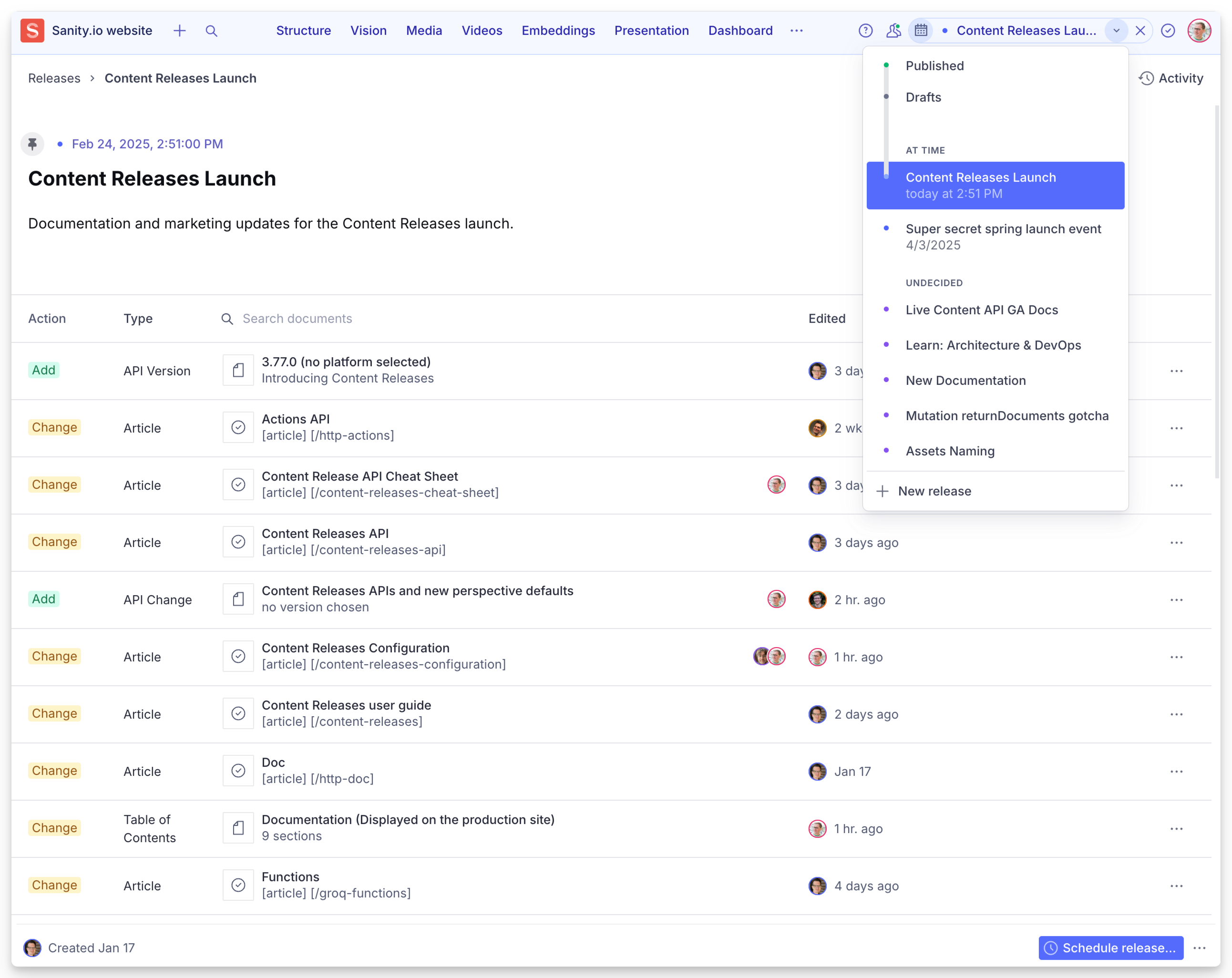
  • Group multiple content changes into coordinated releases
  • Publish and unpublish content in coordinated releases
  • Preview and toggle stacked and individual releases to see the final result (it's like looking into the multiverse).
  • Schedule precise publishing times, or just as "ASAP" or "undecided."
  • Automate and integrate release logic through APIs
  • Validate content and references automatically
  • Roll back changes instantly if needed (requires Enterprise plan)
A screenshot of a content management system (CMS) interface for Sanity.io’s website, displaying a “Content Releases Launch” page. The page lists a collection of document changes for a public beta release. The interface includes a structured table with columns for “Action,” “Type,” “Title,” and “Edited.” Each row represents a document or API change, indicating whether it was added or changed, along with metadata like document type and last edit time.  Key elements visible: 	•	The release is titled “Content Releases Launch” and was scheduled for Feb 24, 2025, at 2:51 PM. 	•	Multiple API and article updates are listed, with some marked as “Add” and others as “Change.” 	•	Documents include topics such as “Content Releases API,” “Actions API,” “GraphQL,” “Functions,” and “IDs and Paths.” 	•	The bottom right corner has a “Schedule release…” button. 	•	A sidebar with navigation options like “Structure,” “Vision,” “Media,” “Videos,” and “Embeddings” is visible at the top.

Content Releases as your publishing platform

Content Releases is a platform feature, which means that it's available as a user interface, APIs, and data models. You can build sophisticated release workflows that integrate with your existing tools and processes. For example, you can trigger releases based on e-commerce inventory updates, coordinate content deployment with feature flags, or sync releases across multiple Sanity projects.

Content Releases is available as an add-on for Enterprise plans. Contact your Sanity representative or the sales team through our form if you need more than two.

Go to our documentation to learn more about configuration, the user interface, and API.

Key Features

Content Releases comes with a range of useful features to ensure confident publishing and coordination:

  • Group changes: Bundle multiple document updates into a single coordinated named release.
  • Preview with confidence: See exactly how your content will look before publishing using Visual Editing in Presentation.
  • Schedule precisely: Set specific dates and times for automated publishing.
  • Validate everything: Ensure content and references are valid before going live.
  • Track history: Keep a clear record of all content releases.
  • Automate: API access enables workflow automation and custom integrations.

Who benefits? Everyone on your team

Let's look at how different teams benefit from Content Releases:

For developers:

  • Eliminates the need for commonly implemented custom scheduling business logic in code
  • Simplified version control that works like code deployments
  • Focus on building features instead of content workflow plumbing
  • API access for automation and custom integrations

For content editors:

  • Prepare and preview changes ahead of time
  • Schedule releases without late-night publishing sessions
  • Maintain multiple content versions without conflicts
  • See exactly how updates will look before going live

For product owners:

  • Clear visibility into planned content changes
  • Confident coordination of marketing campaigns
  • Easy demonstration of upcoming changes
  • Reduced risk with rollback capability

For technical leaders:

  • Clear single source of truth for all content operations
  • Eliminate content silos with a unified release workflow
  • Coordinate cross-team content initiatives with confidence

How Content Releases works

Content Releases introduces a simple but powerful concept: the ability to group multiple document changes into a single unit that can be previewed, validated, and published, and unpublished together – giving you complete control over your content's lifecycle.

Release management for Sanity Studio

Here's how it works:

  1. Create a release: Give it a name and optionally set a target date.
  2. Add documents: Select which documents will be part of the release.
  3. Make changes: Edit the documents within the release context.
  4. Preview and validate: See exactly how everything will look when published.
  5. Schedule or publish: Either publish immediately or set a future date.

What makes Content Releases especially powerful is the concept of release layering. You can plan multiple releases, each building on top of the other. This means you can:

  • Work on holiday content while summer campaign changes are still pending
  • Preview how content will look at any point in the future
  • Maintain regular updates while preparing major launches
  • Keep different teams working independently without conflicts

The system automatically handles the complexity of managing these overlapping changes, ensuring that everything appears exactly as intended when published.

Comprehensive API support

We've built Content Releases to be powerful yet flexible, with comprehensive API support that lets you integrate release management deeply into your workflows. These new capabilities brings important changes you'll want to know about.

Through relevant APIs, you have programmatic control over every aspect of releases:

  • Create and manage releases through the Actions API.
  • Preview content from multiple stacked releases using Perspectives.
  • Query for specific versions of documents with GROQ.
  • Listen to or trigger webhooks for changes to release states.

Actions API

A key part of this release is our enhanced Actions API, which makes publishing in the studio a true platform feature. This addresses many long-standing issues by providing a unified, reliable approach to content operations throughout the content lifecycle. The Actions API gives developers precise control over the entire publishing process, from draft creation to scheduling and coordination.

Perspectives

Think of Content Releases as adding a new dimension to your content—instead of just "published" and "draft," we now have an entire spectrum of possible future states. To support this, we've made your releases queryable using Content Lake's Perspectives.

GROQ

We've also added some powerful new GROQ functions to help you work with releases:

  • sanity::versionOf() for finding specific document versions
  • sanity::partOfRelease() to check if a document is in a release
  • releases::all() to get a list of all releases

Breaking changes to be aware of

Now, here's the part that requires some attention, especially if you're working with custom implementations:

  • "Published" is the new default Perspective: We've changed the default perspective to published instead of raw on v2025-02-19 of the query API. This means your queries will only return published content by default—a safer approach that prevents accidentally exposing draft and versioned content.
  • New version ID paths: Content Releases introduces a new versions.** prefix for document IDs. If you've been relying on checking document paths (like drafts.**), you'll want to update your code to use Perspectives instead.
  • API Version requirements: To work with Content Releases, you'll need to use the Query API version 2025-02-19 or later. This version includes all the new functionality and breaking changes.

Here's a practical example of how this might affect your queries:

What about Scheduled Publishing?

Content Releases supersedes and enhances the Scheduled Publishing feature with a more powerful, coordinated approach to content management. While Scheduled Publishing focuses on timing individual document updates, Content Releases introduces comprehensive version control and scheduling for document groups, complete with preview capabilities and API support.

We recommend transitioning to Content Releases for more robust content coordination. You can even simplify your content models by removing custom scheduling fields, as the platform now handles this natively through the Content Releases API.

Scheduled Publishing will continue to work, but you'll see a notification about running both systems simultaneously. You can turn this warning off by adding the following configuration:

Content Releases is enabled by default for new projects, while Scheduled Publishing requires explicit opt-in through your studio configuration.

Getting Started

Content Releases is now available and enabled by default on the newest Studio version. To get started, update your Sanity Studio dependencies and enable releases in your configuration. Check out our detailed documentation for instructions.

For a seamless experience with Content Releases, make sure your front-end is configured to use the 2025-02-19 Query API version to enable previewing capabilities. This ensures your presentation layer will correctly display content from your releases.