







Amazon products are identified by an ASIN, short for Amazon Standard Identification Number. If you're building a product research tool, price monitoring system, competitor tracker, or an Amazon data workflow, the ASIN is usually the key identifier you need.
In this tutorial, we’ll learn how to:
We’ll use two SerpApi APIs:

We also provide video tutorials for this guide.
Amazon Search Results Scraper:
Amazon Product Detail Scraper:
Manually searching Amazon and copying product details is slow. Building your own scraper also means handling HTML changes, blocking, proxies, parsing, and maintenance.
With an API, you can programmatically look up products and get structured JSON data without the scraping headaches.
The Amazon Search API uses the endpoint https://serpapi.com/search?engine=amazon, and the query parameter is k, which works like a regular Amazon search query.
You can use this for:
We're using Python for the tutorial. You can use any programming language you want.
Install requests first:
pip install requests
Create a new main.py file. Let’s say we want to search for "coffee" in Amazon:
import requests
import json

SERPAPI_API_KEY = "YOUR_SERPAPI_API_KEY"

params = {
    "api_key": SERPAPI_API_KEY,
    "engine": "amazon",
    "amazon_domain": "amazon.com",
    "k": "coffee"
}

search = requests.get("https://serpapi.com/search", params=params)
response = search.json()

print(json.dumps(response, indent=2))
This sends a request to the Amazon Search API and returns Amazon search results in JSON format.
The k parameter defines the Amazon search query, and amazon_domain lets you choose the Amazon marketplace, such as amazon.com.
Here is the example result:
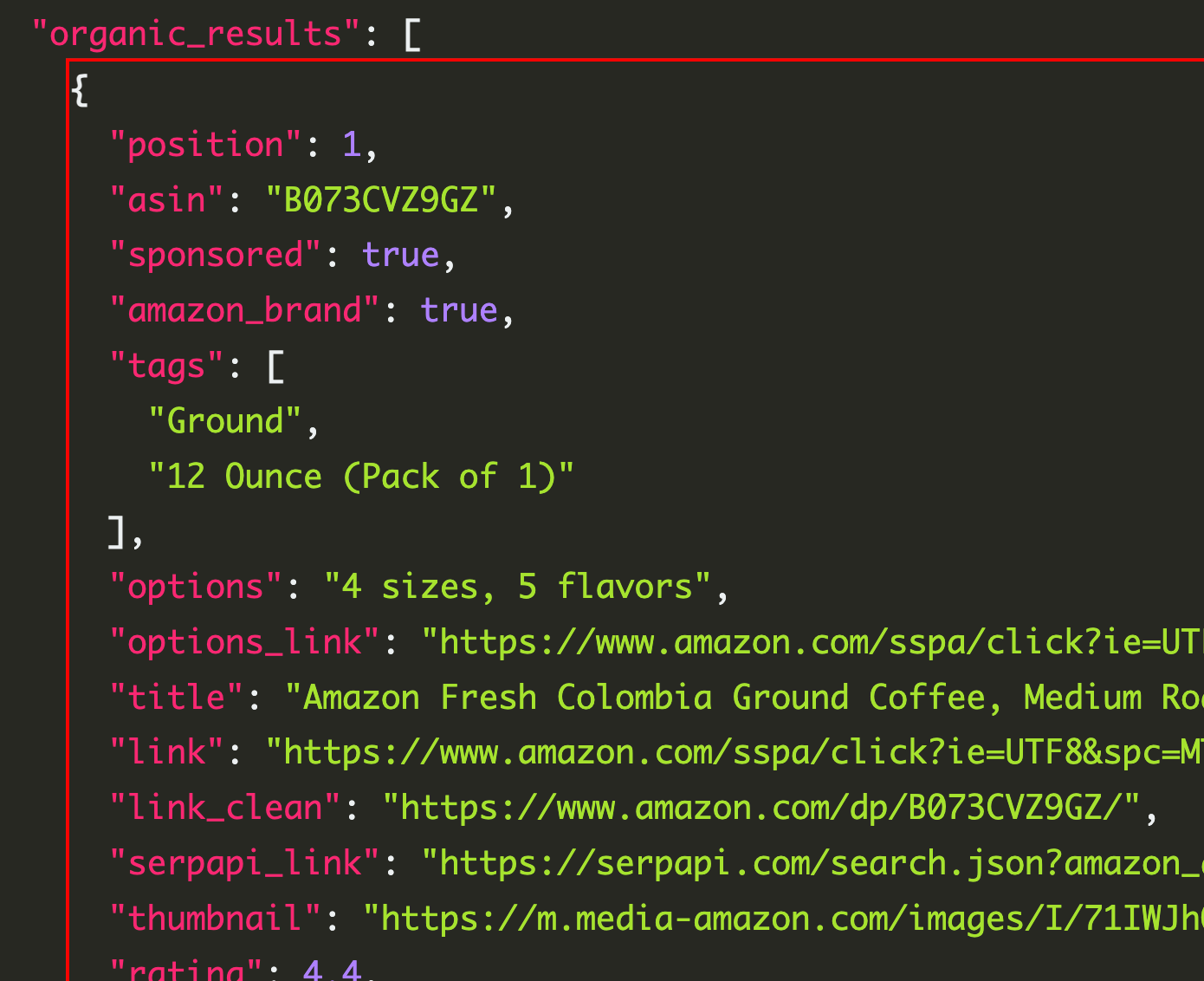
You can see that we receive the ASIN for each item.
Amazon Search API results can include product fields like title, link, thumbnail, rating, and reviews. Products inside Amazon results include an ASIN field and a serpapi_link pointing to the Amazon Product API lookup for that ASIN.
Let’s print a cleaner list of products:
import requests

SERPAPI_API_KEY = "YOUR_SERPAPI_API_KEY"

params = {
    "api_key": SERPAPI_API_KEY,
    "engine": "amazon",
    "amazon_domain": "amazon.com",
    "k": "coffee"
}

search = requests.get("https://serpapi.com/search", params=params)
response = search.json()

for product in response.get("organic_results", []):
    title = product.get("title")
    asin = product.get("asin")
    price = product.get("price")
    rating = product.get("rating")
    reviews = product.get("reviews")

    print(f"Title: {title}")
    print(f"ASIN: {asin}")
    print(f"Price: {price}")
    print(f"Rating: {rating}")
    print(f"Reviews: {reviews}")
    print("-" * 50)
Example output:
Title: Amazon Fresh, Colombia Ground Coffee, Medium Roast, 32 Oz
ASIN: B072MQ5BRX
Price: $15.31
Rating: 4.5
Reviews: 7823
--------------------------------------------------
Now we have the ASIN. Next, we can use it to get more complete product details.
The Amazon Product API uses engine=amazon_product and requires an asin parameter. The request returns a product_results object containing fields like asin, title, description, tags, badges, variants, brand, links, thumbnails, and more.
Here’s how to look up a product by ASIN:
import requests
import json

SERPAPI_API_KEY = "YOUR_SERPAPI_API_KEY"

params = {
    "api_key": SERPAPI_API_KEY,
    "engine": "amazon_product",
    "asin": "B072MQ5BRX"
}

search = requests.get("https://serpapi.com/search", params=params)
response = search.json()

print(json.dumps(response, indent=2))
Now let’s print only the most useful product details:
import requests

SERPAPI_API_KEY = "YOUR_SERPAPI_API_KEY"

params = {
    "api_key": SERPAPI_API_KEY,
    "engine": "amazon_product",
    "amazon_domain": "amazon.com",
    "asin": "B072MQ5BRX"
}

search = requests.get("https://serpapi.com/search", params=params)
response = search.json()

product = response.get("product_results", {})

print(f"Title: {product.get('title')}")
print(f"ASIN: {product.get('asin')}")
print(f"Brand: {product.get('brand')}")
print(f"Rating: {product.get('rating')}")
print(f"Reviews: {product.get('reviews')}")
print(f"Price: {product.get('price')}")
print(f"Link: {product.get('link')}")
In many cases, you don’t already know the ASIN. You only have a keyword, a product name, a brand, or a category.
Here’s a complete workflow:
import requests

SERPAPI_API_KEY = "YOUR_SERPAPI_API_KEY"


def search_amazon_products(query):
    params = {
        "api_key": SERPAPI_API_KEY,
        "engine": "amazon",
        "amazon_domain": "amazon.com",
        "k": query
    }

    search = requests.get("https://serpapi.com/search", params=params)
    return search.json()


def get_amazon_product_by_asin(asin):
    params = {
        "api_key": SERPAPI_API_KEY,
        "engine": "amazon_product",
        "amazon_domain": "amazon.com",
        "asin": asin
    }

    search = requests.get("https://serpapi.com/search", params=params)
    return search.json()


search_results = search_amazon_products("coffee")

first_product = search_results.get("organic_results", [])[0]
asin = first_product.get("asin")

print(f"Found ASIN: {asin}")
print(f"Product title: {first_product.get('title')}")

product_details = get_amazon_product_by_asin(asin)
product = product_details.get("product_results", {})

print("\nProduct Details")
print(f"Title: {product.get('title')}")
print(f"Brand: {product.get('brand')}")
print(f"Price: {product.get('price')}")
print(f"Rating: {product.get('rating')}")
print(f"Reviews: {product.get('reviews')}")
You can also do the same thing in JavaScript.
Install the SerpApi package:
npm install serpapi
Then create an index.js file:
const { getJson } = require("serpapi");

const API_KEY = "YOUR_SERPAPI_API_KEY";

async function searchAmazonProducts(query) {
  return new Promise((resolve, reject) => {
    getJson(
      {
        api_key: API_KEY,
        engine: "amazon",
        amazon_domain: "amazon.com",
        k: query,
      },
      (json) => {
        resolve(json);
      }
    );
  });
}

async function getAmazonProductByAsin(asin) {
  return new Promise((resolve, reject) => {
    getJson(
      {
        api_key: API_KEY,
        engine: "amazon_product",
        amazon_domain: "amazon.com",
        asin,
      },
      (json) => {
        resolve(json);
      }
    );
  });
}

async function main() {
  const searchResults = await searchAmazonProducts("coffee");

  const firstProduct = searchResults.organic_results?.[0];

  if (!firstProduct) {
    console.log("No product found.");
    return;
  }

  const asin = firstProduct.asin;

  console.log("Found ASIN:", asin);
  console.log("Product title:", firstProduct.title);

  const productDetails = await getAmazonProductByAsin(asin);
  const product = productDetails.product_results;

  console.log("\nProduct Details");
  console.log("Title:", product?.title);
  console.log("Brand:", product?.brand);
  console.log("Price:", product?.price);
  console.log("Rating:", product?.rating);
  console.log("Reviews:", product?.reviews);
}

main();
For Amazon Search API:
{
  "engine": "amazon",
  "amazon_domain": "amazon.com",
  "k": "coffee"
}
Useful parameters include:
k: the Amazon search query.amazon_domain: the Amazon marketplace to use.language: the Amazon search language.delivery_zip: ZIP or postal code for shipping-based results.shipping_location: shipping country.s: sorting option.The Amazon Search API supports sorting options such as featured, price low to high, price high to low, average customer review, newest arrivals, and best sellers.
Depending on the product and Amazon page, the Amazon Product API can return structured data such as:
An Amazon ASIN lookup workflow usually has two steps:
This makes it easier to build product research tools, price trackers, marketplace dashboards, AI shopping assistants, and catalog enrichment workflows without maintaining your own Amazon scraper.
You can try the APIs here:
此内容由惯性聚合(RSS阅读器)自动聚合整理,仅供阅读参考。 原文来自 — 版权归原作者所有。