










Google Hotels offers a vast amount of public reviews of hotels around the world. If you're in the hotel industry, you know collecting all this data to mine for insights or monitor how competitors are doing is not a straightforward process.
SerpApi aims to simplify this with our Google Hotels Reviews API. This API makes it to easy to programmatically scrape hotel reviews at scale or set up automated monitoring. In this post, I'll walk you through the various capabilities of our Google Hotels Reviews API.
If you're following along with this tutorial, there are two steps to complete first.
You'll need a SerpApi API key to run the code included in this tutorial. You can create a SerpApi account for free here: https://serpapi.com/users/sign_up
Free SerpApi accounts include 250 free searches per month. If you require more than 250 searches, you can sign up for a paid plan. Free and paid plans offer the same API access, but have different search limits per month.
Once registered, you can locate your API key here: https://serpapi.com/manage-api-key
I'll assume you already have Python installed and just need to install our library. You can do this with the following command:
$ pip install serpapiFull instructions here: https://serpapi.com/integrations/python
The Google Hotels Reviews API requires a property_token to know which hotel you want reviews for. We can use the Google Hotels API to find these.
If we're focused on a single hotel, the easiest way to get a property_token is to run a search in the Google Hotels API in our API Playground. Then just copy the desired token.
Scroll through the results in the properties array to find the hotel you want.
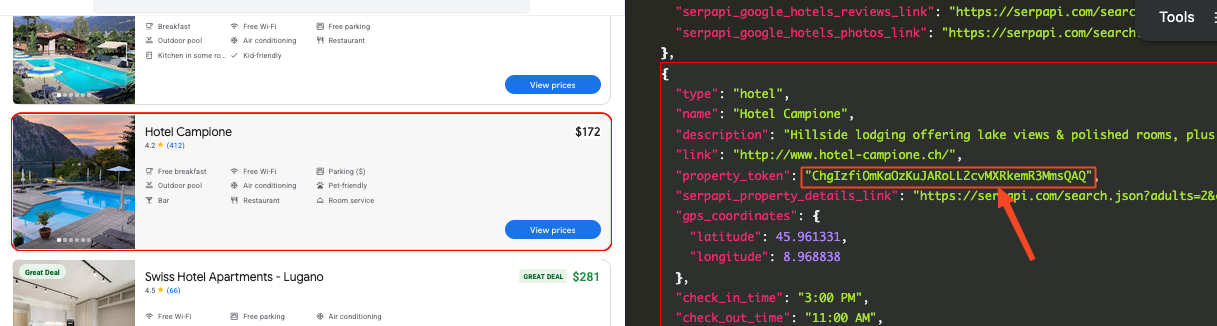
Alternatively, you can run this same query in Python.
import serpapi

client = serpapi.Client(api_key="YOUR_API_KEY")
results = client.search({
  "engine": "google_hotels",
  "q": "lugano hotels",
  "gl": "us",
  "hl": "en",
  "currency": "USD",
  "check_in_date": "2026-10-19",
  "check_out_date": "2026-10-20",
  "adults": 2,
  "children": 0
})

print(results)With our property_token in hand, we can start fetching reviews. The API is quite simple and only requires 2 parameters.
engine must be set to google_hotels_reviews to access the right API.
property_token must be set to select a particular hotel. I'll use ChgIzfiOmKaOzKuJARoLL2cvMXRkemR3MmsQAQ for the examples, but feel free to substitute this for a hotel you're interested in.
import serpapi

client = serpapi.Client(api_key="YOUR_API_KEY")
results = client.search({
  "engine": "google_hotels_reviews",
  "property_token": "ChgIzfiOmKaOzKuJARoLL2cvMXRkemR3MmsQAQ"
})

print(results)
Here's what the response should look like. Note that you'll generally get a maximum of 10 reviews from a single request. I've displayed only 1 review in the sample below to keep it simple.
{
  "search_metadata": {...},
  "search_parameters": {
    "engine": "google_hotels_reviews",
    "property_token": "ChgIzfiOmKaOzKuJARoLL2cvMXRkemR3MmsQAQ",
    "hl": "en"
  },
  "reviews": [
    {
      "user": {
        "name": "John Smith",
        "link": "https://www.google.com/maps/contrib/123456789?hl=en",
        "thumbnail": "https://lh3.googleusercontent.com/a/BCg8ocL30iXhfc76UGqetZ27tDQAen1gIBGSjnUpsIY0_ewWrqgkOg=s40-c-rp-mo-ba3-br100"
      },
      "source": "Google",
      "source_icon": "https://www.gstatic.com/images/branding/product/1x/googleg_48dp.png",
      "rating": 5,
      "best_rating": 5,
      "date": "3 months ago",
      "snippet": "Stayed for a couple of days to attend an event. Lovely staff. Breakfasts was good and dinner was like a home made meal. Delicious! Ticino card for bus travel was super convenient. You get that for free as a hotel guest. We travelled to Lugano one day and lake views and snow capped peaks were breathtaking.",
      "images": [
        "https://lh3.googleusercontent.com/grass-cs/ANxoTn3NGXvHuMTq_GeSyraRXhrKOl_GJ3U3iiV0Y1eE4sU28RIInvmSku4Qd6cPs2FMigGC1RuXo4xNHOwPz9nJezzFxvp17FaeRsMzZ_ZLS816IJtKX_LcIvetJsv1OrdWyMZrbFlOdhTsyrew=k-no",
        "https://lh3.googleusercontent.com/grass-cs/ANxoTn3MieIP2UBKtM0HNDRtlY2x3eggDDlKJxCcGPDVLyhACwOmvpyZzmx4g1kJGNS4ujv1MuEQ5YSRCSNLJdiuEPVsoKkVzulVlvEr3kOjFpdQlbUeHhPpQ6kQwzVYE0kFP1i0mErWlW9_01dS=k-no",
        "https://lh3.googleusercontent.com/grass-cs/ANxoTn1V0j9O1FTAEIsBbzWRRUok_tO24RRBF8V1paSI5CdVwg1UAABGAgxhDGpihmKMRao5-I7cYwtDwYE90tyy79JqeXVyUTvnun-tCTaAPG2SyCoqljKQYBlDC6UrhtXyMjT3nJLfLA81nopV=k-no",
        "https://lh3.googleusercontent.com/grass-cs/ANxoTn15Bun2P_znc5TAj4o517OUkQYQ01GoTRDU7b9XA24YYLDn3pRqZ2bUvMyCwIhSk4JfxUf7J04deksUsBjfIoj0q5itb34r5TaXH4drKzJZ_SixUglqxag7yX7lycJCO8W2alUiP-DiFzh8=k-no"
      ],
      "subratings": {
        "rooms": 4,
        "service": 5,
        "location": 4
      },
      "hotel_highlights": [
        "Quiet"
      ]
    },
    ...
  ],
  "serpapi_pagination": {
    "next_page_token": "CAQSRENqRUlBUklwQ2dvQVA3X0xCTUNGX19fX0VoQVZHSlNxQktzNVB6UEN4N0FBQUFBQUdnbjkyc2tDZHgtWmFBQVlBQ0lB:10",
    "next": "https://serpapi.com/search.json?engine=google_hotels_reviews&hl=en&next_page_token=CAQSRENqRUlBUklwQ2dvQVA3X0xCTUNGX19fX0VoQVZHSlNxQktzNVB6UEN4N0FBQUFBQUdnbjkyc2tDZHgtWmFBQVlBQ0lB%3A10&property_token=ChgIzfiOmKaOzKuJARoLL2cvMXRkemR3MmsQAQ"
  }
}
This covers a basic request, but there are a number of ways we can adjust the request to fulfill specific use cases. Let's take a look at these.
Google will return the "Most helpful" reviews by default. However you can customize the sort order with the following options:1 - Most helpful (Default)2 - Most recent3 - Highest score4 - Lowest score
Sorting by "Most recent" makes sense if you're monitoring a hotel's latest reviews. Sort by "Highest score" or "Lowest score" to only see the most positive or most negative reviews.
Let's update our code to request the newest reviews by adding sort_by=2.
import serpapi

client = serpapi.Client(api_key="YOUR_API_KEY")
results = client.search({
  "engine": "google_hotels_reviews",
  "property_token": "ChgIzfiOmKaOzKuJARoLL2cvMXRkemR3MmsQAQ",
  "sort_by": 2,
})

print(results)
With the previous request, the first review was from 3 months. Now with our updated sort, we get a review from only 2 weeks ago.
"reviews":[
  {
    ...
    "date": "2 weeks ago",
    "snippet": "We stayed for two nights. Although the weather wasn't great and prevented us from swimming...",
    ...
  }
]By default, the API will only return reviews in English. We can customize our request to get reviews in another language using the hl parameter.
The helpful thing is this parameter doesn't just return reviews written originally in the requested language. It returns all the same reviews, but translated into the desired language. Of course it doesn't touch reviews that were already written in the desired language.
We'll update our code to add hl=it for reviews in Italian.
import serpapi

client = serpapi.Client(api_key="YOUR_API_KEY")
results = client.search({
  "engine": "google_hotels_reviews",
  "property_token": "ChgIzfiOmKaOzKuJARoLL2cvMXRkemR3MmsQAQ",
  "sort_by": 2,
  "hl": "it",
})

print(results)
We now get all the same reviews translated into Italian. Note the snippet includes both the translated and original versions so you'll still know when translation was used and have access to the original text.
"reviews":[
  {
    ...
    "date": "2 settimane fa",
    "snippet": "(Traduzione di Google) Abbiamo soggiornato per due notti. Sebbene il tempo non fosse dei migliori e ci abbia impedito di fare il bagno....
    (Originale)
    We stayed for two nights. Although the weather wasn't great and prevented us from swimming...",
    ...
  }
]In other cases, we might only want reviews that mention a particular topic about the hotel.
Returning to the Google Hotels API response from earlier, we can see each hotel property has a list of reviews_breakdown data covering topics like room amenities, parking, fitness, breakfast, etc. Each hotel will have different options available depending on what topics/categories reviewers write about frequently.
Let's copy the category_token for reviews mentioning room amenities: Rr34mHica1yRnFiSmp5fVDl5XVB-fq5CYm5qXmZJZmox4xIQHwDoCw2H
"reviews_breakdown":[
  {
      "name": "Room",
      "description": "Room amenities",
      "total_mentioned": 11,
      "positive": 8,
      "negative": 2,
      "neutral": 1,
      "category_token": "Rr34mHica1yRnFiSmp5fVDl5XVB-fq5CYm5qXmZJZmox4xIQHwDoCw2H",
      "serpapi_link": "https://serpapi.com/search.json?category_token=Rr34mHica1yRnFiSmp5fVDl5XVB-fq5CYm5qXmZJZmox4xIQHwDoCw2H&engine=google_hotels_reviews&hl=en&property_token=ChgIzfiOmKaOzKuJARoLL2cvMXRkemR3MmsQAQ"
  },
  {
      "name": "Fitness",
      "description": "Fitness",
      "total_mentioned": 8,
      "positive": 7,
      "negative": 1,
      "neutral": 0,
      "category_token": "_gyaT3ica1yRnFiSmp5fVDl5uVtmSV5qcTEDjAEAtWsMIQ",
      "serpapi_link": "https://serpapi.com/search.json?category_token=_gyaT3ica1yRnFiSmp5fVDl5uVtmSV5qcTEDjAEAtWsMIQ&engine=google_hotels_reviews&hl=en&property_token=ChgIzfiOmKaOzKuJARoLL2cvMXRkemR3MmsQAQ"
  },
  ...
]
Now we can add the category_token parameter to our request.
import serpapi

client = serpapi.Client(api_key="YOUR_API_KEY")
results = client.search({
  "engine": "google_hotels_reviews",
  "property_token": "ChgIzfiOmKaOzKuJARoLL2cvMXRkemR3MmsQAQ",
  "category_token": "Rr34mHica1yRnFiSmp5fVDl5XVB-fq5CYm5qXmZJZmox4xIQHwDoCw2H"
})

print(results)
We should now get only reviews that explicitly mention something about the hotel's room amenities. Here's an example where someone commented on the presence of air conditioning and bunk beds for kids.
"reviews":[
  {
    ...
    "snippet": "We had a pleasant stay at Hotel Campione. Two adults, and two teen boys - the boys loved the pool(s) and the adults appreciated the good AC. We had the "Family Room" which included 2 bunk beds..."
    ...
  }
]Previously, I noted the Google Hotels Reviews API returns only 10 reviews per page. To get more reviews, we'll need to use pagination.
Paginating is pretty straightforward. In each response, there will be a next_page_token within the serpapi_pagination object. We'll pass this next_page_token to the next request to fetch the next page of reviews. We can continue doing this to get all possible reviews. We'll know there are no more reviews to fetch when either there is no serpapi_pagination object in the response or we get an empty response.
You technically don't need to add a custom sort option to paginate. However it's best to sort by the most recent reviews with sort_by=2. Sorting this way returns all possible reviews whereas the other sort options may return fewer.
Below is a simple Python script to get started paginating through hotel reviews. All it does is paginate through each page and counts how many reviews a hotel has. You can update it as needed to do something relevant to your use case.
Enter your API key and property_token like we did previously.
import serpapi

client = serpapi.Client(api_key="YOUR_API_KEY")

total_reviews = 0
next_page_token = None

while True:
  params = {
    "engine": "google_hotels_reviews",
    "property_token": "ChgIzfiOmKaOzKuJARoLL2cvMXRkemR3MmsQAQ",
    "hl": "en",
    "sort_by": 2,
  }

  if next_page_token:
    params["next_page_token"] = next_page_token

  results = client.search(params)
  reviews = results.get("reviews", [])

  if not reviews:
    break

  total_reviews += len(reviews)
  print(total_reviews)

  pagination = results.get("serpapi_pagination")

  if pagination:
    next_page_token = pagination.get("next_page_token")
  else:
    break

print("Fetched all available reviews")We used Python in this blog post since it's the most popular programming language among SerpApi users. However you can use the Google Hotels Reviews API with any programming language or REST API client.
Check out our other client libraries such as JavaScript, Ruby, Java, and more here:
SerpApi: Integrations
Easy integration. SerpApi provides APIs and integrations for multiple programming languages and AI tools, including Model Context Protocol (MCP).
 SerpApi

If you're not confident writing code, you can use one of our many no code options such as n8n, Make, or Google Sheets.
Boost Your n8n Workflows with SerpApi’s Verified Node
Add real-time search to your n8n workflows and AI Agents with SerpApi’s node. Featuring over 20 APIs including Google Search, Google Maps, Bing, and more.
 SerpApiAlex Barron

Announcing SerpApi’s Make App
We are pleased to announce the release of our Custom App on Make.com. This makes it easier than ever to integrate SerpApi with other systems without having to write any code.
SerpApiAlex Barron

Connect SERP API with Google Sheets (No Code)
Here is how to connect SERP API (SerpApi) to Google Sheets using a no-code solution
SerpApiHilman Ramadhan

I hope this was helpful. Email us at contact@serpapi.com if you have any questions about this API or if you want to show us what you've built.
此内容由惯性聚合(RSS阅读器)自动聚合整理,仅供阅读参考。 原文来自 — 版权归原作者所有。