







SerpApi’s Bing Copilot API lets you fetch AI-generated answers from Bing as structured JSON, including text blocks, images, and source links.


• 4 min read
Bing Copilot, also known as Copilot Search, combines organic and generative search to provide concise, conversational answers to queries. In practice, Bing Copilot returns a summary card with a short answer (often with an illustrative image/video) and a numbered list of source links.
SerpApi’s Bing Copilot API lets you scrape these AI-generated results via a simple endpoint, returning the content and citations in structured JSON (no need to deal with Bing’s complex page layout or anti-bot measures yourself).
Bing Copilot’s AI answers contain rich, structured data – but scraping them at scale is challenging. The Copilot interface uses dynamic, nested HTML and frequent updates, plus anti-bot protections. SerpApi’s Bing Copilot API solves this by handling the heavy lifting (proxies, captchas, layout changes) and giving you reliable JSON output.
Bing Copilot is Microsoft’s AI assistant built into Bing Search. It uses Microsoft’s proprietary Copilot AI model to interpret your query and synthesize an answer. Copilot blends the best of traditional and generative search, so that instead of sifting through links you get an easy-to-digest answer with key points. For example, a Copilot answer might begin with a concise summary, optionally include a supporting image or video, and then list the sources used.
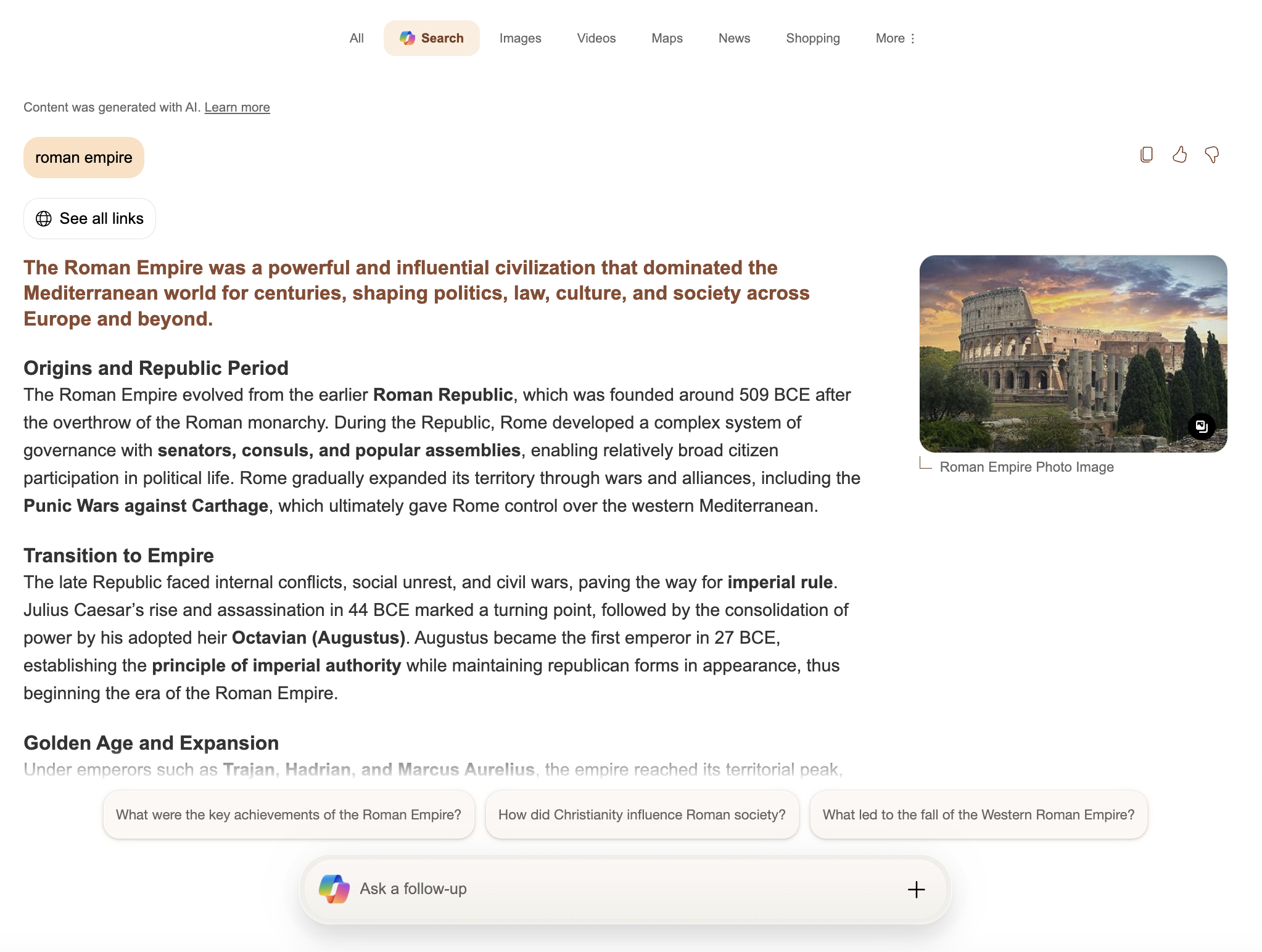
Bing Copilot’s answer to a query (here “Roman Empire”) appears as a summary card with text, an image, and a list of numbered source links.
Each Copilot answer is a generated summary that comes with clearly cited references. This makes Copilot powerful for research: you get the key answer up front and can click any source to verify it. SerpApi’s Bing Copilot API captures all of this in a structured JSON format.
In the JSON response you’ll typically see a header (the main answer text), an optional header_video (if a video result is featured), and an array of text_blocks – where each block might be a paragraph, heading, list, code snippet, or table. At the end of the JSON is a references list containing the source URLs and titles. This mirrors Bing’s behavior: Copilot always provides links to the web pages used to generate the answer.
Bing Copilot’s answers are filled with actionable data that businesses and developers can use. For example:
Scraping Bing Copilot answers programmatically lets you tap all these use cases. You can also run analytics, dashboards, or feeds without manual copy-paste.
You could try to build your own Bing Copilot scraper, but it would be a lot of work. Bing’s Copilot interface uses dynamic HTML and may change over time. It also has rate limits and anti-bot defenses. SerpApi handles all that complexity for you. When you use the Bing Copilot API:
Getting started is easy. Sign up at SerpApi and grab your API key. Then you can query the Copilot API by sending a GET request to SerpApi with engine=bing_copilot and your search query q. You can also test it interactively in the SerpApi Playground by selecting the “Bing Copilot” engine.
import serpapi

client = serpapi.Client(api_key=YOUR_KEY_GOES_HERE)
response = client.search({
  "engine": "bing_copilot",
  "q": "how many moons does Jupiter have"
})

print(response["header"])
This will print the Copilot’s answer to the query and the returned result dictionary will include all text blocks and references.
import { getJson } from 'serpapi';

const search = await getJson({
    engine: "bing_copilot",
    q: "python bubble sort example",
    api_key: YOUR_KEY_GOES_HERE
});

// Main answer text, if it exists
if (search.header) {
    console.log(search.header);
}
// Array of paragraphs, lists, code, etc.
console.log(search?.text_blocks)
// Array of source links
console.log(search?.references)
With the JSON result in hand, you can parse out exactly what you need. For example, you could iterate over result.text_blocks to extract all list items or all code snippets. Because Copilot’s answer is broken into blocks (paragraphs, lists, tables, code, etc.), it’s easy to transform or filter parts of the answer programmatically.
The Bing Copilot API is available to all SerpApi users. To get started, create an account and verify your email and other details. After that, get the API key from your account dashboard, then visit the Playground or use the endpoints above to begin scraping Copilot answers.
Whether you’re optimizing content for AI search, monitoring brand mentions in AI summaries, or building new data insights from generative answers, the Bing Copilot API makes it simple.
此内容由惯性聚合(RSS阅读器)自动聚合整理,仅供阅读参考。 原文来自 — 版权归原作者所有。