



Lot of product ideas fail due to bad timing, not execution. A product that would have been a hit two years ago could be just a commodity now. Similarly, hardly anybody knows for sure what will sell well next year. But with Google Trends we can find what people are searching for right now and make an educated guess for picking the right product to market. By using SerpApi's API for Google Trends we can even completely automate it.
Google Trends is a free tool from Google that shows how search interest changes over time. It does not tell you exact search volume like an SEO tool would. Instead, it normalizes search activity on a 0–100 scale so you can compare whether interest in a topic is rising, falling, seasonal, or suddenly spiking. That kind of insight makes it especially useful for product research. You are not trying to prove that a keyword has exactly 18,000 searches per month, but you want to notice when attention when a new trend is forming.
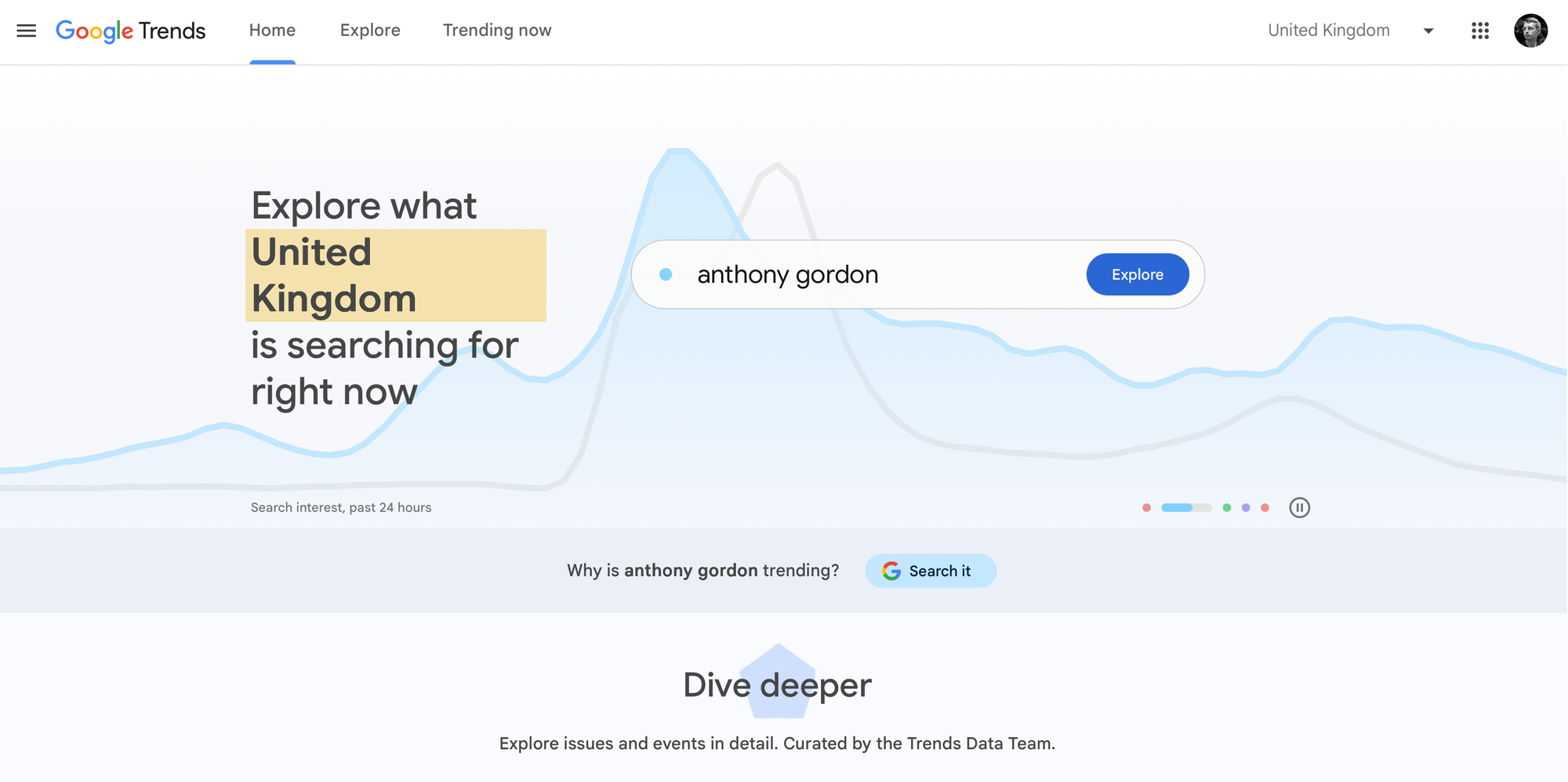
Google Trends has two distinct modes that we need to understand. We'll actually use both of them, just for a different purpose. The first is the historical interest graph called Explore where you type a term and see its relative search volume over time. That's useful for validating an existing idea, but not as useful if you don't know what to validate in the first place. The second view is called Trending now and shows search queries that have seen a dramatic spike in the last 24 hours to a week for a given category.
The idea here is to spot trends on the Trending now page first, like me seeing a spike of interest in ice hockey match of Czech Republic against Canada since the country is participating in Ice Hockey World Championships and eurojackpot because someone scored the biggest win in the history of this lottery recently (lucky guy!):
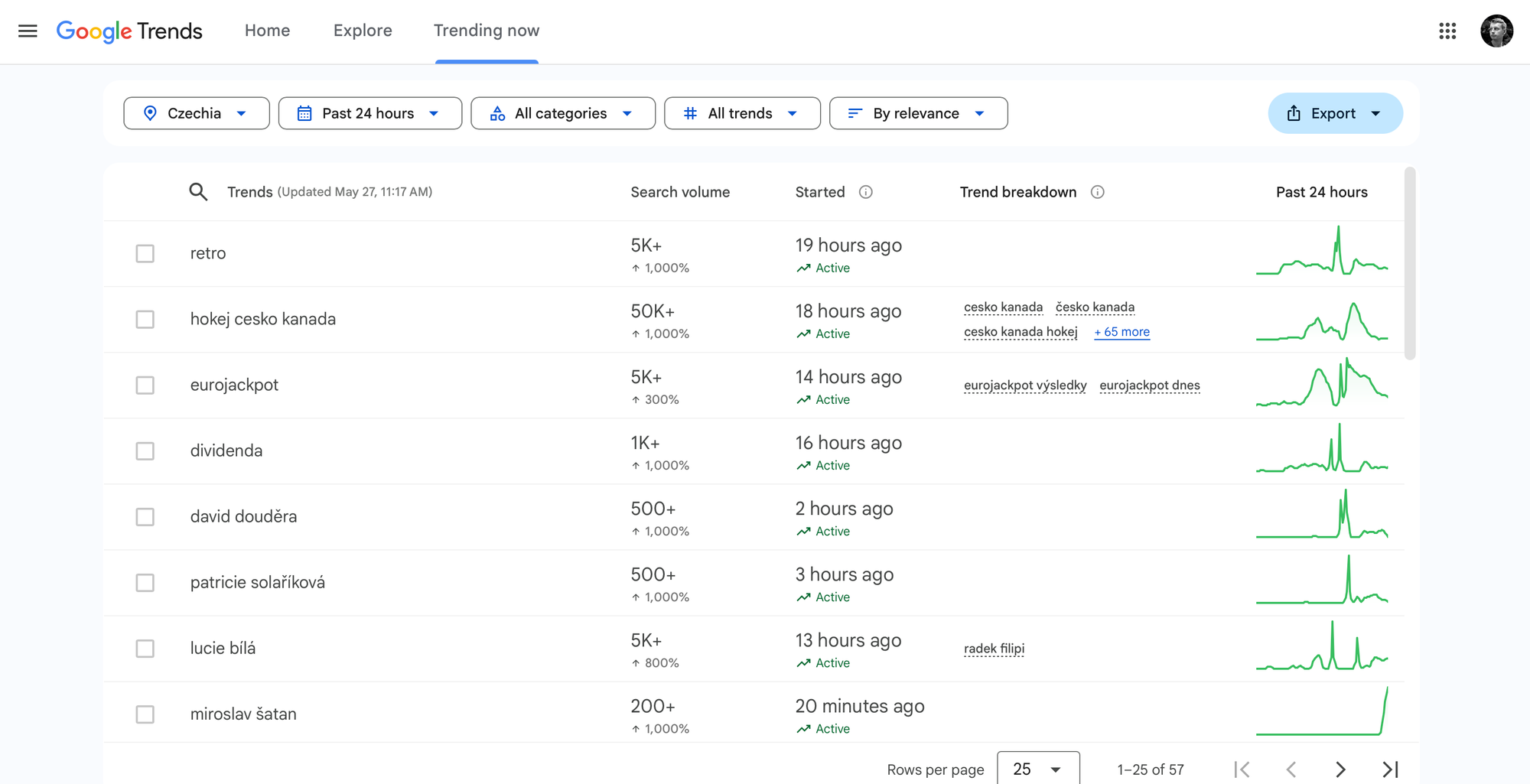
Ideally we want to see something that we could sell. The search would indicate that we should be selling merchandise related to Czechs playing against Canadians as both countries are very proud of their teams and successes in the past. To know if it's worth our effort we might want to cross check this search term with historical data on the Explore page.
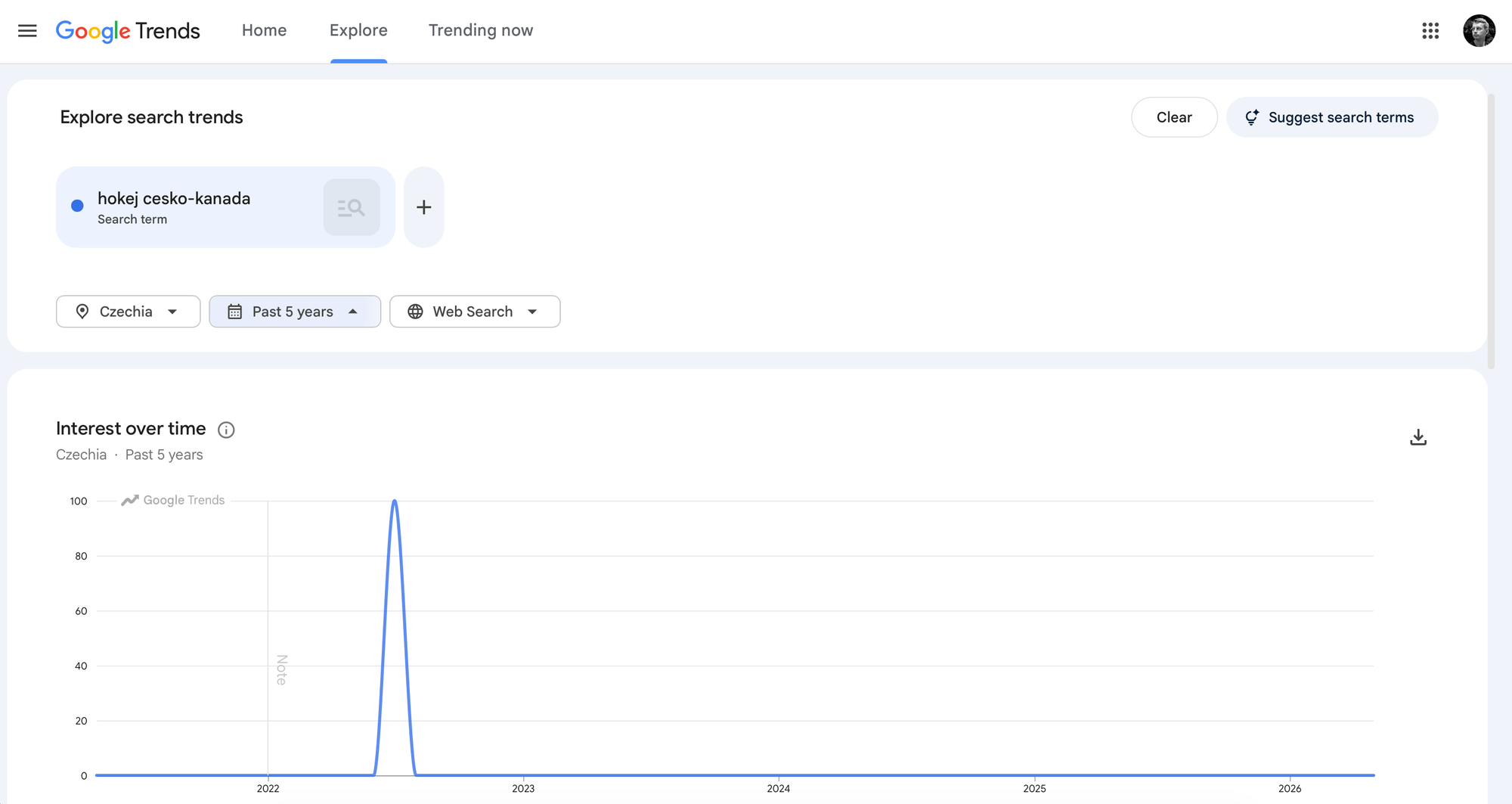
This page clearly shows that a spike in the past happened only once in 2022. It's probably too niche of a thing for merchandise unless we expand this to the whole championship. But it could still be a very good idea for a YouTube video that covers some details about the match.
Now let's return to Trending now and try to be a bit more specific. We'll choose United States as a country with a bigger potential and Technology as our category. Here's what the Trending now page showed me:
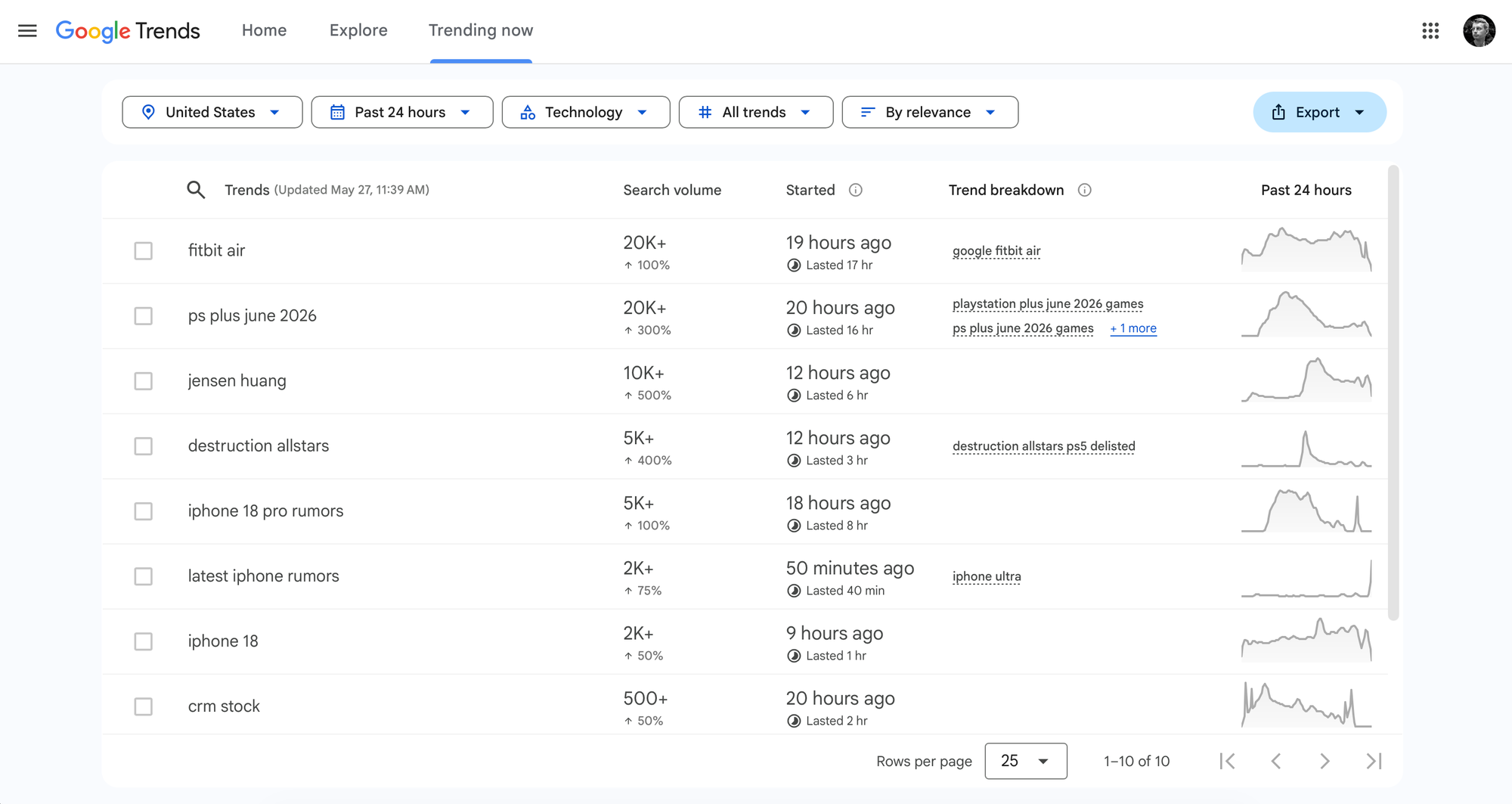
Some obvious picks from the page are fitbit air and iphone 18. Those are exact product names, except for iphone 18 not being released yet. People also search for that iPhone with other terms like latest iphone rumors. When I ask on the Explore page for the fitbit air searches of past year I see this:
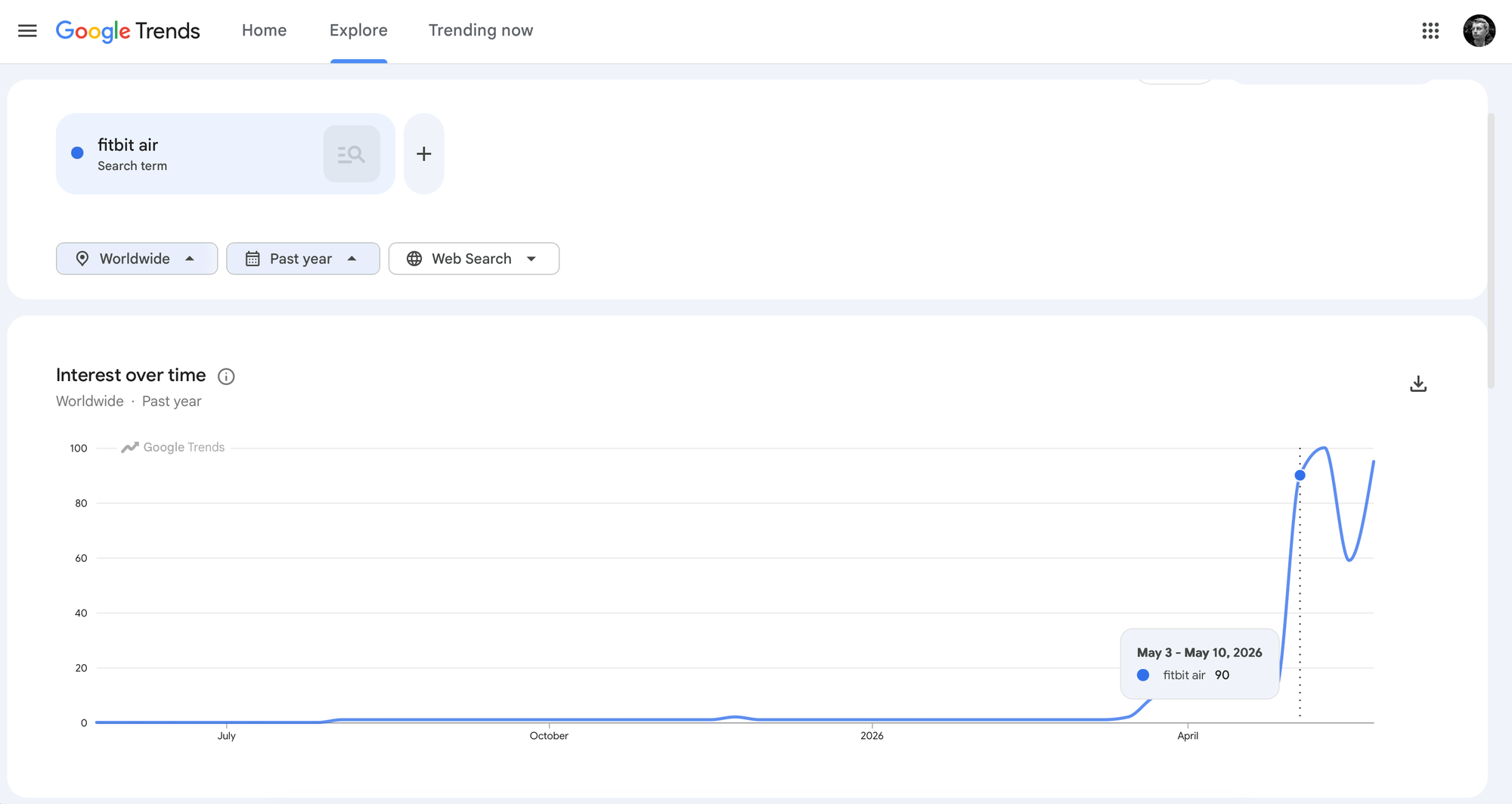
Seems like we clearly see something that it is now becoming trendy. Something we might consider selling as a product. If yes, we can also cross check the data with marketplaces using SerpApi's Google Shopping API or Amazon Search API.
This kind of opportunity search can be time consuming, though. So why not automate it? What if we just want to see a nice report every day with suggestions for what's worth digging deeper?
SerpApi's Google Trends API and Google Trends Trending Now API wrap Google Trends search results into clean JSON you can built upon. These APIs let you query the current trending searches programmatically without manual scraping, browser automation or rate limits.
An example HTTP request for a trending queries looks like this:
GET https://serpapi.com/search.json
  ?engine=google_trends_trending_now
  &geo=US
  &hours=168
  &api_key=YOUR_API_KEY
The key parameters are:
geo: the country code (US, GB, DE, etc.). Trending searches vary dramatically by market.hours: the lookback window: 4, 24, 48, or 168 (one week). Using the maximum gives you a wider pool of emerging trends to rank by volume.category_id: category like Games or Health (in form of their ID).Here's a simplified shape of what you get back:
{
  "trending_searches": [
    {
      "query": "cordless leaf blower",
      "search_volume": "200K+",
      "increase_percentage": 450,
      "trend_breakdown": [
        "best cordless leaf blower",
        "ryobi leaf blower",
        "battery powered leaf blower",
        "cheap cordless leaf blower"
      ]
    }
  ]
}
Note that search_volume is a rough bucket (50K+, 200K+, 500K+), not an exact number. The increase_percentage field tells you how sharp the spike is. The trend_breakdown field shows the full cloud of queries surrounding the trend which often reveals buying intent that the headline query alone does not.
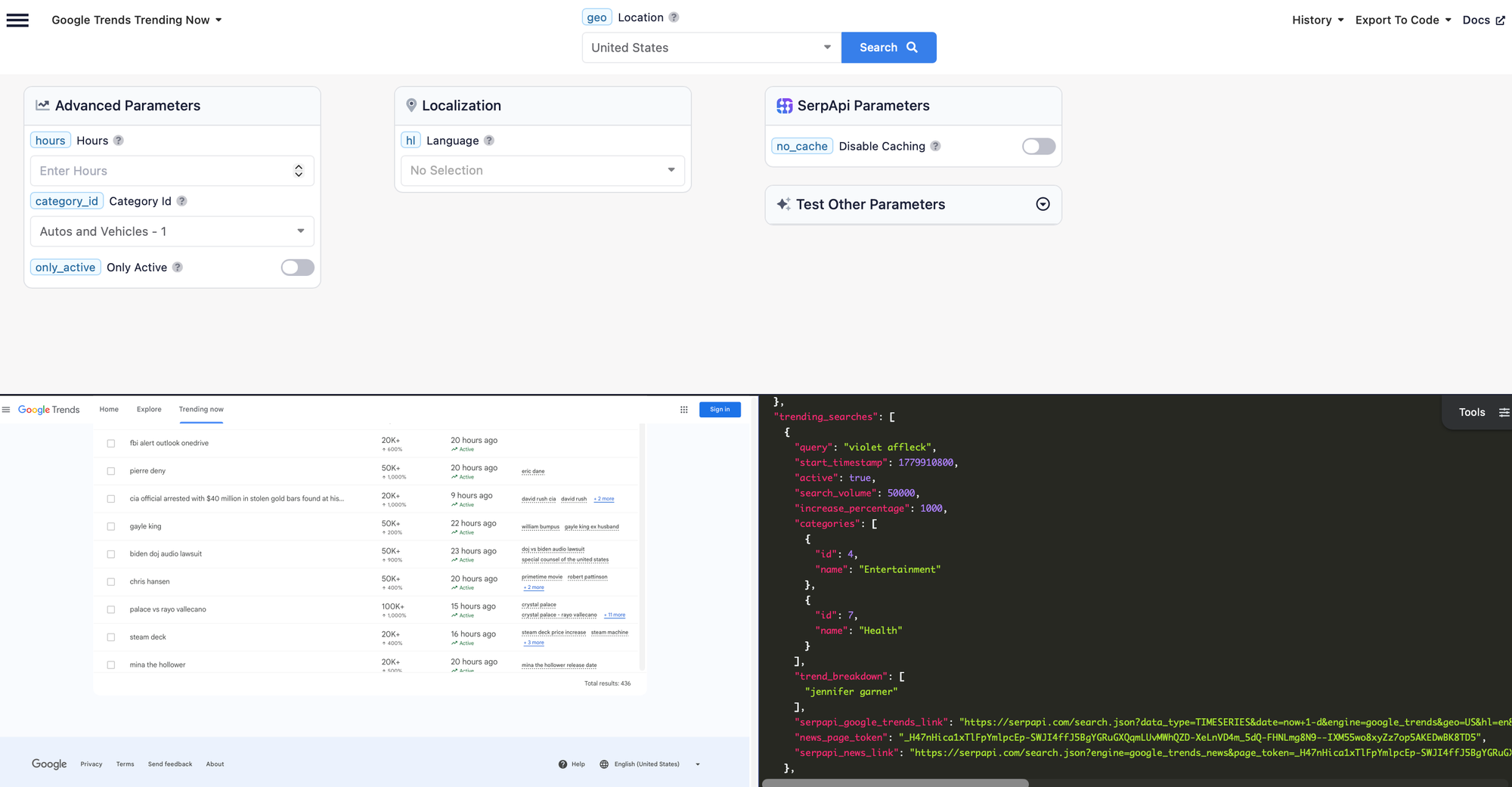
The final JSON you'll get is quite a bit longer, though. You can always visit our API playground to see the what kind of JSON response you'll get, the full list of supported parameters and the correct input like the right category ID:
Now let's put everything together with some code. I'll use Ruby, but SerpApi also comes with official SDKs for Python, JavaScript, and many more languages. You can now also add SerpApi MCP to Claude Code and let most of the code be written for you with AI agents.
The script below takes the full week of trending searches, sorts by volume to find the biggest spikes, then enriches each result with two additional checks to see if interest is historically growing and whether the trend has appeared in other markets like GB, AU, or CA. We collect the data first, then printed them as structured output a short summary for each keyword:
#!/usr/bin/env ruby
# Usage: gem install serpapi
#        SERPAPI_KEY=your_key ruby rails_ai_agents/trending_products.rb
require "serpapi"

API_KEY = ENV["SERPAPI_KEY"] || abort("Set SERPAPI_KEY environment variable")
LOCATION = "US"
OTHER_LOCATIONS = %w[GB AU CA]

# Maximum supported by Trending Now
TRENDING_HOURS = 168

BUYER_INTENT_WORDS = %w[best buy review cheap deal alternative better simpler cheaper]
REVIEW_SOURCES = %w[wirecutter tomsguide goodhousekeeping consumerreports
                        cnet techradar rtings thewirecutter nytimes forbes]

@serpapi_client = SerpApi::Client.new(api_key: API_KEY)

# SerpApi call for trending now
def fetch_trending(geo:, hours:)
  @serpapi_client.search(
    engine: "google_trends_trending_now",
    geo: geo,
    hours: hours,
    symbolize_names: false
  )
end

# SerpApi call for historical trends
def fetch_historical(query, geo:)
  @serpapi_client.search(
    engine: "google_trends",
    q: query,
    geo: geo,
    date: "today 3-m",
    data_type: "TIMESERIES",
    symbolize_names: false
  )
end

def parse_volume(str)
  return 0 if str.nil?
  multiplier = str.to_s.include?("M") ? 1_000_000 : 1_000
  str.to_f * multiplier
end

def growth_direction(query, geo:)
  result = fetch_historical(query, geo: geo)
  points = result.dig("interest_over_time", "timeline_data") || []
  return :unknown if points.size < 6

  values    = points.map { |p| p.dig("values", 0, "extracted_value").to_i }
  third     = values.size / 3
  first_avg = values.first(third).sum.to_f / third
  last_avg  = values.last(third).sum.to_f  / third

  if last_avg > first_avg * 1.1
    :growing
  elsif last_avg < first_avg * 0.9
    :declining
  else
    :stable
  end
end

def markets_trending_in(query)
  OTHER_LOCATIONS.select do |geo|
    result = fetch_trending(geo: geo, hours: TRENDING_HOURS)
    (result["trending_searches"] || []).any? { |t| t["query"].downcase == query.downcase }
  end
end

def buyer_intent?(text)
  lower = text.downcase
  BUYER_INTENT_WORDS.any? { |word| lower.include?(word) }
end

def review_source?(source)
  lower = source.to_s.downcase.gsub(/\s+/, "")
  REVIEW_SOURCES.any? { |s| lower.include?(s) }
end

def intent_signals(trend)
  breakdown = trend["trend_breakdown"] || []
  signals   = []
  signals << :query     if buyer_intent?(trend["query"])
  signals << :breakdown if breakdown.any? { |q| buyer_intent?(q) }
  signals
end

def summarize(info)
  parts = []

  case info[:growth]
  when :growing   then parts << "Interest has been growing steadily over the past 3 months"
  when :declining then parts << "Interest has been declining over the past 3 months"
  when :stable    then parts << "Interest has been relatively stable over the past 3 months"
  when :unknown   then parts << "Not enough historical data to judge the trend"
  end

  if info[:markets].any?
    parts << "also trending in #{info[:markets].join(", ")}"
  else
    parts << "not yet picked up in other tracked markets"
  end

  if info[:intent_signals].any?
    signal_text = {
      query:     "the query itself contains buyer-intent language",
      breakdown: "related searches include buying intent"
    }
    matched = info[:intent_signals].map { |s| signal_text[s] }.join(", ")
    parts << matched
  else
    parts << "no direct buyer-intent signals detected — worth manual review"
  end

  parts.join("; ") + "."
end

puts "Fetching top 10 trends in #{LOCATION} over the last #{TRENDING_HOURS}h...\n"

result  = fetch_trending(geo: LOCATION, hours: TRENDING_HOURS)
top_ten = (result["trending_searches"] || [])
            .sort_by { |t| -parse_volume(t["search_volume"]) }
            .first(10)

collected = top_ten.map do |trend|
  query   = trend["query"]
  growth  = growth_direction(query, geo: LOCATION)
  markets = growth == :growing ? markets_trending_in(query) : []
  signals = intent_signals(trend)

  {
    query:          query,
    search_volume:  trend["search_volume"],
    increase_pct:   trend["increase_percentage"],
    breakdown:      trend["trend_breakdown"] || [],
    growth:         growth,
    markets:        markets,
    intent_signals: signals
  }
end

collected.each do |info|
  puts "QUERY:     #{info[:query]}"
  puts "VOLUME:    #{info[:search_volume]}  (+#{info[:increase_pct]}%)"
  puts "GROWTH:    #{info[:growth]}"
  puts "MARKETS:   #{info[:markets].any? ? info[:markets].join(", ") : "none"}"
  puts "SIGNALS:   #{info[:intent_signals].any? ? info[:intent_signals].join(", ") : "none"}"
  puts "BREAKDOWN: #{info[:breakdown].first(5).join(", ")}" if info[:breakdown].any?
  puts "SUMMARY:   #{summarize(info)}"
  puts
end
The script starts by loading the official SerpApi Ruby client and expects a SERPAPI_KEY environment variable which will hold the API key you can get from serpapi.com/manage-api-key page:
require "serpapi"
API_KEY = ENV["SERPAPI_KEY"] || abort("Set SERPAPI_KEY environment variable")
@serpapi_client = SerpApi::Client.new(api_key: API_KEY)
They are two methods using SerpApi, fetch_trending(...) and fetch_historical(...) which we use to fetch the data themselves:
def fetch_trending(geo:, hours:)
  @serpapi_client.search(
    engine: "google_trends_trending_now",
    geo: geo,
    hours: hours,
    symbolize_names: false
  )
end

def fetch_historical(query, geo:)
  @serpapi_client.search(
    engine: "google_trends",
    q: query,
    geo: geo,
    date: "today 3-m",
    data_type: "TIMESERIES",
    symbolize_names: false
  )
end
The beginning of the script looks at the results from Google Trends “Trending Now” page and tries to understand if the trend is worth checking out further. If the trend has a positive growh trajectory we also check other relevant markets. At last we are trying to understand buyer intent. We check for keywords like best, buy, review, deal, and alternative.
Once everything is processed we print a short summary with the relevant details:
A result with a high volume spike, a growing historical curve, signals in other markets, and buyer-intent words in the breakdown is the strongest combination you can find. Most results will have only one or two of those which is expected.
Here is what the output looks like for a product opportunity:
QUERY:     cordless leaf blower
VOLUME:    200K+  (+450%)
GROWTH:    growing
MARKETS:   GB, CA
SIGNALS:   breakdown
BREAKDOWN: best cordless leaf blower, ryobi leaf blower, cheap cordless leaf blower, battery leaf blower, cordless leaf blower review
SUMMARY:   Interest has been growing steadily over the past 3 months; also trending in GB, CA; related searches include buying intent.
And here is what a non-opportunity looks like; a celebrity death that drives enormous search volume but has no product angle:
QUERY:     kyle busch
VOLUME:    500K+  (+9200%)
GROWTH:    unknown
MARKETS:   none
SIGNALS:   none
BREAKDOWN: kyle busch cause of death, how did kyle busch die, sepsis, kurt busch, nascar...
SUMMARY:   Not enough historical data to judge the trend; not yet picked up in other tracked markets; no direct buyer-intent signals detected — worth manual review.
The breakdown tells you everything. A wall of "how did X die" queries is immediately recognizable as a news event, not a product category.
Google Trends comes with two ways of seeing data. The Trending now page shows trend spikes in the moment and the Explore page let us dive deeper into past searches. Using them together allows us to see the full picture behind a trend.
SerpApi provides programmatic access to this kind of search data and let us scrape Google Trends with a simple API call. We saw how we can find interesting new products with just a few lines of code. You can also find this code on GitHub.
此内容由惯性聚合(RSS阅读器)自动聚合整理,仅供阅读参考。 原文来自 — 版权归原作者所有。