






A few years ago, I moved to Zaragoza, Spain. A city that I'd never set foot in before. I spend hours on Google Maps manually searching for "gyms near [address]," "restaurants near [address]," "metro stations near [address]" — trying to piece together which neighborhoods were safe, convenient, and actually livable.
I was doing the job that PropTech platforms should be provided.
I picked an apartment that looked good on the real estate platform. Within a year, I moved again. This time, to a neighborhood I'd discovered after being there in person. The stress of moving twice? I wouldn't wish that on anyone.
The users, especially those relocating to unfamiliar cities, are facing this exact problem every day. And every time they leave your platform to research neighborhoods on Google Maps, you've lost them.
The platforms winning right now aren't the ones with the most listings. They're the ones delivering location intelligence at scale that automatically enriches every property with the context users need to make confident decisions.
This is the opportunity. And this is how to build it.
According to Fine Magazines, in 2025, real estate platforms function as digital ecosystems, offering AI-driven recommendations, virtual tours, and neighborhood insights all in one place. Users expect to browse listings, explore neighborhoods, and make decisions without leaving the platforms.
But building these ecosystems requires data. Specifically, structured location data that can power recommendations, extract nearby amenities, and provide neighborhood context at scale. That's where a real estate data API stack comes in.
My Zaragoza experience isn't unique. There are millions of users relocating every year to cities they've never visited. They need neighborhood context. And right now, most PropTech platforms can't deliver it.
Here's what most PropTech founders won't admit publicly: their 'neighborhood data' is a patchwork of manual research, outdated datasets, and educated guesses.
"Finding that data fragmentation, inconsistent quality, and high access cost remain major stumbling blocks across UK, USA, China, and India"
- A 2025 report from Warwick Business School
Without a scalable real estate data API solution, the symptoms show up everywhere:
Meanwhile, your competitors, who are the ones raising bigger rounds and signing enterprise deals, have already solved this problem. They've built a real estate data API stack that automates what your team still does manually.
The platforms pulling ahead aren't working harder. They're not hiring armies of researchers. They've built a real estate data API stack that powers automated location intelligence across their entire infrastructure.
Think about what users like me actually needed when apartment hunting:
Winning platforms answer all of these questions automatically at scale for every listing.
Here's what a property listing enrichment looks like in practice:
When users search for properties, typos and incomplete queries lead to frustration. For example, they type "Av de Goya, 90". With SerpApi's Google Maps Autocomplete API it will show you autocomplete suggestions, reducing errors, guiding them to real places, and returning coordinates which you can use for further enrichment.
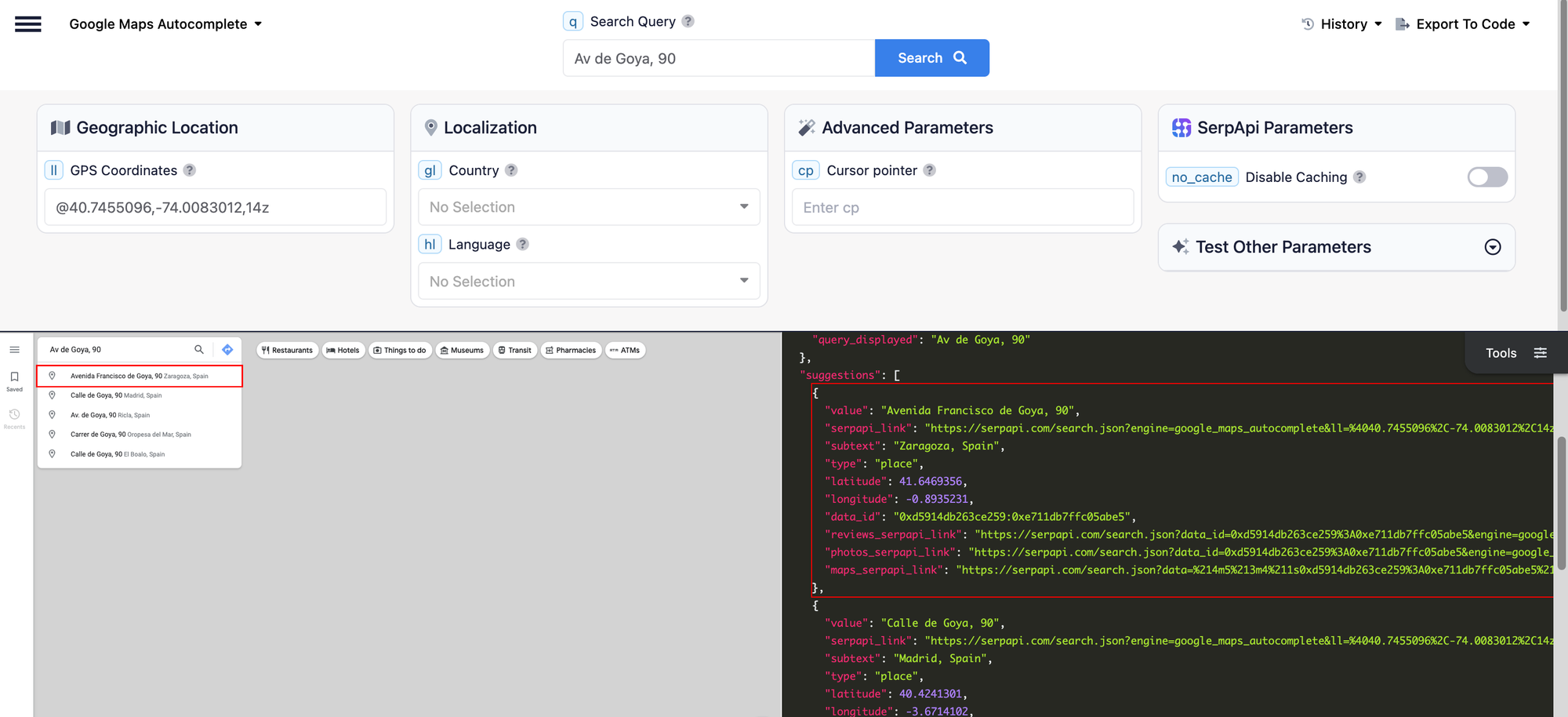
When a listing enters the system, it will automatically be tagged with nearby context:
With SerpApi's Google Maps API, a single API call returns ratings, reviews, exact addresses, hours, and GPS coordinates for any location.
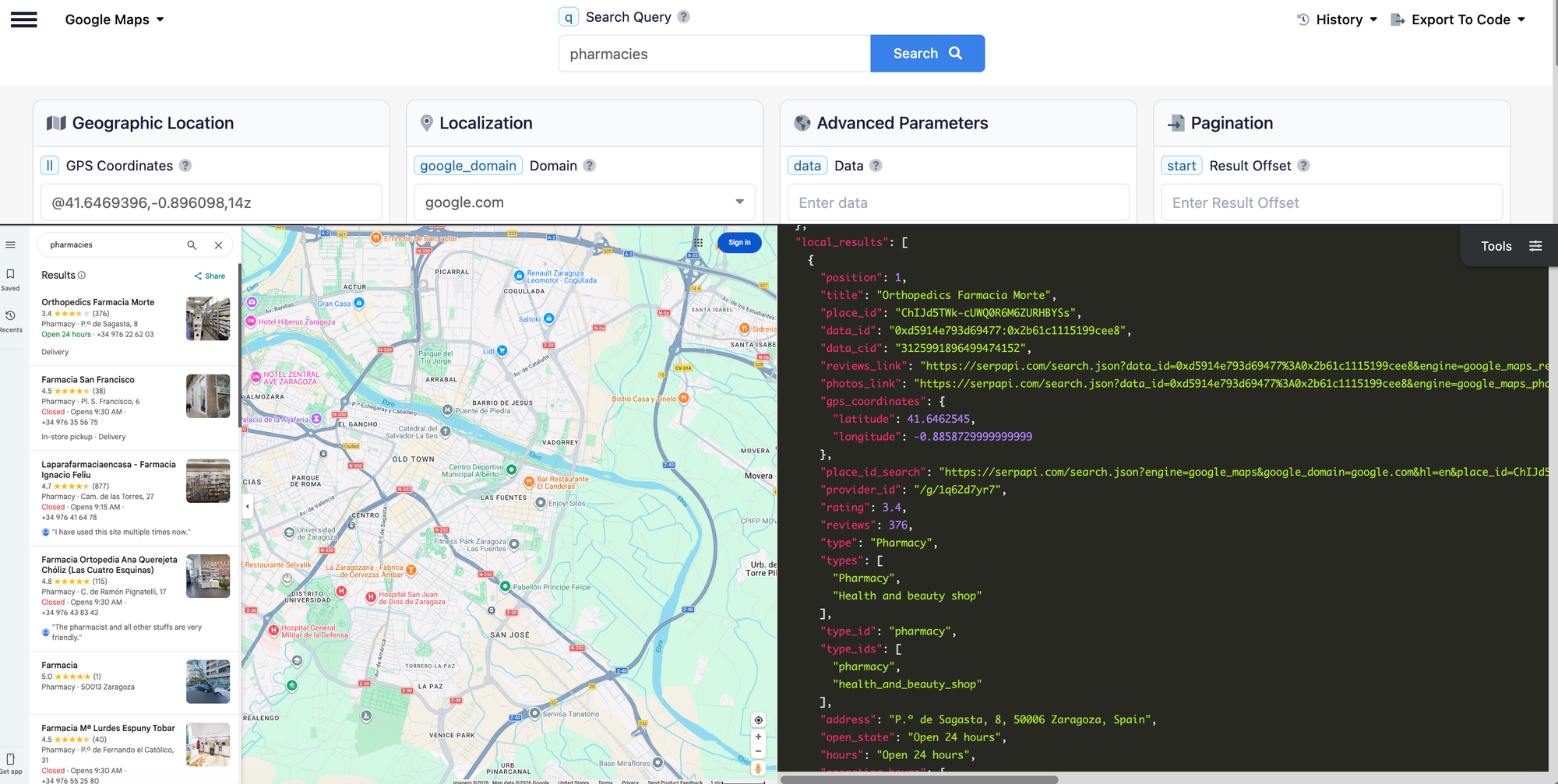
The image above shows an example result from our playground. You can set the coordinates from the address and send the search query. In this example, the results show the available pharmacies around "Avenida Francisco de Goya, 90" including their details such as opening hours, full address, phone numbers and more.
Users don't just want to know what's nearby, they also want to know what's not there.
No grocery store within walking distance? That's a dealbreaker for some. Only a few restaurants in the area? The neighborhood might be too quiet for other. No gyms nearby? Fitness-focus renters will look elsewhere.
With the same Google Maps API, you can send query by category and identify the gaps that matter to users. This will help them to make a better decision before they commit.
Users don't just want to know what's nearby; they want to know how long it takes to get there. Commute time to work, walking distance to the public transport, or driving time to the nearest school.
With SerpApi's Google Maps Direction API, you can extract travel times between any two points by car, transit, walking, or cycling.
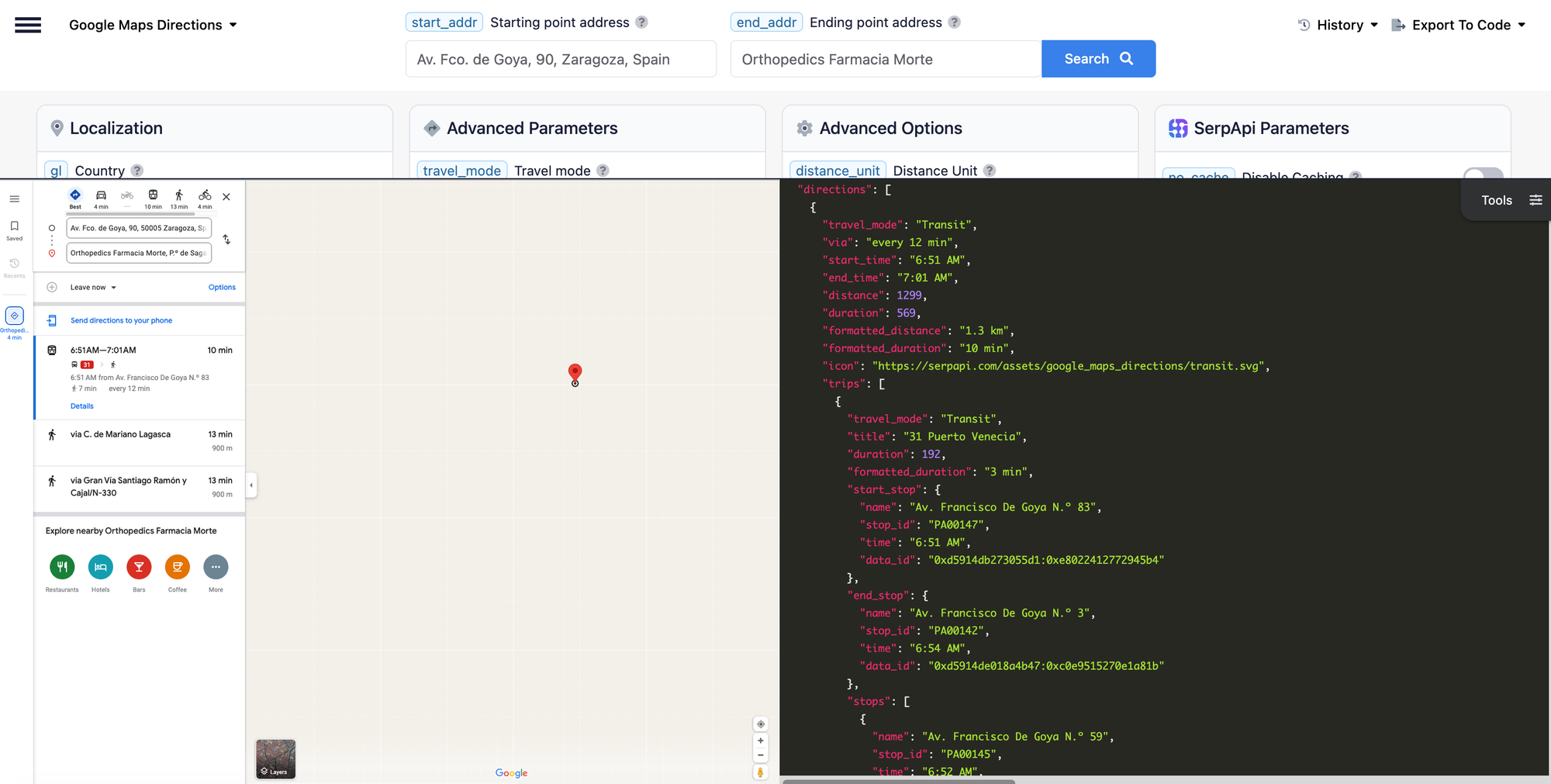
We return structured direction data including the steps it took for every directions giving users a clear picture of their daily commute. By default, it shows the result for the best travel mode. However, you can cutomize by setting the travel_mode parameters.
Read the full tutorial on how to set up the Google Maps Directions with Python in the blog post below.
Get Accurate Route Data: Scraping Google Maps Directions
Scrape route information from Google Maps Directions with Python and simple API
 SerpApiHilman Ramadhan
This is the question every user asks and the hardest one to answer at scale.
While this topic isn't 100% of the PropTech platform's job to judge, at least you can give users the data to decide for themselves. High-rated coffee shops, busy restaurants, and well-reviewed local services can be a good indicator of a healthy neighborhood.
With SerpApi's Google Maps Reviews API, you can aggregate user reviews and sentiment data from local businesses by extracting ratings, reviews counts,review snippets, images (if it was uploaded) price range for every restaurants and more.
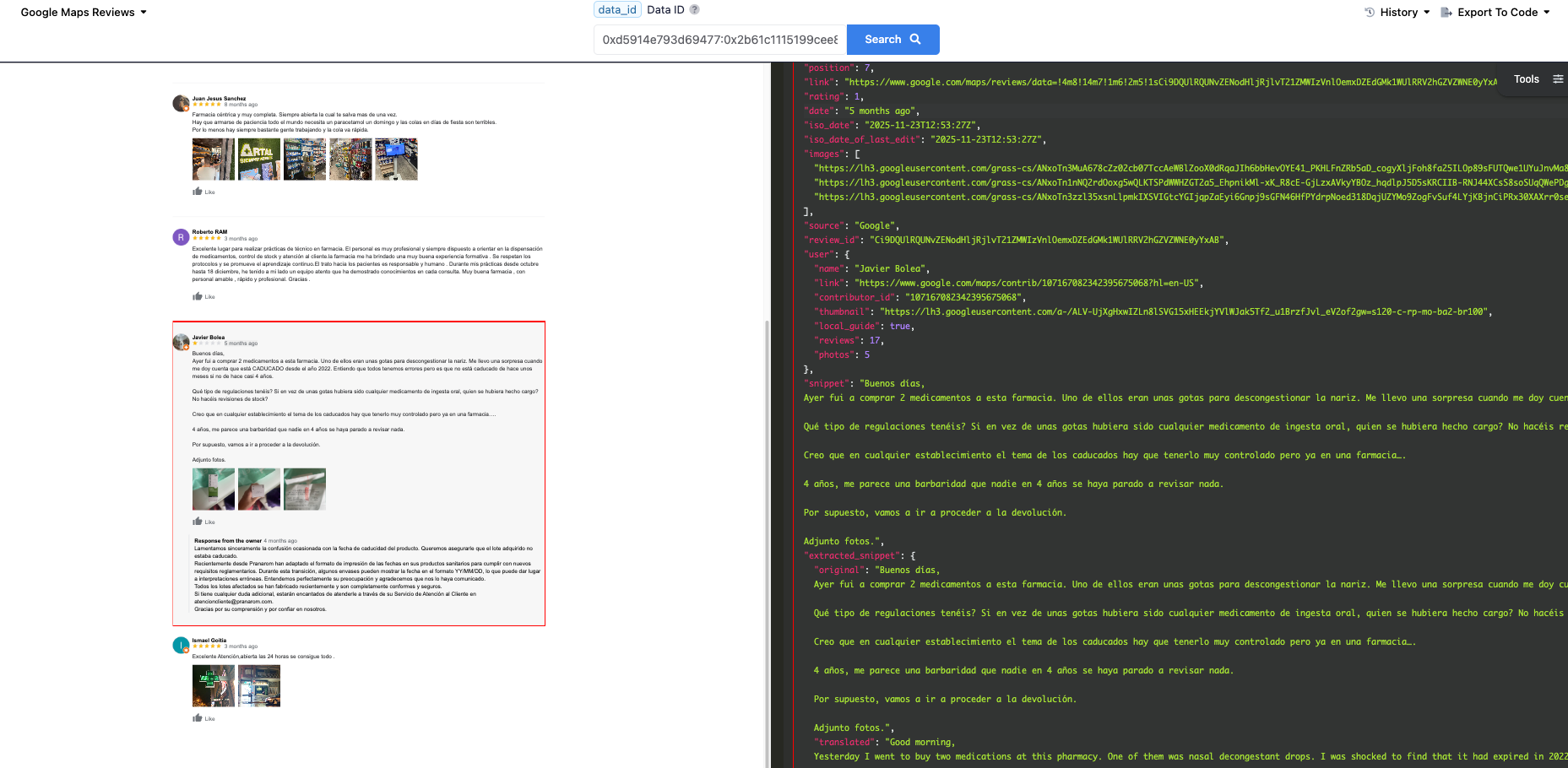
In the example above we can see the details review. Even though the review is in Spanish, SerpApi returns to you both the original language and english translation making it easy to analyze sentiment regardless of location.
Read the full tutorial on how to set up the Google Maps Reviews with Python in the blog post below.
How to scrape Google Maps Reviews
Google Maps is the most popular navigation platform and Google Maps Reviews provides huge customer experience insights for businesses. With Google Maps Reviews data, you can analyze competitors’ reviews, get insight from their strengths and weaknesses. Monitoring and analyzing your business’s reviews also helps you manage your online reputation. Besides
SerpApiAndy L

Every day your platforms run without automated location intelligence, you're:
The PropTech platforms that will dominate the next decade aren't the ones with the most listings. They're the ones delivering the most context around their listing.
A robust real estate data API stack isn't a feature anymore. It's the foundation of every successful PropTech location intelligence strategy.
Google's Official Places API provides similar structured data, such as nearby places, reviews, and directions. So why use SerpApi?
| Factor | Google Maps Platform | SerpApi |
|---|---|---|
| Pricing Model | Pay-per-request with tiered volume discount |
Flat monthly plans |
| Cost | Variable. Depends on usage mix and SKUs |
Fixed monthly cost |
| Data availability | Some browser-visible data not exposed (e.g., Popular Times) |
Returns data as seen on Google Maps on browsers or apps, including Popular Times |
| Field selection | Must specify fields via X-Goog_FieldMask and different fields have different cost (see full list) |
Returns all available data in one response. No field management needed |
| Terms of Service | Strict. Caching limits, display requirements (ToS) |
More flexible. You can store your own data |
| Multi-source | Google data only | Google, Bing, Yelp and more |
| Setup | Requires Google Cloud account and billing |
Simple API key |
| Billing Complexity | Multiple SKUs with different rates |
One search = One credit |
Note on Popular Time: If you've ever looked at a business on Google Maps and seen the bar chart showing when it's the busiest, that's "Popular Time" data. It's valuable for PropTech platform (imagine showing users when nearby gyms or coffee shops are crowded). Google's official API does not expose this data. SerpApi returns it through the place_results endpoint requiring a second API call using the place_id from your initial local_results search. While it's an extra step, the data itself is available and structured as a busyness_score per hour for each day of the week.
Note on FieldMask: Google's Places API (New) requires you to specify exactly which fields you want in every request using X-Goog-FieldMask. Different fields fall into different pricing tiers (Essentials, Pro, Enterprise) so requesting reviews costs more than requesting displayName. This adds complexity to both your code and your billing. With SerpApi, you get all available data in one response with predictable pricing.
Choose Google Maps Platform if:
Choose SerpApi if:
SerpApi isn't limited to Google Maps. You can enrich your listings with data from multiple sources through a single API provider:
| Data Source | API | Best For |
|---|---|---|
| Google Maps | Google Maps API | Nearby places, directions, reviews, autocomplete |
| Bing Maps | Bing Maps API | Alternative location data, different coverage areas |
| Yelp | Yelp Search API | Restaurant ratings, local business reviews, neighborhood vibe |
For example, when building a neighborhood quality score, you could combine:
This gives your users a more complete picture than relying on a single source.
The gap between a platform users trust and one they abandon isn't the number of listings; it's the context around them. Every day your platform runs without automated location intelligence, you're leaving users to do the research you should be doing for them.
The good news? You don't need a team of researchers or a complex data infrastructure to fix it. With the right API stack, you can enrich every listing automatically at scale.
SerpApi gives you structured location data from multiple resources with a simple API call. Prevent user bounce today by giving your listings the context that closes decisions.
If you have any question, contact us at contact@serpapi.com
此内容由惯性聚合(RSS阅读器)自动聚合整理,仅供阅读参考。 原文来自 — 版权归原作者所有。