Many companies run their Ads on the Google Platform to drive more clicks and generate more leads and sales. Scraping Google Ad Results is super useful for businesses: you can research specific keywords, analyze competitors' ads, pricing, and promotional strategies, and identify valuable keywords competitors are bidding on. After this tutorial, you will know how to spy on winning competitors' Google Ads

We offer two APIs for developers to scrape ads from Google:
Preparation
To begin scraping Google Ads data using our APIs, first, create a free account on serpapi.com. You'll receive 250 free search credits each month to explore the API.
First, let's see how to access Google Ads results in real time with the API.
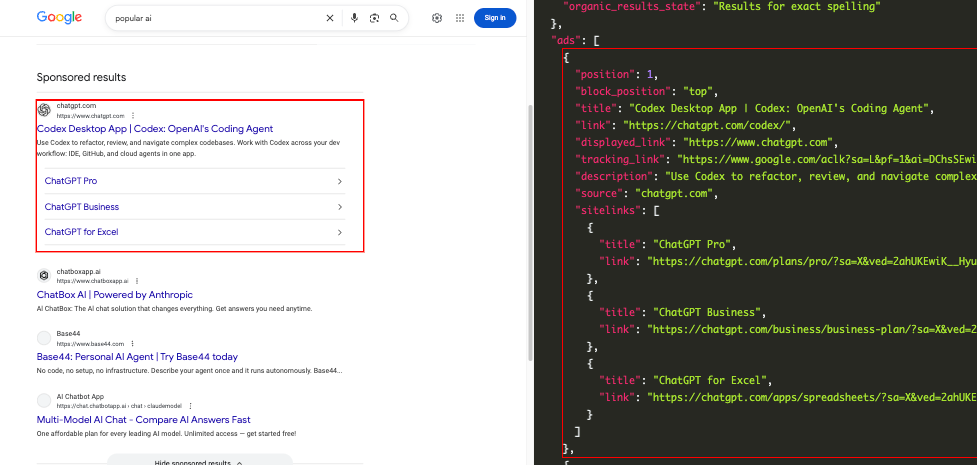
Preparation for accessing the SerpApi API in Python
main.py filepip install requestsHere is what the basic setup looks like:
import requests
SERPAPI_API_KEY = "YOUR_REAL_SERPAPI_API_KEY"

params = {
    "api_key": SERPAPI_API_KEY, #replace with your real API Key
    # soon
}

search = requests.get("https://serpapi.com/search", params=params)
response = search.json()
print(response)
With these few lines of code, we can access all of the search engines available at SerpApi, including the Google Ads API.
import requests
SERPAPI_API_KEY = "YOUR_SERPAPI_API_KEY"

params = {
    "api_key": SERPAPI_API_KEY,
    "engine": "google_ads",
    "q": "best ai tools",
    "location": "Austin, Texas, United States",
}

search = requests.get("https://serpapi.com/search", params=params)
response = search.json()
print(response)
To make it easier to see the response, let's add indentation to the output.
import json

# ...
# ...
# all previous code

print(json.dumps(response, indent=2))
Here is the result from the Python code above:
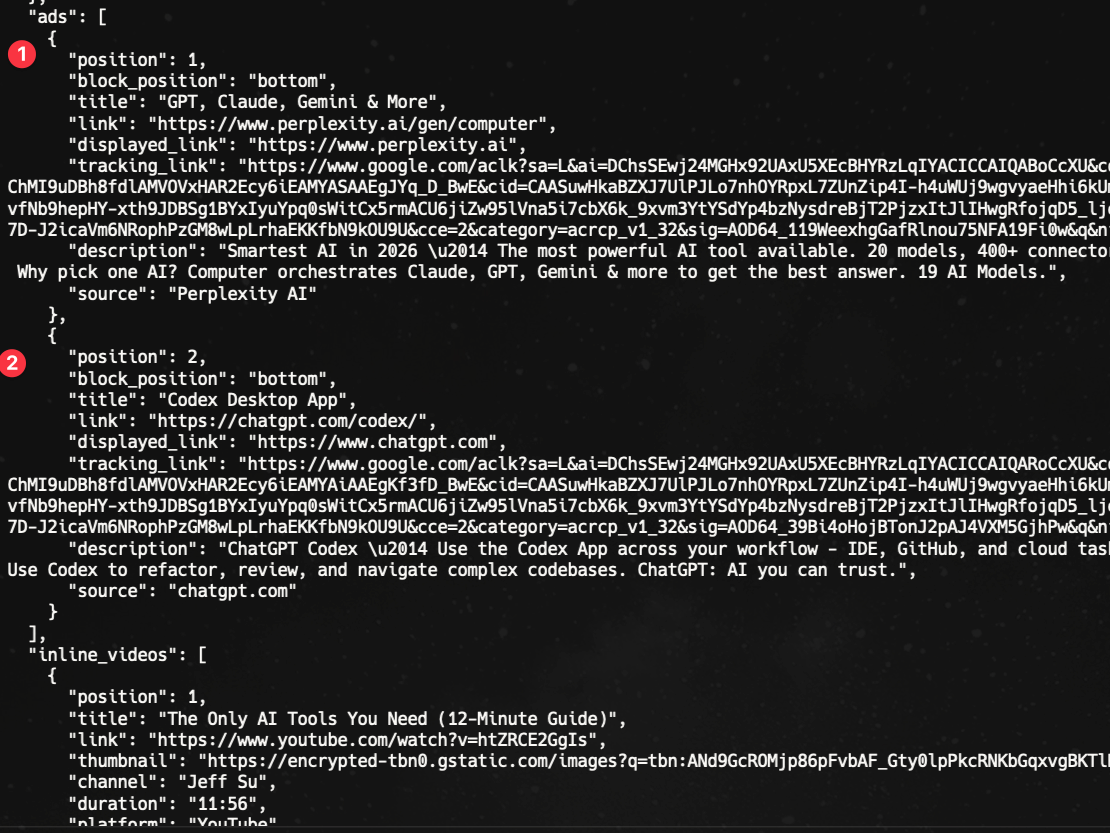
Depending on the query, the API can return several sponsored result types:
ads: regular sponsored results from Google search pages.shopping_results: sponsored shopping results.local_ads: local service-style sponsored results.The ads array can include fields such as position, block_position, title, link, displayed_link, thumbnail, tracking_link, description, source, price, rating, reviews, extensions, and sitelinks.
Google Ads Transparency Center is a search engine for ads that are published through Google. It was created to empower users to make informed decisions about the ads and advertisers they see through Google - this means providing greater transparency about who the advertisers are, which ads they show, and what kind of ads are shown.
Marketers can leverage this tool as a powerful resource to analyze competitors' Google Ads and gain deeper insights into their strategies across platforms. It lets you explore ads on various topics from various companies and filter results by date, region, and creative format for more tailored results.
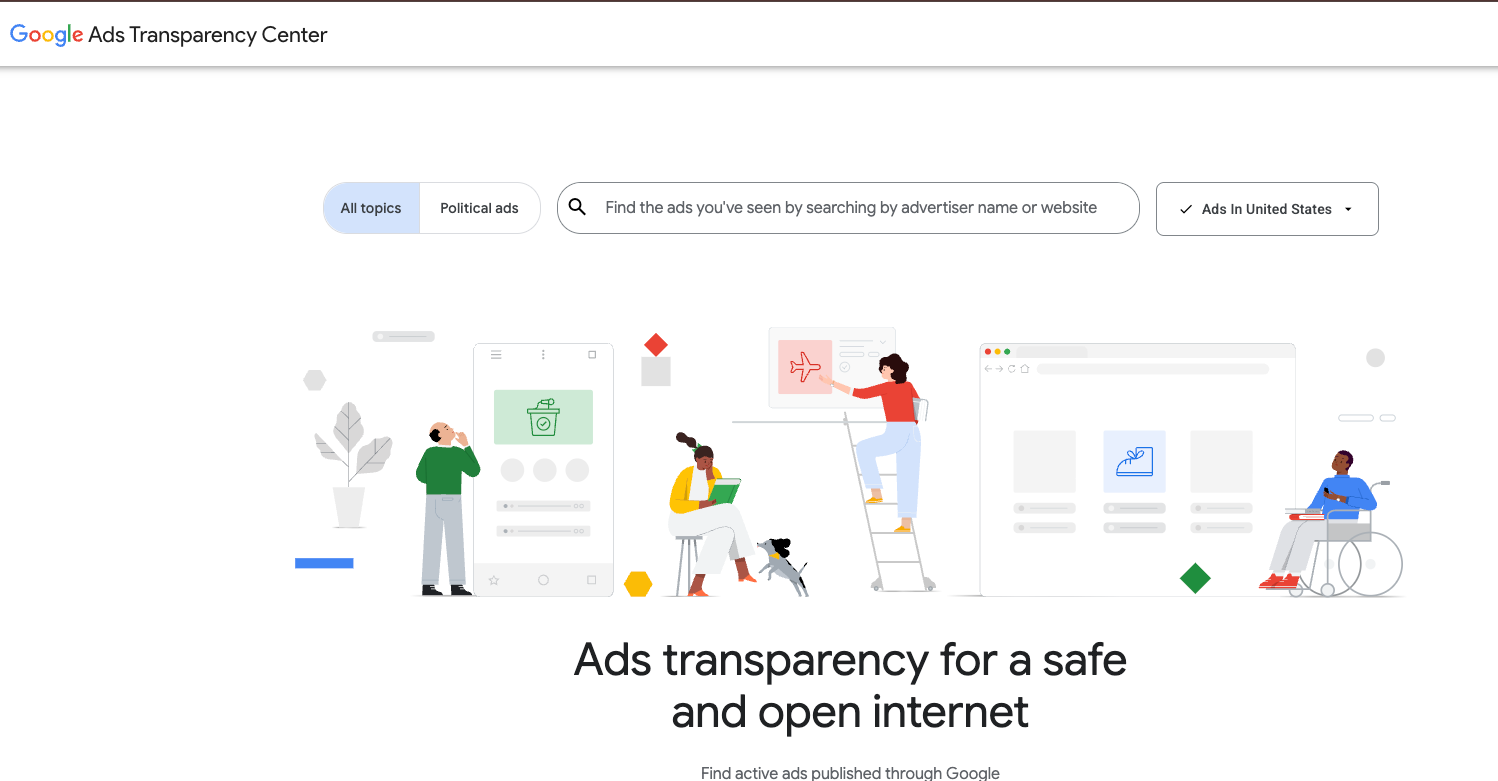
Our Google Ads Transparency Center API allows you to scrape ad information from the Google Ads Transparency Center page.
Search Query Parameters [At least one of these is required]
advertiser_id: Specifies the Google Advertiser ID. You can input a single ID or multiple IDs separated by commas. Alternatively, a free-text search can be performed using the text parameter.
💡
The advertiser_id is a unique identifier assigned to each advertiser within the Google Ads platform. This ID is critical in distinguishing between the different advertisers and accessing data specific to each one.
text: Allows you to perform a search based on a specific text, often related to a domain search within the context of Google Ads. This can be used instead of the advertiser_id parameter.
💡
The text parameter offers a different way to query ads, ideal for exploring a larger pool of advertisers connected to a specific domain or name. You can use the text parameter when aiming to compare advertising strategies of multiple entities within the same industry or domain, or in cases where the specific advertiser_id is unknown.
Location Parameter
region: Sets the geographic origin of the search results. By default, it retrieves results from all regions. Head to the Google Ads Transparency Center Regions page for a full list of supported regions.
💡
The location can help in gaining insight into how advertising strategies are customized for various regions. This data is crucial for businesses looking to engage with diverse audiences. This can be accomplished through the region parameter, by filtering ad data by specific geographic areas.
Date Range Parameters
start_date: Defines the beginning date for your search, formatted as YYYYMMDD.end_date: Sets the ending date for your search results, also in the format YYYYMMDD.
Filter Parameter
creative_format: Allows you to filter search results based on the format (e.g., text, image, video).
💡
The creative_format parameter allows you to filter ad data based on the type of creative medium used. It includes three primary options: Text, Image, and Video.
Pagination Parameters
num: Determines the maximum number of search results to be returned. In a single API request, the default is 40 and the maximum is 100.next_page_token: Used for paginating through search results, enabling you to retrieve the next set of results.
SerpApi Parameters
engine: [Required] Set parameter to google_ads_transparency_center to use the Google Ads Transparency Center API engine.
api_key: [Required] Parameter defines the SerpApi private key to use.
There are some additional optional SerpApi parameters you can set - no_cache, async, and output, which can help you get the desired results.
You can find the API documentation here.
The response is comprised of four parts:
search_metadata: This contains basic data about the search such as search_id, status, endpoint details, timestamps, and more.search_parameters: This specifies which API parameters have been selected for this particular search.search_information: This contains extra information about the search such as total number of results, and more.ad_creatives: This contains a list of ads scraped from Google Ads Transparency Center corresponding to the search parameters.
API_KEY'. In this instance, the code focuses on Amazon's advertising campaigns by utilizing its advertiser_id and region (region code: 2840 is USA). Here is an example in Python:
Set your params according to the parameters I mentioned above, based on which advertiser(s) and region you are looking to get ad details for.
import requests
import os, json

params = {
  "api_key": os.environ["API_KEY"],
  "engine": "google_ads_transparency_center",
  "advertiser_id": "AR12815412684405080065",
  "region": "2840"
}

search = requests.get("https://serpapi.com/search", params=params)
response = search.json()
print(json.dumps(response, indent=2))
Let's take a look at the response:
{
  "search_metadata": {
    "id": "66f748abd11195f945c1522a",
    "status": "Success",
    "json_endpoint": "https://serpapi.com/searches/7938d618e515f1ba/66f748abd11195f945c1522a.json",
    ...
  },
  "search_parameters": {
    "engine": "google_ads_transparency_center",
    "advertiser_id": "AR12815412684405080065",
    "region": "2840"
  },
  "search_information": {
    "total_results": 200
  },
  "ad_creatives": [
    {
      "advertiser_id": "AR12815412684405080065",
      "advertiser": "Amazon",
      "ad_creative_id": "CR07747174253753008129",
      "format": "image",
      "image": "https://tpc.googlesyndication.com/archive/simgad/325087086685235926",
      "width": 320,
      "height": 568,
      "first_shown": 1687330800,
      "last_shown": 1727477863,
      "details_link": "https://adstransparency.google.com/advertiser/AR12815412684405080065/creative/CR07747174253753008129?region=US"
    },
    ...
  ],
  "serpapi_pagination": {
    "next_page_token": "..+K6f+IlLygE=",
    "next": "..."
  }
}
By reviewing the results in the ad_creatives section, you can uncover details about Amazon's advertising approach, favored ad formats, and ad writing techniques. Not only that, you can also collect and analyze valuable ad data, including timestamps for when the ad was shown, and help businesses optimize their advertising strategies and maximize return on investment.
The text parameter can be used when you are looking for more generic data instead of data for specific advertisers.
Let's consider another example where we specify the text parameter and get the data from our Google Ads Transparency Center API. In this instance, the code conducts a search for Youtube related ads by utilizing the text field and region (region code: 2840 is USA). Here is an example in Python:
Set your params according to the parameters I mentioned above, based on which query of interest and region you are looking to get ad details for.
import requests
import os, json

params = {
  "api_key": os.environ["API_KEY"],
  "engine": "google_ads_transparency_center",
  "region": "2840",
  "text": "Youtube"
}

search = requests.get("https://serpapi.com/search", params=params)
response = search.json()
print(json.dumps(response, indent=2))
Let's take a look at the response:
{
  "search_metadata": {
    "id": "66f74c18cdf15587150c6ab5",
    "status": "Success",
    "json_endpoint": "https://serpapi.com/searches/c1ca1966069adace/66f74c18cdf15587150c6ab5.json",
    ...
  },
  "search_parameters": {
    "engine": "google_ads_transparency_center",
    "text": "Youtube",
    "region": "2840"
  },
  "search_information": {
    "total_results": 500000
  },
  "ad_creatives": [
    {
      "advertiser_id": "AR10629003163685879809",
      "advertiser": "Lullify Inc",
      "ad_creative_id": "CR12961410373826641921",
      "format": "text",
      "target_domain": "youtube.com",
      "image": "https://tpc.googlesyndication.com/archive/simgad/11346475487747450235",
      "width": 380,
      "height": 248,
      "first_shown": 1649270477,
      "last_shown": 1727481706,
      "details_link": "https://adstransparency.google.com/advertiser/AR10629003163685879809/creative/CR12961410373826641921?region=US&domain=Youtube"
    },
    ...
}
The start_date and end_date parameters allow you to identify ad strategies over a time period. By specifying the dates, you can narrow down your search to a defined timeframe. This feature is essential for filtering ad data from particular events, such as holidays, promotional sales, or tied to specific company announcements. For example, using the dates, you could filter for ads run during a labor day weekend to see what strategies company may be using for their campaigns during that time.
Let's look at a code example to get data on ads run during labor day weekend in United States (region code: 2840) for Nike:
Playground Link: https://serpapi.com/playground?engine=google_ads_transparency_center&text=nike®ion=2840&start_date=20240830&end_date=20240903
import requests
import os, json

params = {
  "api_key": os.environ["API_KEY"],
  "engine": "google_ads_transparency_center",
  "region": "2840",
  "text": "nike",
  "start_date": "20240830",
  "end_date": "20240903"
}

search = requests.get("https://serpapi.com/search", params=params)
response = search.json()
print(json.dumps(response, indent=2))
Analyzing the resulting data is useful to understand how the ads strategy changes during holiday season. Companies can gain data on how other competitors adapt ads to specific timings and they may be able to get insights into how effective these strategies are to convert ad viewers to customers.
Ads can be created in various formats. The format can inform a lot about a company's marketing strategy and mediums of reaching their audience.
Text Ads are direct and to-the-point ways of communicating content. They are short and effective, and convey a clear message. Image Ads use visuals to engage people and create interest. Video Ads are also a useful tool to create interest using visuals but are more useful to tell a story or narrative behind a brand or product using those visuals.
Let's take a look at an example to get ads for a specific creative format. Here, I'll be getting video ads by Amazon.com Services LLC (advertiser_id: AR15974021587678527489) in United States (region ID: 2840).
import requests
import os, json

def getAdsByCreativeFormat(creativeFormat):
    params = {
    "api_key": os.environ["API_KEY"],
    "engine": "google_ads_transparency_center",
    "advertiser_id": "AR15974021587678527489",
    "region": "2840",
    "creative_format": creativeFormat
    }
    search = requests.get("https://serpapi.com/search", params=params)
    results = search.json()
    return results

available_formats = ["text", "image", "video"]
for format in available_formats:
    print(getAdsByCreativeFormat(format))
Playground Example for getting only Video Ads for an advertiser: https://serpapi.com/playground?engine=google_ads_transparency_center&advertiser_id=AR15974021587678527489®ion=2840&creative_format=video
The Google Ads Transparency Center response may include multiple pages of ads. To efficiently retrieve data and navigate through multiple pages, we can utilize the num and next_page_token parameters.
About the Parameters:
num: This parameter determines the maximum number of search results to be returned. The default is 40. You can maximize the results received per request by setting num to a higher value. 100 is the maximum you can set num to.
next_page_token: This parameter is used for paginating through search results, enabling you to retrieve the next set of results.
Here is how you can set up the pagination flow:
Initial Request: Execute an initial request with your parameters of interest without next_page_token.
Sequential Access Of Results On Following Pages: Fetch the next results page using the next_page_token from the current response.
Last Page: Implement a check for the existence of next_page_token. If it's not present, it indicates that this is the last page and there are no more pages to retrieve.
Let's look at an example where we can use pagination to get all the pages of ads for Nestle Australia Ltd (advertiser_id: AR15820237500506439681) present on Google Ads Transparency Center in United States (region ID: 2840), using Pagination.
import os
import json
import requests

def get_ads(next_page_token=None):
    params = {
        "api_key": os.environ["API_KEY"],
        "engine": "google_ads_transparency_center",
        "advertiser_id": "AR15820237500506439681",
        "region": "2840",
        "num": "50",
    }

    if next_page_token is not None:
        params["next_page_token"] = next_page_token

    search = requests.get("https://serpapi.com/search", params=params)
    response = search.json()

    print(json.dumps(response, indent=2))

    ad_creatives = response.get("ad_creatives", [])
    print(f"Ads retrieved: {len(ad_creatives)}")

    next_token = (
        response.get("serpapi_pagination", {})
        .get("next_page_token")
    )

    if next_token:
        get_ads(next_token)
    else:
        print("All pages retrieved")


get_ads()
The function getAds starts with the first page of results. Above, I have set num to 50, but you can change that to any number between 1 and 100. If next_page_token is present in the response, the function calls itself recursively with the next_page_token, and gets the next set of results. When there is no next_page_token, it indicates that all pages have been retrieved, and the recursive function prints the message “All pages retrieved“ and stops.
By retrieving all this data, you can analyze all the ads to understand brand strategy and ad campaigns.
You can scale your ad research using SerpApi APIs: Google Ads API and Google Ads Transparency Page API.
As digital advertising becomes more prevalent and important, Google Ads Transparency Center API becomes a vital tool for staying competitive. Companies can use data from it and influence decision-making, shape strategies and identify impactful advertising methods.
I hope you found this tutorial helpful. If you have any questions, don't hesitate to reach out to me at contact@serpapi.com.
SerpApi Unveils Google Ads Transparency Center API: Empowering Developers to Harness Ads Insights
SerpApi, a trailblazer in scraping serp results and data extraction solutions, is thrilled to announce the launch of the Google Ads Transparency Center API. This cutting-edge API is designed to provide software engineers and developers with unparalleled access to vital insights, enabling them to dive deep into published Google Ads.
 SerpApiAli Ayar

Scraping Google Ads Transparency Center with SerpApi and Node.js
Learn how to scrape Google Ads Transparency Center through real-world examples and understand the importance of this data in digital advertising.
 SerpApiMartin Kaldramov
Monitoring Competitors’ Google Ads
Google Ads Transparency Center is a search engine for ads that are published through Google. The move on Google on this is awesome for transparency on the internet. Google Ads Transparency Center gives the power to the users to block or report any ads for valid reasons. For marketers, it
 SerpApiTerry Tan

此内容由惯性聚合(RSS阅读器)自动聚合整理,仅供阅读参考。 原文来自 — 版权归原作者所有。