




David M. Lentz
Amazon MQ is a managed ActiveMQ messaging service hosted on the AWS cloud. Amazon MQ’s brokers route messages between the nodes in a distributed application. Each broker is a managed AWS instance, so your messaging infrastructure doesn’t require the maintenance and upfront costs of a self-hosted solution. Amazon MQ supports several ActiveMQ versions and is designed to help users easily migrate ActiveMQ message brokers—or any brokers that use its supported messaging protocols—to the cloud.
Like other message queues, Amazon MQ can help you solve problems like integrating disparate systems to allow them to exchange data. If you need to transition an application from a monolithic architecture to microservices, you can employ Amazon MQ to route data between independently operated services. Message queues also help improve data reliability in dynamic environments (i.e., if services become unavailable, brokers can store messages until those services are able to acknowledge them).
If your distributed applications rely on Amazon MQ to send and receive data, you need to know that your message brokers are operating efficiently and with plenty of resources at all times. In this post we’ll look at some of the key metrics you should monitor to be certain that your Amazon MQ instances are performing well. But first, let’s look closer at how client programs communicate with one another through the Amazon MQ broker, and how Amazon MQ uses resources to store and send messages.
In this section, we’ll look at how messaging works, and how Amazon MQ helps services coordinate their activity. We’ll introduce messaging terms and concepts that apply to Amazon MQ, which are the same as those that apply to ActiveMQ. We’ll cover the following information:
In a distributed architecture, a message is data one service passes to another to coordinate work. Services don’t send these messages directly to one another, but instead pass them via the message broker. Producers are the services that send messages to the broker, and consumers are the services that receive and process the messages. Together, producers and consumers are known as clients.
For example, in an application that contains a feature allowing a user to create an account, that feature might be composed of several services. A create-user service might create a new user account, then send a message to a logger service that records the account information and to a crm service that emails a confirmation to the new user. The three services in this example—create-user, logger, and crm—operate independently and share data through messaging.
In this model, the broker sends messages asynchronously, so consumers don’t necessarily receive them immediately. The producer’s task of composing and sending a message is disconnected from the consumer’s task of fetching it. Because the broker acts as an intermediary, producers and consumers can operate independently. As soon as a producer sends a message to a broker, its task is complete, regardless of whether or when a consumer receives the message. Conversely, when a consumer receives a message from a broker, it does so without knowledge of the producer that created the message.
This type of arrangement, in which clients function without knowledge of one another, is known as loose coupling. Services can perform their work even if other services are busy or unavailable.
On the other hand, tightly coupled services depend explicitly on one another—a service that is slow or unavailable can negatively affect other services that depend on it. In our earlier example, if the create-user service communicated directly and synchronously with the logger service and the crm service, the user-facing signup process wouldn’t complete until all three services had completed their work, which could cause a delay that affects the user experience.
Loose coupling can improve the performance of your application in several ways. Services that are loosely coupled can scale independently, allowing you to increase the throughput of your messaging system by adding producers or consumers at any time. Loose coupling can also improve the reliability of the messaging functionality; if a consumer fails, it could reduce overall throughput, but it won’t cause any of the other clients to fail.
This type of architecture can also accommodate traffic spikes easily: a producer can increase the rate at which it sends messages (for example, as more users send requests)—and even if the consumers can’t keep up, the message queue will buffer the messages as consumers process them at their own pace.
The broker is the core of the Amazon MQ messaging infrastructure. It provides endpoints which clients access to send and receive messages. The broker routes the messages to destinations—the channels through which the messages will be sent. There are two types of destinations: queues and topics. Queues are used for point-to-point messaging, in which each message is delivered to a single consumer (though multiple consumers can read from the same queue). Topics are used for publish/subscribe (or pub/sub) messaging, in which each message is delivered to all of the services that subscribe to the topic.
If a consumer is unavailable to receive a message, the broker temporarily stores the message (in memory and/or on disk, depending on the broker configuration and message type) until the consumer is available or the message expires.
Because Amazon MQ’s producers submit messages without requiring acknowledgment from a consumer, messages may be enqueued—added to the topic or queue—faster than they’re consumed. As consumers read and acknowledge messages, those messages are dequeued from the destination, and storage space is freed up on the broker. Later in this post, we’ll look at why it’s important to track metrics that reflect the broker’s enqueue and dequeue rates.
When multiple consumers read messages from the same queue—known as the competing consumers pattern—each message in the queue is dequeued by the next available consumer based on a round-robin sequence. This arrangement helps balance the load of messages across all the consumers subscribed to the queue.
If a consumer is unavailable when its turn comes (because it’s processing an earlier message or because it is offline), that consumer’s turn is taken by the next one in the sequence. If none of the consumers are available, the message will remain in the queue until a consumer becomes available and dequeues it. If the message expires before a consumer can dequeue it, the broker will delete the message from the queue.
If messages are being enqueued faster than they’re being dequeued, they’ll accumulate on the destination and could exhaust its memory. To prevent this, you can employ the competing consumers pattern to increase the rate at which messages are dequeued.
If your consumers are hosted on EC2 instances, you can take advantage of Auto Scaling to automatically deploy new consumers, increasing your dequeue rate and reclaiming storage space on your broker. You can then monitor your clients and their EC2 instances alongside your Amazon MQ broker to see an end-to-end view of the performance of your application’s messaging.
A consumer can subscribe to a topic as either a durable or nondurable subscriber. (Durability applies only to messages within a topic, not within a queue.) In the case of a durable subscription, Amazon MQ will retain messages if the subscriber is unavailable (and if the producer has marked the message for persistent delivery). When that subscriber reconnects, it receives new messages that arrived during the time it was disconnected. A nondurable subscriber would not receive any messages published to the topic during the time it was disconnected from the broker.
A topic will hold a copy of any message that has yet to be received by a durable subscriber. In other words, when a topic delivers a message, it keeps a copy only if there are durable subscribers who have yet to receive it; once they’ve all received it, the message is deleted from the topic.
You can create an Amazon MQ broker using the Amazon MQ console, the AWS command line interface, or AWS CloudFormation. When you create a broker, you can specify its security group, VPC, and subnet. Each broker includes its own ActiveMQ Web Console, which allows you to operate the broker and its destinations and provides some basic monitoring information.
Depending on your application’s requirements, it may make sense to operate multiple brokers—for example, to isolate different types of messages. You can also arrange brokers in redundant pairs for high availability, and create clients that connect to them using the failover transport. And you can create a network of brokers to ensure the availability and performance of your messaging infrastructure.
Each Amazon MQ broker runs on a managed broker instance, which is the virtualized infrastructure AWS provides when you provision a broker. You can choose from a range of broker instance types, similar to AWS EC2 instance types, which determine the infrastructure resources (such as memory, storage, networking capacity, and number of virtual CPUs) available to your broker, and the hourly cost of operating the broker instance.
Broker instances differ from EC2 instances in a number of ways:
stopped. A broker instance is always running until you delete the broker.The broker instance type influences the performance of your message broker, so you should select a broker instance type that is appropriate for the volume and type of messaging activity required by your application. See the Amazon MQ documentation for guidance on selecting an appropriate broker instance type.
Broker instances have a data storage limit of 20 GB (for the mq.t2.micro broker instance type) or 200 GB (for all other broker instance types). This means that Amazon MQ storage isn’t elastic, so it’s important to select a broker instance type with sufficient storage when you create your broker. If your consumers aren’t keeping up with your producers, you could run out of storage, as undelivered messages accumulate on your broker. Later in this post we’ll look at broker metrics you can monitor to see how much message data is stored on your brokers, and strategies for managing storage space.
We’ve looked at how messaging works, and at the details of how Amazon MQ routes messages to and from client applications. In this section, we’ll look at some key metrics you can monitor from your Amazon MQ brokers and destinations to ensure your messaging infrastructure is healthy. Because you can create multiple destinations on each broker, Amazon MQ provides a group of metrics for each destination, as well as metrics that describe the broker’s resource usage and performance. Understanding key metrics of each type can help you ensure the health of your entire messaging infrastructure.
All Amazon MQ messages pass through destinations. Monitoring destination metrics can give you information about the speed, volume, and resource usage of your messaging system. To understand messaging performance across multiple destinations, you can aggregate and filter these metrics by destination—for example by using the topic or queue name, which automatically get populated as CloudWatch dimensions in destination metrics.
| Name | Description | Metric type | Availability |
|---|---|---|---|
| MemoryUsage | The percentage of available memory that the destination is currently using | Resource: Utilization | CloudWatch |
| ConsumerCount | The number of consumers currently subscribed to the destination | Other | CloudWatch |
| ProducerCount | The number of producers currently attached to the destination | Other | CloudWatch |
| QueueSize | The number of messages in the destination that have not been acknowledged by a consumer | Resource: Saturation | CloudWatch |
| ExpiredCount | The number of messages in the destination that expired before they could be delivered | Other | CloudWatch |
| EnqueueCount | The number of messages sent to the destination | Work: Throughput | CloudWatch |
| DequeueCount | The number of messages acknowledged by consumers | Work: Throughput | CloudWatch |
In your broker configuration, you can optionally set a memoryLimit value for each destination. The MemoryUsage metric represents the percentage of the destination’s memory limit currently in use. If you haven’t set a memoryLimit for a destination, the MemoryUsage metric represents the percentage of the broker’s available memory (which varies by broker instance type) currently being used by the destination.
Slow consumers or unpredictable message volume on one destination could put the broker’s other destinations at risk of resource contention: because all destinations use the resources of a single broker, if destinations are not configured with a memoryLimit value (or if they’re misconfigured to allow a total of more than 100 percent of the broker’s available memory), they could interfere with one another as they try to use broker memory to store messages.
Producer flow control (PFC) is an ActiveMQ feature that protects memory by automatically slowing down the enqueue rate of the producers if the destination’s memory runs low. PFC is triggered once the destination’s memory usage is at or above the cursorMemoryHighWaterMark value defined for the destination. The cursorMemoryHighWaterMark defaults to 70 percent of the available memory (either the broker’s available memory or, if defined, the destination’s memoryLimit). See the Amazon MQ documentation for more information about setting cursorMemoryHighWaterMark and other configuration values.
If you’re using a service like Auto Scaling to ensure that your fleet of consumers scales out automatically, the destination will begin to dequeue messages faster and free up memory, but you should alert on the MemoryUsage metric to ensure you can avoid a slowdown.
To see the combined MemoryUsage value for more than one destination—for example to see the average percentage of memory used across all your queues—you can aggregate them by destination, using the tags functionality in your monitoring platform.
Sooner or later, each destination (queue or topic) needs to deliver messages to consumers. In some cases, a fluctuating consumer count could be normal—consumers may come and go, for example, as your infrastructure dynamically scales. However, you should be able to identify some normal operating parameters for ConsumerCount, based on your traffic patterns and scaling policies. If your ConsumerCount value changes unexpectedly, your consumer fleet may have scaled out more than usual, or some hosts may have become unavailable.
This metric tracks the number of producers currently attached to a broker. A ProducerCount of zero may or may not indicate a problem, depending on your expected pattern of activity. If your producers are typically active only sporadically (e.g., if they send a batch of messages once a day), this may be normal. However, if you expect to have active producers at all times, you should investigate a ProducerCount of zero, as it could indicate a service interruption.
As its name suggests, you can track the QueueSize of queues but not topics. A rising queue size means you have slow consumers: producers are adding messages to the queue faster than consumers can process and dequeue them. This could cause the destination to use up all available memory. This could even affect the performance of the broker’s other destinations.
For example, if you have configured a very high memoryLimit for a destination, an increase in its QueueSize metric could cause it to use so much broker memory that other destinations can’t enqueue their messages. For this reason, you should monitor the destination’s MemoryUsage metric alongside QueueSize. You may be able to reduce the QueueSize by scaling out your consumer fleet so that more hosts are available to read from the queue.
This metric represents the number of messages that expired before they could be delivered. If you expect all messages to be delivered and acknowledged within a certain amount of time, you can set an expiration value for each message, and investigate if your ExpiredCount metric rises above zero. If you determine that latency in your consumers is elevating your ExpiredCount metric, you should consider configuring a network of brokers. Deploying your brokers as a network creates distributed destinations—topics and queues that live across more than one broker. The brokers in the network selectively forward copies of messages to ensure that a message exists on the broker nearest the client that needs to consume it. You should also consider expanding your fleet of subscribers to balance the load of messages across a larger number of consumers.
In some cases, expired messages may not be a sign of trouble. When information is updated frequently (e.g., status updates at one-minute intervals), it’s likely that only the most recent values are useful. If your environment includes consumers with durable subscriptions but an unreliable network, some messages could expire while those consumers are disconnected. When the consumers reconnect, they’ll request all messages published in the interim, but if some of those messages contain outdated information, it’s better to discard them than deliver them.
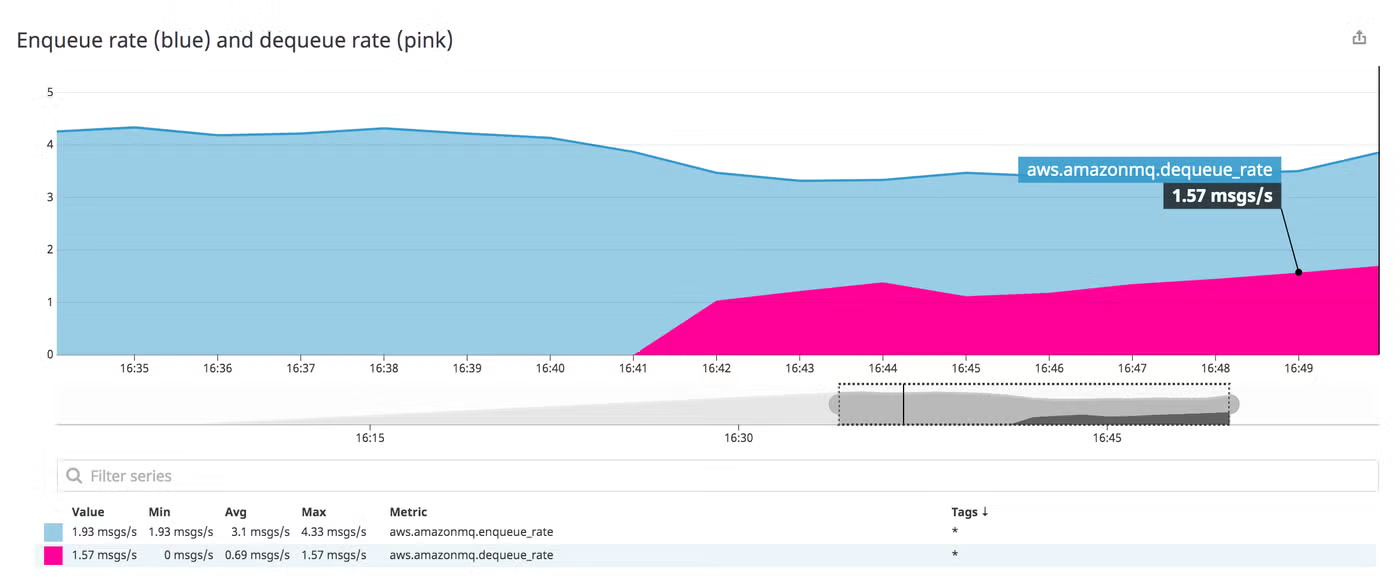
When producers are faster than consumers, the broker holds an increasing number of messages, requiring an increasing amount of memory and disk space. If your broker’s resource usage grows unchecked, its performance could suffer, which could cause a user-facing issue with your application.
The screenshot below shows a message queue whose enqueue rate is greater than its dequeue rate. As a result, the size of the queue rises.
You should monitor EnqueueCount alongside DequeueCount to understand your system’s overall message volume and the degree to which consumers are keeping up with producers. These are both cumulative counts calculated over the entire time the broker has been running, and reset to zero when the broker is restarted. To help you spot significant changes in any destination’s throughput, you should use a monitoring tool to calculate these metrics as enqueue and dequeue rates.
| Name | Description | Metric type | Availability |
|---|---|---|---|
| HeapUsage | The percentage of the ActiveMQ JVM memory limit that the broker currently uses | Resource: Utilization | CloudWatch |
| CPUUtilization | The percentage of the broker instance’s processor capacity that’s currently in use | Resource: Utilization | CloudWatch |
| StorePercentUsage | The percentage of the broker instance’s available disk space that is used for persistent message storage | Resource: Utilization | CloudWatch |
| TotalMessageCount | The number of messages stored on the broker | Other | CloudWatch |
ActiveMQ, the messaging engine behind Amazon MQ, is written in Java, and the broker runs inside a JVM on the broker instance. Of the memory allocated to the JVM, the broker uses a portion to store messages as it dispatches them to consumers. If the broker runs out of heap memory to store messages, it could slow down the movement of messages throughout your infrastructure.
You should monitor this metric to ensure that the broker’s JVM isn’t running out of memory. Java will throw an OutOfMemoryError if the JVM’s memory is exhausted. (See the Java documentation and the ActiveMQ FAQ for guidance on resolving this problem.) You should set an alert to trigger if HeapUsage frequently rises above a comfortable upper limit; if such an alert triggers, you may need to consider moving your broker to a larger broker instance type to resolve this.
Your broker’s CPU usage corresponds to its throughput. As the rate of messages coming in to the broker and being delivered to subscribers increases, the broker uses more processing power. You should monitor CPUUtilization to know whether your broker instance is able to support the level of traffic you need. If this metric is rising, you should consider moving to a larger broker instance type.
In addition to storing messages in memory, Amazon MQ also writes some messages to disk—using KahaDB as a storage mechanism—and deletes them after they’ve been acknowledged by a consumer. Two factors determine whether a message will be written to disk: persistence and destination-level memory usage.
Messages in Amazon MQ are persistent by default, but you can write your producers to explicitly designate messages as either persistent or non-persistent. Persistent messages are written to a message store on disk when they’re enqueued. If the broker were to crash before a message is dequeued, a copy of the message would remain and the process of sending the message could recover when the broker restarted. Non-persistent messages can usually be delivered more quickly since the broker can avoid expensive disk write operations—but since they’re not written to disk, non-persistent messages would be lost in an event that caused the broker to restart.
However, non-persistent messages will be written to disk if the destination runs out of memory to store them. In this case, all messages in memory are moved to the temp store on the disk. Though ActiveMQ’s TempPercentUsage metric allows you to monitor temp storage, that metric isn’t available in Amazon MQ. (You can see this metric in the ActiveMQ Web Console, which we cover in Part 2 of this series.) Instead, you can look at the MemoryUsage metric, which helps you understand how a destination’s memory is being used, so you can proactively ensure that non-persistent messages won’t need to be written to disk.
StorePercentUsage is the percentage of available disk space used by the broker’s persistent message store. The broker stores persistent messages on disk until consumers process and acknowledge them, so StorePercentUsage can reach 100 percent if consumers don’t dequeue messages quickly enough, and/or if messages are large. If you’re using persistent messaging, it’s important to monitor this metric because if a broker runs out of persistent storage, PFC will kick in, causing producers to stop sending messages.
This metric reflects the total number of messages enqueued across all the broker’s destinations. Changes in the value of this metric imply a corresponding change in resource metrics like MemoryUsage. But TotalMessageCount also informs you about the work done by your broker, and you should monitor it alongside work metrics likeDequeueCount and ConsumerCount. If messages are accumulating and ConsumerCount declines, for instance, you may need to scale out your consumer fleet.
Amazon MQ metrics can help you understand the performance and resource usage of your messaging infrastructure. In this post we’ve looked at how Amazon MQ routes messages between clients, and identified some of the important metrics that give you visibility into that process. In the next part of this series, we’ll look at how you can collect metrics from Amazon MQ.
Source Markdown for this post is available on GitHub. Questions, corrections, additions, etc.? Please let us know.
We wish to thank Ram Dileepan and Rick Michaud at AWS for their technical review of this post.
此内容由惯性聚合(RSS阅读器)自动聚合整理,仅供阅读参考。 原文来自 — 版权归原作者所有。