





Cloudflare’s SASE is a zero trust network-as-a-service platform that dynamically connects users to enterprise resources, with identity-based security controls delivered close to users, wherever they are. Cloudflare spans more than 300 cities in over 100 countries, resulting in latencies under 50 milliseconds for 95 percent of the internet-connected population globally.
Today, we’re excited to announce that we’ve expanded our existing Cloudflare integration with out-of-the-box threat detection rules in Datadog Cloud SIEM that help you identify suspicious activity in your Cloudflare Zero Trust logs, an updated dashboard, and new Workflow Automation blueprints to assist with security monitoring, triage, and remediation. By using Cloudflare Zero Trust alongside Cloud SIEM, security teams can access a centralized solution that correlates network and security insights to address the complex risks posed by modern applications and cloud computing.
In this post, we’ll show you how to:
Send your Zero Trust logs to Datadog using Cloudflare Logpush
Analyze and correlate Cloudflare logs with Datadog Cloud SIEM’s out-of-the-box detections
Triage and respond to Cloudflare incidents using Datadog Workflow Automation and Case Management
Visualize security insights using Datadog’s updated Cloudflare dashboard
Cloudflare Zero Trust provides enhanced security for users, devices, and data across an organization by securing access to the corporate network, SaaS applications, email, and other resources. Enforcing access controls across all of these forms of traffic generates a high volume of logs, containing information such as accessed websites, application sign-ins, and shared data across systems. The ability to access and understand these logs helps teams achieve a holistic understanding of who is performing what activities within the environment, and when and where they are taking place.
To take advantage of this deepened integration, you can follow the two steps below to send logs using Logpush, Cloudflare’s tool for uploading logs to a cloud storage provider or monitoring service:
Enable Logpush to Datadog: Cloudflare supports pushing logs directly to Datadog through the Cloudflare dashboard or using the API.
Install the Cloudflare tile: Locate and install the Cloudflare Tile within the Datadog Integration catalog.
After the steps above, Datadog’s out-of-the-box log processing pipeline will automatically parse and normalize your Cloudflare Zero Trust logs. Standardizing the format of these logs helps structure them for easier analysis and correlation with your logs from other sources, so that Cloud SIEM can surface signs of related suspicious activity across all of your logs.
Datadog Cloud SIEM’s integration with Cloudflare Zero Trust provides several capabilities that help you analyze your Cloudflare logs and correlate them with detection rules, so you can understand what’s happening in your environment and catch attacker behavior more quickly.
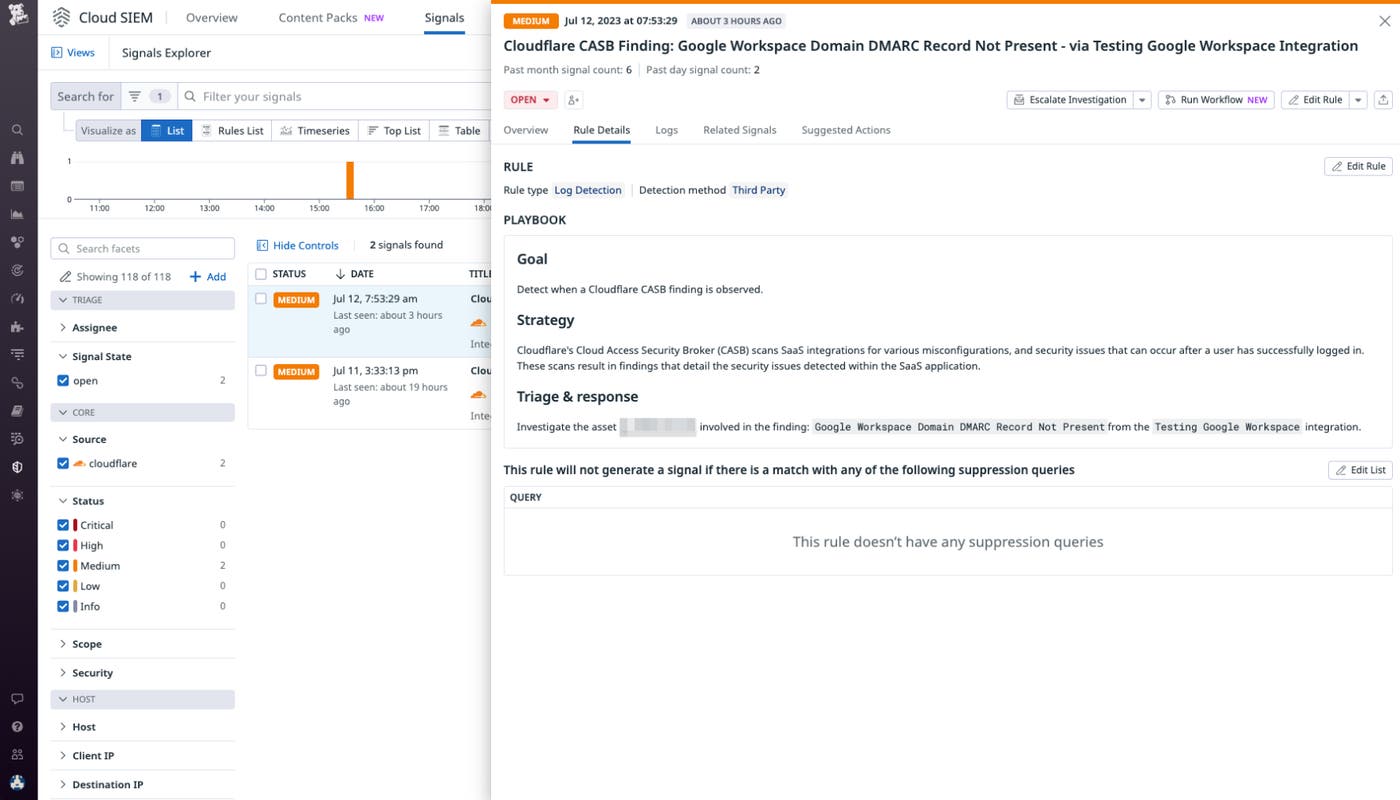
Datadog Cloud SIEM now has an out-of-the-box detection rule developed specifically for Cloudflare’s cloud access security broker (CASB), which will trigger a Security Signal whenever Cloudflare’s CASB finds anomalies that could indicate suspicious activity. Cloud SIEM users can quickly and easily catch Cloudflare CASB findings to immediately identify misconfigurations and other security issues that may pose threats to their SaaS applications.
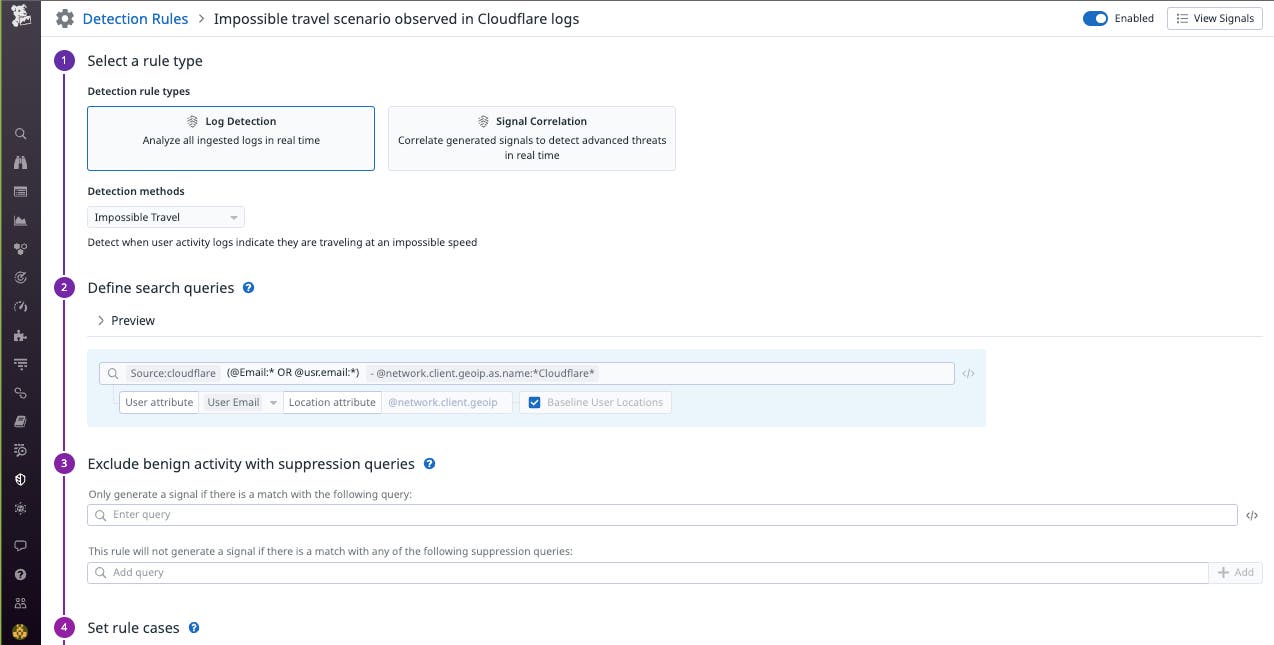
With this integration, Datadog can also use your Cloudflare Zero Trust logs to detect impossible travel scenarios, which could indicate that user accounts have been hijacked by threat actors. Using the impossible travel detection method, Datadog Cloud SIEM compares the GeoIP data of the last log and the current log to determine if this activity indicates the user has traveled more than 500 km at over 1,000 km/h. If your log data indicates this impossible scenario has occurred, Cloud SIEM will surface a Security Signal so you can investigate whether the affected accounts have been accessed by unauthorized users.
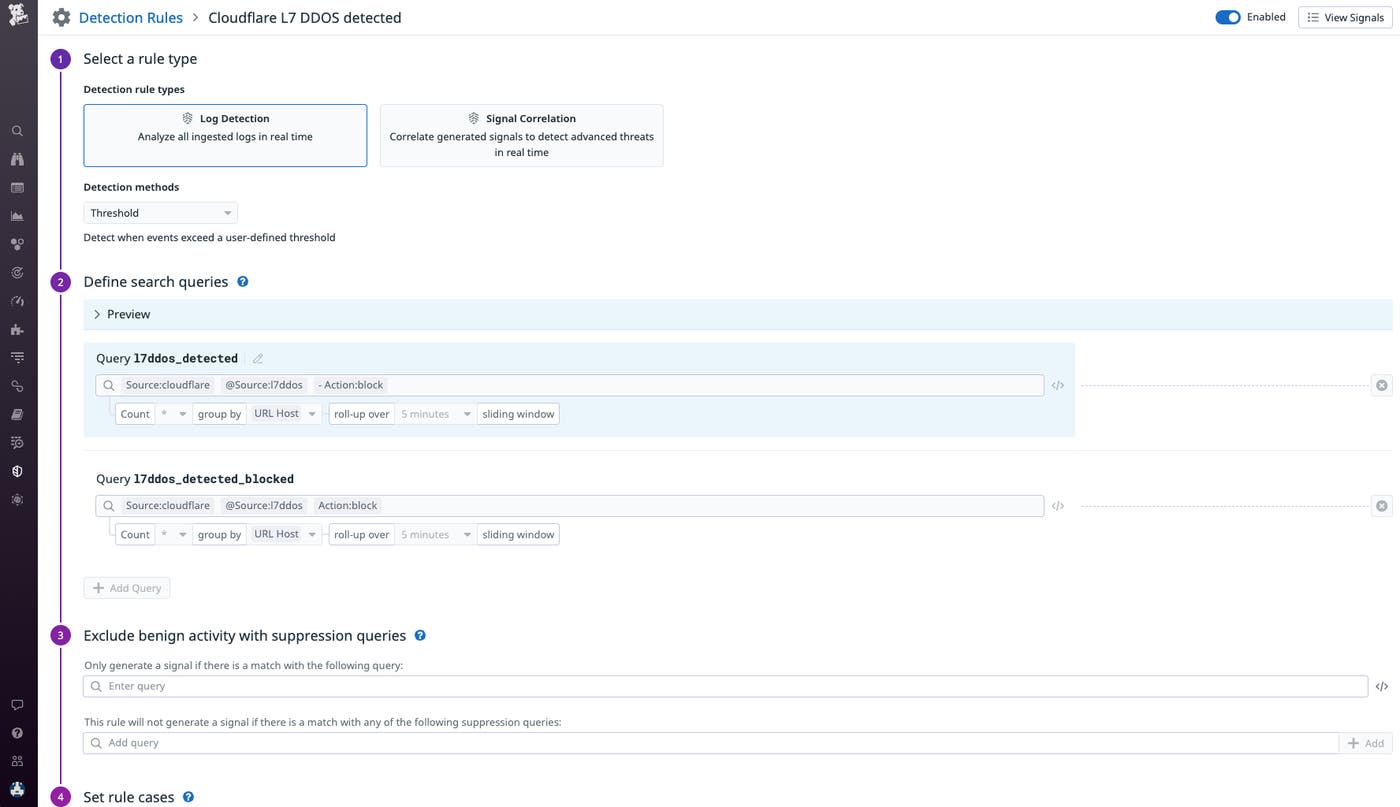
Additionally, Datadog’s Cloud SIEM can now surface signals based on Cloudflare’s HTTP DDoS Attack Protection ruleset in order to immediately alert on DDoS attack vectors at layer 7 of the Cloudflare CDN (i.e., the application layer). Cloudflare’s DDoS protection rule set identifies known attack patterns and tools, suspicious patterns, protocol violations, requests causing large amounts of origin errors, excessive traffic hitting the origin or cache, and additional attack vectors at the application layer. The new out-of-the-box rule in Datadog Cloud SIEM will create a Security Signal when your Cloudflare logs contain the l7ddos attribute, so you can quickly catch indicators of a potential DDoS attack.
Datadog Workflow Automation orchestrates automated series of actions in response to alerts or security signals. You can now use a Datadog workflow to chain together Datadog-specific actions or actions from any of our integrations, including Cloudflare Zero Trust. Datadog now provides two Workflow Blueprints—out-of-the-box automations that you can use immediately or customize for your needs—that include Cloudflare actions: Block IP with Cloudflare and Check IP with GreyNoise and Block Using Cloudflare.
Say you receive a notification for a Security Signal in Datadog Cloud SIEM indicating suspicious activity in your Cloudflare Zero Trust logs. You can use the Block IP with CloudFlare workflow to automatically update the access rule in Cloudflare to remove access from the IP address associated with that activity. Additionally, Workflows integrate with Datadog Case Management, which allows you to create a centralized, easily accessible workspace for investigating your security signals. You can use this feature to add a step to your Workflow that creates a case in Datadog, so that while you’ve denied access to the suspicious user, you can triage and troubleshoot further and determine if you need to take more significant remediation steps, such as permanently blocking the IP address or remediating misconfigured IAM roles.
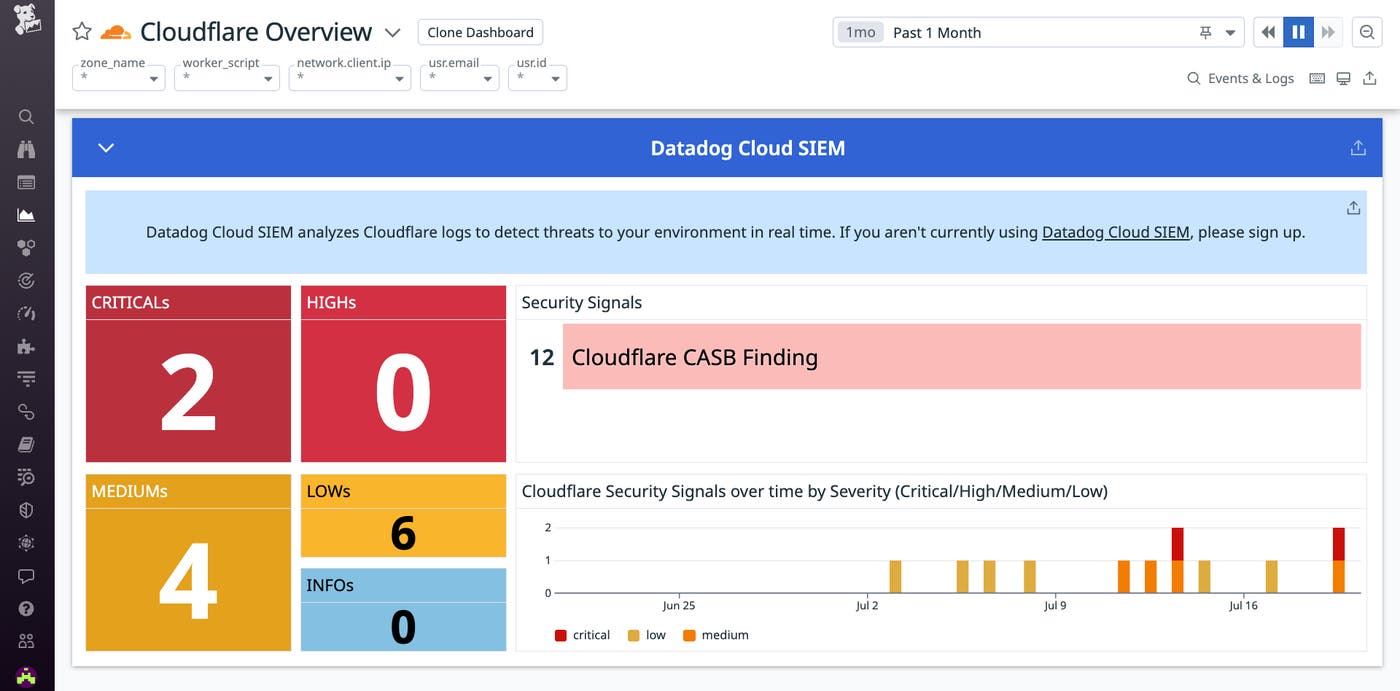
The revamped Cloudflare dashboard in Datadog now features sections with widgets that highlight various details about activity across the applications, devices, and users in your Cloudflare Zero Trust ecosystem. The new Zero Trust insights sections highlight various metrics and charts showing your Zero Trust sessions, CASB alerts, app usage over time, top devices and identities, rare devices and identities, and other key data points. With these details you can gain a holistic view of activity across your Zero Trust environment, helping you spot and respond to anomalies quickly.
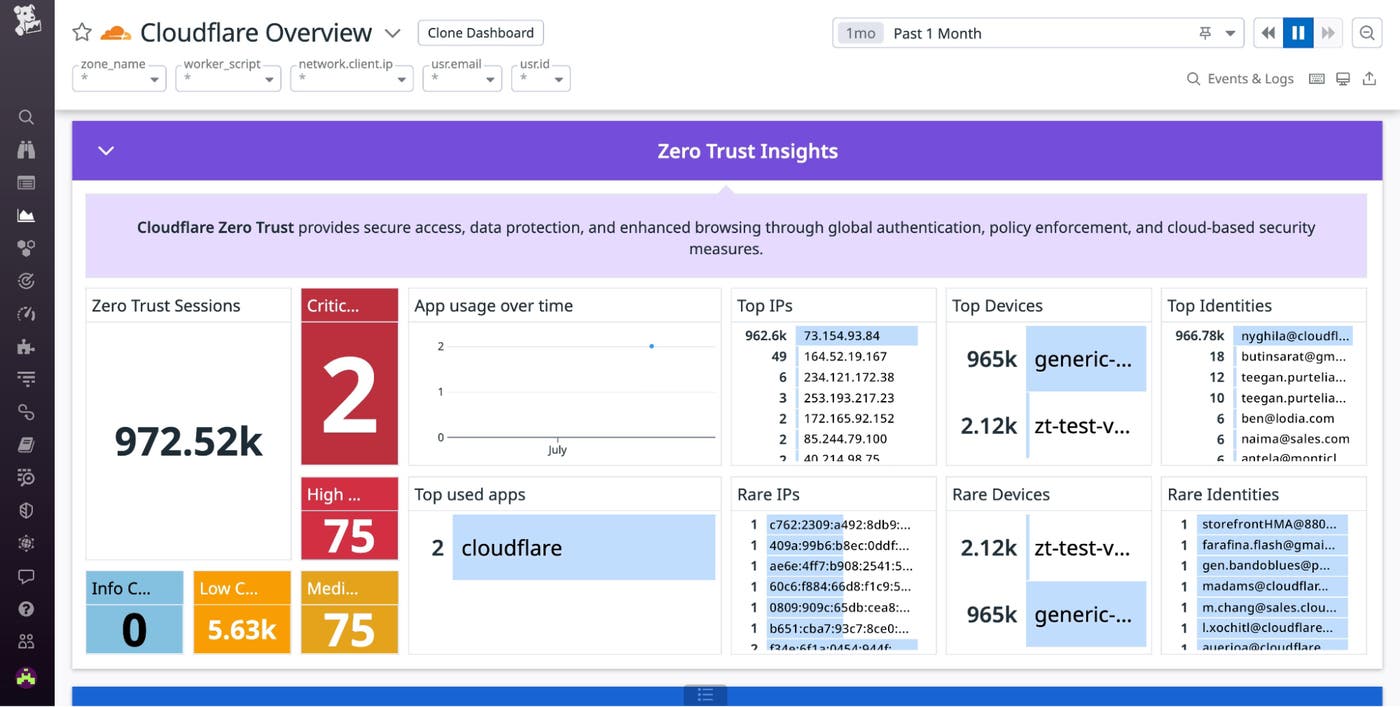
In addition, the new Cloud SIEM section of the Cloudflare dashboard provides a one-glance, real-time view of Cloudflare-related Security Signals that may indicate threats targeting your environment.
Datadog’s Cloudflare Zero Trust integration provides you with more visibility than ever before to detect and secure your environment against threats. If you’re already a Datadog customer, you can start exploring the new Cloudflare Zero Trust integration now. And if you’re not, get started today with a 14-day free trial.
此内容由惯性聚合(RSS阅读器)自动聚合整理,仅供阅读参考。 原文来自 — 版权归原作者所有。