





Darwin Salazar
Detection Engineer II

Zack Allen
Director, Security Research

Nick Frichette
Staff Security Researcher
With the continual increase of attacks, vulnerabilities, and misconfigurations, today’s security organizations face an uphill battle in securing their cloud environments. These risks often materialize into unaddressed alerts, incidents, and findings in their security products. However, part of the issue is that many security teams are often stretched too thin and overburdened by alert fatigue.
Compounding these issues, the increasing complexity of large cloud and multi-cloud environments makes it difficult to know which risks to prioritize. Our State of AWS Security in 2022 report highlights that at least 41 percent of organizations have adopted a multi-account strategy in AWS. We expect this trend to continue as organizations adopt best practices and invest heavily in their cloud infrastructure.
In this increasingly complex picture, misconfigurations are often left unaddressed by security teams. A study conducted by the International Data Corporation (IDC) in 2021 found that companies with 1,500–4,999 employees miss 30 percent of all alerts. Given that missing alerts and findings are seemingly inevitable, it is up to the security teams to identify what must be prioritized versus what can wait.
There are countless best practice configuration guides for cloud environments, but many teams find it difficult to choose which one to use as a baseline. DevOps and security teams want to ensure that security is embedded at every critical juncture of their cloud environment and in their software development lifecycle (SDLC), including post-deployment. However, with so much ground to cover, teams often struggle to identify and prioritize which remediations protect them from the most imminent risks.
Today, we are announcing the Essential Cloud Security Controls Ruleset for Cloud Security. DevOps and security teams can use this ruleset to prioritize the remediation of misconfigurations in their environment. They’ll also be able to leverage Datadog’s cloud security expertise to stay protected against emerging vulnerabilities and threats to cloud environments. By remediating the insecure configurations that pose the most imminent and greatest risk, DevOps and security teams can operate with peace of mind as they scale their operations.
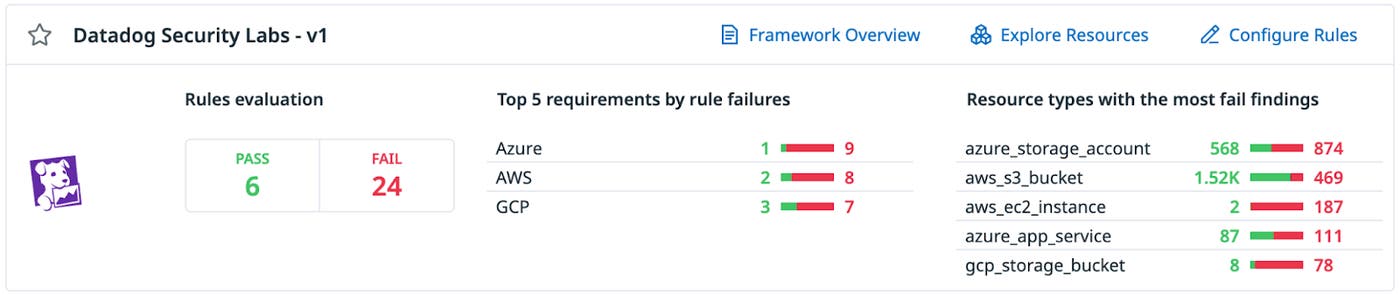
The Essential Cloud Security Controls Ruleset includes 10 key rules each for AWS, Azure, and GCP. We have selected the rules based on industry best practices, the risk of significant impact, and the potential to have prevented a known public breach. For example, in AWS environments, using the default Instance Metadata Service version 1 (IMDSv1) can introduce the risk that attackers could steal IAM credentials via server-side request forgery attacks. Because of this risk, Datadog Cloud Security includes a detection rule to identify instances using IMDSv1 and recommends upgrading to the more secure IMDSv2. You can find a full list of the included rules below.
Datadog’s Security Research team is constantly evaluating the threat landscape for new best practice configurations, cloud breaches, and cloud attack toolsets used by security researchers and threat actors. As the cloud threat landscape changes, the team will continuously add, update, and deprecate these misconfiguration detection rules. All customers have to do is keep this ruleset enabled and remediate surfaced findings.
For existing Datadog customers, you will find the Essential Cloud Security Controls Ruleset on the Cloud Security homepage, under Compliance Reports. If you’re not a customer, sign up for a free 14-day trial today. To learn more about Datadog Cloud Security, see our documentation.
As organizations continue to fend off the latest threats and attacks, Datadog Security Labs is here to ensure you’re always kept up to date and protected from the latest emerging risks. With this ruleset, we not only streamline your security efforts—we also help reduce alert fatigue and minimize the risk of high-criticality misconfigurations slipping through the cracks. Our goal is to make your life simpler and easier, and to help you continue to focus on what’s important.
| Control # | Title | Description |
|---|---|---|
| 1.1 | IAM role trust policy does not contain a wildcard principal | Each IAM role must have a trust policy which defines the principals who are trusted to assume that role. It is possible to specify a wildcard principal which permits any principal, including those outside your organization, the ability to assume the role. It is strongly discouraged to use the wildcard principal in a trust policy unless there is a Condition element to restrict access. |
| 1.2 | IAM policies that allow full “:” administrative privileges are not created | IAM policies are how privileges are granted to users, groups, or roles. It is recommended and considered best practice to give only the permissions required to perform a task. Determine what users need to do and then craft policies that let the users perform only those tasks, instead of allowing full administrative privileges. |
| 1.3 | S3 bucket is not publicly exposed via bucket policy | Update your bucket policy as your Amazon S3 bucket is currently publicly accessible. |
| 1.4 | RDS snapshot is not publicly accessible | Secure your Amazon Relational Database Service (RDS) database snapshots by ensuring they are not publicly accessible. |
| 1.5 | S3 bucket ACLs are configured to block public write actions | Modify your access control permissions to remove WRITEACP, WRITE, or FULLCONTROL access for all AWS users or any authenticated AWS user. |
| 1.6 | Multi-factor authentication is enabled for all IAM users with a console password | Multi-factor authentication (MFA) adds an extra layer of protection on top of a username and password. With MFA enabled, when a user signs in to an AWS website, they will be prompted for their user name and password, and for an authentication code from their AWS MFA device. It is recommended that MFA be enabled for all accounts that have a console password. |
| 1.7 | IAM access keys older than 1 year have not been used in the last 30 days | This rule identifies IAM access keys that are older than one year and have not been used in the past 30 days. |
| 1.8 | ‘Block Public Access’ feature is enabled for S3 bucket | Amazon S3 provides Block public access (bucket settings) and Block public access (account settings) to help you restrict unintended public access to Amazon S3 resources. By default, S3 buckets and objects are created without public access. However, someone with sufficient permissions can enable public access at the bucket or object level, often unexpectedly. While enabled, Block public access (bucket settings) prevents an individual bucket, and its contained objects, from becoming publicly accessible. Similarly, Block public access (account settings) prevents all buckets in the account, and contained objects, from becoming publicly accessible. |
| 1.9 | EC2 instance uses IMDSv2 | Use the IMDSv2 session-oriented communication method to transport instance metadata. |
| 1.10 | No root account access key exists | The root account is the most privileged user in an AWS account. AWS Access Keys provide programmatic access to a given AWS account. It is recommended that all access keys associated with the root account be removed. |
| Control # | Title | Description |
|---|---|---|
| 2.1 | Web app redirects all HTTP traffic to HTTPS in Azure App Service | Azure Web Apps allow sites to use both HTTP and HTTPS by default. Web apps can be accessed by anyone using non-secure HTTP links by default. Non-secure HTTP requests can be restricted and all HTTP requests redirected to the secure HTTPS port. It is recommended to enforce HTTPS-only traffic. |
| 2.2 | Azure Key Vault is recoverable | The key vault contains object keys, secrets, and certificates. Accidental unavailability of a key vault can cause immediate data loss or loss of security functions (authentication, validation, verification, non-repudiation, etc.) supported by the key vault objects. Datadog recommends the key vault be made recoverable by enabling the “Do Not Purge” and “Soft Delete” functions. This is to prevent loss of encrypted data including storage accounts, SQL databases, and dependent services provided by key vault objects (Keys, Secrets, Certificates) etc., as may happen in the case of accidental deletion by a user or from disruptive activity by a malicious user. |
| 2.3 | User has ‘Delete Key Vault’ activity log alert configured | Create an activity log alert for the Delete Key Vault event. |
| 2.4 | SQL Databases do not allow ingress 0.0.0.0/0 (ANY IP) | Ensure that no SQL Databases allow ingress from 0.0.0.0/0 (ANY IP). |
| 2.5 | PostgreSQL Databases do not allow ingress 0.0.0.0/0 (ANY IP) | Ensure that no PostgreSQL Databases allow ingress from 0.0.0.0/0 (ANY IP). |
| 2.6 | ‘Secure transfer required’ is set to ‘Enabled’ | Enable data encryption in transit. |
| 2.7 | All keys in Azure Key Vault have an expiration time set | Ensure that all keys in your Azure Key Vault have an expiration time set. |
| 2.8 | Blob Containers do not allow anonymous access | Anonymous read access is disabled for Azure Storage Blobs. |
| 2.9 | Default network access rule for Storage Accounts is set to deny | Restricting default network access provides a layer of security, because storage accounts accept connections from clients on any network. To limit access to selected networks, change the default action. |
| 2.10 | All secrets in the Azure Key Vault have an expiration time set | Ensure that all Secrets in the Azure Key Vault have an expiration time set. |
| Control # | Title | Description |
|---|---|---|
| 3.1 | RDP access is restricted from the internet | GCP Firewall Rules are specific to a VPC Network. Each rule either allows or denies traffic when its conditions are met. Its conditions allow users to specify the type of traffic, such as ports and protocols, and the source or destination of the traffic, including IP addresses, subnets, and instances. Firewall rules are defined at the VPC network level and are specific to the network in which they are defined. The rules themselves cannot be shared among networks. Firewall rules only support IPv4 traffic. When specifying a source for an ingress rule or a destination for an egress rule by address, an IPv4 address or IPv4 block in CIDR notation can be used. Generic (0.0.0.0/0) incoming traffic from the Internet to a VPC or VM instance using RDP on Port 3389 can be avoided. |
| 3.2 | SSH access is restricted from the internet | GCP Firewall Rules are specific to a VPC Network. Each rule either allows or denies traffic when its conditions are met. Its conditions allow the user to specify the type of traffic, such as ports and protocols, and the source or destination of the traffic, including IP addresses, subnets, and instances. Firewall rules are defined at the VPC network level and are specific to the network in which they are defined. The rules themselves cannot be shared among networks. Firewall rules only support IPv4 traffic. When specifying a source for an ingress rule or a destination for an egress rule by address, only an IPv4 address or IPv4 block in CIDR notation can be used. Generic (0.0.0.0/0) incoming traffic from the internet to VPC or VM instance using SSH on Port 22 can be avoided. |
| 3.3 | Cloud storage buckets have uniform bucket-level access enabled | Uniform bucket-level access is enabled on Cloud Storage buckets. |
| 3.4 | The default network does not exist in a project | To prevent use of the default network, a project should not have a default network. |
| 3.5 | Cloud storage bucket is not anonymously or publicly accessible | It is recommended that IAM policies on Cloud Storage buckets do not allow anonymous or public access. |
| 3.6 | Compute instances do not have public IP addresses | Compute instances should not be configured to have external IP addresses. |
| 3.7 | Instances are not configured to use the default service account | Configure your instance to use an account other than the default Compute Engine service account, because it has the Editor role on the project. |
| 3.8 | OS Login is enabled for the project | Enabling OS Login binds SSH certificates to IAM users and facilitates effective SSH certificate management. |
| 3.9 | SQL database instances do not have public IPs | Datadog recommends configuring the second generation SQL instance to use private IPs instead of public IPs. |
| 3.10 | Only GCP-managed service account keys are used for service account | User managed service accounts should not have user-managed keys. |
此内容由惯性聚合(RSS阅读器)自动聚合整理,仅供阅读参考。 原文来自 — 版权归原作者所有。