




Hugo Puceat

Mallory Mooney
Multi-factor authentication (MFA) is an increasingly popular method for securing user accounts that requires users to provide two or more pieces of identifying information when logging into an application. This information can consist of unique verification links or codes sent to the user’s phone or email address, as well as time-based one-time passwords (TOTPs) generated by authenticator applications or hardware. These authentication methods protect your applications against unauthorized access, but they can also make testing features more difficult. For instance, teams often need to disable MFA in their environments in order to test certain user journeys, so they are not able to verify that critical authentication workflows are working as expected.
We’re pleased to announce that you can now automatically generate and use time-based one-time passwords as a form of multi-factor authentication directly in your Synthetic browser and API tests, which complements our existing support for testing other authentication methods. This enables you to fully test your application’s MFA modules and features without disabling critical security measures or manually entering authentication codes that were created by separate tools. This also eliminates the need for creating and maintaining dedicated environments to test MFA-enabled user journeys.
Many applications leverage TOTPs as an additional layer of security for user journeys that require authentication, such as login or access to advanced or administrative account settings. TOTPs are one-time passwords that authenticator tools (e.g., Google Authenticator, YubiKey) generate by combining the current time and a secret key. These tools then expose the one-time password to the user, who enters it as a final step in the authentication process. TOTPs can also be generated offline, making them the recommended authentication method for your application to ensure that users can safely and reliably access their accounts.
To start using Datadog to generate TOTPs for your tests, create a new MFA - Global Variable in the “Variables” section of your account and enter a secret key or upload a QR code from your authentication provider.
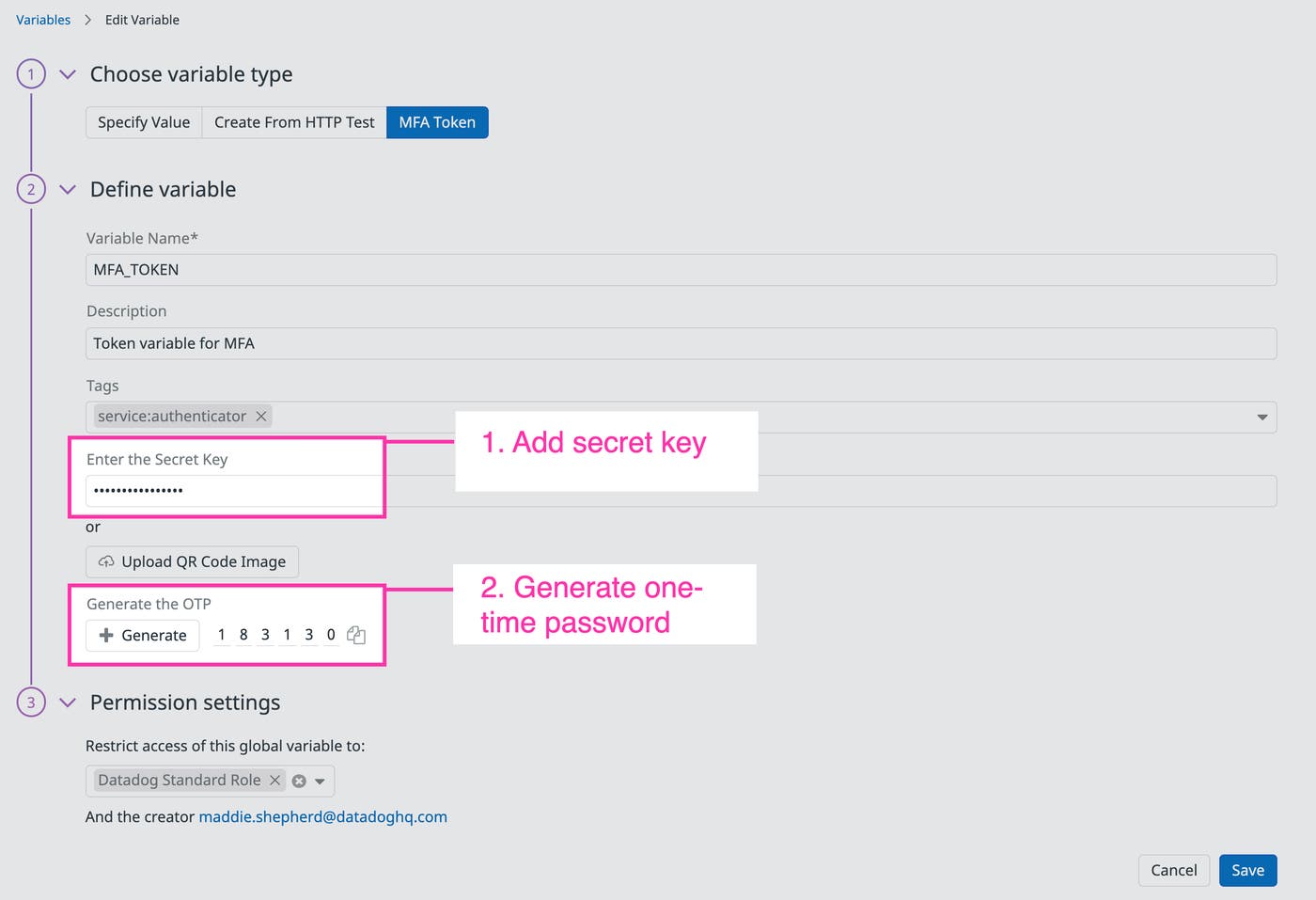
You can also use Datadog role permissions to ensure that only appropriate members of your team can access and edit your MFA variable. Once you save your new variable, you can add it to browser and API tests—just as you would with any other global variable—in order to verify your application’s authentication workflows. Datadog will use the variable to automatically generate a one-time password each time you run a test.
Datadog enables you to verify other authentication methods you use for your application, so you can get comprehensive test coverage of all of your custom MFA modules and integrations. For example, you can test user journeys that send a one-time code to a user’s phone or email address via third-party email or SMS provider APIs that you can leverage in either an HTTP request step or an API test.
Datadog can also generate custom synthetic email addresses for simple validation workflows, such as sending a verification link to a user’s inbox after they sign up for a new account. This enables you to test more user journeys from end to end.
It’s important to note that these workflows may not be suitable for concurrent test runs. If you typically run tests in multiple locations (i.e., in parallel), it will be more difficult to associate the unique code that Datadog generates with each execution to the appropriate test. Additionally, SMS and email protocols do not guarantee delivery, so tests verifying scenarios that use these methods may occasionally fail.
Datadog Synthetic Monitoring provides detailed information about what occurred in every test run, so you can quickly identify bugs in your authentication workflows before they affect your end users. For example, Datadog can alert you when a test fails to log into your application after using a one-time code and automatically link steps to traces generated by that test. This enables you to track requests across all of your application’s supporting services and pinpoint the root cause of an issue, such as a bug in an underlying authentication module.
You can also mitigate temporary connectivity issues, such as network latency, by configuring your browser or API tests to re-run multiple times in order to ensure that failures are legitimate.
Datadog Synthetic Monitoring provides built-in tools for generating one-time passwords, testing verification links sent via email for new accounts, and more. This enables you to easily and safely test MFA-enabled and other validation user journeys from end to end without needing to spend time spinning up dedicated test environments. Check out our documentation to learn more or sign up for a free trial to start creating Synthetic tests today.
此内容由惯性聚合(RSS阅读器)自动聚合整理,仅供阅读参考。 原文来自 — 版权归原作者所有。