




惯性聚合 高效追踪和阅读你感兴趣的博客、新闻、科技资讯
阅读原文 在惯性聚合中打开

推荐订阅源

爱范儿
爱范儿
B
Blog RSS Feed
奇客Solidot–传递最新科技情报
奇客Solidot–传递最新科技情报
量子位
博客园 - 三生石上(FineUI控件)
博客园 - 【当耐特】
Attack and Defense Labs
让小产品的独立变现更简单 - ezindie.com
人人都是产品经理
人人都是产品经理
酷 壳 – CoolShell
酷 壳 – CoolShell
Apple Machine Learning Research
阮一峰的网络日志
阮一峰的网络日志
大猫的无限游戏
大猫的无限游戏
T
Tailwind CSS Blog
钛媒体:引领未来商业与生活新知
钛媒体:引领未来商业与生活新知
罗磊的独立博客
V
Visual Studio Blog
博客园 - Franky
博客园 - 叶小钗
有赞技术团队
有赞技术团队
IT之家
IT之家
freeCodeCamp Programming Tutorials: Python, JavaScript, Git & More
博客园_首页
J
Java Code Geeks
S
SegmentFault 最新的问题
Last Week in AI
Last Week in AI
月光博客
月光博客
博客园 - 司徒正美
小众软件
小众软件
The Cloudflare Blog
宝玉的分享
宝玉的分享
博客园 - 聂微东
WordPress大学
WordPress大学
雷峰网
雷峰网
V
V2EX
Engineering at Meta
Engineering at Meta
OSCHINA 社区最新新闻
OSCHINA 社区最新新闻
L
LangChain Blog
Jina AI
Jina AI
Hugging Face - Blog
Hugging Face - Blog
The Register - Security
腾讯CDC
Microsoft Azure Blog
Recent Announcements
D
Docker
F
Fortinet All Blogs
美团技术团队
H
Help Net Security
U
Unit 42
MyScale Blog
MyScale Blog

NetworkManager

NetworkManager 1.54 NetworkManager 1.52 Protect your VPN from TunnelVision attacks NetworkManager 1.50 Addressing hostname assignment in NetworkManager 1.40 Help NetworkManager project to triage issues NetworkManager 1.48 NetworkManager 1.46 NetworkManager 1.44 NetworkManager 1.42 Set up NMCI on Fedora Linux VM Using Python and NetworkManager to control the network [link] Notes on D-Bus NetworkManager 1.40 NetworkManager 1.38 From ifcfg to keyfiles [link] NetworkManager 1.36 NetworkManager 1.34 NetworkManager 1.32 NetworkManager 1.30 Initscripts’ ifcfg-rh Format in NetworkManager and its Future [link] How to set up your NetworkManager environment [link] NetworkManager 1.28 [link] Looking forward to Linux network configuration in the initial ramdisk (initrd) [link] NetworkManager 1.26 [link] Internet connection sharing with NetworkManager [link] Why NetworkManager? [link] Please welcome: NetworkManager 1.20 [link] Becoming friends with NetworkManager [link] WireGuard in NetworkManager [link] MAC Address Spoofing in NetworkManager 1.4.0 [link] NetworkManager for administrators Resources for developers man pages Video tutorials VPN support RFKill
NetworkManager 1.58
Josephine Pfeiffer · 2026-07-20 · via NetworkManager

After a little over 5 months and 407 commits since NetworkManager 1.56, the new release is ready: NetworkManager 1.58.

Let’s take a look at the most interesting parts!

A wave of nmtui improvements

This release brings a batch of usability work to nmtui, the text user interface.

When creating a profile for a physical interface (Ethernet, Wi-Fi, and so on), a new <Select...> button lets you pick from the available devices instead of typing the interface name by hand.
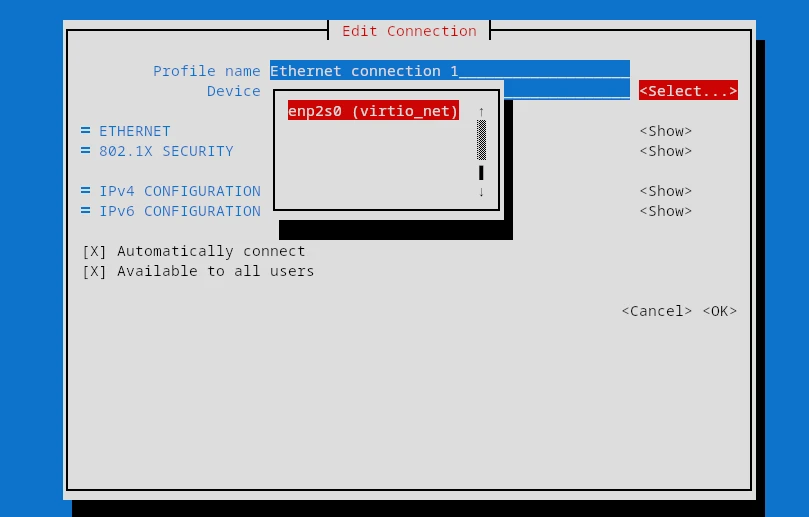
The Select button opens a list of available devices when creating a connection in nmtui

The connection lists in nmtui connect and nmtui edit now support a vim-style / search that filters the list to matching entries as you type.
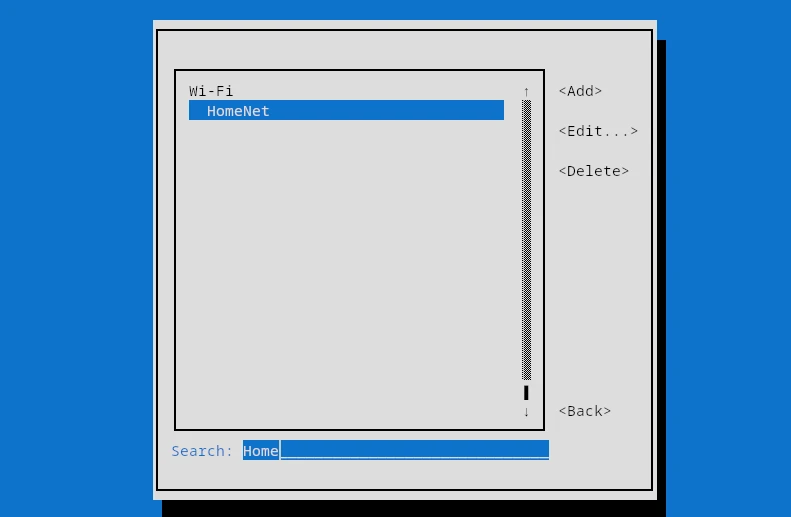
Typing / in nmtui opens a Search field that filters the connection list

The “Activate a connection” screen gained a “Rescan Wi-Fi” button that scans for nearby networks on demand, and the secret prompt shown when activating a connection now has a “Show password” checkbox, matching the connection editor.

You can also share a Wi-Fi network as a QR code straight from nmtui: the new “Share QR…” button in “Edit a connection” mirrors nmcli device wifi show-password.
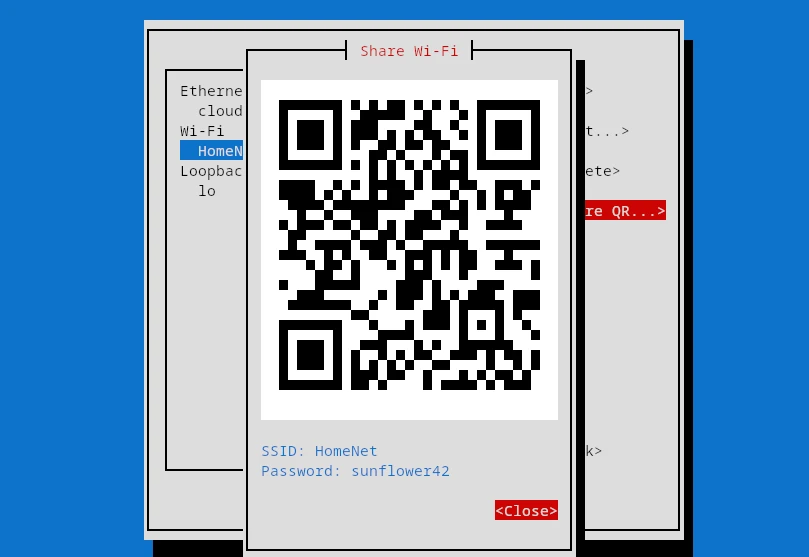
The Share Wi-Fi dialog in nmtui showing a QR code with the network name and password

Finally, configuring bonds is more complete thanks to a new “other options” field that covers bond options without a dedicated input, and nmtui forms now redraw when the terminal is resized instead of staying clipped or off-center until you reopen them.

IPv6-only networks: CLAT (464XLAT)

Continuing the march towards IPv6-only networks, NetworkManager now supports CLAT (464XLAT), implemented with a BPF program. CLAT lets an IPv6-only host reach IPv4-only destinations.

To go with it, the default of the ipv4.dhcp-ipv6-only-preferred property changed to a new auto value, which automatically enables the option when CLAT is enabled (yes or auto) in the connection profile.

GENEVE tunnels

NetworkManager can now create and manage GENEVE (Generic Network Virtualization Encapsulation) interfaces.

Wi-Fi updates

Several Wi-Fi improvements landed in this release:

  • The band property of Wi-Fi connections now accepts the 6GHz value.
  • nmcli scan results now show each access point’s Wi-Fi band.
  • The powersave property now works with the iwd backend.
  • WPS credentials with a 64 hex-character PSK are now accepted, which some access points return.
  • wpa-psk connections respect connection.auth-retry and only prompt for new secrets on the last authentication attempt before failing.

Persisting device managed state

The managed state of a device can now be persisted across reboots via nmcli and the D-Bus API. On top of that, you can change the device’s administrative state in the kernel at the same time as the managed state.

Security hardening

This release fixes two vulnerabilities and tightens several defaults:

  • CVE-2026-10805: hostnames and MUD URLs are now validated before being written to the dhclient configuration file, rejecting characters that could alter the config syntax.
  • Fixed an out-of-bounds read in the internal DHCPv4 client that an on-link attacker could trigger with a malformed UDP packet, crashing NetworkManager.
  • Support for Wireless Extensions is deprecated and is now disabled by default. It will be removed in a future release.
  • For private connections (those that set a user in connection.permissions), NetworkManager now verifies that the user can access the 802.1X certificates and keys referenced by the connection. A new libnm function lets VPN plugins perform the same check.
  • Removed the modify_system build option, which set up polkit permissions allowing non-admin users to create system-wide connections. That configuration is discouraged because it can be used to bypass filesystem permissions.
  • Dropped support for dhclient as a DHCP backend, which had been deprecated since NetworkManager 1.50.

What else?

  • The connectivity check now uses only the DNS servers defined on the same link, falling back to any available server if the link has none. A new check-connectivity configuration option can disable the check for selected interfaces, and a bug that left stale global connectivity state was fixed.
  • NetworkManager uses an internal ping implementation when connection.gateway-ping-timeout or connection.ip-ping-addresses are set, instead of relying on the ping tool.
  • The systemd units in the initramfs are now installed via a systemd generator.
  • The internal DHCPv4 client ignores option 3 (Router) when the lease contains option 121 (Classless Static Route), as recommended by RFC 3442.
  • IPv6 interfaces that receive a prefix via DHCPv6 prefix delegation are now considered healthy without a non-temporary address, and the delegated prefix can be used on an interface configured with ipv6.method=shared.
  • reapply now honors the ipv6.ignore-auto-dns, ipv6.ignore-auto-routes and ipv6.never-default properties even when DHCPv6 is not restarted, so DHCPv6-provided DNS and routes are correctly suppressed without a connection restart.
  • Connection profiles with manual IP addressing and gateways that are not directly reachable now warn on activation and when added or modified via nmcli and nmtui. On-link routes are still added automatically for now, but that will change in the future; add addresses or routes whose subnets cover these gateways to fix the warning.
  • The versioning scheme is unified to use the -rcX and -dev suffixes everywhere they apply, including the release tarball URL and filename and the version reported by nmcli and the daemon. The C API keeps the 90+ scheme for RC versions.

Acknowledgements

Many thanks to all contributors who provided feedback, ideas or patches.

Anders Jonsson, Andrej Kozemcak, Antonio Alvarez Feijoo, Baurzhan Muftakhidinov, Ben Hagen, Beniamino Galvani, Cédric Bellegarde, Christian Krause, Daniel Nylander, David Ward, Federico Ton, filmsi, François Horta, Gris Ge, Günther Noack, Hiroyuki Yasuhara, Íñigo Huguet, Jan Fooken, Jan Vaclav, Josephine Pfeiffer, Leon M. Busch-George, Lubomir Rintel, Marko M. Kostić, Mary Strodl, Matthieu Baerts, Mattia Dal Ben, Mitchell Augustin, Muhammet Kara, Paul Menzel, Popax21, Pradyumn Rahar, Rafael Fontenelle, Rahul Rajesh, Rishabh Garg, Robert Schlabbach, Thomas Makin, Till Maas, Tim Spriggs, twlvnn, Vicki Pfau, Vladimír Beneš and Vladislav Tsisyk.

Also thanks to our Quality Engineers from Red Hat for all the testing: Vladimír Beneš, Filip Pokryvka and Mingyu Shi.

Join us on our GitLab project.

Get the new release

As usual, the next release of your favorite Linux distribution will surely ship the new version.

In case you’re too impatient to wait, or you are, in fact, responsible for keeping NetworkManager up to date in a distribution, get the tarball from our download page.

Thanks for tuning in and goodbye!