






Half a year and almost 800 commits since NetworkManager 1.40, a new release is ready: NetworkManager 1.42.
Let’s take a look at the most interesting parts!
nmtuinmtui is a screen-oriented configuration tool for NetworkManager. While
not nearly as powerful as nmcli, its command-line based equivalent, it
certainly has its niche of users.
In the new version, nmtui gained support for configuring
IEEE 802.1X.
IEEE 802.1X is an authentication method most commonly utilized by secure
enterprise Wi-Fi networks. Wired networks utilize IEEE 802.1X to control
port access or secure the traffic in conjuction with
MACsec.
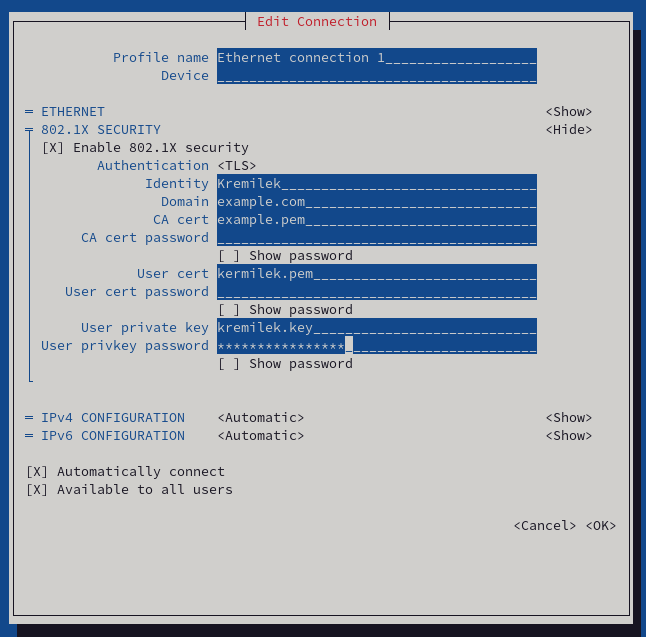
Providing a reasonable user experience for a mechanism as complex as
IEEE 802.1X is nothing but easy. Those brave enough to cope with
the complexity now have an option of configuring access to their secure
network can do so from within nmtui.
Linux’s loopback interface is a virtual network link that treats data sent to it as if it arrived from an actual network. It always exists and is guaranteed to always have a well known address that can’t appear on wire. This is typically used to simulate network operation, debug network issues or to bind network services to be used only by a single machine.
Because of the loopback interface’s somewhat unique characteristics, NetworkManager traditionally treated it specially. That basically meant it ensured it’s up and that’s about it.
In the new version of NetworkManager, loopback interfaces are less special. While it’s still a little special – it will be configured even if there’s no connection profile for it – it’s now possible to actually activate a connection profile on a loopback interface. It behaves a lot like on an actual physical interface with some interesting properties. With the loopback interface always guaranteed to exist in one instance, a connection on a loopback interface can be used to specify configuration that’s always supposed to be applied. This includes things like adding an extra IP address or perhaps a DNS server.
IPv4 routes now support weight attribute along with the next hop. With multiple such routes set up, ECMP is utilized for multipath routing. This increases network utilization in case the destination is reachable via multiple paths.
It is now possible to specify a host name along with the address of a manually configured DNS-over-TLS server. This makes using a DNS-over-TLS service that uses a virtual host with a SNI as opposed to a dedicated IP address.
The VLANs can now alternatively use 802.1ad protocol headers for VLAN tagging. Compared to more traditional 802.1Q protocol, it allows the tagging headers to be nested.
Etherned bonding gained support for Source Load Balancing.
IP tunnels now support for VTI protocol.
Developer documentation was significantly improved.
WEP support was removed from nmtui.
Plus a lots and lots of bugfixes and translation updates. See NEWS file for even more detailed summary of what’s new.
Many thanks to all contributors who provided feedback, ideas or patches.
Adrian Freihofer, Alexander Elbs, Alexander Lochmann, Ana Cabral, Andrew Zaborowski, Balázs Úr, Beniamino Galvani, Bhushan Shah, Dylan Van Assche, Fernando Fernandez Mancera, Frederic Martinsons, gaoxingwang, Gris Ge, Lubomir Rintel, Marc Muehlfeld, Michael Biebl, Michael Catanzaro, NorwayFun, Piotr Łobacz, Ratchanan Srirattanamet, Thomas Haller, Vojtech Bubela, Wen Liang, yan12125, Yufan You, Yuri Chornoivan.
Also thanks to our Quality Engineers from Red Hat for all the testing: Vladimír Beneš, Filip Pokryvka, David Jasa and Matej Berezny.
Join us on our GitLab project.
As usual, the next release of your favorite Linux distribution will surely ship the new version.
In case you’re too impatient to wait, or you are, in fact, responsible for keeping NetworkManager up to date in a distribution, get the tarball from our download page.
Thanks for tuning in and goodbye!
此内容由惯性聚合(RSS阅读器)自动聚合整理,仅供阅读参考。 原文来自 — 版权归原作者所有。