

惯性聚合 高效追踪和阅读你感兴趣的博客、新闻、科技资讯
阅读原文 在惯性聚合中打开

推荐订阅源

Cyberwarzone
Cyberwarzone
Vercel News
Vercel News
freeCodeCamp Programming Tutorials: Python, JavaScript, Git & More
奇客Solidot–传递最新科技情报
奇客Solidot–传递最新科技情报
aimingoo的专栏
aimingoo的专栏
B
Blog RSS Feed
A
About on SuperTechFans
T
The Blog of Author Tim Ferriss
爱范儿
爱范儿
腾讯CDC
S
SegmentFault 最新的问题
Exploit-DB.com RSS Feed
The Hacker News
The Hacker News
J
Java Code Geeks
大猫的无限游戏
大猫的无限游戏
B
Blog
IT之家
IT之家
Spread Privacy
Spread Privacy
K
KPMG report finds enterprise disconnect between AI and its ROI | CIO
C
Cisco Blogs
Recent Announcements
H
Hacker News: Front Page
AI
AI
I
InfoQ
H
Heimdal Security Blog
T
Threatpost
Cisco Talos Blog
Cisco Talos Blog
Threat Intelligence Blog | Flashpoint
I
Intezer
W
WeLiveSecurity
SecWiki News
SecWiki News
MongoDB | Blog
MongoDB | Blog
宝玉的分享
宝玉的分享
博客园 - 【当耐特】
云风的 BLOG
云风的 BLOG
T
Threat Research - Cisco Blogs
V2EX - 技术
V2EX - 技术
N
News and Events Feed by Topic
cs.CV updates on arXiv.org
O
OpenAI News
阮一峰的网络日志
阮一峰的网络日志
T
Troy Hunt's Blog
www.infosecurity-magazine.com
博客园 - 司徒正美
Apple Machine Learning Research
雷峰网
雷峰网
T
Tor Project blog
有赞技术团队
有赞技术团队
Schneier on Security
Last Week in AI
Last Week in AI

Homepage on Aditya Telange

One Year with evil-winrm-py - A Retrospective Bypassing LinkedIn's Connection Privacy with a Simple Search Filter Breaking Payload Encryption in Web Applications HackTheBox (HTB) - Escape HackTheBox (HTB) - Resolute HackTheBox (HTB) - Certified State of VMWare Workstation (Pro?) on Linux Android App Security Testing Lab with MobSleuth Android phone as a Webcam on Linux Breaking down Reverse shell commands HackTheBox (HTB) - Photobomb Merging AOSP Security Patches into Custom ROMs Primer on HTTP Security Headers Image Zoom-In effect with HUGO HackTheBox (HTB) - Legacy HackTheBox (HTB) - Lame Cryptohack - Keyed Permutations [5 pts] Cryptohack - Resisting Bruteforce [10 pts] Cryptohack - RSA Starter 1 [10 pts] Cryptohack - Base64 [10 pts] Cryptohack - Bytes and Big Integers [10 pts] Cryptohack - Hex [5 pts] Cryptohack- XOR Starter [10 pts] HackTheBox (HTB) - Horizontall HackTheBox (HTB) - Forge HackTheBox (HTB) - Previse HackTheBox (HTB) - BountyHunter HackTheBox (HTB) - Explore HackTheBox (HTB) - Cap HackTheBox (HTB) - Pit HackTheBox (HTB) - Knife HackTheBox (HTB) - Love HackTheBox (HTB) - Tenet HackTheBox (HTB) - Ready Watermarking images with HUGO My Github Project went viral! Cryptohack - ASCII [5 pts] Cryptohack - Finding Flags [2 pts] Cryptohack - Great Snakes [3 pts] Cryptohack - JWT Sessions [10 pts] Cryptohack - Network Attacks [5 pts] Cryptohack - Token Appreciation [5 pts] CAF's Android for MSM Basic Website Analytics with Vercel Github Actions as Temporary File Sharing Platform Addition of prebuilt APK - AOSP Rom Development External Link With target='_blank' in Hugo Markdown Setting Up Build Environment - AOSP Rom Development Getting Started - AOSP Rom Development Using Secure HTTP Headers with Vercel/Zeit Education and Certifications Link Tree ↟ | Aditya Telange Personal Projects Resume - Aditya Telange Security Acknowledgements About Me Graph View License Privacy Policy
Making Dynamic Instrumentation Accessible with Frida UI
[Aditya Telange](https://x.com/adityatelange) · 2026-01-15 · via Homepage on Aditya Telange

If you perform penetration testing or reverse engineering on mobile apps, Frida is likely already in your toolkit. It’s the de-facto standard for dynamic instrumentation, letting us hook functions, trace execution, and modify behavior at runtime.

But powerful as the CLI is, it has friction. managing long command strings, manually looking up package names, juggling PIDs, downloading scripts from Codeshare and pasting script snippets into the terminal can break your flow. I built Frida UI to bridge that gap, a minimal web-based interface that runs locally and gives you a visual dashboard for your instrumentation sessions.
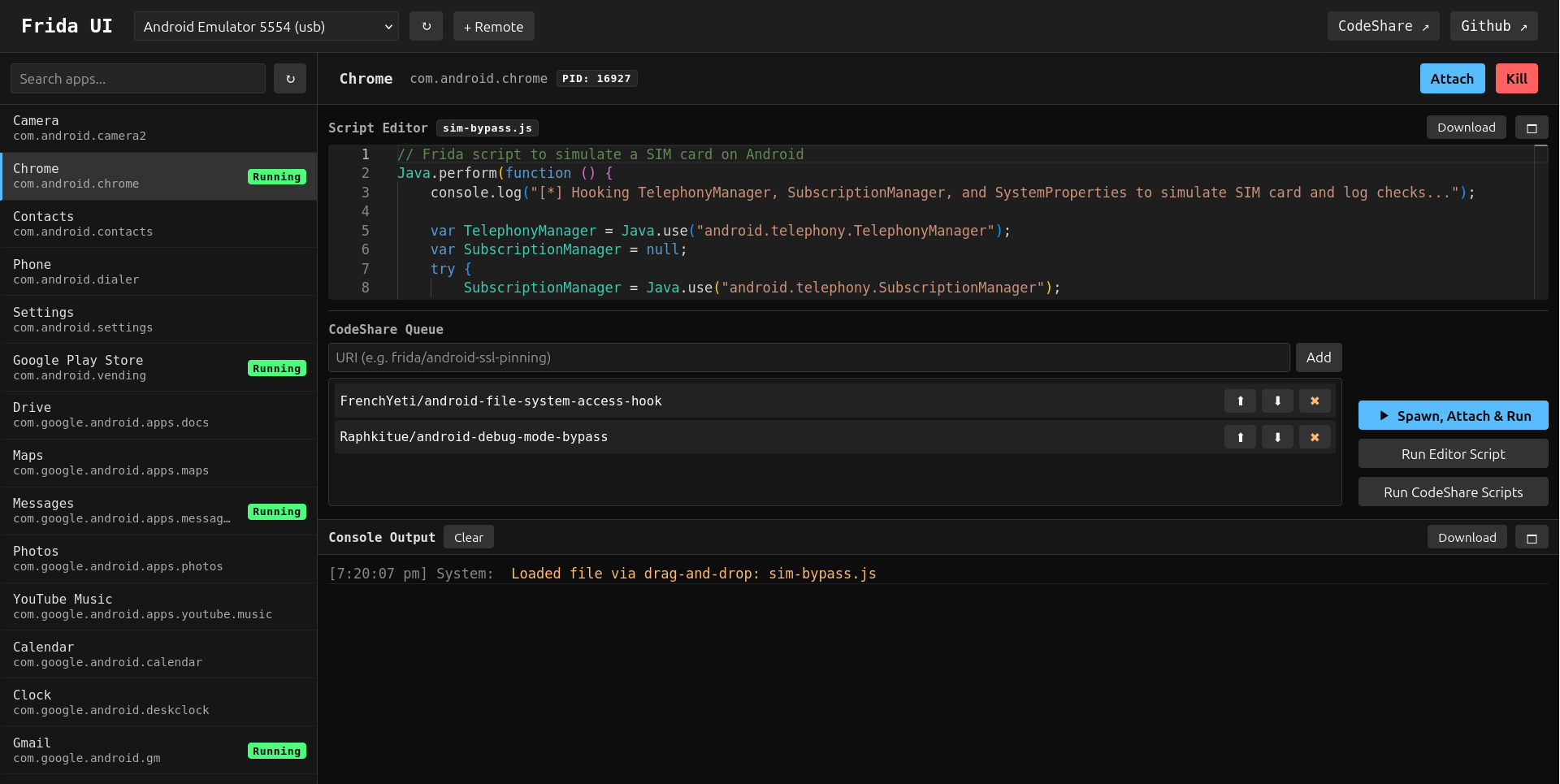
Frida UI Dashboard

Why I built this?

I wanted a tool that respects the pentester’s workflow. When you are analyzing an app, you want to focus on the logic and the vulnerabilities, not on syntax errors in your CLI arguments. Frida UI is designed to be:

  • Fast & Local: It runs entirely on your machine (localhost). No cloud dependencies. It talks directly to the frida-server on your USB-connected Android/iOS devices or remote devices over WiFi.
  • Visual: See all running processes and installed apps in a searchable list.
  • Organized: Manage your custom scripts and CodeShare snippets in one place.
  • Lightweight: No heavy IDEs or bloated frameworks. Just a simple web app that opens in your browser.

Key Features and Benefits

1. Seamless Device & Process Management

Forget running frida-ps -Uia repeatedly to find a Process ID. Frida UI auto-detects connected USB devices, while remote TCP devices can be added manually by ip/port. You get a clean sidebar listing every running process and installed application.

  • Search: Instant filter by app name or package identifier.
  • One-click Actions: Hit Attach to jump into a running process or Spawn to launch an app from scratch (perfect for early-initialization hooks).

2. A Proper Scripting Environment

The built-in editor (powered by Monaco) gives you a VS Code-like experience right in the browser.

  • Drag & Drop: Have a pre-written custom frida script in .js? Just drag it into the editor and start tweaking.
  • Syntax Highlighting & Autocomplete: Write scripts faster with intelligent code suggestions and error highlighting.
  • Save & Load: Iterate on your scripts and save them for later.

3. Integrated CodeShare

This is a game-changer for speed. You often need standard script, like SSL Pinning Bypass or Root Detection Bypass.

  • Search & Import: Pull scripts directly from Frida CodeShare inside the UI.
  • Script Queueing: You can chain multiple CodeShare scripts and your own custom logic to run simultaneously.

4. Interactive Console

The logging pane isn’t just a text dumps; it handles your console.log output and script errors in real-time, making it easier to spot return values, hex dumps, and stack traces without the noise of a terminal buffers.

Getting Started

Frida UI is a Python tool, so installation is a breeze. I recommend using uv or pipx to keep it isolated.

# Install from PyPI
uv tool install frida-ui

# Or if you want bleeding edge, install from GitHub
uv tool install git+https://github.com/adityatelange/frida-ui.git

# Start the dashboard
frida-ui

Your browser will open to http://127.0.0.1:8000. Connect your device (make sure frida-server is running on it!), and you’ll see it appear in the dropdown.

Summary

My goal with Frida UI wasn’t to replace the CLI for everything, but to make the 90% use case like exploring an app, testing hooks, and bypassing standard protections, much faster and more enjoyable. It’s open source and built for the community.

Check it out on:

Give it a spin on your next engagement and let me know what you think! Happy pentesting! 🕵️‍♂️🔍📱