












How often do we trust the parameters by the client? Apparently, sometimes a bit too much. By default, we cannot view people’s connections on LinkedIn if we aren’t directly connected, but I found a way around that.
Recently, while exploring LinkedIn’s search functionality, I stumbled upon a simple authorization bypass that allowed me to view the connection list of users I wasn’t connected with, which is private information that shouldn’t have been accessible.
Note: This issue was reported to LinkedIn via HackerOne and was closed as Informative.
If you go to a LinkedIn user’s profile, you can see their connections only if:
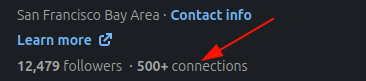
As you see in the screenshot below, the list of connections is hidden as I am not connected to this user.
I was playing around with the “People” search filters. Specifically, I was looking at the “Followers of” filter, which lets you find people who follow a specific user.
When you apply this filter, the URL updates to include a specific parameter: followerOf. This parameter reveals a critical piece of information, the target user’s unique ID hash.
The URL looks something like this:
https://www.linkedin.com/search/results/people/?origin=FACETED_SEARCH&followerOf="USER-HASH-HERE"
It worked as expected and returned the list of followers.
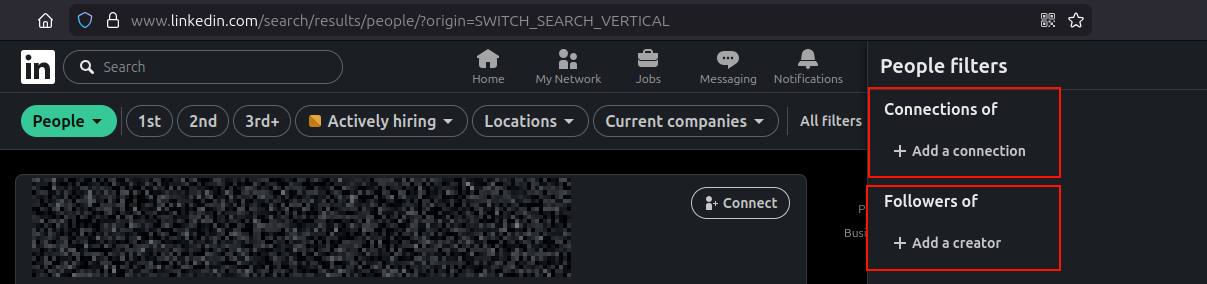
Seeing followerOf made me wonder: if there’s a key for followers, is there a corresponding key for connections? And if there is, does the server check if I’m allowed to use it?
I decided to try a simple swap. I took the user hash I obtained from the followers search and manually constructed a new query:
https://www.linkedin.com/search/results/people/?origin=FACETED_SEARCH&connectionOf="USER-HASH-HERE"
I hit enter, expecting an error or an empty list. Instead, the search results refreshed and displayed the full list of connections for that user.
This allowed me to view 2nd and even 3rd degree connections of the target.
There is no such option in the UI/frontend to do so. This method allowed me to see connections even if the user has disabled them under settings.
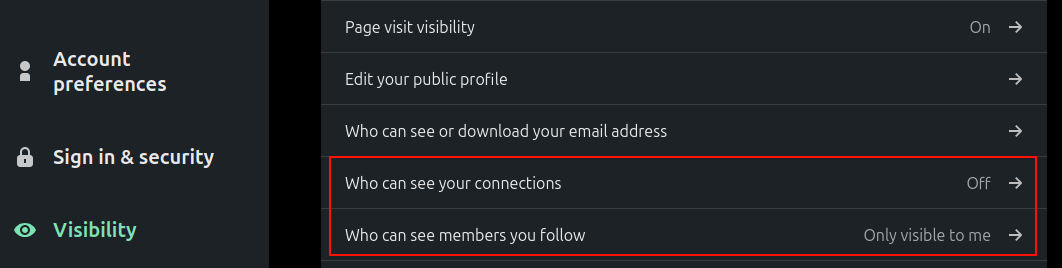
Despite not being a 1st-degree connection myself, the server processed the connectionOf filter and returned their private network data. It seemed the access control check was tied to the intent of the original UI action (viewing followers) or wasn’t reapplied when the filter key was manually modified.
Privacy controls are critical for professional networks. Many users choose to keep their connection lists private to prevent competitors from seeing their network, to avoid targeted phishing (social engineering), or simply for privacy.
By bypassing this check, an attacker could:
I reported this behavior to LinkedIn’s security team via HackerOne. After review, they decided not to track this as a security vulnerability.
The report was closed with the following comment:
“After review, there doesn’t seem to be any significant security impact as a result of the behavior you are describing.
As a result, we will be closing this report as informative. If you are able to leverage this into a practical exploitation scenario, we will be happy to reevaluate this report.”
While the team didn’t see a significant direct impact, it was an interesting dive into how API filters can sometimes behave unexpectedly when manipulated.
此内容由惯性聚合(RSS阅读器)自动聚合整理,仅供阅读参考。 原文来自 — 版权归原作者所有。