







SSE技术原理与核心特性
SSE基础概念
SSE是基于HTTP协议的单向通信协议(仅服务端→客户端),通过EventSourceAPI实现。其核心特点:
- 长连接:HTTP连接保持打开状态,服务端可持续推送数据,避免频繁重建连接的开销;
- 文本协议:数据以文本格式(默认UTF-8)传输,支持自定义事件类型;
- 自动管理:浏览器自动处理连接重试(默认3秒间隔)、心跳检测等;
- 简单易用:通过EventSource对象监听message事件或自定义事件,无需额外库。
与传统方案的对比
| 特性 | SSE | WebSocket | 长轮询 |
|---|---|---|---|
| 通信方向 | 服务端->客户端(单向) | 双向(全双工) | 客户端-> 服务端(被动响应) |
| 协议 | HTTP | WS | HTP |
| 数据格式 | 文本 | 二进制/文本 | 二进制/文本 |
| 连接管理 | 自动重连,心跳 | 手动维护 | 客户端主动重试 |
| 适用场景 | 服务端推送通知、流式数据 | 实时双向交互 | 低频更新、兼容性要求极高 |
场景调研
deepseek
在我们跟Deepseek的交互过程中,可以从图中看到:
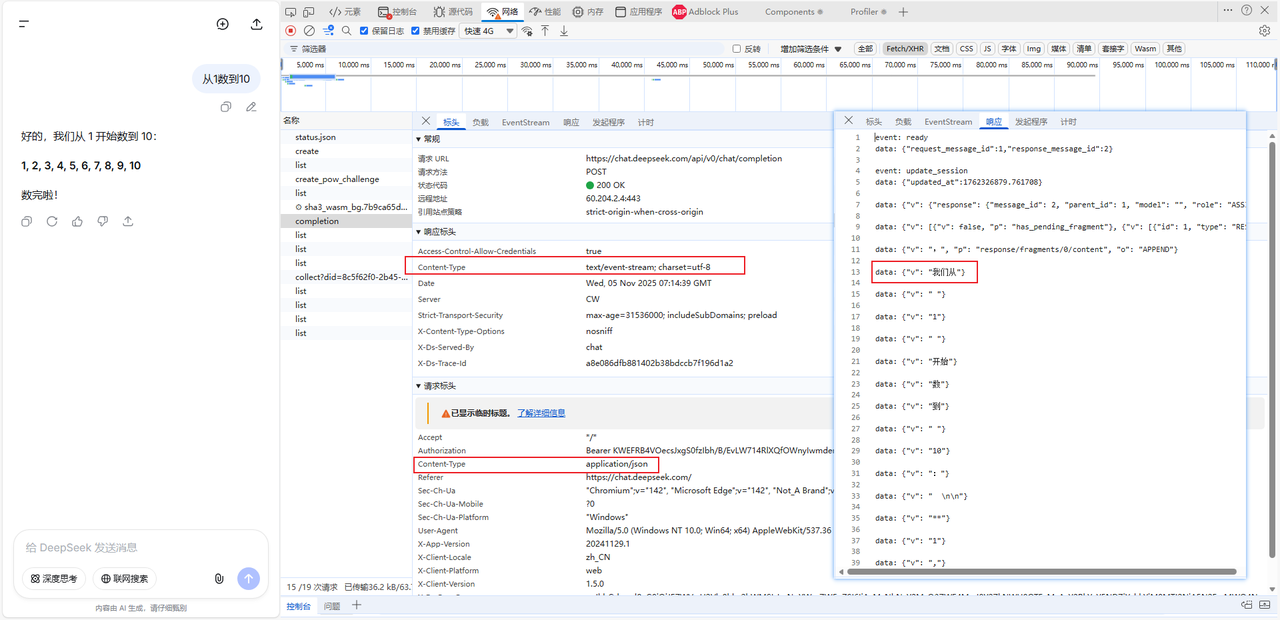
客户端以content-type:application/json格式发送请求。
服务端以content-type:text/event-stream; charset=utf-8()流式响应按照标准流式响应格式data: {“v”: “我们从”}推送数据。
前端获取流式响应数据部分代码实现
1
fetch('https://api.deepseek.com/v1/chat/completions', {
2
method: 'POST',
3
headers: {
4
'Content-Type': 'application/json',
5
'Authorization': 'Bearer ' + api_key,
6
},
7
body: JSON.stringify({
8
"model": "deepseek-chat",
9
"messages": [
10
{
11
"role": "user",
12
"content": content
13
}
14
],
15
"stream": true,
25 collapsed lines
16
"max_tokens": 500
17
}),
18
})
19
const reader = res.body.getReader();
20
const decoder = new TextDecoder();
21
while (true) {
22
const {done, value} = await reader.read();
23
if (done) break;
24
const chunk = decoder.decode(value);
25
const lines = chunk.split('\n');
26
27
for (const line of lines) {
28
if (line.startsWith('data: ') && line !== 'data: [DONE]') {
29
try {
30
const data = JSON.parse(line.slice(6));
31
if (data.choices?.[0]?.delta?.content) {
32
// 获取到的数据拼接
33
let text = data.choices[0].delta.content
34
}
35
} catch (e) {
36
// 忽略解析错误
37
}
38
}
39
}
40
}
前端渲染markdown的两种方案
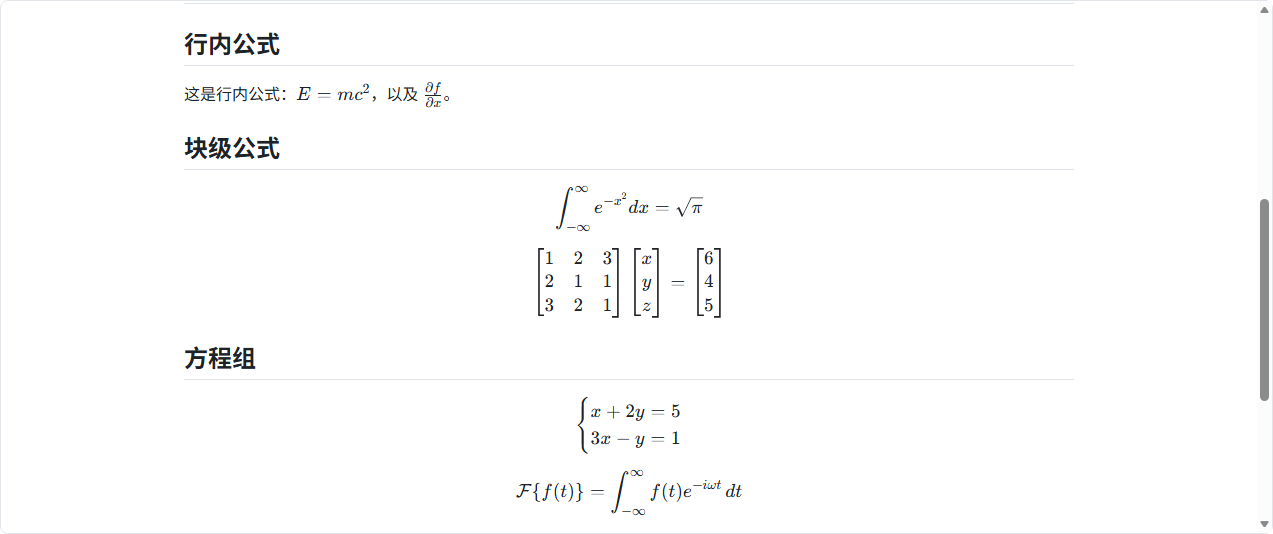
方案一:如果markdown是标准规范,没有添加自定义内容,采用markdown-it和mdit插件组合的方式渲染即可。 前端部分代码:
1
import MarkdownIt from 'markdown-it'
2
import hljs from 'highlight.js' // 添加代码高亮
3
import 'highlight.js/styles/github-dark.css' // 选择你喜欢的主题
4
import markdownItKatex from "@vscode/markdown-it-katex"; // 添加公式支持
5
import katex from "katex";
6
7
import "katex/contrib/mhchem"; // 添加化学公式支持
8
import "katex/contrib/copy-tex";
9
const md = new MarkdownIt({
10
html: true, // 必须为 true 才能渲染 SVG
11
linkify: true,
12
typographer: true,
13
xhtmlOut: false, // 设置为 false,避免生成自闭合标签
14
highlight: function (str, lang) {
15
if (lang && hljs.getLanguage(lang)) {
19 collapsed lines
16
try {
17
return `<pre class="hljs"><code>${
18
hljs.highlight(str, {language: lang, ignoreIllegals: true}).value
19
}</code></pre>`
20
} catch (__) {
21
}
22
}
23
24
return `<pre class="hljs"><code>${md.utils.escapeHtml(str)}</code></pre>`
25
}
26
})
27
// 使用 KaTeX 插件支持 LaTeX
28
md.use(markdownItKatex, {
29
katex,
30
throwOnError: false, // 不抛出错误,在页面上显示错误信息
31
errorColor: '#cc0000'
32
})
33
34
<div class="markdown-body" v-html="renderedMarkdown" ref="contentRef"></div>
以下为demo图:
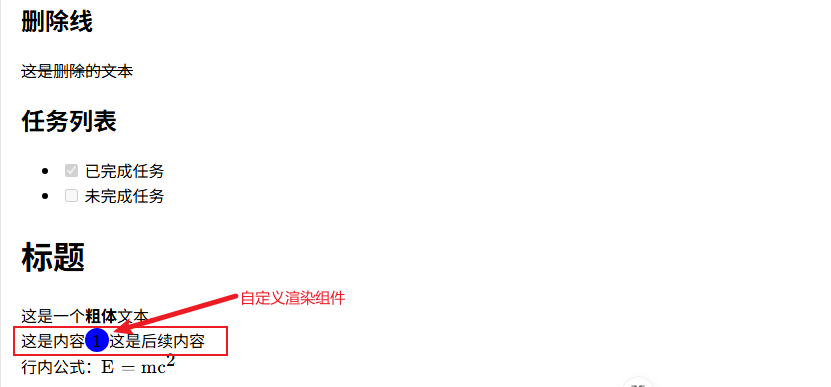
方案二:有自定义markdown语法,采用unified方案,在语法树层面处理自定义标签,并渲染组件。 部分代码:
1
import CitationList from "@/components/CitationList.vue"; // 引入自定义语法需要渲染的组件
2
const astToVNode = (ast) => {
3
if (ast.type === 'text') {
4
return ast.value
5
}
6
if (ast.type === 'element') {
7
if (ast.tagName === 'citations') { // 这个地方的citations就是自定义语法
8
return h(CitationList, {
9
nums: ast.properties?.dataNums || '',
10
})
11
}
12
return h(ast.tagName, ast.properties, ast.children?.map(astToVNode) || [])
13
}
14
return null
15
}
以下为demo图:
Google LearnAbout
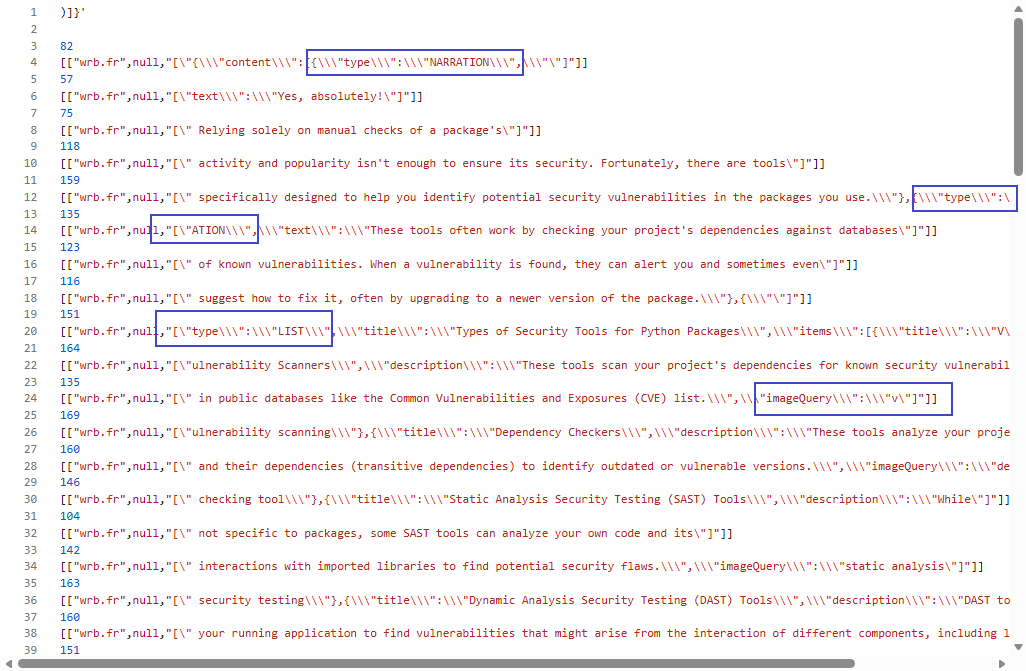
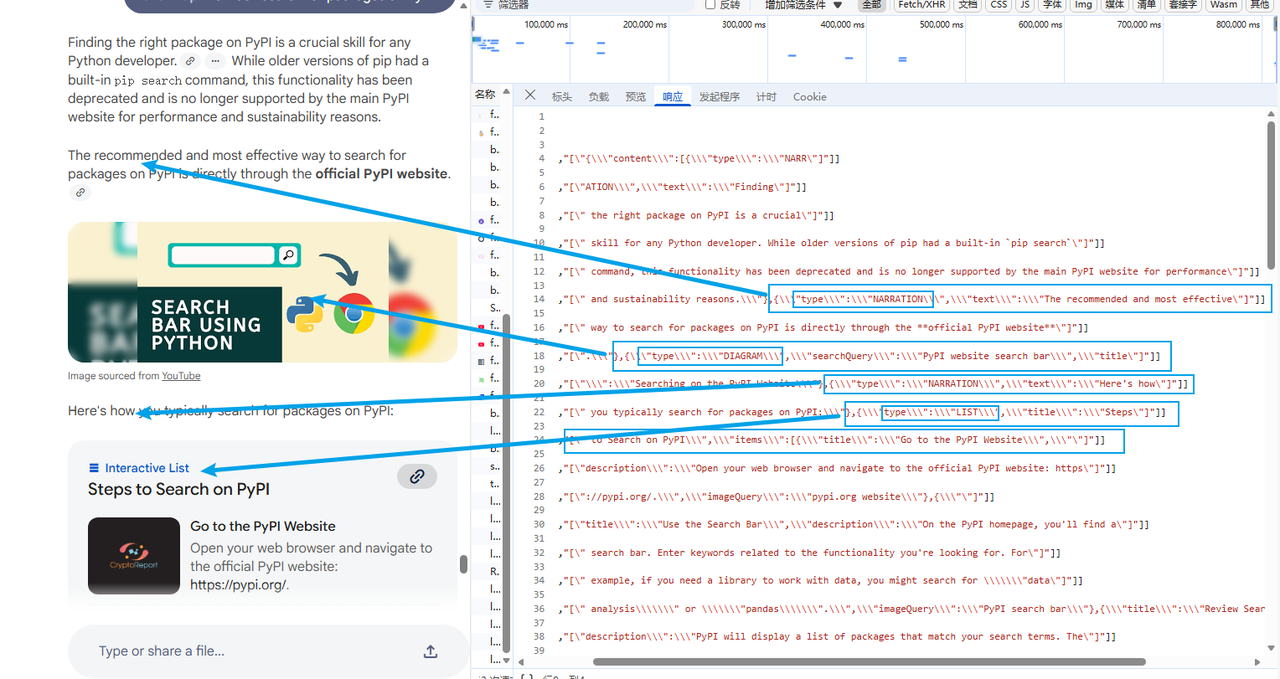
在图中我们看到:
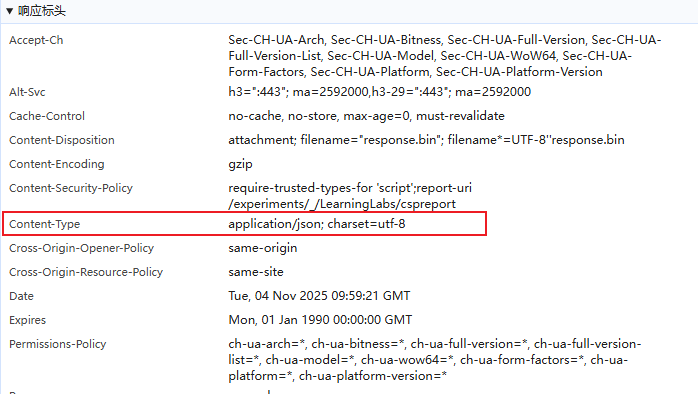
服务端以content-type:application/json; charset=utf-8流式推送数据。
服务端响应的数据中是以json格式流式返回,前端通过动态解析json,动态加载实现,其中返回数据中有type字段来区分卡片类型。
接下来按照learn about的这个方案来实现我们的学习卡片demo,需要验证下面两个问题。
- 验证动态解析json的可行性,json在传输中任何字段均可能被截断且标签不闭合。
- 验证根据动态json,动态加载卡片的可行性。
以deepseek的json-output验证json流式传输
deepseek官方案例 https://api-docs.deepseek.com/zh-cn/guides/json_mode 需要设置3个地方:
- 设置 response_format 参数为 {‘type’: ‘json_object’}。
- 用户传入的 system 或 user prompt 中必须含有 json 字样,并给出希望模型输出的 JSON 格式的样例,以指导模型来输出合法 JSON。
- 需要合理设置 max_tokens 参数,防止 JSON 字符串被中途截断。 部分代码:
1
import {parse} from 'best-effort-json-parser'
2
fetch('https://api.deepseek.com/v1/chat/completions', {
3
method: 'POST',
4
headers: {
5
'Content-Type': 'application/json',
6
'Authorization': 'Bearer ' + api_key,
7
},
8
body: JSON.stringify({
9
"model": "deepseek-chat",
10
"messages": [
11
{"role": "system", "content": systemPrompt},
12
{ "role": "user","content":content}
13
],
14
responseFormat: "json",
15
"stream": true,
26 collapsed lines
16
"max_tokens": 500
17
}),
18
})
19
const reader = res.body.getReader();
20
const decoder = new TextDecoder();
21
while (true) {
22
const {done, value} = await reader.read();
23
if (done) break;
24
const chunk = decoder.decode(value);
25
const lines = chunk.split('\n');
26
27
for (const line of lines) {
28
if (line.startsWith('data: ') && line !== 'data: [DONE]') {
29
try {
30
const data = JSON.parse(line.slice(6));
31
if (data.choices?.[0]?.delta?.content) {
32
let text = data.choices[0].delta.content
33
result += text
34
let obj = parse(result)
35
}
36
} catch (e) {
37
// 忽略解析错误
38
}
39
}
40
}
41
}
验证完deepseek的json output格式输出前端渲染完全可行。 以动态json渲染学习卡片 前端渲染技术实现同ai应答区域相同,deepseek官方提供的json无法满足学习卡片需要的json,所以我本地写了一段自定义json,定时截取模拟后端输出,来动态渲染学习卡片。 每一个类型,自定义一个卡片组件。根据动态解析json实时渲染,验证可行。 以下为demo图:
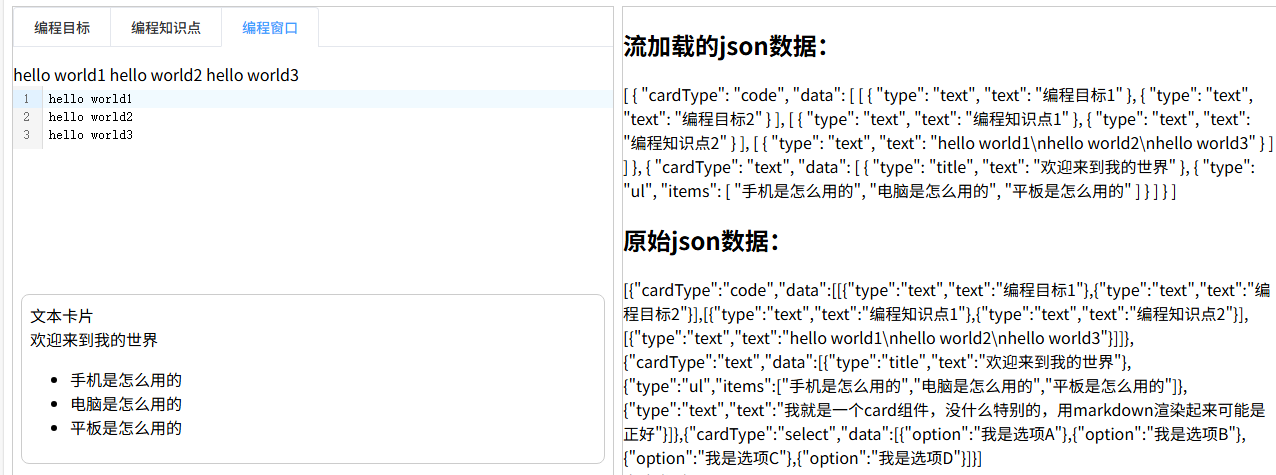
实现效果,卡片和卡片内容都可以根据流加载的json数据一点点加载出来。 4.总结 SSE技术实现了前端流式加载数据的功能,具有协议简单、自动重连、服务端低开销的优势,适用于服务端单向推送数据的实时场景。对于markdown和json格式的推送支持也很好,对于获取数据后动态渲染复杂内容也是完全可行的。