







Grok Imagine Video 1.5 is the most exciting video model release from xAI. You can generate realistic video with synchronized audio in a single pass, capable of juggling complex motion with precise prompt adherence. We pushed it hard across a range of scenes, and came up with the ultimate prompting guide to get the most out of this model.
This is a scene from a movie, she is having a conversation on the phone with a man, she speaks and pauses to listen then talks again. Her tone is hesitant then determined. She’s walking around slowly and talking on the phone. They are talking about a meetup on Thursday to discuss details.
The guy in the middle starts skateboarding slowly, then goes faster, then is going very fast, the camera is following his face from the side, zoomed in on his face, he looks happy, documentary style coming of age vibe, the background buildings and street are moving fast as he’s skateboarding, handheld camera style, he’s laughing and says “I told you bro, this will be the best summer!”, then he goes silent, he’s looking at his friends briefly, and then he’s just looking at where he’s rolling with his skateboard, sounds of cars passing by, the two other teenagers are laughing, they are not talking. Skateboards rolling sounds.
The character is showing off her fighting moves, no music.
She touches her cheek and smiles gently, then smiles wide looking into the camera, camera not moving, text and items stay exactly the same not moving.
The monkey slowly turns a page, focused, reading. A small baby monkey dressed in a baby suit comes to distract him. No talking.
Drone footage, flying at the front of the building.
The wave crests fully and pitches forward, the translucent green crest folding and crashing down onto the dark rocks with tremendous force. White foam explodes upward and outward, hanging for a moment before collapsing back. Sea spray drifts across the frame in the dawn wind. The water rushes back off the rocks in white rivulets. A second smaller wave rises behind. Sound: the deep boom of a heavy swell hitting rock, the hiss and rush of water pulling back across stone, the low moan of wind across an open coastline, sea spray on a microphone.
The camera tracks alongside the runners in Bangkok as they continue sprinting, all four pumping their arms and legs in perfect lockstep, breath visible in the cool morning air. The lead runner glances briefly at the camera, then snaps his focus back ahead. The shopfront shutters, parked motorbikes, and pedestrians on the curb streak past in heavy horizontal motion blur. Sound: the rhythmic slap of running shoes on pavement, heavy synchronized breathing, the rumble of a distant scooter, the muffled chatter of an early morning street market.
The figure slowly lowers the phone from their ear, exhales, and lets their hand fall to their side. They turn their head almost imperceptibly toward the room. Dust motes drift through the shaft of golden light. The cat lifts its head, ears swivelling. The CRT television flickers once. The sheer curtains stir in a slow breeze. Sound: distant city traffic muffled through glass, a kitchen tap dripping somewhere off-screen, the soft hum of the old TV, the creak of a wood floor.
Hopefully, these give a good sense of just how far you can push Grok Imagine Video 1.5.
After experimenting with Grok Imagine 1.5 quite a bit, we came up with the following prompting tips that can really elevate your outputs.
Every example above has an explicit Sound: section. Signaling this to the model and describe how you want sound to be designed in your video can make or break the final delivery.
Vague: Sound: city sounds, traffic.
Specific: Sound: cars passing by, skateboards rolling on pavement, teenagers laughing, the distant rumble of a street.
It knows the difference between ambient noise and targeted sound design. You can be as granular as you want, and it will keep up.
A few things that work particularly well: “sounds of cars passing by,” “skateboards rolling sounds,” “no music,” “camera not moving.” These are all spatial and material cues that tell the model exactly what the soundscape needs to feel like.
Without them, the model picks its own interpretation of scale. “The wave crests” is ambiguous. “The wave crests fully and pitches forward, crashing down with tremendous force” is much more indicative.
The skateboarding scene works, for instance, because of “starts skateboarding slowly, then goes faster, then is going very fast” and “background buildings and street are moving fast.” Remove those words and you get a flat, static clip.
The model holds static if you don’t ask for movement which is generally the right call if you don’t specify anything. A locked camera with patient motion reads more cinematic than unnecessary moves. But when you want a certain camera move, be sure to stipulate that.
Things that work: slow push-in, aerial push-in toward, camera drifts gently to the left, tracking shot alongside, locked, static. The Iceland clip asks for “slow aerial push-in” and “camera drifts gently to the left as it descends.”
The model handles focused prompts better than sprawling ones. The skincare scene is three beats: touch cheek, smile gently, smile wide at camera. The monkey scene gives each character a clear role. You can really hone in on specific actions while keeping everything else locked and still.
The best way to use Video 1.5 is to start with a still you’ve already dialed in. Use any image generator, like Grok Imagine Image, or your own photo to nail the composition and lighting first. Once the frame looks right, the video prompt only needs to say what changes.
Starting image:
Abstract 3D render of a large glossy morphic form — smooth curved surfaces of transparent glass or liquid chrome, refracting prismatic iridescent color bands of cyan, magenta, gold, and electric blue against a pure black background. Hyperreal studio lighting, physically accurate reflections and refractions.
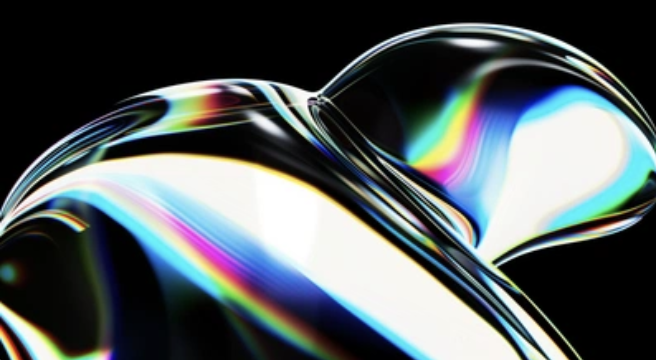
Then passed to Video 1.5:
The glossy morphic form slowly undulates and breathes, its surfaces shifting like liquid mercury. The prismatic iridescent bands — cyan, magenta, gold, electric blue — flow and ripple across the curves as the shape subtly deforms and reforms. The light refracts differently as the surface tension shifts. The form rotates almost imperceptibly. Sound: a deep resonant hum, like the inside of a seashell, the faint crystalline ring of glass under tension, slow and meditative.
Starting image:
A minimalist Belgian wabi-sabi interior. A long low linen-upholstered sofa in a sandy oatmeal tone sits against a tactile cream lime-plaster wall. A single rough-hewn dark walnut coffee table sits in front of it on a polished concrete floor. On a built-in concrete plinth: a squat ceramic table lamp with a dark earth-brown clay base and a soft cream linen shade, casting a low warm glow. A heavy linen throw drapes asymmetrically across the sofa. No decoration, no clutter, no pattern. The architectural photography of Vincent Van Duysen and Axel Vervoordt.
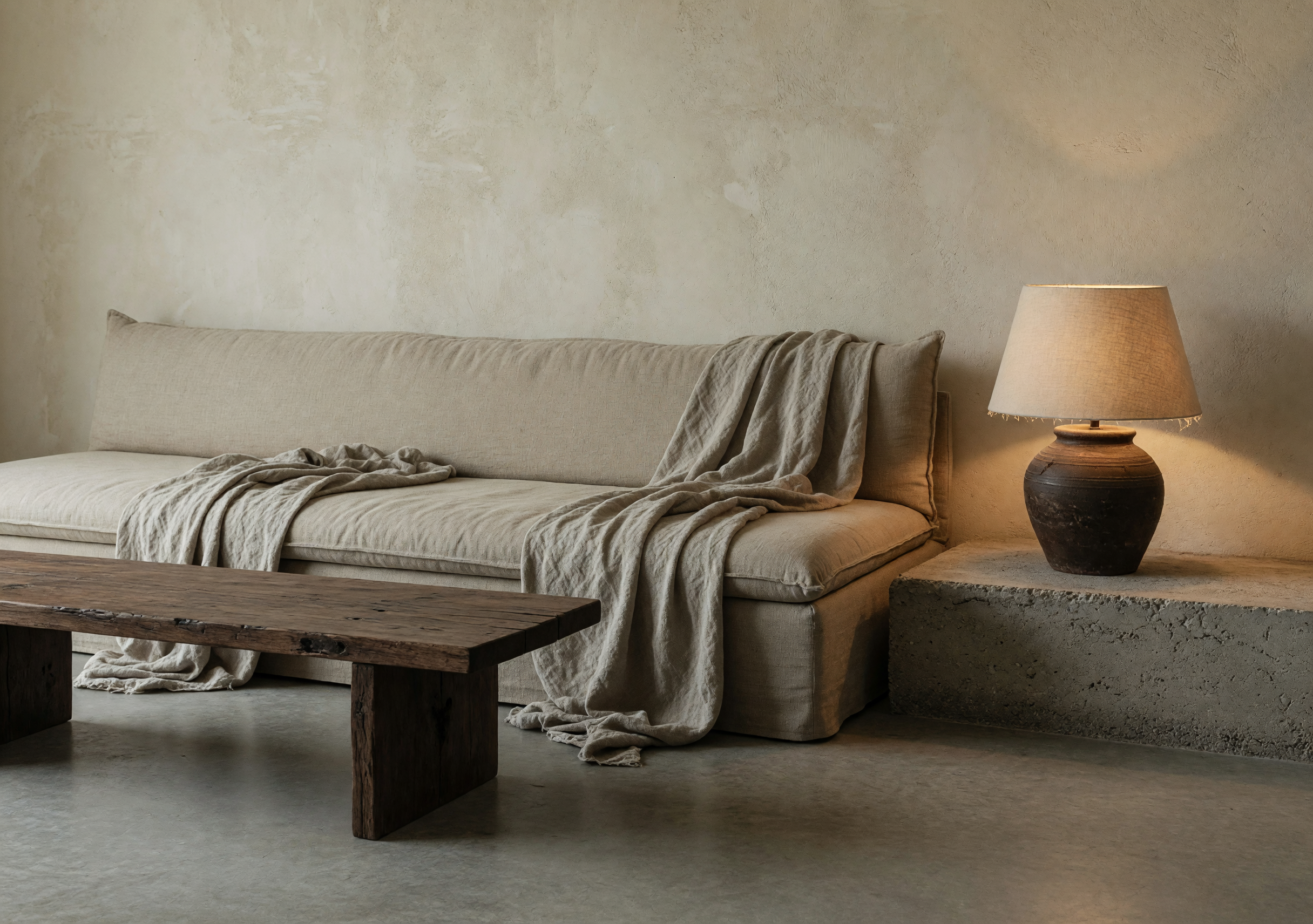
Then passed to Video 1.5:
The afternoon sunlight coming through an unseen window slowly shifts and dims as time passes. The shaft of warm golden light that falls across the linen sofa and concrete floor moves gradually to the right and narrows, the color shifting from warm amber to cooler blue as the hour advances toward evening. The lamp’s warm glow becomes more pronounced as the room darkens. Shadows deepen in the corners. Sound: deep interior quiet, the barely audible ambient hum of the city outside, a building settling in the cooling air.
The still handles composition and color while the video prompt handles motion. Keeping them separate can make both easier to iterate on.
此内容由惯性聚合(RSS阅读器)自动聚合整理,仅供阅读参考。 原文来自 — 版权归原作者所有。