



惯性聚合 高效追踪和阅读你感兴趣的博客、新闻、科技资讯
阅读原文 在惯性聚合中打开

推荐订阅源

有赞技术团队
有赞技术团队
V
V2EX
Jina AI
Jina AI
钛媒体:引领未来商业与生活新知
钛媒体:引领未来商业与生活新知
宝玉的分享
宝玉的分享
S
SegmentFault 最新的问题
量子位
Engineering at Meta
Engineering at Meta
Forbes - Security
Forbes - Security
H
Hackread – Cybersecurity News, Data Breaches, AI and More
B
Blog
I
Intezer
V
Vulnerabilities – Threatpost
NISL@THU
NISL@THU
P
Proofpoint News Feed
cs.CL updates on arXiv.org
人人都是产品经理
人人都是产品经理
The Cloudflare Blog
博客园 - 三生石上(FineUI控件)
Google DeepMind News
T
Tenable Blog
Know Your Adversary
Know Your Adversary
Cisco Talos Blog
Cisco Talos Blog
D
Darknet – Hacking Tools, Hacker News & Cyber Security
Scott Helme
Scott Helme
Stack Overflow Blog
Stack Overflow Blog
博客园 - 【当耐特】
S
Securelist
T
Tailwind CSS Blog
Simon Willison's Weblog
Microsoft Security Blog
博客园_首页
P
Privacy International News Feed
K
Kaspersky official blog
T
Tor Project blog
L
LINUX DO - 热门话题
Apple Machine Learning Research
T
The Exploit Database - CXSecurity.com
Security Latest
Security Latest
酷 壳 – CoolShell
酷 壳 – CoolShell
C
Cybersecurity and Infrastructure Security Agency CISA
T
Threat Research - Cisco Blogs
G
GRAHAM CLULEY
Last Week in AI
Last Week in AI
L
LangChain Blog
C
Cisco Blogs
freeCodeCamp Programming Tutorials: Python, JavaScript, Git & More
N
Netflix TechBlog - Medium
博客园 - 叶小钗
I
InfoQ

Replicate's blog

How to make remarkable videos with Seedance 2.0 – Replicate blog How to prompt Seedream 5.0 – Replicate blog Recraft V4: image generation with design taste – Replicate blog Run Isaac 0.1 on Replicate – Replicate blog Run FLUX.2 on Replicate – Replicate blog How to prompt Nano Banana Pro – Replicate blog Retro Diffusion's pixel art models are now on Replicate – Replicate blog Replicate is joining Cloudflare – Replicate blog Extract text from documents and images with Datalab Marker and OCR – Replicate blog How to prompt Veo 3.1 – Replicate blog IBM's Granite 4.0 is now on Replicate – Replicate blog Introducing our new search API – Replicate blog Torch compile caching for inference speed – Replicate blog Announcing Replicate's remote MCP server – Replicate blog How to prompt Veo 3 with images – Replicate blog Open source video is back – Replicate blog Generate consistent characters – Replicate blog Bria is now on Replicate – Replicate blog How we optimized FLUX.1 Kontext [dev] – Replicate blog Compare AI video models – Replicate blog The FLUX.1 Kontext hackathon – Replicate blog How to prompt Veo 3 for the best results – Replicate blog Get the most from Google Veo 3 – Replicate blog FLUX.1 Kontext from the community – Replicate blog Use FLUX.1 Kontext to edit images with words – Replicate blog Generate incredible images with Google's Imagen 4 – Replicate blog Run OpenAI’s latest models on Replicate – Replicate blog NVIDIA H100 GPUs are here – Replicate blog Run 30,000+ LoRAs on Hugging Face with Replicate – Replicate blog Ideogram 3.0 on Replicate – Replicate blog Run MiniMax Speech-02 models with an API – Replicate blog Easel AI is now on Replicate – Replicate blog Stylized video with Wan2.1 – Replicate blog Creative roundup: avatars, lightsabers, and LoRA tricks – Replicate blog Wan2.1: generate videos with an API – Replicate blog Wan2.1 parameter sweep – Replicate blog You can now fine-tune open-source video models – Replicate blog Generate short videos with the Replicate playground – Replicate blog AI video is having its Stable Diffusion moment – Replicate blog FLUX fine-tunes are now fast – Replicate blog FLUX.1 Tools – Control and steerability for FLUX – Replicate blog NVIDIA L40S GPUs are here – Replicate blog Ideogram v2 is an outstanding new inpainting model – Replicate blog Stable Diffusion 3.5 is here – Replicate blog FLUX is fast and it's open source – Replicate blog FLUX1.1 [pro] is here – Replicate blog Using synthetic training data to improve Flux finetunes – Replicate blog Fine-tune FLUX.1 with an API – Replicate blog Fine-tune FLUX.1 to create images of yourself – Replicate blog Replicate Intelligence #12 – Replicate blog Replicate Intelligence #11 – Replicate blog Fine-tune FLUX.1 with your own images – Replicate blog Replicate Intelligence #10 – Replicate blog FLUX.1: First Impressions – Replicate blog Replicate Intelligence #9 – Replicate blog Run FLUX with an API – Replicate blog Replicate Intelligence #8 – Replicate blog Run Meta Llama 3.1 405B with an API – Replicate blog Replicate Intelligence #7 – Replicate blog Replicate Intelligence #6 – Replicate blog Replicate Intelligence #5 – Replicate blog How to get the best results from Stable Diffusion 3 – Replicate blog Run Stable Diffusion 3 on your Apple Silicon Mac – Replicate blog Push a custom version of Stable Diffusion 3 – Replicate blog Replicate Intelligence #4 – Replicate blog Run Stable Diffusion 3 on your own machine with ComfyUI – Replicate blog H100s are coming to Replicate – Replicate blog Run Stable Diffusion 3 with an API – Replicate blog Replicate Intelligence #3 – Replicate blog Replicate Intelligence #2 – Replicate blog Replicate Intelligence #1 – Replicate blog Shared network vulnerability disclosure – Replicate blog Run Snowflake Arctic with an API – Replicate blog Run Meta Llama 3 with an API – Replicate blog Run Code Llama 70B with an API – Replicate blog How to create an AI narrator for your life – Replicate blog Clone your voice using open-source models – Replicate blog Businesses are building on open-source AI – Replicate blog How to run Yi chat models with an API – Replicate blog Scaffold Replicate apps with one command – Replicate blog Using open-source models for faster and cheaper text embeddings – Replicate blog Generate music from chord progressions and text prompts with MusicGen-Chord – Replicate blog Generate images in one second on your Mac using a latent consistency model – Replicate blog How to use retrieval augmented generation with ChromaDB and Mistral – Replicate blog Fine-tune MusicGen to generate music in any style – Replicate blog Jet-setting with Llama 2 + Grammars – Replicate blog How to run Mistral 7B with an API – Replicate blog Make smooth AI generated videos with AnimateDiff and an interpolator – Replicate blog Fine-tuned models now boot in less than one second – Replicate blog Painting with words: a history of text-to-image AI – Replicate blog We're cutting our prices in half – Replicate blog A guide to prompting Llama 2 – Replicate blog Streaming output for language models – Replicate blog Fine-tune SDXL with your own images – Replicate blog Run Llama 2 with an API – Replicate blog Run SDXL with an API – Replicate blog A comprehensive guide to running Llama 2 locally – Replicate blog Fine-tune Llama 2 on Replicate – Replicate blog What happened with Llama 2 in the last 24 hours? 🦙 – Replicate blog Make any large language model a better poet – Replicate blog
Which image editing model should I use? – Replicate blog
2025-09-23 · via Replicate's blog

In the past few weeks, nearly every major AI lab has released an image editing model. The first was FLUX.1 Kontext from Black Forest Labs in May, which stood out for style transformations and simple image edits. Since then, we’ve seen a wave of models, each strong in its own way.

With so many options, it can be hard to figure out which one works best for your needs. In this post, we’re putting them head to head and evaluating each across a range of image editing tasks. By the end, you should have a clear sense of which one fits your workflow.

To start, here’s an overview of the cost and average inference time for each model we’re evaluating.

The cheapest is GPT-image-1 from OpenAI which starts $0.01 per image, but it has the longest generation time (around 40 seconds). FLUX.1 Kontext [dev] (optimized by Pruna AI) is the fastest at 1.9s per generation and is also one of the cheaper options, but there is, of course, a trade off with image editing quality for hyper-optimized models.

For our tests, we’re evaluating the base model from each AI lab. Specifically, for FLUX.1 Kontext and Qwen, we’ll only show results from FLUX.1 Kontext [pro] and Qwen Image Edit.

Let’s put these models up to the test.

Object removal

The first task we’re looking at is object removal. This is a basic task that one should be able to do in Photoshop. In particular, if we remove objects that are in front of other elements of an image, how well is the model able to interpolate what is behind the removed object?

We tested this with an image of the Golden Gate Bridge.

Original Golden Gate Bridge image
Original image

Here’s how different image editing models perform when tasked with removing the bridge from the image:

Remove the bridge

Winners: SeedEdit 3.0 and Qwen Image Edit

Loser: FLUX.1 Kontext [pro]

The model that struggled the most was FLUX.1 Kontext [pro], which left the two towers in place. Nano Banana removed the entire bridge but failed to keep the background hills consistent. GPT-image-1 smoothed out the building in the bottom left corner but did successfully remove the bridge. The other models handled the task well.

Front view comparison

Another common image editing task is changing the viewing angles of the object in the image.
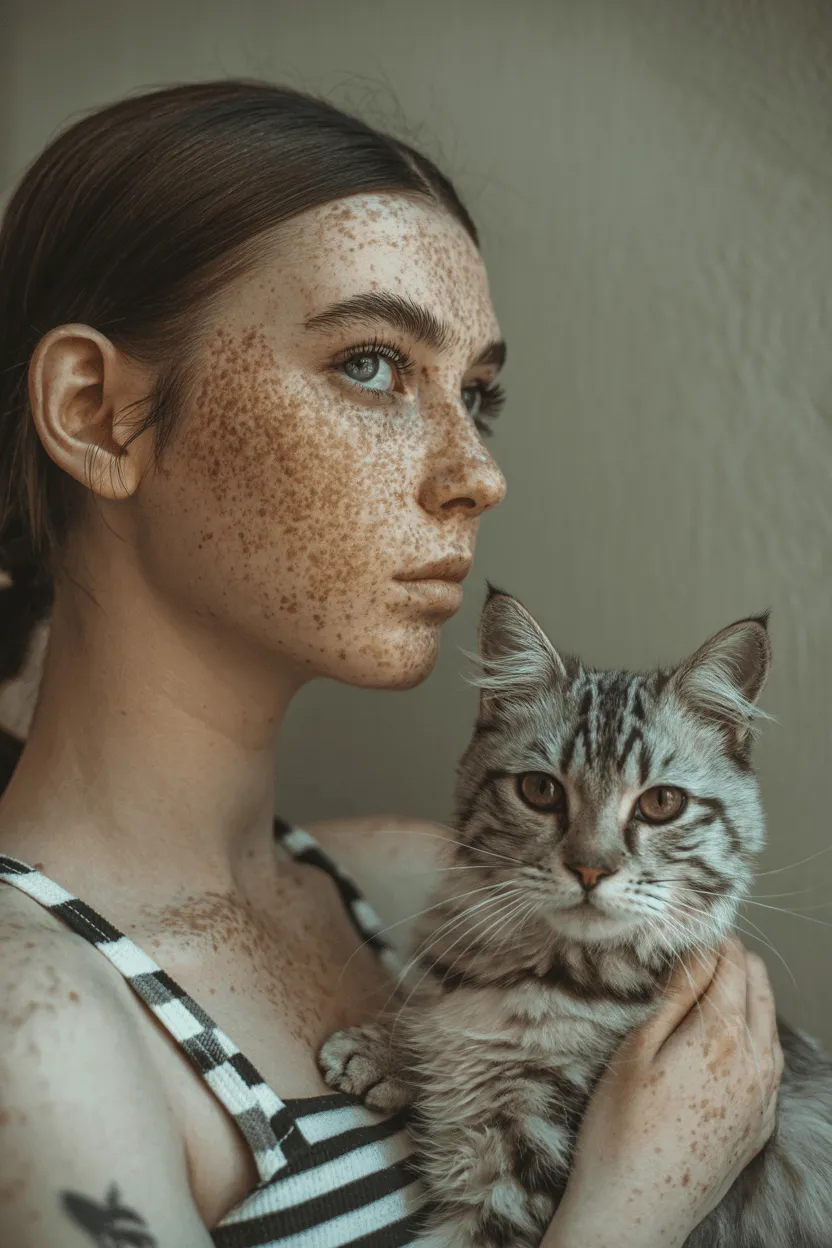
Original image for front view transformation
Original image

Let’s see which image models can give us the front-facing view of this character and her cat while maintaining character consistency.

Show the front view of the woman and the cat

Winner: Qwen Image Edit

Loser: SeedEdit 3.0

Only GPT-image-1 and Qwen Image Edit gave us the head-on view we were looking for, albeit GPT-image-1 did not seem to maintain character consistency. FLUX.1 Kontext [pro] and Nano Banana did fairly well at showing a front view of our character; both of them even managed to preserve the tattoo on the character’s arm. The ByteDance models struggled the most — SeedEdit did not turn the character at all and Seedream did not preserve our character.

Background editing

Background editing requires models to understand object boundaries and generate coherent environments. Here’s how different image editing models perform when tasked with editing or replacing backgrounds:
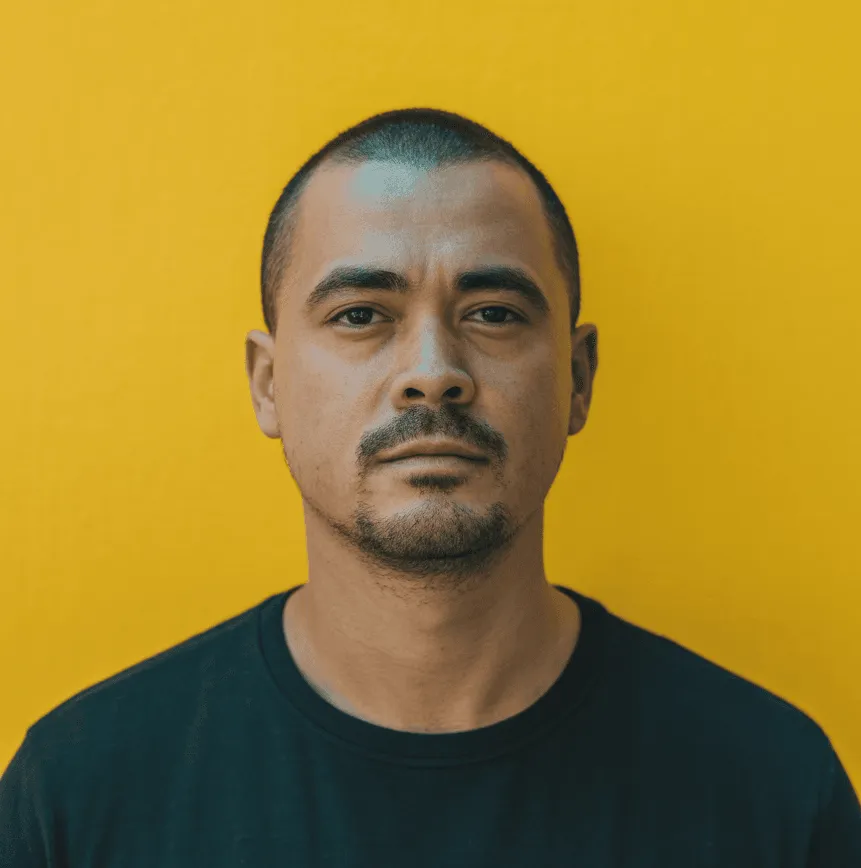
Original image for background editing
Original image

Make the background a jungle

Winner: SeedEdit 3.0 and Seedream 4

Loser: Nano Banana

Nano Banana performs the worst here, cutting out a small piece of the character and placing it on a generic jungle background. The ByteDance Seed models do the best, with strong character consistency, natural lighting, and believable placement. FLUX.1 Kontext [pro] comes close but doesn’t fully land it, while GPT-image-1 and Qwen generate characters that look noticeably different. Qwen also smooths out the textures, making the result feel less detailed.

Text editing

Text editing within images represents one of the most challenging and impressive capabilities of modern image editing models. The ability to understand, modify, and generate text while maintaining proper typography, perspective, and lighting is a remarkable technical achievement that was nearly impossible even a year ago.

In this evaluation, we are looking for which image models preserve the original font of the text and maintain the physical elements of the signage (i.e. sign texture/color, placement of the surrounding words, etc.)

Let’s see if we change the word “seven” to “eight” in the following image:
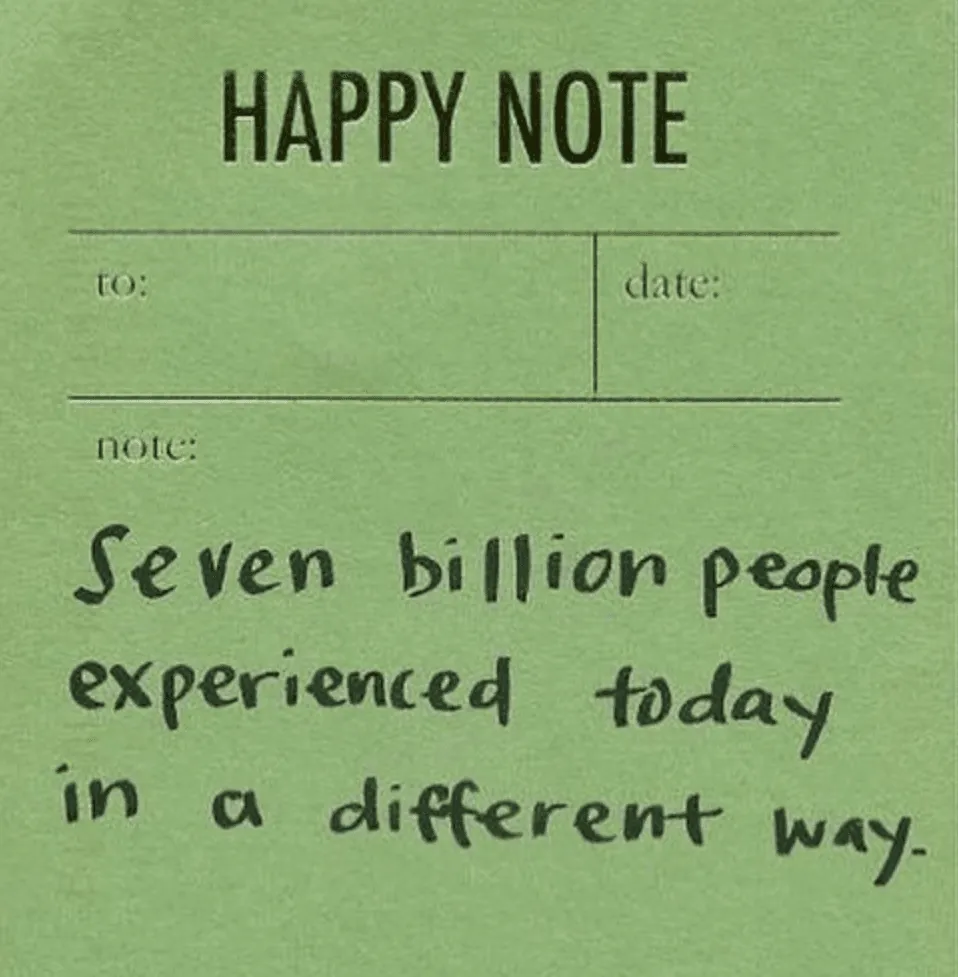
Original image for text editing
Original image

Change ‘seven’ to ‘eight’

Winners: FLUX.1 Kontext [pro] and Nano Banana

Losers: GPT-image-1 and Seedream 4

The favorites here are FLUX.1 Kontext [pro] and Nano Banana which were able to introduce the word “eight” naturally with consistent type and placement. Even the paper-like texture of the note is preserved in these edits. With Seededit and Qwen, the word “eight” is sticking out and clearly looks edited in. GPT-image-1 looks visually appealing but did not maintain the original note. Seedream’s typography looks fine but it did produce an artifact in the “to:” section of the note.

Style transfer

Style transfer showcases each model’s ability to understand artistic styles and apply them while preserving the original image’s content and composition. Some models excel at capturing fine artistic details while others focus on maintaining structural integrity.

Here’s how these models handle style transfer tasks, specifically converting images to an oil painting style:

Original image for oil painting style transfer
Original image

Transform this into an oil painting

Winner: Nano Banana

Loser: FLUX.1 Kontext [pro]

This task yielded interesting results across all the models as each have different ideas on what an oil painting should look like. Nano Banana and Seedream look closest to the original image, offering an air-brushed, well-blended look. GPT-image also has the short strokes but also has its signature yellow tint. Qwen and FLUX.1 Kontext [pro] are quite similar, with more of a painterly, unblended look (yet both of these also have the yellow tint).

Takeaways

After evaluating these six image editing models across five distinct tasks — object removal, perspective transformation, background editing, text manipulation, and style transfer — there are some clear winners that can guide your choice based on specific needs and priorities.

  • Object removal: Most models succeeded, but FLUX.1 Kontext [pro] struggled
  • Perspective changes: GPT Image 1 and Qwen Image Edit best achieved the requested front-facing views with character consistency
  • Background editing: The ByteDance models (SeedEdit and Seedream) clearly dominated with natural integration of the character with the jungle landscape
  • Text editing: FLUX.1 Kontext and Nano Banana preserved typography and texture most effectively
  • Style transfer: Nano Banana and Seedream maintained closest resemblance to originals while achieving nice artistic effects

Keep in mind that these were all surface-level experimentations and the above recommendations might not be enough to justify your choice of model.

Need to experiment some more? Check out Replicate’s playground to parallely test and compare image editing models (or any model):
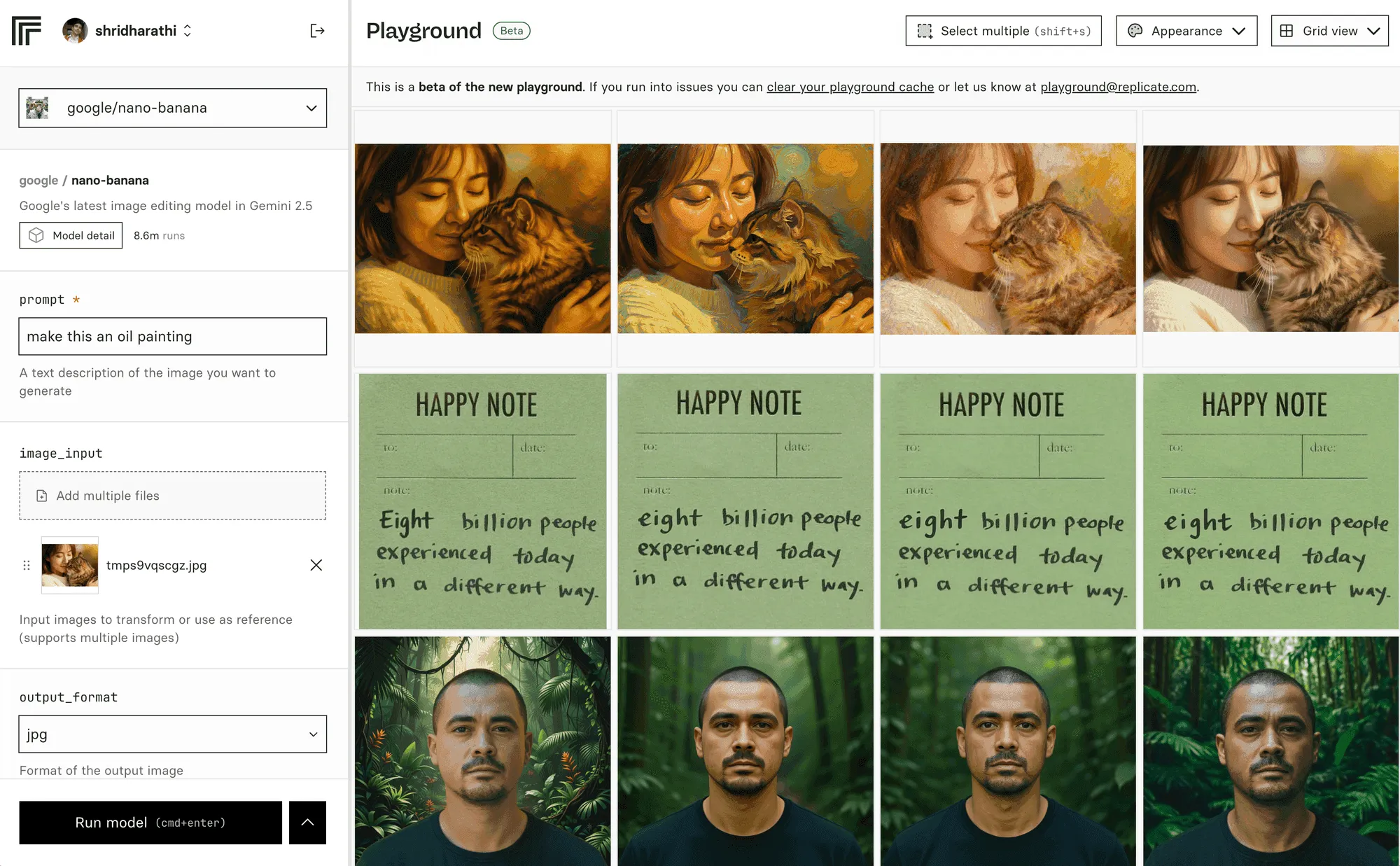
Replicate playground showing image editing models
Playground on Replicate

It’s what we used to create this post!

As always, chat with us on Discord and follow us on X to keep up with the latest.