

惯性聚合 高效追踪和阅读你感兴趣的博客、新闻、科技资讯
阅读原文 在惯性聚合中打开

推荐订阅源

Threat Intelligence Blog | Flashpoint
WordPress大学
WordPress大学
N
Netflix TechBlog - Medium
宝玉的分享
宝玉的分享
V
Visual Studio Blog
S
Securelist
P
Palo Alto Networks Blog
A
Arctic Wolf
T
Tor Project blog
P
Proofpoint News Feed
I
InfoQ
博客园 - 三生石上(FineUI控件)
T
Threat Research - Cisco Blogs
G
GRAHAM CLULEY
M
MIT News - Artificial intelligence
Cyber Security Advisories - MS-ISAC
Microsoft Security Blog
MongoDB | Blog
MongoDB | Blog
C
CXSECURITY Database RSS Feed - CXSecurity.com
Apple Machine Learning Research
S
Secure Thoughts
Cyberwarzone
Cyberwarzone
Blog — PlanetScale
Blog — PlanetScale
Simon Willison's Weblog
博客园 - 【当耐特】
大猫的无限游戏
大猫的无限游戏
腾讯CDC
Latest news
Latest news
Project Zero
Project Zero
V
Vulnerabilities – Threatpost
Y
Y Combinator Blog
S
SegmentFault 最新的问题
Schneier on Security
C
CERT Recently Published Vulnerability Notes
W
WeLiveSecurity
罗磊的独立博客
Stack Overflow Blog
Stack Overflow Blog
酷 壳 – CoolShell
酷 壳 – CoolShell
L
LINUX DO - 热门话题
N
News and Events Feed by Topic
PCI Perspectives
PCI Perspectives
C
Cisco Blogs
Application and Cybersecurity Blog
爱范儿
爱范儿
T
The Exploit Database - CXSecurity.com
The Last Watchdog
The Last Watchdog
人人都是产品经理
人人都是产品经理
GbyAI
GbyAI
Know Your Adversary
Know Your Adversary
U
Unit 42

Replicate's blog

How to make remarkable videos with Seedance 2.0 – Replicate blog How to prompt Seedream 5.0 – Replicate blog Run Isaac 0.1 on Replicate – Replicate blog Run FLUX.2 on Replicate – Replicate blog How to prompt Nano Banana Pro – Replicate blog Retro Diffusion's pixel art models are now on Replicate – Replicate blog Replicate is joining Cloudflare – Replicate blog Extract text from documents and images with Datalab Marker and OCR – Replicate blog How to prompt Veo 3.1 – Replicate blog IBM's Granite 4.0 is now on Replicate – Replicate blog Which image editing model should I use? – Replicate blog Introducing our new search API – Replicate blog Torch compile caching for inference speed – Replicate blog Announcing Replicate's remote MCP server – Replicate blog How to prompt Veo 3 with images – Replicate blog Open source video is back – Replicate blog Generate consistent characters – Replicate blog Bria is now on Replicate – Replicate blog How we optimized FLUX.1 Kontext [dev] – Replicate blog Compare AI video models – Replicate blog The FLUX.1 Kontext hackathon – Replicate blog How to prompt Veo 3 for the best results – Replicate blog Get the most from Google Veo 3 – Replicate blog FLUX.1 Kontext from the community – Replicate blog Use FLUX.1 Kontext to edit images with words – Replicate blog Generate incredible images with Google's Imagen 4 – Replicate blog Run OpenAI’s latest models on Replicate – Replicate blog NVIDIA H100 GPUs are here – Replicate blog Run 30,000+ LoRAs on Hugging Face with Replicate – Replicate blog Ideogram 3.0 on Replicate – Replicate blog Run MiniMax Speech-02 models with an API – Replicate blog Easel AI is now on Replicate – Replicate blog Stylized video with Wan2.1 – Replicate blog Creative roundup: avatars, lightsabers, and LoRA tricks – Replicate blog Wan2.1: generate videos with an API – Replicate blog Wan2.1 parameter sweep – Replicate blog You can now fine-tune open-source video models – Replicate blog Generate short videos with the Replicate playground – Replicate blog AI video is having its Stable Diffusion moment – Replicate blog FLUX fine-tunes are now fast – Replicate blog FLUX.1 Tools – Control and steerability for FLUX – Replicate blog NVIDIA L40S GPUs are here – Replicate blog Ideogram v2 is an outstanding new inpainting model – Replicate blog Stable Diffusion 3.5 is here – Replicate blog FLUX is fast and it's open source – Replicate blog FLUX1.1 [pro] is here – Replicate blog Using synthetic training data to improve Flux finetunes – Replicate blog Fine-tune FLUX.1 with an API – Replicate blog Fine-tune FLUX.1 to create images of yourself – Replicate blog Replicate Intelligence #12 – Replicate blog Replicate Intelligence #11 – Replicate blog Fine-tune FLUX.1 with your own images – Replicate blog Replicate Intelligence #10 – Replicate blog FLUX.1: First Impressions – Replicate blog Replicate Intelligence #9 – Replicate blog Run FLUX with an API – Replicate blog Replicate Intelligence #8 – Replicate blog Run Meta Llama 3.1 405B with an API – Replicate blog Replicate Intelligence #7 – Replicate blog Replicate Intelligence #6 – Replicate blog Replicate Intelligence #5 – Replicate blog How to get the best results from Stable Diffusion 3 – Replicate blog Run Stable Diffusion 3 on your Apple Silicon Mac – Replicate blog Push a custom version of Stable Diffusion 3 – Replicate blog Replicate Intelligence #4 – Replicate blog Run Stable Diffusion 3 on your own machine with ComfyUI – Replicate blog H100s are coming to Replicate – Replicate blog Run Stable Diffusion 3 with an API – Replicate blog Replicate Intelligence #3 – Replicate blog Replicate Intelligence #2 – Replicate blog Replicate Intelligence #1 – Replicate blog Shared network vulnerability disclosure – Replicate blog Run Snowflake Arctic with an API – Replicate blog Run Meta Llama 3 with an API – Replicate blog Run Code Llama 70B with an API – Replicate blog How to create an AI narrator for your life – Replicate blog Clone your voice using open-source models – Replicate blog Businesses are building on open-source AI – Replicate blog How to run Yi chat models with an API – Replicate blog Scaffold Replicate apps with one command – Replicate blog Using open-source models for faster and cheaper text embeddings – Replicate blog Generate music from chord progressions and text prompts with MusicGen-Chord – Replicate blog Generate images in one second on your Mac using a latent consistency model – Replicate blog How to use retrieval augmented generation with ChromaDB and Mistral – Replicate blog Fine-tune MusicGen to generate music in any style – Replicate blog Jet-setting with Llama 2 + Grammars – Replicate blog How to run Mistral 7B with an API – Replicate blog Make smooth AI generated videos with AnimateDiff and an interpolator – Replicate blog Fine-tuned models now boot in less than one second – Replicate blog Painting with words: a history of text-to-image AI – Replicate blog We're cutting our prices in half – Replicate blog A guide to prompting Llama 2 – Replicate blog Streaming output for language models – Replicate blog Fine-tune SDXL with your own images – Replicate blog Run Llama 2 with an API – Replicate blog Run SDXL with an API – Replicate blog A comprehensive guide to running Llama 2 locally – Replicate blog Fine-tune Llama 2 on Replicate – Replicate blog What happened with Llama 2 in the last 24 hours? 🦙 – Replicate blog Make any large language model a better poet – Replicate blog
Recraft V4: image generation with design taste – Replicate blog
2026-02-18 · via Replicate's blog

Recraft V4 is Recraft’s latest image generation model, rebuilt from the ground up. The big idea behind it is what the Recraft team calls “design taste” — the model makes visual decisions about composition, lighting, and color that feel intentional rather than generic. Images come out looking art-directed, even from simple prompts.

V4 comes in four versions — two raster, two vector:

ModelOutputResolutionSpeedPrice
Recraft V4Raster (WebP)~1024px~10s$0.04/image
Recraft V4 ProRaster (WebP)~2048px~28s$0.25/image
Recraft V4 SVGVector (SVG)Standard~15s$0.08/image
Recraft V4 Pro SVGVector (SVG)High-res~30s$0.30/image

All four share the same design taste and prompt accuracy. The differences are output format, resolution, and speed.

Some examples

These prompts are designed to push V4 into territory where most image models fall flat — complex typography layouts, precise material rendering, extreme detail at macro scale, structured vector assets, and stylized illustration with character.

Typography and editorial design

V4 treats text as a first-class element of composition. This prompt asks for a cinematic editorial poster with specific typographic hierarchy — “INTERVAL” placed vertically, a subtitle with a thin cyan rule, numbered sections. V4 nails the layout, integrating the typography into the mood of the image rather than stamping it on top:
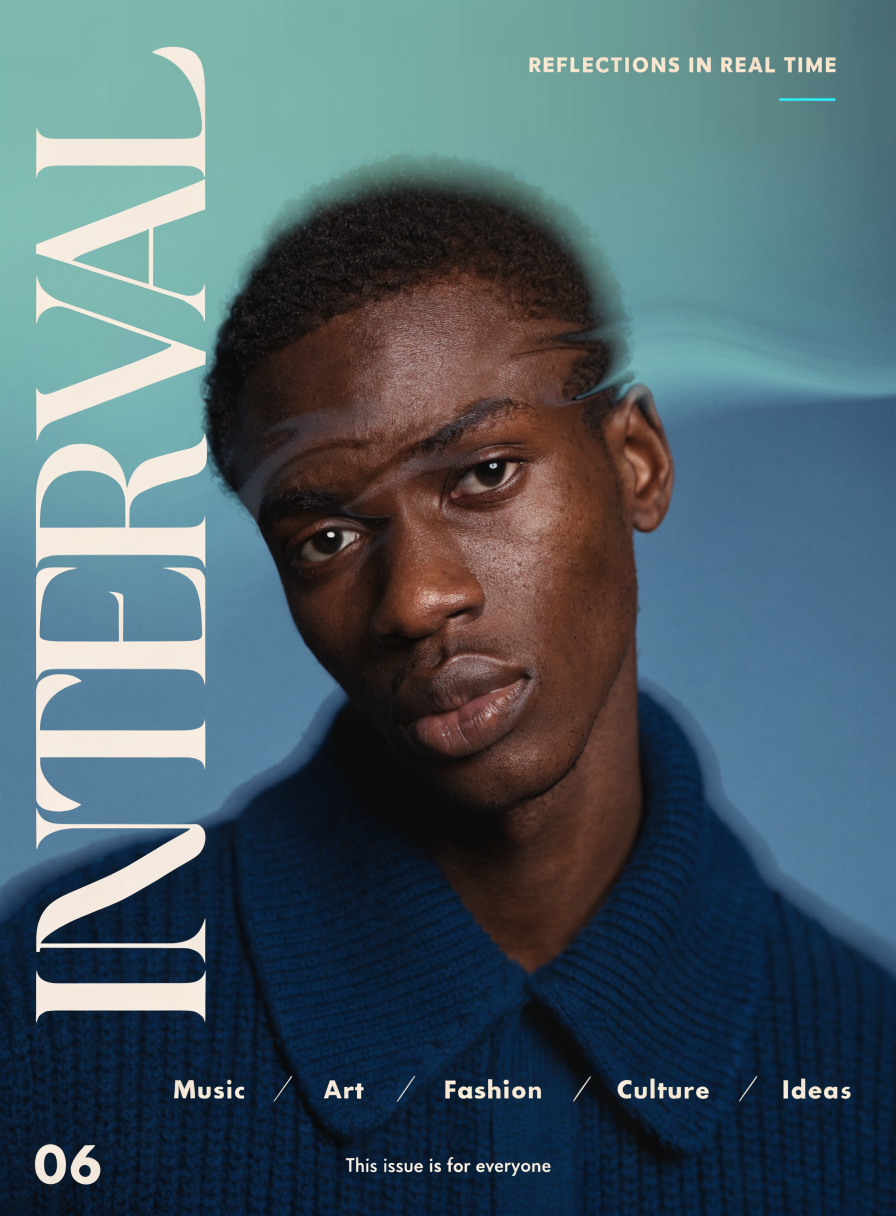
Cinematic editorial poster with INTERVAL typography generated by Recraft V4

“Minimal cinematic editorial poster. Chest-up portrait in dark coat, sharp face with soft halo diffusion, shallow depth, introspective gaze. Petrol-teal to slate-blue gradient background. Subtle translucent refraction across face. Warm off-white big typography: ‘INTERVAL’ vertical left, subtitle top-right with thin cyan line, section row lower third. ‘06’ bottom-left, footer centered. Clean hierarchy, large negative space, ultra high resolution.”

Commercial product photography

Product shots need precise material rendering and lighting control. This prompt specifies brushed steel, matte aluminum, micro-reflections from an engraved monogram, glossy highlights, and motion light streaks — all on a vibrant gradient background. V4 handles the material physics and the playful commercial energy together:

Metallic perfume bottle commercial still life generated by Recraft V4

“A playful commercial still life of a sleek metallic minimalist perfume bottle. Brushed steel or matte aluminum finish, clean geometric silhouette, cap casually placed beside the bottle. Engraved on the front: subtle ‘ION’ monogram, minimal and refined, precisely etched into the metal surface. The engraving catches the light softly, creating elegant micro-reflections. Set on a smooth pastel surface. Bright vibrant gradient background (peach to coral or sky blue to lilac). Glossy reflections, soft diffused studio lighting, crisp highlights and gentle shadows. Add subtle motion light streaks or color reflections for energy. Modern commercial fragrance aesthetic — fun, stylish, energetic, premium yet approachable.”

Extreme macro detail

This is a stress test for texture and light rendering. The prompt asks for iridescent snake scales with a neon-green-to-violet color shift, glossy highlights revealing micro-textures under dramatic side light, and razor-sharp focus with shallow depth of field. V4 resolves each overlapping scale individually:

Iridescent snake scales extreme macro generated by Recraft V4

“Extreme macro of snake scales filling the frame. Iridescent surface shifting from vibrant neon green to rich violet, smooth luminous transition across overlapping scales. Glossy highlights under dramatic side light reveal fine micro-textures. High contrast, shallow depth of field, razor-sharp focus. Dark minimal background, cinematic macro photography, ultra high resolution.”

Structured vector icon sets (SVG)

Icon sets require consistency — uniform stroke weight, cohesive style, aligned geometry across multiple distinct shapes. This prompt asks Recraft V4 SVG for six icons with thick black outlines and neon green accents, each depicting a different abstract concept. The output is a real .svg file you can open in Figma or Illustrator and edit path by path:
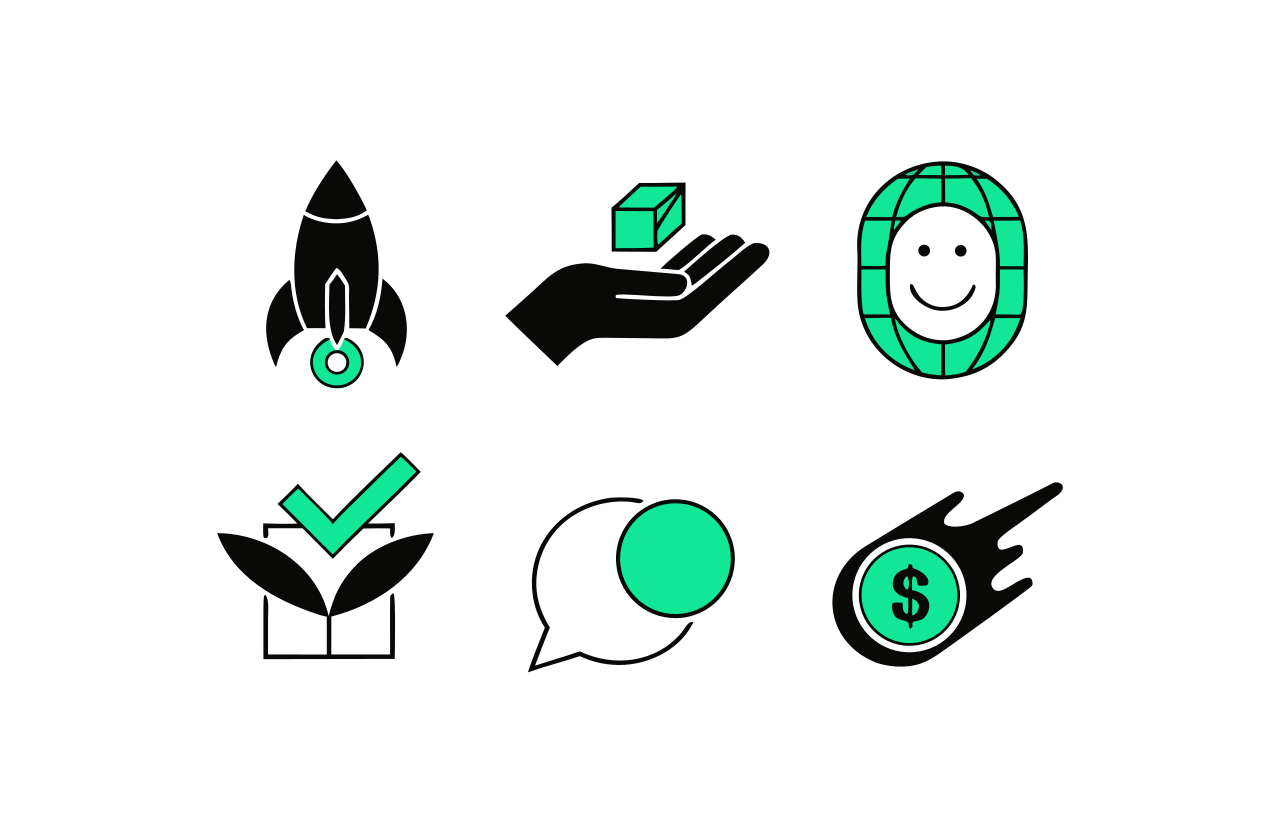
Six startup-style vector icons generated as SVG by Recraft V4 SVG

“Create a set of 6 clean vector icons in a bold minimal style: thick black outlines, flat white background, bright neon green accents only, no gradients, no shadows. Slightly playful abstract shapes, modern startup vibe. Icons: rocket launch button, hand holding a tiny cube, smiling AI face with grid overlay, checkbox growing like a plant, chat bubble with a coin, a coin with a dollar sign rolling like a comet.”

Stylized illustration

V4 can also generate illustrations with real artistic character — not just photorealism. This prompt asks for distorted proportions, a distinct style, and a vibrant color palette. The model makes its own design choices about how to interpret “levitating” and “random objects,” producing something that feels hand-drawn rather than generated:

Stylized illustration of a levitating man with vibrant colors generated by Recraft V4

“A nice modern vector illustration of a man levitating with a number of various random objects around him. Distinct style, distorted proportions and unique vibrant color palette.”

Native SVG generation

This is the really interesting part. Recraft is the only image generation model that produces native vector output — actual SVG files with real paths, structured layers, and clean geometry. Not traced rasters. Not bitmaps wrapped in an SVG container. Real, editable vector graphics.

The output opens directly in Illustrator, Figma, or Sketch. You can edit paths, recolor elements, scale to any size. No tracing, cleanup, or conversion steps.

The icon set example above demonstrates this — those six icons are a single .svg file with clean vector paths. You can drop it directly into a design tool or onto a webpage. This is useful for brand assets, icon sets, illustrations, logos, and anything that needs to scale cleanly or be edited after generation.

What’s new in V4

Most image generation models are tuned for broad general preference. V4 takes a different approach: it was developed in collaboration with designers and tuned specifically around design aesthetics and professional expectations.

In practice, this shows up in a few ways:

Art-directed composition. V4 makes choices about how elements are arranged, how colors relate to each other, and where the eye moves through the frame. When you compare its output side-by-side with other models, V4’s images tend to feel more like they were art-directed and less like stock photography.

Strong prompt accuracy. Whether your prompt is a few words or a detailed paragraph (the model accepts up to 10,000 characters), V4 follows it closely while keeping the overall image coherent.

Integrated text rendering. V4 treats typography as a structural part of the image, not an afterthought. Text interacts with the scene — bridging visual elements, responding to spatial context, and fitting naturally into the design. This is a standout feature for posters, packaging, editorial layouts, and any work where text is part of the composition.

Native vector output. The SVG models produce actual editable vector files with clean paths and structured layers. This is unique to Recraft — no other image generation model does this.

Running the models

Here’s a raster example using Replicate’s JavaScript client:

And here’s the SVG model — same API, but the output is an SVG file:

In Python:

All four models accept the same three inputs:

  • prompt — your text description (up to 10,000 characters)
  • aspect_ratio — common ratios like 1:1, 4:3, 16:9, 9:16, and more
  • size — explicit dimensions like 1024x1024, 1536x768, etc. (ignored if aspect ratio is set)

Which model should you use?

  • V4 — Fast raster output for web, social media, concept exploration, and rapid iteration.
  • V4 Pro — High-res raster for print production, large-format displays, and detailed work.
  • V4 SVG — Vector output for icons, logos, brand assets, illustrations, and anything that needs to scale or be edited.
  • V4 Pro SVG — High-detail vector for large-format print, detailed illustrations, and design system components.

Licensing

Images generated with Recraft V4 on Replicate can be used commercially. See Recraft’s terms for details.


Give them a try: Recraft V4, Recraft V4 Pro, Recraft V4 SVG, and Recraft V4 Pro SVG.