
惯性聚合 高效追踪和阅读你感兴趣的博客、新闻、科技资讯
阅读原文 在惯性聚合中打开

推荐订阅源

博客园 - Franky
U
Unit 42
MyScale Blog
MyScale Blog
B
Blog
阮一峰的网络日志
阮一峰的网络日志
量子位
IT之家
IT之家
The GitHub Blog
The GitHub Blog
F
Fortinet All Blogs
Recent Announcements
V
Visual Studio Blog
G
Google Developers Blog
Last Week in AI
Last Week in AI
雷峰网
雷峰网
博客园 - 聂微东
博客园 - 叶小钗
OSCHINA 社区最新新闻
OSCHINA 社区最新新闻
让小产品的独立变现更简单 - ezindie.com
J
Java Code Geeks
博客园 - 司徒正美
Y
Y Combinator Blog
T
The Blog of Author Tim Ferriss
月光博客
月光博客
aimingoo的专栏
aimingoo的专栏

Replicate's blog

How to make remarkable videos with Seedance 2.0 – Replicate blog How to prompt Seedream 5.0 – Replicate blog Recraft V4: image generation with design taste – Replicate blog Run Isaac 0.1 on Replicate – Replicate blog Run FLUX.2 on Replicate – Replicate blog How to prompt Nano Banana Pro – Replicate blog Retro Diffusion's pixel art models are now on Replicate – Replicate blog Replicate is joining Cloudflare – Replicate blog Extract text from documents and images with Datalab Marker and OCR – Replicate blog How to prompt Veo 3.1 – Replicate blog IBM's Granite 4.0 is now on Replicate – Replicate blog Which image editing model should I use? – Replicate blog Introducing our new search API – Replicate blog Torch compile caching for inference speed – Replicate blog Announcing Replicate's remote MCP server – Replicate blog How to prompt Veo 3 with images – Replicate blog Open source video is back – Replicate blog Generate consistent characters – Replicate blog Bria is now on Replicate – Replicate blog How we optimized FLUX.1 Kontext [dev] – Replicate blog Compare AI video models – Replicate blog The FLUX.1 Kontext hackathon – Replicate blog How to prompt Veo 3 for the best results – Replicate blog Get the most from Google Veo 3 – Replicate blog FLUX.1 Kontext from the community – Replicate blog Use FLUX.1 Kontext to edit images with words – Replicate blog Generate incredible images with Google's Imagen 4 – Replicate blog Run OpenAI’s latest models on Replicate – Replicate blog NVIDIA H100 GPUs are here – Replicate blog Run 30,000+ LoRAs on Hugging Face with Replicate – Replicate blog
Generate music from chord progressions and text prompts w...
2023-11-08 · via Replicate's blog

Posted November 8, 2023 by

MusicGen-Chord is a model that generates music in any style based on a text prompt, a chord progression, and a tempo. It is based on Meta’s MusicGen model, where we have changed the melody input to accept chords as text or audio.

For example, here are three different generations, each with the repeating chord progression “F:maj7 G E:min A:min”:

”90s euro trance, uplifting, ibiza” in 140bpm

“british jangle pop, the smiths, 1980s” in 113 bpm:

“sacred chamber choir, choral”, based on a fine-tuned model:

How does it work?

MusicGen-Chord is built on top of Meta’s MusicGen-Melody model. MusicGen-Melody conditions the generation on both a text prompt and an audio file.

In MusicGen-Melody, the audio file is source separated to remove drums and bass, and the melody is extracted by picking the most prominent pitch in the chromagram for each time step. This results in a matrix of one-hot encoded chroma vectors (i.e. vectors where each element is 0 except a single 1).
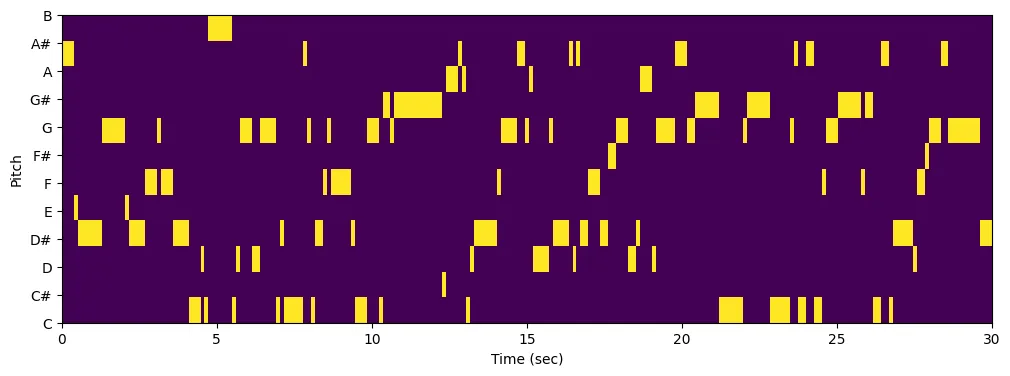
One-hot melody chromagram matrix. Yellow bins are 1, purple bins are 0.

MusicGen-Chord repurposes the melody input to pass in “multi-hot” encoded chord vectors. At each time step, the pitches belonging to the desired chord are set to 1, and the remaining pitches are 0. For example, in the chromagram below there is an Eb chord (Eb, G, Bb) followed by a G chord (D, G, B), followed by a C minor chord (C, Eb, G), etc.
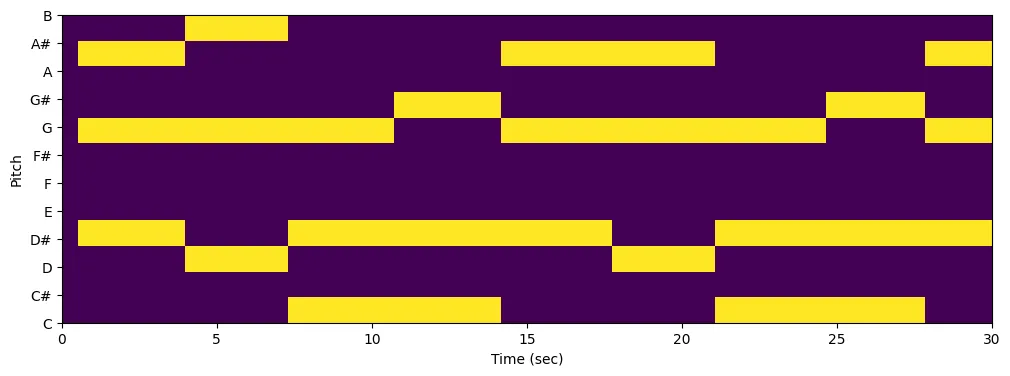
Multi-hot chord chromagram matrix. Yellow bins are 1, purple bins are 0.

As in MusicGen-Melody, MusicGen-Chord passes the chromagram as additional conditioning along with the text prompt to MusicGen. Somewhat surprisingly, this “trick” works remarkably well — MusicGen is able to render chord progressions that are consistent with the style given by the prompt.

Chord input formats

You can input chords either as text (e.g. C D:min G:7 C) or audio. If you input chords as text you also have control over tempo and time signature.

The syntax for the text_chords input is a list of chords separated by spaces. Each chord lasts for a single bar, but you can add multiple chords in a bar by separating them with commas. A chord is defined by ROOT:TYPE. Valid chord types are maj, min, dim, aug, min6, maj6, min7, minmaj7, maj7, 7, dim7, hdim7, sus2 and sus4. If you omit the chord type it defaults to major. For example:

  • B:min G F# E:min (listen)
  • G:maj7 D:min7,G:7 C:maj7 F:7 B:min7,Bb:7 A:min7,D:7 (listen)

When you pass an input audio file, chords are recognized using A Bi-Directional Transformer for Musical Chord Recognition.

Run MusicGen-Chord

You can run MusicGen-Chord using Replicate’s API. Here’s an example using the replicate Python client:

And of course you can run it on the web as well, at replicate.com/sakemin/musicgen-chord.

We’d love to hear what you create with MusicGen-Chord, whether you use it to generate new music, as a backing track for vocals, for remixes, or something completely different.

Let us know what you make on X or Discord.