

惯性聚合 高效追踪和阅读你感兴趣的博客、新闻、科技资讯
阅读原文 在惯性聚合中打开

推荐订阅源

Microsoft Azure Blog
H
Hacker News: Front Page
A
About on SuperTechFans
云风的 BLOG
云风的 BLOG
aimingoo的专栏
aimingoo的专栏
Martin Fowler
Martin Fowler
博客园 - 叶小钗
Last Week in AI
Last Week in AI
Recent Announcements
P
Palo Alto Networks Blog
Webroot Blog
Webroot Blog
Hacker News: Ask HN
Hacker News: Ask HN
IT之家
IT之家
K
KPMG report finds enterprise disconnect between AI and its ROI | CIO
T
Threat Research - Cisco Blogs
C
CERT Recently Published Vulnerability Notes
Google DeepMind News
Hugging Face - Blog
Hugging Face - Blog
H
Help Net Security
P
Privacy & Cybersecurity Law Blog
C
Cisco Blogs
罗磊的独立博客
The GitHub Blog
The GitHub Blog
M
MIT News - Artificial intelligence
人人都是产品经理
人人都是产品经理
The Cloudflare Blog
Y
Y Combinator Blog
AWS News Blog
AWS News Blog
H
Hackread – Cybersecurity News, Data Breaches, AI and More
钛媒体:引领未来商业与生活新知
钛媒体:引领未来商业与生活新知
K
Kaspersky official blog
博客园 - 司徒正美
Threat Intelligence Blog | Flashpoint
Security Archives - TechRepublic
The Last Watchdog
The Last Watchdog
Jina AI
Jina AI
MyScale Blog
MyScale Blog
TaoSecurity Blog
TaoSecurity Blog
大猫的无限游戏
大猫的无限游戏
cs.CL updates on arXiv.org
Cisco Talos Blog
Cisco Talos Blog
美团技术团队
T
Tor Project blog
cs.CV updates on arXiv.org
博客园 - 【当耐特】
博客园 - 聂微东
V2EX - 技术
V2EX - 技术
I
Intezer
V
Visual Studio Blog
酷 壳 – CoolShell
酷 壳 – CoolShell

Replicate's blog

How to make remarkable videos with Seedance 2.0 – Replicate blog How to prompt Seedream 5.0 – Replicate blog Recraft V4: image generation with design taste – Replicate blog Run Isaac 0.1 on Replicate – Replicate blog Run FLUX.2 on Replicate – Replicate blog How to prompt Nano Banana Pro – Replicate blog Retro Diffusion's pixel art models are now on Replicate – Replicate blog Replicate is joining Cloudflare – Replicate blog Extract text from documents and images with Datalab Marker and OCR – Replicate blog How to prompt Veo 3.1 – Replicate blog IBM's Granite 4.0 is now on Replicate – Replicate blog Which image editing model should I use? – Replicate blog Introducing our new search API – Replicate blog Torch compile caching for inference speed – Replicate blog Announcing Replicate's remote MCP server – Replicate blog How to prompt Veo 3 with images – Replicate blog Open source video is back – Replicate blog Generate consistent characters – Replicate blog Bria is now on Replicate – Replicate blog How we optimized FLUX.1 Kontext [dev] – Replicate blog Compare AI video models – Replicate blog The FLUX.1 Kontext hackathon – Replicate blog How to prompt Veo 3 for the best results – Replicate blog Get the most from Google Veo 3 – Replicate blog FLUX.1 Kontext from the community – Replicate blog Use FLUX.1 Kontext to edit images with words – Replicate blog Generate incredible images with Google's Imagen 4 – Replicate blog Run OpenAI’s latest models on Replicate – Replicate blog NVIDIA H100 GPUs are here – Replicate blog Run 30,000+ LoRAs on Hugging Face with Replicate – Replicate blog Ideogram 3.0 on Replicate – Replicate blog Run MiniMax Speech-02 models with an API – Replicate blog Easel AI is now on Replicate – Replicate blog Stylized video with Wan2.1 – Replicate blog Creative roundup: avatars, lightsabers, and LoRA tricks – Replicate blog Wan2.1: generate videos with an API – Replicate blog Wan2.1 parameter sweep – Replicate blog You can now fine-tune open-source video models – Replicate blog Generate short videos with the Replicate playground – Replicate blog AI video is having its Stable Diffusion moment – Replicate blog FLUX fine-tunes are now fast – Replicate blog FLUX.1 Tools – Control and steerability for FLUX – Replicate blog NVIDIA L40S GPUs are here – Replicate blog Ideogram v2 is an outstanding new inpainting model – Replicate blog Stable Diffusion 3.5 is here – Replicate blog FLUX is fast and it's open source – Replicate blog FLUX1.1 [pro] is here – Replicate blog Using synthetic training data to improve Flux finetunes – Replicate blog Fine-tune FLUX.1 with an API – Replicate blog Fine-tune FLUX.1 to create images of yourself – Replicate blog Replicate Intelligence #12 – Replicate blog Replicate Intelligence #11 – Replicate blog Fine-tune FLUX.1 with your own images – Replicate blog Replicate Intelligence #10 – Replicate blog FLUX.1: First Impressions – Replicate blog Replicate Intelligence #9 – Replicate blog Run FLUX with an API – Replicate blog Replicate Intelligence #8 – Replicate blog Run Meta Llama 3.1 405B with an API – Replicate blog Replicate Intelligence #7 – Replicate blog Replicate Intelligence #6 – Replicate blog Replicate Intelligence #5 – Replicate blog How to get the best results from Stable Diffusion 3 – Replicate blog Run Stable Diffusion 3 on your Apple Silicon Mac – Replicate blog Push a custom version of Stable Diffusion 3 – Replicate blog Replicate Intelligence #4 – Replicate blog Run Stable Diffusion 3 on your own machine with ComfyUI – Replicate blog H100s are coming to Replicate – Replicate blog Run Stable Diffusion 3 with an API – Replicate blog Replicate Intelligence #3 – Replicate blog Replicate Intelligence #2 – Replicate blog Replicate Intelligence #1 – Replicate blog Shared network vulnerability disclosure – Replicate blog Run Snowflake Arctic with an API – Replicate blog Run Meta Llama 3 with an API – Replicate blog Run Code Llama 70B with an API – Replicate blog How to create an AI narrator for your life – Replicate blog Clone your voice using open-source models – Replicate blog Businesses are building on open-source AI – Replicate blog How to run Yi chat models with an API – Replicate blog Scaffold Replicate apps with one command – Replicate blog Using open-source models for faster and cheaper text embeddings – Replicate blog Generate music from chord progressions and text prompts with MusicGen-Chord – Replicate blog Generate images in one second on your Mac using a latent consistency model – Replicate blog How to use retrieval augmented generation with ChromaDB and Mistral – Replicate blog Fine-tune MusicGen to generate music in any style – Replicate blog Jet-setting with Llama 2 + Grammars – Replicate blog How to run Mistral 7B with an API – Replicate blog Make smooth AI generated videos with AnimateDiff and an interpolator – Replicate blog Fine-tuned models now boot in less than one second – Replicate blog Painting with words: a history of text-to-image AI – Replicate blog We're cutting our prices in half – Replicate blog A guide to prompting Llama 2 – Replicate blog Streaming output for language models – Replicate blog Fine-tune SDXL with your own images – Replicate blog Run Llama 2 with an API – Replicate blog Run SDXL with an API – Replicate blog A comprehensive guide to running Llama 2 locally – Replicate blog Fine-tune Llama 2 on Replicate – Replicate blog What happened with Llama 2 in the last 24 hours? 🦙 – Replicate blog
Introducing LoRA: A faster way to fine-tune Stable Diffusion – Replicate blog
2023-02-07 · via Replicate's blog

Last year, DreamBooth was released. It was a way to train Stable Diffusion on your own objects or styles.

A few short months later, Simo Ryu has created a new image generation model that applies a technique called LoRA to Stable Diffusion. Similar to DreamBooth, LoRA lets you train Stable Diffusion using just a few images, and it generates new output images with those objects or styles. Unlike DreamBooth, LoRA is fast: While DreamBooth takes around twenty minutes to run and produces models that are several gigabytes, LoRA trains in as little as eight minutes and produces models that are around 5MB.

LoRA stands for Low-Rank Adaptation, a mathematical technique to reduce the number of parameters that are trained. You can think of it like creating a diff of the model, instead of saving the whole thing. LoRA was developed by researchers at Microsoft, and Simo has applied it to Stable Diffusion. Check out the README for Simo’s inference model on GitHub and the paper on arXiv to learn more about how it works.

We’ve been collaborating with Simo to get LoRA up on Replicate. You can now train LoRA models in the cloud with a single API call. Unlike DreamBooth where you had to wait for a model to push and boot up, LoRA predictions run instantly with no cold boots.
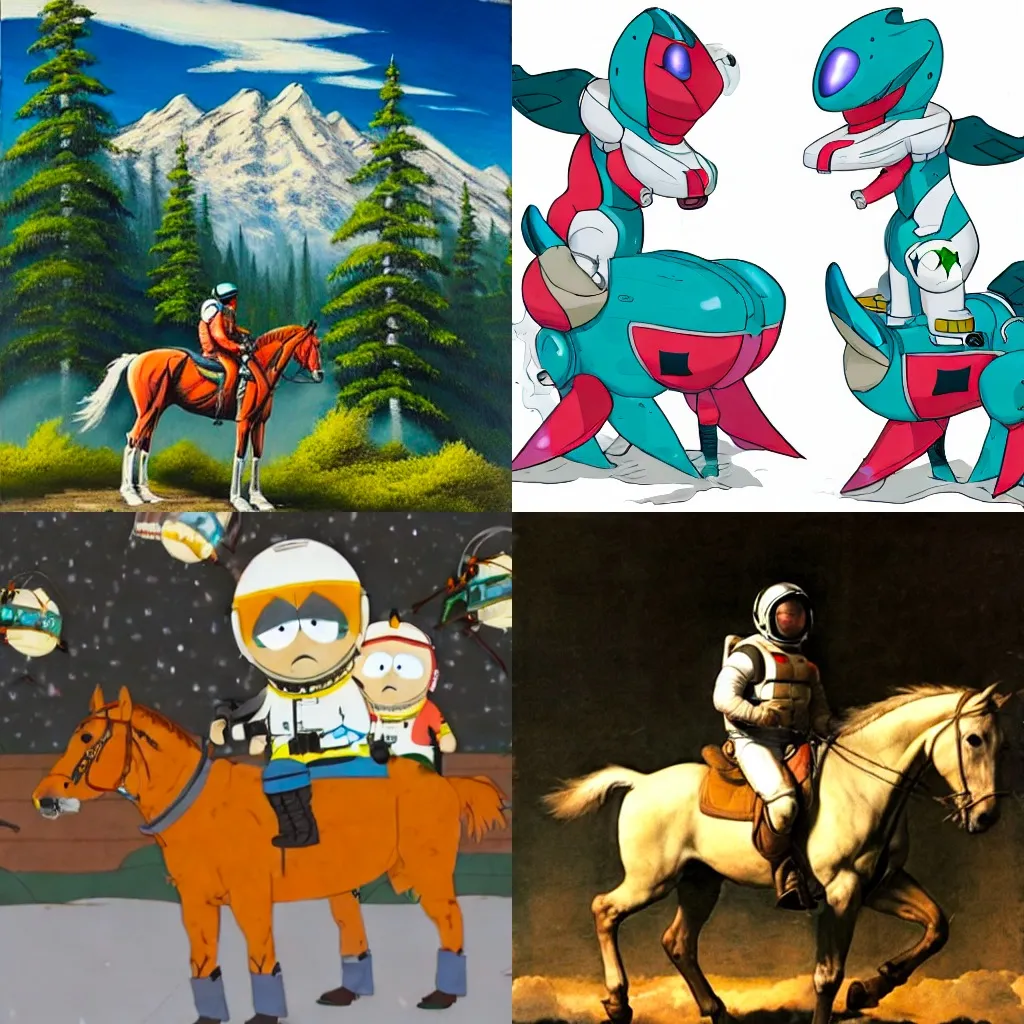
Example impages from LoRA trainings

What’s unique about LoRA?

LoRA has a few differences from DreamBooth that make it especially appealing as an alternative:

  • Faster training: Training a new concept with LoRA takes just a few minutes.
  • Smaller outputs: Trained LoRA outputs are much smaller than DreamBooth outputs. This makes them easier to share, store, and re-use.
  • Multiple concepts: You can combine multiple trained concepts in a single image. (This feature is still experimental, but we’re working on improving it. 🧪)
  • Faster image generation: When you train your own DreamBooth model on Replicate, the model only stays warm when you’re actively using it. With LoRA, you’re not running your own model, but rather running the one cloneofsimo/lora model, which is always on and ready to serve predictions.
  • Better at styles, worse at faces. Based on our experimentation, LoRA seems to do a better job at styles than DreamBooth, but faces aren’t as good. They are stuck in uncanny valley, rather than looking precisely like the person. Your results might be better than ours though, so let us know how you get on.

How to use LoRA

🐴 To get an idea of what’s possible, check out the LoRA examples page, where you can play around with some of our pretrained concepts like Bob Ross, Pokemon, South Park, Caravaggio, and more.

To train your own reusable LoRA concept, you’ll do the following:

  1. Gather training images in a zip file.
  2. Upload your training images to a publicly accessible URL.
  3. Use one of LoRA’s training models to train your concept.
  4. Save the URL of your trained output.
  5. Use LoRA’s prediction model to generate new images with your trained concept.

Step 1: Gather training images

To train a new LoRA concept, create a zip file with a few images of the same face, object, or style. 5-10 images are enough, but for styles you may get better results if you have 20-100 examples. Many of the recommendations for training DreamBooth also apply to LoRA. The training images can be JPGs or PNGs.

💡 Give your zip file a meaningful name, as it will be included as part of the filename of the trained output. This will make it easier to identify and differentiate from other training outputs later.

Step 2: Upload training images

LoRA’s training model expects your images to be accessible over HTTP at a public URL. You can use a service like Google Drive, Amazon S3, or GitHub Pages to host your zip file.

Step 3: Train your concept

There are two LoRA training models on Replicate:

Start by using the lora-training model to train your concept. Here’s an example Python script that uses the training model to train a new concept:

Step 4: Save the URL of your trained output

The output of each training run is a single .safetensors file at an HTTPS URL that we host indefinitely.

For example, https://replicate.delivery/pbxt/S8wVSt0vXr5mEFDjP5XkmMPjLPCaDmv1Rw6AzRMDEhoFqqGE/tmp_fs4evyhbob-ross.safetensors

Copy the URL of that trained concept file from your prediction response so you can use it as an input to LoRA’s prediction model.

Step 5: Generate images

Now that you’ve got a trained concept, it’s time to generate some new images! You can generate an image based on a single trained concept, or use multiple trained concepts together.

The prediction model replicate/lora requires two inputs:

  • prompt: A prompt that contains the string <1> where the trained concept should be, e.g. an astronaut riding a horse in the style of <1>. Use <2>, <3> if you’re passing multiple URLs to the lora_urls input.
  • lora_urls: The URL or URLs of your trained LoRA concept(s) you copied in the previous step. You can pass a single URL, or a list of URLs separated by a pipe character |. Passing multiple URLs allows you to combine multiple concepts into a single image.

You can run LoRA’s prediction model from your browser:

LoRA web prediction

You can also run LoRA’s prediction model using Replicate. Here’s an example Python script that uses the API to generate a new image:

Next steps

In the next couple of weeks we’ll add support for training LoRA on Stable Diffusion 2.1, inpainting, and other cool things. Let us know your ideas!

If you want to share your LoRA models with the community or see what others come up with, join the #lora channel in our Discord.