



惯性聚合 高效追踪和阅读你感兴趣的博客、新闻、科技资讯
阅读原文 在惯性聚合中打开

推荐订阅源

IT之家
IT之家
奇客Solidot–传递最新科技情报
奇客Solidot–传递最新科技情报
大猫的无限游戏
大猫的无限游戏
美团技术团队
OSCHINA 社区最新新闻
OSCHINA 社区最新新闻
博客园_首页
MyScale Blog
MyScale Blog
N
Netflix TechBlog - Medium
I
InfoQ
Jina AI
Jina AI
Martin Fowler
Martin Fowler
Recent Announcements
量子位
月光博客
月光博客
罗磊的独立博客
雷峰网
雷峰网
The Cloudflare Blog
V
V2EX
小众软件
小众软件
人人都是产品经理
人人都是产品经理
博客园 - Franky
T
Tailwind CSS Blog
有赞技术团队
有赞技术团队
S
SegmentFault 最新的问题

Replicate's blog

How to make remarkable videos with Seedance 2.0 – Replicate blog How to prompt Seedream 5.0 – Replicate blog Recraft V4: image generation with design taste – Replicate blog Run Isaac 0.1 on Replicate – Replicate blog Run FLUX.2 on Replicate – Replicate blog How to prompt Nano Banana Pro – Replicate blog Retro Diffusion's pixel art models are now on Replicate – Replicate blog Replicate is joining Cloudflare – Replicate blog Extract text from documents and images with Datalab Marker and OCR – Replicate blog How to prompt Veo 3.1 – Replicate blog IBM's Granite 4.0 is now on Replicate – Replicate blog Which image editing model should I use? – Replicate blog Introducing our new search API – Replicate blog Torch compile caching for inference speed – Replicate blog Announcing Replicate's remote MCP server – Replicate blog How to prompt Veo 3 with images – Replicate blog Open source video is back – Replicate blog Generate consistent characters – Replicate blog Bria is now on Replicate – Replicate blog How we optimized FLUX.1 Kontext [dev] – Replicate blog Compare AI video models – Replicate blog The FLUX.1 Kontext hackathon – Replicate blog How to prompt Veo 3 for the best results – Replicate blog Get the most from Google Veo 3 – Replicate blog FLUX.1 Kontext from the community – Replicate blog Use FLUX.1 Kontext to edit images with words – Replicate blog Generate incredible images with Google's Imagen 4 – Replicate blog Run OpenAI’s latest models on Replicate – Replicate blog NVIDIA H100 GPUs are here – Replicate blog Run 30,000+ LoRAs on Hugging Face with Replicate – Replicate blog
FLUX.1 Tools – Control and steerability for FLUX – Replic...
2024-11-21 · via Replicate's blog

Posted November 21, 2024 by

The team at Black Forest Labs is back with FLUX.1 Tools, a new set of models that add control and steerability to their FLUX text-to-image model.

The FLUX.1 Tools lineup includes four new features:

  • Fill: Inpainting and outpainting, like a magic AI paintbrush for precise edits.
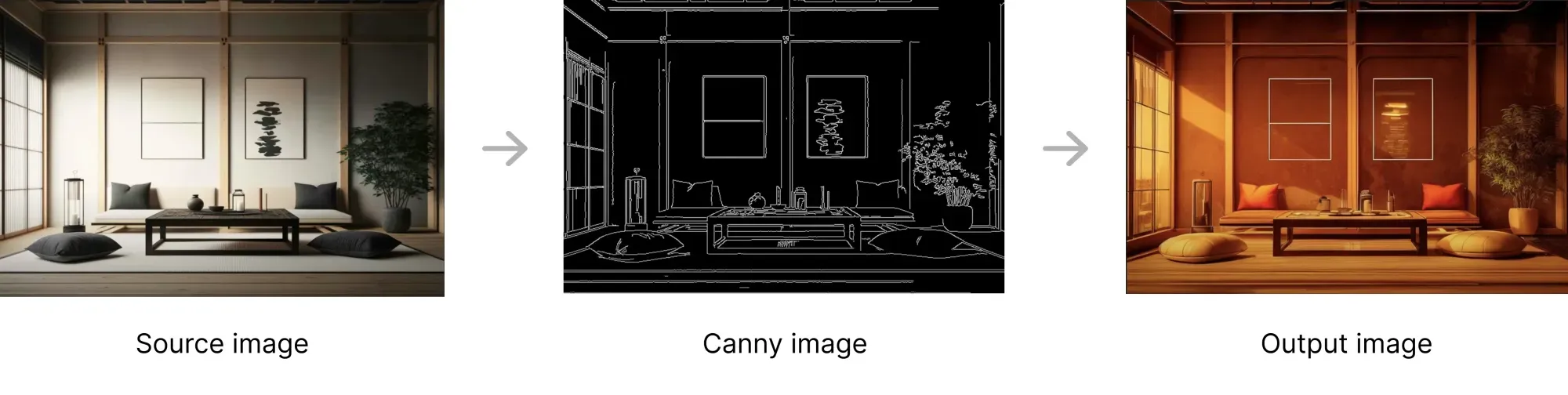
  • Canny: Use edge detection to generate images with precise structure.
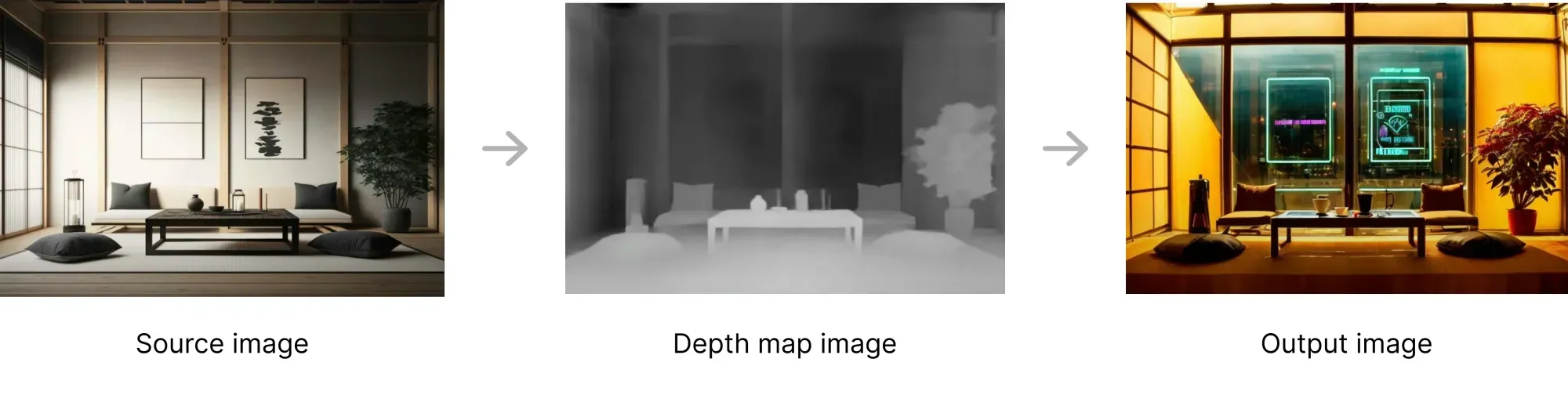
  • Depth: Use depth maps to generate images with realistic perspective.
  • Redux: An adapter for the FLUX.1 base models that you can use to create variations of images.

Each of these new features is available for both the FLUX.1 [dev] and FLUX.1 [pro] models, with Redux also available for FLUX.1 [schnell]. All of these models are now on Replicate.

FLUX Fill is great at text inpainting

One of the most exciting new features is FLUX Fill’s ability to inpaint text. Simply mask out the text you want to change and prompt for new words. FLUX Fill will inpaint that text while also matching the style of the original.

In this example we used FLUX Fill to quickly change the text “FLUX Dev” to “Fill Dev”. Our mask covered the word “FLUX”, and our prompt was:

a photo of misty woods with the text “FILL DEV”

It just works.
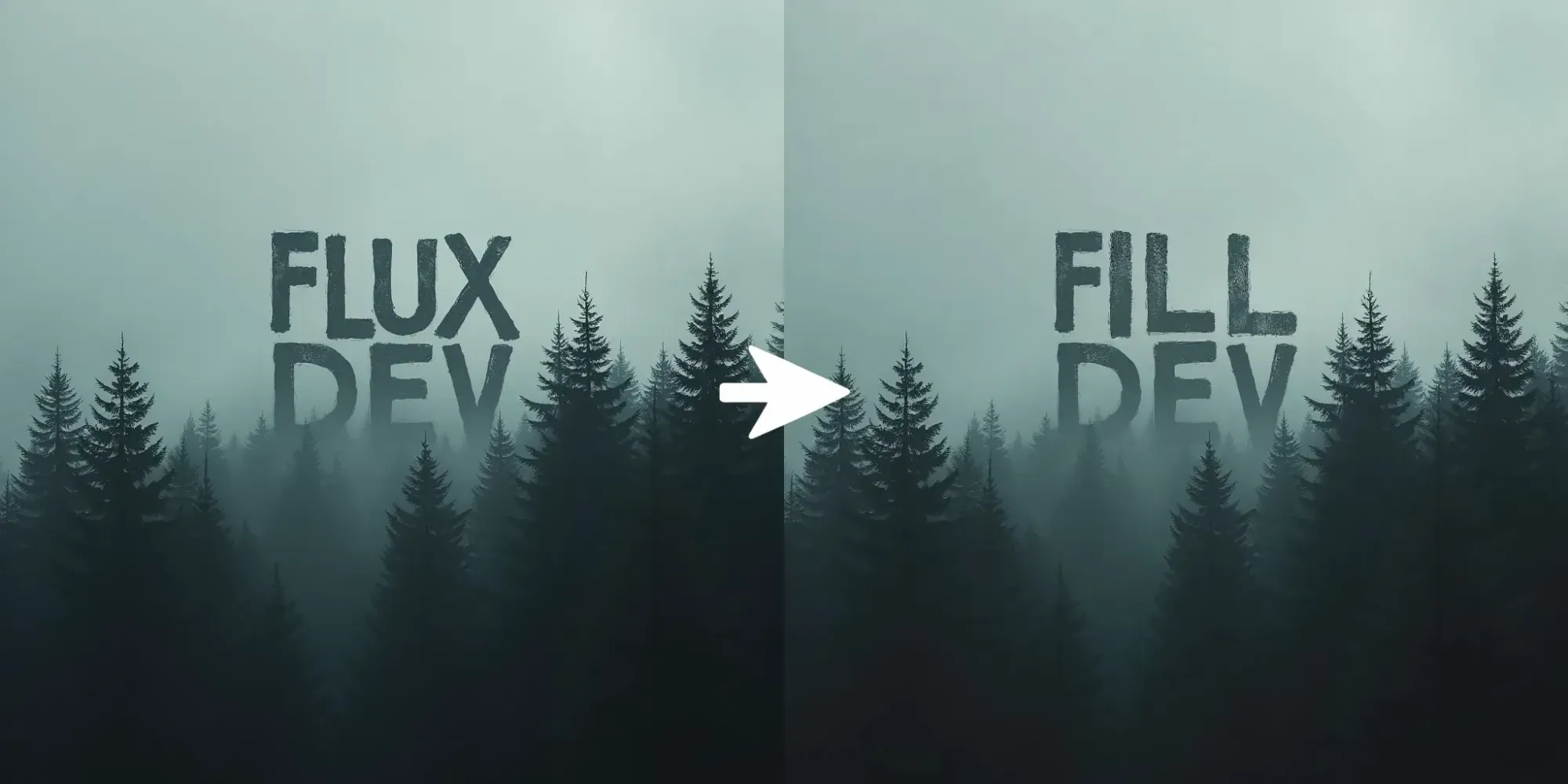
An example of FLUX Fill

All the new models

FLUX.1 [dev] models:

FLUX.1 [pro] models:

FLUX.1 [schnell] models:

FLUX Redux

You can use FLUX Redux to generate variations of images. When you give it an input image, it will generate a new version with subtle differences, while maintaining the core elements of the original.

You can also customize the output by adding a text prompt, allowing for creative restyling of existing images.

Redux is available as its own model for FLUX.1 [dev] and FLUX.1 [schnell], and will soon be available as a new feature on the pro, pro 1.1 and pro 1.1 ultra models.
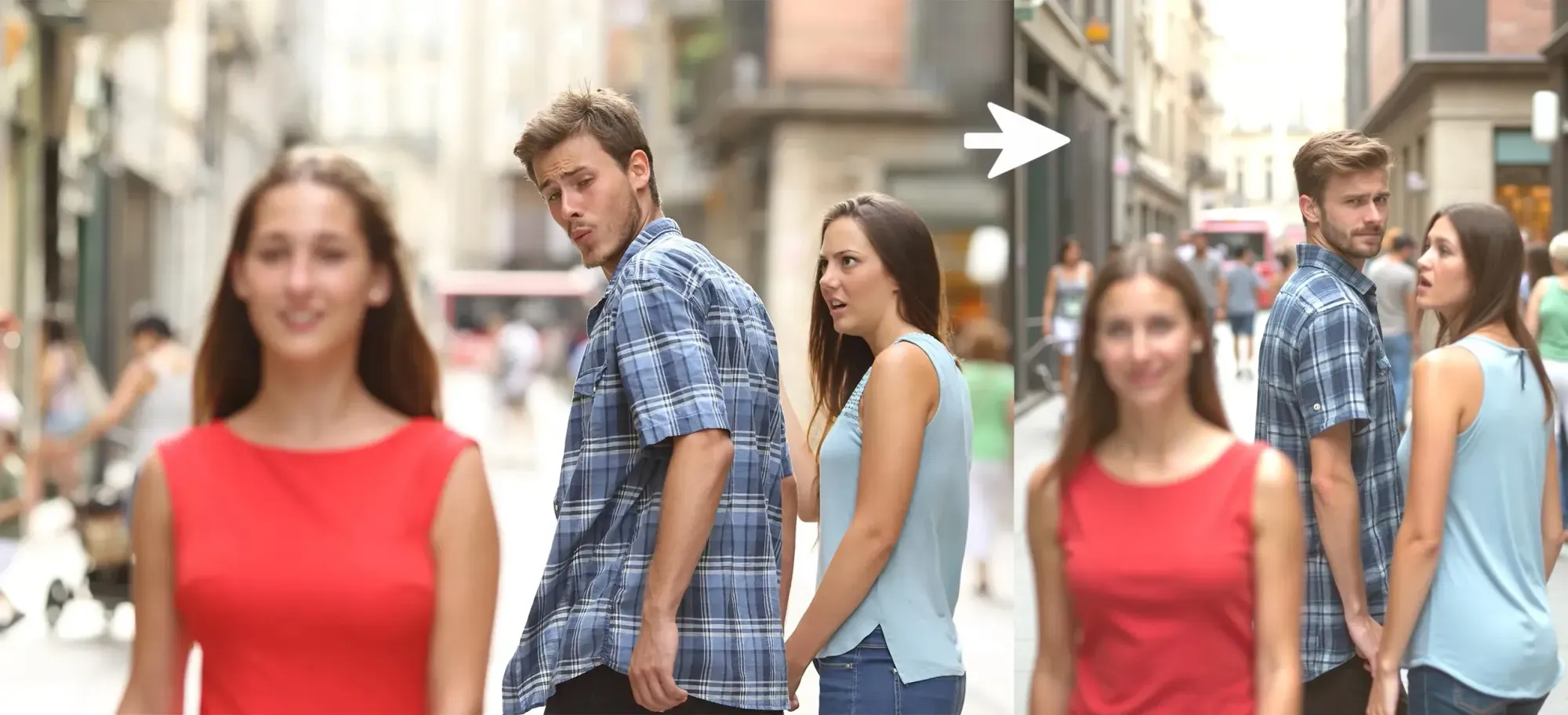
An example of FLUX Redux changing the distracted boyfriend meme

What is ControlNet?

ControlNet is an open-source tool that lets you use “conditioning images” to guide image generation models.

Combined with a text prompt, conditioning images steer the model toward producing specific results, like replicating the structure of an outline or the depth of a scene, while still allowing for creativity in the generated details.
What is ControlNet Canny?

An example of ControlNet Canny

The Canny method is a way to detect edges in an image. It simplifies a picture into lines and boundaries that show the shapes of objects. ControlNet can use these edges as a conditioning image to ensure the generated output matches the structure or outline provided. Canny edge detection is great for turning sketches or outlines into fleshed-out, detailed images. You can also use canny edge detection to preserve the edges of an existing image while generating a new variation on that image.
What is ControlNet Depth?

An example of ControlNet Depth

A depth map is a visual representation where darker and lighter areas show how far or close parts of an image are. ControlNet can use depth maps to guide a model in generating images with realistic perspective, making sure objects are arranged and sized correctly in the output.

Further reading

To learn more, check out our ControlNet guide.