


惯性聚合 高效追踪和阅读你感兴趣的博客、新闻、科技资讯
阅读原文 在惯性聚合中打开

推荐订阅源

T
The Exploit Database - CXSecurity.com
S
Secure Thoughts
A
Arctic Wolf
V
Vulnerabilities – Threatpost
S
Schneier on Security
D
Darknet – Hacking Tools, Hacker News & Cyber Security
T
Threat Research - Cisco Blogs
AWS News Blog
AWS News Blog
NISL@THU
NISL@THU
cs.CL updates on arXiv.org
P
Palo Alto Networks Blog
L
Lohrmann on Cybersecurity
Schneier on Security
Exploit-DB.com RSS Feed
Scott Helme
Scott Helme
L
LINUX DO - 最新话题
L
LangChain Blog
量子位
T
Threatpost
freeCodeCamp Programming Tutorials: Python, JavaScript, Git & More
腾讯CDC
W
WeLiveSecurity
Last Week in AI
Last Week in AI
美团技术团队
The GitHub Blog
The GitHub Blog
The Last Watchdog
The Last Watchdog
C
CERT Recently Published Vulnerability Notes
月光博客
月光博客
Cyber Security Advisories - MS-ISAC
Threat Intelligence Blog | Flashpoint
L
LINUX DO - 热门话题
Microsoft Security Blog
H
Hackread – Cybersecurity News, Data Breaches, AI and More
T
Troy Hunt's Blog
Webroot Blog
Webroot Blog
云风的 BLOG
云风的 BLOG
博客园 - 叶小钗
V2EX - 技术
V2EX - 技术
雷峰网
雷峰网
Security Latest
Security Latest
小众软件
小众软件
J
Java Code Geeks
博客园 - Franky
让小产品的独立变现更简单 - ezindie.com
Spread Privacy
Spread Privacy
cs.CV updates on arXiv.org
Recent Commits to openclaw:main
K
KPMG report finds enterprise disconnect between AI and its ROI | CIO
T
The Blog of Author Tim Ferriss
M
MIT News - Artificial intelligence

Replicate's blog

How to make remarkable videos with Seedance 2.0 – Replicate blog How to prompt Seedream 5.0 – Replicate blog Recraft V4: image generation with design taste – Replicate blog Run Isaac 0.1 on Replicate – Replicate blog Run FLUX.2 on Replicate – Replicate blog How to prompt Nano Banana Pro – Replicate blog Retro Diffusion's pixel art models are now on Replicate – Replicate blog Replicate is joining Cloudflare – Replicate blog Extract text from documents and images with Datalab Marker and OCR – Replicate blog How to prompt Veo 3.1 – Replicate blog IBM's Granite 4.0 is now on Replicate – Replicate blog Which image editing model should I use? – Replicate blog Introducing our new search API – Replicate blog Torch compile caching for inference speed – Replicate blog Announcing Replicate's remote MCP server – Replicate blog How to prompt Veo 3 with images – Replicate blog Open source video is back – Replicate blog Generate consistent characters – Replicate blog Bria is now on Replicate – Replicate blog How we optimized FLUX.1 Kontext [dev] – Replicate blog Compare AI video models – Replicate blog The FLUX.1 Kontext hackathon – Replicate blog How to prompt Veo 3 for the best results – Replicate blog Get the most from Google Veo 3 – Replicate blog FLUX.1 Kontext from the community – Replicate blog Use FLUX.1 Kontext to edit images with words – Replicate blog Generate incredible images with Google's Imagen 4 – Replicate blog Run OpenAI’s latest models on Replicate – Replicate blog NVIDIA H100 GPUs are here – Replicate blog Run 30,000+ LoRAs on Hugging Face with Replicate – Replicate blog Ideogram 3.0 on Replicate – Replicate blog Run MiniMax Speech-02 models with an API – Replicate blog Easel AI is now on Replicate – Replicate blog Stylized video with Wan2.1 – Replicate blog Creative roundup: avatars, lightsabers, and LoRA tricks – Replicate blog Wan2.1: generate videos with an API – Replicate blog Wan2.1 parameter sweep – Replicate blog You can now fine-tune open-source video models – Replicate blog Generate short videos with the Replicate playground – Replicate blog AI video is having its Stable Diffusion moment – Replicate blog FLUX fine-tunes are now fast – Replicate blog FLUX.1 Tools – Control and steerability for FLUX – Replicate blog NVIDIA L40S GPUs are here – Replicate blog Ideogram v2 is an outstanding new inpainting model – Replicate blog Stable Diffusion 3.5 is here – Replicate blog FLUX is fast and it's open source – Replicate blog FLUX1.1 [pro] is here – Replicate blog Using synthetic training data to improve Flux finetunes – Replicate blog Fine-tune FLUX.1 with an API – Replicate blog Fine-tune FLUX.1 to create images of yourself – Replicate blog Replicate Intelligence #12 – Replicate blog Replicate Intelligence #11 – Replicate blog Fine-tune FLUX.1 with your own images – Replicate blog Replicate Intelligence #10 – Replicate blog FLUX.1: First Impressions – Replicate blog Replicate Intelligence #9 – Replicate blog Run FLUX with an API – Replicate blog Replicate Intelligence #8 – Replicate blog Run Meta Llama 3.1 405B with an API – Replicate blog Replicate Intelligence #7 – Replicate blog Replicate Intelligence #6 – Replicate blog Replicate Intelligence #5 – Replicate blog How to get the best results from Stable Diffusion 3 – Replicate blog Run Stable Diffusion 3 on your Apple Silicon Mac – Replicate blog Push a custom version of Stable Diffusion 3 – Replicate blog Replicate Intelligence #4 – Replicate blog Run Stable Diffusion 3 on your own machine with ComfyUI – Replicate blog H100s are coming to Replicate – Replicate blog Run Stable Diffusion 3 with an API – Replicate blog Replicate Intelligence #3 – Replicate blog Replicate Intelligence #2 – Replicate blog Replicate Intelligence #1 – Replicate blog Shared network vulnerability disclosure – Replicate blog Run Snowflake Arctic with an API – Replicate blog Run Meta Llama 3 with an API – Replicate blog Run Code Llama 70B with an API – Replicate blog How to create an AI narrator for your life – Replicate blog Clone your voice using open-source models – Replicate blog Businesses are building on open-source AI – Replicate blog How to run Yi chat models with an API – Replicate blog Scaffold Replicate apps with one command – Replicate blog Using open-source models for faster and cheaper text embeddings – Replicate blog Generate music from chord progressions and text prompts with MusicGen-Chord – Replicate blog Generate images in one second on your Mac using a latent consistency model – Replicate blog How to use retrieval augmented generation with ChromaDB and Mistral – Replicate blog Fine-tune MusicGen to generate music in any style – Replicate blog Jet-setting with Llama 2 + Grammars – Replicate blog How to run Mistral 7B with an API – Replicate blog Make smooth AI generated videos with AnimateDiff and an interpolator – Replicate blog Fine-tuned models now boot in less than one second – Replicate blog Painting with words: a history of text-to-image AI – Replicate blog We're cutting our prices in half – Replicate blog A guide to prompting Llama 2 – Replicate blog Streaming output for language models – Replicate blog Fine-tune SDXL with your own images – Replicate blog Run Llama 2 with an API – Replicate blog Run SDXL with an API – Replicate blog A comprehensive guide to running Llama 2 locally – Replicate blog Fine-tune Llama 2 on Replicate – Replicate blog What happened with Llama 2 in the last 24 hours? 🦙 – Replicate blog
Build a robot artist for your Discord server with Stable Diffusion, Replicate, and Fly.io – Replicate blog
2022-08-25 · via Replicate's blog

Soon after VQGAN-CLIP was released last year, somebody made a bot in #the-faraday-cage on Eleuther’s Discord that ran the model. You asked it to !imagine something, and then VQGAN-CLIP responded with its weird interpretation of your request.

It was thrilling. This was the first playground for text to image models, the first place where people could prompt computers to produce art. And, it was hilarious! Instead of the model being locked up in a Colab, it was a hundred people in a room playing with it together. People were riffing off each other’s ideas, patting each other on the back, laughing at each other’s outputs. This is where the “unreal engine”, “artstation”, and other prompt hacks appeared. Somebody saw somebody else do something neat, and then the prompt meme reproduced.

We’ve come a long way since four-eared faceless rabbits. Earlier this week, we were blessed with the weights from The Great A100 Cluster. So, let’s put them to good use.
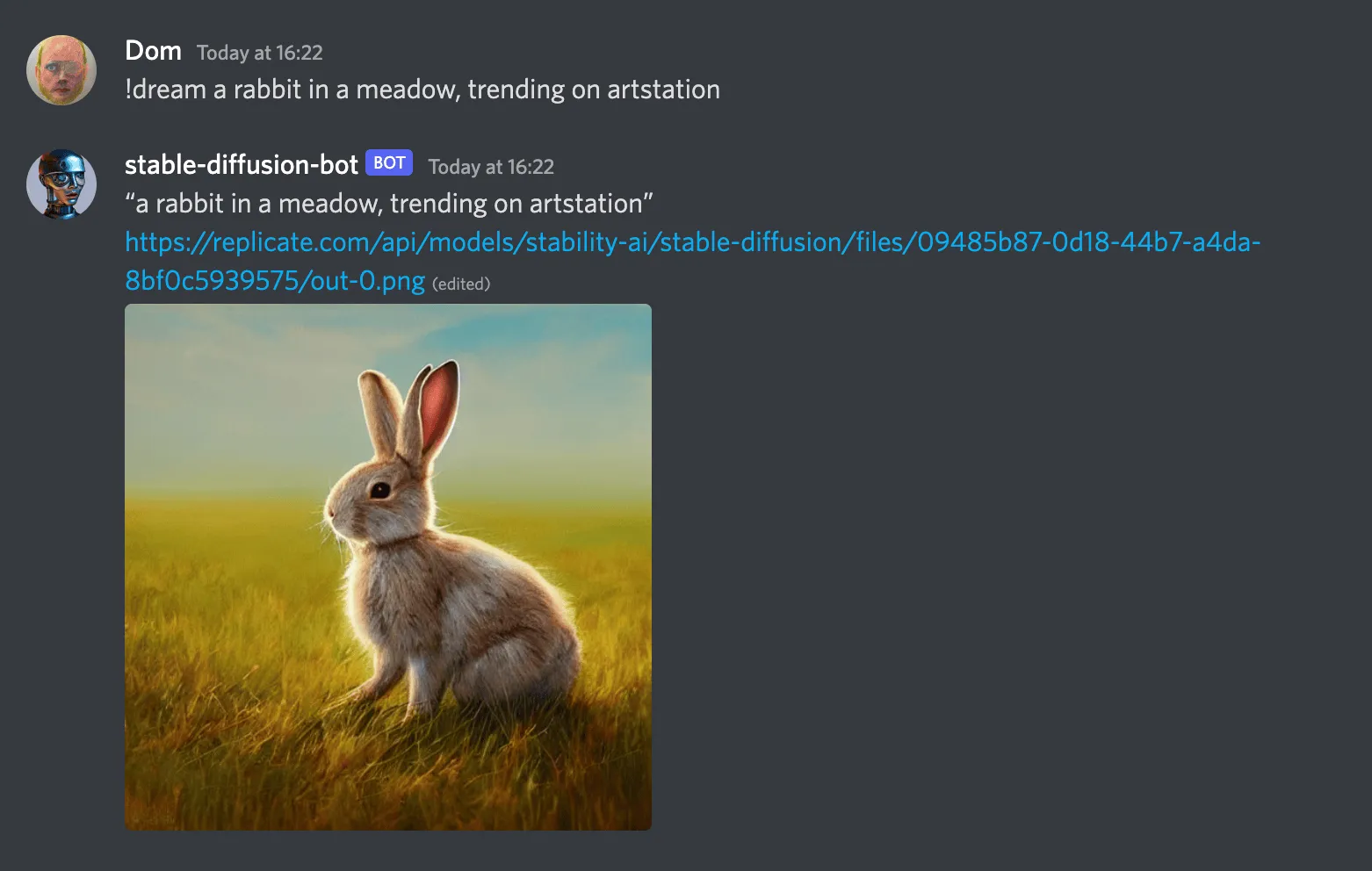
a screenshot of the stable-diffusion-bot generating a cute rabbit in Discord

This guide will show you how to create your own Discord bot with Stable Diffusion, so you can have a much better robot artist in your own Discord server.

We’ll use Replicate to run the model so you don’t need to have a GPU, and we’ll deploy it to Fly.io so you can keep it running all the time, even when your computer’s off.

Prerequisites

Set up a Discord Bot account

Follow discord.py’s guide to set up a Discord Bot account. Give it a name like stable-diffusion-bot. At the end of the first section, you’ll need to turn on the “message content intent” option on the bot page. That permission is needed for your bot to read the content of messages, to get the prompts!

In the second half of the guide (“Inviting your bot”) when it tells you to “tick the permissions required for your bot to function”, you’ll want to give the bot permission to “Send messages”.

Write some code

This section walks you through steps required to set up a codebase.

🐇 Want to skip ahead? If you’d rather not copy and paste all the code below, then you can clone the replicate/discord-bot-tutorial-code GitHub repo to start with a working project template.

Create a project directory

Define Python dependencies

Next you’ll define some of the Python package dependencies needed by your project.

Create a new file called requirements.txt and paste in the following content:

Then install the dependencies:

Configure environment and secrets

Create a file named .env. This text file will be used to store secrets for your development environment. Paste in the following:

Visit replicate.com/account to copy and paste your API token.

The Discord token is the token you copied when creating your bot from the Discord guide. If you don’t have it, you can generate a new one by visiting discord.com/applications, selecting your bot application, selecting “Bot” from the side menu, and clicking “Reset Token”.

✋ The .env file contains secrets, so it should not be shared with anyone. If you’re planning to turn your project into a Git repository, be sure to create a .gitignore file and add .env to it.

Write the bot

Create a new file called bot.py and paste the following code into it:

This file defines the command for your bot (!dream) and how it works. When you want to make changes to your bot later, this will be the file you come back to.

Run your bot locally

Now that you’ve written the code for your bot, it’s time to run it!

Run this command to start your bot locally:

Use the bot

Check your bot is running by typing !help into one of the channels on your Discord server. Your bot should respond with the list of commands it can run, including !dream.

Now try generating an image:

Your bot should write a message saying “Generating…”, and then 20–40 seconds later it should swap out that message for the newly generated image. 🥳

Deploy your bot with Fly.io

Running your bot locally is convenient, especially when you’re actively working on it. The downside, however, is that it can only run when you’re online. If you’re building a bot for a server, you probably want it to be online even when you aren’t.

There are lots of ways to deploy an application like this. Some of the easiest are services like Vercel, Fly.io or Heroku. In this tutorial, you’ll use Fly to deploy the bot to the cloud.

To get started, see Fly’s “speedrun” guide to install the flyctl command-line tool and create a Fly account.

Then create a new file called Dockerfile and paste the following code into it:

Then create a new Fly application:

That command will generate a new file called fly.toml, but it’s designed for running web apps so you’ll need to make a few changes. Remove the [[services]] block and everything below it. Your modified file should look something like this:

Then configure your Fly app using the secrets from your local .env file:

That’s it! Your bot is now running in the cloud.

One thing you need to do if you’re running the bot in a server is to make people who use it aware of the model’s license. You might want to add it to the server rules, or to the channel topic, or something like that.

Make it your own

Now might be a good time to tinker with the bot a bit. Some ideas:

Get creative! Share what you’ve built in our Discord and we’ll feature some of our favorite things. 🪄