


惯性聚合 高效追踪和阅读你感兴趣的博客、新闻、科技资讯
阅读原文 在惯性聚合中打开

推荐订阅源

D
DataBreaches.Net
T
Threatpost
N
News and Events Feed by Topic
PCI Perspectives
PCI Perspectives
V2EX - 技术
V2EX - 技术
D
Docker
G
Google Developers Blog
Microsoft Security Blog
N
News and Events Feed by Topic
cs.AI updates on arXiv.org
Google Online Security Blog
The GitHub Blog
The GitHub Blog
Hacker News - Newest:
Hacker News - Newest: "LLM"
Y
Y Combinator Blog
M
MIT News - Artificial intelligence
Blog — PlanetScale
Blog — PlanetScale
博客园 - 司徒正美
T
Troy Hunt's Blog
Webroot Blog
Webroot Blog
Security Archives - TechRepublic
量子位
Apple Machine Learning Research
H
Help Net Security
F
Full Disclosure
B
Blog
O
OpenAI News
H
Hackread – Cybersecurity News, Data Breaches, AI and More
博客园_首页
Google DeepMind News
Exploit-DB.com RSS Feed
Engineering at Meta
Engineering at Meta
大猫的无限游戏
大猫的无限游戏
Forbes - Security
Forbes - Security
Know Your Adversary
Know Your Adversary
B
Blog RSS Feed
MongoDB | Blog
MongoDB | Blog
Scott Helme
Scott Helme
T
The Exploit Database - CXSecurity.com
博客园 - 聂微东
cs.CV updates on arXiv.org
The Last Watchdog
The Last Watchdog
Recorded Future
Recorded Future
IT之家
IT之家
Project Zero
Project Zero
Stack Overflow Blog
Stack Overflow Blog
小众软件
小众软件
Attack and Defense Labs
L
Lohrmann on Cybersecurity
SecWiki News
SecWiki News
让小产品的独立变现更简单 - ezindie.com

Deno

Deno 2.8 | Deno Claw Patrol: an open-source security firewall for agents | Deno Fresh 2.3: Zero JS by default, View Transitions, and Temporal support | Deno Deno 2.7: Temporal API, Windows ARM, and npm overrides | Deno Build a dinosaur runner game with Deno, pt. 6 | Deno Build a dinosaur runner game with Deno, pt. 5 | Deno Deno Deploy is Generally Available | Deno Introducing Deno Sandbox | Deno Build a dinosaur runner game with Deno, pt. 4 | Deno Build a dinosaur runner game with Deno, pt. 3 | Deno Build a dinosaur runner game with Deno, pt. 2 | Deno React / Next.js Denial-of-Service Vulnerability: Deno Deploy users protected | Deno Deno 2.6: dx is the new npx | Deno Build a dinosaur runner game with Deno, pt. 1 | Deno React Server Functions / Next.js Vulnerability: Deno Deploy users protected | Deno My highlights from the new Deno Deploy | Deno Deno's Other Open Source Projects | Deno How Deno protects against npm exploits | Deno Help Us Raise $200k to Free JavaScript from Oracle | Deno Deno 2.5: Permissions in the config file | Deno Fresh 2.0 Graduates to Beta, Adds Vite Support | Deno Deno 2.4: deno bundle is back | Deno JavaScript™ Trademark Update | Deno What's coming to JavaScript | Deno A brief history of JavaScript | Deno Reports of Deno's Demise Have Been Greatly Exaggerated | Deno An Update on Fresh | Deno How Plaid migrated 100 services to a new database platform 5x faster with Deno | Deno Deno 2.3: Improved deno compile, local npm packages, and more | Deno Add JSR packages with pnpm and Yarn | Deno Zero-config Debugging with Deno and OpenTelemetry | Deno Exploring Art with TypeScript, Jupyter, Polars, and Observable Plot | Deno Deno v Oracle Update 3: Fighting the JavaScript Trademark | Deno Build a custom RAG AI agent in TypeScript and Jupyter | Deno How to get deep traces in your Node.js backend with OTel and Deno | Deno toranoana.deno #20 登録受付中(2025年3月14日) | Deno Node just added TypeScript support. What does that mean for Deno? | Deno The Dino 🦕, the Llama 🦙, and the Whale 🐋 | Deno Publish a lint rule, get a prize | Deno Deno 2.2: OpenTelemetry, Lint Plugins, node:sqlite | Deno If you're not using npm specifiers, you're doing it wrong | Deno How Deno's documentation is evolving | Deno Oracle justified its JavaScript trademark with Node.js—now it wants that ignored | Deno Introducing the JSR open governance board | Deno Intro to Wasm in Deno | Deno Announcing OpenAI on JSR | Deno Deno in 2024 | Deno Goodbye WinterCG, welcome WinterTC | Deno Build a SolidJS app with Deno | Deno Run your Next.js SSR app on Deno Deploy | Deno Solve Advent of Code 2024 with Deno and Win Prizes! | Deno Deno v. Oracle: Canceling the JavaScript Trademark | Deno Deno 2.1: Wasm Imports and other enhancements | Deno Build a Typesafe API with tRPC and Deno | Deno Self-contained Executable Programs with Deno Compile | Deno Build a Database App with Drizzle ORM and Deno | Deno Introducing your new JavaScript package manager: Deno | Deno Announcing Growthbook on JSR | Deno Build an Astro site with Deno | Deno How to convert CommonJS to ESM | Deno Announcing Deno 2 | Deno The Final Touches: What’s New In v2.0.0-rc.10 | Deno Announcing Stable V8 Bindings for Rust | Deno Deno 2.0 Release Candidate | Deno Secure, efficient private npm registries with Cloudsmith and Deno | Deno Painting the Plane as We Fly It: Designing JSR | Deno Introducing Web Cache API support on Deno Deploy | Deno Deno 1.46: The Last 1.x Release | Deno Protect your cloud spend with new Deno Deploy spend limits | Deno What we got wrong about HTTP imports | Deno Benchmarking AWS Lambda Cold Starts Across JavaScript Runtimes | Deno Announcing Supabase on JSR | Deno Deno 1.45: Workspace and Monorepo Support | Deno Introducing KV Backup for Deno Subhosting | Deno A Gentle Intro to TypeScript | Deno Announcing Hono on JSR | Deno How We Made the Deno Language Server Ten Times Faster | Deno How the Guardian uses Deno to audit accessibility and performance across their 2.7 million articles | Deno Introducing More Flexible Domain Association for Deno Subhosting | Deno The stabilization process of the Standard Library has begun | Deno Deno 1.44: Private npm registries, improved Node.js compat, and performance boosts | Deno How we built a secure, performant, multi-tenant cloud platform to run untrusted code | Deno The Deno Standard Library is now available on JSR | Deno How to document your JavaScript package | Deno Your Low Code Solution Needs an Escape Hatch | Deno Deno 1.43: Improved Language Server performance | Deno How Slack used Deno to save months of engineering effort in launching their new platform | Deno JSR Is Not Another Package Manager | Deno Announcing the Hookdeck SDK on JSR | Deno Announcing the Neon Serverless Driver on JSR | Deno An intro to TSConfig for JavaScript Developers | Deno How we built JSR | Deno How Netlify used Deno Subhosting to build a successful edge functions product | Deno Introducing Simpler Project Creation in Deno Deploy | Deno Deno 1.42: Better dependency management with JSR | Deno Introducing deployctl, the command line interface for Deno Deploy | Deno Introducing JSR - the JavaScript Registry | Deno How to add Monaco to a Next.js app and securely run untrusted user code | Deno Survey Results and Roadmap | Deno Deno 1.41: smaller deno compile binaries | Deno
Build your own ChatGPT-style doc search with Fresh, OpenAI, and Supabase | Deno
2023-05-11 · via Deno

After such positive reception of our SaasKit last month, we’ve teamed up with Supabase to bring you yet another Deno Fresh starter. This time, we’ve created a custom ChatGPT-style doc search using the OpenAI Text Completion API.
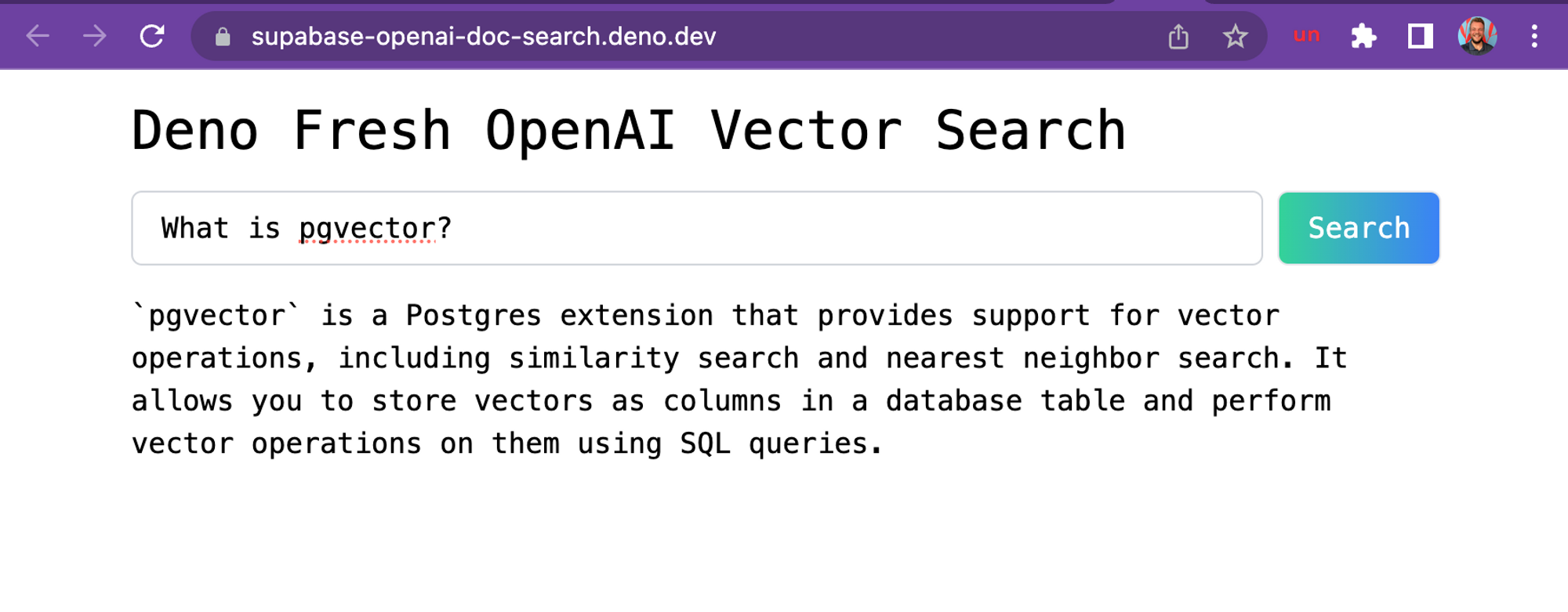
Screenshot of the chatgpt doc search.

A screenshot of the demo hosted on Deno Deploy, based off Supabase’s docs.

Supabase’s free, hosted PostgresDB is perfect to use with OpenAI’s GPT-3, since the database comes with the extension pgvector, allowing you to store embeddings and perform vector similarity search. Both of those are required for building GPT-3 apps.

If you want to dive into more details, check out this blogpost. Or you can dive right in and start building your own custom ChatGPT doc search.

Let’s start coding!

Technical Details

Building your own custom ChatGPT involves four steps:

  1. ⚡️ GitHub Action Pre-process the knowledge base (your .mdx files in your docs folder).
  2. ⚡️ GitHub Action Store embeddings in Postgres with pgvector.
  3. 🏃 Runtime Perform vector similarity search to find the content that’s relevant to the question.
  4. 🏃 Runtime Inject content into OpenAI GPT-3 text completion prompt and stream response to the client.

⚡️ GitHub Action

Step 1. and 2. happen via a GitHub Action anytime we make changes to the main branch.

When main is merged, this generate-embeddings script is executed, which performs the following tasks:

  1. Pre-process the knowledge base with the .mdx files
  2. Generate embeddings with OpenAI
  3. Store the embedding in Supabase

Here’s a workflow diagram of what happens:
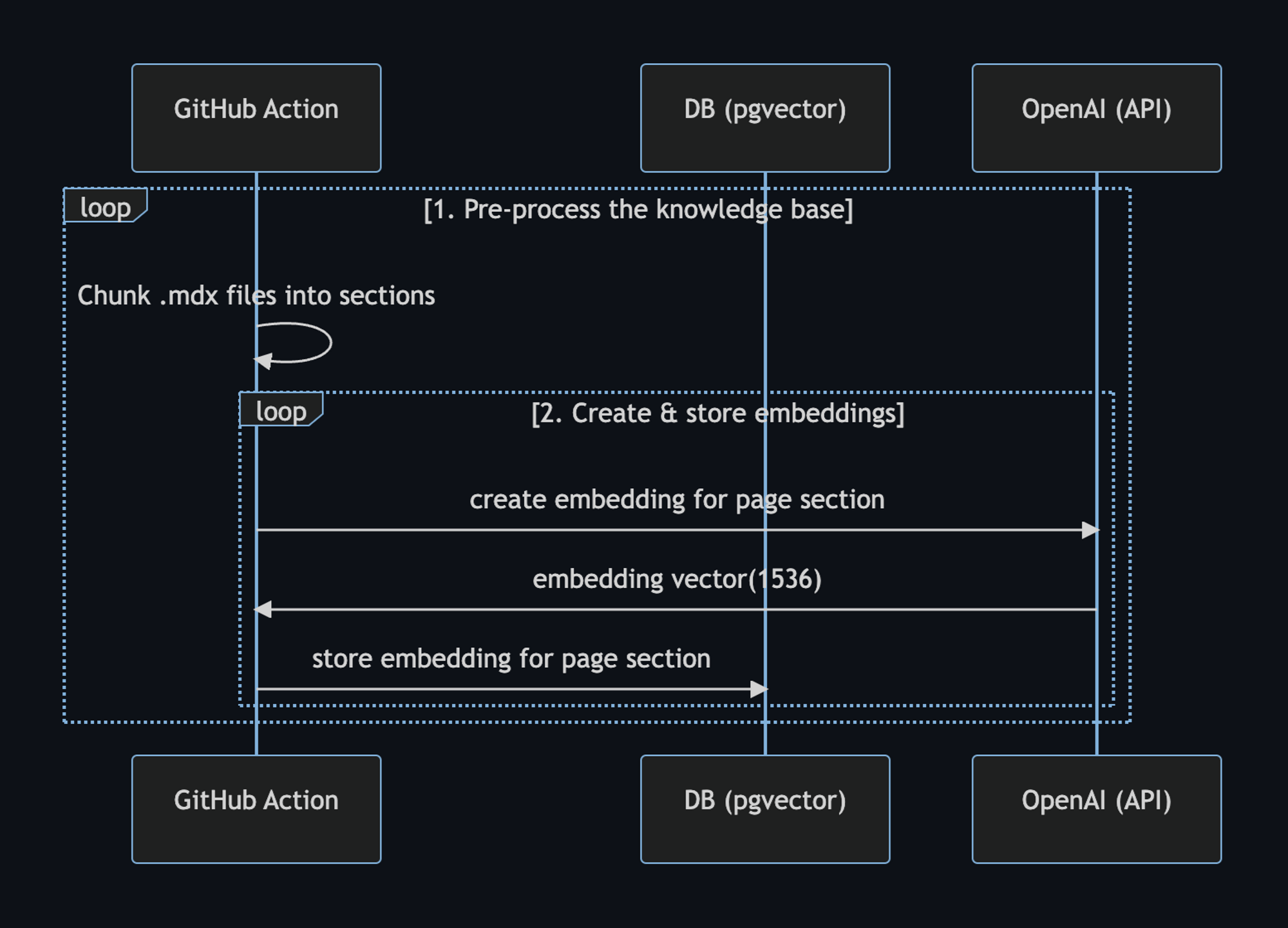
Workflow of pre processing knowledge base and generating embeddings.

We can use the setup-deno GitHub Action to execute TypScript scripts via Deno in GitHub Actions. This action allows us to also use npm specifiers.

Here’s the GitHub Action yml file:

name: Generate Embeddings

on:
  push:
    branches:
      - main
  workflow_dispatch:

jobs:
  generate-embeddings:
    runs-on: ubuntu-latest

    env:
      SUPABASE_URL: ${{ secrets.SUPABASE_URL }}
      SUPABASE_SERVICE_ROLE_KEY: ${{ secrets.SUPABASE_SERVICE_ROLE_KEY }}
      OPENAI_KEY: ${{ secrets.OPENAI_KEY }}

    steps:
      - uses: actions/checkout@v3

      - uses: denoland/setup-deno@v1
        with:
          deno-version: v1.x

      - run: deno task embeddings

In addition to storing the embeddings, this script generates a checksum for each of your .mdx files and stores this in another database table to make sure the embeddings are only regenerated when the file has changed.

🏃 Runtime

Step 3. and 4. happen at runtime, anytime the user submits a question. When this happens, the following sequence of tasks is performed:

  1. Edge function receives the query and generates an embedding for the query with OpenAI
  2. The embedding vector is used to perform a vector similarity search on Supabase with pgvector, which returns the relevant docs
  3. The docs and query is sent to OpenAI and the response is streamed to the client

Here’s a workflow diagram describing the steps in further detail:
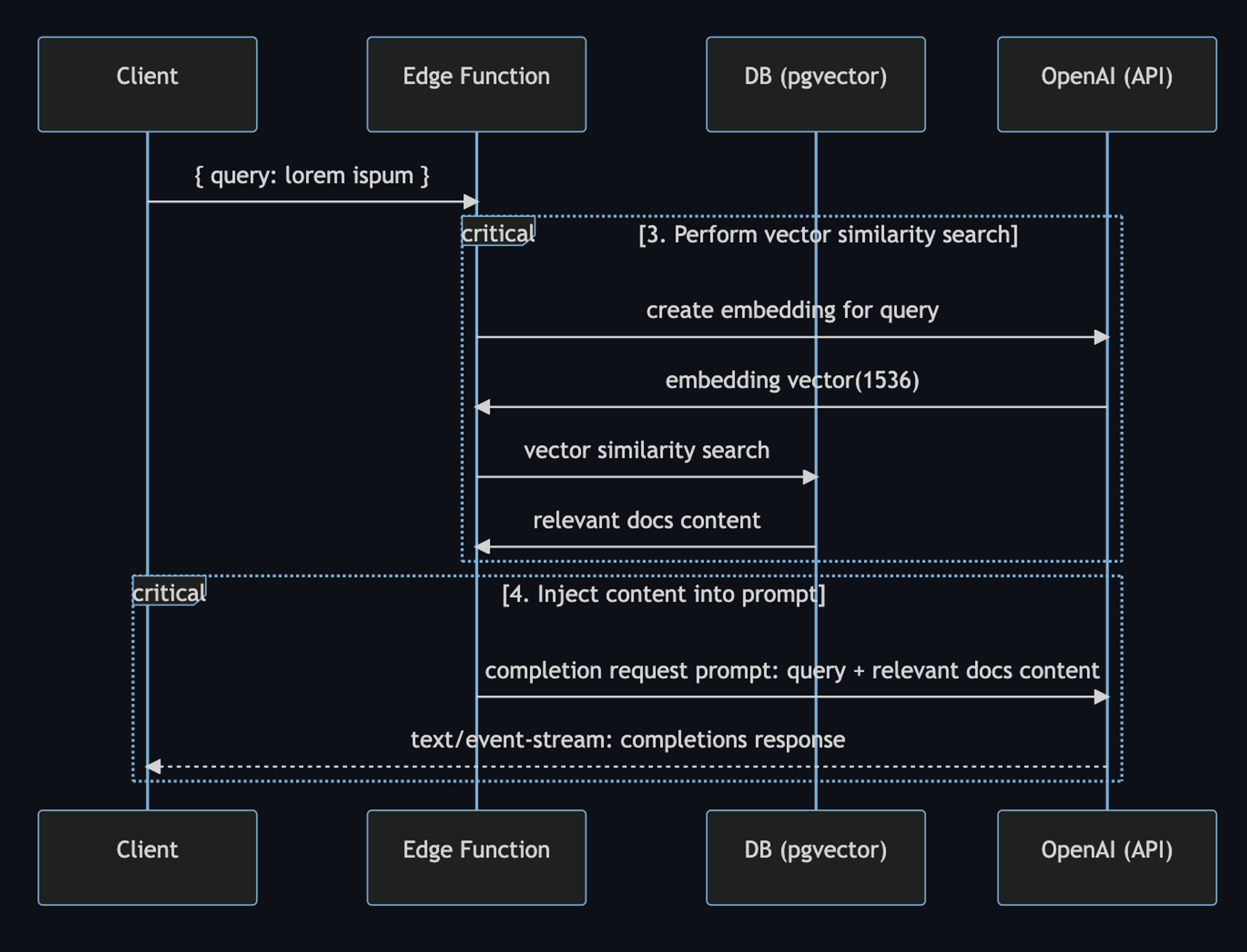
Workflow at runtime

In the code, the user prompt begins with the SearchDialog island.

Then, the vector-search API endpoint generates the embedding, then performs the vector search on Supabase. When it gets the response with relevant docs, it assembles the prompt for OpenAI:

const prompt = codeBlock`
${oneLine`
  You are a very enthusiastic Supabase representative who loves
  to help people! Given the following sections from the Supabase
  documentation, answer the question using only that information,
  outputted in markdown format. If you are unsure and the answer
  is not explicitly written in the documentation, say
  "Sorry, I don't know how to help with that."
`}

Context sections:
${contextText}

Question: """
${sanitizedQuery}
"""

Answer as markdown (including related code snippets if available):
`;

const completionOptions: CreateCompletionRequest = {
  model: "text-davinci-003",
  prompt,
  max_tokens: 512,
  temperature: 0,
  stream: true,
};


const response = await fetch("https://api.openai.com/v1/completions", {
  headers: {
    Authorization: `Bearer ${OPENAI_KEY}`,
    "Content-Type": "application/json",
  },
  method: "POST",
  body: JSON.stringify(completionOptions),
});


return new Response(response.body, {
  headers: {
    ...corsHeaders,
    "Content-Type": "text/event-stream",
  },
});

Finally, the SearchDialog island uses the EventSource web API to process server-sent events that are returned from the OpenAI API. This is what allows us to stream the response to the client as it is being generated from OpenAI:

const onSubmit = (e: Event) => {
  e.preventDefault();
  answer.value = "";
  isLoading.value = true;

  const query = new URLSearchParams({ query: inputRef.current!.value });
  const eventSource = new EventSource(`api/vector-search?${query}`);

  eventSource.addEventListener("error", (err) => {
    isLoading.value = false;
    console.error(err);
  });
  eventSource.addEventListener("message", (e: MessageEvent) => {
    isLoading.value = false;

    if (e.data === "[DONE]") {
      eventSource.close();
      return;
    }

    const completionResponse: CreateCompletionResponse = JSON.parse(e.data);
    const text = completionResponse.choices[0].text;

    answer.value += text;
  });

  isLoading.value = true;
};

What’s next?

This is the full power of open source and the modern web coming together right here at your fingertips. Try it out now, we can’t wait to see what you will build!

Here are additional resources to learn about building with OpenAI and ChatGPT.

Finally, we’d like to thank Asher Gomez for his contribution on this project.

Don’t miss any updates - follow us on Twitter!