



惯性聚合 高效追踪和阅读你感兴趣的博客、新闻、科技资讯
阅读原文 在惯性聚合中打开

推荐订阅源

T
The Blog of Author Tim Ferriss
S
Securelist
D
Docker
The Register - Security
GbyAI
GbyAI
Recorded Future
Recorded Future
Engineering at Meta
Engineering at Meta
Stack Overflow Blog
Stack Overflow Blog
云风的 BLOG
云风的 BLOG
P
Proofpoint News Feed
罗磊的独立博客
博客园 - 【当耐特】
F
Full Disclosure
WordPress大学
WordPress大学
腾讯CDC
小众软件
小众软件
大猫的无限游戏
大猫的无限游戏
D
DataBreaches.Net
SecWiki News
SecWiki News
L
Lohrmann on Cybersecurity
I
InfoQ
MyScale Blog
MyScale Blog
量子位
Cyberwarzone
Cyberwarzone
博客园 - 三生石上(FineUI控件)
The Hacker News
The Hacker News
F
Fortinet All Blogs
freeCodeCamp Programming Tutorials: Python, JavaScript, Git & More
Jina AI
Jina AI
博客园_首页
H
Help Net Security
K
Kaspersky official blog
酷 壳 – CoolShell
酷 壳 – CoolShell
Threat Intelligence Blog | Flashpoint
www.infosecurity-magazine.com
Webroot Blog
Webroot Blog
Blog — PlanetScale
Blog — PlanetScale
V
Vulnerabilities – Threatpost
Y
Y Combinator Blog
The Cloudflare Blog
P
Proofpoint News Feed
V
Visual Studio Blog
C
Cyber Attacks, Cyber Crime and Cyber Security
T
Tailwind CSS Blog
爱范儿
爱范儿
P
Privacy International News Feed
Security Archives - TechRepublic
The GitHub Blog
The GitHub Blog
C
Cybersecurity and Infrastructure Security Agency CISA
B
Blog RSS Feed

Deno

Deno 2.8 | Deno Claw Patrol: an open-source security firewall for agents | Deno Fresh 2.3: Zero JS by default, View Transitions, and Temporal support | Deno Deno 2.7: Temporal API, Windows ARM, and npm overrides | Deno Build a dinosaur runner game with Deno, pt. 6 | Deno Build a dinosaur runner game with Deno, pt. 5 | Deno Deno Deploy is Generally Available | Deno Introducing Deno Sandbox | Deno Build a dinosaur runner game with Deno, pt. 4 | Deno Build a dinosaur runner game with Deno, pt. 3 | Deno Build a dinosaur runner game with Deno, pt. 2 | Deno React / Next.js Denial-of-Service Vulnerability: Deno Deploy users protected | Deno Deno 2.6: dx is the new npx | Deno Build a dinosaur runner game with Deno, pt. 1 | Deno React Server Functions / Next.js Vulnerability: Deno Deploy users protected | Deno My highlights from the new Deno Deploy | Deno Deno's Other Open Source Projects | Deno How Deno protects against npm exploits | Deno Help Us Raise $200k to Free JavaScript from Oracle | Deno Deno 2.5: Permissions in the config file | Deno Fresh 2.0 Graduates to Beta, Adds Vite Support | Deno Deno 2.4: deno bundle is back | Deno JavaScript™ Trademark Update | Deno What's coming to JavaScript | Deno A brief history of JavaScript | Deno Reports of Deno's Demise Have Been Greatly Exaggerated | Deno An Update on Fresh | Deno How Plaid migrated 100 services to a new database platform 5x faster with Deno | Deno Deno 2.3: Improved deno compile, local npm packages, and more | Deno Add JSR packages with pnpm and Yarn | Deno Zero-config Debugging with Deno and OpenTelemetry | Deno Exploring Art with TypeScript, Jupyter, Polars, and Observable Plot | Deno Deno v Oracle Update 3: Fighting the JavaScript Trademark | Deno Build a custom RAG AI agent in TypeScript and Jupyter | Deno How to get deep traces in your Node.js backend with OTel and Deno | Deno toranoana.deno #20 登録受付中(2025年3月14日) | Deno Node just added TypeScript support. What does that mean for Deno? | Deno The Dino 🦕, the Llama 🦙, and the Whale 🐋 | Deno Publish a lint rule, get a prize | Deno Deno 2.2: OpenTelemetry, Lint Plugins, node:sqlite | Deno If you're not using npm specifiers, you're doing it wrong | Deno How Deno's documentation is evolving | Deno Oracle justified its JavaScript trademark with Node.js—now it wants that ignored | Deno Introducing the JSR open governance board | Deno Intro to Wasm in Deno | Deno Announcing OpenAI on JSR | Deno Deno in 2024 | Deno Goodbye WinterCG, welcome WinterTC | Deno Build a SolidJS app with Deno | Deno Run your Next.js SSR app on Deno Deploy | Deno Solve Advent of Code 2024 with Deno and Win Prizes! | Deno Deno v. Oracle: Canceling the JavaScript Trademark | Deno Deno 2.1: Wasm Imports and other enhancements | Deno Build a Typesafe API with tRPC and Deno | Deno Self-contained Executable Programs with Deno Compile | Deno Build a Database App with Drizzle ORM and Deno | Deno Announcing Growthbook on JSR | Deno Build an Astro site with Deno | Deno How to convert CommonJS to ESM | Deno Announcing Deno 2 | Deno The Final Touches: What’s New In v2.0.0-rc.10 | Deno Announcing Stable V8 Bindings for Rust | Deno Deno 2.0 Release Candidate | Deno Secure, efficient private npm registries with Cloudsmith and Deno | Deno Painting the Plane as We Fly It: Designing JSR | Deno Introducing Web Cache API support on Deno Deploy | Deno Deno 1.46: The Last 1.x Release | Deno Protect your cloud spend with new Deno Deploy spend limits | Deno What we got wrong about HTTP imports | Deno Benchmarking AWS Lambda Cold Starts Across JavaScript Runtimes | Deno Announcing Supabase on JSR | Deno Deno 1.45: Workspace and Monorepo Support | Deno Introducing KV Backup for Deno Subhosting | Deno A Gentle Intro to TypeScript | Deno Announcing Hono on JSR | Deno How We Made the Deno Language Server Ten Times Faster | Deno How the Guardian uses Deno to audit accessibility and performance across their 2.7 million articles | Deno Introducing More Flexible Domain Association for Deno Subhosting | Deno The stabilization process of the Standard Library has begun | Deno Deno 1.44: Private npm registries, improved Node.js compat, and performance boosts | Deno How we built a secure, performant, multi-tenant cloud platform to run untrusted code | Deno The Deno Standard Library is now available on JSR | Deno How to document your JavaScript package | Deno Your Low Code Solution Needs an Escape Hatch | Deno Deno 1.43: Improved Language Server performance | Deno How Slack used Deno to save months of engineering effort in launching their new platform | Deno JSR Is Not Another Package Manager | Deno Announcing the Hookdeck SDK on JSR | Deno Announcing the Neon Serverless Driver on JSR | Deno An intro to TSConfig for JavaScript Developers | Deno How we built JSR | Deno How Netlify used Deno Subhosting to build a successful edge functions product | Deno Introducing Simpler Project Creation in Deno Deploy | Deno Deno 1.42: Better dependency management with JSR | Deno Introducing deployctl, the command line interface for Deno Deploy | Deno Introducing JSR - the JavaScript Registry | Deno How to add Monaco to a Next.js app and securely run untrusted user code | Deno Survey Results and Roadmap | Deno Deno 1.41: smaller deno compile binaries | Deno Webhooks suck, but here are alternatives | Deno
Introducing your new JavaScript package manager: Deno | Deno
2024-11-09 · via Deno

With Deno 2, we’ve introduced several subcommands to simplify dependency management: deno add, deno remove, and deno install. These commands will feel familiar to Node users, but offer greater flexibility, allowing you to import npm and JSR packages seamlessly — even within Node projects.

In this post, we’ll cover how to manage packages with Deno’s tooling, whether you’re working with npm, JSR, or projects that have a package.json. We’ll also look at how its performance stacks up against other package managers:

  • Overview of deno add, remove, install, and uninstall
  • Integrating with Node and npm
  • Performance insights
  • Upcoming features

🚨️ Deno 2 is here. 🚨️

With backwards compatibility with Node/npm, built-in package management, all-in-one zero-config toolchain, and native TypeScript and web API support, writing JavaScript has never been simpler.

New subcommands

deno add

Use deno add to add dependencies directly to your deno.json or package.json file:

deno add jsr:@std/path npm:chalk

If no config files exist, Deno will create a deno.json with an import map:

{
  "imports": {
    "@std/path": "jsr:@std/path@^1.0.8",
    "chalk": "npm:chalk@^5.3.0"
  }
}

In projects with a package.json, npm modules will be added there instead. The command above would add "chalk": "^5.3.0" to package.json while deno.json holds JSR dependencies.

deno remove

deno remove deletes dependencies from deno.json and package.json. deno uninstall is an alias for this command. Here’s an example:

deno remove jsr:@std/path npm:chalk

For removing globally installed binaries, you can use --global:

deno remove --global file-server

deno install

Like npm install, deno install installs all dependencies listed in deno.json or package.json. If a package.json is present, npm dependencies will be installed in node_modules. Otherwise, Deno installs packages in the global cache.

deno install
Note: Deno uses hard links (like pnpm) to optimize space and speed. See the performance section for benchmarks.

Caching Dependencies

For projects with jsr:, npm:, http:, and/or https: dependencies, you can pre-cache these using the --entrypoint flag:

deno install --entrypoint main.ts

This is especially useful for production deployments, like when building a Docker container, to minimize cold start times.

Postinstall Scripts

Unlike npm, Deno doesn’t automatically run postinstall scripts. In npm, these scripts can execute untrusted code from third-party packages—posing significant security risks by allowing arbitrary code to run with full access to your system. Deno’s approach avoids this by requiring you to explicitly allow scripts.

To permit specific packages to run their postinstall scripts, use the --allow-scripts flag:

deno install --allow-scripts=npm:sqlite3

This command lets npm:sqlite3 run its postinstall script while blocking others. This setup gives you more control over which scripts, if any, can execute, protecting your system from potentially harmful or untrusted code.

Learn more about how Deno is secure-by-default with its opt-in permission system.

Package Management with Node and npm

Since Deno recognizes package.json, these subcommands work as you’d expect in a Node project. For example:

/tmp
✔ Project name: … vite-project
✔ Select a framework: › Vanilla
✔ Select a variant: › TypeScript

Scaffolding project in /private/tmp/vite-project...

Done. Now run:

  cd vite-project
  deno install
  deno run dev

/tmp
/tmp/vite-project

This compatibility means you can use Deno with a variety of JavaScript frameworks from Node and npm. Learn more about building a React app with Vite, a Next.js app with create-next-app, an Astro app, and more.

Performance

Deno uses a global cache with hard links, like pnpm, to improve speed and reduce storage usage across projects. Hard links (on Linux) and clonefile (on macOS) point to the same place on the disk as the original files, so they avoid redundant copies, while appearing in multiple locations. This means that if dependency foo occupies 1MB of space, it will appear as 1MB in both node_modules and the global store, but in reality that 1MB is only stored once. This design minimizes disk usage and speeds up installations, particularly in monorepos or projects with shared dependencies.

Here’s a comparison of installation speeds in cached and uncached settings:
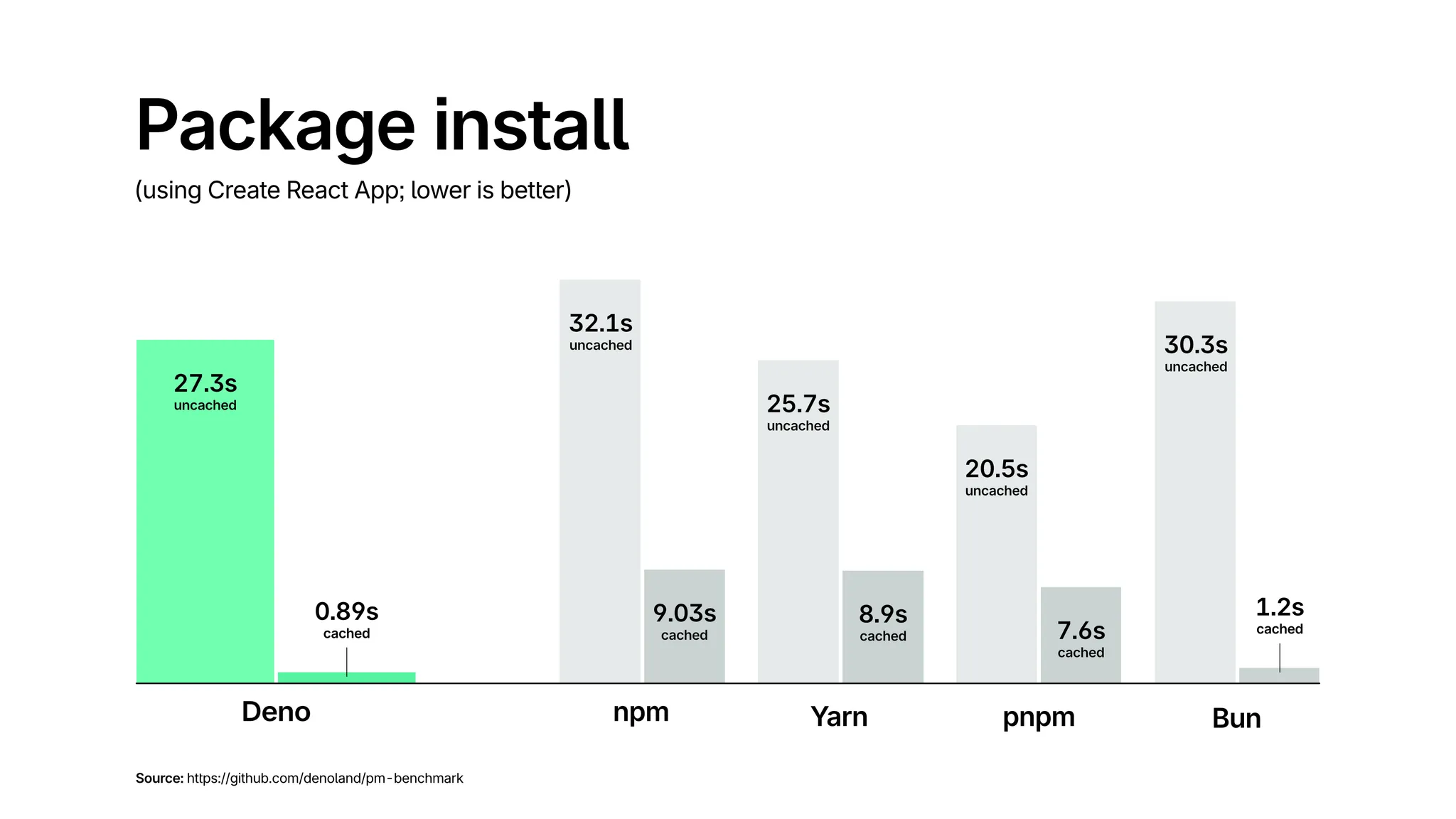
Benchmark of package installation times across various package managers

For more detail into this benchmark, please refer to this GitHub repo.

What’s Next

These new subcommands make managing dependencies faster, familiar, and versatile in both Deno and Node projects. Look out for additional features, including deno update and deno outdated, in the next release.

$ deno outdated
---------------------------------------------
Package       |  Current |   Update |  Latest
---------------------------------------------
jsr:@std/http |   ^1.0.0 |    1.0.7 |   1.0.7 
npm:react     |   17.0.2 |   17.0.2 |  18.3.1
npm:vite      |    4.5.5 |    4.5.5 |   5.4.8

$ deno outdated react
---------------------------------------------
Package       |  Current |   Update |  Latest
--------------------------------------------- 
npm:react     |   17.0.2 |   17.0.2 |  18.3.1

🚨️ Want to learn more Deno? 🚨️

Check out our new Learn Deno tutorial series, where you’ll learn:

…and more, in short, bite-sized videos. New tutorials published every Tuesday and Thursday.