











With Deno 2, we’ve introduced several subcommands to simplify dependency
management: deno add, deno remove, and deno install. These commands will
feel familiar to Node users, but offer greater flexibility, allowing you to
import npm and JSR packages seamlessly — even within Node projects.
In this post, we’ll cover how to manage packages with Deno’s tooling, whether
you’re working with npm, JSR, or projects that have a
package.json. We’ll also look at how its performance stacks up against other
package managers:
deno add, remove, install, and uninstall🚨️ Deno 2 is here. 🚨️
With backwards compatibility with Node/npm, built-in package management, all-in-one zero-config toolchain, and native TypeScript and web API support, writing JavaScript has never been simpler.
deno addUse deno add to add
dependencies directly to your deno.json or package.json file:
deno add jsr:@std/path npm:chalkIf no config files exist, Deno will create a deno.json with an import map:
{
  "imports": {
    "@std/path": "jsr:@std/path@^1.0.8",
    "chalk": "npm:chalk@^5.3.0"
  }
}
In projects with a package.json, npm modules will be added there instead. The
command above would add "chalk": "^5.3.0" to package.json while deno.json
holds JSR dependencies.
deno removedeno remove deletes
dependencies from deno.json and package.json. deno uninstall is an alias
for this command. Here’s an example:
deno remove jsr:@std/path npm:chalk
For removing globally installed binaries, you can use --global:
deno remove --global file-server
deno installLike npm install, deno install installs all dependencies listed in
deno.json or package.json. If a package.json is present, npm dependencies
will be installed in node_modules. Otherwise, Deno installs packages in the
global cache.
deno installFor projects with jsr:, npm:, http:, and/or https: dependencies, you can
pre-cache these using the --entrypoint flag:
deno install --entrypoint main.ts
This is especially useful for production deployments, like when building a Docker container, to minimize cold start times.
Unlike npm, Deno doesn’t automatically run postinstall scripts. In npm, these scripts can execute untrusted code from third-party packages—posing significant security risks by allowing arbitrary code to run with full access to your system. Deno’s approach avoids this by requiring you to explicitly allow scripts.
To permit specific packages to run their postinstall scripts, use the
--allow-scripts flag:
deno install --allow-scripts=npm:sqlite3
This command lets npm:sqlite3 run its postinstall script while blocking
others. This setup gives you more control over which scripts, if any, can
execute, protecting your system from potentially harmful or untrusted code.
Learn more about how Deno is secure-by-default with its opt-in permission system.
Since Deno recognizes package.json, these subcommands work as you’d expect in
a Node project. For example:
/tmp
✔ Project name: … vite-project
✔ Select a framework: › Vanilla
✔ Select a variant: › TypeScript

Scaffolding project in /private/tmp/vite-project...

Done. Now run:

  cd vite-project
  deno install
  deno run dev

/tmp
/tmp/vite-project
This compatibility means you can use Deno with a variety of JavaScript
frameworks from Node and npm. Learn more about
building a React app with Vite,
a Next.js app with create-next-app,
an Astro app, and
more.
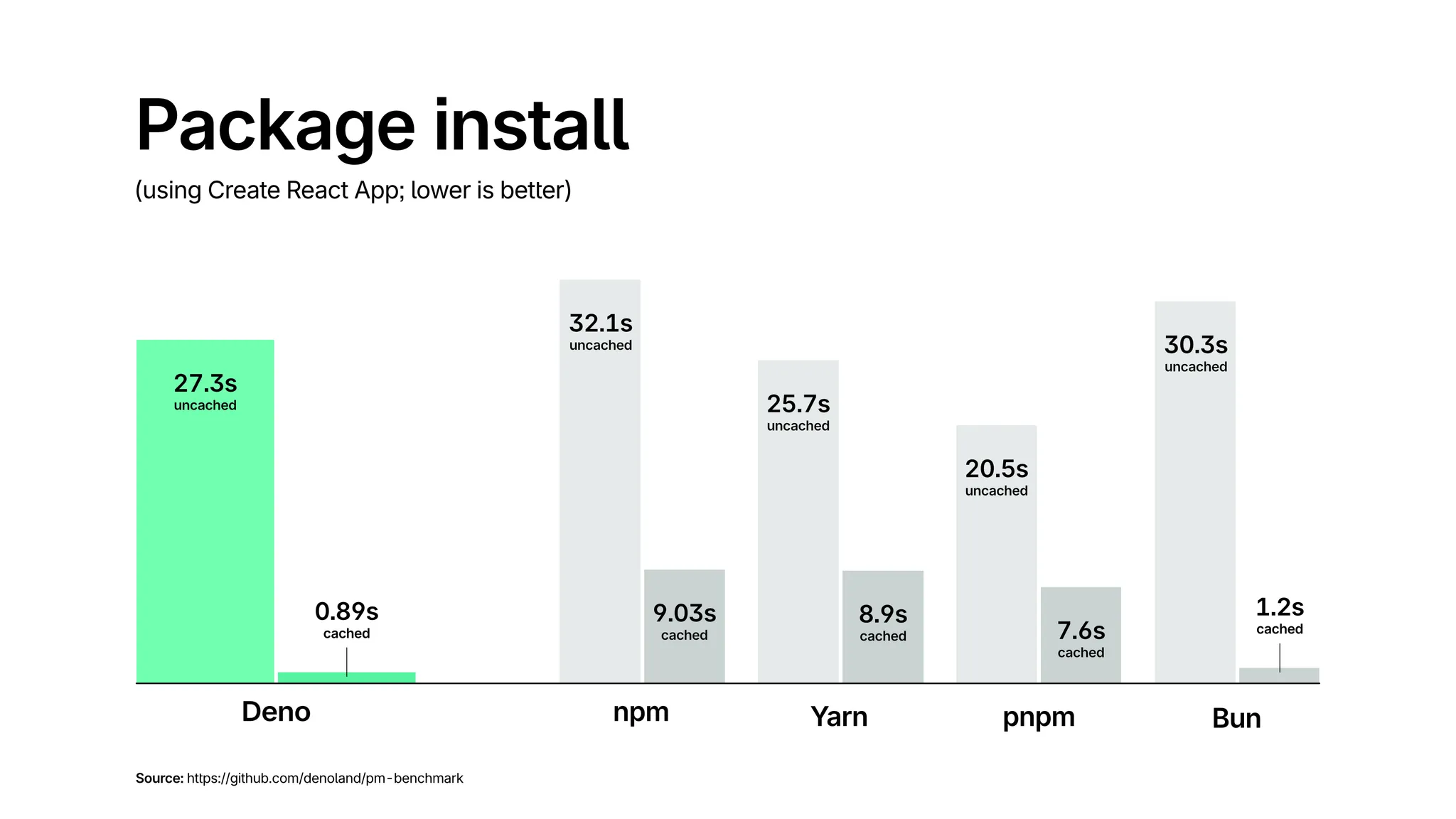
Deno uses a global cache with hard links, like pnpm, to improve speed and
reduce storage usage across projects. Hard links (on Linux) and clonefile (on
macOS) point to the same place on the disk as the original files, so they avoid
redundant copies, while appearing in multiple locations. This means that if
dependency foo occupies 1MB of space, it will appear as 1MB in both
node_modules and the global store, but in reality that 1MB is only stored
once. This design minimizes disk usage and speeds up installations, particularly
in monorepos or projects with shared dependencies.
Here’s a comparison of installation speeds in cached and uncached settings:
These new subcommands make managing dependencies faster, familiar, and versatile
in both Deno and Node projects. Look out for additional features, including
deno update and deno outdated,
in the next release.
$ deno outdated
---------------------------------------------
Package       |  Current |   Update |  Latest
---------------------------------------------
jsr:@std/http |   ^1.0.0 |    1.0.7 |   1.0.7
npm:react     |   17.0.2 |   17.0.2 |  18.3.1
npm:vite      |    4.5.5 |    4.5.5 |   5.4.8

$ deno outdated react
---------------------------------------------
Package       |  Current |   Update |  Latest
---------------------------------------------
npm:react     |   17.0.2 |   17.0.2 |  18.3.1
🚨️ Want to learn more Deno? 🚨️
Check out our new Learn Deno tutorial series, where you’ll learn:
…and more, in short, bite-sized videos. New tutorials published every Tuesday and Thursday.
此内容由惯性聚合(RSS阅读器)自动聚合整理,仅供阅读参考。 原文来自 — 版权归原作者所有。