

惯性聚合 高效追踪和阅读你感兴趣的博客、新闻、科技资讯
阅读原文 在惯性聚合中打开

推荐订阅源

博客园 - 司徒正美
OSCHINA 社区最新新闻
OSCHINA 社区最新新闻
腾讯CDC
WordPress大学
WordPress大学
爱范儿
爱范儿
GbyAI
GbyAI
酷 壳 – CoolShell
酷 壳 – CoolShell
博客园 - 聂微东
Google DeepMind News
Recent Announcements
Latest news
Latest news
Last Week in AI
Last Week in AI
V2EX - 技术
V2EX - 技术
I
InfoQ
N
News | PayPal Newsroom
SecWiki News
SecWiki News
Microsoft Azure Blog
美团技术团队
T
Troy Hunt's Blog
H
Hacker News: Front Page
S
SegmentFault 最新的问题
TaoSecurity Blog
TaoSecurity Blog
V
Visual Studio Blog
Martin Fowler
Martin Fowler
钛媒体:引领未来商业与生活新知
钛媒体:引领未来商业与生活新知
博客园_首页
S
Security @ Cisco Blogs
K
KPMG report finds enterprise disconnect between AI and its ROI | CIO
小众软件
小众软件
L
LangChain Blog
奇客Solidot–传递最新科技情报
奇客Solidot–传递最新科技情报
T
Tor Project blog
L
LINUX DO - 热门话题
月光博客
月光博客
S
Schneier on Security
Y
Y Combinator Blog
freeCodeCamp Programming Tutorials: Python, JavaScript, Git & More
CTFtime.org: upcoming CTF events
P
Proofpoint News Feed
Forbes - Security
Forbes - Security
cs.CV updates on arXiv.org
Hugging Face - Blog
Hugging Face - Blog
A
Arctic Wolf
Webroot Blog
Webroot Blog
博客园 - 叶小钗
F
Fortinet All Blogs
S
Securelist
AI
AI
B
Blog RSS Feed
Security Latest
Security Latest

VMware Blogs

Diagnostics for VMware Cloud Foundation (VCF) 9.1 with Old Versions of VCF Components Mastering Infrastructure Policies in VMware Cloud Foundation Automation 9.1 Modernizing the Private Cloud: Why VCF 9.1 Lifecycle Management is a Game Changer Announcing the VMware Cloud Foundation 9.1 Upgrade Planning Tool VCF Breakroom Chats Episode 86 – Containers Made Easy: The New “Container-as-a-Service” in VCF 9.1 Securing Your VCF 9.1 Infrastructure with the Symantec Identity Security Platform Virtually Speaking: The AI Reality Check with Dave Linthicum Zero Touch Provisioning: Activating Edge Sites with VMware Cloud Foundation Edge 9.1 VCF Breakroom Chats Episode 85 – Cloning Success at Scale: Inside VCF 9.1’s App Stack Formation VMware Cloud on AWS の使用状況を確認できる API Unlocking the Full Potential of Programmable Infrastructure with VMware Cloud Foundation 9.1 – New Features and Capabilities Smarter Patching at Scale: Vulnerability Assessment and Remediation with VMware Tanzu Platform Encrypted vMotion Offload to Intel QAT in VMware Cloud Foundation 9.1 Deepen Your Expertise: Four Key Benefits of Attending Increase Deployment Flexibility with VCF Edge Automation 1.0.3 Avi Advantage: Automating Certificate Management of VCF Workloads More Memory, Less Effort: Configuring Memory Tiering in VCF 9.1 VCF 9.1 Licensing: Programmatic, Centralized, and Built to Scale Why APJ Networking Professionals Need Private Cloud Expertise VCF 9.1 Networking: Simpler VPC Connectivity Control VCF 9.1 Networking: Exploring Network Services for Virtual Private Clouds VCF Networking 9.1: Seamless DDI Integration with Infoblox The Open Source Advantage: Building from Source for Ultimate Security Expand Shared VMDKs with Clustered Applications in VMware vSAN for VCF 9.1 Monetizing Zero-Trust Security with VCF 9.1 and VMware vDefend VMware vSAN Protection and Recovery Enhancements for VCF 9.1 Deliver Production SQL Server DBaaS with VMware Data Services Manager 9.1 Maximizing Profitability: VCF 9.1 Cost-Focused Approach for VMware Cloud Service Providers Modernizing Your Infrastructure: Introducing VMware Cloud Foundation 9.1 to VCSPs VCF 9.1 is Available: Explore the New Features in Hands-on Labs What’s New with vSphere in VMware Cloud Foundation 9.1? Non-Disruptive VMware vCenter Patching in VMware Cloud Foundation 9.1 VMware vCenter Virtual Hardware Gets an Upgrade in vSphere with VCF 9.1 AI Has Changed the Threat Landscape. Is Your Infrastructure Ready? Simplifying Storage with the New Effective Capacity View in VMware vSAN for VCF 9.1 Auto-RAID in VMware vSAN for VCF 9.1 – Comprehensive System-Managed Data Resilience Introducing VMmark 4.1: Enhanced Power Efficiency Benchmarking for Private Cloud Infrastructure Advanced Memory Tiering Enhancements in VMware Cloud Foundation 9.1 VCF 9.1 Is Here. See It in Action. 博通發布 VMware Cloud Foundation 9.1 How Broadcom Is Helping Enterprises Win the AI Security Sprint How to Prepare for the World of AI Driven Exploits Avi Innovations for VCF 9.1: Powering Kubernetes, Agentic AI and VPC Workloads VCF 9.1: The Secure, Cost-Effective Private Cloud Platform for Production AI Announcing VCF 9.1: Modern Private Cloud Built for Efficiency and Resilience Announcing VMware Cloud Foundation Edge 9.1: A Scalable, Autonomous Edge Platform Accelerate, Streamline, and Control Your Self-Service Private Cloud with VMware Cloud Foundation 9.1 Deploy Modern Apps Faster, Scale Smarter, and Lower Your TCO with VMware vSphere Kubernetes Service in VCF 9.1 Scale Smarter, Save More: Redefining Infrastructure Economics with VMware vSphere in VCF 9.1 AI with VCF 9.1 on AMD GPUs: Build with open frameworks and simplify management, at a lower TCO Streamline, Simplify and Protect all your AI workloads with VCF 9.1 Simplify Workload Connectivity and Enhance Network Scale and Performance with VCF 9.1 VMware and CrowdStrike Deliver New Integration for Cyber Recovery Workflows How Many Users Can Your LLM Server Really Handle? From Infrastructure to Agents: A Hands-On Guide to Secure Private AI with Broadcom – Part 2 The New Frontier: Leading the Cloud-Native Evolution Replicating VMware vSphere Configuration Profile Desired State Webinar Recap: Design and Architecture Considerations for VMware vSphere Kubernetes Service on VMware Cloud Foundation Kubernetes 1.36: What Actually Changed for Enterprise Platforms Enhance Lateral Security and Ingress Load Balancing for Kubernetes Workloads Avi Load Balancer Analytics: Root Cause Application Performance Issues in Minutes Analyst Insight Series #3: Policy-Driven Governance and Multi-Tenant Control Post-Quantum Readiness on VMware Cloud Foundation Registration Is Live for Las Vegas | $ave with Early-Bird May 21, 2026: What’s New in VMware Tanzu Data Intelligence 10.4 From Infrastructure to Agents: A Hands-On Guide to Secure Private AI with Broadcom – Part 1 Stop Guessing: Advanced Monitoring and Troubleshooting for Data Services CPU, Disk, Network, and Memory Workload Profiles for DVD Store Database Testing How VMware Salt Automates Compliance Across Private Cloud Analyst Insight Series #2: Operational Scalability and Lifecycle Management MCP vs. APIs: Why You Need Both for AI Applications The Real Constraint on Enterprise AI isn’t GPUs; It’s Power Deploying Harbor Service in Air-Gapped VMware Cloud Foundation 9.0 Why Enhanced DirectPath Wins for High-Performance Apps Bridging the (.Local) Gap: A Split-Domain Design for VMware Cloud Foundation Deployment Observability on VMware vSphere Kubernetes Service VMware Cloud on AWS: Introducing the Usage Report APIs Converging VMware vSphere to VMware Cloud Foundation 9.0: The Top 10 Questions Answered May 6, 2026: What’s New in Tanzu Platform 10.4: Powering Agentic Apps at Scale VMware Tanzu RabbitMQ Powers the Modern Data Lakehouse with New Spark Integration and Enterprise Tooling Tanzu Data Intelligence 10.4 Delivers AI-Driven Analytics, Unified Real-Time Operations, and Sovereign Resilience Enterprise-Ready Agents Made Simple & Safe with VMware Tanzu Platform Agent Foundations Introducing Tanzu Platform 10.4: Extending Platform as a Service to Agentic Applications How AI-Assisted Analytics in Tanzu Data Intelligence Can Help Remove the SQL Bottleneck From Prototype to Production: Securing Database MCP at Enterprise Scale The Compelling Case for a Private Cloud Data Intelligence Platform The Unification Dividend: Consolidating Database Operations on VMware Cloud Foundation The Modern Spring Workflow Is Enterprise-Ready and AI-Boosted [TAM Blog] セキュアブート証明書の有効期限切れに関する注意点と対応について Accelerate Lateral Security and Ingress Load Balancing for Kubernetes Workloads From Platform to Data: Building a Cloud-Native Developer Experience On-Prem with VMware Cloud Foundation How VMware Cloud Foundation (VCF) Training Helps Keep Top Tech Talent in APJ Build Your Case for Attending VMware Explore 2026 Spring 開発元が提供する商用サポート「VMware Tanzu® Spring Essentials」とは VMware Cloud on AWS より i7i.metal-24xl インスタンスの提供開始 VMware Advanced Memory Tiering Tips for Success VMware Cloud Foundation Edge 9.0: Two-Host Edge Site Deployment with Brownfield Import Your Database Is About to Become an AI Tool. Is It Ready? Applying GitOps Principles to Maintain Desired State Configuration using VMware vSphere Configuration Profile – Part 3 Webinar Recap: Converging VMware vSphere to VMware Cloud Foundation 9.0
Resizing VMware vCenter in VMware Cloud Foundation 9
VMware Commu · 2026-05-12 · via VMware Blogs

When you deploy the VMware vCenter appliance, you select an appliance that is suitable for the size of your environment. The option that you select determines the number of CPUs, the amount of memory, and the size of the disks for the appliance. We refer to these sizes as “t-shirt sizes” and they consist of tiny, small, medium, large, and extra-large. Disk size can use sizes default, large and extra-large.

For more information on vCenter sizing, see the documentation System Requirements for the vCenter Appliance

Resizing CPU and memory is straightforward. Simply shut down the vCenter VM and increase the CPU and memory as desired and power it back on. Resizing the disks is a little more involved and you can learn more about that process in the Knowledge Base article Increasing the disk space for the vCenter Server Appliance.

In this blog we explore options to automatically resize vCenter, including a new API introduced in VMware Cloud Foundation (VCF) 9.1. Using the new API is the preferred method once you are running vCenter version 9.1.

Important: Resizing vCenter is a one-way process and is for sizing up only. Be sure to take appropriate backups before performing any resize operation. Resizing using the API is not supported if the vCenter is running on snapshots.

Resize vCenter VCF 9.1 using API

VCF 9.1 introduces a new API that makes it even easier to resize the vCenter. A single API call and a reboot are all that is needed to scale up vCenter compute and disk sizes.

You can initiate the API using the Developer Center API Explorer within vCenter. The API is named deployment/size and uses the PATCH method to invoke the API.
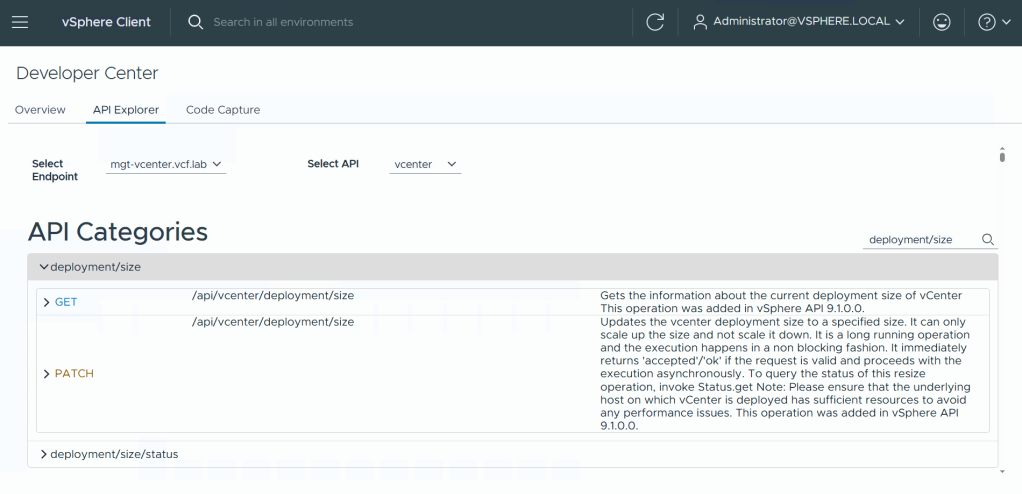
You can invoke the API directly from the API Explorer. The API requires a body of variables.
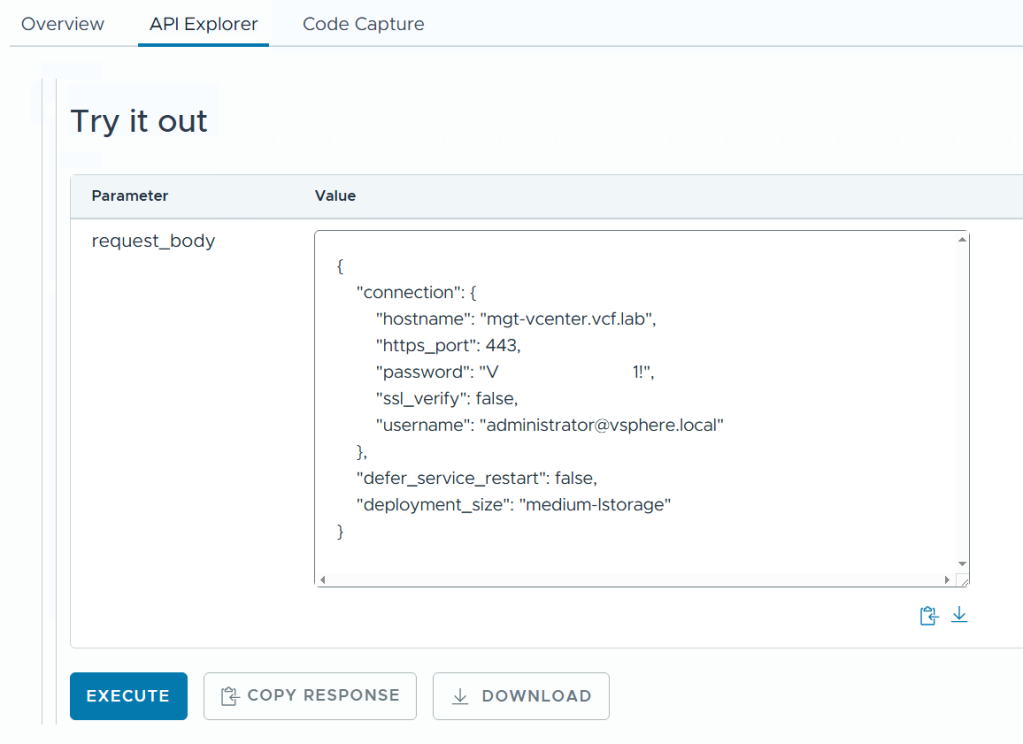
The hostname of the vCenter being resized, the https port, and the username and password of a vCenter administrator user are all required.

1

2

3

4

5

6

7

8

9

10

11

12

{

    "connection": {

        "hostname": "<vcenter_hostname>",

        "https_port": 443,

        "password": "<vcenter_sso_admin_password>",

        "ssl_verify": false,

        "username": "administrator@vsphere.local"

    },

    "defer_service_restart": false,

    "deployment_size": "<see_size_table>"

}

The value for deployment_size can be found in the table below. 

The vCenter “t-shirt” sizes small, medium, large, and extra-large all have additional sizes for large and extra-large disks. Determine the size you wish to resize vCenter to and use the appropriate string from the deployment_size API value column.

Sizedeployment_size(string)CPU (vCPU)Memory (GB)Disk (GB)
Small with default diskssmall421734
Small with large diskssmall-lstorage4212084
Small with extra-large diskssmall-xlstorage4214344
Medium with default disksmedium830933
Medium with large disksmedium-lstorage8302233
Medium with extra-large disksmedium-xlstorage8304493
Large with default diskslarge16391383
Large with large diskslarge-lstorage16392283
Large with extra-large diskslarge-xlstorage16394543
Extra-Large with default disksxlarge24582308
Extra-Large with large disksxlarge-lstorage24582408
Extra-Large with extra-large disksxlarge-xlstorage24584668

Important: You cannot decrease the size of vCenter or the size of the disks. For example, if you are currently running with size “Small with large disks” you cannot resize to “Medium with default disks” as this would reduce the size of the disks from 2084GB to 933GB.

If you are executing the resize API from the API Explorer, the vCenter services will be restarted and connectivity to the vSphere Client will be lost. By default, the value for defer_service_restart is false. This means that all vCenter services will be restarted as part of the resize operation. If you choose to change this value to true, you will need to manually restart all vCenter services to complete the resize task.

Monitor the status of the resize operation using the deployment/size/status API.
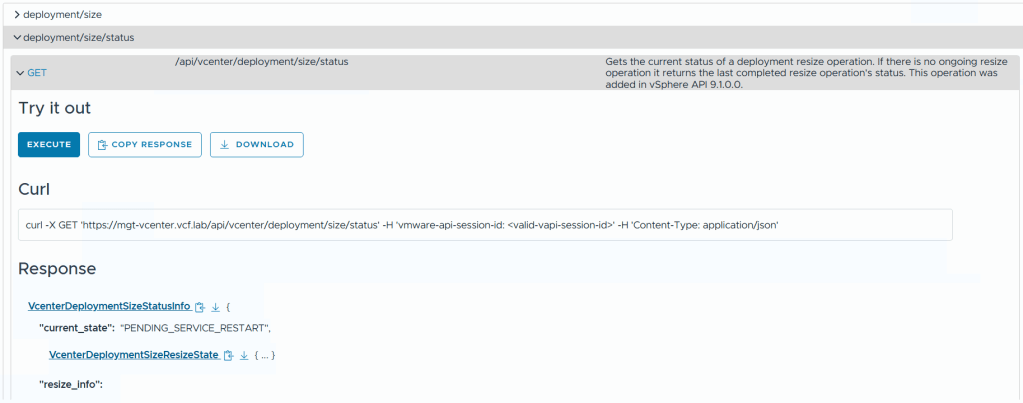
When you see the state “PENDING_SERVICE_RESTART” it means that the resize has completed and you can manually restart the vCenter services. See the Knowledge Base article Stopping, Starting or Restarting VMware vCenter Server Appliance services

Resize vCenter 9.0 and earlier using reduced downtime upgrade

Reduced downtime upgrade (RDU) is a method of upgrading (or patching) vCenter using a migration-based approach. This means that rather than an in-place upgrade or patch, a new vCenter VM is deployed and the data is copied. This reduces the overall vCenter downtime to a few minutes.

RDU can also be used to resize the vCenter during an upgrade or patch cycle. When configuring the target vCenter VM, simply choose a larger size than the source vCenter. See the section Configure the Target vCenter appliance and step 13.

The following image shows the source vCenter size is Small and the upgrade is choosing deployment size Medium with storage size Large.
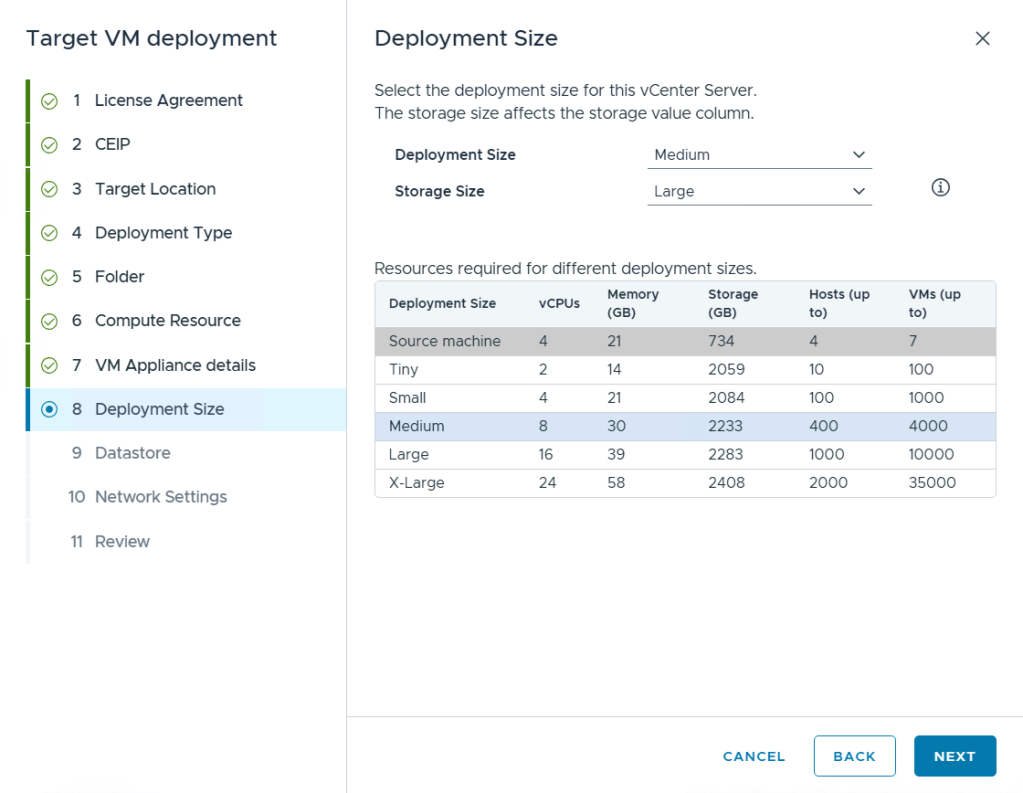
If you are planning to upgrade or patch vCenter, consider if you may need to increase the compute and disk size for the vCenter and combine the process into the maintenance cycle.

For more information on reduced downtime upgrade, see the documentation About the Reduced Downtime Upgrade Process.

Resize vCenter 9.0 and earlier using File-Based Backup Restore

If RDU is not a viable option, perhaps you are currently running the latest patch, and you can use the native file-based backup and restore process for vCenter to increase the vCenter size during the restore portion.

Deploy the new vCenter VM to be restored, and choose a larger deployment and storage size than the source backup.

See the document Stage 1 – Deploy a New Appliance and steps 10 and 11.
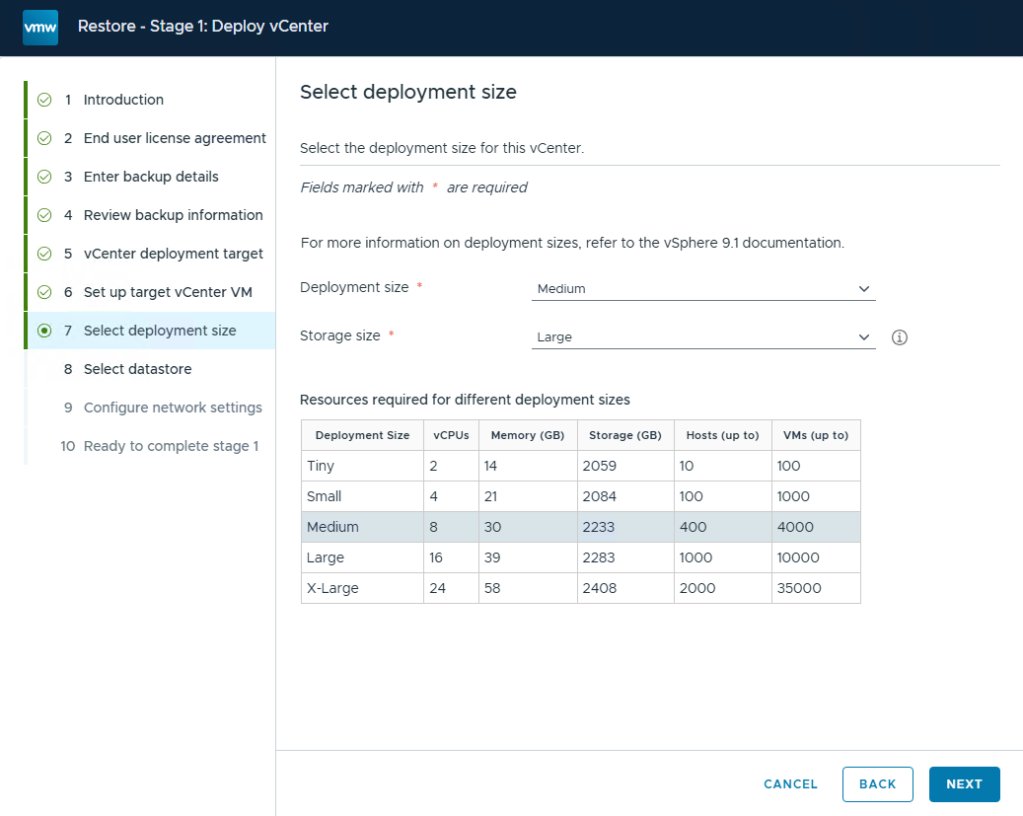
If you do not know the size of the vCenter that the backup was taken from, you can inspect the backup-metadata.json file of the backup and review the DeploymentSize value.

For more information on vCenter backup and restore, see the documentation File-Based Backup and Restore of vCenter


Discover more from VMware Cloud Foundation (VCF) Blog

Subscribe to get the latest posts sent to your email.