惯性聚合 高效追踪和阅读你感兴趣的博客、新闻、科技资讯
阅读原文 在惯性聚合中打开

推荐订阅源

让小产品的独立变现更简单 - ezindie.com
美团技术团队
OSCHINA 社区最新新闻
OSCHINA 社区最新新闻
月光博客
月光博客
J
Java Code Geeks
Jina AI
Jina AI
罗磊的独立博客
宝玉的分享
宝玉的分享
S
SegmentFault 最新的问题
D
DataBreaches.Net
博客园 - 叶小钗
腾讯CDC
freeCodeCamp Programming Tutorials: Python, JavaScript, Git & More
Last Week in AI
Last Week in AI
钛媒体:引领未来商业与生活新知
钛媒体:引领未来商业与生活新知
Google DeepMind News
阮一峰的网络日志
阮一峰的网络日志
B
Blog
V
Visual Studio Blog
雷峰网
雷峰网
博客园 - 【当耐特】
Apple Machine Learning Research
Engineering at Meta
Engineering at Meta
奇客Solidot–传递最新科技情报
奇客Solidot–传递最新科技情报

VMware Blogs

Diagnostics for VMware Cloud Foundation (VCF) 9.1 with Old Versions of VCF Components Mastering Infrastructure Policies in VMware Cloud Foundation Automation 9.1 Modernizing the Private Cloud: Why VCF 9.1 Lifecycle Management is a Game Changer Announcing the VMware Cloud Foundation 9.1 Upgrade Planning Tool VCF Breakroom Chats Episode 86 – Containers Made Easy: The New “Container-as-a-Service” in VCF 9.1 Securing Your VCF 9.1 Infrastructure with the Symantec Identity Security Platform Virtually Speaking: The AI Reality Check with Dave Linthicum Zero Touch Provisioning: Activating Edge Sites with VMware Cloud Foundation Edge 9.1 VCF Breakroom Chats Episode 85 – Cloning Success at Scale: Inside VCF 9.1’s App Stack Formation VMware Cloud on AWS の使用状況を確認できる API Unlocking the Full Potential of Programmable Infrastructure with VMware Cloud Foundation 9.1 – New Features and Capabilities Smarter Patching at Scale: Vulnerability Assessment and Remediation with VMware Tanzu Platform Encrypted vMotion Offload to Intel QAT in VMware Cloud Foundation 9.1 Deepen Your Expertise: Four Key Benefits of Attending Increase Deployment Flexibility with VCF Edge Automation 1.0.3 Avi Advantage: Automating Certificate Management of VCF Workloads More Memory, Less Effort: Configuring Memory Tiering in VCF 9.1 VCF 9.1 Licensing: Programmatic, Centralized, and Built to Scale Why APJ Networking Professionals Need Private Cloud Expertise VCF 9.1 Networking: Simpler VPC Connectivity Control VCF 9.1 Networking: Exploring Network Services for Virtual Private Clouds VCF Networking 9.1: Seamless DDI Integration with Infoblox The Open Source Advantage: Building from Source for Ultimate Security Expand Shared VMDKs with Clustered Applications in VMware vSAN for VCF 9.1 Monetizing Zero-Trust Security with VCF 9.1 and VMware vDefend VMware vSAN Protection and Recovery Enhancements for VCF 9.1 Deliver Production SQL Server DBaaS with VMware Data Services Manager 9.1 Maximizing Profitability: VCF 9.1 Cost-Focused Approach for VMware Cloud Service Providers Modernizing Your Infrastructure: Introducing VMware Cloud Foundation 9.1 to VCSPs VCF 9.1 is Available: Explore the New Features in Hands-on Labs
CPU, Disk, Network, and Memory Workload Profiles for DVD ...
Todd Muirhea · 2026-04-25 · via VMware Blogs

DVD Store, an open source database testing toolkit, has been widely used since it was originally released in 2005. It can be run on SQL Server, Oracle, PostgreSQL, and MySQL databases. DVD Store simulates an online store where users log in, browse, review, rate, and purchase DVDs. It uses many common database features including stored procedures, indexes, foreign keys, full text search, multi-join complex queries, and transactions.

DVD Store was originally developed and designed to be a database workload that is CPU intensive. It has also always included parameters that can be used to alter this CPU-intensive profile, allowing for network-, disk-, and even memory-intensive profiles.

Examples of these profiles have now been included and explained in the main DVD Store GitHub repository: https://github.com/dvdstore/ds35/tree/main/workload_profiles

Testing was done with these workloads to provide context to how much they change workload behavior as compared to the default CPU-intensive workload. All tests were done with a single VM running on a VMware Cloud Foundation (VCF) ESX 9.0 server. The VM was running Windows Server 2022 with SQL Server 2022.

The performance metrics used are all from the ESX host perspective and were captured using esxtop (similar to linux top, but for ESX and collects many more metrics).

  • CPU Utilization – CPU Utilization of the ESX host
  • Disk I/O per second (IOPS) – Disk read and write operations for ESX host
  • Mb received per second (Mb Rec/s) – Megabits received per second via network
  • Mb sent per second (Mb Sent/s) – Megabits sent per second via network
  • Active Memory (ActiveMem) – Memory touched (or active) recently

Relative Changes in Key Metrics with Workload Profiles

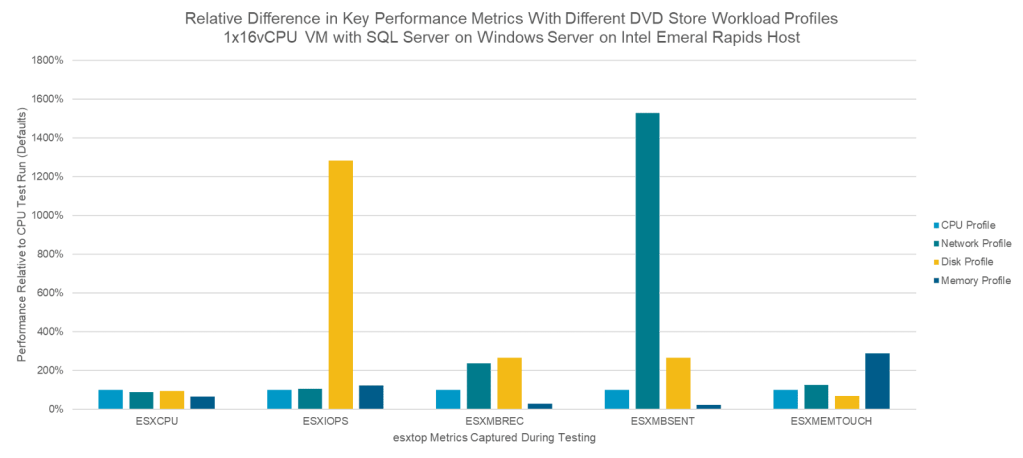
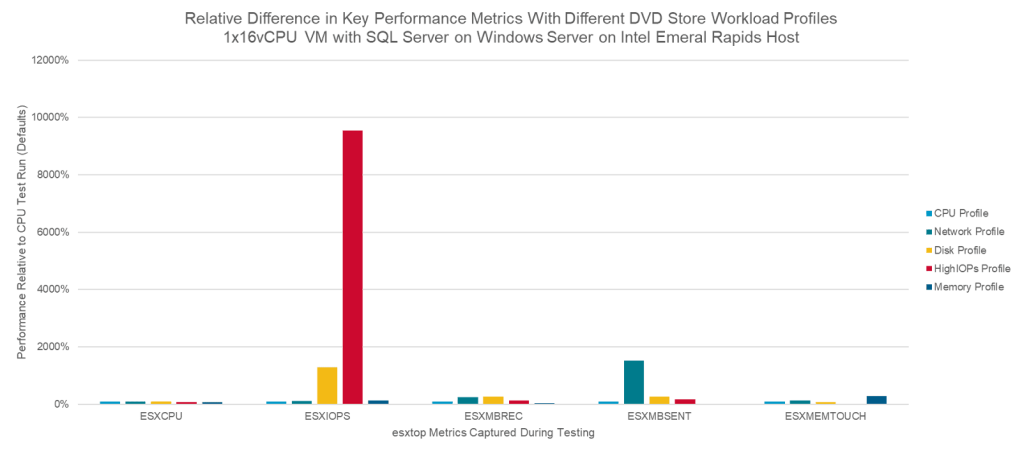
To baseline the key metrics, tests were run with the CPU-intensive profile. Tests were then run with the disk-, highIOPs-, network- and memory-intensive profiles and the key metrics were compared against this baseline. The graphs below show the relative differences across these key performance metrics as compared to the baseline CPU-intensive profile. The first graph shows all workload profiles; the second one excludes highIOPS so that the other relative differences can be seen more easily.  
In summary, in the key metric for each respective workload profile significant increases are seen:

  •    Disk-intensive profile produces 13x more IOPS
  •    High IOPS profile produces 95x more IOPS, 7x more IOPS than disk-intensive
  •    Network-intensive profile produces 15x more Mb sent per second
  •    Memory-intensive profile causes 2.9x more active memory

Details for all workload profiles are located in ds35_workload_profiles.txt on the DVD Store GitHub project. Specific DVD Store parameters and database configuration details as well as brief explanations are included.


Discover more from VMware Cloud Foundation (VCF) Blog

Subscribe to get the latest posts sent to your email.