







Tracking VMware Cloud on AWS consumption across hosts, SPLA, and non-host charges today requires manual data pulls and waiting for invoice every quarter. Customers building FinOps practices and mature cloud financial operations have consistently asked for programmatic access to this data, in a format their existing tools can consume.
Today, we’re delivering on that with three new Usage Report APIs for Host Usage, Microsoft SPLA Usage, and Miscellaneous Usage (non-host charges) covering networking charges like EIP, TGW, data transfer, and Direct Connect.
These Usage Report APIs provide daily-granularity usage data through clean, filterable endpoints that integrate directly into your existing cost management, BI, and reporting workflows. Whether you’re tracking costs, analyzing consumption patterns, or building custom dashboards, these APIs give you the flexibility to retrieve and organize usage data on your terms.
All three APIs are available now to all VMware Cloud on AWS customers.
GET /activityanalytic/{org_id}/hosts/{freq}/usage-report
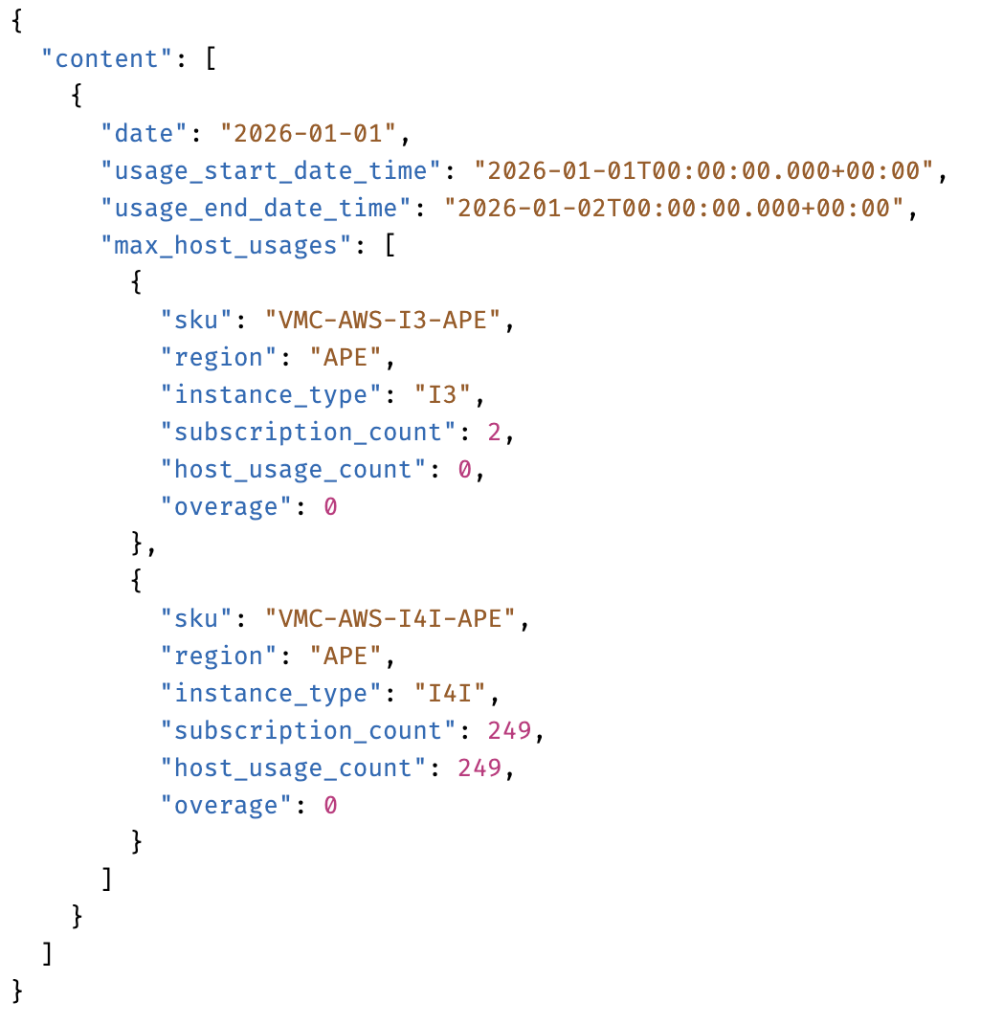
Retrieve daily host consumption data for any date range, broken down by instance type and region group. Each record includes the SKU, region, instance type, subscription count, actual host usage count, and overage. This gives you the data needed for forecasting invoices, understanding usage spikes, financial planning, chargeback, and subscription right-sizing.
The API returns the maximum host usage per day, per instance type, per region group. Values are aggregated across all SDDCs, allowing you to compare actual consumption against subscriptions purchased. Host usage data is available starting from 2025-02-01.
For more details please review the API details on the developer portal.
Sample API Response:
GET /activityanalytic/{org_id}/spla/{freq}/usage-report
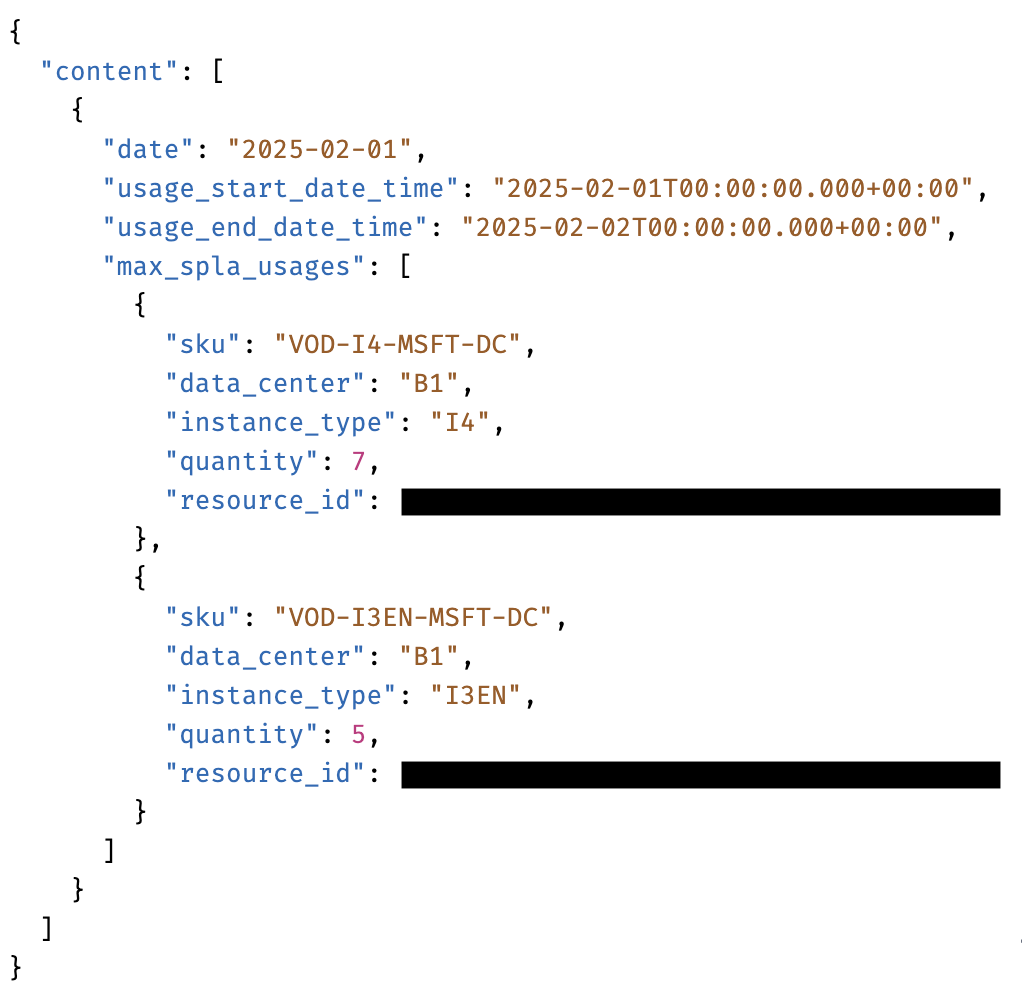
Access your Microsoft SPLA usage data programmatically, broken down by instance type, SKU, quantity, and resource ID (SDDC ID). This API enables you to precisely track license consumption across your SDDCs and validate upcoming SPLA charges.
The API considers the maximum SPLA usage for the day per instance type, SPLA license type, and SDDC. SPLA usage data is available starting from 2026-01-01.
SKU Format: VOD-<Instance Type>-MSFT-<License Type>
Instance types: I3, I4I, I7I, I3EN
License types:
We will be adding SKU descriptions in a future update for easier reference.
For more details please review the API details on the developer portal.
Sample API Response:
GET /activityanalytic/{org_id}/misc/{freq}/usage-report
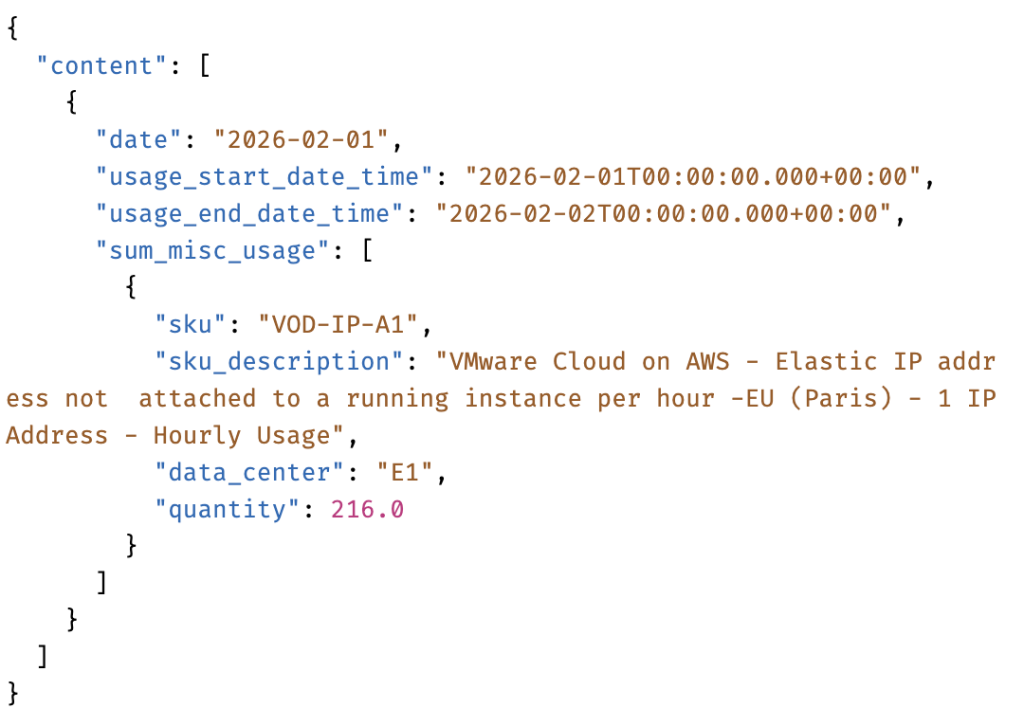
Retrieve daily usage data for supplemental and add-on charges. This gives you full visibility into networking and ancillary costs that contribute to your total cost of ownership.
Charge types covered:
Daily quantities are summed across each charge type. Historical data is available from 2026-01-01 onward.
For more details please review the API details on the developer portal.
Sample API Response:
All three APIs share a common set of capabilities designed for operational integration.
For teams that need a visual summary without building API integrations, we’re also releasing the HTML Usage Report Generator. This command-line tool produces a Broadcom-branded HTML report combining host, SPLA, and miscellaneous usage data into daily trend charts, Non-Host Charges Usage API Documentationfiltering controls, and detailed data tables.
For setup instructions and usage examples, see the Interactive Usage Report Generator – KB Article.
All three APIs are available now. To start retrieving usage data:
For complete API references, authentication details, and additional examples:
We’re continuing to invest in usage visibility with enhanced visualization in the VMC console, additional filtering and aggregation capabilities, and bulk export options for large datasets.
For questions, feedback, or feature requests, reach out to your account team. Your input directly informs our roadmap.
Subscribe to get the latest posts sent to your email.
此内容由惯性聚合(RSS阅读器)自动聚合整理,仅供阅读参考。 原文来自 — 版权归原作者所有。