







What if there was a sales bot that could give you personally relevant suggestions based on your past purchases and conversations? What about a support agent that remembered you called an hour ago and gave you a new solution to your problem without making you repeat all the info you gave it last time? Or, in our case at Packabby Robotics, what if our companion robots remembered your important events, your likes, hobbies, allergies, and even what kind of jokes make you laugh?
In our work designing companion robots we realized that you need long-term memory to be a friend because, frankly, anyone would be pretty upset if a “friend” forgot their birthday.
Of course, the first thing you’d probably think of when we talk about memory for large language models (LLMs) is Retrieval Augmented Generation (RAG) and Vector Databases. However, people aren’t wikis, FAQs, or internal knowledge bases that you can pre-process, chunk, vectorize, and upsert into a vector database like you would in a traditional RAG pipeline.
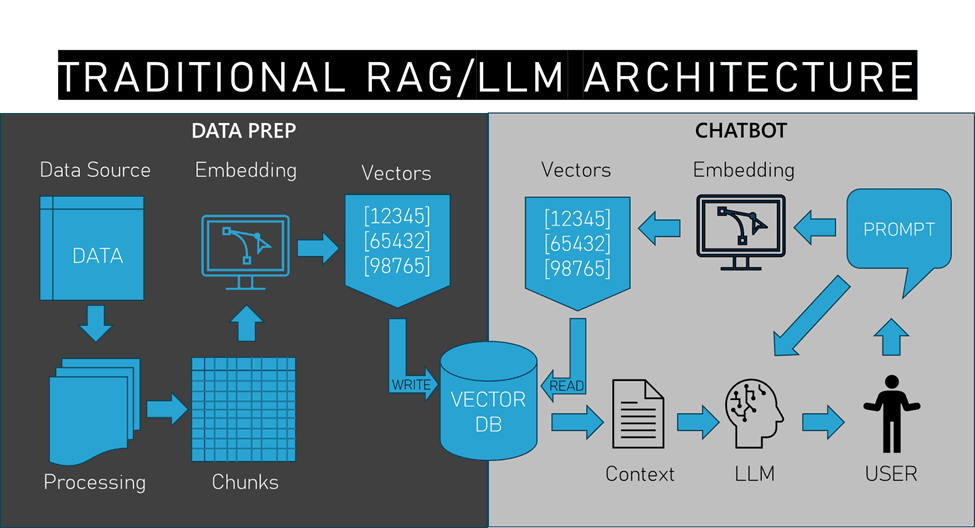
Does this mean we can’t use RAG to give our robots this kind of more personal conversational memory? Of course not!
Humans don’t carry around thumb drives filled with personal details to help make friends. We humans slowly develop memories of our experiences with other people in the process of building relationships. So, for our robot friends, we need an approach that slowly creates memories, one conversation at a time. The question is, how do we go about doing this with RAG?
Quite simply, we turn the traditional RAG architecture around a bit and let the human be the data source, or more specifically, let the conversations that humans have with our LLMs and robots be the data source.
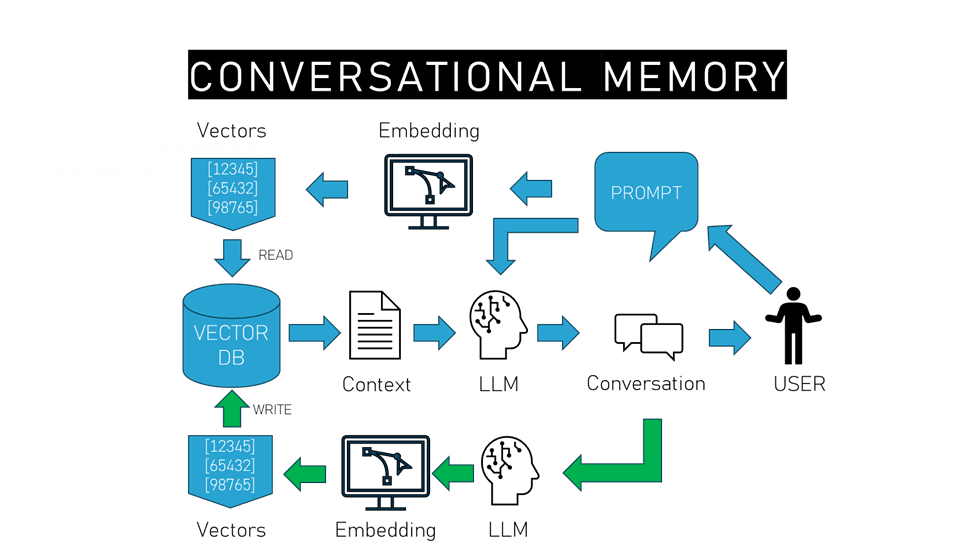
The first thing to note with this pipeline is that there’s no longer any separation between the data processing side of things and the actual interactions between a human and LLM, they all become part of the same process. In this pipeline, everything starts with the human and what they say to the model.
Of course, as with traditional RAG, the prompt from the user is first fed into an embedding model that vectorizes the prompt to query against the vector database for relevant results. The resulting context from the database is then added to the original prompt and given to the LLM to generate a response.
At this point, we can use the usual process to give the LLM short-term conversational memory by adding that prompt/response chain to subsequent turns in the conversation, but once this contextual turn-based conversation is ended, so too goes the memory of what occurred. However, this is where we change things up.
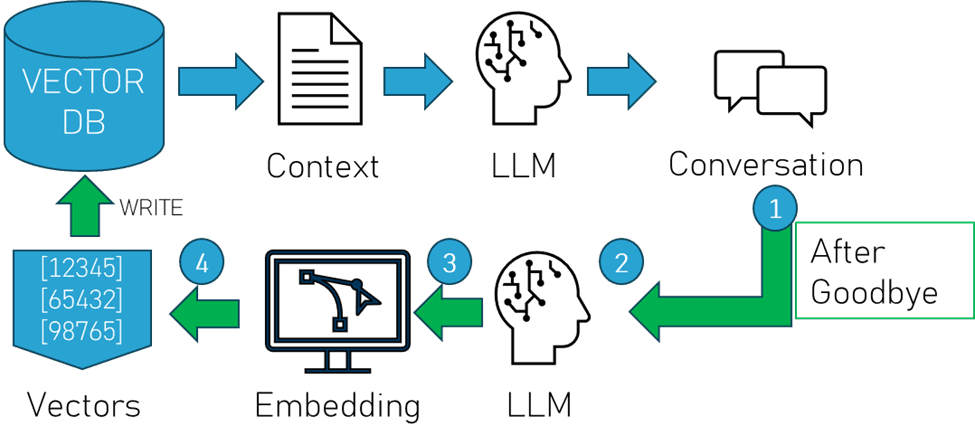
As illustrated above:
1. When a conversation ends, we send that conversation data to another LLM.
2. We use that model to summarize that conversation into a chunk size that is efficient for retrieval.
3. We then send that summary to an embedding model and…
4. Import that into the vector database as a new “memory”.
This way, we not only have the short-term memory for a turn-based chat, but we also retain the parts of that conversation that are relevant to the user in a long-term memory that can be used to add context to subsequent conversations that are semantically related to the discussion that just occurred, giving our little robot friends the literal long-term memory that RAG promises.
Let’s dive into some sample Python code using Pinecone Serverless, OctoAI Text Generation Services, and OpenAI’s tiktoken library to provide an example of how we give a robot (or chatbot) this kind of conversational long-term memory (Full code listing).
First we install the libraries that we need to pull this off. With Linux or Mac, use the following at the command line:
$ pip install pinecone-client octoai-sdk tiktokenThis might also be a good time to set up your Pinecone Serverless index.
Next, if you haven’t already, grab those API keys for those accounts. Once you have those, append the following in /etc/profile or wherever else you like to store your environmental variables:
export pinecone_key=’YourPineconeKeyGoesHere’
export OCTOAI_API_TOKEN=’YourOctoAITokenGoesHere’
With that taken care of, let’s start writing our Python code by importing our libraries:
import os
import time
import tiktoken
import requests
from datetime import datetime
from datetime import date
from octoai.client import Client
from pinecone import Pinecone
Now we initialize those services and environmental variables for the keys and tokens we’re using:
#keys and such
octoai_api_token = os.environ.get("OCTOAI_API_TOKEN")
pc_key = os.environ.get("pinecone_key")
pc = Pinecone(api_key=pc_key)
client = Client()
At this point, you’ll want to have some code that kicks things off by signaling that a user is ready to converse. In our case our robots use an offline keyphrase so that they protect everyone’s privacy by only listening for a speech pattern stored locally. You probably do something different and, if you do, that goes here:
def wait_for_input():
    user_initiates_conversation = False
    """SOME USER INPUT MECHANISM GOES HERE"""
    if user_initiates_conversation == True:
        conversation_time()
One thing we’ve noticed is that it really helps if you include date/time information into the conversation so that your memory can use temporal data (eg. What date is it and how many days until your birthday from this date?). So we construct system prompts and subsequent conversation turns with date/time stamps:
def conversation_time():
    #Conversation setup that adds time/date info to prompt
    now = datetime.now()
    current_time = now.strftime("%H:%M:%S")
    today = date.today()
    date_string = str (today)
    system_message = {"role": "system", "content": "It is "  + str(current_time) + " on " + str(date_string) + " and you are a friendly robot that enjoys being helpful to your human friend. "}
    user_greeting = {"role": "user", "content": "Hey bot."}
    bot_response = {"role": "assistant", "content": "What's up?"}
    conversation=[]
    conversation.append(system_message)
    conversation.append(user_greeting)
    conversation.append(bot_response)
Now that you’ve set up your system prompt and conversation format along with date/time info, it’s time to get the prompt from the user and get your Pinecone index established:
  #User input section
    user_input = "THIS IS WHAT THE USER ENTERED"
    use_serverless = True
    index = pc.Index("some_pinecone_indexname") #replace with your index name
    text_field = "text"
Let’s go ahead and get our user’s prompt and send it to OctoAI’s GTE-Large open-source embedding model that’s also available on HuggingFace:
    #Embedding the prompt
    payload = {
        "input": user_input,
        "model": "thenlper/gte-large"
        }
    headers = {
        "Authorization": f"Bearer {octoai_api_token}",
        "Content-Type": "application/json",
        }
    res = requests.post("https://text.octoai.run/v1/embeddings", headers=headers, json=payload)
    xq = res.json()['data'][0]['embedding']
    limit = 500
Then get context matches from the Pinecone vector database that include the text metadata.
    #Vector context retrieval
    contexts = []
    res = index.query(vector=xq, top_k=1, include_metadata=True)
    contexts = contexts + [
        x['metadata']['text'] for x in res['matches']
        ]
    print (f"Retrieved {len(contexts)} contexts")
    time.sleep(.5)
Merge that context from the vector database with the prompt and add that to the conversation.
#Merge context with prompt and merge into conversation
    prompt_end = (
        f" The following may or may not be relevent information from past conversations. If it is not relevent to this conversation, ignore it:\n\n"
        )
    prompt = (
        user_input +
        "\n\n " +
        prompt_end +
        "\n\n---\n\n".join(contexts[:1])
        )
    conversation.append({"role": "user", "content": prompt})
At this point it’s probably a good idea to do some token counting for our turn-based conversation to ensure that we’re not going over our context window and doing a bit of pruning if we do. Since Mixtral and many Llama based models use CL100K_Base encoding, which tiktoken can count, we’ll use that to get a fair approximation of our token count at each turn.
def num_tokens_from_messages(messages, tkmodel="cl100k_base"):
        encoding = tiktoken.get_encoding(tkmodel)
        num_tokens = 0
        for message in messages:
            num_tokens += 4  # Start/end message preambles
            for key, value in message.items():
                num_tokens += len(encoding.encode(value))
                if key == "name":  # if there's a name, the role is omitted
                    num_tokens += -1  # role always required, always 1 token
            num_tokens += 2  # every reply primed with <im_start>assistant
            return num_tokens
        conv_history_tokens = num_tokens_from_messages(conversation)
        print("tokens: " + str(conv_history_tokens))
        token_limit = 31000
        max_response_tokens = 300
        while (conv_history_tokens+max_response_tokens >= token_limit):
            del conversation[1]
            conv_history_tokens = num_tokens_from_messages(conversation)
And now we’re ready to let the LLM use the prompt+context to generate a response:
    #Pass conversation + context + prompt to LLM
    completion = client.chat.completions.create(
        model="mixtral-8x7b-instruct-fp16",
        messages = conversation,
        max_tokens=300,
        presence_penalty=0,
        temperature=0.5,
        top_p=0.9,
        )
At this point we send the result to the user and the result is added to the conversation so that the next turn can use that information as context for the immediate conversation.
   #Append result to conversation
    conversation.append({"role": "assistant", "content": completion.choices[0].message.content})
    response_text = completion.choices[0].message.content + "\n"
    print(response_text)
For our use case, we want to let the user decide whether what was discussed is worth remembering. So, when they signal the end of a conversation we simply ask if this was something that should be remembered.
    if "goodbye" in user_input:
        #Give the user a choice of what the bot will remember
        Bot_Text = "Do you want me to remember this conversation?"
        print(Bot_Text)
        """GET RESPONSE HERE"""
        response = (user_input_2)
If the user says no, we just end things there, returning to the wait function:
        #If no, say goodbye and wait for next conversation
        if "No" in response:
            bot_text = "Ok, I'll talk to you later then. Goodbye."
            print(bot_text)
            wait_for_input()
However, if the user says yes, then we remove the initial system prompt from the conversation and then send the remaining conversation to the LLM for summarization with a token count limit that matches the context size we’ve established for our vector database (remember, we’re not chunking but still need to limit the context size.)
else:
            #Remove system prompt
            del conversation[0]

            #Send conversation to LLM for summarization
            completion = client.chat.completions.create(
            messages = [
                {"role": "system", "content": "Briefly list the key points to remember about the user from this conversation that occurred at "  + str(current_time) + " on " + str(date_string) + ": "},
                {"role": "user", "content": str(conversation)},
                ],
            model="mixtral-8x7b-instruct-fp16",
                max_tokens=300,
                temperature=0.3,
                presence_penalty=0,
                top_p=0.9,
                )
            summarization = completion.choices[0].message.content
Once we have our summarization, we send that to the embedding model, GTE-Large in this case, in order to get the vectors for the upsert.
            #Start embedding
            idv = "id" + str(time.time())
            payload = {
                "input": summarization,
                "model": "thenlper/gte-large"
                }
            headers = {
                "Authorization": f"Bearer {OCTOAI_TOKEN}",
                "Content-Type": "application/json",
                }
            res = requests.post("https://text.octoai.run/v1/embeddings", headers=headers, json=payload)
Then we finish up by upserting the summary vectors and text metadata to our Pinecone serverless database before sending things back to the wait function.
            #Upsert the embedding
            index.upsert(vectors=[{"id":idv, "values":res.json()['data'][0]['embedding'], "metadata":{'text': summarization}}])
            time.sleep(.4)
            index.describe_index_stats()

            #return to wait for next conversation
wait_for_input()There are a few things we’ve found during the development of this novel approach to using RAG that you ought to also consider if you decide to try this out for your own use case.
I hope this helps you look at chatbot and robot memory in a different, perhaps more interesting way. I’m always excited to hear about the different ways people think of using an approach like this, as well as different roadblocks and mitigations for the issues that might arise. So, please do drop me a message if you have any feedback!
此内容由惯性聚合(RSS阅读器)自动聚合整理,仅供阅读参考。 原文来自 — 版权归原作者所有。