








Note: Public collections are no longer supported as part of collections. Visit our documentation to learn more.
Last month, we announced a new feature in public preview: collections. Collections allow users to save vectors and metadata from an index as a snapshot, and create new indexes from any collection.
Today we are excited to announce the addition of public collections to help users quickly run a sample index pre-loaded with data and experience the power of the Pinecone vector database.
For users to run a query in Pinecone, they need to upload data to an index. This takes time. Public collections make it easier to explore Pinecone by providing public data from real-world data sources that can be used to create an index in one click.
Pinecone users can now create an index from pre-loaded vector embeddings in one of three example collections. Each collection features data from Pinecone partners:
These collections contain real-world data, load in less than a minute, and have matching guides to get started:
The collections are available under Public Collections within the Pinecone console. You can create an index from the example collections and use the guides to get started including code snippets in Python showing how to use the particular index.
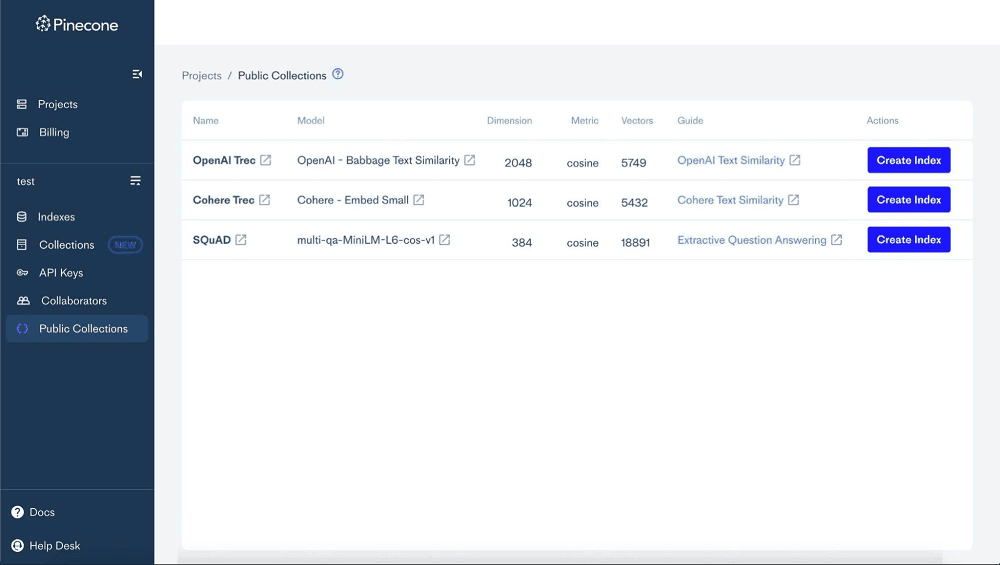
To create an index from a public collection, follow these steps:
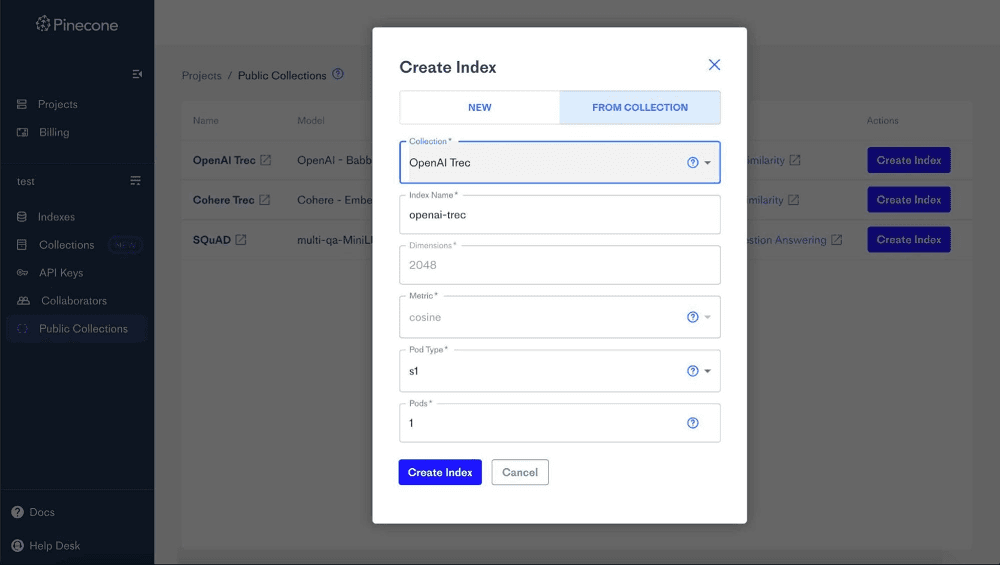
If you don’t have an embedding model or ready-to-use data to start testing Pinecone, then public collections can help. All Pinecone users will have access to three example collections — Glue SSTB, TREC question classification, and SQuaD — starting today. We will add more public collections over time.
To learn more about public collections, check out the guides or try them for yourself in the console.
此内容由惯性聚合(RSS阅读器)自动聚合整理,仅供阅读参考。 原文来自 — 版权归原作者所有。