


惯性聚合 高效追踪和阅读你感兴趣的博客、新闻、科技资讯
阅读原文 在惯性聚合中打开

推荐订阅源

T
Tor Project blog
月光博客
月光博客
P
Proofpoint News Feed
大猫的无限游戏
大猫的无限游戏
N
News and Events Feed by Topic
The Cloudflare Blog
博客园_首页
NISL@THU
NISL@THU
量子位
A
Arctic Wolf
Y
Y Combinator Blog
Spread Privacy
Spread Privacy
Engineering at Meta
Engineering at Meta
F
Fortinet All Blogs
酷 壳 – CoolShell
酷 壳 – CoolShell
Cyberwarzone
Cyberwarzone
The GitHub Blog
The GitHub Blog
OSCHINA 社区最新新闻
OSCHINA 社区最新新闻
F
Full Disclosure
C
Cisco Blogs
Security Latest
Security Latest
T
The Exploit Database - CXSecurity.com
T
Tenable Blog
PCI Perspectives
PCI Perspectives
S
Security Affairs
Forbes - Security
Forbes - Security
Hugging Face - Blog
Hugging Face - Blog
C
CERT Recently Published Vulnerability Notes
钛媒体:引领未来商业与生活新知
钛媒体:引领未来商业与生活新知
博客园 - 聂微东
H
Hacker News: Front Page
S
Securelist
cs.CL updates on arXiv.org
D
Darknet – Hacking Tools, Hacker News & Cyber Security
罗磊的独立博客
S
SegmentFault 最新的问题
C
Cyber Attacks, Cyber Crime and Cyber Security
The Hacker News
The Hacker News
奇客Solidot–传递最新科技情报
奇客Solidot–传递最新科技情报
S
Security @ Cisco Blogs
The Last Watchdog
The Last Watchdog
小众软件
小众软件
Hacker News - Newest:
Hacker News - Newest: "LLM"
Google DeepMind News
让小产品的独立变现更简单 - ezindie.com
IT之家
IT之家
Last Week in AI
Last Week in AI
爱范儿
爱范儿
AWS News Blog
AWS News Blog
MongoDB | Blog
MongoDB | Blog

Pinecone

Pinecone Assistant: A Managed Knowledge Layer for Production AI Applications Multi-domain RAG in n8n: why one knowledge base is not enough Allspice Transforms the Culinary Experience with Semantic Search Powered by Pinecone | Pinecone Building RAG workflows in n8n: choosing the right Pinecone node Knowledge needs a meta-knowledge layer Garbage Day: How Pinecone Safely Deletes Billions of Objects at Scale When "Performance" Means Two Different Things Pinecone BYOC: Pinecone in your AWS, GCP, or Azure account, no vendor access True, Relevant, and Wrong: The Applicability Problem in RAG Use the Pinecone Plugin for Claude Code to develop AI Applications Faster Millions at Stake: How Melange's High-Recall Retrieval Prevents Litigation Collapse Powering High-stakes Patent Search at Scale: How Melange Built a Reliable AI System on Pinecone | Pinecone Pinecone Assistant Node in n8n: Turn Any Data Source Into Knowledge RAG with Access Control Pinecone Dedicated Read Nodes are now in Public Preview Inside Pinecone: Slab Architecture New Bulk Data Operations: Update, Delete, and Fetch by Metadata The Hidden Cost of Building: Lessons from Aquant Simplifying Vector Embeddings with Pinecone Integrated Inference Capabilities Pinecone joins Microsoft Marketplace as a Launch Partner GTM Engineering: Clay + Pinecone for AI-powered Sales Outbound Build an AI knowledge assistant with Google Docs and Pinecone Moving Pinecone forward with Ash Ashutosh as CEO and Edo spearheading our growing AI ambitions as Chief Scientist Pinecone Founder Edo Liberty to Spearhead Pinecone’s Growing AI Ambitions; Appoints Ash Ashutosh as CEO to Expand Vector Database Market Leadership Fast, Accurate Retrieval for Creators at Scale: Delphi’s Path Toward a Million Conversational Agents with Pinecone | Pinecone Announcing Pinecone Pioneers: A Program for Builders, Organizers, and Community Leaders What is Context Engineering? Chunking Strategies for LLM Applications Beyond the hype: Why RAG remains essential for modern AI Obviant Makes 30% More Accurate Defense Acquisition Recommendations Combining Sparse and Dense Retrieval with Pinecone | Pinecone Build more knowledgeable AI applications with new LLMs and greater control in Pinecone Assistant #NYTECHWEEK 2025 Retrieval-Augmented Generation (RAG) Accurate and Efficient Metadata Filtering in Pinecone’s Serverless Vector Database | Pinecone Terminal X AI Agents, Powered by Pinecone, Turn Complex Financial Data Into Production-grade Insights at Scale | Pinecone Aquant Delivers Scalable, Expert-level Service Intelligence with Pinecone | Pinecone Cascading retrieval with multi-vector representations: balancing efficiency and effectiveness Vector databases aren't just for large-scale enterprise AI Unveiling DIME: Reproducibility, Scalability, and Formal Analysis of Dimension Importance Estimation for Dense Retrieval | Pinecone Fast and Effective Early Termination for Simple Ranking Functions | Pinecone Domain-specific AI Agents at Scale: CustomGPT.ai Serves 10,000+ Customers with Pinecone | Pinecone Using Pinecone asynchronously with FastAPI A Flexible Resource for Top-Weighted Comparisons Between Sets and Rankings | Pinecone Build secure, scalable agentic AI workflows with Rubrik Annapurna and Pinecone Tool up: Pinecone’s first MCP servers are here Add context to your agent with Pinecone Assistant MCP remote server E2Rank: Efficient and Effective Layer-wise Reranking | Pinecone ColBERT-serve: Efficient Multi-Stage Memory-Mapped Scoring | Pinecone Efficient Constant-Space Multi-Vector Retrieval | Pinecone How Vanguard Worked with Pinecone to Boost Customer Support with Faster Calls and 12% More Accurate Responses | Pinecone Pinecone Named to Fast Company's Annual List of the World's Most Innovative Companies of 2025 Launch Week: Pinecone for agents, search, recommendations, and more Optimizing Pinecone for agents (and more) Retrieval Inference for scale and performance How 1up Turns Sales Reps Into Product Experts with Pinecone | Pinecone Don’t be dense: Launching sparse indexes in Pinecone Unlock High-Precision Keyword Search with pinecone-sparse-english-v0 Evolving Pinecone's architecture to meet the demands of Knowledgeable AI Pinpoint references faster with citation highlights in Pinecone Assistant Bringing the leading vector database to your cloud Getting started with llama-text-embed-v2 Natural Language Counterfactual Explanations for Graphs Using Large Language Models | Pinecone Easily build knowledgeable chat and agent-based applications in minutes with Pinecone Assistant, now generally available How to build an agentic, chat or RAG knowledge system using Pinecone Assistant Real-time RAG with Pinecone and Estuary Flow BigQuery to Pinecone in Real-Time with Estuary Flow Stravito Turns Market and Consumer Data Into Actionable Insights with Pinecone Inference | Pinecone Accelerate prototyping and development with Pinecone Local First-of-its-kind Pinecone Knowledge Platform to Power Best-in-class Retrieval for Customers Introducing integrated inference: Embed, rerank, and retrieve your data with a single API Strengthening security and increasing control with CMEK and API key roles Introducing Pinecone Rerank V0 Introducing cascading retrieval: Unifying dense and sparse with reranking From Idea to Action: How Pinecone Assistant Meaningfully Accelerates AI Business Building AI apps on Azure with Pinecone just got a lot easier Building a reliable, curated, and accurate RAG system with Cleanlab and Pinecone Four features of the Assistant API you aren't using - but should Deploying Pinecone with Infrastructure as Code (IaC) Streamlining CI/CD with Pinecone Local September 2024 Product Update Results of the Big ANN: NeurIPS'23 competition | Pinecone Introducing import from object storage for more efficient data transfer to Pinecone serverless Simplify, enhance, and evaluate RAG development with Pinecone Assistant, now in public preview Vectors and Graphs: Better Together August 2024 Product Update Pinecone Helps Deep Talk Deliver World-Class AI Assistants with Lower Engineering Overhead | Pinecone Assembled Delivers Better, Faster AI- Driven Support with Pinecone | Pinecone Llama 3.1 Agent using LangGraph and Ollama Build knowledgeable AI with Pinecone serverless, now generally available on Microsoft Azure Pinecone serverless is now generally available on Google Cloud, adding knowledge to AI assistants and other applications Accelerating Legal Discovery and Analysis with Pinecone and Voyage AI Bridging Dense and Sparse Maximum Inner Product Search | Pinecone Refine Retrieval Quality with Pinecone Rerank Introducing reranking to Pinecone Inference to simplify building accurate AI July 2024 Product Update Connect to Pinecone within your platform to enable a seamless AI development experience Introducing Pinecone API Versioning RAG Brag with Inkeep Co-Founder Nick Gomez LangGraph and Research Agents Introducing Pinecone Inference to streamline your AI workflow
What is Vector Search? 2024 Guide for Developers
Greg Kogan · 2023-06-22 · via Pinecone

As a developer, you may only have the bandwidth to explore machine learning to the extend that it offers solutions to your present problems. For many developers, the present problem is vector similarity search. The solution is Pinecone.

Pinecone is a managed vector database that provides vector search (or “similarity search”) for developers with a straightforward API and usage-based pricing. (And it’s free to try.)

While it may be encouraging to hear that a SaaS solution exists for your data science needs, you still might feel lost. What is vector search? How or why would you use it? In this article, we’ll walk through everything you need to get started with vector search using Pinecone. Let’s go!

If you’ve ever used a LIKE query in SQL, then you’ve performed a very simple form of vector search, though it’s unlikely that any ML theorist or practitioner would say as much. In reality though, vector search is fundamentally the same exercise.

When searching for similar text, there must be some kind of metric to check for overlap in the data. For text, this is simple: are the characters in the strings you’re searching over close to the ones you have in your search string? Depending on your background, you may have even heard technical terms like Hamming distance or Levenshtein distance, which are precise metrics for describing the similarity (or dissimilarity) of strings.

How does a vector search engine work?

For more complicated data sets, it’s also possible to make use of metrics like these. This is where vector based search shines, but how does it work?

In order to measure the distance between items in a particular data set, we need a programmatic way to quantify these things and their differences. Regardless of the types of objects we’re searching through, we use “vectors” or “vector embeddings” to convert the data we’re analyzing into simpler representations. Then, we check for similarity on those representations while still maintaining the deeper meaning of the objects themselves.

What are vector search embeddings?

At this point, we’ve defined an unfamiliar concept with an even more unfamiliar concept, but don’t be concerned. Vector embeddings are really just a simplified numerical representation of complex data, used to make it easier to run generic machine-learning algorithms on sets of that data. By taking real-world objects and translating them to vector embeddings — numerical representations — those numbers can be fed into machine learning algorithms to determine semantic similarity.

Vector search use cases

For example, let’s consider the phrase “one in a million.” Is this phrase more similar to “once in a lifetime” or more similar to “a million to one”? You might have some intuition about which pairing is more similar. By creating a vector embedding for each of these phrases, machine learning goes beyond human intuition to generate actual metrics to quantify that similarity.

If you’re thinking about how to get vector embeddings but coming from an SQL background, what might come to mind are aggregate functions which — if used correctly in cleverly crafted queries — could yield some sort of “all of this data boils down to a single number” result. At best, though, an SQL query can only perform really simple aggregations to distill out a final numerical representation.

Obtaining a vector embedding of real value requires some machine-learning techniques and a good understanding of the problem space.

Vector search examples

Image data, for example, is represented numerically based on the pixel values of each image. It already has the form of a vector embedding. But what about cases where obtaining a numerical representation isn’t so straightforward? Let’s consider some examples.

If we wanted to determine similarity across movies, we might look at people who had watched and rated the same movies, along with what other movies they had watched and rated. To find product similarity, we could look at customer purchases and see who has bought other items in the same purchase.

These examples are too complex and cumbersome to be handled manually. This data needs to be fed into some kind of neural network to reduce the number of dimensions of these vectors (length of the list of numbers). The following diagram shows how this reduction might work for simple object examples:
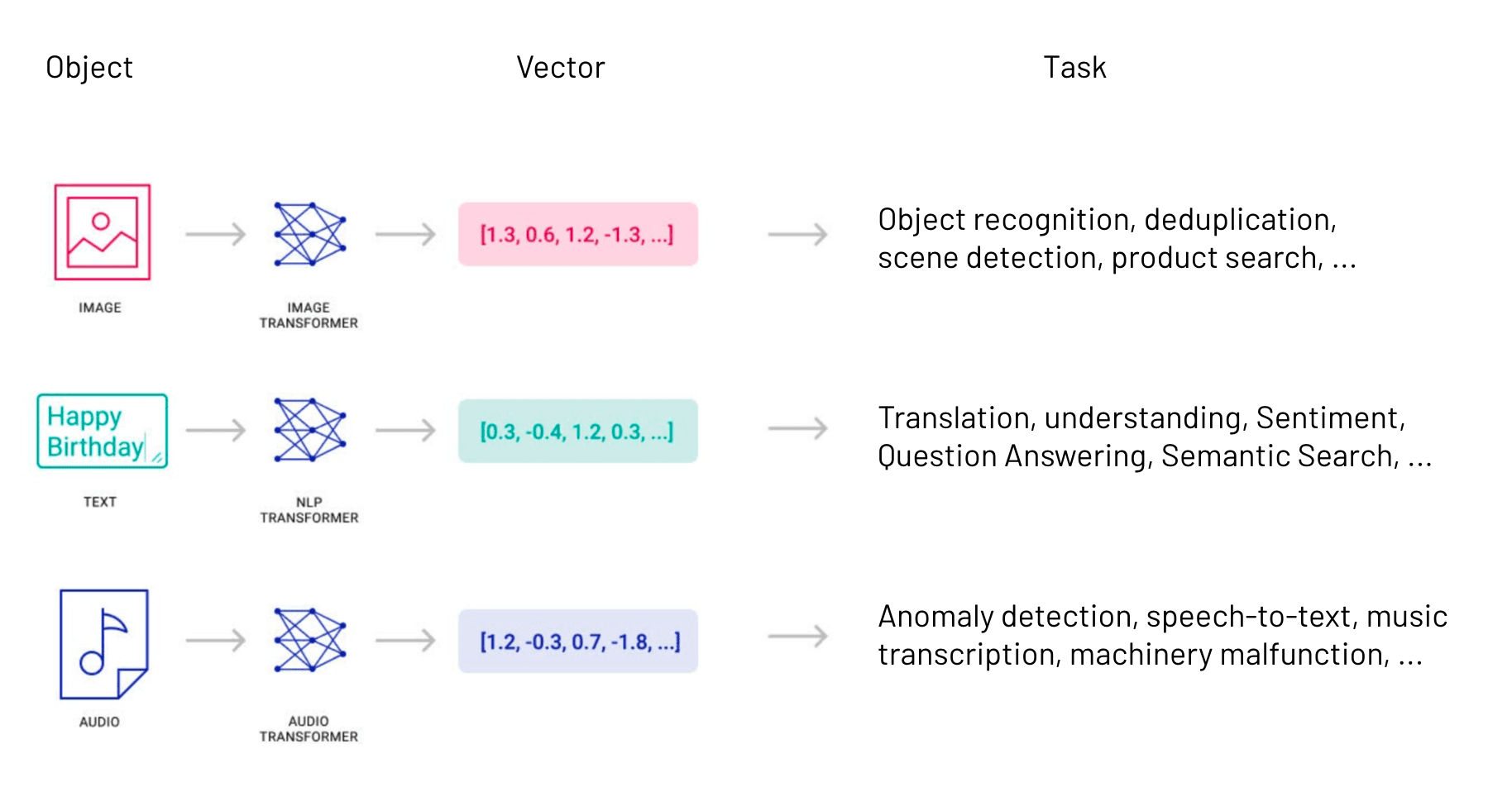
Diagram showing how objects like images, text and audio are transformed into vectors to complete various tasks like object recognition, deduplication, translation, anomaly detection and more.

Depending on the data you’re working with, there may be existing models you can use. But if you’re working with a unique dataset or use case, you’ll need to put some time into ensuring your model will capture your data well. For more generic situations — such as text data — we can use a more widely available model like Word2vec. That model is trained against a wide collection of text data to determine similarities and differences between the concepts that real words represent.

Regardless of the model you’re using, though, Pinecone can help you search through the generated vector embeddings to find similar items.

What to do with your vector embeddings

Once you have a vector embedding, you need to be able to run queries against it. This is where Pinecone comes in. Rather than requiring you to learn all kinds of techniques for searching through your data, Pinecone provides managed vector search. You store vector embeddings with IDs that tie your data back to the objects they represent, allowing you to search through that data with a straightforward API and client. A store of vector embeddings and their IDs is called a “vector index.”

Creating a vector index is quite simple with Pinecone’s Python client:

import pinecone
pinecone.init(YOUR_API_KEY)
index = pinecone.create_index("my-new-index")

(Java and Go clients are coming soon.)

You’ll need to get an API key and choose a name for your index. There are other parameters — such as the metric measuring similarity between vectors searching your data — but when you’re just starting, the defaults should be good enough.

Once you have an index created, you can insert your data as a tuple containing the id and vector representation of each object in your data set. Pinecone is blazing fast, able to index 10,000 tuples or more in just a second.

Querying an index is very simple. You can perform a unary query with a single vector, or you can query with a list of vectors too. All you need is a vector or a list of vectors you want to find similarities for and how many results (integer) you want Pinecone to return:

index.query(queries=vectors, top_k=integer)

In the above line, top_k is a reference to the k-nearest neighbors to any given vector. If you’re not familiar with that algorithm, Pinecone’s usage is analogous to a LIMIT clause from SQL. All of the k-nearest neighbors analysis is taken care of by the platform! Pinecone will return IDs that match. It also returns a score that shows its confidence in the match.

Try Pinecone's managed vector search solutions

By now, you should have a better understanding of what vector search is and how Pinecone can help you integrate vector search into your application. If you’re interested in learning more, try out some techniques from our examples and start playing around with Pinecone and its vector search API yourself.

If you find you’re ready to get going with Pinecone on your own product, don’t hesitate to sign up or get in touch with us. We’ll be happy to help you get started!