




Building apps with Pinecone and Claude Code just got way easier. We've launched the official Pinecone Plugin for Claude Code—now available in the Anthropic Claude Code Plugin Marketplace.
This plugin brings Pinecone's vector database and managed RAG service directly into your development workflow, alongside preset skills, slash commands, MCP, and other handy shortcuts to get started building with Claude Code, faster.
Search and manage indexes, query Assistants, and build intelligent applications—all without leaving Claude Code.
/pinecone:query or /pinecone:assistant-chat for explicit access to integrated tooling/pinecone:quickstart to learn how to build with Pinecone, and setup your development environment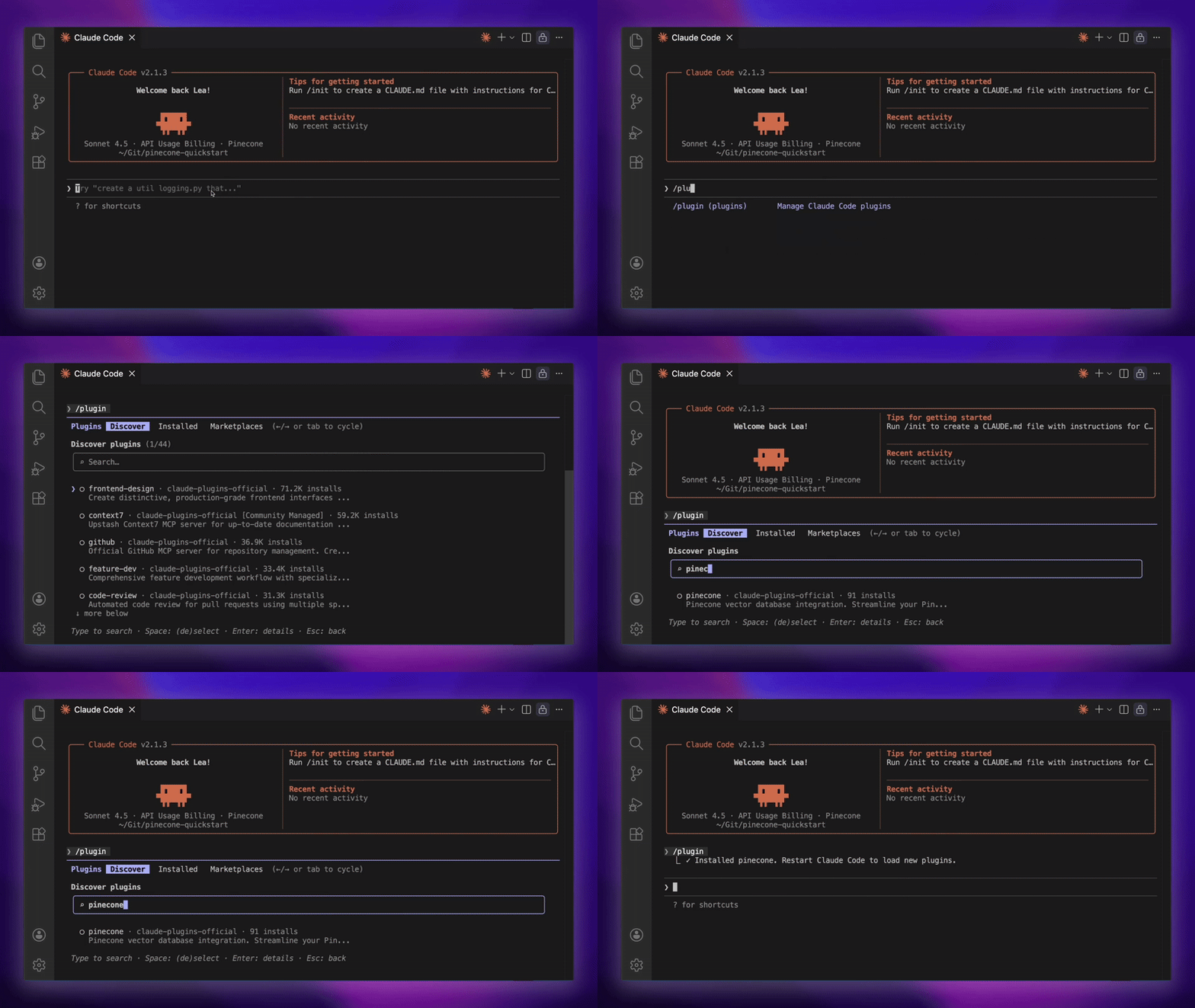
Install the Pinecone Plugin easily from Anthropic's Claude Code marketplace
1. Set your API key
Add your Pinecone API key as an environment variable:
export PINECONE_API_KEY=your-api-key-here2. Install the plugin in Claude Code
claude plugin install pinecone3. Start building
Restart Claude Code, then ask Claude to use Pinecone:
Or use a slash command for semantic search:
/pinecone:query query "your query here" index your-index-name
That's it. You're ready to build!
Work with your vector data using natural language or explicit commands:
/pinecone:query or just ask Claude to "search my index for X"upsert-records to add data to your indexesNote: The /pinecone:query command works only with integrated indexes using Pinecone's hosted embedding models. For third-party embeddings (OpenAI, HuggingFace, etc.), you'll need to generate scripts insteadPinecone Assistant handles the entire RAG pipeline—chunking, embedding, retrieval, and citation—so you can focus on building your application. Remember, that you can invoke any of these commands just by asking Claude Code too!
/pinecone:assistant-create --name product-docs-assistant/pinecone:assistant-upload --assistant product-docs-assistant --source ./documentation/pinecone:assistant-sync --assistant product-docs-assistant --source ./documentation/pinecone:assistant-chat --assistant product-docs-assistant --message "How do I configure authentication?"/pinecone:assistant-context --assistant product-docs-assistant --query "rate limiting"
The plugin remembers your last assistant, so you can use natural language for follow-ups: "Ask my assistant about API endpoints."
Important: Assistant commands requireuvto be installed. Runuv --versionto check, or see our troubleshooting guide below.
And, you can infinitely compose any of these capabilities to build better search and RAG experiences with Pinecone. Such as:
Install the Pinecone Plugin and start building context-aware applications:
claude plugin install pineconeHappy building!
此内容由惯性聚合(RSS阅读器)自动聚合整理,仅供阅读参考。 原文来自 — 版权归原作者所有。