





Introduction
The ability to perform real-time analytics and leverage advanced AI capabilities is crucial for businesses aiming to stay competitive. Google BigQuery, with its powerful data analytics capabilities, and Pinecone, a state-of-the-art vector database, are two technologies that can be integrated to achieve this goal. By using continuous queries in BigQuery to build real-time data transformations, you can stream data directly into Pinecone with Estuary Flow, enabling real-time vector search and retrieval. This integration is especially valuable for applications requiring instant data updates and rapid responses, such as anomaly detection, personalized recommendations, and more.
In this chapter, we’ll explore how to set up a real-time data pipeline from BigQuery to Pinecone using Estuary Flow, focusing on continuous queries and incremental data loading. We'll walk you through each step of the process, ensuring that you can harness the full potential of both BigQuery and Pinecone for your real-time applications.
Overview of BigQuery
Google BigQuery is a fully managed, serverless data warehouse that allows businesses to analyze vast amounts of data with exceptional speed. It excels in handling large datasets and supports advanced SQL queries, making it an ideal choice for organizations that require fast and scalable analytics. BigQuery's integration with other Google Cloud services and its ability to handle streaming data makes it a powerful tool for real-time analytics.
Step-by-Step Guide
Step 1: Setting Up BigQuery for Continuous Queries
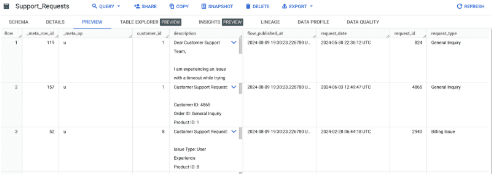
For this guide, we’ll consider a dataset comprised of two tables in BigQuery:
Customer Support Requests
Customers
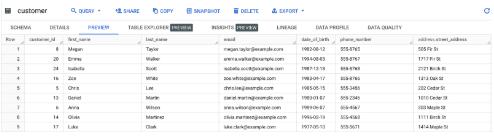
The first table contains continuously updating incoming customer support requests generated by users and the second table contains data about the customers themselves.
Here’s the DDL statement to generate both tables:
CREATE TABLE `your_project.your_dataset.support_requests` (
  customer_id BIGNUMERIC(38) NULL,
  description STRING NULL,
  request_date TIMESTAMP NULL,
  request_id BIGNUMERIC(38) NULL,
  request_type STRING NULL,
  status STRING NULL
);

CREATE TABLE `your_project.your_dataset.customer` (
  customer_id INTEGER NULL,
  first_name STRING NULL,
  last_name STRING NULL,
  email STRING NULL,
  date_of_birth DATE NULL,
  phone_number STRING NULL,
  address RECORD NULL,
  signup_date TIMESTAMP NULL,
  is_active BOOLEAN NULL,
  loyalty_points INTEGER NULL
);
What we’d like to achieve in this data flow, is to join the two datasets and vectorize the resulting records and load the embeddings into Pinecone.
With BigQuery continuous queries, we can do this all in real-time! Let’s dive a bit deeper into how exactly.
Explanation of BigQuery Continuous Queries
BigQuery continuous queries are a powerful feature that allows you to process and analyze data as it streams into your BigQuery tables. Unlike traditional batch processing, continuous queries operate in real-time, continuously updating the results as new data arrives.
To set up continuous queries in BigQuery:
- Create a BigQuery Dataset: Start by creating a dataset that will store the results of your continuous queries.
- Define the Continuous Query: Write an SQL query that processes your streaming data. Ensure that the query is optimized for continuous processing, focusing on incremental updates rather than full table scans.
- Configure the Query as Continuous: In BigQuery, set the query to run continuously, specifying the frequency and other relevant parameters.
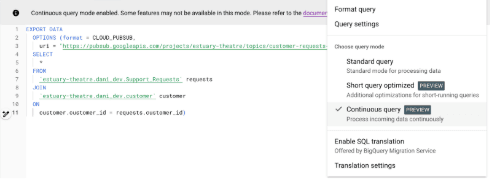
You’ll have to create a Pub/Sub topic first, then configure the query as “Continuous”, targeting the topic you just created.
Once configured, the continuous query will automatically update as new data arrives, providing real-time insights and analysis.
As you can see in the image above, our live dataset is the joined product of the two source tables.
You can quickly test the continuous query by inserting a few records to each table, then heading over to the Pub/Sub message preview page on the Google Cloud Console.
Step 2: Setting Up Estuary Flow for Pub/Sub Integration
Initializing the Capture Connector for Pub/Sub in Estuary Flow
Estuary Flow is a real-time data integration platform that allows you to capture and stream data from various sources, including Google Pub/Sub, to different destinations. To integrate BigQuery continuous queries with Estuary Flow, you’ll first need to set up a capture connector for Pub/Sub.
- Create a Service Account: Ensure that you have a Google Cloud service account with the necessary permissions to access Pub/Sub and BigQuery.
- Initialize the Capture Connector: In the Estuary Flow dashboard, create a new capture connector and select Google Pub/Sub as the source. Provide the service account credentials and configure the connector to listen to the relevant Pub/Sub topics.
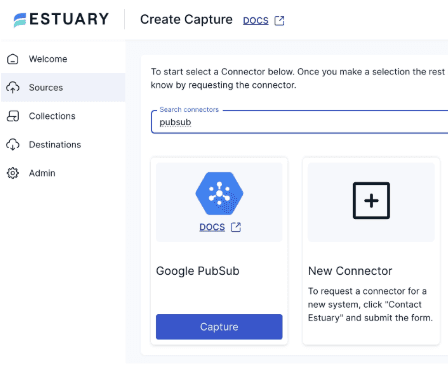
Configuring the Connector to Receive Messages from Pub/Sub Topics
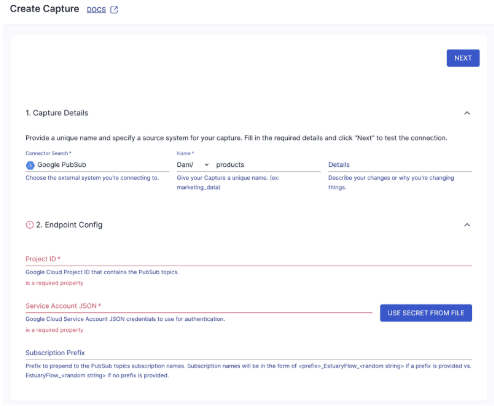
Configure the connector to receive messages from the Pub/Sub topics associated with your continuous queries. This setup ensures that any new data processed by BigQuery is immediately captured by Estuary Flow and streamed to the next destination, such as Pinecone.
- Select the Pub/Sub Topics: Choose the topics you want to subscribe to, ensuring they are linked to the continuous queries in BigQuery. In our example the name of the topic is projects/estuary-theatre/topics/customer-requests-demo
After pressing “Save & Publish”, Estuary Flow will start immediately capturing data coming from the Pub/Sub topic in real-time. As the last step, let’s set up the Pinecone Materialization.
Step 3: Loading Vectorized Data into Pinecone
Pinecone is a specialized vector database designed for high-performance vector search and similarity matching. By vectorizing your Google Sheets data incrementally and loading it into Pinecone, you can leverage its native search capabilities to quickly retrieve relevant information.
Here's what you need to do to quickly set up Estuary Flow’s Pinecone materialization connector:
Head over to your Estuary Flow dashboard, navigate to the "Destinations" section, and click on "Create New Materialization". Select "Pinecone" as your materialization connector.
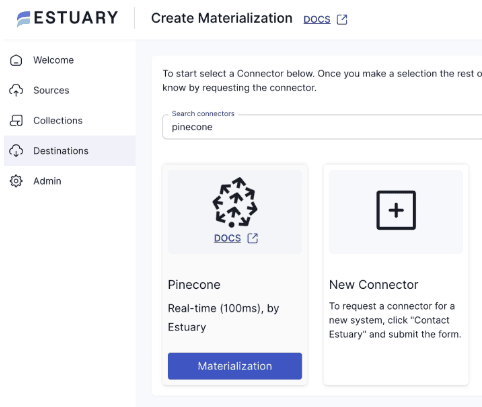
Next, configure the Materialization. Enter all the configuration details required by the connector; such as your Pinecone index name and both API keys.
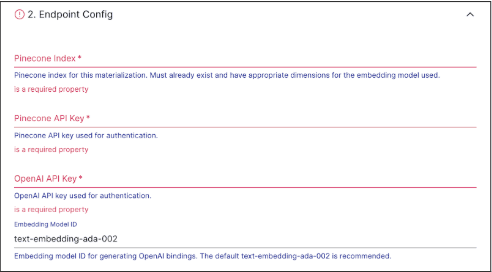
Finally, Save & Publish the Materialization. To verify that it’s working correctly, you can head over to the Pinecone web UI and make sure there are embeddings in the index.
It should look something like this:
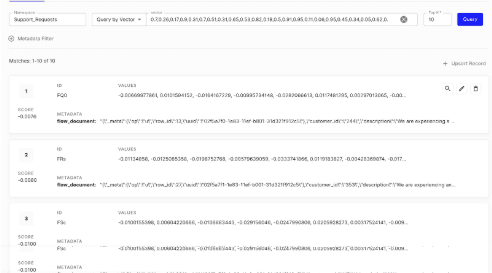
The Pinecone materialization connector will generate a vector embedding for each document in the collection that the source connector produces with some additional metadata.
Flow packages the incoming documents under the flow_document key, including the metadata fields it produces while capturing changes from the source which include a uuid value, the original row_id and the operation type that triggered the change event.
Because Pinecone supports upserts, you can always use only the latest version for every record – this is critical to avoid stale data.
More Use Cases and Applications
Integrating BigQuery with Pinecone using continuous queries opens up a wide range of real-time applications across various industries. Apart from customer support requests, here are some other practical examples:
- Real-Time Analytics: Companies can use this integration to analyze and visualize data in real-time, enabling immediate insights and decision-making. For example, a retail business could track customer behavior in real-time and adjust marketing strategies on the fly.
- Anomaly Detection: Financial institutions can leverage real-time data from BigQuery and Pinecone to detect fraudulent transactions or unusual patterns, enabling faster response times and reducing potential losses.
- Personalized Recommendations: E-commerce platforms can offer personalized product recommendations by continuously updating vector representations of user behavior and product features in Pinecone, ensuring that recommendations are always relevant and up-to-date.
Businesses across various sectors can benefit from this integration:
- E-commerce: By continuously updating product vectors in Pinecone based on real-time sales data from BigQuery, e-commerce platforms can deliver highly accurate and personalized recommendations, driving sales and enhancing customer satisfaction.
- Finance: Financial firms can use real-time analytics to monitor transactions and detect anomalies, improving the accuracy of fraud detection systems and enhancing security measures.
- Healthcare: Healthcare providers can use real-time data to monitor patient health metrics and provide timely interventions, improving patient outcomes and reducing the burden on healthcare systems.
Wrapping up
The integration of BigQuery with Pinecone using continuous queries represents a powerful solution for real-time data processing and retrieval. By following the steps outlined in this guide, you can set up a seamless data pipeline that ensures your vector database is always up-to-date and ready to deliver fast, accurate results for your AI-driven applications. Whether you’re building a recommendation system, monitoring financial transactions, or analyzing customer behavior, this integration will empower your business to make data-driven decisions in real-time.
This concludes Chapters 1 and 2 of the series. The next chapter will delve into the advanced configurations and optimizations that can further enhance the performance and scalability of your real-time data pipeline.
Stay tuned!
Was this article helpful?