





Special offer for n8n users: Build with the Assistant node before May 1, 2026 to get a discount when upgrading to Pinecone's Standard plan. Add the Pinecone Assistant node and connect to Pinecone in n8n to claim this offer.
When you're building RAG (Retrieval-Augmented Generation) workflows in n8n, it's easy to get pulled into pipeline decisions before you've built anything useful. Which chunking strategy should I use? Which embedding model? Do I need a reranker? Why aren't these results what I'm expecting?! Before you know it, you're three days in and still haven't shipped anything. The Pinecone Assistant node exists to remove those questions entirely — handling chunking, embedding, retrieval, and reranking for you so you can focus on what you're building, not how retrieval works. But sometimes you need that control. This post will help you know when.
Think of the Pinecone Assistant node as a managed RAG pipeline. When you add documents to an Assistant using this node, Pinecone automatically handles document chunking, embedding generation, query understanding, result reranking, and prompt engineering. In your n8n workflow, you interact with a single Assistant node to send it documents, query it, and get back relevant context.
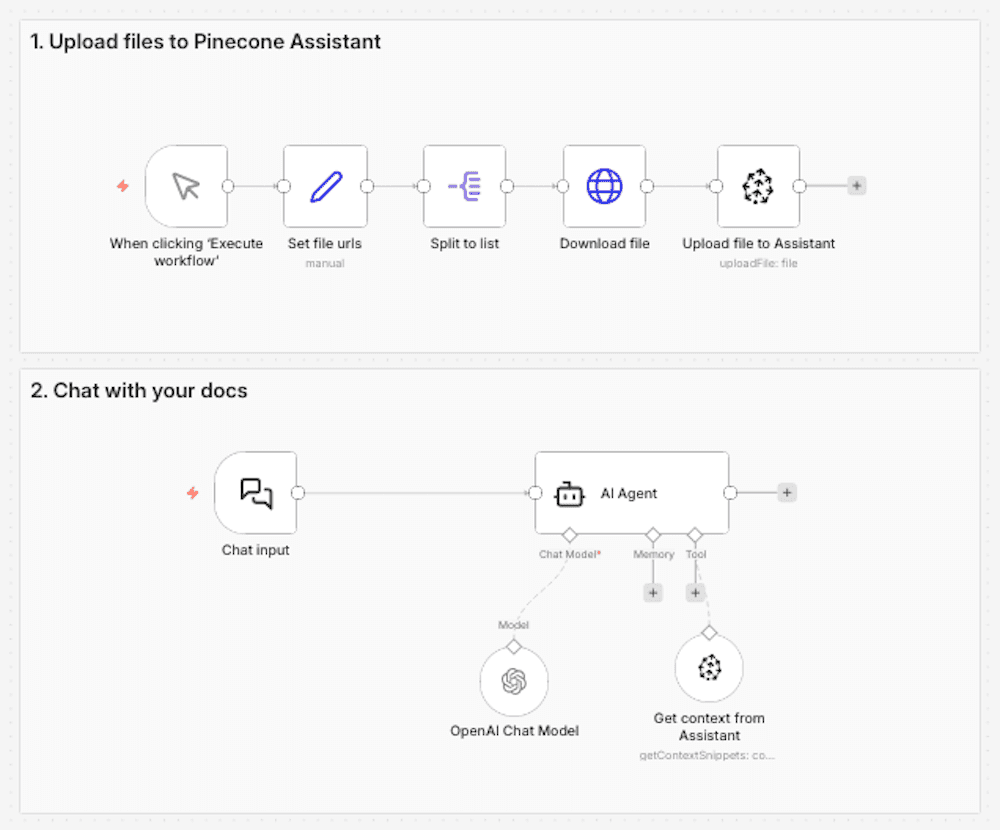
Technical considerations
This simplicity has a compounding effect. When RAG becomes a managed building block rather than a pipeline you maintain, it changes how you think about what you're building. Instead of asking "how do I set up chunking and embeddings?", you're asking "what should I build next?" That mental shift — from infrastructure to product — is the real value of the Assistant node.
The Pinecone Vector Store node gives you direct access to the vector database. You're responsible for building and maintaining the entire RAG pipeline in your n8n workflow: choosing your chunking strategy, embedding your data, and implementing the search approach.
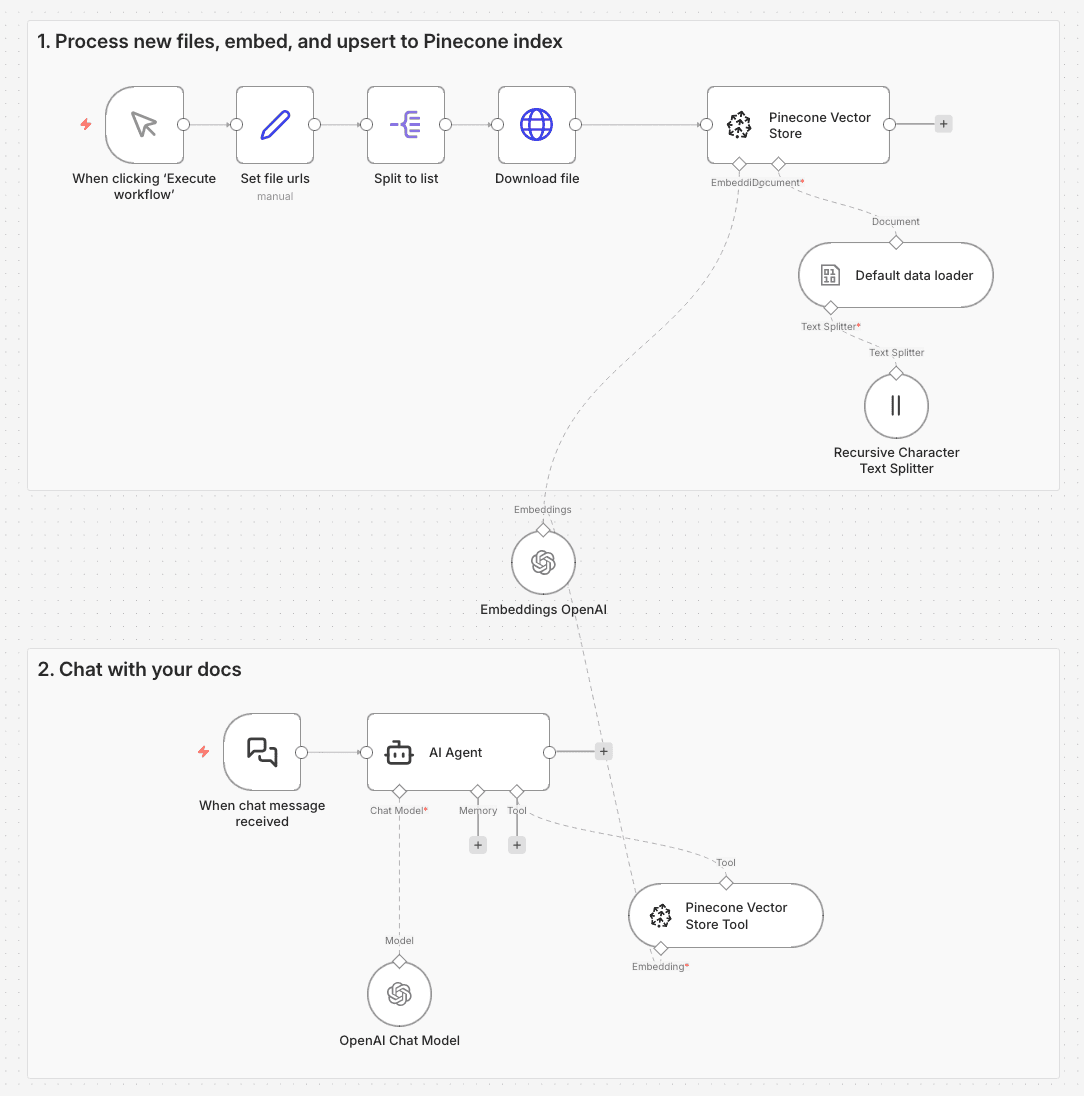
Technical considerations
It comes down to one question: Do you need custom control over chunking, embeddings, retrieval, or reranking?
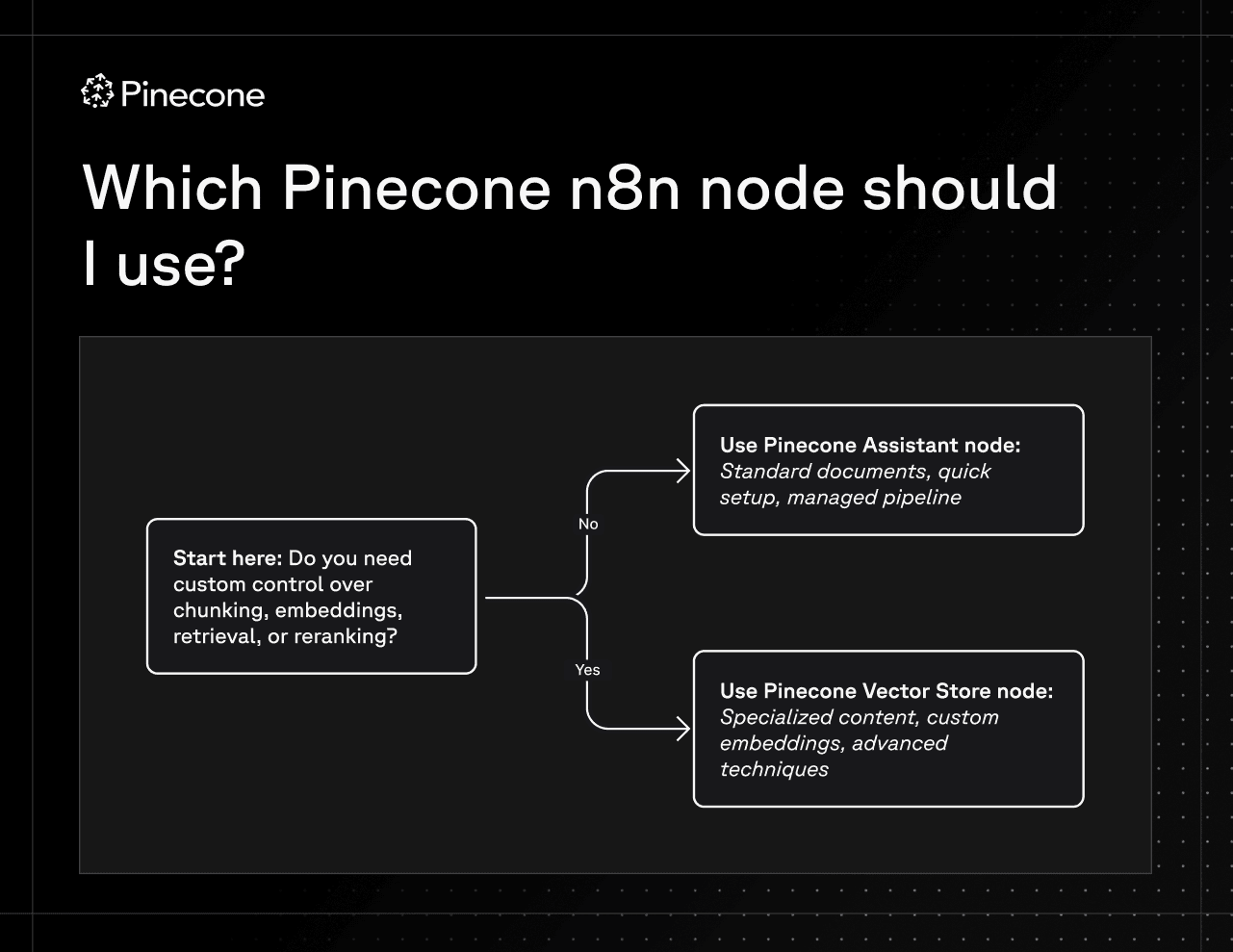
The Assistant node works best for standard knowledge search applications like customer support chatbots, internal knowledge bases, FAQ systems, and product documentation search. If you're building straightforward document search where the complexity of managing chunking strategies and embeddings isn't adding value to your use case, the Assistant node handles everything automatically. It's also ideal when you need to get up and running quickly without becoming an expert in RAG pipelines, or when you want automatic updates as new Assistant features are released.
The Pinecone Vector Store node is designed for specialized scenarios where the details of your retrieval pipeline actually matter. If you're working with structured content that has unique retrieval needs, like technical documentation with code snippets, legal documents where clause-level precision is critical, or multi-lingual content requiring language-specific processing, the Vector Store node may be a better choice. It's also the right choice when you need a specific embedding model, whether that's a fine-tuned model trained on your data, a domain-specific model, or one required for compliance. And if you're implementing advanced retrieval techniques like hybrid search or multi-stage retrieval with custom reranking, the Vector Store node gives you the control to build exactly what you need.
The best RAG pipeline is the one you're not thinking about. The Pinecone Assistant node gets you there — managed retrieval, clean workflow canvas, and the mental space to focus on what you're actually building on top of it.
When you hit a real limitation — specialized content that needs custom chunking, a domain-specific embedding model, advanced retrieval techniques — the Vector Store node gives you the control to go deeper. But that's a deliberate tradeoff, not a starting point.
For most n8n builders, the Pinecone Assistant node is the right starting point. The sooner you stop asking "how do I build this?", the sooner you can start asking "what should I build next?" — and that's when the interesting work begins.
Ready to get started with the Pinecone Assistant node on n8n? Check out our quickstart here.
Using the Pinecone Vector Store node?
此内容由惯性聚合(RSS阅读器)自动聚合整理,仅供阅读参考。 原文来自 — 版权归原作者所有。