







Generative AI sparked several “wow” moments in 2022. From generative art tools like OpenAI’s DALL-E 2, Midjourney, and Stable Diffusion, to the next generation of Large Language Models like OpenAI’s GPT-3.5 generation models, BLOOM, and chatbots like LaMDA and ChatGPT.
It’s hardly surprising that Generative AI is experiencing a boom in interest and innovation [1]. Yet, this marks the just first year of generative AI’s widespread adoption. The early days of a new field poised to disrupt how we interact with machines.
One of the most thought-provoking use cases belongs to Generative Question-Answering (GQA). Using GQA, we can sculpt human-like interaction with machines for information retrieval (IR).
We all use IR systems every day. Google search indexes the web and retrieves relevant information to your search terms. Netflix uses your behavior and history on the platform to recommend new TV shows and movies, and Amazon does the same with products [2].
These applications of IR are world-changing. Yet, they may be little more than a faint echo of what we will see in the coming months and years with the combination of IR and GQA.
Imagine a Google that can answer your queries with an intelligent and insightful summary based on the top 20 pages — highlighting key points and information sources.
The technology available today already makes this possible and surprisingly easy. This article will look at retrieval-augmented GQA and how to implement it with Pinecone and OpenAI.
The most straightforward GQA system requires nothing more than a user text query and a large language model (LLM).
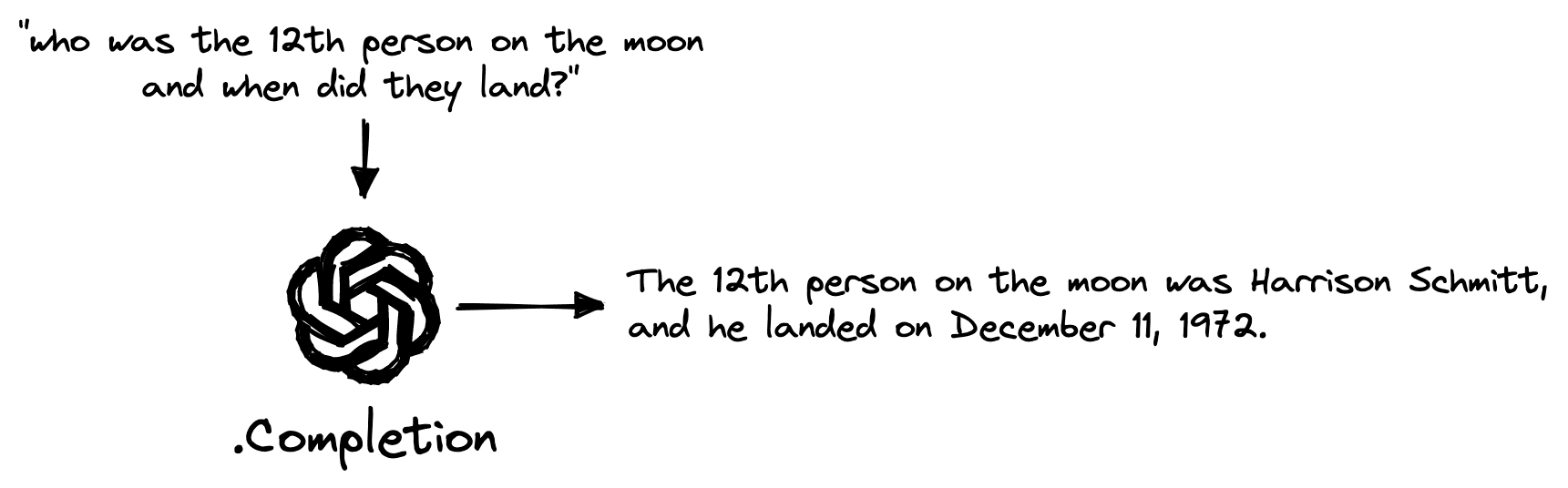
Simplest GQA system.
We can access one of the most advanced LLMs in the world via OpenAI. To start, we sign up for an API key.
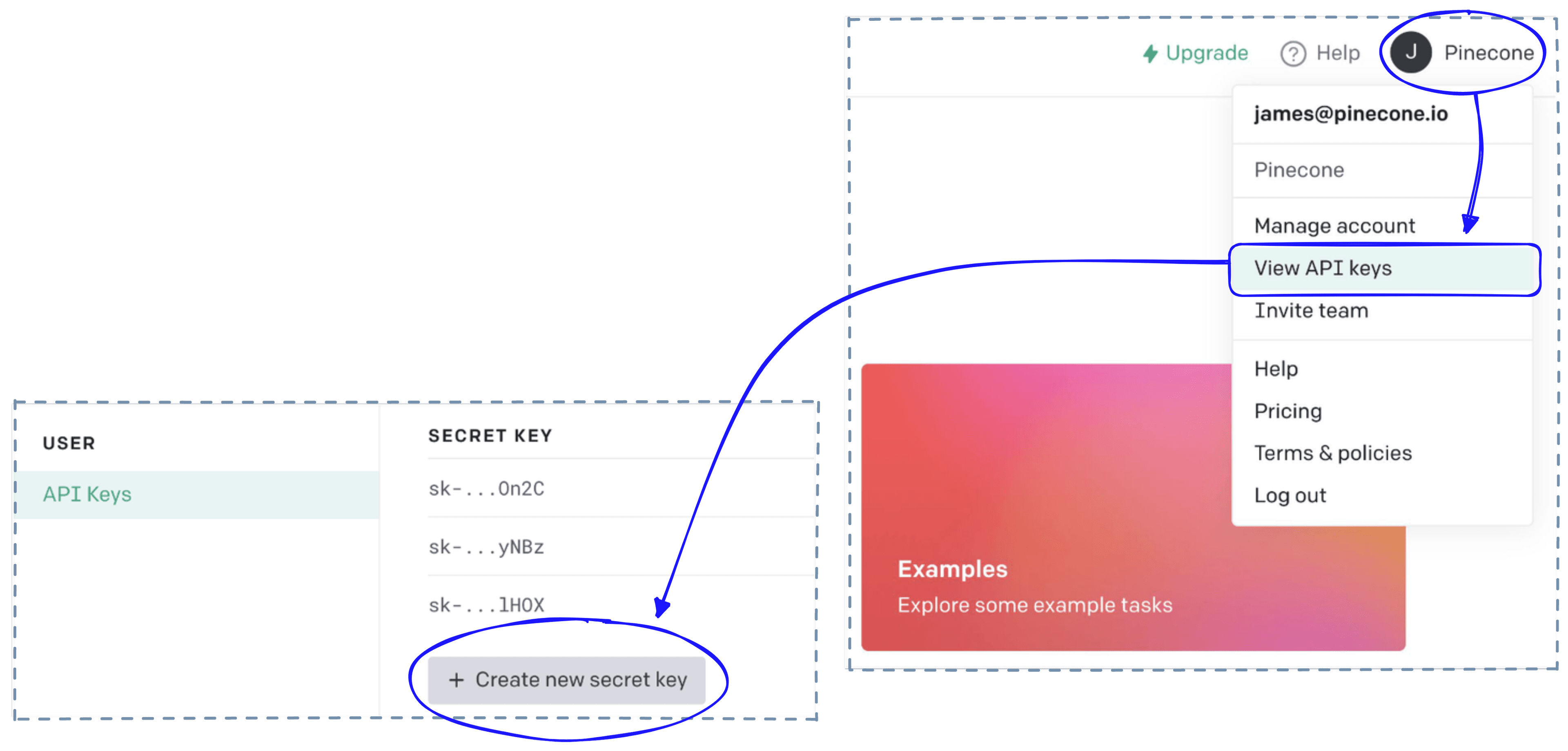
After signing up for an account, API keys can be created by clicking on your account (top-right) > View API keys > Create new secret key.
Then we switch to a Python file or notebook, install some prerequisites, and initialize our connection to OpenAI.
In[1]:
!pip install -qU openai pinecone-client datasetsIn[2]:
import openai

# get API key from top-right dropdown on OpenAI website
openai.api_key = "OPENAI_API_KEY"
From here, we can use the OpenAI completion endpoint to ask a question like _“who was the 12th person on the moon and when did they land?” _:
In[3]:
query = "who was the 12th person on the moon and when did they land?"

# now query text-davinci-003 WITHOUT context
res = openai.Completion.create(
    engine='text-davinci-003',
    prompt=query,
    temperature=0,
    max_tokens=400,
    top_p=1,
    frequency_penalty=0,
    presence_penalty=0,
    stop=None
)

res['choices'][0]['text'].strip()
Out[3]:
'The 12th person on the moon was Harrison Schmitt, and he landed on December 11, 1972.'We get an accurate answer immediately. Yet, this question is relatively easy, what happens if we ask about a lesser-known topic?
In[4]:
# first let's make it simpler to get answers
def complete(prompt):
    # query text-davinci-003
    res = openai.Completion.create(
        engine='text-davinci-003',
        prompt=prompt,
        temperature=0,
        max_tokens=400,
        top_p=1,
        frequency_penalty=0,
        presence_penalty=0,
        stop=None
    )
    return res['choices'][0]['text'].strip()
In[5]:
query = (
    "Which training method should I use for sentence transformers when " +
    "I only have pairs of related sentences?"
)

complete(query)
Out[5]:
'If you only have pairs of related sentences, then the best training method to use for sentence transformers is the supervised learning approach. This approach involves providing the model with labeled data, such as pairs of related sentences, and then training the model to learn the relationships between the sentences. This approach is often used for tasks such as natural language inference, semantic similarity, and paraphrase identification.'Although this answer is technically correct, it isn’t an answer. It tells us to use a supervised training method and learn the relationship between sentences. Both of these facts are true but do not answer the original question.
There are two options for allowing our LLM to better understand the topic and, more precisely, answer the question.
In the following sections, we will outline how to implement option two.
With option two of implementing retrieval, we need an external “knowledge base “. A knowledge base acts as the place where we store information and as the system that effectively retrieves this information.
A knowledge base is a store of information that can act as an external reference for GQA models. We can think of it as the “long-term memory” for AI systems.
We refer to knowledge bases that can enable the retrieval of semantically relevant information as vector databases.
A vector database stores vector representations of information encoded using specific ML models. These models have an “understanding” of language and can encode passages with similar meanings into a similar vector space and dissimilar passages into a dissimilar vector space.
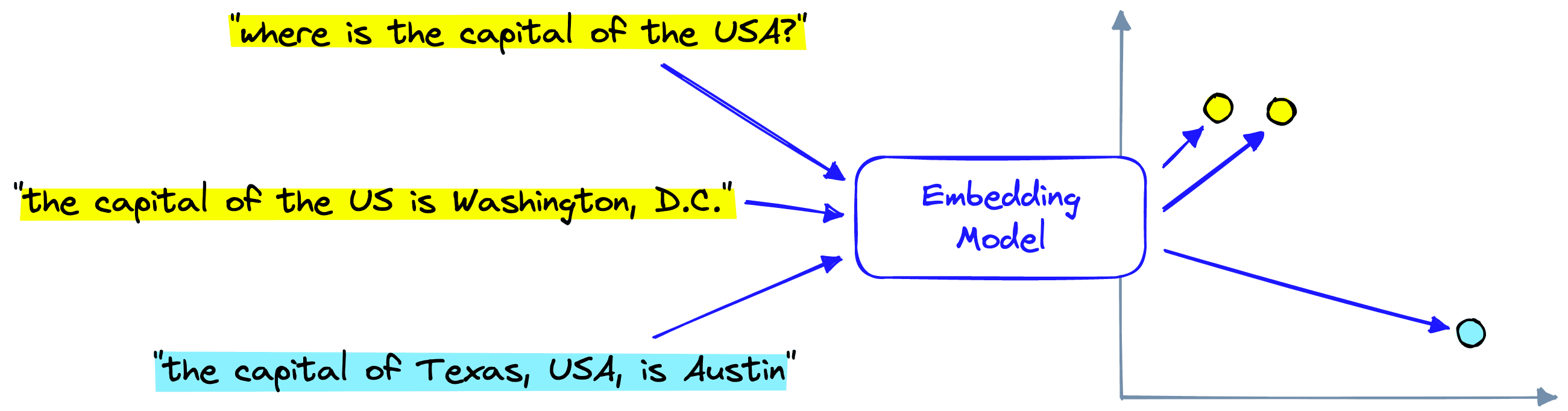
We can achieve this with OpenAI via the embed endpoint:
In[6]:
embed_model = "text-embedding-ada-002"

res = openai.Embedding.create(
    input=[
        "Sample document text goes here",
        "there will be several phrases in each batch"
    ], engine=embed_model
)
In[7]:
# vector embeddings are stored within the 'data' key
res.keys()
Out[7]:
dict_keys(['object', 'data', 'model', 'usage'])In[8]:
# we have created two vectors (one for each sentence input)
len(res['data'])
In[9]:
# we have created two 1536-dimensional vectors
len(res['data'][0]['embedding']), len(res['data'][1]['embedding'])
We’ll need to repeat this embedding process over many records that will act as our pipeline’s external source of information. These records still need to be downloaded and prepared for embedding.
The dataset we will use in our knowledge base is the jamescalam/youtube-transcriptions dataset hosted on Hugging Face Datasets. It contains transcribed audio from several ML and tech YouTube channels. We download it with the following:
In[2]:
from datasets import load_dataset

data = load_dataset('jamescalam/youtube-transcriptions', split='train')
data
Out[2]:
Dataset({
    features: ['title', 'published', 'url', 'video_id', 'channel_id', 'id', 'text', 'start', 'end'],
    num_rows: 208619
})
Out[3]:
{'title': 'Training and Testing an Italian BERT - Transformers From Scratch #4',
 'published': '2021-07-06 13:00:03 UTC',
 'url': 'https://youtu.be/35Pdoyi6ZoQ',
 'video_id': '35Pdoyi6ZoQ',
 'channel_id': 'UCv83tO5cePwHMt1952IVVHw',
 'id': '35Pdoyi6ZoQ-t0.0',
 'text': 'Hi, welcome to the video.',
 'start': 0.0,
 'end': 9.36}
The dataset contains many small snippets of text data. We need to merge several snippets to create more substantial chunks of text that contain more meaningful information.
In[11]:
from tqdm.auto import tqdm

new_data = []

window = 20  # number of sentences to combine
stride = 4  # number of sentences to 'stride' over, used to create overlap

for i in tqdm(range(0, len(data), stride)):
    i_end = min(len(data)-1, i+window)
    if data[i]['title'] != data[i_end]['title']:
        # in this case we skip this entry as we have start/end of two videos
        continue
    text = ' '.join(data[i:i_end]['text'])
    # create the new merged dataset
    new_data.append({
        'start': data[i]['start'],
        'end': data[i_end]['end'],
        'title': data[i]['title'],
        'text': text,
        'id': data[i]['id'],
        'url': data[i]['url'],
        'published': data[i]['published'],
        'channel_id': data[i]['channel_id']
    })
Out[12]:
{'start': 0.0,
 'end': 74.12,
 'title': 'Training and Testing an Italian BERT - Transformers From Scratch #4',
 'text': "Hi, welcome to the video. So this is the fourth video in a Transformers from Scratch mini series. So if you haven't been following along, we've essentially covered what you can see on the screen. So we got some data. We built a tokenizer with it. And then we've set up our input pipeline ready to begin actually training our model, which is what we're going to cover in this video. So let's move over to the code. And we see here that we have essentially everything we've done so far. So we've built our input data, our input pipeline. And we're now at a point where we have a data loader, PyTorch data loader, ready. And we can begin training a model with it. So there are a few things to be aware of. So I mean, first, let's just have a quick look at the structure of our data.",
 'id': '35Pdoyi6ZoQ-t0.0',
 'url': 'https://youtu.be/35Pdoyi6ZoQ',
 'published': '2021-07-06 13:00:03 UTC',
 'channel_id': 'UCv83tO5cePwHMt1952IVVHw'}
With the text chunks created, we can begin initializing our knowledge base and populating it with our data.
The vector database is the storage and retrieval component in our pipeline. We use Pinecone as our vector database. For this, we need to sign up for a free API key and enter it below, where we create the index for storing our data.
In[13]:
import pinecone

index_name = 'openai-youtube-transcriptions'

# initialize connection (get API key at app.pinecone.io)
pinecone.init(
    api_key="YOUR_API_KEY",
    environment="YOUR_ENV"  # find next to API key
)

# check if index already exists (it shouldn't if this is first time)
if index_name not in pinecone.list_indexes():
    # if does not exist, create index
    pinecone.create_index(
        index_name,
        dimension=len(res['data'][0]['embedding']),
        metric='cosine',
        metadata_config={
            'indexed': ['channel_id', 'published']
        }
    )
# connect to index
index = pinecone.Index(index_name)
# view index stats
index.describe_index_stats()
Out[13]:
{'dimension': 1536,
 'index_fullness': 0.0,
 'namespaces': {},
 'total_vector_count': 0}
Then we embed and index a dataset like so:
In[14]:
from tqdm.auto import tqdm
import datetime
from time import sleep

batch_size = 100  # how many embeddings we create and insert at once

for i in tqdm(range(0, len(new_data), batch_size)):
    # find end of batch
    i_end = min(len(new_data), i+batch_size)
    meta_batch = new_data[i:i_end]
    # get ids
    ids_batch = [x['id'] for x in meta_batch]
    # get texts to encode
    texts = [x['text'] for x in meta_batch]
    # create embeddings (try-except added to avoid RateLimitError)
    try:
        res = openai.Embedding.create(input=texts, engine=embed_model)
    except:
        done = False
        while not done:
            sleep(5)
            try:
                res = openai.Embedding.create(input=texts, engine=embed_model)
                done = True
            except:
                pass
    embeds = [record['embedding'] for record in res['data']]
    # cleanup metadata
    meta_batch = [{
        'start': x['start'],
        'end': x['end'],
        'title': x['title'],
        'text': x['text'],
        'url': x['url'],
        'published': x['published'],
        'channel_id': x['channel_id']
    } for x in meta_batch]
    to_upsert = list(zip(ids_batch, embeds, meta_batch))
    # upsert to Pinecone
    index.upsert(vectors=to_upsert)
We’re ready to combine OpenAI’s Completion and Embedding endpoints with our Pinecone vector database to create a retrieval-augmented GQA system.
The OpenAI Pinecone (OP) stack is an increasingly popular choice for building high-performance AI apps, including retrieval-augmented GQA.
Our pipeline during query time consists of the following:
Embedding endpoint to create vector representations of each query.Completion endpoint to generate a natural language answer considering the retrieved contexts.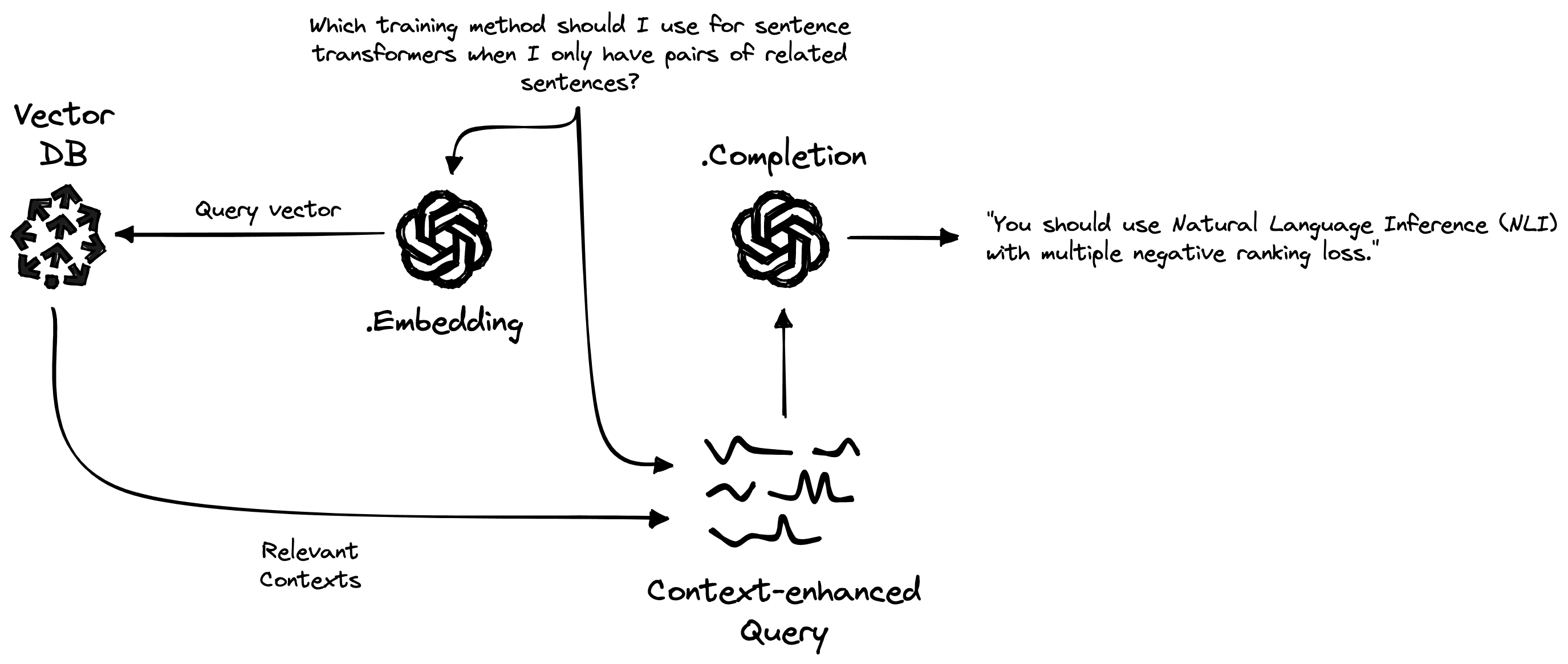
We start by encoding queries using the same encoder model to create a query vector xq.
In[15]:
res = openai.Embedding.create(
    input=[query],
    engine=embed_model
)

# retrieve from Pinecone
xq = res['data'][0]['embedding']

# get relevant contexts (including the questions)
res = index.query(xq, top_k=2, include_metadata=True)
Out[16]:
{'matches': [{'id': 'pNvujJ1XyeQ-t418.88',
     'metadata': {
         'channel_id': 'UCv83tO5cePwHMt1952IVVHw',
         'end': 568.4,
         'published': datetime.date(2021, 11, 24),
         'start': 418.88,
         'text': 'pairs of related sentences you can go '
                 'ahead and actually try training or '
                 'fine-tuning using NLI with multiple '
                 "negative ranking loss..."
         'title': 'Today Unsupervised Sentence Transformers, '
                  'Tomorrow Skynet (how TSDAE works)',
         'url': 'https://youtu.be/pNvujJ1XyeQ'
     },
     'score': 0.865277052,
     'sparseValues': {},
     'values': []},
    {'id': 'WS1uVMGhlWQ-t737.28',
     'metadata': {
         'channel_id': 'UCv83tO5cePwHMt1952IVVHw',
         'end': 900.72,
         'published': datetime.date(2021, 10, 20),
         'start': 737.28,
         'text': "were actually more accurate. So we can't "
                 "really do that. We can't use this what is "
                 'called a mean pooling approach. Or we '
                 "can't use it in its current form..."
         'title': 'Intro to Sentence Embeddings with '
                  'Transformers',
         'url': 'https://youtu.be/WS1uVMGhlWQ'
     },
     'score': 0.85855335,
     'sparseValues': {},
     'values': []}],
 'namespace': ''}
The query vector xq is used to query Pinecone via index.query, and previously indexed passage vectors are compared to find the most similar matches — returned in res above.
Using these returned contexts, we can construct a prompt instructing the generative LLM to answer the question based on the retrieved contexts. To keep things simple, we will do all this in a function called retrieve.
In[30]:
limit = 3750

def retrieve(query):
    res = openai.Embedding.create(
        input=[query],
        engine=embed_model
    )

    # retrieve from Pinecone
    xq = res['data'][0]['embedding']

    # get relevant contexts
    res = index.query(xq, top_k=3, include_metadata=True)
    contexts = [
        x['metadata']['text'] for x in res['matches']
    ]

    # build our prompt with the retrieved contexts included
    prompt_start = (
        "Answer the question based on the context below.\n\n"+
        "Context:\n"
    )
    prompt_end = (
        f"\n\nQuestion: {query}\nAnswer:"
    )
    # append contexts until hitting limit
    for i in range(1, len(contexts)):
        if len("\n\n---\n\n".join(contexts[:i])) >= limit:
            prompt = (
                prompt_start +
                "\n\n---\n\n".join(contexts[:i-1]) +
                prompt_end
            )
            break
        elif i == len(contexts)-1:
            prompt = (
                prompt_start +
                "\n\n---\n\n".join(contexts) +
                prompt_end
            )
    return prompt
In[31]:
# first we retrieve relevant items from Pinecone
query_with_contexts = retrieve(query)
query_with_contexts
Out[31]:
"Answer the question based on the context below.\n\nContext:\npairs of related sentences you can go ahead and actually try training or fine-tuning using NLI with multiple negative ranking loss. If you don't have...\n\n---\n\n...we have the core transform models and what S BERT does is fine tunes on sentence pairs using what is called a Siamese architecture or Siamese network...\n\n---\n\n...we're looking at here is Natural Language Inference or NLI and NLI requires that we have pairs of sentences that are labeled as either contradictory, neutral which means they're not necessarily related or as entailing or as inferring each other. So you have pairs that entail each other...\n\nQuestion: Which training method should I use for sentence transformers when I only have pairs of related sentences?\nAnswer:"Note that the generated expanded query (query_with_contexts) has been shortened for readability.
From retrieve, we produce a longer prompt (query_with_contexts) containing some instructions, the contexts, and the original question.
The prompt is then fed into the generative LLM via OpenAI’s Completion endpoint. As before, we use the complete function to handle everything.
In[32]:
# then we complete the context-infused query
complete(query_with_contexts)
Out[32]:
'You should use Natural Language Inference (NLI) with multiple negative ranking loss.'Because of the additional “source knowledge” (information fed directly into the model), we have eliminated the hallucinations of the LLM — producing accurate answers to our question.
Beyond providing more factual answers, we also have the sources of information from Pinecone used to generate our answer. Adding this to downstream tools or apps can help improve user trust in the system. Allowing users to confirm the reliability of the information being presented to them.
That’s it for this walkthrough of retrieval-augmented Generative Question Answering (GQA) systems.
As demonstrated, LLMs alone work incredibly well but struggle with more niche or specific questions. This often leads to hallucinations that are rarely obvious and likely to go undetected by system users.
By adding a “long-term memory” component to our GQA system, we benefit from an external knowledge base to improve system factuality and user trust in generated outputs.
Naturally, there is vast potential for this type of technology. Despite being a new technology, we are already seeing its use in YouChat, several podcast search apps, and rumors of its upcoming use as a challenger to Google itself [3].
There is potential for disruption in any place where the need for information exists, and retrieval-augmented GQA represents one of the best opportunities for taking advantage of the outdated information retrieval systems in use today.
[1] E. Griffith, C. Metz, A New Area of A.I. Booms, Even Amid the Tech Gloom (2023), NYTimes
[2] G. Linden, B. Smith, J. York, Amazon.com Recommendations: Item-to-Item Collaborative Filtering (2003), IEEE
[3] T. Warren, Microsoft to challenge Google by integrating ChatGPT with Bing search (2023), The Verge
此内容由惯性聚合(RSS阅读器)自动聚合整理,仅供阅读参考。 原文来自 — 版权归原作者所有。