











RAG has become a dominant pattern in applications that leverage LLMs. This is mainly due to the fact that these applications are attempting to tame the behavior of the LLM such that it responds with content that is deemed “correct”. Correctness is a subjective measure that depends on both the intent of the application as well as the intention of the user. RAG provides an opportunity to align these two intentions such that the user can get their query resolved, and the knowledge provider can establish a “ground truth” for the LLM to work off of.
But for all its power, the naive implementation of the RAG pattern is rarely enough to satisfy production grade requirements. This is due to several reasons:
To address these limitations, many new advanced RAG patterns have emerged. In the post, we’ll explore three popular patterns, and then build an example that draws lessons from all three. It’s important to note, that there is no silver bullet proposed here. Each one of these methods may still produce poor results in certain situations. The goal of this post is to explore some of the techniques used to mitigate the common problems we run into with RAG applications.
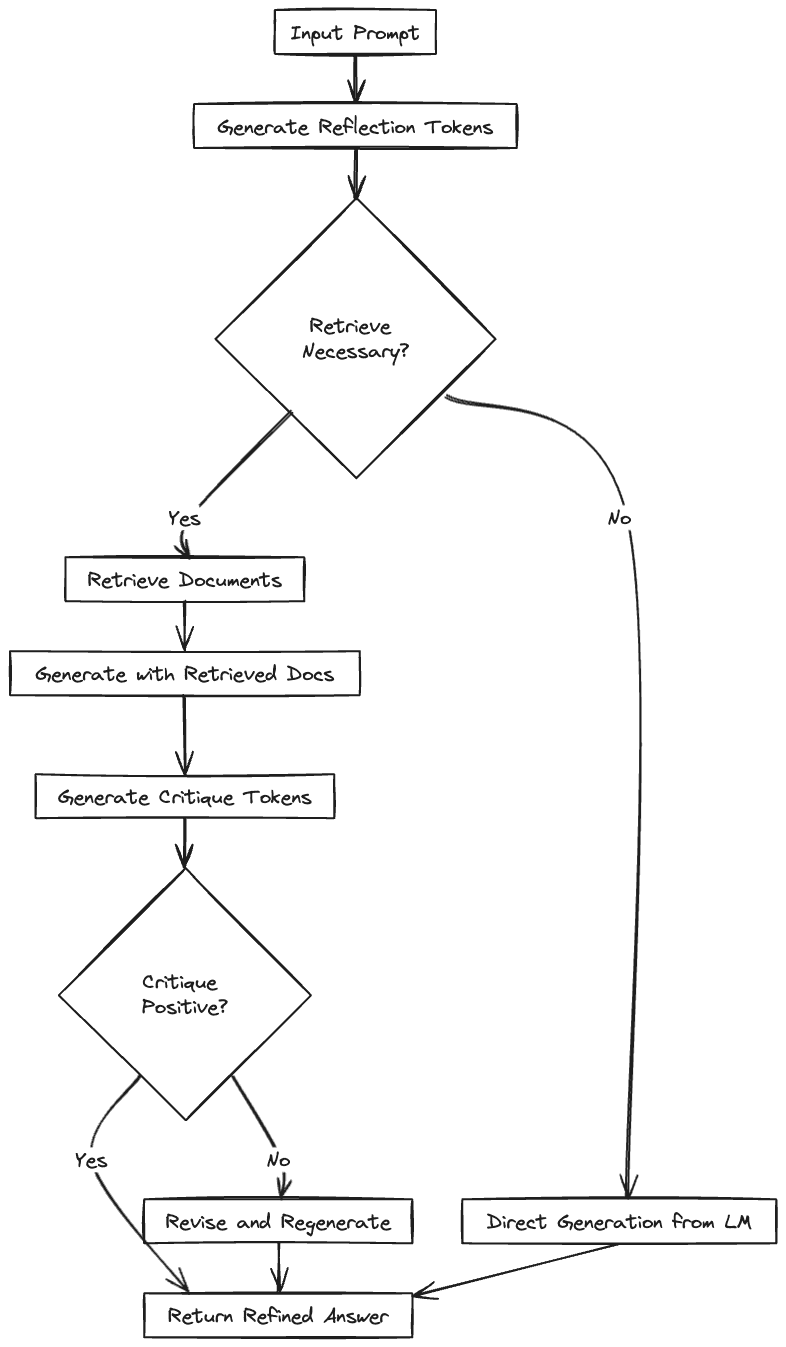
The SELF-RAG paper describes fine-tuned model that incorporates mechanisms for adaptive information retrieval and self critique. That is, the model can dynamically determine when external information is needed, and can critically evaluate its generated responses for relevance and factual accuracy.
At the core of this fine-tuning process are new elements like reflection and critique tokens. Reflection tokens enable the model to make informed decisions about whether to retrieve additional information, ensuring that such actions are taken only when they add value to the response. Critique tokens, on the other hand, allow the model to assess the quality of its responses and the relevance of any retrieved information, promoting a higher standard of accuracy and relevance in generated content.
The SELF-RAG training process begins with the usual dataset of prompts and responses, then adds reflection and critique tokens. This augmented dataset trains the model to understand when and how to critique the generation's relevance and factual alignment. The main model undergoes end-to-end training with this dataset, learning to seamlessly integrate the capabilities of adaptive retrieval and internal critique into its operation. This fine-tuning ensures that SELF-RAG can apply these advanced techniques effectively at inference time, significantly enhancing the model's ability to generate contextually relevant and factually accurate responses.
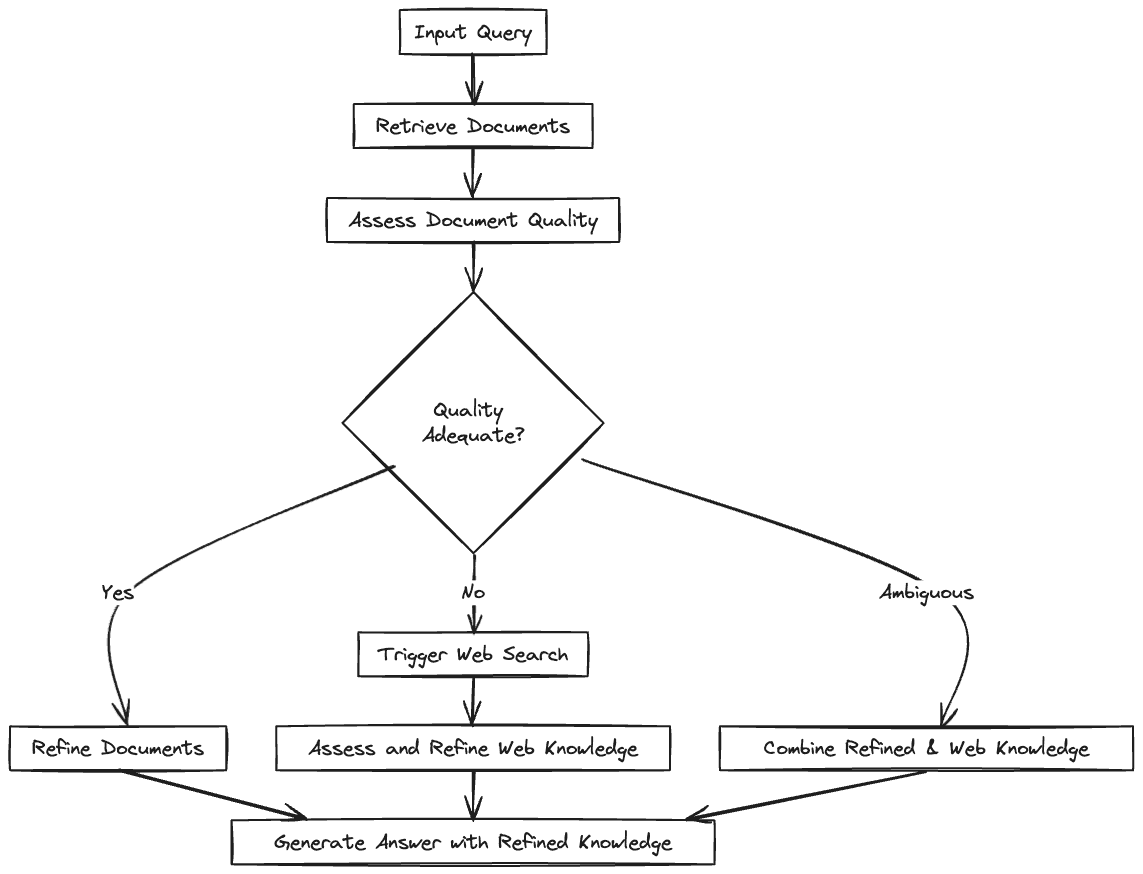
The Corrective RAG (CRAG) paper introduces a method that improves the accuracy of language models by intelligently re-incorporating information from retrieved documents. It uses an evaluator to assess the quality of documents obtained for a query. Then, it decides whether to use, ignore, or request more data from these documents.
CRAG goes one step further by using web searches to extend its information beyond static databases, ensuring access to a wider, up-to-date range of information. It also uses a unique strategy to break down and rebuild retrieved documents, focusing on getting the most relevant information while getting rid of distractions. This better control over the use of external knowledge lets CRAG greatly improve generation quality. It can be easily combined with existing RAG-based models, boosting their effectiveness without needing a lot of changes.
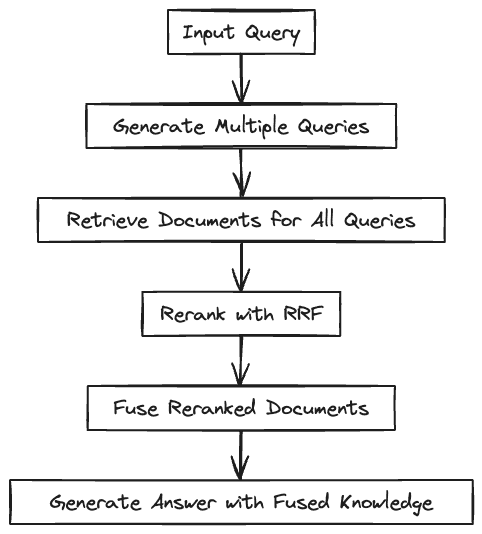
RAG-Fusion begins by generating multiple derivative queries using a large language model. This step broadens the understanding of the initial user input, ensuring a thorough exploration of the query subject from various perspectives. Next, a vector search identifies relevant documents for both the original and derivative queries, compiling a diverse range of related information.
After document retrieval, the Reciprocal Rank Fusion (RRF) algorithm reranks the documents based on their relevance. These documents are then combined to form a comprehensive and relevant information source.
In the final stage, this combined dataset and all queries are processed by a large language model. The model synthesizes this input to create a well-articulated and contextually relevant response. Through this systematic approach, RAG-Fusion enhances the accuracy and comprehensiveness of responses, significantly improving the quality of answers to user queries.
Let’s summarize these three approaches and compare them side-by-side:
| Feature | Self RAG | Corrective RAG | RAG Fusion |
|---|---|---|---|
| Overview | Enhances LM's quality and factuality through retrieval and self-reflection. Uses special tokens for adaptive retrieval and critique of its own generations. | Improves robustness of generation with a lightweight retrieval evaluator and a decompose-then-recompose algorithm for document refinement. Utilizes large-scale web searches for augmentation. | Combines RAG and Reciprocal Rank Fusion (RRF) by generating multiple queries, reranking with reciprocal scores, and fusing documents and scores for more accurate and comprehensive answers. |
| Key Mechanism | Fine-tuned with reflection tokens and critique tokens for on-demand retrieval and generation quality assessment. | Employs a retrieval evaluator to assess document quality and triggers actions (Correct, Incorrect, Ambiguous) based on confidence scores. | Generates multiple queries from the original query, reranks documents using RRF, and fuses them for the final output. |
| Advantages | Increases factuality and versatility of responses. Adaptable to diverse task requirements. | Significantly improves the performance of RAG-based approaches in both short- and long-form generation tasks. | Provides more accurate and comprehensive answers by contextualizing the original query from various perspectives. |
Let’s review an example that combines some of the techniques we described above. We’re not going to implement any one of them specifically, but rather draw on the patterns they present. We’ll use Canopy to drive the embedding and querying process, and add additional processes around it. Namely, we’re going to do the following:
Let’s get started! (Full code listing)
Start with installing the required dependencies:
!pip install -qU canopy-sdk langchain langchain_openai cohere==4.27 markdown google-search-resultsIf using Google Colab for this, you’ll need to downgrade numpy:
!pip uninstall -y numpy
!pip install numpy==1.24.4
Use getpass to get all the required keys:
import getpass
import os

os.environ["PINECONE_API_KEY"] =  getpass.getpass()
os.environ["OPENAI_API_KEY"] = getpass.getpass()
os.environ["SERPAPI_API_KEY"] = getpass.getpass()
os.environ["COHERE_API_KEY"] = getpass.getpass()
Next, read some data that will feed into our knowledge base:
import pandas as pd
import warnings
warnings.filterwarnings('ignore')

data = pd.read_parquet("https://storage.googleapis.com/pinecone-datasets-dev/pinecone_docs_ada-002/raw/file1.parquet")
data.head()
Initialize the Canopy knowledge base:
from canopy.knowledge_base import KnowledgeBase
from canopy.tokenizer import Tokenizer
from canopy.knowledge_base import list_canopy_indexes

Tokenizer.initialize()

INDEX_NAME = "advanced-rag"
kb = KnowledgeBase(index_name=INDEX_NAME)

if not any(name.endswith(INDEX_NAME) for name in list_canopy_indexes()):
    kb.create_canopy_index()

kb = KnowledgeBase(index_name=INDEX_NAME)
kb.connect()
Load the documents into the Canopy index:
from canopy.models.data_models import Document
from tqdm.auto import tqdm

batch_size = 10
documents = [Document(**row) for _, row in data.iterrows()]

for i in tqdm(range(0, len(documents), batch_size)):
    kb.upsert(documents[i: i+batch_size])
Test your newly created knowledge base:
from canopy.models.data_models import Query

results = kb.query([Query(text="p1 pod capacity")])
You should see the following:
[QueryResult(query='p1 pod capacity', documents=[DocumentWithScore(id='6df9a04a-381c-5309-a0f9-321ef0d99d66_10', text='#### p2 pod type (Public Preview)("Beta")\n\n\nThe new [p2 pod type](indexes/#p2-pods) provides search speeds of around 5ms and throughput of 200 queries per second per replica, or approximately 10x faster speeds and higher throughput than the p1 pod type, depending on your data and network conditions. \n\n\nThis is a **public preview** feature and is not appropriate for production workloads.\n\n\n#### Improved p1 and s1 performance\n\n\nThe [s1](indexes/#s1-pods) and [p1](indexes/#p1-pods) pod types now offer approximately 50% higher query throughput and 50% lower latency, depending on your workload.', source='https://docs.pinecone.io/docs/release-notes', metadata={'created_at': '2023_10_25', 'title': 'release-notes'}, score=0.57957387), DocumentWithScore(id='82c9cb76-6f8a-56b3-ad59-a89bd6e3725b_2', text='### s1 pods\n\n\nThese storage-optimized pods provide large storage capacity and lower overall costs with slightly higher query latencies than p1 pods. They are ideal for very large indexes with moderate or relaxed latency requirements.\n\n\nEach s1 pod has enough capacity for around 5M vectors of 768 dimensions.\n\n\n### p1 pods\n\n\nThese performance-optimized pods provide very low query latencies, but hold fewer vectors per pod than s1 pods. They are ideal for applications with low latency requirements (<100ms).\n\n\nEach p1 pod has enough capacity for around 1M vectors of 768 dimensions.', source='https://docs.pinecone.io/docs/indexes', metadata={'created_at': '2023_10_25', 'title': 'indexes'}, score=0.573040187), DocumentWithScore(id='e2b1ebe4-e17a-5830-9b32-11b7bdd80022_4', text='| Pod type | Dimensions | Estimated max vectors per pod |\n| --- | --- | --- |\n| p1 | 512 | 1,250,000 |\n| | 768 | 1,000,000 |\n| | 1024 | 675,000 |\n| p2 | 512 | 1,250,000 |\n| | 768 | 1,100,000 |\n| | 1024 | 1,000,000 |\n| s1 | 512 | 8,000,000 |\n| | 768 | 5,000,000 |\n| | 1024 | 4,000,000 |\n\n\nPinecone does not support fractional pod deployments, so always round up to the next nearest whole number when choosing your pods. \n\n\n# Queries per second (QPS)', source='https://docs.pinecone.io/docs/choosing-index-type-and-size', metadata={'created_at': '2023_10_25', 'title': 'choosing-index-type-and-size'}, score=0.566722095), DocumentWithScore(id='82c9cb76-6f8a-56b3-ad59-a89bd6e3725b_3', text='### p2 pods\n\n\nThe p2 pod type provides greater query throughput with lower latency. For vectors with fewer than 128 dimension and queries where `topK` is less than 50, p2 pods support up to 200 QPS per replica and return queries in less than 10ms. This means that query throughput and latency are better than s1 and p1.\n\n\nEach p2 pod has enough capacity for around 1M vectors of 768 dimensions. However, capacity may vary with dimensionality.\n\n\nThe data ingestion rate for p2 pods is significantly slower than for p1 pods; this rate decreases as the number of dimensions increases. For example, a p2 pod containing vectors with 128 dimensions can upsert up to 300 updates per second; a p2 pod containing vectors with 768 dimensions or more supports upsert of 50 updates per second. Because query latency and throughput for p2 pods vary from p1 pods, test p2 pod performance with your dataset.\n\n\nThe p2 pod type does not support sparse vector values.', source='https://docs.pinecone.io/docs/indexes', metadata={'created_at': '2023_10_25', 'title': 'indexes'}, score=0.558333158), DocumentWithScore(id='b4f7c4d3-d0f4-5fde-91db-54de9bfc892f_1', text='## Pod storage capacity\n\n\nEach **p1** pod has enough capacity for 1M vectors with 768 dimensions.\n\n\nEach **s1** pod has enough capacity for 5M vectors with 768 dimensions.\n\n\n## Metadata\n\n\nMax metadata size per vector is 40 KB.\n\n\nNull metadata values are not supported. Instead of setting a key to hold a null value, we recommend you remove that key from the metadata payload.\n\n\nMetadata with high cardinality, such as a unique value for every vector in a large index, uses more memory than expected and can cause the pods to become full.', source='https://docs.pinecone.io/docs/limits', metadata={'created_at': '2023_10_25', 'title': 'limits'}, score=0.548385203)], debug_info={})]We’ll use a straightforward call to the LLM to generate additional queries based on the initial user prompt:
def generate_queries(model,prompt, num_queries):
  query_generation_prompt = ChatPromptTemplate.from_template("Given the prompt: '{prompt}', generate {num_queries} questions that are better articulated. Return in the form of an list. For example: ['question 1', 'question 2', 'question 3']")
  query_generation_chain = query_generation_prompt | model
return str_to_json(query_generation_chain.invoke({"prompt": prompt, "num_queries": num_queries}).content)Instead of fine tuning a model like the SELF-RAG paper suggest, we’ll use an LLM and ask it to produce a score for several measures which we’ll eventually average out and set a final “critique” score.
def evaluate_with_llm(model, prompt, generated_text):
    """
    Uses a Large Language Model (LLM) to evaluate generated text.

    :param model: An instance of the LLM, ready to generate responses.
    :param prompt: The original prompt given to the system.
    :param generated_text: The text generated by the SELF-RAG system.
    :return: A dictionary containing critique scores or assessments.
    """
    evaluations = {}

    # Template for creating evaluation queries
    def create_evaluation_query(template, **kwargs):
        query = ChatPromptTemplate.from_template(template)
        chain = query | model
        return float(chain.invoke(kwargs).content)

    # Evaluate Relevance
    relevance_template = "Given the context provided by the following prompt: '{prompt}', please evaluate on a scale from 0 to 1, where 1 is highly relevant and 0 is not relevant at all, how relevant is this generated response: '{generated_text}'? Provide a numerical score only."
    evaluations['relevance'] = create_evaluation_query(relevance_template, prompt=prompt, generated_text=generated_text)

    # Evaluate Clarity
    clarity_template = "How clear and easily understandable is this text: '{generated_text}'? Rate its clarity on a scale from 0 to 1, where 1 indicates that the text is very clear and 0 indicates that the text is very unclear. Provide a numerical score only."
    evaluations['clarity'] = create_evaluation_query(clarity_template, prompt=prompt, generated_text=generated_text)

    # Evaluate Coherence
    coherence_template = "On a scale from 0 to 1, with 1 being highly coherent and 0 being not coherent at all, how well do the ideas in this generated text: '{generated_text}' flow together? Consider if the text makes logical sense as a whole. Provide a numerical score only."
    evaluations['coherence'] = create_evaluation_query(coherence_template, prompt=prompt, generated_text=generated_text)

    # Evaluate Detail and Exhaustiveness
    detail_template = "Assessing the detail and exhaustiveness relative to the prompt '{prompt}', how thoroughly does this generated text: '{generated_text}' cover the topic? Rate on a scale from 0 to 1, where 1 is very detailed and exhaustive, and 0 is not detailed at all. Provide a numerical score only."
    evaluations['details'] = create_evaluation_query(detail_template, prompt=prompt, generated_text=generated_text)

    # Evaluate Suitability as an Answer
    suitability_template = "Evaluate the suitability of this generated text: '{generated_text}' as an answer to the original prompt '{prompt}'. On a scale from 0 to 1, where 1 is a perfect answer and 0 is completely unsuitable, provide a numerical score only."
    evaluations['suitability'] = create_evaluation_query(suitability_template, prompt=prompt, generated_text=generated_text)

    return evaluations
The critique function will take these evaluation, and create the final score - based on a weight for each evaluation criteria. These weights can be adjusted based on the use case:
def critique(model, prompt, generated_text):
    evaluation_weights = {
        'relevance': 3,
        'clarity': 1,
        'coherence': 0.5,
        'details': 1.5,
        'suitability': 2
    }

    evaluations = evaluate_with_llm(model, prompt, generated_text)
    print("Evaluations:", evaluations)

    # Calculate the weighted sum of the evaluations
    weighted_sum = sum(evaluations[aspect] * evaluation_weights.get(aspect, 1) for aspect in evaluations)

    # Calculate the sum of weights for the aspects evaluated
    total_weight = sum(evaluation_weights.get(aspect, 1) for aspect in evaluations)

    # Calculate the weighted average of the evaluations
    weighted_average = weighted_sum / total_weight if total_weight > 0 else 0

return [weighted_average, evaluations]To rerank results we get from Canopy, we’ll use Cohere’s reranker:
import cohere
from langchain_community.utilities import SerpAPIWrapper
co = cohere.Client(os.environ["COHERE_API_KEY"])


def get_reranked_result(query, top_n=1):
  matches = kb.query([Query(text=query)])
  docs = extract_documents_texts(matches)
  rerank_results = co.rerank(model="rerank-english-v2.0", query=query, documents=docs, top_n=top_n)
  texts = []
  for rerank_result in rerank_results:
      # Accessing the 'text' field in the document attribute of each RerankResult
      text = rerank_result.document['text']
      texts.append(text)
return textsThe code bellow defines the QueryProcessor and QueryDetail classes which are used in the advanced_rag_query function. In this segment, the code
QueryDetail** class to encapsulate details about a query, including the query itself, a list to hold content responses, a score and details for critique, and flags for whether retrieval and search operations are necessary. __init__ method initializes these attributes. query is required, while others like content and critique_details are set to their default values.add_response method decides whether retrieval is needed based on the model's response to the query, then adjusts attributes based on critique results, including whether a search is needed.search_and_add_results method is called if the critique score is low, indicating poor response quality. It performs a search and adds the results to the content list.QueryProcessor class to handle a list of queries using a specified model and search mechanism.__init__ method sets up the processor with a model, search tool, and initializes QueryDetail objects for each query.process_queries method processes each query through add_response, consolidates responses if a search was needed, and recalculates critique scores and details.advanced_rag_query function creates a setup for processing queries using an unspecified model and a SerpAPIWrapper for searches. It generates an initial list of queries, processes them with QueryProcessor, and returns the processed queries.from typing import List, Dict, Any, Tuple
from collections import defaultdict
class QueryDetail:
def __init__(self, query: str):
self.query = query
self.content: List[str] = []
self.critique_score: float = 0.0
self.critique_details: Dict[str, Any] = {}
self.retrieval_needed: bool = False
self.search_needed: bool = False
def add_response(self, model, search) -> None:
"""Process the query to add response, handle retrieval and critique."""
if is_retrieval_needed(model, self.query):
response = " ".join(get_reranked_result(self.query, top_n=3))
self.retrieval_needed = True
else:
response = "Some generated answer"
self.retrieval_needed = False
self.content.append(response)
critique_score, critique_details = critique(model, self.query, response)
self.critique_score = critique_score
self.critique_details = critique_details
self.search_needed = critique_score < 0.5
if self.search_needed:
self.search_and_add_results(search)
def search_and_add_results(self, search) -> None:
"""Perform a search and process the results if critique score is low."""
search_result_raw = search.run(self.query)
search_result = str_to_json(search_result_raw) or []
self.content.extend(search_result)
class QueryProcessor:
def __init__(self, model, search, queries: List[str]):
self.model = model
self.search = search
self.queries = [QueryDetail(query) for query in queries]
def process_queries(self) -> List[QueryDetail]:
"""Process each query in the list."""
for query_detail in self.queries:
query_detail.add_response(self.model, self.search)
if query_detail.search_needed:
consolidated_response = consolidate(self.model, query_detail.content)
query_detail.content = [consolidated_response]
critique_score, critique_details = critique(self.model, query_detail.query, consolidated_response)
query_detail.critique_score = critique_score
query_detail.critique_details = critique_details
return self.queries
def advanced_rag_query(model, query: str, num_queries: int) -> List[QueryDetail]:
search = SerpAPIWrapper()
initial_queries = generate_queries(model, query, num_queries)[:num_queries]
query_processor = QueryProcessor(model, search, initial_queries)
processed_queries = query_processor.process_queries()
return processed_queriesTo compare the results of the “naive” RAG approach with the approach proposed here, we’ll again call on our trusty LLM:
def compare(model, query, text1, text2):
  compare_prompt = ChatPromptTemplate.from_template("Given the following query: '{query}', score text1 and text2 between 0 and 1, to indicate which provides a better answer overall to the query. Reply with two numbers in an array, for example: [0.1, 0.9]. The sum total of the values should be 1. text1: '{text1}' \n text2: '{text2}'")
  compare_chain = compare_prompt | model

  return str_to_json(compare_chain.invoke({"query": query, "text1": text1, "text2": text2}).content)
Run the query twice: First, using Canopy directly, then using the chat function:
query = "How can I make a new Pinecone index?"
rag_result = chat(query, [])
Then, we’ll run the same query through the advanced_rag_results function:
results = advanced_rag_query(model, query, 3)
combined_content = " ".join(content for result in results for content in result.content)
advanced_rag_results = consolidate(model, combined_content)
"Naive" RAG results:
To create a new Pinecone index, you can follow these general steps:
You can also consider specifying additional configurations and choices like the distance metric and metadata fields during the index creation process.
Advanced RAG results:
To create an index in Pinecone, first download a pre-embedded dataset from the pinecone-datasets library. This allows you to skip the embedding and preprocessing steps.
import pinecone_datasets
dataset = pinecone_datasets.load_dataset('wikipedia-simple-text-embedding-ada-002-100K')
dataset.head()
After downloading the data, initialize your Pinecone environment and create your first index. You have the option to select a distance metric for your index. Note - By default, all fields are indexed. To avoid redundant and costly indexing, pass an additional empty metadata_config parameter.
pinecone.create_index( name=index_name_v1, metric='cosine', dimension=1536, metadata_config={“indexed”:[]} )Before creating an index, ensure your Pinecone API key is set up. If the 'openai' index already exists, you can connect to it directly.
import pinecone

pinecone.init( api_key="YOUR_API_KEY", environment="YOUR_ENV" )

if 'openai' notin pinecone.list_indexes():
  pinecone.create_index('openai', dimension=len(embeds[0]))
When preparing your project structure, consider creating separate projects for your development and production indexes. This allows you to test changes before deploying them to production. Ensure that you have properly configured user access to your production environment. Before moving your index to production, test that your index is returning accurate results in the context of your application. Consider identifying the appropriate metrics for evaluating your results.
As we can see, the advanced RAG response was more comprehensive and included some code snippets that weren’t included in the “naive” RAG response. With that said, the advanced RAG example the final set of instructions seemed to have missed the mark, although they aren't entirely wrong.
We can run the compare function to see which of the results is considered better by the LLM:
compare(model, query, advanced_rag_results, rag_result)In this case, the LLM gave the result on the left a score of 0.9 and the result on the right a result of 0.1.
RAG is an ever-evolving pattern in the industry, with new techniques being innovated continuously. The advanced methods we explored in this post (as well as others) are pushing RAG systems to become more accurate and faithful. It’s likely we’ll continue seeing advancements in these techniques, further expanding the boundaries of what's possible for Generative AI knowledge systems.
此内容由惯性聚合(RSS阅读器)自动聚合整理,仅供阅读参考。 原文来自 — 版权归原作者所有。