







The LangChain Expression Language (LCEL) is an abstraction of some interesting Python concepts into a format that enables a "minimalist" code layer for building chains of LangChain components.
LCEL comes with strong support for:
- Superfast development of chains.
- Advanced features such as streaming, async, parallel execution, and more.
- Easy integration with LangSmith and LangServe.
In this article, we'll learn what LCEL is, how it works, and the essentials of LCEL chains, pipes, and Runnables.
LCEL Syntax
We'll begin by installing all of the prerequisite libraries that we'll need for this walkthrough. Note, you can follow along via our Jupyter notebook here.
!pip install -qU \
    langchain==0.0.345 \
    anthropic==0.7.7 \
    cohere==4.37 \
    docarray==0.39.1
To understand LCEL syntax let's first build a simple chain using the traditional LangChain syntax. We will initialize a simple LLMChain using Claude 2.1.
from langchain.chat_models import ChatAnthropic
from langchain.prompts import ChatPromptTemplate
from langchain.schema.output_parser import StrOutputParser

ANTHROPIC_API_KEY = "<<YOUR_ANTHROPIC_API_KEY>>"

prompt = ChatPromptTemplate.from_template(
    "Give me small report about {topic}"
)
model = ChatAnthropic(
    model="claude-2.1",
    max_tokens_to_sample=512,
    anthropic_api_key=ANTHROPIC_API_KEY
)  # swap Anthropic for OpenAI with `ChatOpenAI` and `openai_api_key`
output_parser = StrOutputParser()
Using this chain we can generate a small report about a particular topic, such as "Artificial Intelligence" by calling the chain.run method on an LLMChain:
With LCEL we create our chain differently using pipe operators (|) rather than Chains:
The syntax here is not typical for Python but uses nothing but native Python. Our | operator simply takes output from the left and feeds it into the function on the right.
How the Pipe Operator Works
To understand what is happening with LCEL and the pipe operator we create our own pipe-compatible functions.
When the Python interpreter sees the | operator between two objects (like a | b) it attempts to feed object a into the __or__ method of object b. That means these patterns are equivalent:
# object approach
chain = a.__or__(b)
chain("some input")

# pipe approach
chain = a | b
chain("some input")
With that in mind, we can build a Runnable class that consumes a function and turns it into a function that can be chained with other functions using the pipe operator |.
class Runnable:
    def __init__(self, func):
        self.func = func

    def __or__(self, other):
        def chained_func(*args, **kwargs):
            # the other func consumes the result of this func
            return other(self.func(*args, **kwargs))
        return Runnable(chained_func)

    def __call__(self, *args, **kwargs):
        return self.func(*args, **kwargs)
Let's implement this to take the value 3, add 5 (giving 8), and multiply by 2 — giving us 16.
Using __or__ directly we get the correct answer, let's try using the pipe operator | to chain them together:
With either method, we get the same response, and at its core, this is the pipe logic that LCEL uses when chaining together components. However, this is not all there is to LCEL, there is more.
LCEL Deep Dive
Now that we understand what the LCEL syntax is doing under the hood, let's explore it within the context of LangChain and see a few of the additional methods that are provided to maximize flexibility when working with LCEL.
Runnables
When working with LCEL we may find that we need to modify the flow of values, or the values themselves as they are passed between components — for this, we can use runnables. Let's begin by initializing a couple of simple vector store components.
from langchain.embeddings import CohereEmbeddings
from langchain.vectorstores import DocArrayInMemorySearch

COHERE_API_KEY = "<<COHERE_API_KEY>>"

embedding = CohereEmbeddings(
    model="embed-english-light-v3.0",
    cohere_api_key=COHERE_API_KEY
)

vecstore_a = DocArrayInMemorySearch.from_texts(
    ["half the info will be here", "James' birthday is the 7th December"],
    embedding=embedding
)
vecstore_b = DocArrayInMemorySearch.from_texts(
    ["and half here", "James was born in 1994"],
    embedding=embedding
)
We're creating two local vector stores here and breaking apart two essential pieces of information between the two vector stores. We'll see why soon, but for now we only need one of these. Let's try passing a question through a RAG pipeline using vecstore_a.
from langchain_core.runnables import (
    RunnableParallel,
    RunnablePassthrough
)

retriever_a = vecstore_a.as_retriever()
retriever_b = vecstore_b.as_retriever()

prompt_str = """Answer the question below using the context:

Context: {context}

Question: {question}

Answer: """
prompt = ChatPromptTemplate.from_template(prompt_str)

retrieval = RunnableParallel(
    {"context": retriever_a, "question": RunnablePassthrough()}
)

chain = retrieval | prompt | model | output_parser
We use two new objects here, RunnableParallel and RunnablePassthrough. The RunnableParallel object allows us to define multiple values and operations, and run them all in parallel. Here we call retriever_a using the input to our chain (below), and then pass the results from retriever_a to the next component in the chain via the "context" parameter.
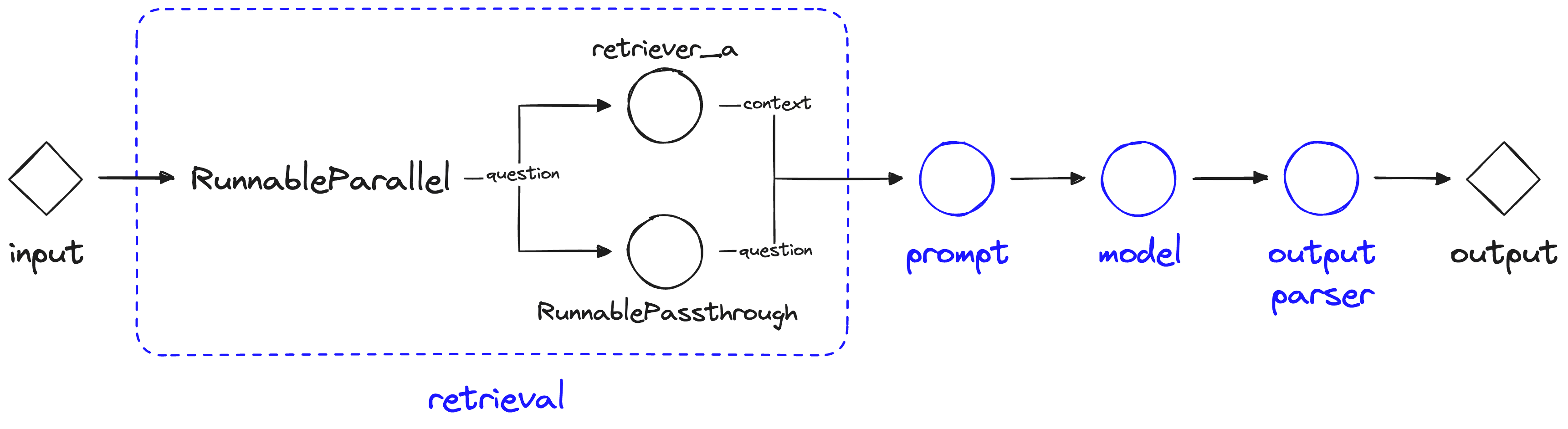
LCEL Flow using RunnableParallel and RunnablePassthrough.
The RunnablePassthrough object is used as a "passthrough" take takes any input to the current component (retrieval) and allows us to provide it in the component output via the "question" key.
Using this information the chain is close to answering the question but it doesn't have enough information, it is missing the information that we have stored in retriever_b. Fortunately, we can have multiple parallel information streams with the RunnableParallel object.
prompt_str = """Answer the question below using the context:

Context:
{context_a}
{context_b}

Question: {question}

Answer: """
prompt = ChatPromptTemplate.from_template(prompt_str)

retrieval = RunnableParallel(
    {
        "context_a": retriever_a, "context_b": retriever_b,
        "question": RunnablePassthrough()
    }
)

chain = retrieval | prompt | model | output_parser
Here we're passing two sets of context to our prompt component via "context_a" and "context_b". Using this we get more information into our LLM (although oddly the LLM doesn't manage to put two-and-two together).
Using this approach we're able to have multiple parallel executions and build more complex chains pretty easily.
Runnable Lambdas
The RunnableLambda is a LangChain abstraction that allows us to turn Python functions into pipe-compatible functions, similar to the Runnable class we created near the beginning of this article.
Let's try it out with our earlier add_five and multiply_by_two functions.
from langchain_core.runnables import RunnableLambda

def add_five(x):
    return x + 5

def multiply_by_two(x):
    return x * 2

# wrap the functions with RunnableLambda
add_five = RunnableLambda(add_five)
multiply_by_two = RunnableLambda(multiply_by_two)
As with our earlier Runnable abstraction, we can use | operators to chain together our RunnableLambda abstractions.
chain = add_five | multiply_by_twoUnlike our Runnable abstraction, we cannot run the RunnableLambda chain by calling it directly, instead we must call chain.invoke:
As before, we can see the same answer. Naturally, we can feed custom functions into our chains using this approach. Let's try a short chain and see where we might want to insert a custom function:
prompt_str = "Tell me an short fact about {topic}"
prompt = ChatPromptTemplate.from_template(prompt_str)

chain = prompt | model | output_parser
We can run this chain a couple of times to see what type of answers it returns:
The returned text always includes the initial "Here's a short fact about ...\n\n" — let's add a function to split on double newlines "\n\n" and only return the fact itself.
def extract_fact(x):
    if "\n\n" in x:
        return "\n".join(x.split("\n\n")[1:])
    else:
        return x

get_fact = RunnableLambda(extract_fact)

chain = prompt | model | output_parser | get_fact
Now let's try invoking our chain again.
Using the get_fact function we're not getting well-formatted responses.
That covers the essentials you need to get started and build with the LangChain Expression Language (LCEL). With it, we can put together chains very easily — and the current focus of the LangChain team is on further LCEL development and support.
The pros and cons of LCEL are varied. Those who love it tend to focus on the minimalist code style, LCEL's support for streaming, parallel operations, and async, and LCEL's nice integration with LangChain's focus on chaining components together.
Some people are less fond of LCEL. These people typically point to LCEL being yet another abstraction on top of an already very abstract library, that the syntax is confusing, against the Zen of Python, and requires too much effort to learn new (or uncommon) syntax.
Both viewpoints are entirely valid, LCEL is a very different approach — there are major pros and major cons. In either case, if you're willing to spend some time learning the syntax, it allows us to develop very quickly, and with that in mind, it's well worth learning.
Was this article helpful?