







AI application development typically begins with experimentation, usually using Python notebooks, local ML libraries, and small datasets. But deploying AI systems at scale requires more thought and planning; it involves complex systems, large datasets, intense compute requirements, and stricter performance demands. When scaling AI applications, teams often turn to distributed, cloud-native technologies that are purpose-built to deal with intense workloads - like Kubernetes and Pinecone.
Scaling AI applications isn’t just about resource augmentation or performance enhancement; it demands a fundamental shift in application design. It's important at scale to consider things like parallel processing data and providing quick responses to user feedback, even if these aren't thought about in the early stages of development.
To illustrate the challenges and choices we have to make when building a scalable system, we chose to demonstrate how to build a video search engine.
Video object search
With AI, we can transform video content into rich, searchable data. We can create new opportunities for data extraction and analysis, and enable new applications and experiences.
Video content packs an incredible amount of information within it. Building AI for video shows how hard it is to mimic what our brain does easily. For example - think about an object or a person that you see in a piece of video content. Your brain can seamlessly track that object and uniquely identify it from frame to frame, from scene to scene. There are a big number of problems our application is going to have to solve in order to mimic what our brain does naturally.
Because of the huge amount of data involved, it’s a great opportunity to explore the difficulties of what happens when we move into the world of distributed computing and combine it with cutting-edge AI capabilities.
Consider the enormous volume of video content being generated every second. Every second of video might contain anywhere from 24 to 60 frames or more, each essentially being an image. The challenge lies in processing each of these images, identifying objects within them, and converting this information into searchable, actionable data.
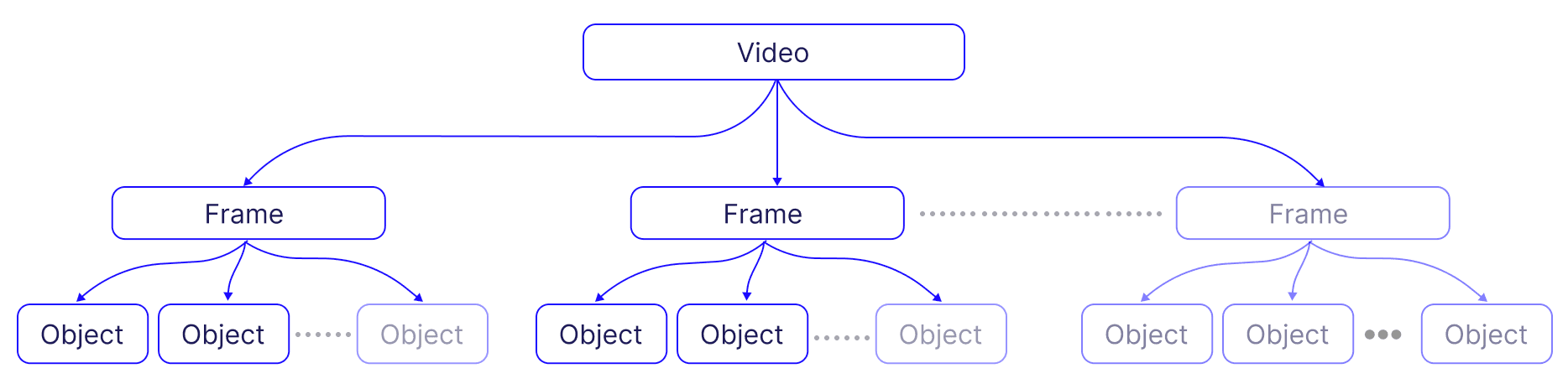
Moreover, the task of accurately matching user queries to relevant content within this vast sea of video frames and identified objects requires an efficient search mechanism. Distributed vector databases like Pinecone enable similarity search in high-dimensional space, facilitating the retrieval of the most relevant frames and objects in response to a user query.
Throughout this series, we’ll unpack the complex process of enriching video with information derived from AI models. We'll discuss challenges, such as managing large volumes of data and handling embeddings efficiently, with an emphasis on building a scalable system. We’ll explore how to build a distributed AI model inference system and use it in conjunction with a distributed vector database.
Use cases
Let’s explore some potential use cases for a search engine for video content:
- Entertainment - Netflix has recently introduced the technologies behind their home-grown in-video search. It’s likely we’ll see more providers and content producers leverage this technology to improve the experience of their users.
- Industrial Surveillance - This technology can be used to track the movement and usage of materials and equipment in industrial settings, improving efficiency and safety.
- Commerce - Businesses can utilize this technology to analyze consumer behavior in stores, optimizing product placement and store layout.
- Agriculture - It can be used to monitor crop and livestock conditions, allowing for timely interventions and better management.
- News and Media - By helping journalists and researchers locate specific clips within hours of footage, it saves time and enhances the quality of reporting.
- Security - Security teams can analyze surveillance footage to track incidents or follow the movements of individuals, enhancing the effectiveness of security measures.
- Medical - In the medical field, it can assist in the analysis of medical imaging videos, potentially improving diagnosis and treatment plans.
These are just some of the potential use cases for a search engine for video content - and they can all leverage the same system and workflow as the one we’ll present in this post.
System Objectives and Approaches
Let’s summarize what we want our system to be able to do:
- Identify objects in video content - these are the smallest units of data that we’re going to index and search over.
- Provide an interactive interface for users to navigate through the content and conduct specific searches
- Enable users to improve the system over time by identifying and labeling objects of interest
There are two possible approaches to accomplish this.
- Fine tuning a vision model to the subset of labeled objects we want to cover, and rely on its ability to identify them effectively. Whenever we want to introduce a new type of object, we’ll have to retrain our model with the newly labeled data.
- Use an off-the-shelf vision model with a vector database. Using a vector database means you don't have to retrain your model every time a new label is added. In addition, you don’t rely on the model’s use of GPUs to get the label for each identified object in the frame, and instead you can make use of the vector database’s much cheaper querying capabilities to accomplish the same result. This significantly simplifies the process and makes the system more adaptable to changes. Vector databases are uniquely positioned to provide a level of flexibility and cost savings in terms of GPU usage.
In this series, we wanted to demonstrate the second approach, since it underscores the potential of reducing the operational and compute cost which traditionally would have required substantial GPU compute resources - and replacing them with CPU compute (used by the vector database).
Challenges
Now that we’ve decided on a general approach, let’s call out the challenges we’re likely to face when building this system:
- Data Volume: Videos are inherently rich in data. Processing such a large volume of data efficiently is nontrivial. It demands robust computational resources and sophisticated data management techniques to ensure all that valuable information can be handled efficiently.
- Creating and Managing Embeddings at Scale: In the world of AI and machine learning, embeddings are a common way to represent complex data, such as images or text. However, creating embeddings for a vast number of objects is computationally expensive. Once the embeddings are created, managing them efficiently poses another significant challenge. It involves generating, storing, and retrieving these embeddings in a way that maintains system performance.
- Limitations of Off-the-shelf Vision Models: The capabilities of traditional systems are often limited by the constraints of off-the-shelf computer vision models. They might not always be suitable for specific use cases. Adjusting them to meet these needs can be both costly and time-consuming, requiring a deep understanding of the model's inner workings and the skill to adjust it as needed. The process of labeling data for these models can be a significant challenge in its own right. It often requires substantial time and resources to ensure the labels are accurate and meaningful, which is crucial for the success of the model's performance.
- Tracking Objects: The process of tracking objects as they move across multiple frames in a video sequence is an involved task. It's not just about identifying an object in a single frame — it's about following that object's progress through time and space. This involves tracking the object's position, movement, and changes over multiple frames, often while other objects are moving and changing around it. It requires a high level of precision and consistency, and the computational challenge of doing this for many objects across many frames should not be underestimated.
- Integration Challenges: Making all of these components work together harmoniously is a challenge in and of itself. It requires thoughtful and intentional planning and coordination. Overcoming these integration challenges can be complex and time-consuming, but they are essential for the successful operation of the system.
- Scaling Consistency: Ideally, any solution that works at a small scale should be able to function at a larger scale with minimal adjustments - essentially, the turn of a knob. However, this is often not the case. Scaling an application often involves significant architecting and rewriting of the solution, making it a complex and resource-intensive process. After the experimental stage, we need to start anticipating future growth, and incorporating scalability into the architecture. This ensures that when it's time to scale up, the transition will be as smooth as possible, maintaining the application's performance and reliability.
System Overview
Now that we have a good understanding of the problem scope, let’s start drilling into the solution. Let’s start by looking at a high level diagram of the system:
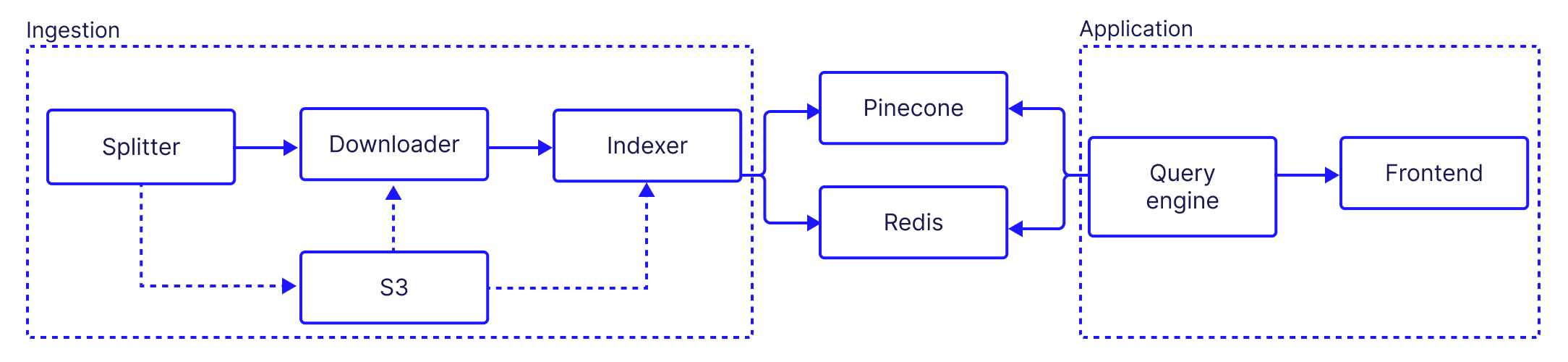
Our components can be split into two groups:
- Ingestion: In the ingestion phase, video content is divided into manageable segments and then broken down into individual frames. Objects within these frames are identified and categorized, and the images of these objects are embedded and stored into a distributed vector database for efficient storage and retrieval.
- Application: this is the user-facing portion, which allows interaction with the system, visualization of video content and identified objects, and provision of feedback. It enables users to navigate through the content, conduct specific searches, and contribute to system improvement by providing labels for recognized objects. The design of this phase focuses on ease of use, intuitive navigation, and clear feedback to users.
Architectural choices
One of the basic choices we have to make is between a monolithic or microservice architecture. Monolithic architecture, involving a single, indivisible unit, offers simplicity but limits scalability and resilience, particularly for compute-intensive processes like AI inference. Conversely, a microservices architecture divides the application into smaller, independent services running in parallel, enhancing data processing speed and efficiency for AI's compute-intensive components.
In addition, microservices offer increased flexibility and scalability, allowing each service to independently adjust to varying workloads — perfect for AI applications with fluctuating data volumes and model complexities.
For example, this is what the ingestion portion of the system looks like using a microservice architecture:
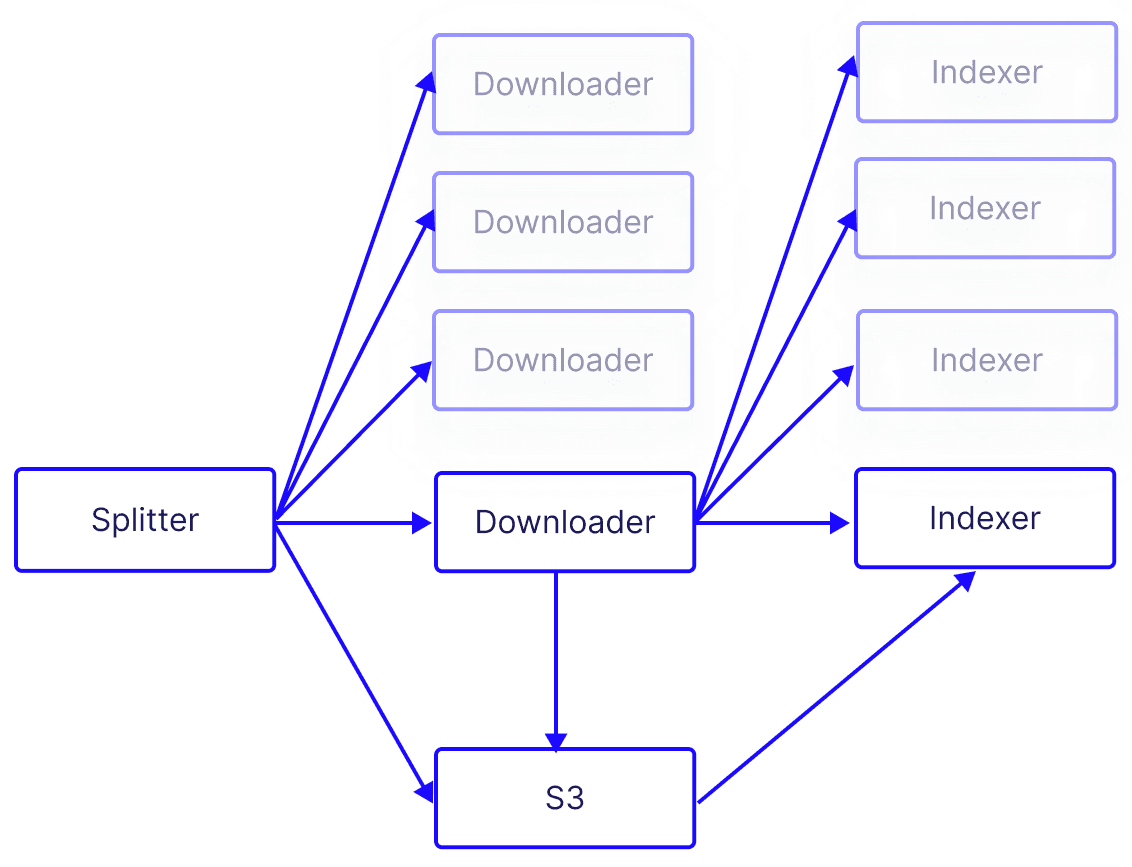
This architecture allows us to handle a larger amount of video frames in a reasonable period of time (making it economically viable), but it also brings another layer of complexity. Let’s consider some key aspects of this architecture:
- Stateless: the microservices do not store any information about the session on their system over multiple requests from the same client (i.e an application or a another microservice making a request). Instead, they rely on the client to provide all necessary information for each request.
- Shared stateful resources: while our architecture’s requests are stateless by design, we do need to share stateful resources such as databases or message queues across microservices. Sharing stateful resources allows for consistent and coordinated handling of data, which is vital when processing large volumes of content.
- Inter-service communication: microservices need a way to communicate and share the workload. This is where technologies such as Kafka come into play, enabling efficient communication between microservices. The use of load balancers also ensures that workloads are distributed evenly across the microservices, preventing any one service from becoming a bottleneck.
Adopting a microservices architecture is not without its challenges, but it is a necessary step towards building AI applications at scale. The capacity to handle larger datasets, adapt to varying workloads, and maintain performance under high demand are key advantages of this approach.
Of course, there are many more considerations to account for when building a scalable microservices system, but we’ll address them in more detail in later chapters of this series.
Next, we’ll dive in a bit deeper and break up the ingestion and application groups into their constituent microservices. We’ll talk about what each component does in general terms, and what technologies are being used to accomplish it (later in the series, will drill down even further to see how each component works and how they all work together).
Ingestion
Video Splitter: Splits the full length video into smaller segments to allow for a parallelized processes downstream.
- The video splitter fetches videos, typically from platforms like YouTube, and divides them into manageable segments based on specified time spans.
- Each segment is then stored in an AWS S3 bucket.
- Upon completing this segmentation, the Splitter communicates (via Kafka) signaling the Video Downloader to start its task.
Video Downloader: Handles turning video segment into frames.
- Responding to the Splitter's cue, the Downloader retrieves the video segments from S3.
- It breaks down each segment into individual frames, storing them back in S3.
- Every frame generated prompts the Downloader to send a message (via Kafka) cueing the Indexer to begin the object recognition process.
Indexer: The Indexer is where AI models meet the processed video data. Each of the indexer instances handles one frame at a time.
- Each frame fetched from S3 undergoes an object recognition process. Each identified object is associated with a bounding box which defines it’s location on the frame. - as well as a unique identifier and it’s frame identifier. The Indexer saves the extracted information from the frame and the identified bounding boxes within it in Redis for later use.
- After recognition, it extracts the images of the objects from the frames and stores them in S3. These cropped images will be used later on in the labeling process.
- Finally, the indexer produces embeddings for each cropped image and then upserts them into Pinecone.
Application
Query engine: responsible for retrieving and synthesizing data from Pinecone.
- Retrieve the object recognition information associated with each frame of the video
- Allow the user to select an identified object in a specific frame in the video and retrieve similar objects
- Allow the user to quickly label identified objects
- Retrieve previously labeled objects
- Provide information to the front end application so that it could highlight labeled and tracked objects.
Frontend: built using React.js, serves as the system's user interface:
- It displays the video content, the object recognition layer, and any associated labels in an intuitive layout.
- It provides interactive labeling controls for users.
- Users can load similar objects, search for label candidates, and execute both positive and negative labeling (more on that later)
- This interactivity is key to enhancing the accuracy and utility of the object recognition process. It allows users to enrich the database with human-verified labeled objects, which makes subsequent labeling easier and allows the system to produce likely labels for objects the user didn’t explicitly label.
What does it look like?
The first thing the user will do is provide a URL pointing to a video to download, define a name for the project and configure the length of time for the chunks of video - this will define the number of chunks created for the video. Finally the user can provide an explicit time limit, if they choose not to process the entire video.
Ingestion
When the ingestion process starts, each downloader and indexer start reporting their activities back to a logging component (which we’ll discuss in a later chapter).
Whenever a downloader (in blue) lights up, it indicates that a new frame has been emitted, and is queued up for the indexers (in green) to process. When the indexers are finished processing the frame and that it’s saving it to Pinecone - and by doing so, completing the ingestion process for that frame.
After the indexing process has completed, the user will be able to see the labeling view:
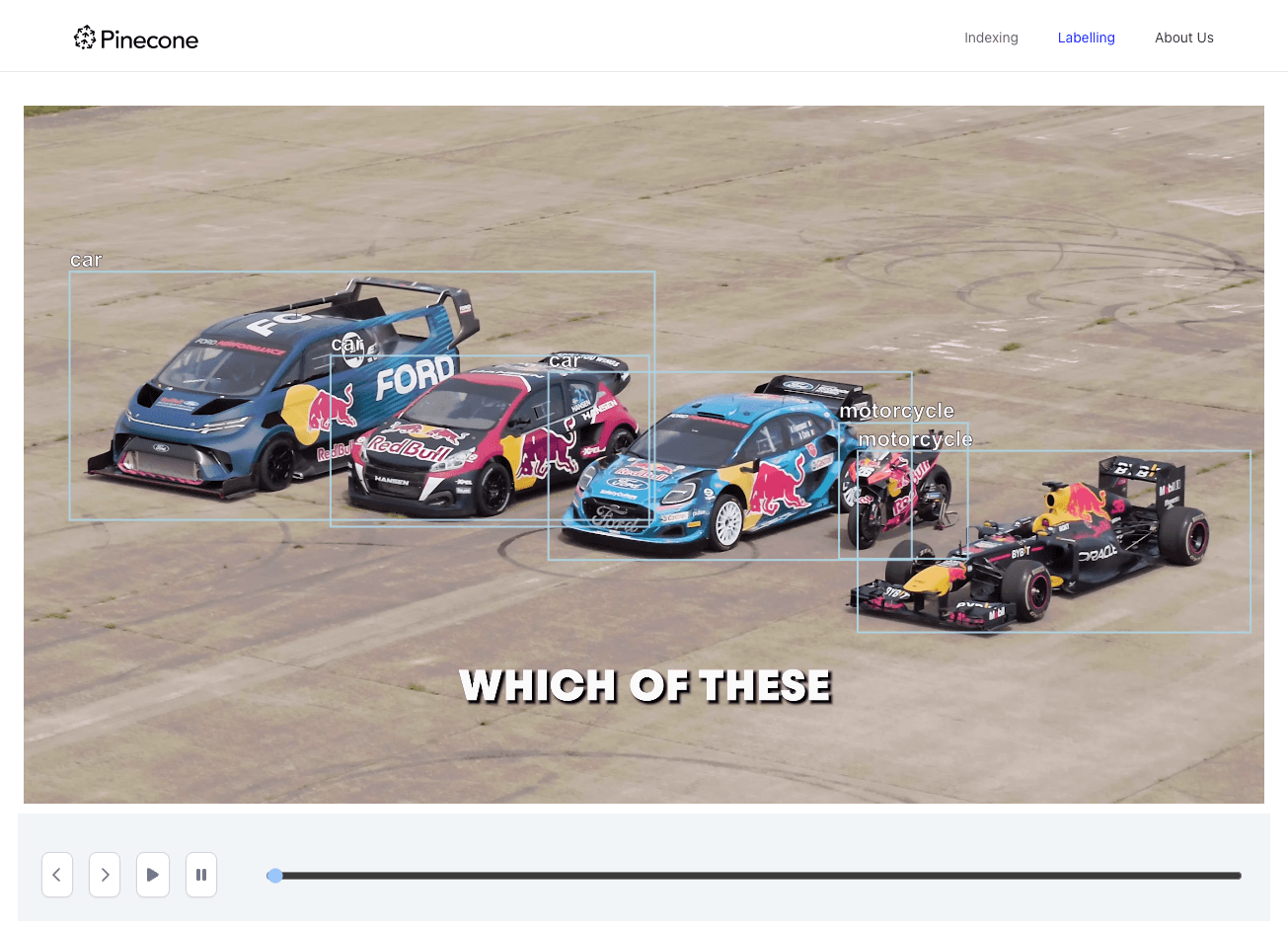
We can see some labels that were identified by the image recognition model - but there are two problems:
- Some of the objects were not detected correctly - the Formula 1 car on the left side of the image was identified as a motorcycle.
- We have three cars identified - but as expected, we don’t have any differentiation between them. Just a bunch of cars…
These two issues highlight the limitations of using a ready-made object detection model. This is why we introduced a labeling mechanism. When we click on a box containing the Formula 1, the server will search for images similar to the one within the bounding box.
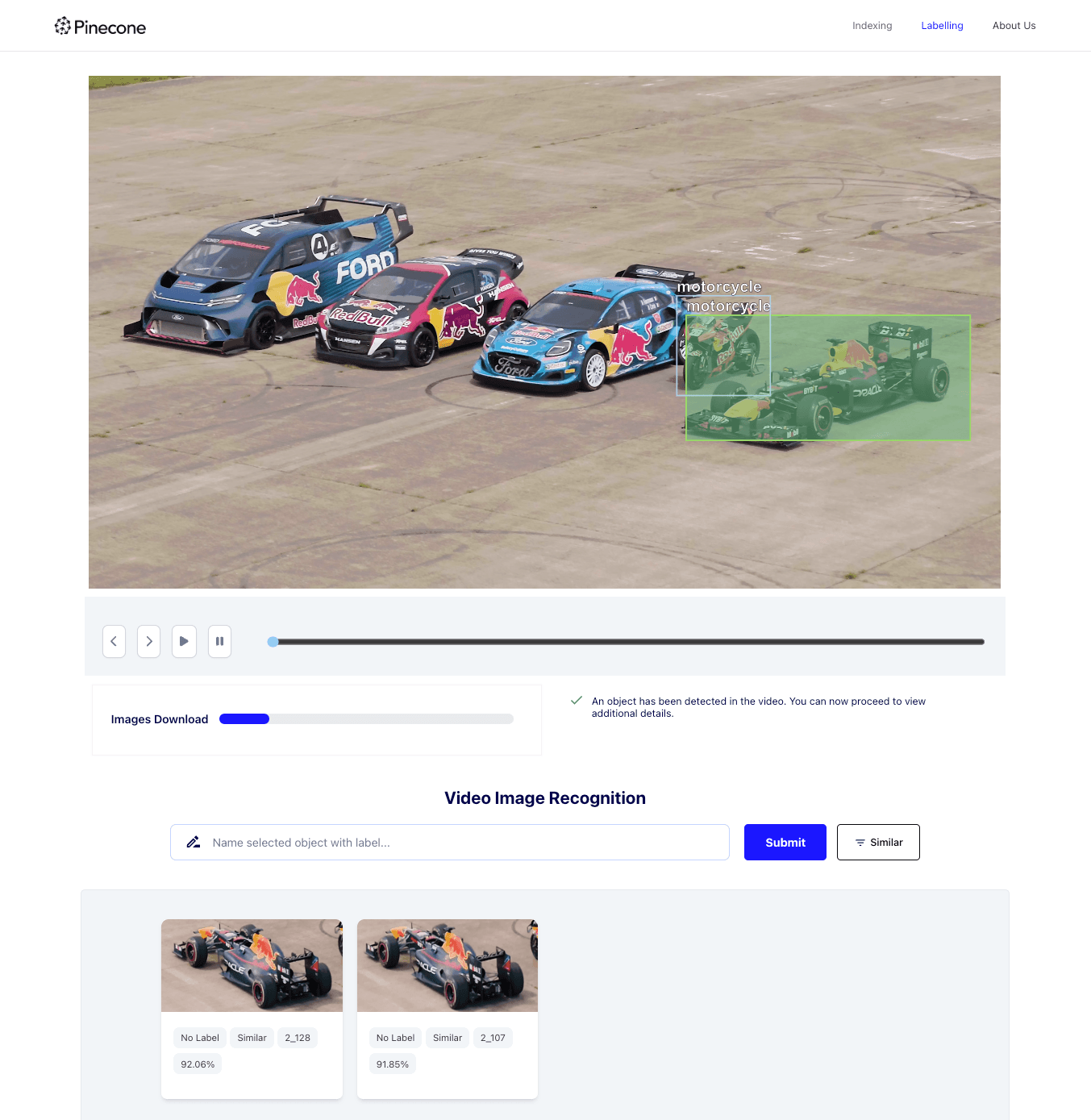
To label an item, the user can drag the similar image the “positive label” column. The system automatically populates the column with other images that are similar to the dragged image, with a high level of confidence.
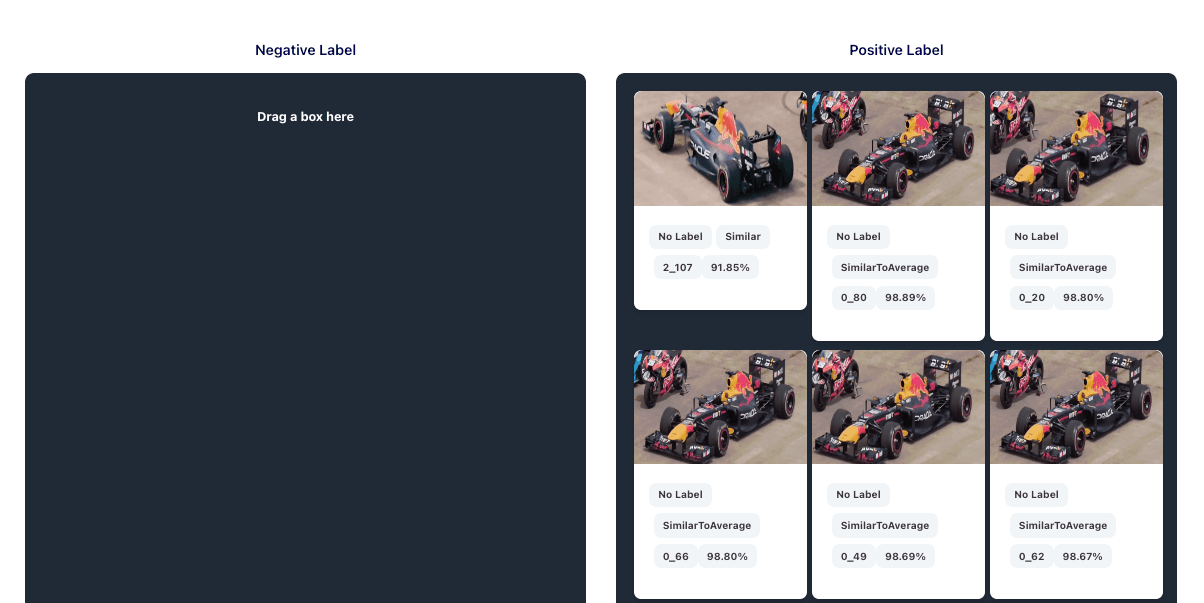
We’ll discuss negative in a later chapter - but for now we’ll just mention that it’s a mechanism that helps us avoid false positive labels.
Up next…
In this chapter, we talked about the overall challenge and the high level architecture of the system. We discussed the difference in approaches between building an experimental application and an application that scales. We also highlighted the key challenges faced when creating a scalable AI search application for video content. In the next chapter, we'll dive deeper into the individual microservices, discuss their roles, and explore how they work together to create a scalable AI application. Later in this series, we’ll go through the entire workflow to see how the labeling system works as a whole.
Was this article helpful?