








YouTube is a cultural phenomenon. The first video “Me at the zoo” was uploaded in 2005. It is a 19 second clip of YouTube’s co-founder Jawed Karim at the zoo. This was a uniquely ordinary insight into another person’s life, and, back then, this type of content had not really been seen before.
Today’s world is different. 30,000 hours of video are uploaded to YouTube every hour, and more than one billion hours of video are watched daily [1][2].
Technology and culture have advanced and become ever more entangled. Some of the most significant technological breakthroughs are integrated so tightly into our culture that we never even notice they’re there.
One of those is AI-powered search. It powers your Google results, Netflix recommendations, and ads you see everywhere. It is being rapidly weaved throughout all aspects of our lives. Further, this is a new technology; its full potential is unknown.
This technology weaves directly into the cultural phenomenon of YouTube. Imagine a search engine like Google that allows you to rapidly access the billions of hours of YouTube content. There is no comparison to that level of highly engaging video content in the world [3].
All supporting notebooks and scripts can be found here.
To power this technology, we will need data. We will use the YTTTS Speech Collection dataset from Kaggle. The dataset is organized into a set of directories containing folders named by video IDs.
Inside each video ID directory, we find more directories where each represents a timestamp start and end. Those timestamp directories contain a subtitles.txt file containing the text from that timestamp range.
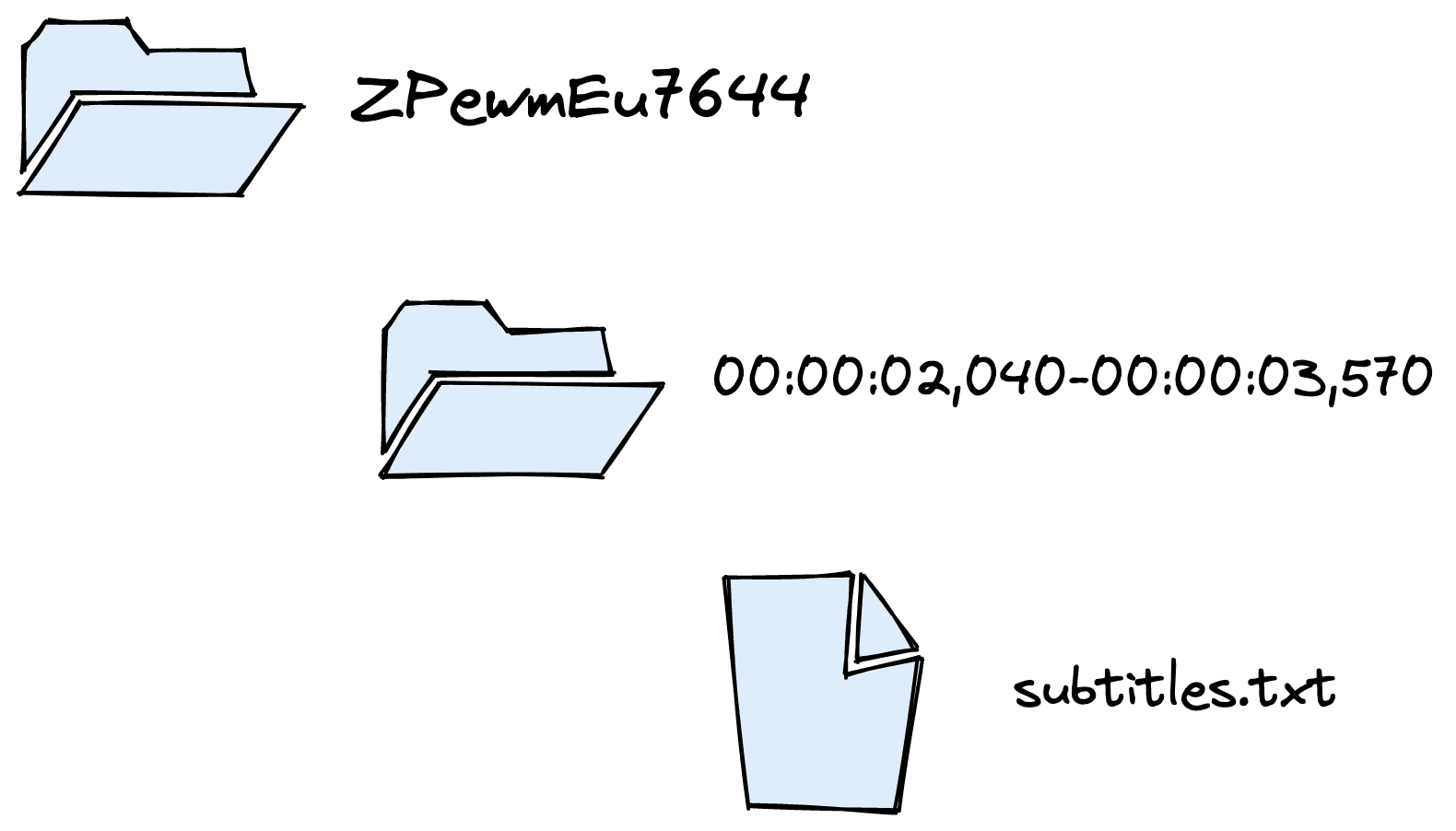
Dataset directory structure. Containing video IDs > timestamps > subtitles.
We can extract the transcriptions, their start/end timestamps, and even the video URL (using the ID).
The original dataset is excellent, but we do need to make some changes for it to better suit our use case. The code for downloading and processing this dataset can be found here.
If you prefer, this step can be skipped by downloading the processed dataset with:
from datasets import load_dataset  # pip install datasets

ytt = load_dataset(
    "pinecone/yt-transcriptions",
    split="train",
    revision="926a45"
)
First, we need to extract the data from the subtitles.txt files. We do this by iterating through the directory names, structured by video IDs and timestamps.
In[5]:
documents = []
for video_id in tqdm(video_ids):
    splits = sorted(os.listdir(f"data/{video_id}"))
    # we start at 00:00:00
    start_timestamp = "00:00:00"
    passage = ""
    for i, s in enumerate(splits):
        with open(f"data/{video_id}/{s}/subtitles.txt") as f:
            # append tect to current chunk
            out = f.read()
            passage += " " + out
        # average sentence length is 75-100 characters so we will cut off
        # around 3-4 sentences
        if len(passage) > 360:
            # now we've hit the needed length create a record
            # extract the end timestamp from the filename
            end_timestamp = s.split("-")[1].split(",")[0]
            # extract string timestamps to actual datetime objects
            start = time.strptime(start_timestamp,"%H:%M:%S")
            end = time.strptime(end_timestamp,"%H:%M:%S")
            # now we extract the second/minute/hour values and convert
            # to total number of seconds
            start_second = start.tm_sec + start.tm_min*60 + start.tm_hour*3600
            end_second = end.tm_sec + end.tm_min*60 + end.tm_hour*3600
            # save this to the documents list
            documents.append({
                "video_id": video_id,
                "text": passage,
                "start_second": start_second,
                "end_second": end_second,
                "url": f"https://www.youtube.com/watch?v={video_id}&t={start_second}s",
            })
            # now we update the start_timestamp for the next chunk
            start_timestamp = end_timestamp
            # refresh passage
            passage = ""
Out[5]:
100%|██████████| 127/127 [00:19<00:00, 6.60it/s]
Out[6]:
[{'video_id': 'ZPewmEu7644',
  'text': " hi this is Jeff Dean welcome to applications of deep neural networks of Washington University in this video we're going to look at how we can use ganz to generate additional training data for the latest on my a I course and projects click subscribe in the bell next to it to be notified of every new video Dan's have a wide array of uses beyond just the face generation that you",
  'start_second': 0,
  'end_second': 20,
  'url': 'https://www.youtube.com/watch?v=ZPewmEu7644&t=0s'},
 {'video_id': 'ZPewmEu7644',
  'text': ' often see them use for they can definitely generate other types of images but they can also work on tabular data and really any sort of data where you are attempting to have a neural network that is generating data that should be real or should or could be classified as fake the key element to having something as again is having that discriminator that tells the difference',
  'start_second': 20,
  'end_second': 41,
  'url': 'https://www.youtube.com/watch?v=ZPewmEu7644&t=20s'},
 {'video_id': 'ZPewmEu7644',
  'text': " in the generator that actually generates the data another area that we are seeing ganz use for a great deal is in the area of semi supervised training so let's first talk about what semi-supervised training actually is and see how again can be used to implement this first let's talk about supervised training and unsupervised training which you've probably seen in previous machine",
  'start_second': 41,
  'end_second': 64,
  'url': 'https://www.youtube.com/watch?v=ZPewmEu7644&t=41s'}]
We now have the core data for building our search tool, but it would be nice to include video titles and thumbnails in search results.
Retrieving this data is as simple as scraping the title and thumbnail for each record using the url feature and Python’s BeautifulSoup package.
In[7]:
import lxml  # if on mac, pip/conda install lxml

metadata = {}
for _id in tqdm(video_ids):
    r = requests.get(f"https://www.youtube.com/watch?v={_id}")
    soup = BeautifulSoup(r.content, 'lxml')  # lxml package is used here
    try:
        title = soup.find("meta", property="og:title").get("content")
        thumbnail = soup.find("meta", property="og:image").get("content")
        metadata[_id] = {"title": title, "thumbnail": thumbnail}
    except Exception as e:
        print(e)
        print(_id)
        metadata[_id] = {"title": "", "thumbnail": ""}

len(metadata)
Out[7]:
51%|█████ | 65/127 [02:56<02:01, 1.96s/it]Out[7]:
'NoneType' object has no attribute 'get'
fpDaQxG5w4o
Out[7]:
52%|█████▏ | 66/127 [03:00<02:42, 2.67s/it]Out[7]:
'NoneType' object has no attribute 'get'
arbbhHyRP90
Out[7]:
100%|██████████| 127/127 [05:21<00:00, 2.54s/it]
Out[8]:
{'video_id': 'ZPewmEu7644',
 'text': " hi this is Jeff Dean welcome to applications of deep neural networks of Washington University in this video we're going to look at how we can use ganz to generate additional training data for the latest on my a I course and projects click subscribe in the bell next to it to be notified of every new video Dan's have a wide array of uses beyond just the face generation that you",
 'start_second': 0,
 'end_second': 20,
 'url': 'https://www.youtube.com/watch?v=ZPewmEu7644&t=0s'}
Out[9]:
{'title': 'GANS for Semi-Supervised Learning in Keras (7.4)',
 'thumbnail': 'https://i.ytimg.com/vi/ZPewmEu7644/maxresdefault.jpg'}
We need to merge the data we pulled from the YTTTS dataset and this metadata.
In[10]:
for i, doc in enumerate(documents):
    _id = doc['video_id']
    meta = metadata[_id]
    # add metadata to existing doc
    documents[i] = {**doc, **meta}
Out[11]:
{'video_id': 'ZPewmEu7644',
 'text': " hi this is Jeff Dean welcome to applications of deep neural networks of Washington University in this video we're going to look at how we can use ganz to generate additional training data for the latest on my a I course and projects click subscribe in the bell next to it to be notified of every new video Dan's have a wide array of uses beyond just the face generation that you",
 'start_second': 0,
 'end_second': 20,
 'url': 'https://www.youtube.com/watch?v=ZPewmEu7644&t=0s',
 'title': 'GANS for Semi-Supervised Learning in Keras (7.4)',
 'thumbnail': 'https://i.ytimg.com/vi/ZPewmEu7644/maxresdefault.jpg'}
That leaves us with 11298 sentence-to-paragraph length video transcriptions. Using this, we’re now ready to move on to developing the video search pipeline.
Our video search relies on a subdomain of NLP called semantic search. There are many approaches to semantic search, at a high-level this is the retrieval of contexts (sentences/paragraphs) that seem to answer a query.
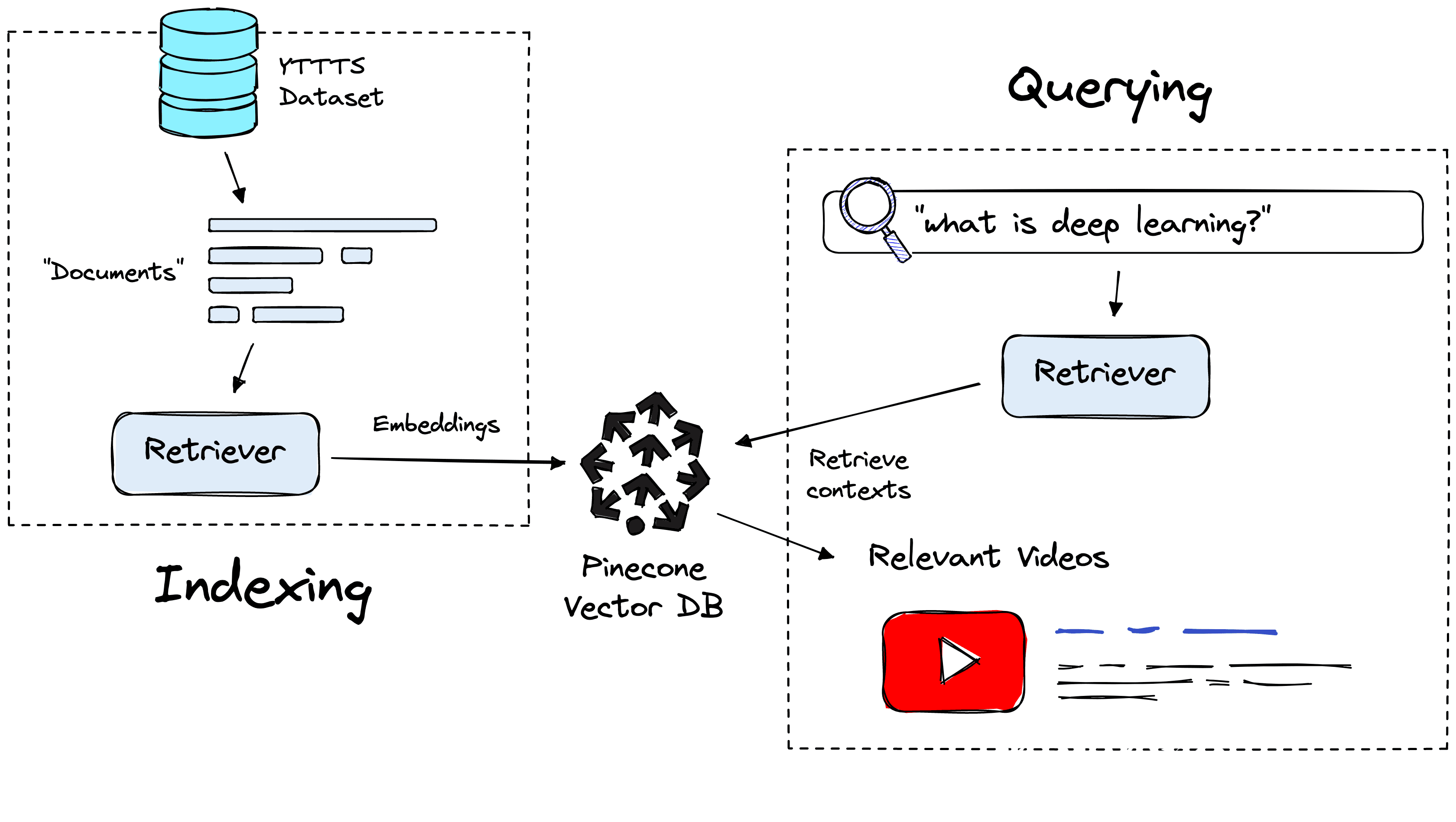
Indexing and querying pipeline with the retriever and vector database components.
Retrieving contexts requires two components, a vector database and a retriever model, both of which are used for indexing and retrieving data.
The vector database acts as our data storage and retrieval component. It stores vector representations of our text data that can be retrieved using another vector. We will use the Pinecone vector database.
Although we use a small sample here, any meaningful coverage of YouTube would require us to scale to billions of records. Pinecone’s vector database allows this through Approximate Nearest Neighbors Search (ANNS). Using ANNS, we can restrict our search scope to a small subset of the index, avoiding the excessive complexity of comparing (potentially) billions of vectors.
To initialize the database, we sign up for a free Pinecone API key and pip install pinecone-client. Once ready, we initialize our index with:
import pinecone  # pip install pinecone-client

# connect to pinecone (get API key and env at app.pinecone.io)
pinecone.init(api_key="YOUR_API_KEY", environment="YOUR_ENV")
# create index
pinecone.create_index(
	'youtube-search',
  	dimension=768, metric='cosine'
)
# connect to the new index
index = pinecone.Index('youtube-search')
When creating the index, we pass:
'youtube-search' but it can be anything.dimension, the dimensionality of vector embeddings stored in the index, must align with the retriever dimensionality (more on this soon).metric, describing the method for calculating the proximity of vectors here we use 'cosine' similarity, which aligns to the retriever output (again, more later).We have our index, but we’re missing a key detail. How do we go from the transcription text we have now to vector representations for our vector database? We need a retriever model.
The retriever is a transformer model specially trained to embed sentences/paragraphs into a meaningful vector space. By meaningful, we expect sentences with similar semantic meaning (like question-answer pairs) to be placed into the model and embedded into a similar vector space.
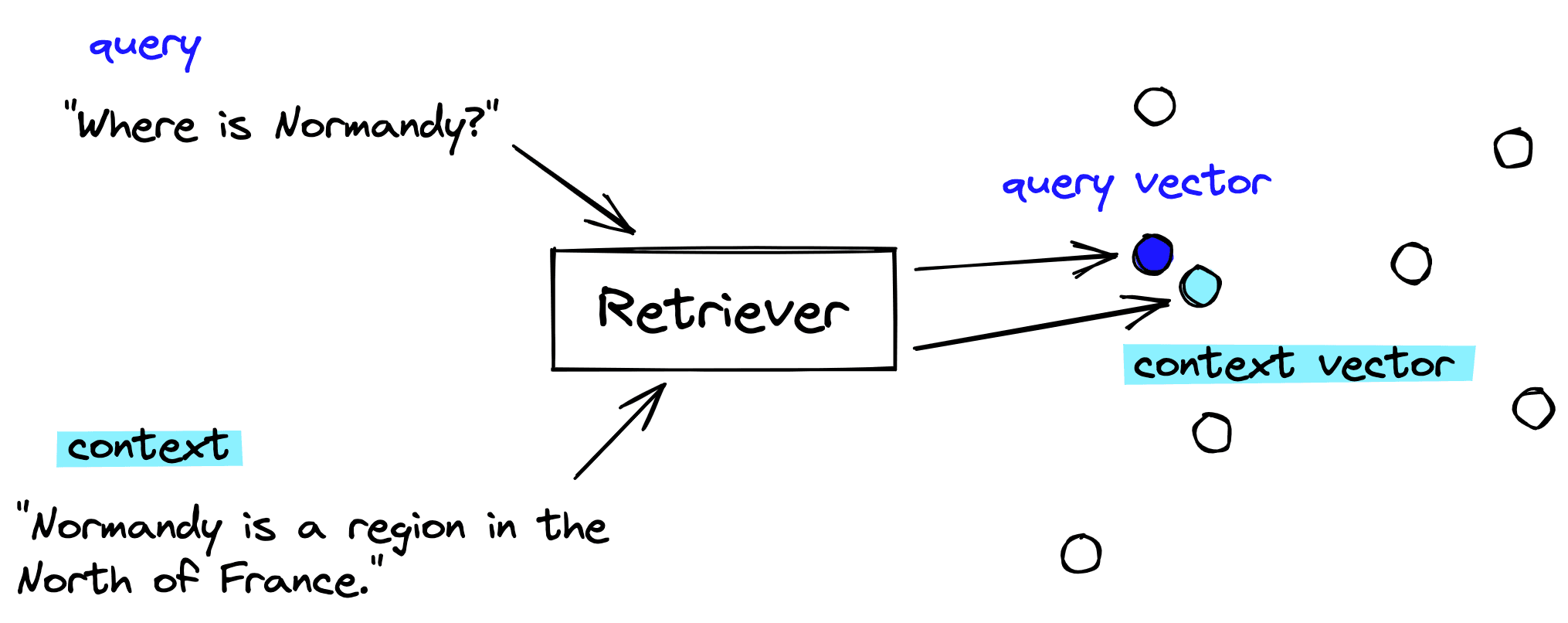
The retriever model encodes semantically related phrases into a similar vector space.
From this, we can place these vectors into our vector database. When we have a query, we use the same retriever model to create a query vector. This query vector is used to retrieve the most similar (already indexed) context vectors.
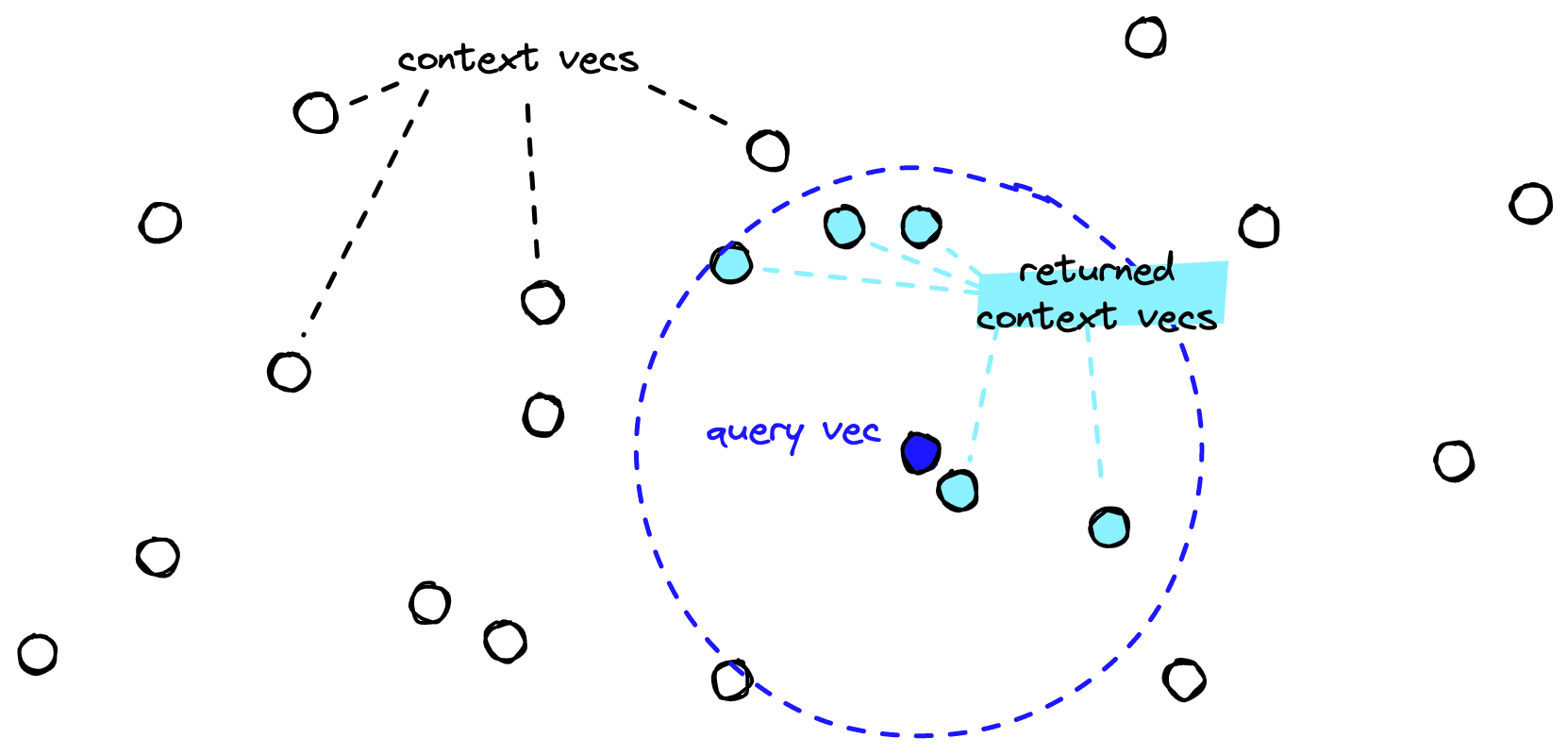
When given a query vector, the vector database handles the search and retrieval of similar context vectors.
We can load a pre-existing retriever model from the sentence-transformers library (pip install sentence-transformers).
In[3]:
from sentence_transformers import SentenceTransformer

retriever = SentenceTransformer('flax-sentence-embeddings/all_datasets_v3_mpnet-base')
retriever
Out[3]:
SentenceTransformer(
  (0): Transformer({'max_seq_length': 128, 'do_lower_case': False}) with Transformer model: MPNetModel
  (1): Pooling({'word_embedding_dimension': 768, 'pooling_mode_cls_token': False, 'pooling_mode_mean_tokens': True, 'pooling_mode_max_tokens': False, 'pooling_mode_mean_sqrt_len_tokens': False})
  (2): Normalize()
)
Now we can see the model details, including that it outputs vectors of dimensionality 768. This does not include the similarity metric that the model is optimized to use. That information can often be found via the [model card] (TK link) (if in doubt, cosine is most common).
We can begin embedding and inserting our vectors into the vector database with both our vector database and retriever initialized. We will do this in batches of 32.
In[6]:
from tqdm.auto import tqdm

docs = []  # this will store IDs, embeddings, and metadata

batch_size = 32

for i in tqdm(range(0, len(ytt), batch_size)):
    i_end = min(i+batch_size, len(ytt))
    # extract batch from YT transactions data
    batch = ytt[i:i_end]
    # encode batch of text
    embeds = retriever.encode(batch['text']).tolist()
    # each snippet needs a unique ID
    # we will merge video ID and start_seconds for this
    ids = [f"{x[0]}-{x[1]}" for x in zip(batch['video_id'], batch['start_second'])]
    # create metadata records
    meta = [{
        'video_id': x[0],
        'title': x[1],
        'text': x[2],
        'start_second': x[3],
        'end_second': x[4],
        'url': x[5],
        'thumbnail': x[6]
    } for x in zip(
        batch['video_id'],
        batch['title'],
        batch['text'],
        batch['start_second'],
        batch['end_second'],
        batch['url'],
        batch['thumbnail']
    )]
    # create list of (IDs, vectors, metadata) to upsert
    to_upsert = list(zip(ids, embeds, meta))
    # add to pinecone
    index.upsert(vectors=to_upsert)
Out[6]:
0%| | 0/177 [00:00<?, ?it/s]In[13]:
index.describe_index_stats()Out[13]:
{'dimension': 768,
 'index_fullness': 0.01,
 'namespaces': {'': {'vector_count': 11298}}}
Once we’re finished indexing our data, we can check that all records have been added using index.describe_index_stats() or via the Pinecone dashboard.
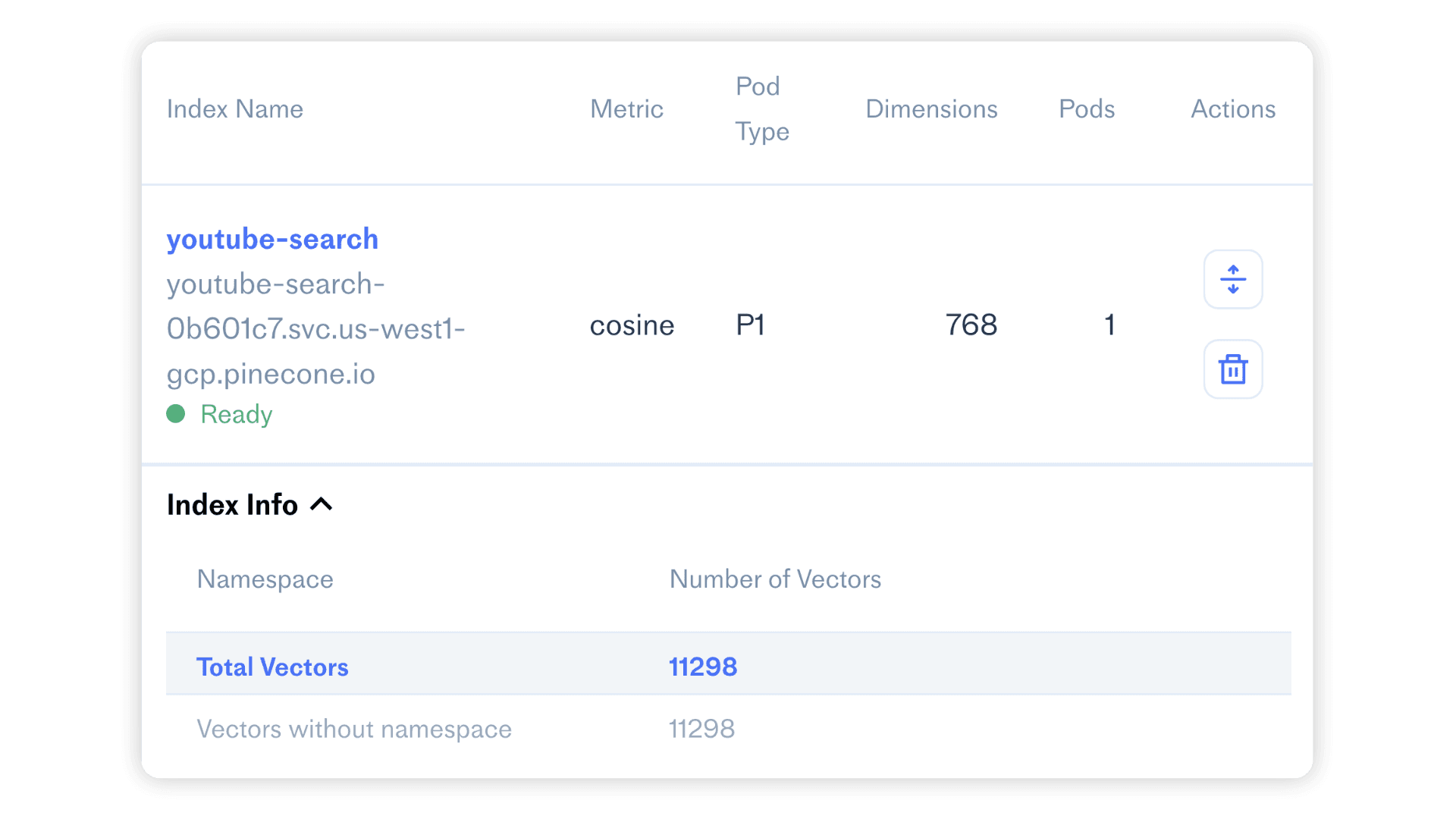
We can see the index details from the Pinecone dashboard.
Everything has been initialized and indexed. All that is left to do is query. To do this, we create a query like "what is deep learning?", embed it using our retriever, and query via index.query.
In[10]:
query = "What is deep learning?"

xq = retriever.encode([query]).tolist()
In[15]:
xc = index.query(xq, top_k=3,
                 include_metadata=True)
for context in xc['results'][0]['matches']:
    print(context['metadata']['text'], end="\n---\n")
Out[15]:
 terms of optimization but what's the algorithm for updating the parameters or updating whatever the state of the network is and then the the last part is the the data set like how do you actually represent the world as it comes into your machine learning system so I think of deep learning as telling us something about what does the model look like and basically to qualify as deep I
---
 any theoretical components any theoretical things that you need to understand about deep learning can be sick later for that link again just watched the word doc file again in that I mentioned the link also the second channel is my channel because deep learning might be complete deep learning playlist that I have created is completely in order okay to the other
---
 under a rock for the last few years you have heard of the deep networks and how they have revolutionised computer vision and kind of the standard classic way of doing this is it's basically a classic supervised learning problem you are giving a network which you can think of as a big black box a pairs of input images and output labels XY pairs okay and this big black box essentially you
---
Within the index.query method, we pass our query vector xq, the top_k number of similar context vectors to return, and that we’d like to return metadata.
Inside that metadata, we have several important features: title, url, thumbnail, and start_second. We can build a user-friendly interface using these features and a framework like Streamlit with straightforward code.
Streamlit built YouTube search demo, try it yourself here.
The fields of NLP and vector search are experiencing a renaissance as increasing interest and application generate more research, which fuels even greater interest and application of the technology.
In this walkthrough, we have demoed one use case that, despite its simplicity, can be incredibly useful and engaging. As the adoption of NLP and vector search continues to grow, more use cases will appear and embed themselves into our daily lives, just as Google search and Netflix recommendations have done in the past, becoming an ever-greater influence in the world.
[1] L. Ceci, Hours of video uploaded to YouTube every minute (2022), Statistica
[2] C. Goodrow, You know what’s cool? A billion hours (2017), YouTube Blog
[3] A. Hayes, State of Video Marketing report (2022), Wyzowl
此内容由惯性聚合(RSS阅读器)自动聚合整理,仅供阅读参考。 原文来自 — 版权归原作者所有。