

惯性聚合 高效追踪和阅读你感兴趣的博客、新闻、科技资讯
阅读原文 在惯性聚合中打开

推荐订阅源

F
Fortinet All Blogs
让小产品的独立变现更简单 - ezindie.com
有赞技术团队
有赞技术团队
www.infosecurity-magazine.com
大猫的无限游戏
大猫的无限游戏
爱范儿
爱范儿
Threat Intelligence Blog | Flashpoint
T
Threatpost
V
Visual Studio Blog
Apple Machine Learning Research
博客园 - Franky
人人都是产品经理
人人都是产品经理
cs.AI updates on arXiv.org
The Cloudflare Blog
N
News and Events Feed by Topic
L
Lohrmann on Cybersecurity
cs.CL updates on arXiv.org
酷 壳 – CoolShell
酷 壳 – CoolShell
V
V2EX
AWS News Blog
AWS News Blog
S
SegmentFault 最新的问题
T
Tailwind CSS Blog
Hugging Face - Blog
Hugging Face - Blog
钛媒体:引领未来商业与生活新知
钛媒体:引领未来商业与生活新知
Spread Privacy
Spread Privacy
J
Java Code Geeks
博客园 - 聂微东
T
Tor Project blog
宝玉的分享
宝玉的分享
博客园 - 叶小钗
Webroot Blog
Webroot Blog
博客园 - 【当耐特】
freeCodeCamp Programming Tutorials: Python, JavaScript, Git & More
H
Heimdal Security Blog
Y
Y Combinator Blog
T
The Blog of Author Tim Ferriss
MongoDB | Blog
MongoDB | Blog
I
InfoQ
Security Latest
Security Latest
Martin Fowler
Martin Fowler
Hacker News: Ask HN
Hacker News: Ask HN
P
Privacy International News Feed
C
CERT Recently Published Vulnerability Notes
Latest news
Latest news
雷峰网
雷峰网
D
Darknet – Hacking Tools, Hacker News & Cyber Security
C
Cisco Blogs
H
Help Net Security
L
LINUX DO - 最新话题
L
LINUX DO - 热门话题

Pinecone

Pinecone Assistant: A Managed Knowledge Layer for Production AI Applications Multi-domain RAG in n8n: why one knowledge base is not enough Allspice Transforms the Culinary Experience with Semantic Search Powered by Pinecone | Pinecone Building RAG workflows in n8n: choosing the right Pinecone node Knowledge needs a meta-knowledge layer Garbage Day: How Pinecone Safely Deletes Billions of Objects at Scale When "Performance" Means Two Different Things Pinecone BYOC: Pinecone in your AWS, GCP, or Azure account, no vendor access True, Relevant, and Wrong: The Applicability Problem in RAG Use the Pinecone Plugin for Claude Code to develop AI Applications Faster Millions at Stake: How Melange's High-Recall Retrieval Prevents Litigation Collapse Powering High-stakes Patent Search at Scale: How Melange Built a Reliable AI System on Pinecone | Pinecone Pinecone Assistant Node in n8n: Turn Any Data Source Into Knowledge RAG with Access Control Pinecone Dedicated Read Nodes are now in Public Preview Inside Pinecone: Slab Architecture New Bulk Data Operations: Update, Delete, and Fetch by Metadata The Hidden Cost of Building: Lessons from Aquant Simplifying Vector Embeddings with Pinecone Integrated Inference Capabilities Pinecone joins Microsoft Marketplace as a Launch Partner GTM Engineering: Clay + Pinecone for AI-powered Sales Outbound Build an AI knowledge assistant with Google Docs and Pinecone Moving Pinecone forward with Ash Ashutosh as CEO and Edo spearheading our growing AI ambitions as Chief Scientist Pinecone Founder Edo Liberty to Spearhead Pinecone’s Growing AI Ambitions; Appoints Ash Ashutosh as CEO to Expand Vector Database Market Leadership Fast, Accurate Retrieval for Creators at Scale: Delphi’s Path Toward a Million Conversational Agents with Pinecone | Pinecone Announcing Pinecone Pioneers: A Program for Builders, Organizers, and Community Leaders What is Context Engineering? Chunking Strategies for LLM Applications Beyond the hype: Why RAG remains essential for modern AI Obviant Makes 30% More Accurate Defense Acquisition Recommendations Combining Sparse and Dense Retrieval with Pinecone | Pinecone Build more knowledgeable AI applications with new LLMs and greater control in Pinecone Assistant #NYTECHWEEK 2025 Retrieval-Augmented Generation (RAG) Accurate and Efficient Metadata Filtering in Pinecone’s Serverless Vector Database | Pinecone Terminal X AI Agents, Powered by Pinecone, Turn Complex Financial Data Into Production-grade Insights at Scale | Pinecone Aquant Delivers Scalable, Expert-level Service Intelligence with Pinecone | Pinecone Cascading retrieval with multi-vector representations: balancing efficiency and effectiveness Vector databases aren't just for large-scale enterprise AI Unveiling DIME: Reproducibility, Scalability, and Formal Analysis of Dimension Importance Estimation for Dense Retrieval | Pinecone Fast and Effective Early Termination for Simple Ranking Functions | Pinecone Domain-specific AI Agents at Scale: CustomGPT.ai Serves 10,000+ Customers with Pinecone | Pinecone Using Pinecone asynchronously with FastAPI A Flexible Resource for Top-Weighted Comparisons Between Sets and Rankings | Pinecone Build secure, scalable agentic AI workflows with Rubrik Annapurna and Pinecone Tool up: Pinecone’s first MCP servers are here Add context to your agent with Pinecone Assistant MCP remote server E2Rank: Efficient and Effective Layer-wise Reranking | Pinecone ColBERT-serve: Efficient Multi-Stage Memory-Mapped Scoring | Pinecone Efficient Constant-Space Multi-Vector Retrieval | Pinecone How Vanguard Worked with Pinecone to Boost Customer Support with Faster Calls and 12% More Accurate Responses | Pinecone Pinecone Named to Fast Company's Annual List of the World's Most Innovative Companies of 2025 Launch Week: Pinecone for agents, search, recommendations, and more Optimizing Pinecone for agents (and more) Retrieval Inference for scale and performance How 1up Turns Sales Reps Into Product Experts with Pinecone | Pinecone Don’t be dense: Launching sparse indexes in Pinecone Unlock High-Precision Keyword Search with pinecone-sparse-english-v0 Evolving Pinecone's architecture to meet the demands of Knowledgeable AI Pinpoint references faster with citation highlights in Pinecone Assistant Bringing the leading vector database to your cloud Getting started with llama-text-embed-v2 Natural Language Counterfactual Explanations for Graphs Using Large Language Models | Pinecone Easily build knowledgeable chat and agent-based applications in minutes with Pinecone Assistant, now generally available How to build an agentic, chat or RAG knowledge system using Pinecone Assistant Real-time RAG with Pinecone and Estuary Flow BigQuery to Pinecone in Real-Time with Estuary Flow Stravito Turns Market and Consumer Data Into Actionable Insights with Pinecone Inference | Pinecone Accelerate prototyping and development with Pinecone Local First-of-its-kind Pinecone Knowledge Platform to Power Best-in-class Retrieval for Customers Introducing integrated inference: Embed, rerank, and retrieve your data with a single API Strengthening security and increasing control with CMEK and API key roles Introducing Pinecone Rerank V0 Introducing cascading retrieval: Unifying dense and sparse with reranking From Idea to Action: How Pinecone Assistant Meaningfully Accelerates AI Business Building AI apps on Azure with Pinecone just got a lot easier Building a reliable, curated, and accurate RAG system with Cleanlab and Pinecone Four features of the Assistant API you aren't using - but should Deploying Pinecone with Infrastructure as Code (IaC) Streamlining CI/CD with Pinecone Local September 2024 Product Update Results of the Big ANN: NeurIPS'23 competition | Pinecone Introducing import from object storage for more efficient data transfer to Pinecone serverless Simplify, enhance, and evaluate RAG development with Pinecone Assistant, now in public preview Vectors and Graphs: Better Together August 2024 Product Update Pinecone Helps Deep Talk Deliver World-Class AI Assistants with Lower Engineering Overhead | Pinecone Assembled Delivers Better, Faster AI- Driven Support with Pinecone | Pinecone Llama 3.1 Agent using LangGraph and Ollama Build knowledgeable AI with Pinecone serverless, now generally available on Microsoft Azure Pinecone serverless is now generally available on Google Cloud, adding knowledge to AI assistants and other applications Accelerating Legal Discovery and Analysis with Pinecone and Voyage AI Bridging Dense and Sparse Maximum Inner Product Search | Pinecone Refine Retrieval Quality with Pinecone Rerank Introducing reranking to Pinecone Inference to simplify building accurate AI July 2024 Product Update Connect to Pinecone within your platform to enable a seamless AI development experience Introducing Pinecone API Versioning RAG Brag with Inkeep Co-Founder Nick Gomez LangGraph and Research Agents Introducing Pinecone Inference to streamline your AI workflow
Postgres to Pinecone Syncing
Roie Schwaber-Cohen · 2023-10-11 · via Pinecone

Introduction

A core part of many applications is a relational database - and in many AI applications it’s very common to use Pinecone alongside such a relational databases. PostgreSQL, commonly referred to as Postgres, is one of the most popular open-source relational databases. It is known for its robustness, scalability, and stability, making it a popular choice for many applications.

In order to facilitate the process of keeping a Postgres database in sync with your Pinecone index, we’ll make use of Airbyte’s Postgres source connector and the Pinecone destination connector. This integration streamlines the process of creating embeddings and simplifies the data pipeline, making it easier for you to focus on building you application.

The Pinecone Airbyte connector

The Pinecone Airbyte Connector is a data integration solution that allows you to easily connect multiple data sources. It leverages Airbyte's source connectors and Pinecone's capabilities to streamline the data integration process and enable seamless data flow across different systems. The connector is highly adaptable and flexible to various data needs, with no need for complex integration steps or on-premises deployment. The connector offers the ability to embed and upsert information, with specific column and metadata fields defined by the user. This enables greater flexibility and customization, making it easier to handle specific data integration needs.

Read about the basics of the Pinecone connector.

The scenario

For this example, consider an e-commerce website that allows users to search for products based on their description. To enable better results, the search functionality will leverage semantic search powered by Pinecone. The product data will be stored in a Postgres database. Our goal will be to enable this semantic search whenever a new product is created in the database - or when any of the products are updated.

We’re going to use a table with the following structure:

CREATE TABLE public.products ( 
  id character varying(255) NOT NULL DEFAULT nextval('products_id_seq'::regclass),
  name text NOT NULL, sku character varying(255) NULL,
  description character varying(255) NULL,
  price money NULL,
  last_updated date NULL DEFAULT now() 
);

We load the table with a set of fictitious products found in this file. Here’s a sample:

idnameskudescriptionpricelast_update
3d6ae001-ef80-4cbd-8e8e-5e296bbf80a6Pro System SKU-fLRM-842This is a monetize user-centric markets product with Implemented local framework features.$344.872023-09-20 22:51:32
ee47e11c-e06b-4281-8531-4be90978549dLite DeviceSKU-wxJp-879This is a iterate customized models product with User-centric zero-defect success features.$845.00 2023-09-03 22:51:32
05d6f029-1ede-446d-ad07-855bdc55a02dUltra ControllerSKU-raQP-504This is a facilitate plug-and-play technologies product with Realigned regional product features.$242.11 2023-09-09 22:51:32

We’ll set up a pipeline which will consume the data found in our products table in the Postgres database, and automatically generate and upsert embeddings for the description column. We’ll save the id of each product as metadata, so that we can reference the information once we retrieve the semantically relevant entries from Pinecone:
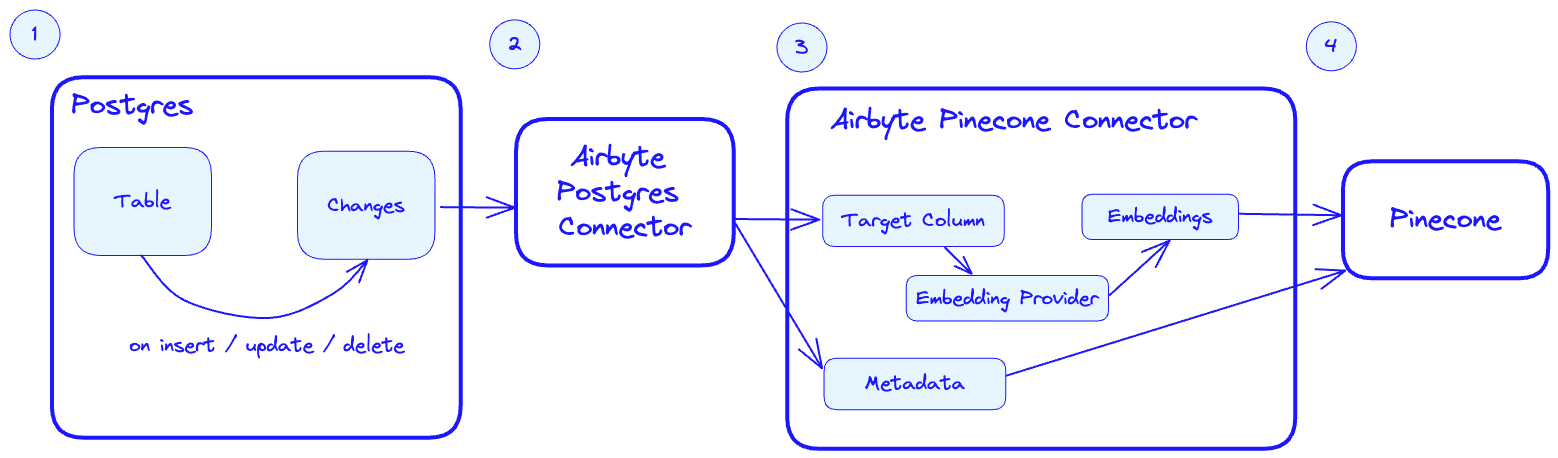
architecture

  1. Postgres tracks changes in the products table for any insert / update / delete event.
  2. The Airbtye Postgres connector picks up the changes when it is triggered.
  3. When the Airbyte Pinecone connector is triggered, it takes the target column (on our case description and sends them to the configured embedding provider to produce embeddings. The metadata is also passed to the connector based on it’s configuration (more on configuring the connector later).
  4. The embeddings and metadata are upserted into Pinecone.

Postgres Integration with Pinecone

In this portion of the guide, we’ll walk through the set up and replication options of using Postgres with Pinecone.

Setting up Postgres Integration with Pinecone

  1. Install and configure the Postgres Airbyte connector
  2. Connect to the Postgres database by providing the necessary details such as the host, port, database name, username, and password
  3. Configure the data replication settings, such as the tables to be synced, the frequency of syncing, and the data mapping
  4. Verify and test the data replication process to ensure that data is being synced accurately and efficiently

Postgres Connector Configuration

To set up the Postgres connector, start by adding a new Postgres “Source”.

postgres connector

Name the source Postgres - one connector may serve many connections.

create a source

Next, provide the host, port and the database name for your Postgres instance. You may optionally provide a specific schema - although by default public should suffice.
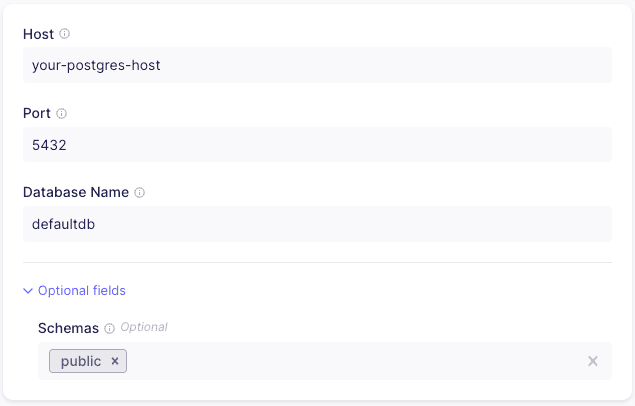
postgres setup

Provide the user name and password for your database. It’s advisable to create a user specific to the Airbyte connector. By default, the SSL mode is set to require - you should modify this if your database configuration differs. You can read more about connecting with SSL in the Postgres Airbyte Connector page.
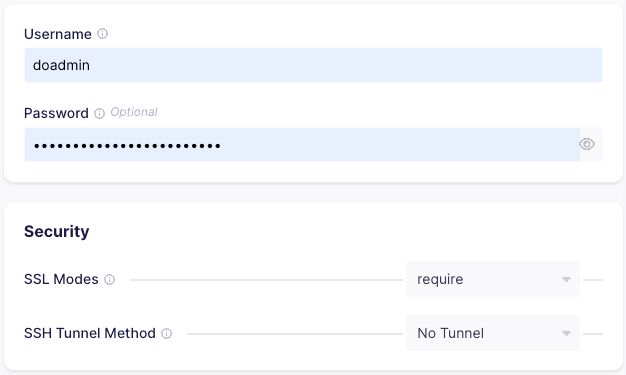
password

As of the time of this writing, the Pinecone connector doesn’t support the CDC update method, so we’ll choose the second option, which will leverage the Xmin System Column.

Xmin replication is a cursor-less replication method for Postgres. Cursorless syncs enable syncing new or updated rows without explicitly choosing a cursor field. The xmin system column (available in all Postgres databases) is used to track inserts and updates to your source data.
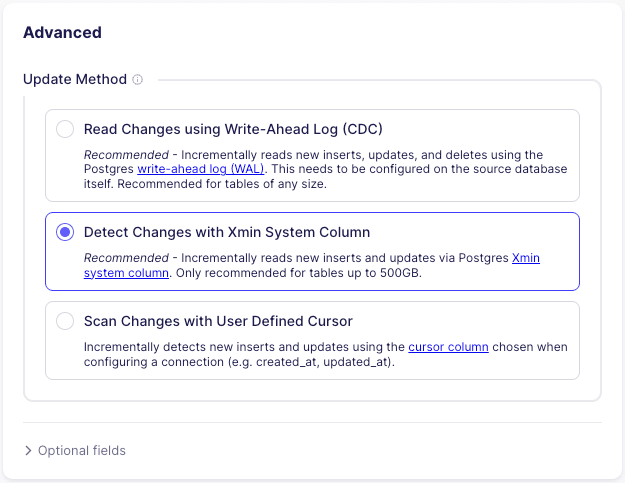
xmin

Finally, you’ll have to allow ingress to your Postgres database. You’ll find the list of IPs that must be whitelisted for the connector to work properly in the last section of the connector setup.

white list ips

Pinecone Connector Configuration

We covered the basics of how the Pinecone connector works in the previous chapter, so we’ll just highlight the changes that are relevant for our setup. Since the Pinecone connector targets specific text fields for embeddings and metadata, we’ll have to create a separate connector that will handle the connection for our Postgres source.

destination name

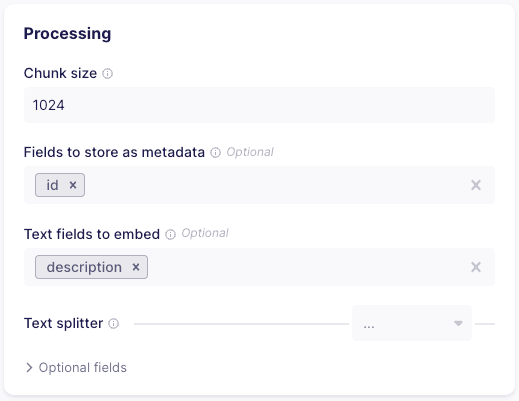
In the “Processing” section, set the metadata field to be stored to id and the text field to embed to description.
destination processing

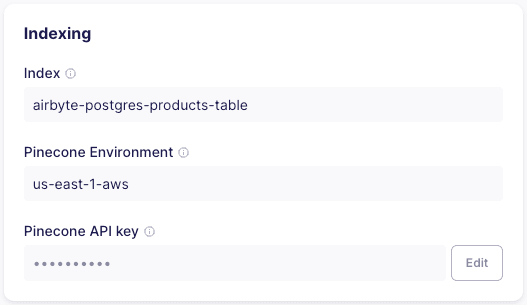
Point the connector to a 1536 dimensions index called airbyte-postgres-products-table , then provide the Pinecone environment and API key.
indexing settings

Create a connection

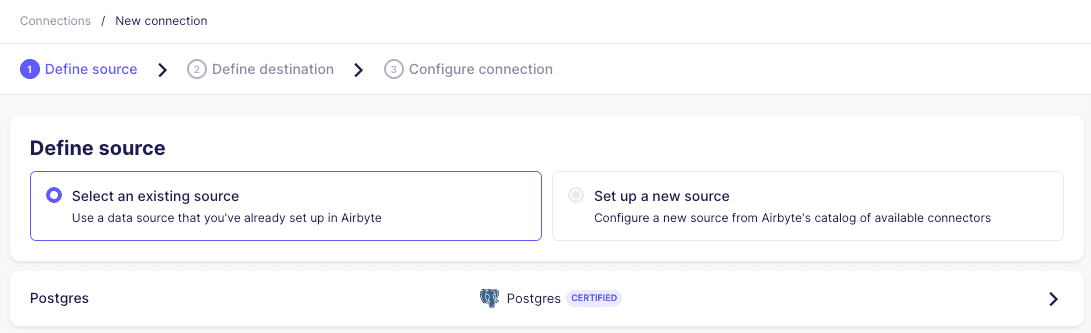
We’ll start creating a new connection by selecting the Postgres source:
define source

Then select the newly crated Pinecone - Postgres - Products Table destination:

define destination

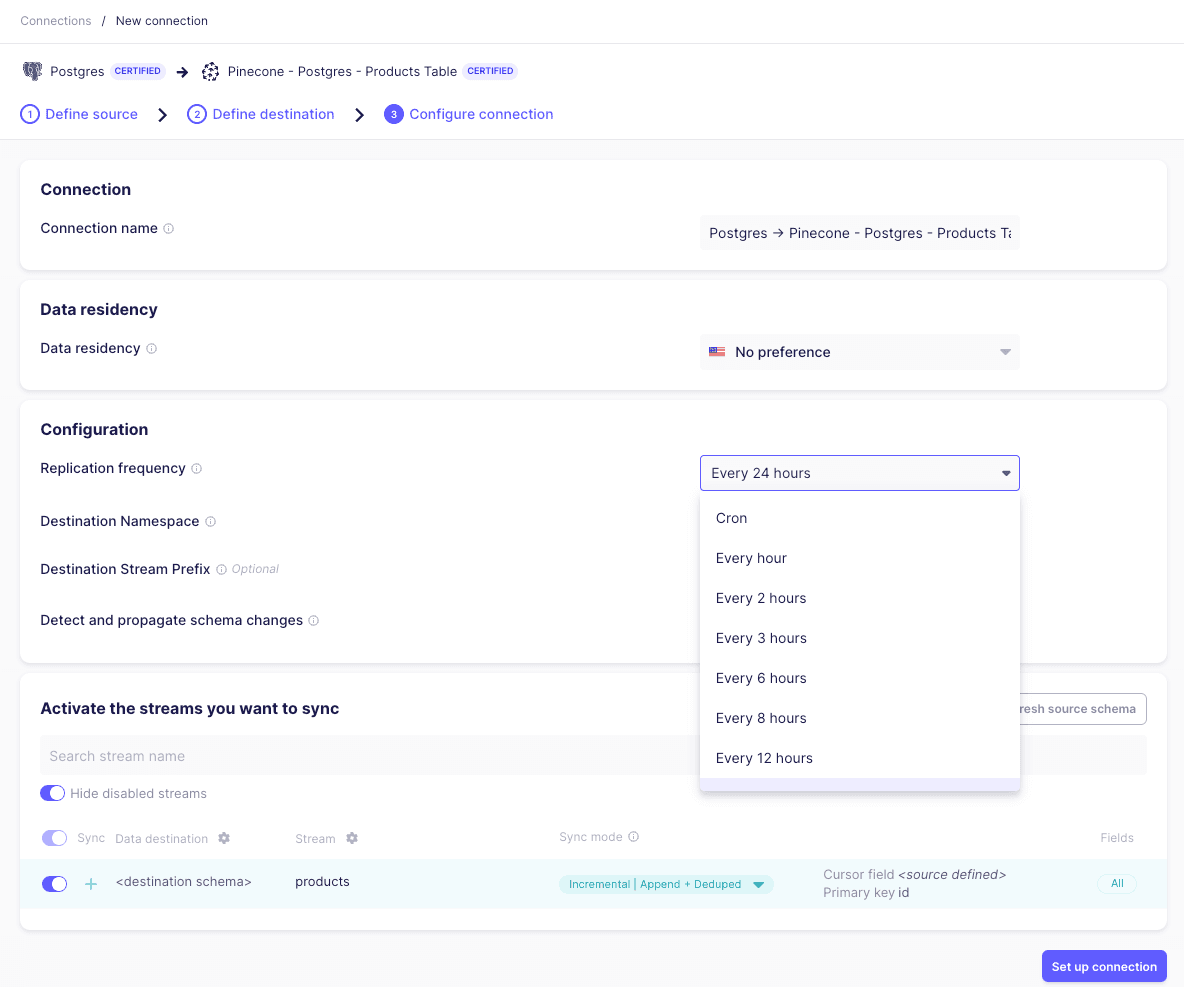
In the next screen, we can set up the desired frequency in which the target table will be synchronized. We’ll also select the specific table in Postgres that we’d like to sync:
configure connection

Once our connection is created, we can trigger a manual sync by clicking “Sync now”:
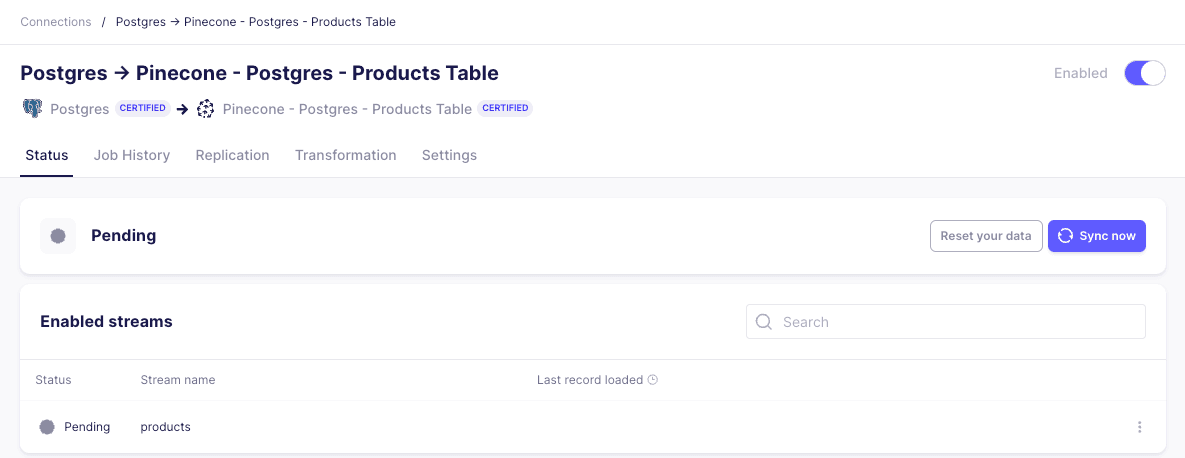
pre sync

As the connector finishes upserting embeddings into Pinecone, we’ll see the updated vector count in the console:
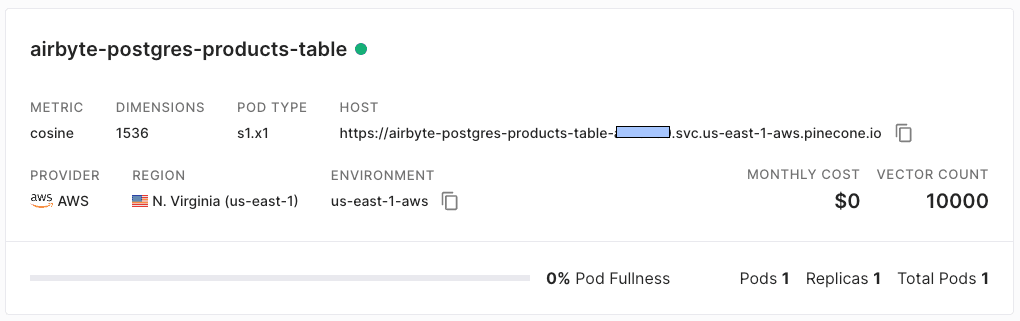
indexing done

Testing

To test the integration, we built a semantic search application that searches through the descriptions of each product. We’ll start with a simple search for the term without friction:
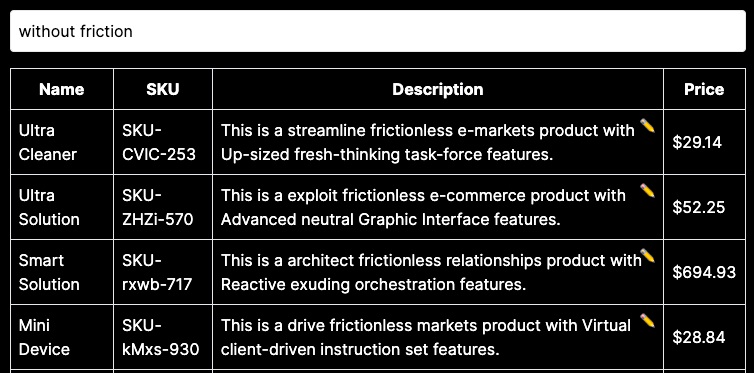
initial table

Since we’re performing a semantic search (and not just searching for keywords), our results will include entries with the word frictionless - which is semantically equivalent to without friction

Next, we’ll edit the first three entries, and remove the word “frictionless” from the description.
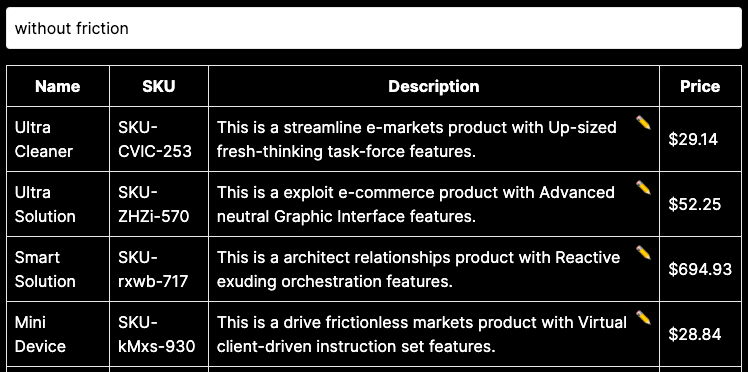
e2e first step

When we query again, the Postgres database has not yet been synchronized - and so the same 3 products still appear for the without friction query - even though the word frictionless doesn’t appear in them. Let’s synchronize the database with Pinecone again.

re-sync

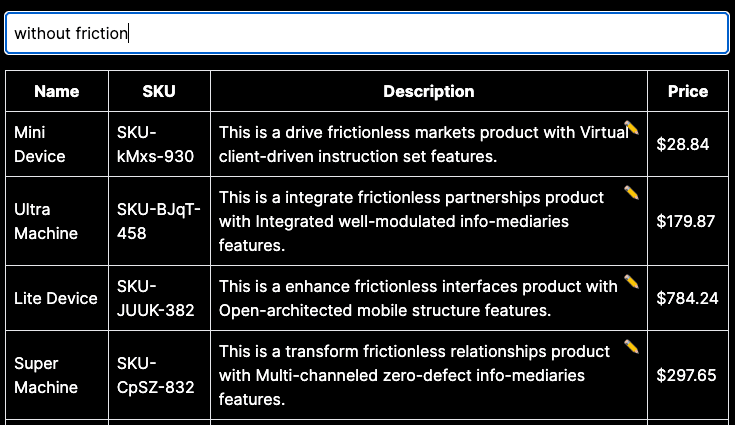
Once the synchronization has completed, we’ll check out application once again:
final

This time, as expected, the first 3 original products don’t show up, and instead we get only those which include the term “frictionless”. The Airbyte Postgres connector picked up the changes, and then the Airbyte Pinecone connector re-embedded the changed entries - which eventually resulted in the updated query result.

Conclusion

With Airbyte's connectors, you can easily create embeddings and simplify your data pipeline - without writing a single line of code. Still, this integration will work for both modest and very large datasets, and efficiently keep the your Postgres database and Pinecone index in sync. In the next chapter, we’ll dive into how to use Airbyte with one the most popular document stores: MongoDB.

Was this article helpful?