






GTM tools are everywhere these days. Most follow the same pattern: pull signals, do enrichment, send outbound. We are big fans of Clay here at Pinecone because of its intuitive spreadsheet interface.
Excel has always been intuitive for most people. You're essentially programming through rows and columns acting as control flows (e.g., while or for loops), cell references as variables, if formulas for conditionals, array or lookup functions as primitive data structures, other formulas as basic math libraries, tabs as subroutines, etc (fun fact: Excel is actually Turing complete). Clay takes the basic spreadsheet, pulls in a ton of data sources, adds in some AI functions, and automates GTM processes (e.g., sales outbound, lead scoring, CRM enrichment, account research, etc). Non-coders can build complex processes without technical barriers, otherwise known as GTM engineering.
We use Clay extensively at Pinecone. The interface simplicity makes it easy to look up information, enrich data, and send messages through tools like Gong, as an example of a GTM outbound process.
Most automated outbound emails were rather generic without much context to the company. It is time consuming and manual to research every company, explain how our products fit their specific needs, and include relevant customer references. We wanted to send more personalized emails that can give this relevance. Can we combine Pinecone and Clay into a workflow that automates this research process? Yes.
Here is how we did it at a high level.
💡 Note: the code shown is slightly shortened for the purposes of the blog post and may differ from the code repo.
Below we will walk through some of the code. This system obviously required some coding, but it's easily reproducible in a low-code tool like n8n.
Web Crawler Part 1: News Aggregation and Content Extraction
The web crawler searches for company news using Google Custom Search API. A Google query is constructed based on key publications reporting on the company and the company’s own domain. This is fed to the Search API with only results from the last year returned.
def get_company_news(company_name: str, category: str ="technology", max_results: int = 10):
    # Get related publications using OpenAI
    new_sites = get_related_publications(company_name)
    site_filters = ["forbes.com", "wired.com", "bloomberg.com", "businessinsider.com"]
    site_filters.extend([site.strip() for site in new_sites.split(",")])

    # Build search query with site filters
    search_query = f"{company_name} AI OR cloud OR machine learning ({' OR '.join([f'site:{site}' for site in site_filters])})"

    # Execute Google Custom Search
    results = google_search(search_query, 10)
    return [{"title": item["title"], "url": item["link"]} for item in results]
The crawler then crawls the returned URLs of the company news and extracts the content using crawl4ai into markdown:
async def crawl_urls_to_markdown(urls: List[str], max_concurrent: int = 3):
    # Configure content filtering
    prune_filter = PruningContentFilter(threshold=0.45, threshold_type="dynamic")
    md_generator = DefaultMarkdownGenerator(content_filter=prune_filter)

    crawl_config = CrawlerRunConfig(
        css_selector="main, article, #main-content, .content",
        word_count_threshold=10,
        excluded_tags=["nav", "footer", "form", "header"]
    )

    # Process URLs in batches to avoid rate limits
    for i in range(0, len(urls), max_concurrent):
        batch = urls[i : i + max_concurrent]
        tasks = [crawler.arun(url=url, config=crawl_config) for url in batch]
        results = await asyncio.gather(*tasks, return_exceptions=True)
Web Crawler Part 2: Content Reranking
After extracting the news content, the web crawler uses Pinecone's reranking service to identify the most relevant articles:
def rerank_markdown(query, markdown_dict, top_n=5, model="pinecone-rerank-v0"):
    pc = Pinecone(api_key=os.getenv("PINECONE_API_KEY"))

    # Split content into 512-token chunks for better processing
    documents = []
    for url, md in markdown_dict.items():
        for idx, chunk in enumerate(chunk_text(md, max_tokens=512)):
            documents.append({"id": f"{url}__chunk{idx}", "chunk_text": chunk})

    # Rerank based on relevance to AI initiatives
    ranked_results = pc.inference.rerank(
        model=model,
        query=query,
        documents=documents,
        top_n=top_n,
        rank_fields=["chunk_text"]
    )

    return {item.document["id"]: item.document["chunk_text"] for item in ranked_results.data}
Case Study Retriever
The system uses Pinecone Assistant to retrieve relevant case studies based on the company news. Case studies were downloaded into markdown and uploaded either by python script or through the Assistant console. Follow the Assistant getting started guide to learn how to upload.
📢 Assistant is a retrieval augmented generation (RAG) service. It ingests content (e.g., pdf, markdown, txt), chunks it, creates vector embeddings, and upserts it into a Pinecone index. The context API can be used to query the index where it retrieves the specified top-k, reranks the results, and returns the results. Alternatively, the Assistant can also directly expose a chat interface where context is fed into a LLM and the response to the query is directly returned.
Before any querying happens, the company news from the web crawler is first summarized:
def summarize_company_news(news: str, company: str):
    if not openai.api_key:
        raise HTTPException(status_code=500, detail="OpenAI API key not set.")
    try:
        system_prompt = f"You are a technology news analyst summarizing {company} company news"
        request_body =  f"Summarize this and pull out news specifically as it relates to {company} technology initiatives {news}"
        completion = openai.chat.completions.create(
            model="gpt-4o",
            messages=[
                {"role": "system", "content": system_prompt},
                {"role": "user", "content": request_body}
            ]
        )
        reply = completion.choices[0].message.content.strip()
        return reply
    except Exception as e:
        raise HTTPException(status_code=500, detail=str(e))
The context API is then used to query the Assistant to return the most similar case studies to the company.
def get_pinecone_context(query: str) -> str:
    pc = pinecone.Pinecone(api_key=PINECONE_API_KEY)
    assistant = pc.assistant.Assistant(assistant_name=PINECONE_ASSISTANT_NAME)

    response = assistant.context(query=query, top_k=10, snippet_size=2500)
    return response
Email Copy Generator
The main endpoint orchestrates all components, and the API is served at the /chat route.
@app.post("/chat", response_model=ChatResponse)
async def chat_endpoint(request: ChatRequest):
    target_company = request.message

    # 1. Get company news
    headlines = get_company_news(target_company, category="technology", max_results=8)
    urls = [article["url"] for article in headlines if "url" in article]

    # 2. Extract and rerank content
    news_markdown = await crawl_urls_to_markdown(urls=urls)
    ranked_results = rerank_markdown(target_company + " AI initiatives", news_markdown, top_n=5)

    # 3. Consolidate news content
    news_summary = "\n\n".join(f"## {url}\n\n{md}" for url, md in ranked_results.items())

    # 4. Retrieve relevant case studies
    response = get_pinecone_context(news_summary)
    contents = []
    for snippet in response.snippets[:5]:
        contents.append({
            "content": snippet.content,
            "score": snippet.score,
            "file_name": snippet.reference.file.name
        })

    # 5. Generate personalized email using GPT-4
    context_str = "\n".join([snippet["content"] for snippet in contents])
    completion = openai.chat.completions.create(
        model="gpt-4.1",
        messages=[
            {"role": "system", "content": system_prompt},
            {"role": "user", "content": f"{target_company}\n{user_message}"}
        ]
    )

return ChatResponse(response=completion.choices[0].message.content.strip())The system is packaged using Docker:
FROM python:3.11-slim
WORKDIR /app

# Install dependencies including Playwright for web crawling
RUN apt-get update && apt-get install -y build-essential
COPY requirements.txt .
RUN pip install --no-cache-dir -r requirements.txt
RUN python -m playwright install --with-deps

COPY . .
EXPOSE 8080
CMD ["uvicorn", "main:app", "--host", "0.0.0.0", "--port", "8080"]
The application is then deployed to Cloud Run through a GitHub Action. The configuration is in deploy.yml. You can also deploy directly through the gcloud CLI.
You can also test everything locally by running uv run uvicorn main:app and visiting 127.0.0.1:8080 to test the endpoint.
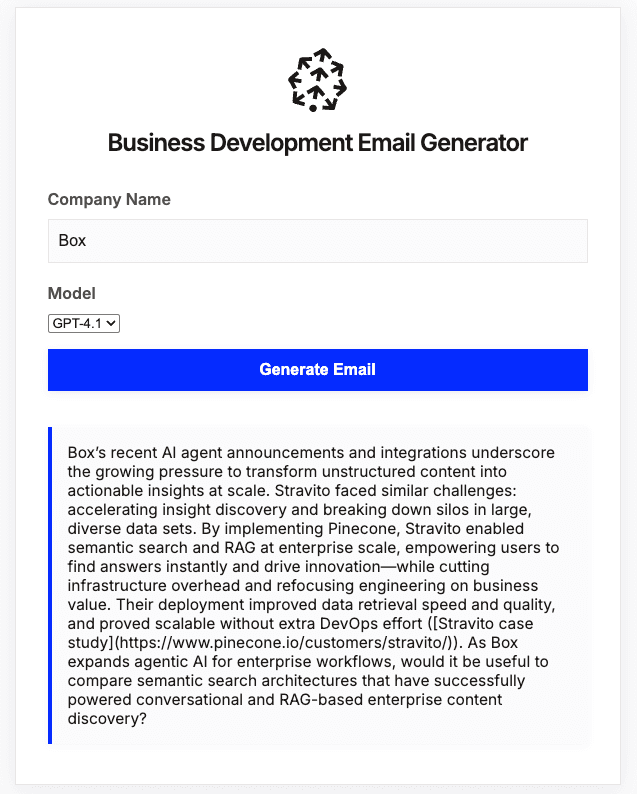
If you want to just test everything locally with Clay, you can just route the local endpoint to a public URL with ngrok.
On the Clay side, a column is created that contains all the companies you want to prospect. The FastAPI service exposes a single /chat endpoint that accepts company names and returns email content. You can configure a column with the Clay HTTP API action that adds the company name from the first column and post it to the Cloud Run or ngrok endpoint.
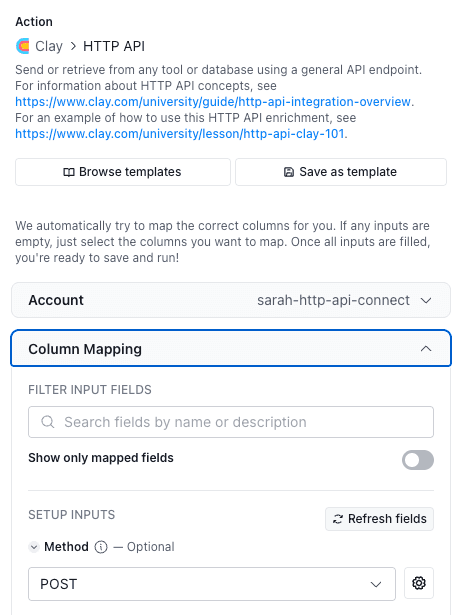
Once the column is configured, the endpoint generates email body copy that can be passed into Gong or something else for downstream.
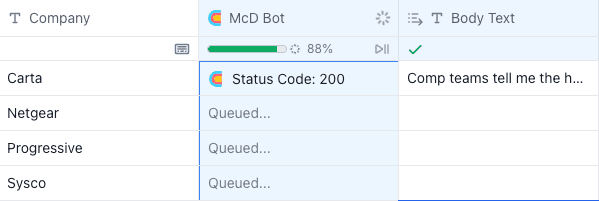
There you have it: GTM engineering using Clay and Pinecone in one workflow. This system replaces manual research with automated enrichment, so outreach emails reflect actual, recent company news and relevant customer stories. The code is available here: https://github.com/aaronkao/clay-outreach-bot. Deploy it and try it out. Email us at community@pinecone.io to show us what you built. If you would like to see me do one using n8n, hit the like button and drop a comment or find me on our new Discord server.
此内容由惯性聚合(RSS阅读器)自动聚合整理,仅供阅读参考。 原文来自 — 版权归原作者所有。