





Plagiarism is one of the biggest issues in many industries, especially in academia. This phenomenon worsened with the rise of the internet and open information, where anyone can access any information at a click about a specific topic.
Based on this observation, researchers have been trying to tackle the issue using different text analysis approaches. In this article, we will tackle two main limitations of plagiarism detection tools: (1) content paraphrasing plagiarism and (2) content translation plagiarism.
(1) Rephrased contents can be difficult to capture by traditional tools because they do not take into consideration synonyms and antonyms of the overall context.
(2) Contents written in a language different from the original one are also a big issue faced by even the most advanced machine learning-based tools since the context is being completely shifted to another language.
In this conceptual blog, we will explain how to use transformer-based models to tackle these two challenges in an innovative way. First of all, we will walk you through the analytical approach describing the entire workflow, from data collection to performance analysis. Then, we will dive into the scientific/technical implementation of the solution before showing the final results.
Imagine you are interested in building a scholarly content management platform. You might want to only accept articles not shared on your platform. In this case, your goal will be to reject all new articles that are similar to existing ones at a certain threshold.
To illustrate this scenario, we will use the cord-19 dataset, which is an open research challenge data made freely available on Kaggle by the Allen Institute for AI.
Before going further with the analysis, let’s clarify what we are trying to achieve here from the following question:
Problem: Can we find within our dataset one or more documents that are similar (at a certain threshold) to a new submitted document?
The following workflow highlights all the main steps required to better answer this question.
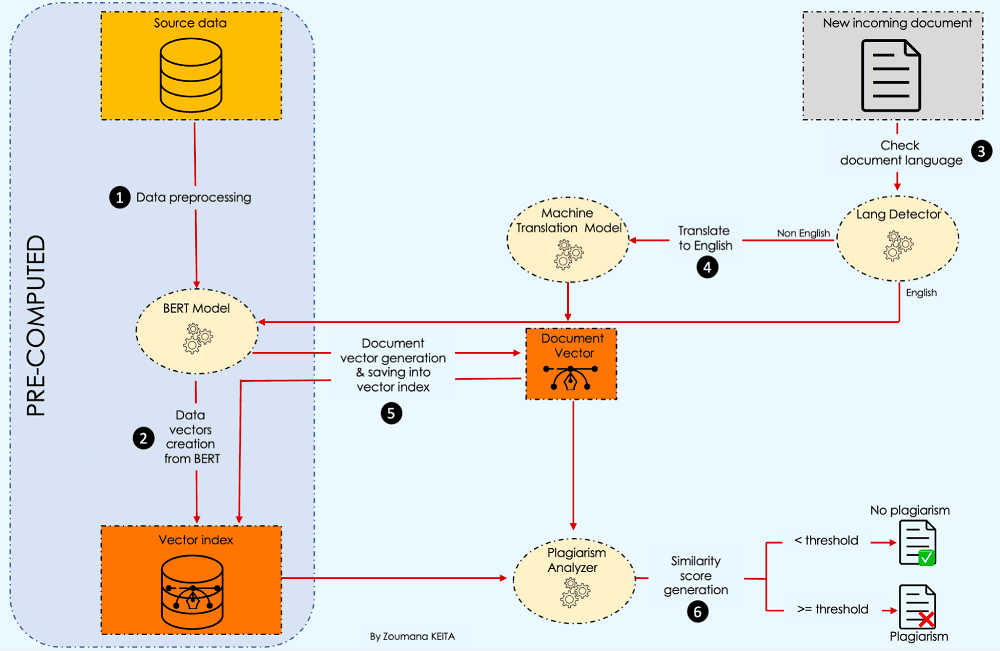
Let’s understand what is happening here 💡.
After collecting the source data, we start by preprocessing the content, then create a vector index from BERT.
Then, whenever we have a new incoming document, we check the language and perform plagiarism detection. More details are given later in the article.
This section is focused on the technical implementation of each component in the approach.
We are only interested in the abstract column of the source data, and also, for simplicity’s sake, we will use only 100 observations to speed up the preprocessing.
import pandas as pd

def preprocess_data(data_path, sample_size):

  # Read the data from specific path
  data = pd.read_csv(data_path, low_memory=False)

  # Drop articles without Abstract
  data = data.dropna(subset = ['abstract']).reset_index(drop = True)

  # Get "sample_size" random articles
  data = data.sample(sample_size)[['abstract']]

 return data

# Read data & preprocess it
data_path = "./data/cord19_source_data.csv"
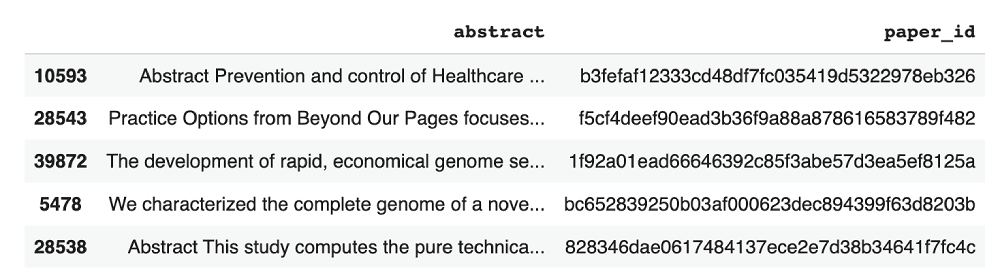
Below are the five random observations from the source data set.
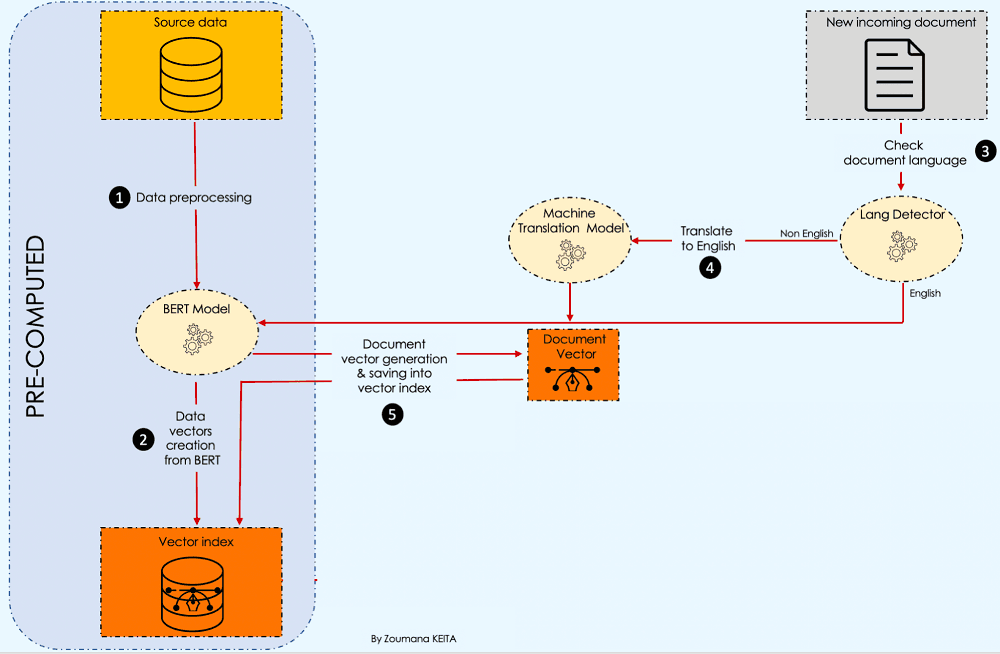
The challenges observed in the introduction lead to respectively choosing the following two transformer-based models:
(1) A BERT model: to solve the first limitation because it provides a better contextual representation of textual information. To do so, we will have:
create_vector_from_text: used to generate the vector representation of a single document.create_vector_index: responsible for creating an index containing for each document the corresponding vector.# Useful libraries
import numpy as np
import torch
from keras.preprocessing.sequence import pad_sequences
from transformers import BertTokenizer, AutoModelForSequenceClassification
# Load bert model
model_path = "bert-base-uncased"
tokenizer = BertTokenizer.from_pretrained(model_path,
do_lower_case=True)
model = AutoModelForSequenceClassification.from_pretrained(model_path,
output_attentions=False,
output_hidden_states=True)
device = "cuda" if torch.cuda.is_available() else "cpu"
model.to(device)
def create_vector_from_text(tokenizer, model, text, MAX_LEN = 510):
input_ids = tokenizer.encode(
text,
add_special_tokens = True,
max_length = MAX_LEN,
)
results = pad_sequences([input_ids], maxlen=MAX_LEN, dtype="long",
truncating="post", padding="post")
# Remove the outer list.
input_ids = results[0]
# Create attention masks
attention_mask = [int(i>0) for i in input_ids]
# Convert to tensors.
input_ids = torch.tensor(input_ids)
attention_mask = torch.tensor(attention_mask)
# Add an extra dimension for the "batch" (even though there is only one
# input in this batch.)
input_ids = input_ids.unsqueeze(0)
attention_mask = attention_mask.unsqueeze(0)
# Put the model in "evaluation" mode, meaning feed-forward operation.
model.eval()
# Run the text through BERT, and collect all of the hidden states produced
# from all 12 layers.
with torch.no_grad():
logits, encoded_layers = model(
input_ids = input_ids,
token_type_ids = None,
attention_mask = attention_mask,
return_dict=False)
layer_i = 12 # The last BERT layer before the classifier.
batch_i = 0 # Only one input in the batch.
token_i = 0 # The first token, corresponding to [CLS]
# Extract the vector.
vector = encoded_layers[layer_i][batch_i][token_i]
# Move to the CPU and convert to numpy ndarray.
vector = vector.detach().cpu().numpy()
return(vector)
def create_vector_index(data):
# The list of all the vectors
vectors = []
# Get overall text data
source_data = data.abstract.values
# Loop over all the comment and get the embeddings
for text in tqdm(source_data):
# Get the embedding
vector = create_vector_from_text(tokenizer, model, text)
#add it to the list
vectors.append(vector)
data["vectors"] = vectors
data["vectors"] = data["vectors"].apply(lambda emb: np.array(emb))
data["vectors"] = data["vectors"].apply(lambda emb: emb.reshape(1, -1))
return data
# Create the vector index
vector_index = create_vector_index(source_data)
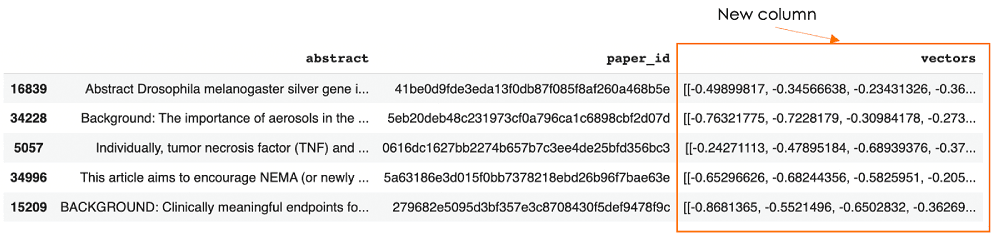
vector_index.sample(5)The last line of the code shows the following five random observations from the vector index, with the new vectors column.
2) A Machine Translation transformer model is used to translate the language of the incoming document into English because the source documents are in English in our case. The translation is performed only if the document’s language is one of the following five: German, French, Japanese, Greek, and Russian. Below is the helper function to implement this logic using the MarianMT model.
from langdetect import detect, DetectorFactory
DetectorFactory.seed = 0
def translate_text(text, text_lang, target_lang='en'):
  # Get the name of the model
  model_name = f"Helsinki-NLP/opus-mt-{text_lang}-{target_lang}"
  # Get the tokenizer
  tokenizer = MarianTokenizer.from_pretrained(model_name)

 # Instantiate the model
  model = MarianMTModel.from_pretrained(model_name)

  # Translation of the text
  formated_text = ">>{}<< {}".format(text_lang, text)
  translation = model.generate(**tokenizer([formated_text],
                               return_tensors="pt", padding=True))
  translated_text = [tokenizer.decode(t, skip_special_tokens=True) for t in       translation][0]

return translated_textThere is plagiarism when the incoming document’s vector is similar to one of the index vectors at a certain threshold level.
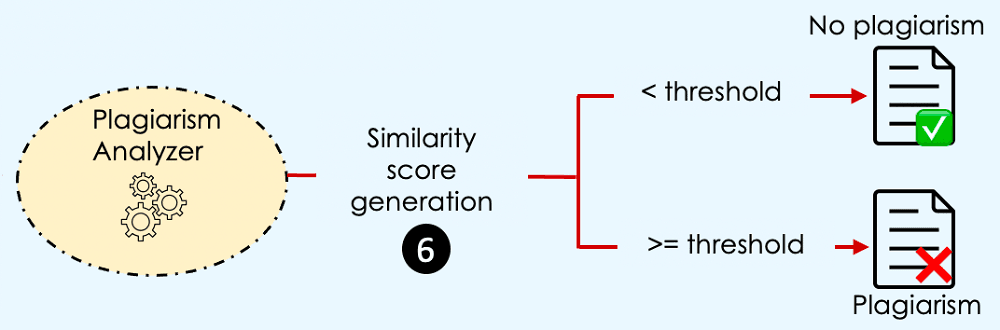
But, when are two vectors similar?
→ When they have the same magnitude and direction.
This definition requires our vectors to have the same magnitude, which can be an issue because the dimension of a document vector depends on the length of that document. Luckily, we have multiple similarity measure approaches that can be used to overcome this issue, and one of them is the cosine similarity, which will be used in our case.
(If you are interested in other approaches, you can refer to this semantic search overview. It explains how each approach works and its benefits, with guides through their implementation.)
The plagiarism analysis is performed using the run_plagiarism_analysis function. We start by checking the document language using the check_incoming_document function to perform the right translation when required.
The final result is a dictionary with four main values:
similarity_score: the score between the incoming article and the most similar existing article in the index.is_plagiarism: the value is true whether the similarity score is equal to or beyond the threshold. It is false otherwise.most_similar_article: the textual information of the most similar article.article_submitted: the article that was submitted for approval.def process_document(text):
"""
Create a vector for given text and adjust it for cosine similarity search
"""
text_vect = create_vector_from_text(tokenizer, model, text)
text_vect = np.array(text_vect)
text_vect = text_vect.reshape(1, -1)
return text_vect
def is_plagiarism(similarity_score, plagiarism_threshold):
is_plagiarism = False
if(similarity_score >= plagiarism_threshold):
is_plagiarism = True
return is_plagiarism
def check_incoming_document(incoming_document):
text_lang = detect(incoming_document)
language_list = ['de', 'fr', 'el', 'ja', 'ru']
final_result = ""
if(text_lang == 'en'):
final_result = incoming_document
elif(text_lang not in language_list):
final_result = None
else:
# Translate in English
final_result = translate_text(incoming_document, text_lang)
return final_result
def run_plagiarism_analysis(query_text, data, plagiarism_threshold=0.8):
top_N=3
# Check the language of the query/incoming text and translate if required.
document_translation = check_incoming_document(query_text)
if(document_translation is None):
print("Only the following languages are supported: English, French, Russian, German, Greek and Japanese")
exit(-1)
else:
# Preprocess the document to get the required vector for similarity analysis
query_vect = process_document(document_translation)
# Run similarity Search
data["similarity"] = data["vectors"].apply(lambda x:
cosine_similarity(query_vect, x))
data["similarity"] = data["similarity"].apply(lambda x: x[0][0])
similar_articles = data.sort_values(by='similarity',
ascending=False)[1:top_N+1]
formated_result = similar_articles[["abstract", "paper_id",
"similarity"]].reset_index(drop = True)
similarity_score = formated_result.iloc[0]["similarity"]
most_similar_article = formated_result.iloc[0]["abstract"]
is_plagiarism_bool = is_plagiarism(similarity_score, plagiarism_threshold)
plagiarism_decision = {'similarity_score': similarity_score,
'is_plagiarism': is_plagiarism_bool,
'most_similar_article': most_similar_article,
'article_submitted': query_text
}
return plagiarism_decisionWe have covered and implemented all the components of the workflow. Now, it is time to test our system using three of the languages accepted by our system: German, French, Japanese, Greek, and Russian.
These are the abstract text of the articles we want to check whether the authors plagiarized or not.
This article is actually an example from the source data.
english_article_to_check = "The need for multidisciplinary research to address today's complex health and environmental challenges has never been greater. The One Health (OH) approach to research ensures that human, animal, and environmental health questions are evaluated in an integrated and holistic manner to provide a more comprehensive understanding of the problem and potential solutions than would be possible with siloed approaches. However, the OH approach is complex, and there is limited guidance available for investigators regarding the practical design and implementation of OH research. In this paper we provide a framework to guide researchers through conceptualizing and planning an OH study. We discuss key steps in designing an OH study, including conceptualization of hypotheses and study aims, identification of collaborators for a multi-disciplinary research team, study design options, data sources and collection methods, and analytical methods. We illustrate these concepts through the presentation of a case study of health impacts associated with land application of biosolids. Finally, we discuss opportunities for applying an OH approach to identify solutions to current global health issues, and the need for cross-disciplinary funding sources to foster an OH approach to research."

# Select an existing article from the data
new_incoming_text = source_data.iloc[0]['abstract']

# Run the plagiarism detection
analysis_result = run_plagiarism_analysis(new_incoming_text,
                                         vector_index, plagiarism_threshold=0.8)
After running the system we get a similarity score of 1, which is a 100% match with an existing article. This is obvious because we took exactly the same article from the vector index.
This article is freely available from the French agriculture website.
french_article_to_check = """Les Réseaux d'Innovation et de Transfert Agricole (RITA) ont été créés en 2011 pour mieux connecter la recherche et le développement agricole, intra et inter-DOM, avec un objectif d'accompagnement de la diversification des productions locales. Le CGAAER a été chargé d'analyser ce dispositif et de proposer des pistes d'action pour améliorer la chaine Recherche – Formation – Innovation – Développement – Transfert dans les outre-mer dans un contexte d'agriculture durable, au profit de l'accroissement de l'autonomie alimentaire."""

analysis_result = run_plagiarism_analysis(french_article_to_check,
                                         vector_index, plagiarism_threshold=0.8)
analysis_result
There is no plagiarism in this situation because the similarity score is less than the threshold.
Let’s imagine that some really liked the fifth article in the data, and decided to translate it into German. Now let’s see how the system will judge that article.
german_article_to_check = """Derzeit ist eine Reihe strukturell und funktionell unterschiedlicher temperaturempfindlicher Elemente wie RNA-Thermometer bekannt, die eine Vielzahl biologischer Prozesse in Bakterien, einschließlich der Virulenz, steuern. Auf der Grundlage einer Computer- und thermodynamischen Analyse der vollständig sequenzierten Genome von 25 Salmonella enterica-Isolaten wurden ein Algorithmus und Kriterien für die Suche nach potenziellen RNA-Thermometern entwickelt. Er wird es ermöglichen, die Suche nach potentiellen Riboschaltern im Genom anderer gesellschaftlich wichtiger Krankheitserreger durchzuführen. Für S. enterica wurden neben dem bekannten 4U-RNA-Thermometer vier Hairpin-Loop-Strukturen identifiziert, die wahrscheinlich als weitere RNA-Thermometer fungieren. Sie erfüllen die notwendigen und hinreichenden Bedingungen für die Bildung von RNA-Thermometern und sind hochkonservative nichtkanonische Strukturen, da diese hochkonservativen Strukturen im Genom aller 25 Isolate von S. enterica gefunden wurden. Die Hairpins, die eine kreuzförmige Struktur in der supergewickelten pUC8-DNA bilden, wurden mit Hilfe der Rasterkraftmikroskopie sichtbar gemacht."""

analysis_result = run_plagiarism_analysis(german_article_to_check,
                                         vector_index, plagiarism_threshold=0.8)
analysis_result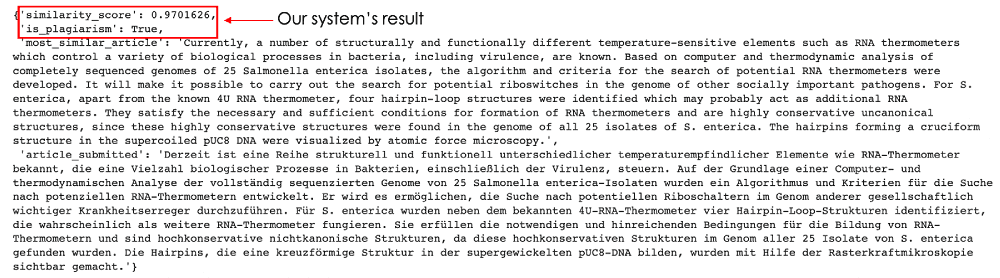
97% of similarity — this is what the model captured! The result is quite impressive. This article is definitely a plagiat.
Congratulations, now you have all the tools to build a more robust plagiarism detection system, using BERT and Machine Translation models combined with Cosine Similarity.
You can also find more resources related to vector search and vector databases from our learning center.
MarianMT model from HuggingFace
此内容由惯性聚合(RSS阅读器)自动聚合整理,仅供阅读参考。 原文来自 — 版权归原作者所有。