





I surely hope you are not getting too tired of MCP announcements these days. I get it if you are. If the “it’s raining cats and dogs” idiom was to be invented by some geek today, it’d probably be phrased as “it’s raining MCP servers.” That said, MCP servers coming down in buckets is not just some artificially created hype — it reflects the wider adoption of the MCP protocol that aims to standardize (and as a result, redefine) the interaction between humans, agents, and LLMs. It is a significant step towards making AI knowledgeable, so no surprise we at Pinecone are embracing it. We’ve been heads down, working on not one, but three MCP servers. We are now ready to put them in your hands and we can’t wait to see what you’ll do with them and how we can evolve them together.
The short answer is, because we started early. We saw the MCP potential long before it was hype. But we weren't the first. Turns out we have awesome community members like Nav Rao who beat us by creating and releasing the first, unofficial MCP server for Pinecone’s database. This, otherwise amazing project, didn’t support Pinecone Assistant. So we initially focused on closing that gap. With time, we simultaneously started working on a more feature-rich MCP server for Pinecone Database. We also discovered that AI-powered code editors like Cursor added MCP clients in their recent versions; that led to experimenting with additional capabilities to reference Pinecone’s documentation to help improve the quality of the code generated.
Since then, we’ve tried out many things. Searching for the best results, we experimented with different languages, solved unforeseen architectural challenges, improved performance, and enhanced security. And we are proud to have contributed many of our solutions, like Bearer Token Auth for SSE connections in Inspector, that have influenced the standard.
We understand having several MCP servers can be confusing. As the MCP standard matures, so are our implementations — we may eventually merge them into a single official Pinecone MCP along with more tools you’d want to see from our vector database.
But as the famous saying goes, perfect is the enemy of the good. So we don’t want to wait any longer to give you the opportunity to try them out yourself. To help you navigate Pinecone’s current MCP landscape, here is what you need to know:
It’s outside the scope of this post to explain the protocol in detail. If you are interested in diving deeper, please refer to the official documentation. A brief explanation, however, would help grasp the bigger picture and demonstrate the importance of this new approach.
To solve the issue of LLMs lacking information (post-training data, private data, etc.) the Retrieval Augmented Generation (RAG) technique was developed. As it boils down to passing the relevant missing information together with the request, it’s more or less a standard (leaving aside things like context window sizes and content structure). To solve the issue of LLMs being unable to perform tasks, a technique known as “tool calling” was developed. In a nut shell, it allows an LLM to call an external tool and ask it to perform an operation. The main issue with that approach is that different LLMs have different ideas of how to do “tool calling.” On top of that, popular frameworks (like LangChain, for example) have developed their own ways of “tool calling.” The lack of a standard approach was the problem MCP protocol aimed to solve.
How it solves it is probably best explained by example. The following diagram shows how an application interacting with an LLM can make use of the MCP servers provided by Pinecone.
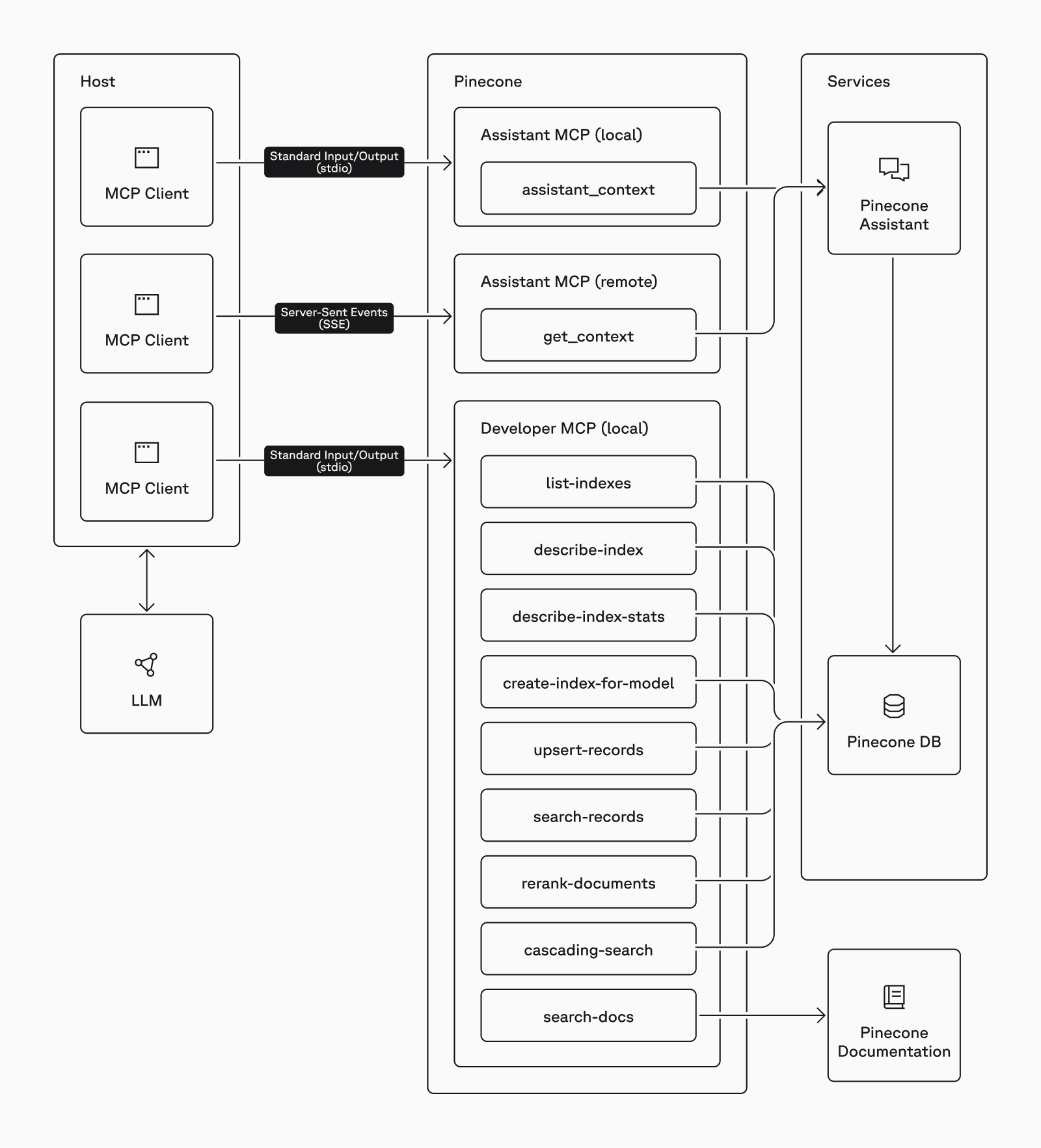
A flowchart showing the interaction between different components in MCP (using Pinecone’s MCP servers as the example)
Host is the application. It may be something you built or an existing application that supports MCP.MCP client is the piece that communicates with a specific MCP server. Its responsibility is to get the tools provided from the server and inform the LLM what they do and how to use them (what arguments they expect).transports defined in the MCP protocol. The stdio transport is used to call a server on the same machine and exchange information via standard input/output (similar to how pipes works in Linux). The SSE protocol is used to call servers via the network.MCP Server is software that provides one or more tools for the LLM to use. Local servers are programs that the client runs on demand. Remote servers expose an API that the client connects to.tool is a function that performs a tasks. It may be parametrized and expect certain arguments to perform the task. It may or may not return a result.With such configuration in place, your application can ask the LLM a question like, “What is the dimension of the ‘product-catalog’ index?” Here is what happens:
describe-index that can provide the needed information.describe-index tool passing product-catalog as the argument.The fact that the players, the process, and the schema are well defined by the MCP standard makes it vary easy to build and use tools. Furthermore, it allows you to combine tools from different vendors. For example adding a local file system MCP server would make it possible to ask the LLM to read a file and upsert the data into a Pinecone index.
It wouldn't be too big of an exaggeration to say that you are only limited by your imagination. But to get more to the point, below are some areas in which we think the Pinecone community will make the most of the new MCP servers.
It’s not a secret that more and more developers are using AI coding assistants (a.k.a. vibe coding) these days. Claude Code, Cursor, Windsurf, Cline, VSCode, and more all support the MCP standard now. That’s one of the main reasons we worked hard to have the search-docs tool. Our tests clearly show that when connected to our docs via the MCP server, those IDEs and coding assistants produce much better code and can improve existing code. If you use Pinecone in your project, make sure to give it a try and let us know what do you think.
The MCP server landscape is undergoing a massive influx at the moment. A simple chat app that I use on my laptop to connect to multiple LLMs now comes with a market for MCP extensions. There you can find virtually everything: tools for file system access, command execution, web search, email send/receive, video transforming, access to various databases, Git, Slack, Obsidian, etc. As those all conform to the same standard, you can now use them together with Pinecone. Let’s see who will be the first to make an LLM successfully follow an instruction like, “Split this video into frames, describe each frame, upsert the embeddings in Pinecone, and send me an email with the scenes where the main character wears a hat.”
If the example above sounded like an automation workflow, you are spot on. And that is no longer a playground reserved for developers. In fact statistics show an increased adoption of tools like n8n, Make, Zapier, etc. by people who don’t know how to code. The two major challenges with such products are missing connectors (developers are needed to build those) and dealing with unstructured data. As models, vector databases, and the MCP protocol evolve, complex automations will not only become much easier, but also become better at understanding unstructured data. Product vendors will not need to build and maintain several integrations, but rather provide one MCP server. And, of course, if you can do it with those tools, just imagine how much more you could do with scripts and code.
Sure! Here is something simple enough that demonstrates how to connect to the local Pinecone Developer MCP from Node.js. I trust you can covert this code to whatever your preferred language is.
import { Client } from "@modelcontextprotocol/sdk/client/index.js";
import { StdioClientTransport } from "@modelcontextprotocol/sdk/client/stdio.js";
import { ChatGroq } from "@langchain/groq";
import { createReactAgent } from "@langchain/langgraph/prebuilt";
import { loadMcpTools } from "@langchain/mcp-adapters";
import dotenv from "dotenv";
dotenv.config();

async function main() {
  // Initialize the Groq model
  const model = new ChatGroq({
    model: "llama3-8b-8192",
    temperature: 0.7,
  });

  // Configure the transport to connect to the MCP server
  const transport = new StdioClientTransport({
    command: "npx",
    args: ["-y", "@pinecone-database/mcp"],
    env: {
      PATH: process.env.PATH,
      PINECONE_API_KEY: process.env.PINECONE_API_KEY,
    },
  });

  // Initialize the client
  const client = new Client({
    name: "pinecone-client",
    version: "1.0.0",
  });

  try {
    // Connect to the transport
    await client.connect(transport);

    // Get the tools the MCP server provides
    const tools = await loadMcpTools("pinecone", client);

    // Create an agent
    const agent = createReactAgent({
      llm: model,
      tools,
    });

    // Invoke the agent with a user message
    const agentResponse = await agent.invoke({
      messages: [
        { role: "user", content: "What indexes do I have in Pinecone?" },
      ],
    });

    // Print the response
    console.log("\nResponse:");
    console.log(agentResponse.messages.slice(-1)[0].content);
  } catch (error) {
    console.error("Error:", error.message);
  } finally {
    // Clean up the connection
    await client.close();
  }
}

main();
A simple Node.js standalone executable demonstrating how to use Pinecone Developer MCP with a LLM (llama3-8b-8192 on Groq in this case)
I really hope the comments explain it all but in case they are not enough, here is what’s happening:
llama3-8b-8192 via Groq’s API. You can, of course, use OpenAI or any other provider. Just make sure the LLM you pick knows how to use tools.stdio transport. This boils down to telling it to call npx -y @pinecone-database/mcp when needed with the appropriate environment varaibles.In the example above we are asking the LLM, “What indexes do I have in Pinecone?” Obviously, the LLM itself cannot know that. But because of the Pinecone Developer MCP server, it knows who to ask and how. Below you can see the relevant parts of the entire communication between the agent (the app) and the LLM:
{
  messages: [
    HumanMessage {
      "content": "What indexes do I have in Pinecone?",
      ...
    },
    AIMessage {
      ...
      "tool_calls": [
        {
          "name": "list-indexes",
          "args": {},
          "type": "tool_call",
          "id": "call_189v"
        }
      ],
      ...
    },
    ToolMessage {
      ...
      "content": "{\n  \"indexes\": [\n    {\n      \"name\": \"mcp-client-demo\", ...}",
      ...
    },
    AIMessage {
      ...
      "content": "It looks like you have two indexes in Pinecone: \"mcp-client-demo\" and \"ai4jd\"...",
      ...
    }
  ]
}
Selected fragments from the message exchange between the agent and the LLM
To be sure, this is a very simple and straightforward usage of the MCP server. In a real application, you’d likely need to deal with passing the right arguments, fitting the information in the context window, prompt engineering the system message(s), and many more considerations.
We know you will! We are fully aware we are barely scratching the surface with the current versions. We are actively working on adding more tools and improving the existing ones. And we are counting on you to help. Give it try and let us know what you think. Tell us if something breaks, but also brag about the things you were able to achieve.
Feel welcome to request features or share ideas (even crazy ones). We can’t promise we’ll work on all of them, but we’ll surely consider them.
Use the respective GitHub repos for reporting bugs and sending pull requests.
Use the Pinecone Community Forum to discuss ideas or ask questions.
And if you want to keep it private, drop us as a line at community@pinecone.io.
此内容由惯性聚合(RSS阅读器)自动聚合整理,仅供阅读参考。 原文来自 — 版权归原作者所有。