


Conversational memory is how a chatbot can respond to multiple queries in a chat-like manner. It enables a coherent conversation, and without it, every query would be treated as an entirely independent input without considering past interactions.
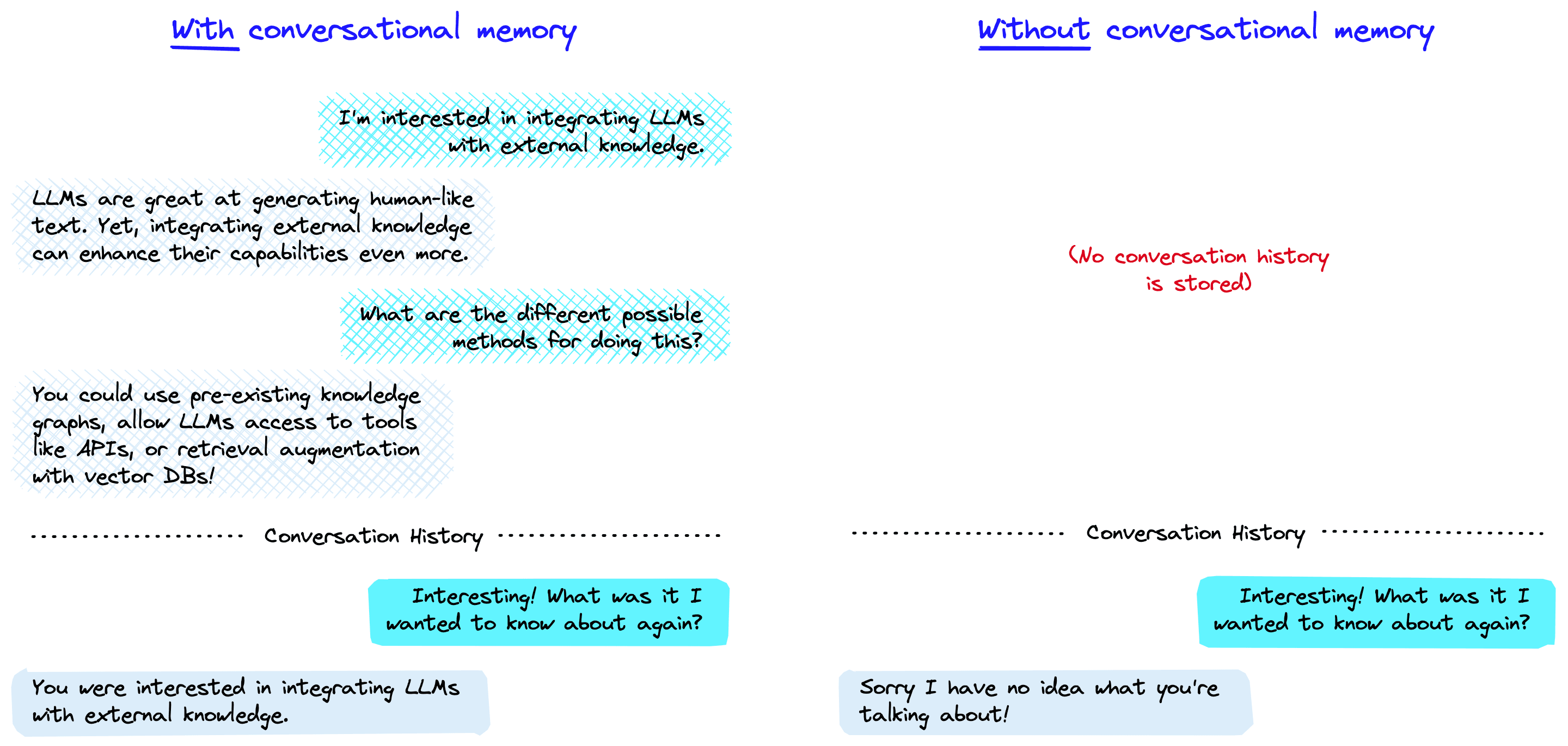
The LLM with and without conversational memory. The blue boxes are user prompts and in grey are the LLMs responses. Without conversational memory (right), the LLM cannot respond using knowledge of previous interactions.
Start using Pinecone for free
Pinecone is the developer-favorite vector database that's fast and easy to use at any scale.
The memory allows a Large Language Model (LLM) to remember previous interactions with the user. By default, LLMs are stateless — meaning each incoming query is processed independently of other interactions. The only thing that exists for a stateless agent is the current input, nothing else.
There are many applications where remembering previous interactions is very important, such as chatbots. Conversational memory allows us to do that.
There are several ways that we can implement conversational memory. In the context of [LangChain](/learn/langchain-intro/, they are all built on top of the ConversationChain.
ConversationChain
We can start by initializing the ConversationChain. We will use OpenAI’s text-davinci-003 as the LLM, but other models like gpt-3.5-turbo can be used.
from langchain import OpenAI
from langchain.chains import ConversationChain

# first initialize the large language model
llm = OpenAI(
	temperature=0,
	openai_api_key="OPENAI_API_KEY",
	model_name="text-davinci-003"
)

# now initialize the conversation chain
conversation = ConversationChain(llm=llm)
We can see the prompt template used by the ConversationChain like so:
In[8]:
print(conversation.prompt.template)Out[8]:
The following is a friendly conversation between a human and an AI. The AI is talkative and provides lots of specific details from its context. If the AI does not know the answer to a question, it truthfully says it does not know.

Current conversation:
{history}
Human: {input}
AI:
Here, the prompt primes the model by telling it that the following is a conversation between a human (us) and an AI (text-davinci-003). The prompt attempts to reduce hallucinations (where a model makes things up) by stating:
"If the AI does not know the answer to a question, it truthfully says it does not know."
This can help but does not solve the problem of hallucinations — but we will save this for the topic of a future chapter.
Following the initial prompt, we see two parameters; {history} and {input}. The {input} is where we’d place the latest human query; it is the input entered into a chatbot text box:
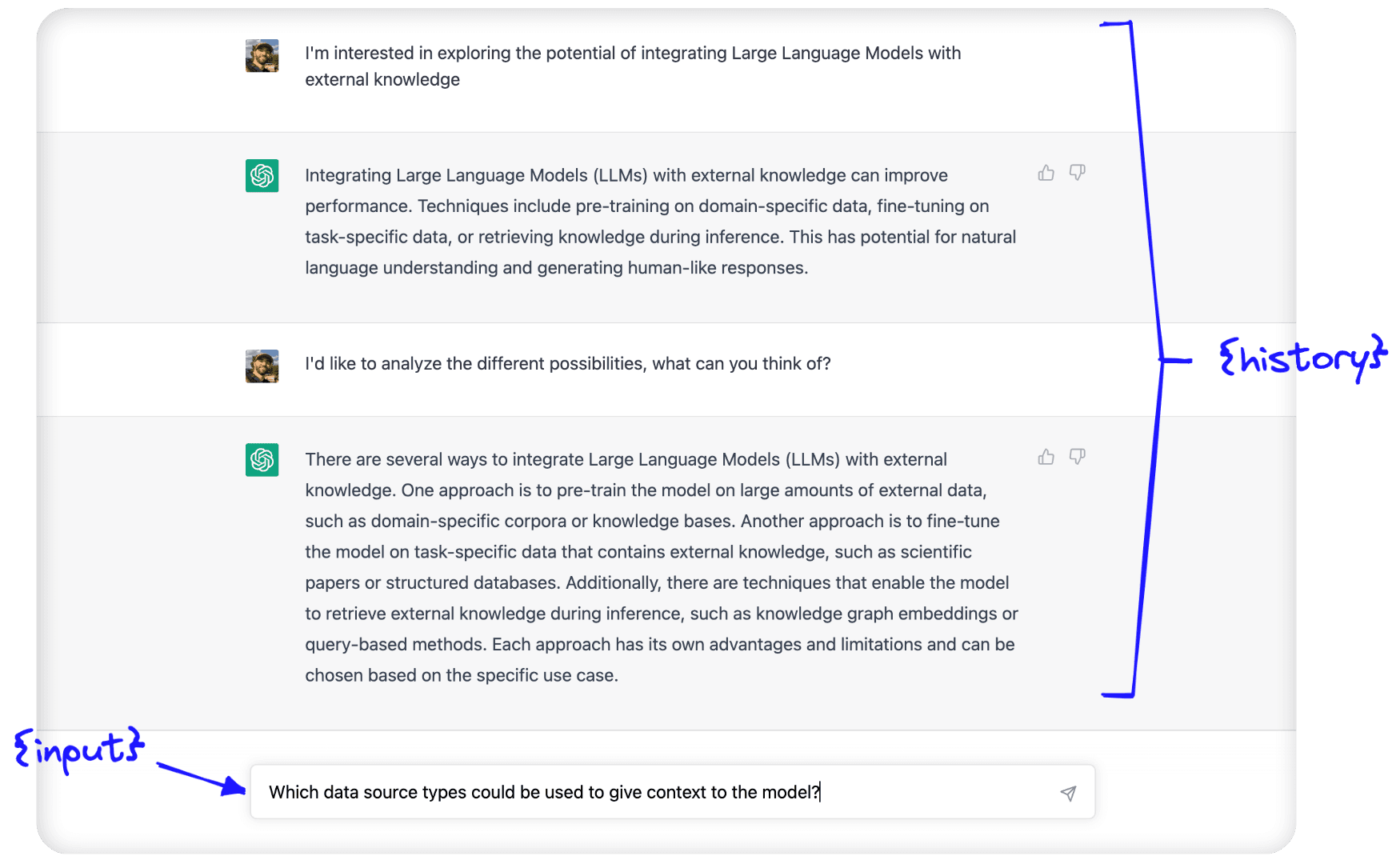
The {history} is where conversational memory is used. Here, we feed in information about the conversation history between the human and AI.
These two parameters — {history} and {input} — are passed to the LLM within the prompt template we just saw, and the output that we (hopefully) return is simply the predicted continuation of the conversation.
Forms of Conversational Memory
We can use several types of conversational memory with the ConversationChain. They modify the text passed to the {history} parameter.
ConversationBufferMemory
(Follow along with our Jupyter notebooks)
The ConversationBufferMemory is the most straightforward conversational memory in LangChain. As we described above, the raw input of the past conversation between the human and AI is passed — in its raw form — to the {history} parameter.
In[11]:
from langchain.chains.conversation.memory import ConversationBufferMemory

conversation_buf = ConversationChain(
    llm=llm,
    memory=ConversationBufferMemory()
)
In[32]:
conversation_buf("Good morning AI!")Out[32]:
{'input': 'Good morning AI!',
 'history': '',
 'response': " Good morning! It's a beautiful day today, isn't it? How can I help you?"}
We return the first response from the conversational agent. Let’s continue the conversation, writing prompts that the LLM can only answer if it considers the conversation history. We also add a count_tokens function so we can see how many tokens are being used by each interaction.
In[6]:
from langchain.callbacks import get_openai_callback

def count_tokens(chain, query):
    with get_openai_callback() as cb:
        result = chain.run(query)
        print(f'Spent a total of {cb.total_tokens} tokens')

    return result
In[33]:
count_tokens(
    conversation_buf,
    "My interest here is to explore the potential of integrating Large Language Models with external knowledge"
)
Out[33]:
Spent a total of 179 tokens
Out[33]:
' Interesting! Large Language Models are a type of artificial intelligence that can process natural language and generate text. They can be used to generate text from a given context, or to answer questions about a given context. Integrating them with external knowledge can help them to better understand the context and generate more accurate results. Is there anything else I can help you with?'In[34]:
count_tokens(
    conversation_buf,
    "I just want to analyze the different possibilities. What can you think of?"
)
Out[34]:
Spent a total of 268 tokens
Out[34]:
' Well, integrating Large Language Models with external knowledge can open up a lot of possibilities. For example, you could use them to generate more accurate and detailed summaries of text, or to answer questions about a given context more accurately. You could also use them to generate more accurate translations, or to generate more accurate predictions about future events.'In[35]:
count_tokens(
    conversation_buf,
    "Which data source types could be used to give context to the model?"
)
Out[35]:
Spent a total of 360 tokens
Out[35]:
' There are a variety of data sources that could be used to give context to a Large Language Model. These include structured data sources such as databases, unstructured data sources such as text documents, and even audio and video data sources. Additionally, you could use external knowledge sources such as Wikipedia or other online encyclopedias to provide additional context.'In[36]:
count_tokens(
    conversation_buf,
    "What is my aim again?"
)
Out[36]:
Spent a total of 388 tokens
Out[36]:
' Your aim is to explore the potential of integrating Large Language Models with external knowledge.'The LLM can clearly remember the history of the conversation. Let’s take a look at how this conversation history is stored by the ConversationBufferMemory:
In[37]:
print(conversation_buf.memory.buffer)Out[37]:
Human: Good morning AI!
AI:  Good morning! It's a beautiful day today, isn't it? How can I help you?
Human: My interest here is to explore the potential of integrating Large Language Models with external knowledge
AI:  Interesting! Large Language Models are a type of artificial intelligence that can process natural language and generate text. They can be used to generate text from a given context, or to answer questions about a given context. Integrating them with external knowledge can help them to better understand the context and generate more accurate results. Is there anything else I can help you with?
Human: I just want to analyze the different possibilities. What can you think of?
AI:  Well, integrating Large Language Models with external knowledge can open up a lot of possibilities. For example, you could use them to generate more accurate and detailed summaries of text, or to answer questions about a given context more accurately. You could also use them to generate more accurate translations, or to generate more accurate predictions about future events.
Human: Which data source types could be used to give context to the model?
AI:   There are a variety of data sources that could be used to give context to a Large Language Model. These include structured data sources such as databases, unstructured data sources such as text documents, and even audio and video data sources. Additionally, you could use external knowledge sources such as Wikipedia or other online encyclopedias to provide additional context.
Human: What is my aim again?
AI:  Your aim is to explore the potential of integrating Large Language Models with external knowledge.
We can see that the buffer saves every interaction in the chat history directly. There are a few pros and cons to this approach. In short, they are:
| Pros | Cons |
|---|---|
| Storing everything gives the LLM the maximum amount of information | More tokens mean slowing response times and higher costs |
| Storing everything is simple and intuitive | Long conversations cannot be remembered as we hit the LLM token limit (4096 tokens for text-davinci-003 and gpt-3.5-turbo) |
The ConversationBufferMemory is an excellent option to get started with but is limited by the storage of every interaction. Let’s take a look at other options that help remedy this.
ConversationSummaryMemory
Using ConversationBufferMemory, we very quickly use a lot of tokens and even exceed the context window limit of even the most advanced LLMs available today.
To avoid excessive token usage, we can use ConversationSummaryMemory. As the name would suggest, this form of memory summarizes the conversation history before it is passed to the {history} parameter.
We initialize the ConversationChain with the summary memory like so:
from langchain.chains.conversation.memory import ConversationSummaryMemory

conversation = ConversationChain(
	llm=llm,
	memory=ConversationSummaryMemory(llm=llm)
)
When using ConversationSummaryMemory, we need to pass an LLM to the object because the summarization is powered by an LLM. We can see the prompt used to do this here:
In[19]:
print(conversation_sum.memory.prompt.template)Out[19]:
Progressively summarize the lines of conversation provided, adding onto the previous summary returning a new summary.

EXAMPLE
Current summary:
The human asks what the AI thinks of artificial intelligence. The AI thinks artificial intelligence is a force for good.

New lines of conversation:
Human: Why do you think artificial intelligence is a force for good?
AI: Because artificial intelligence will help humans reach their full potential.

New summary:
The human asks what the AI thinks of artificial intelligence. The AI thinks artificial intelligence is a force for good because it will help humans reach their full potential.
END OF EXAMPLE

Current summary:
{summary}

New lines of conversation:
{new_lines}

New summary:
Using this, we can summarize every new interaction and append it to a “running summary” of all past interactions. Let’s have another conversation utilizing this approach.
In[40]:
# without count_tokens we'd call `conversation_sum("Good morning AI!")`
# but let's keep track of our tokens:
count_tokens(
    conversation_sum,
    "Good morning AI!"
)
Out[40]:
Spent a total of 290 tokens
Out[40]:
" Good morning! It's a beautiful day today, isn't it? How can I help you?"In[41]:
count_tokens(
    conversation_sum,
    "My interest here is to explore the potential of integrating Large Language Models with external knowledge"
)
Out[41]:
Spent a total of 440 tokens
Out[41]:
" That sounds like an interesting project! I'm familiar with Large Language Models, but I'm not sure how they could be integrated with external knowledge. Could you tell me more about what you have in mind?"In[42]:
count_tokens(
    conversation_sum,
    "I just want to analyze the different possibilities. What can you think of?"
)
Out[42]:
Spent a total of 664 tokens
Out[42]:
' I can think of a few possibilities. One option is to use a large language model to generate a set of candidate answers to a given query, and then use external knowledge to filter out the most relevant answers. Another option is to use the large language model to generate a set of candidate answers, and then use external knowledge to score and rank the answers. Finally, you could use the large language model to generate a set of candidate answers, and then use external knowledge to refine the answers.'In[43]:
count_tokens(
    conversation_sum,
    "Which data source types could be used to give context to the model?"
)
Out[43]:
Spent a total of 799 tokens
Out[43]:
' There are many different types of data sources that could be used to give context to the model. These could include structured data sources such as databases, unstructured data sources such as text documents, or even external APIs that provide access to external knowledge. Additionally, the model could be trained on a combination of these data sources to provide a more comprehensive understanding of the context.'In[44]:
count_tokens(
    conversation_sum,
    "What is my aim again?"
)
Out[44]:
Spent a total of 853 tokens
Out[44]:
' Your aim is to explore the potential of integrating Large Language Models with external knowledge.'In this case the summary contains enough information for the LLM to “remember” our original aim. We can see this summary in it’s raw form like so:
In[45]:
print(conversation_sum.memory.buffer)Out[45]:
The human greeted the AI with a good morning, to which the AI responded with a good morning and asked how it could help. The human expressed interest in exploring the potential of integrating Large Language Models with external knowledge, to which the AI responded positively and asked for more information. The human asked the AI to think of different possibilities, and the AI suggested three options: using the large language model to generate a set of candidate answers and then using external knowledge to filter out the most relevant answers, score and rank the answers, or refine the answers. The human then asked which data source types could be used to give context to the model, to which the AI responded that there are many different types of data sources that could be used, such as structured data sources, unstructured data sources, or external APIs. Additionally, the model could be trained on a combination of these data sources to provide a more comprehensive understanding of the context. The human then asked what their aim was again, to which the AI responded that their aim was to explore the potential of integrating Large Language Models with external knowledge.
The number of tokens being used for this conversation is greater than when using the ConversationBufferMemory, so is there any advantage to using ConversationSummaryMemory over the buffer memory?
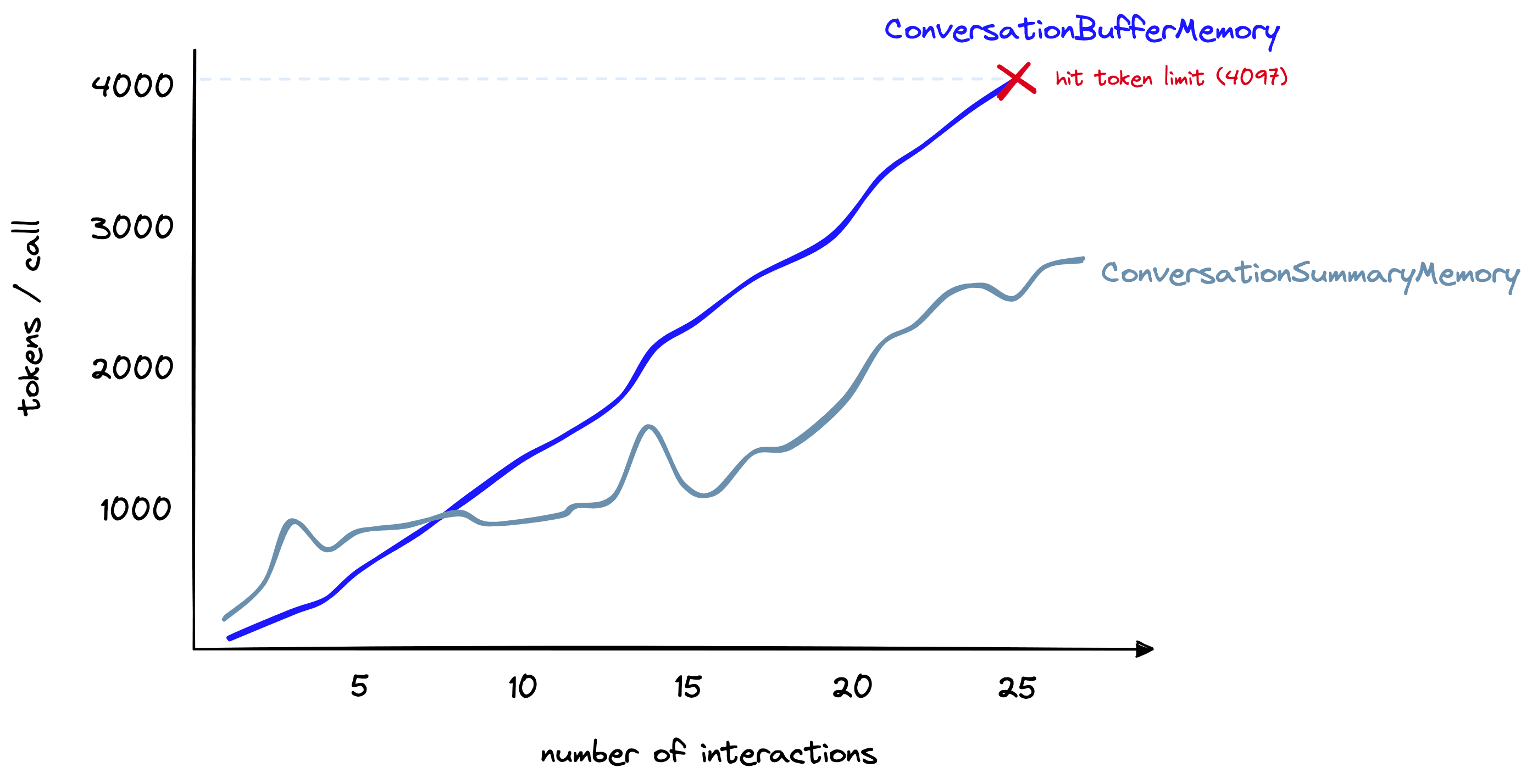
Token count (y-axis) for the buffer memory vs. summary memory as the number of interactions (x-axis) increases.
For longer conversations, yes. Here, we have a longer conversation. As shown above, the summary memory initially uses far more tokens. However, as the conversation progresses, the summarization approach grows more slowly. In contrast, the buffer memory continues to grow linearly with the number of tokens in the chat.
We can summarize the pros and cons of ConversationSummaryMemory as follows:
| Pros | Cons |
|---|---|
| Shortens the number of tokens for long conversations. | Can result in higher token usage for smaller conversations |
| Enables much longer conversations | Memorization of the conversation history is wholly reliant on the summarization ability of the intermediate summarization LLM |
| Relatively straightforward implementation, intuitively simple to understand | Also requires token usage for the summarization LLM; this increases costs (but does not limit conversation length) |
Conversation summarization is a good approach for cases where long conversations are expected. Yet, it is still fundamentally limited by token limits. After a certain amount of time, we still exceed context window limits.
ConversationBufferWindowMemory
The ConversationBufferWindowMemory acts in the same way as our earlier “buffer memory” but adds a window to the memory. Meaning that we only keep a given number of past interactions before “forgetting” them. We use it like so:
from langchain.chains.conversation.memory import ConversationBufferWindowMemory

conversation = ConversationChain(
	llm=llm,
	memory=ConversationBufferWindowMemory(k=1)
)
In this instance, we set k=1 — this means the window will remember the single latest interaction between the human and AI. That is the latest human response and the latest AI response. We can see the effect of this below:
In[61]:
count_tokens(
    conversation_bufw,
    "Good morning AI!"
)
Out[61]:
Spent a total of 85 tokens
Out[61]:
" Good morning! It's a beautiful day today, isn't it? How can I help you?"In[62]:
count_tokens(
    conversation_bufw,
    "My interest here is to explore the potential of integrating Large Language Models with external knowledge"
)
Out[62]:
Spent a total of 178 tokens
Out[62]:
' Interesting! Large Language Models are a type of artificial intelligence that can process natural language and generate text. They can be used to generate text from a given context, or to answer questions about a given context. Integrating them with external knowledge can help them to better understand the context and generate more accurate results. Do you have any specific questions about this integration?'In[63]:
count_tokens(
    conversation_bufw,
    "I just want to analyze the different possibilities. What can you think of?"
)
Out[63]:
Spent a total of 233 tokens
Out[63]:
' There are many possibilities for integrating Large Language Models with external knowledge. For example, you could use external knowledge to provide additional context to the model, or to provide additional training data. You could also use external knowledge to help the model better understand the context of a given text, or to help it generate more accurate results.'In[64]:
count_tokens(
    conversation_bufw,
    "Which data source types could be used to give context to the model?"
)
Out[64]:
Spent a total of 245 tokens
Out[64]:
' Data sources that could be used to give context to the model include text corpora, structured databases, and ontologies. Text corpora provide a large amount of text data that can be used to train the model and provide additional context. Structured databases provide structured data that can be used to provide additional context to the model. Ontologies provide a structured representation of knowledge that can be used to provide additional context to the model.'In[65]:
count_tokens(
    conversation_bufw,
    "What is my aim again?"
)
Out[65]:
Spent a total of 186 tokens
Out[65]:
' Your aim is to use data sources to give context to the model.'By the end of the conversation, when we ask "What is my aim again?", the answer to this was contained in the human response three interactions ago. As we only kept the most recent interaction (k=1), the model had forgotten and could not give the correct answer.
We can see the effective “memory” of the model like so:
In[66]:
bufw_history = conversation_bufw.memory.load_memory_variables(
    inputs=[]
)['history']
Out[67]:
Human: What is my aim again?
AI:  Your aim is to use data sources to give context to the model.
Although this method isn’t suitable for remembering distant interactions, it is good at limiting the number of tokens being used — a number that we can increase/decrease depending on our needs. For the longer conversation used in our earlier comparison, we can set k=6 and reach ~1.5K tokens per interaction after 27 total interactions:
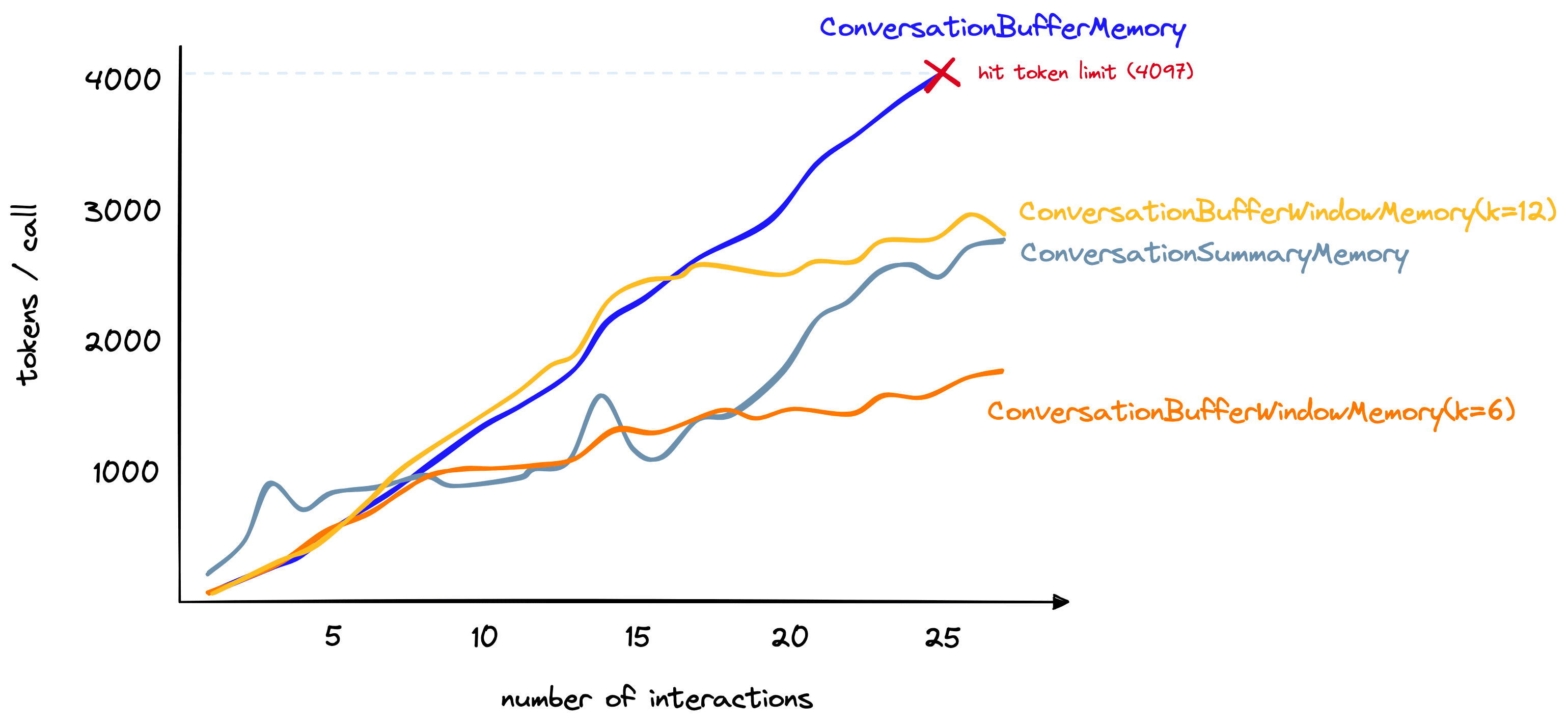
Token count including the ConversationBufferWindowMemory at k=6 and k=12.
If we only need memory of recent interactions, this is a great option. However, for a mix of both distant and recent interactions, there are other options.
ConversationSummaryBufferMemory
The ConversationSummaryBufferMemory is a mix of the ConversationSummaryMemory and the ConversationBufferWindowMemory. It summarizes the earliest interactions in a conversation while maintaining the max_token_limit most recent tokens in their conversation. It is initialized like so:
conversation_sum_bufw = ConversationChain(
    llm=llm, memory=ConversationSummaryBufferMemory(
        llm=llm,
        max_token_limit=650
)
When applying this to our earlier conversation, we can set max_token_limit to a small number and yet the LLM can remember our earlier “aim”.
This is because that information is captured by the “summarization” component of the memory, despite being missed by the “buffer window” component.
Naturally, the pros and cons of this component are a mix of the earlier components on which this is based.
| Pros | Cons |
|---|---|
| Summarizer means we can remember distant interactions | Summarizer increases token count for shorter conversations |
| Buffer prevents us from missing information from the most recent interactions | Storing the raw interactions — even if just the most recent interactions — increases token count |
Although requiring more tweaking on what to summarize and what to maintain within the buffer window, the ConversationSummaryBufferMemory does give us plenty of flexibility and is the only one of our memory types (so far) that allows us to remember distant interactions and store the most recent interactions in their raw — and most information-rich — form.
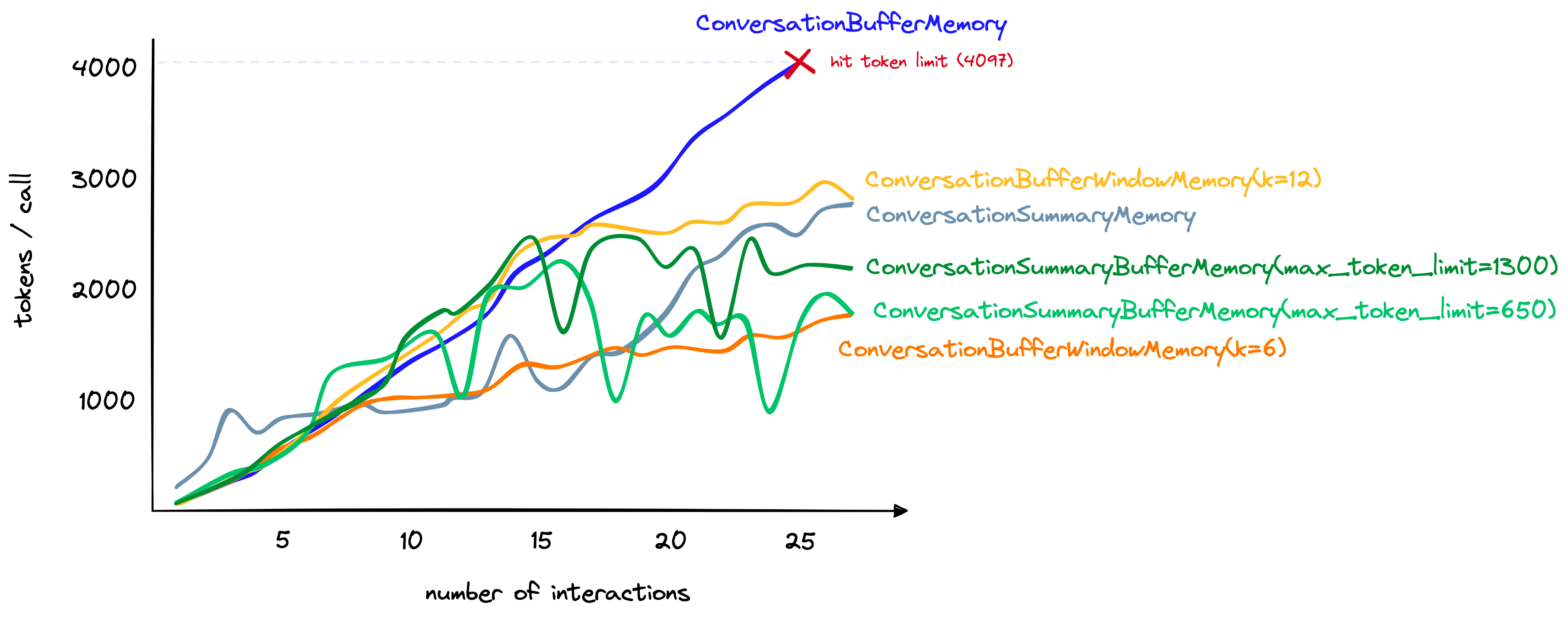
Token count comparisons including the ConversationSummaryBufferMemory type with max_token_limit values of 650 and 1300.
We can also see that despite including a summary of past interactions and the raw form of recent interactions — the increase in token count of ConversationSummaryBufferMemory is competitive with other methods.
Other Memory Types
The memory types we have covered here are great for getting started and give a good balance between remembering as much as possible and minimizing tokens.
However, we have other options — particularly the ConversationKnowledgeGraphMemory and ConversationEntityMemory. We’ll give these different forms of memory the attention they deserve in upcoming chapters.
That’s it for this introduction to conversational memory for LLMs using LangChain. As we’ve seen, there are plenty of options for helping stateless LLMs interact as if they were in a stateful environment — able to consider and refer back to past interactions.
As mentioned, there are other forms of memory we can cover. We can also implement our own memory modules, use multiple types of memory within the same chain, combine them with agents, and much more. All of which we will cover in future chapters.
Was this article helpful?